light Lexus GS450h 2015 Owner's Manual
[x] Cancel search | Manufacturer: LEXUS, Model Year: 2015, Model line: GS450h, Model: Lexus GS450h 2015Pages: 654, PDF Size: 34.84 MB
Page 394 of 654
393
GS450h_OM_OM30F70U_(U)5-5. Other interior features
5
Interior features
Garage door opener
The garage door opener (HomeLink® Universal Transceiver) is manufac-
tured under license from HomeLink
®.
The HomeLink
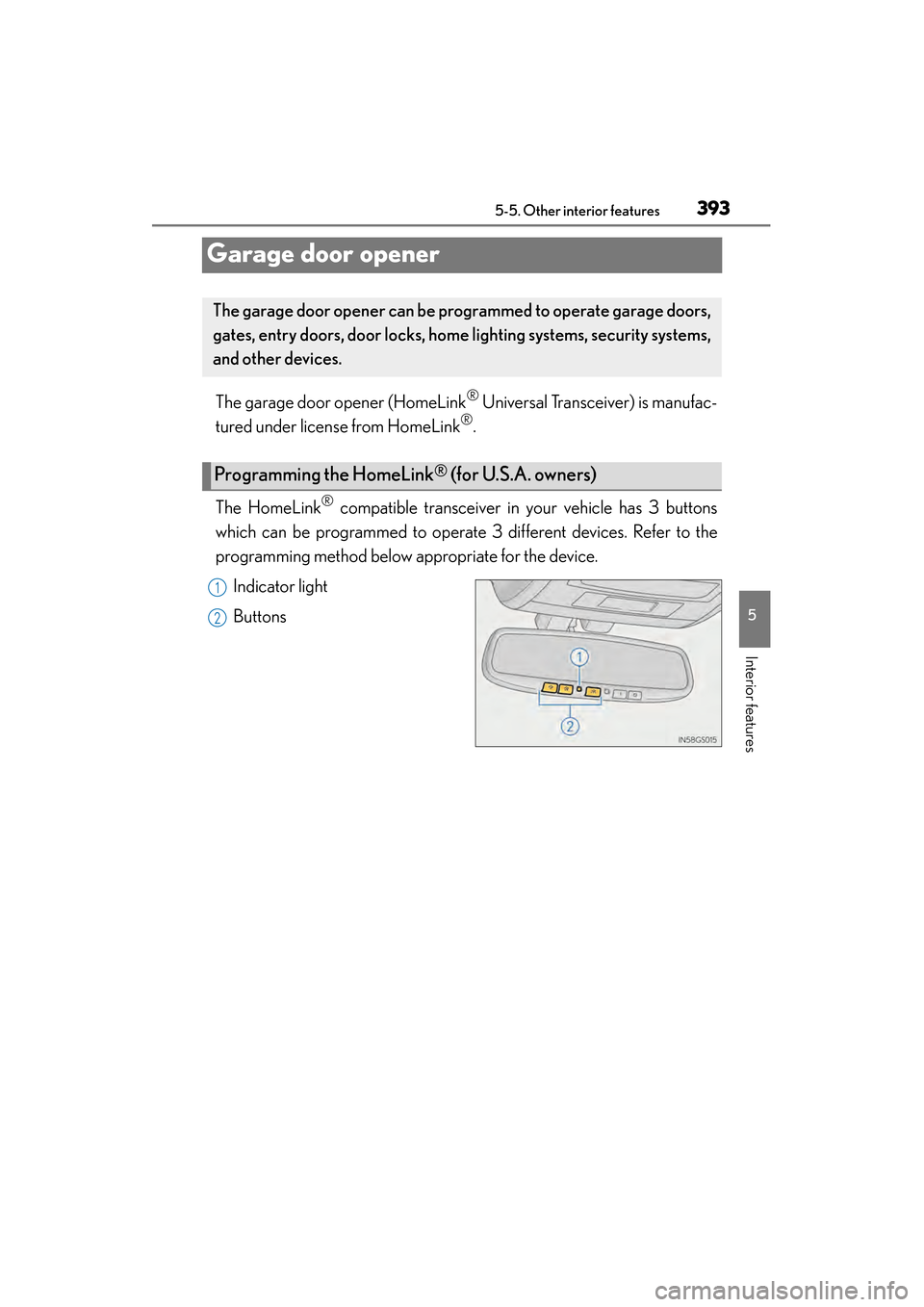
® compatible transceiver in your vehicle has 3 buttons
which can be programmed to operate 3 different devices. Refer to the
programming method below appropriate for the device.
Indicator light
Buttons
The garage door opener can be pr ogrammed to operate garage doors,
gates, entry doors, door locks, home lighting systems, security systems,
and other devices.
Programming the HomeLink® (for U.S.A. owners)
1
2
GS450h_OM_OM30F70U_(U).book Page 393 Monday, January 19, 2015 9:34 AM
Page 395 of 654
394
GS450h_OM_OM30F70U_(U)
5-5. Other interior features
■Programming HomeLink®
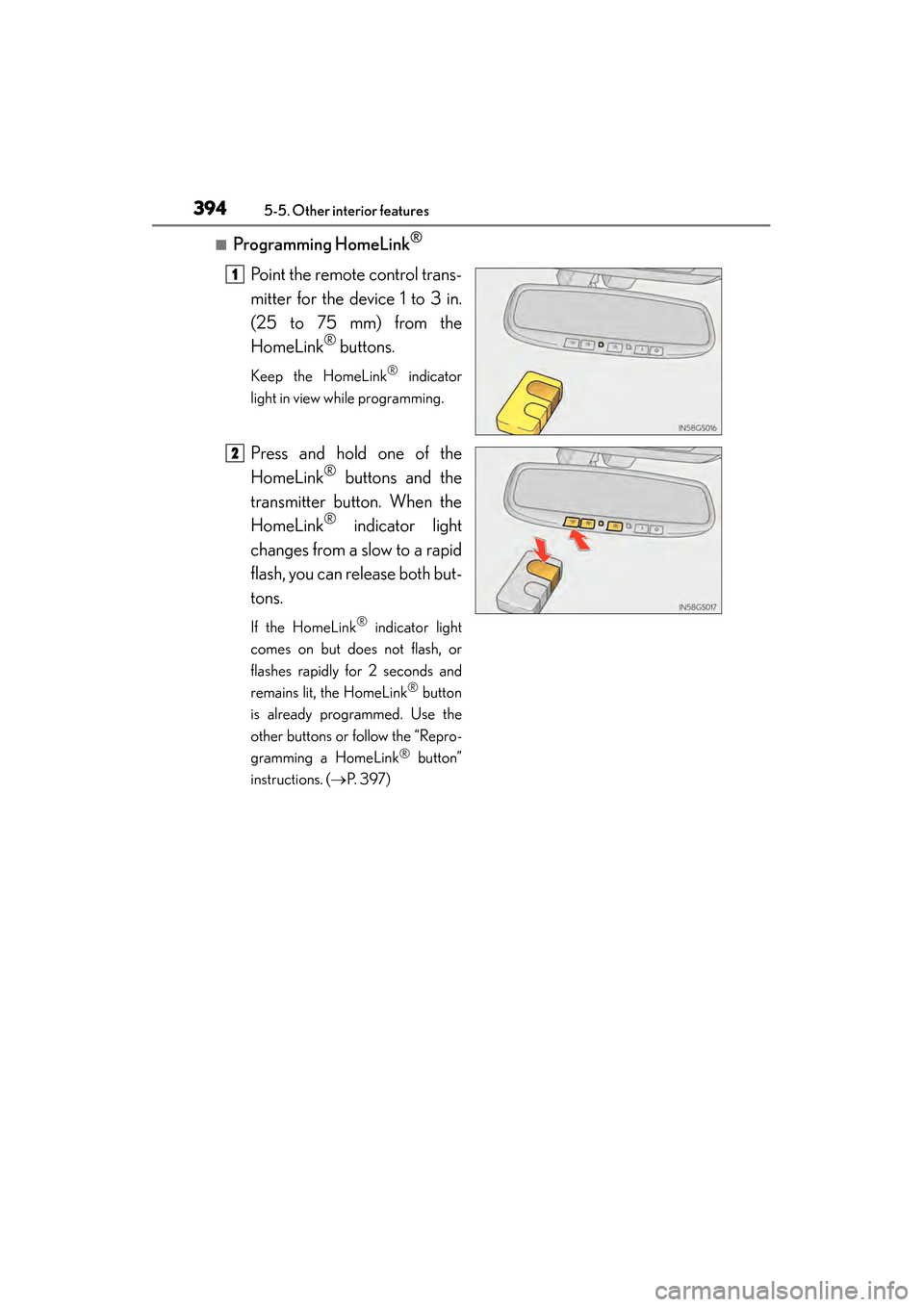
Point the remote control trans-
mitter for the device 1 to 3 in.
(25 to 75 mm) from the
HomeLink
® buttons.
Keep the HomeLink® indicator
light in view while programming.
Press and hold one of the
HomeLink
® buttons and the
transmitter button. When the
HomeLink
® indicator light
changes from a slow to a rapid
flash, you can release both but-
tons.
If the HomeLink® indicator light
comes on but does not flash, or
flashes rapidly for 2 seconds and
remains lit, the HomeLink
® button
is already programmed. Use the
other buttons or follow the “Repro-
gramming a HomeLink
® button”
instructions. ( →P. 3 9 7 )
1
2
GS450h_OM_OM30F70U_(U).book Page 394 Monday, January 19, 2015 9:34 AM
Page 396 of 654
GS450h_OM_OM30F70U_(U)
3955-5. Other interior features
5
Interior features
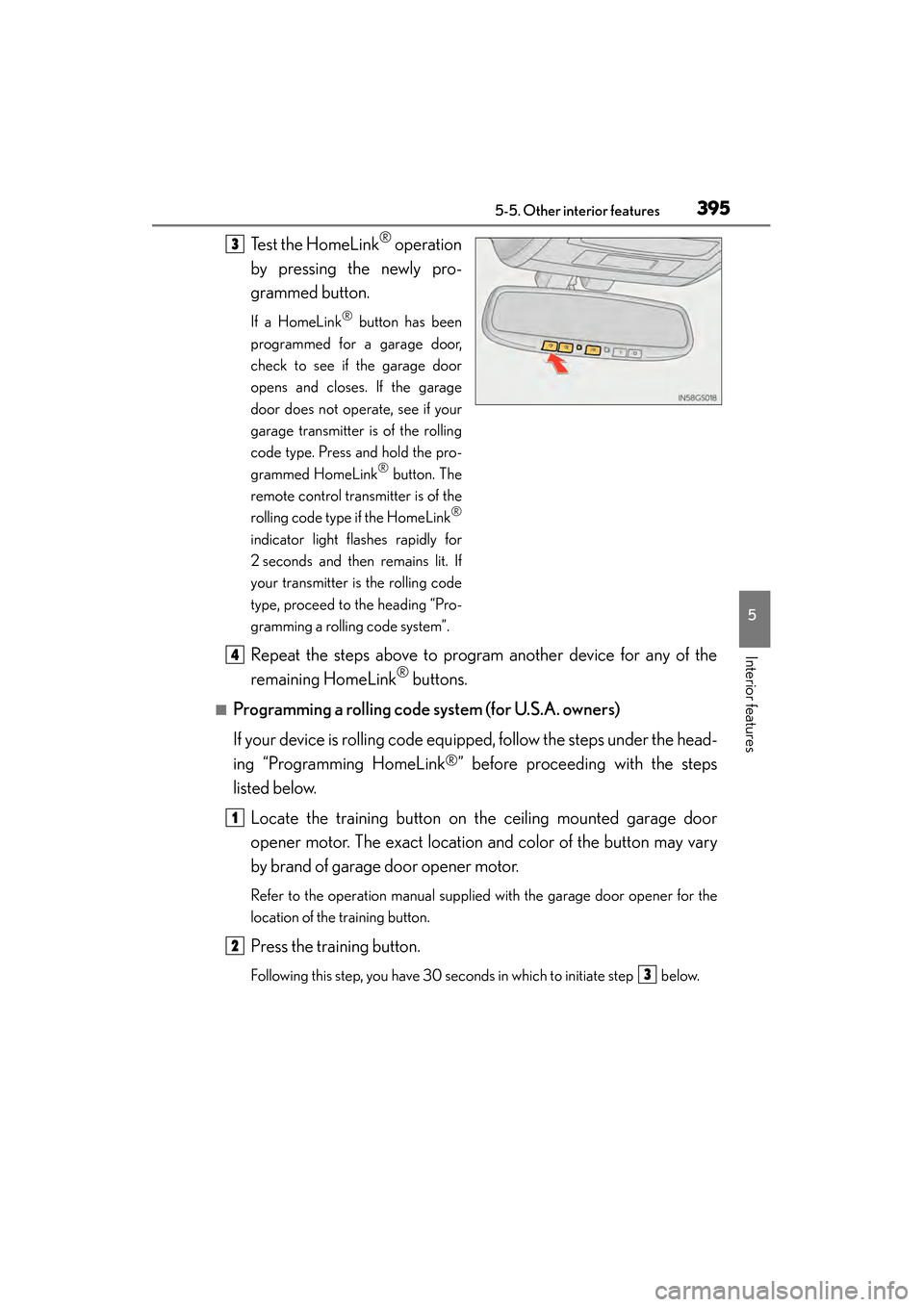
Test the HomeLink® operation
by pressing the newly pro-
grammed button.
If a HomeLink® button has been
programmed for a garage door,
check to see if the garage door
opens and closes. If the garage
door does not operate, see if your
garage transmitter is of the rolling
code type. Press and hold the pro-
grammed HomeLink
® button. The
remote control transmitter is of the
rolling code type if the HomeLink
®
indicator light flashes rapidly for
2 seconds and then remains lit. If
your transmitter is the rolling code
type, proceed to the heading “Pro-
gramming a rolling code system”.
Repeat the steps above to program another device for any of the
remaining HomeLink
® buttons.
■Programming a rolling code system (for U.S.A. owners)
If your device is rolling code equipped, follow the steps under the head-
ing “Programming HomeLink
®” before proceeding with the steps
listed below.
Locate the training button on the ceiling mounted garage door
opener motor. The exact location and color of the button may vary
by brand of garage door opener motor.
Refer to the operation manual supplied with the garage door opener for the
location of the training button.
Press the training button.
Following this step, you have 30 seconds in which to initiate step below.
3
4
1
2
3
GS450h_OM_OM30F70U_(U).book Page 395 Monday, January 19, 2015 9:34 AM
Page 397 of 654
396
GS450h_OM_OM30F70U_(U)
5-5. Other interior features
Press and hold the vehicle’s programmed HomeLink® button for
2 seconds and release it. Repeat this step once again. The garage
door may open.
If the garage door opens, the programming process is complete. If the door
does not open, press and release the button a third time. This third press and
release will complete the programming process by opening the garage door.
The ceiling mounted garage door opener motor should now recognize the
HomeLink
® signal and operate the garage door.
Repeat the steps above to program another rolling code system for
any of the remaining HomeLink
® buttons.
■Programming an entry gate (for U.S.A. owners)/Programming a
devices in the Canadian market
Place the remote control transmit ter 1 to 3 in. (25 to 75 mm) away
from the HomeLink
® buttons.
Keep the HomeLink® indicator light in view while programming.
Press and hold the selected HomeLink® button.
Repeatedly press and release (cycle) the remote control transmitter
for 2 seconds each until step is completed.
When the HomeLink
® indicator light starts to flash rapidly, release
the buttons.
Test the HomeLink
® operation by pressing the newly programmed
button. Check to see if the gate/device operates correctly.
Repeat the steps above to program another device for any of the
remaining HomeLink
® buttons.
■Programming other devices
To program other devices such as home security systems, home door
locks and lighting, contact your Lexus dealer for assistance.
■Reprogramming a button
The individual HomeLink
® buttons cannot be erased but can be repro-
grammed. To reprogram a button, follow the “Reprogramming a
HomeLink
® button” instructions.
3
4
1
2
3
4
4
5
6
GS450h_OM_OM30F70U_(U).book Page 396 Monday, January 19, 2015 9:34 AM
Page 398 of 654
GS450h_OM_OM30F70U_(U)
3975-5. Other interior features
5
Interior features
Press the appropriate HomeLink® button. The HomeLink® indicator light
should come on.
The HomeLink® compatible transceiver in your vehicle continues to send a sig-
nal for up to 20 seconds as long as the button is pressed.
Press and hold the desired HomeLink® button. After 20 seconds, the
HomeLink
® indicator light will start flashing slowly. Keep pressing the
HomeLink
® button and press and hold the transmitter button until the
HomeLink
® indicator light changes from a slow to a rapid flash. Release
the buttons.
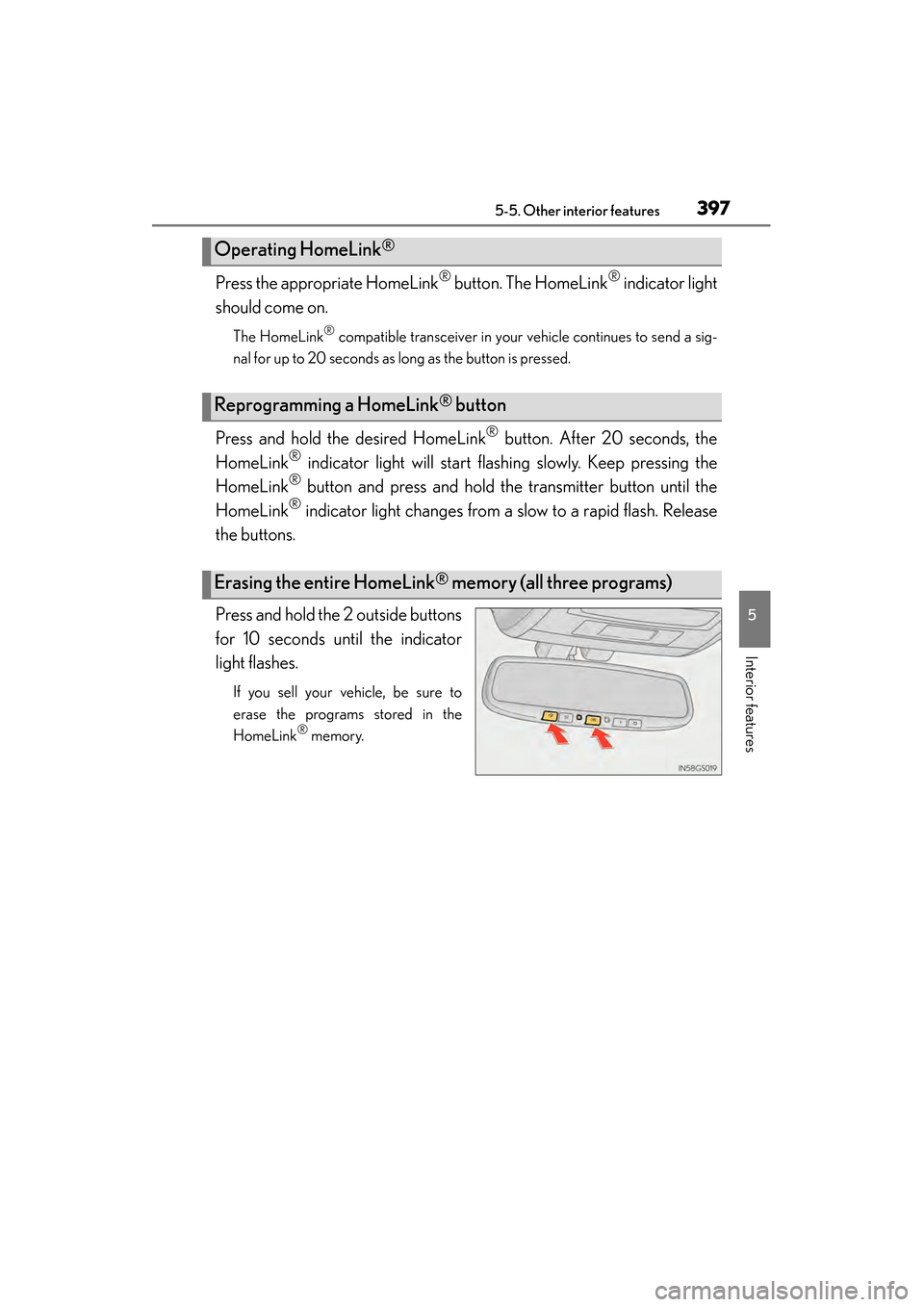
Press and hold the 2 outside buttons
for 10 seconds until the indicator
light flashes.
If you sell your vehicle, be sure to
erase the programs stored in the
HomeLink
® memory.
Operating HomeLink®
Reprogramming a HomeLink® button
Erasing the entire HomeLink® memory (all three programs)
GS450h_OM_OM30F70U_(U).book Page 397 Monday, January 19, 2015 9:34 AM
Page 401 of 654
400
GS450h_OM_OM30F70U_(U)
5-5. Other interior features
LEXUS Enform Safety Connect∗
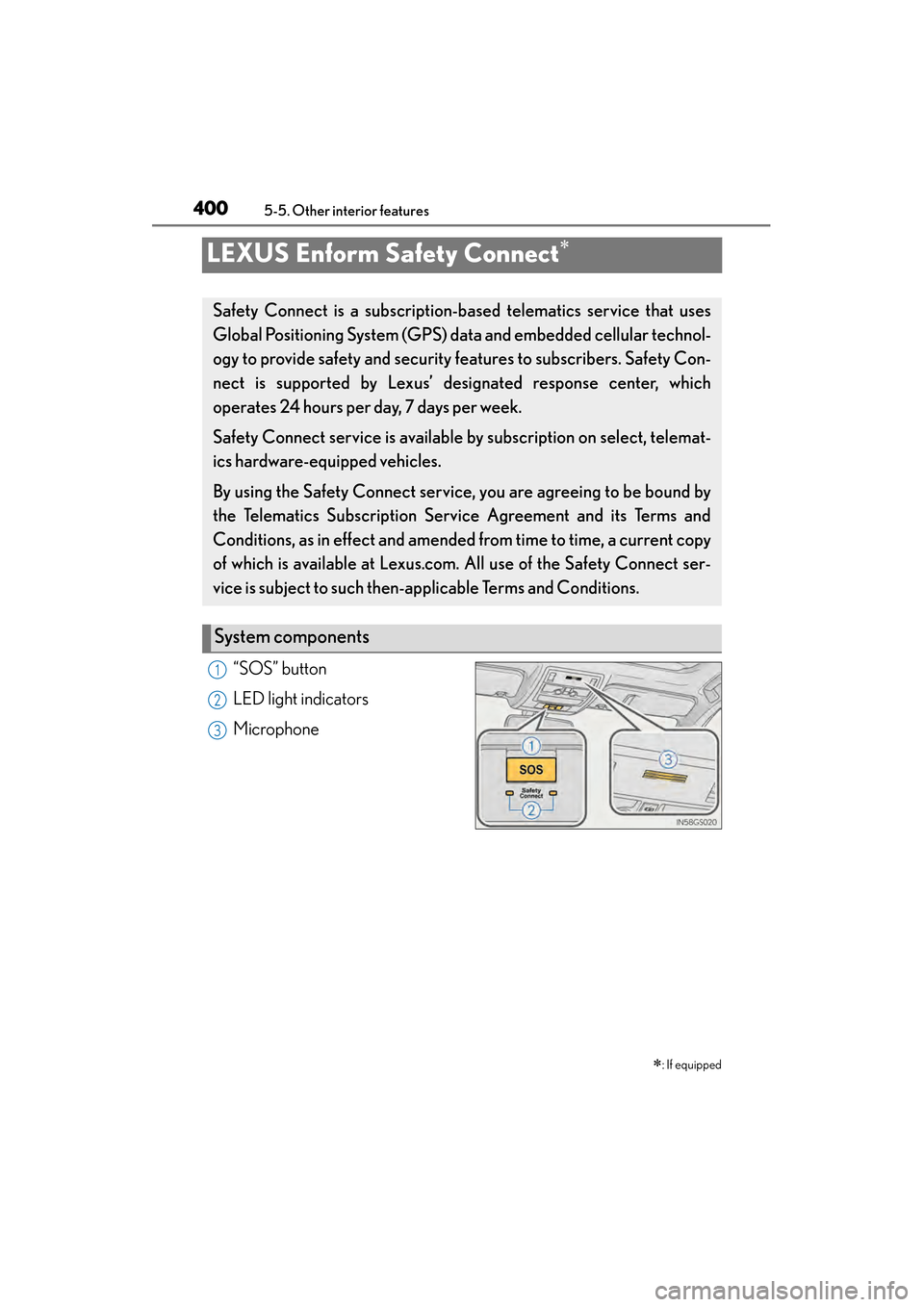
“SOS” button
LED light indicators
Microphone∗
: If equipped
Safety Connect is a subscription-based telematics service that uses
Global Positioning System (GPS) data and embedded cellular technol-
ogy to provide safety and security features to subscribers. Safety Con-
nect is supported by Lexus’ de signated response center, which
operates 24 hours per day, 7 days per week.
Safety Connect service is available by subscription on select, telemat-
ics hardware-equipped vehicles.
By using the Safety Connect service, you are agreeing to be bound by
the Telematics Subscription Ser vice Agreement and its Terms and
Conditions, as in effect and amended from time to time, a current copy
of which is available at Lexus.com. All use of the Safety Connect ser-
vice is subject to such then-app licable Terms and Conditions.
System components
1
2
3
GS450h_OM_OM30F70U_(U).book Page 400 Monday, January 19, 2015 9:34 AM
Page 404 of 654
GS450h_OM_OM30F70U_(U)
4035-5. Other interior features
5
Interior features
When the power switch is turned to ON mode, the red indicator light
comes on for 2 seconds then turns off. Afterward, the green indicator light
comes on, indicating that the service is active.
The following indicator light patterns indicate specific system usage con-
ditions:
●Green indicator light on = Active service
●Green indicator light flashing = Safety Connect call in process
●Red indicator light (except at vehicle start-up) = System malfunction
(contact your Lexus dealer)
●No indicator light (off) = Safety Connect service not active
■Automatic Collision Notification
In case of either airbag deployment or severe rear-end collision, the
system is designed to automatically call the response center. The
responding agent receives the vehicle’s location and attempts to speak
with the vehicle occupants to assess the level of emergency. If the occu-
pants are unable to communicate, the agent automatically treats the
call as an emergency, contacts the nearest emergency services pro-
vider to describe the situation, and requests that assistance be sent to
the location.
Safety Connect LED light Indicators
Safety Connect services
GS450h_OM_OM30F70U_(U).book Page 403 Monday, January 19, 2015 9:34 AM
Page 408 of 654

407
GS450h_OM_OM30F70U_(U)
6Maintenance and care
6-1. Maintenance and care Cleaning and protecting the vehicle exterior ................ 408
Cleaning and protecting the vehicle interior ................... 412
6-2. Maintenance Maintenance requirements .... 415
General maintenance ............... 418
Emission inspection and maintenance (I/M)
programs .................................... 422 6-3. Do-it-yourself maintenance
Do-it-yourself service precautions................................ 423
Hood ............................................... 426
Positioning a floor jack ..............427
Engine compartment ............... 429
12-volt battery.............................. 439
Tires.................................................. 443
Tire inflation pressure ............... 453
Wheels ........................................... 456
Air conditioning filter ...............458
Electronic key battery ..............460
Checking and replacing fuses.............................................. 462
Headlight aim ...............................477
Light bulbs..................................... 479
GS450h_OM_OM30F70U_(U).book Page 407 Monday, January 19, 2015 9:34 AM
Page 412 of 654
GS450h_OM_OM30F70U_(U)
4116-1. Maintenance and care
6
Maintenance and care
NOTICE
■To prevent paint deterioration and corrosion on the body and components (alu-
minum wheels etc.)
●Wash the vehicle immediately in the following cases:
• After driving near the sea coast
• After driving on salted roads
• If coal tar or tree sap is present on the paint surface
• If dead insects, insect droppings or bird droppings are present on the paintsurface
• After driving in an area contaminated with soot, oily smoke, mine dust, iron powder or chemical substances
• If the vehicle becomes heavily soiled with dust or mud
• If liquids such as benzene and gasoline are spilled on the paint surface
●If the paint is chipped or scratched, have it repaired immediately.
●To prevent the wheels from corroding, remove any dirt and store in a place with
low humidity when storing the wheels.
■Cleaning the exterior lights
●Wash carefully. Do not use organic substances or scrub with a hard brush.
This may damage the surfaces of the lights.
●Do not apply wax to the surfaces of the lights.
Wax may cause damage to the lenses.
■When using an automatic car wash
Turn off AUTO mode of the wiper to prevent the wiper from operating. ( →P. 223)
If AUTO mode is selected, the wipers may operate and the wiper blades may be
damaged.
■When using a high-pressure car wash
●When washing the vehicle, do not let water from the high-pressure washer
directly hit the camera or the area around the camera. Due to the shock from
high-pressure water, it is possible that the device may not operate normally.
●Do not bring the nozzle tip close to boots (rubber or resin manufactured cover),
connectors or the following parts. The parts may be damaged if they come into
contact with high-pressure water.
• Traction battery related parts
•Steering parts
• Suspension parts
•Brake parts
GS450h_OM_OM30F70U_(U).book Page 411 Monday, January 19, 2015 9:34 AM
Page 415 of 654
414
GS450h_OM_OM30F70U_(U)
6-1. Maintenance and care
NOTICE
■Cleaning detergents
●Do not use the following types of detergent, as they may discolor the vehicle inte-
rior or cause streaks or damage to painted surfaces:
• Non-seat portions: Organic substances such as benzene or gasoline, alkalineor acidic solutions, dye, and bleach
• Seats: Alkaline or acidic solutions, such as thinner, benzene, and alcohol
●Do not use polish wax or polish cleaner. The instrument panel’s or other interior
part’s painted surface may be damaged.
■Preventing damage to leather surfaces
Observe the following precautions to avoid damage to and deterioration of
leather surfaces:
●Remove any dust or dirt from leather surfaces immediately.
●Do not expose the vehicle to direct sunlight for extended periods of time. Park
the vehicle in the shade, especially during summer.
●Do not place items made of vinyl, plastic, or containing wax on the upholstery, as
they may stick to the leather surface if the vehicle interior heats up significantly.
■Water on the floor
Do not wash the vehicle floor with water.
Vehicle systems such as the audio system may be damaged if water comes into
contact with electrical components such as the audio system above or under the
floor of the vehicle. Water may also cause the body to rust.
■When cleaning the inside of the windshield (vehicles with LKA [Lane-Keeping
Assist])
Be careful not to touch the camera sensor ( →P. 2 7 0 ) .
If the camera is accidentally scratched or hit, LKA may not operate properly or
may cause a malfunction.
■Cleaning the inside of the rear window
●Do not use glass cleaner to clean the rear window, as this may cause damage to
the rear window defogger heater wires or antenna. Use a cloth dampened with
lukewarm water to gently wipe the window clean. Wipe the window in strokes
running parallel to the heater wires or antenna.
●Be careful not to scratch or damage the heater wires or antenna.
GS450h_OM_OM30F70U_(U).book Page 414 Monday, January 19, 2015 9:34 AM