ABS Lexus GS450h 2015 User Guide
[x] Cancel search | Manufacturer: LEXUS, Model Year: 2015, Model line: GS450h, Model: Lexus GS450h 2015Pages: 654, PDF Size: 34.84 MB
Page 290 of 654
GS450h_OM_OM30F70U_(U)
2894-5. Using the driving support systems
4
Driving
CAUTION
■Replacing tires
Make sure that all tires are of the specified size, brand, tread pattern and total load
capacity. In addition, make sure that the tires are inflated to the recommended tire
inflation pressure level.
The ABS, TRAC and VSC systems will not function correctly if different tires are
installed on the vehicle.
Contact your Lexus dealer for further information when replacing tires or wheels.
■Handling of tires and the suspension
Using tires with any kind of problem or modifying the suspension will affect the
driving assist systems, and may cause a system to malfunction.
GS450h_OM_OM30F70U_(U).book Page 289 Monday, January 19, 2015 9:34 AM
Page 292 of 654
GS450h_OM_OM30F70U_(U)
2914-5. Using the driving support systems
4
Driving
◆Suspension control
When the system determines that there is a high possibility of a frontal
collision, the operation of AVS ( →P. 284) optimally controls the damp-
ing force of the shock absorber.
◆Steering control (if equipped)
XVehicles with VGRS
There is a high possibility of collision and if the steering wheel is oper-
ated, the steering gear ratio is changed by VGRS to help improve the
response to steering input.
XVehicles with LDH
There is a high possibility of collision and if the steering wheel is oper-
ated, the steering angles of the front and rear wheels and the heaviness
of the steering wheel are controlled by LDH, thus heightening respon-
siveness in response to the steering operation.
◆Driver monitor sy stem (if equipped)
When the system determines that there is a possibility of a collision, and
either the driver is not facing forward or the driver’s eyes are closed,
PCS warnings are given in advance to warn the driver. If the system
determines that the conditions to operate pre-collision alert braking
have been met even when the possibility of a collision increases further,
pre-collision alert braking will operate.
GS450h_OM_OM30F70U_(U).book Page 291 Monday, January 19, 2015 9:34 AM
Page 300 of 654
GS450h_OM_OM30F70U_(U)
2994-5. Using the driving support systems
4
Driving
CAUTION
■Cautions regarding the assist contents of the system
By means of alarms and brake control, the pre-collision system is intended to assist
the driver in avoiding collisions through the process of LOOK-JUDGE-ACT.
There are limits to the degree of assistance the system can provide, so please keep
in mind the following important points.
●Assisting the driver in watching the road
The pre-collision system is only able to detect obstacles directly in front of the
vehicle, and only within a limited range. It is not a mechanism that allows careless
or inattentive driving, and it is not a system that can assist the driver in low-visibil-
ity conditions. It is still necessary for the driver to pay close attention to the vehi-
cle’s surroundings.
●Assisting the driver in making correct judgment
When attempting to estimate the possibility of a collision, the only data available
to the pre-collision system is that from obstacles it has detected directly in front of
the vehicle. Therefore, it is absolutely necessary for the driver to remain vigilant
and to determine whether or not there is a possibility of collision in any given situ-
ation.
●Assisting the driver in taking action
The pre-collision system’s braking assist feature is designed to help reduce the
severity of a collision, and so only acts when the system has judged that a collision
is unavoidable. This system by itself is not capable of automatically avoiding a col-
lision or bringing the vehicle to a stop safely. For this reason, when encountering a
dangerous situation the driver must take direct and immediate action in order to
ensure the safety of all involved.
NOTICE
■Precautions for cleaning the driver monitor sensor
●Gently wipe the sensor with a soft cloth to prevent damage.
●Wipe any excess dirt with a cloth dampened with neutral detergent, all liquids
having been wringed out of the cloth. After that, wipe again with a dry cloth.
●Do not use benzene, thinner, glass cleaners, wax, etc.
GS450h_OM_OM30F70U_(U).book Page 299 Monday, January 19, 2015 9:34 AM
Page 438 of 654
GS450h_OM_OM30F70U_(U)
4376-3. Do-it-yourself maintenance
6
Maintenance and care
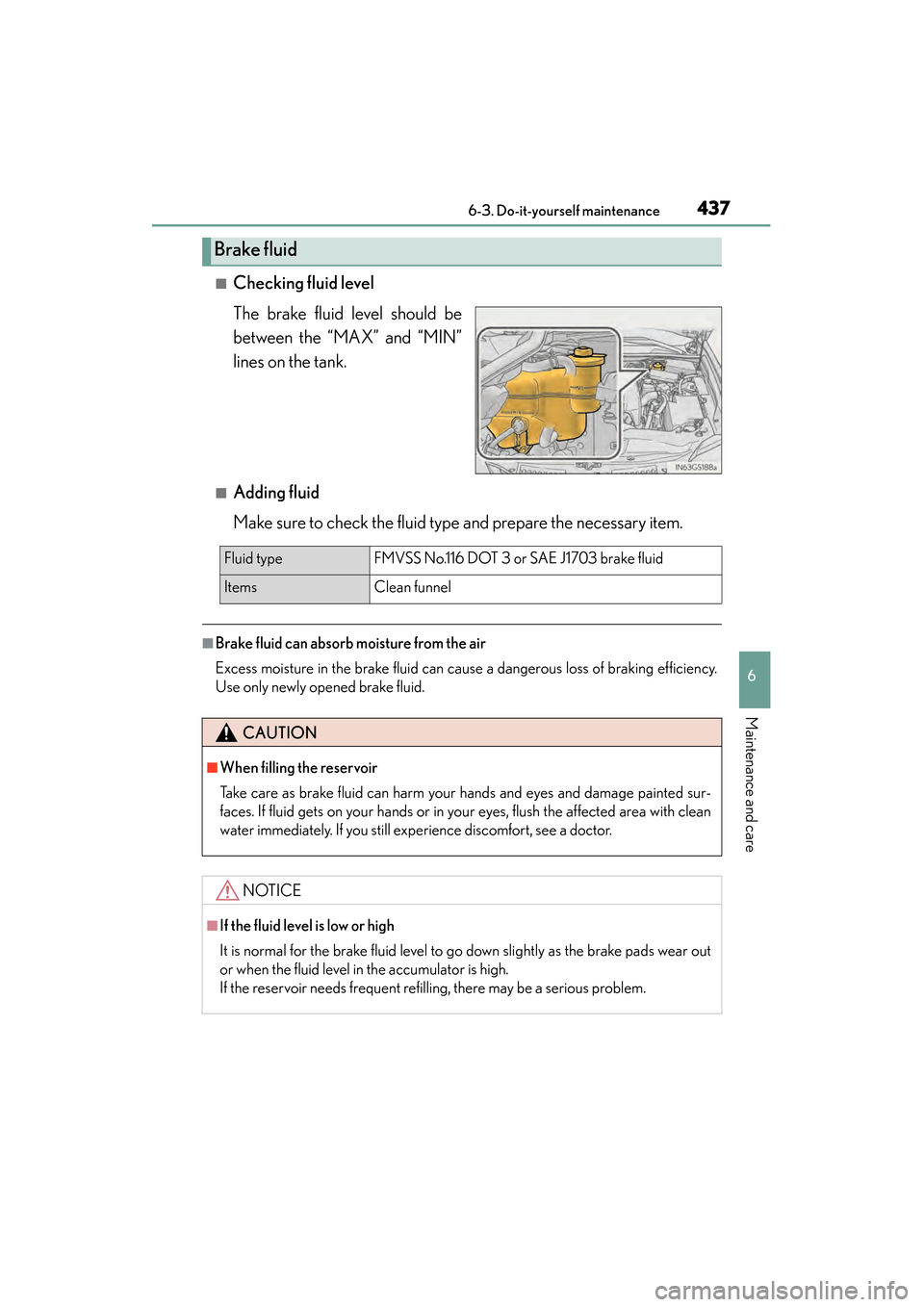
■Checking fluid level
The brake fluid level should be
between the “MAX” and “MIN”
lines on the tank.
■Adding fluid
Make sure to check the fluid type and prepare the necessary item.
■Brake fluid can absorb moisture from the air
Excess moisture in the brake fluid can cause a dangerous loss of braking efficiency.
Use only newly opened brake fluid.
Brake fluid
Fluid typeFMVSS No.116 DOT 3 or SAE J1703 brake fluid
Items Clean funnel
CAUTION
■When filling the reservoir
Take care as brake fluid can harm your hands and eyes and damage painted sur-
faces. If fluid gets on your hands or in your eyes, flush the affected area with clean
water immediately. If you still experience discomfort, see a doctor.
NOTICE
■If the fluid level is low or high
It is normal for the brake fluid level to go down slightly as the brake pads wear out
or when the fluid level in the accumulator is high.
If the reservoir needs frequent refilling, there may be a serious problem.
GS450h_OM_OM30F70U_(U).book Page 437 Monday, January 19, 2015 9:34 AM
Page 459 of 654
458
GS450h_OM_OM30F70U_(U)
6-3. Do-it-yourself maintenance
Air conditioning filter
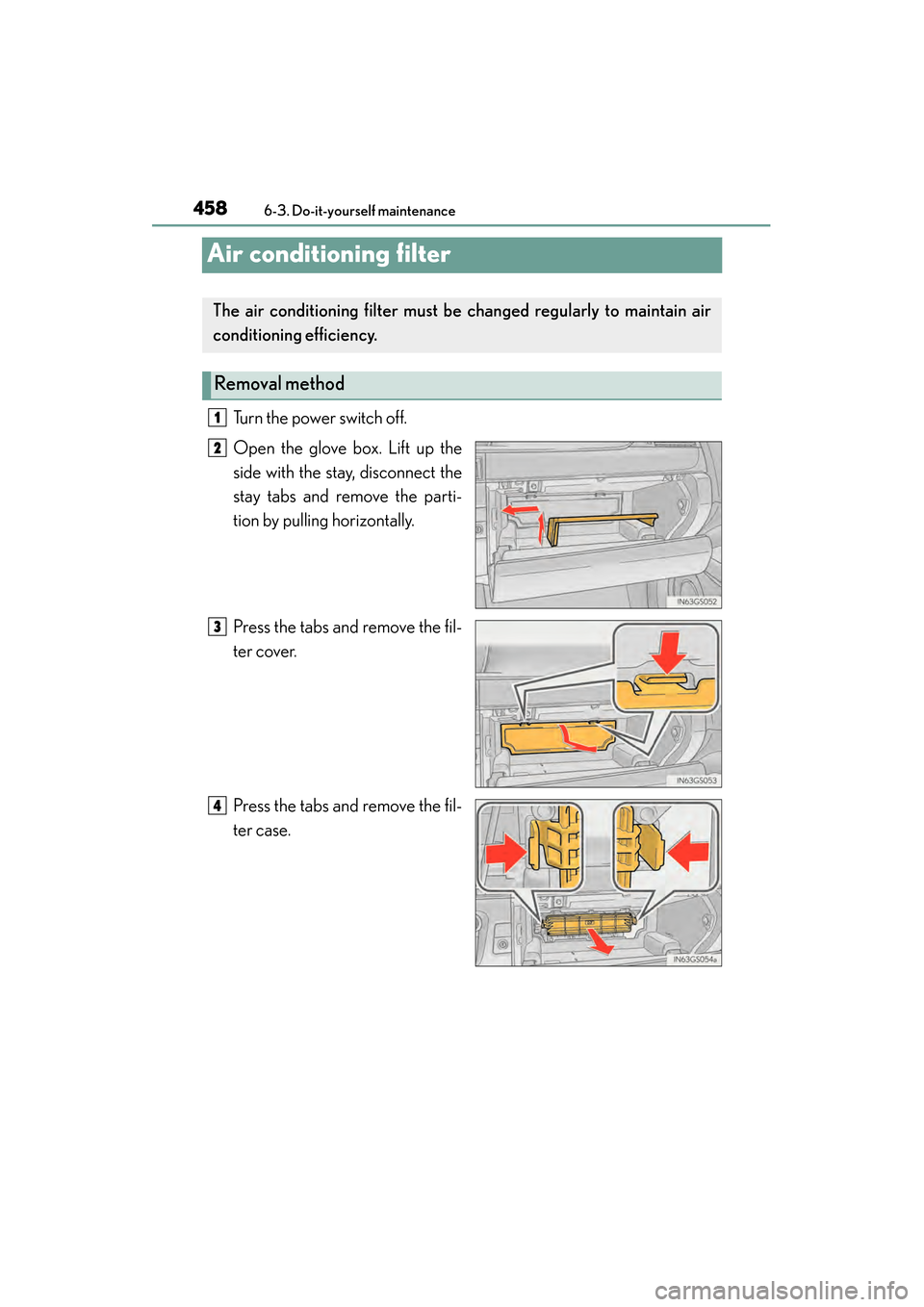
Turn the power switch off.
Open the glove box. Lift up the
side with the stay, disconnect the
stay tabs and remove the parti-
tion by pulling horizontally.
Press the tabs and remove the fil-
ter cover.
Press the tabs and remove the fil-
ter case.
The air conditioning filter must be changed regularly to maintain air
conditioning efficiency.
Removal method
1
2
3
4
GS450h_OM_OM30F70U_(U).book Page 458 Monday, January 19, 2015 9:34 AM
Page 463 of 654

462
GS450h_OM_OM30F70U_(U)
6-3. Do-it-yourself maintenance
Checking and replacing fuses
Turn the power switch off.
After a system failure, see “Fuse layout and amperage ratings” for
details about which fuse to check. (→P. 466)
Open the fuse box cover.
XEngine compartment
Remove the engine compart-
ment cover ( →P. 4 3 0 ) a n d
remove all of the clips.
Push the tabs on either side to
detach the lock and lift the lid off
while pulling the lock plate.
When installing the lid, check that
the lock plate and the tabs on either
side are connected correctly.
If any of the electrical components do not operate, a fuse may have
blown. If this happens, check and replace the fuses as necessary.
1
2
3
GS450h_OM_OM30F70U_(U).book Page 462 Monday, January 19, 2015 9:34 AM
Page 468 of 654
GS450h_OM_OM30F70U_(U)
4676-3. Do-it-yourself maintenance
6
Maintenance and care
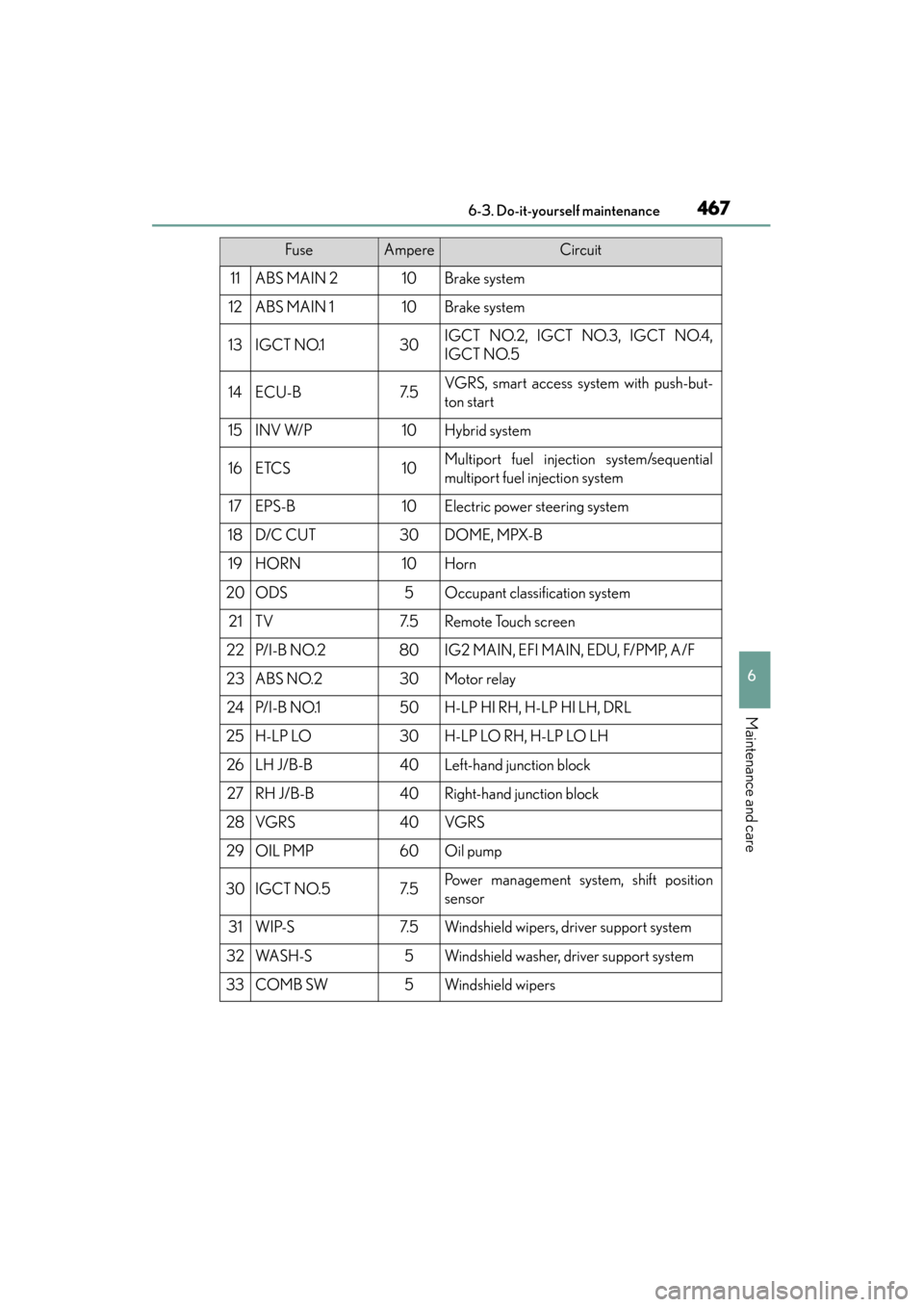
11ABS MAIN 210Brake system
12ABS MAIN 110Brake system
13IGCT NO.130IGCT NO.2, IGCT NO.3, IGCT NO.4,
IGCT NO.5
14ECU-B7. 5VGRS, smart access system with push-but-
ton start
15INV W/P10Hybrid system
16ETCS10Multiport fuel injection system/sequential
multiport fuel injection system
17EPS-B10Electric power steering system
18D/C CUT30DOME, MPX-B
19HORN10Horn
20ODS5Occupant classification system
21TV7. 5Remote Touch screen
22P/ I - B N O. 280IG2 MAIN, EFI MAIN, EDU, F/PMP, A/F
23ABS NO.230Motor relay
24P/ I - B N O.150H-LP HI RH, H-LP HI LH, DRL
25H-LP LO30H-LP LO RH, H-LP LO LH
26LH J/B-B40Left-hand junction block
27RH J/B-B40Right-hand junction block
28VGRS40VGRS
29OIL PMP60Oil pump
30IGCT NO.57. 5Power management system, shift position
sensor
31WIP-S7. 5Windshield wipers, driver support system
32WA S H - S5Windshield washer, driver support system
33COMB SW5Windshield wipers
FuseAmpereCircuit
GS450h_OM_OM30F70U_(U).book Page 467 Monday, January 19, 2015 9:34 AM
Page 470 of 654
GS450h_OM_OM30F70U_(U)
4696-3. Do-it-yourself maintenance
6
Maintenance and care
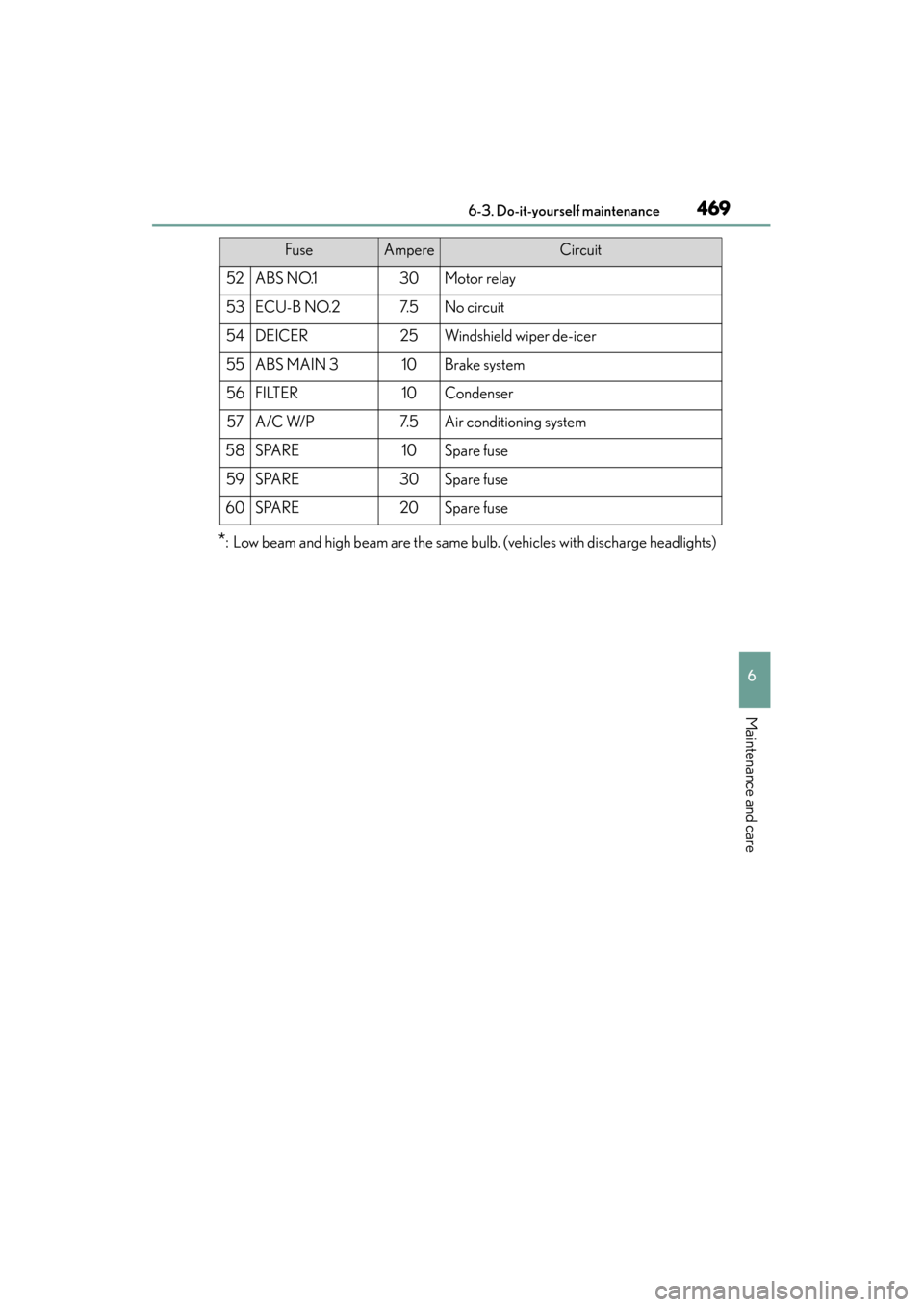
*: Low beam and high beam are the same bulb. (vehicles with discharge headlights)
52ABS NO.130Motor relay
53ECU-B NO.27. 5No circuit
54DEICER25Windshield wiper de-icer
55ABS MAIN 310Brake system
56FILTER10Condenser
57A/C W/P7. 5Air conditioning system
58SPARE10Spare fuse
59SPARE30Spare fuse
60SPARE20Spare fuse
FuseAmpereCircuit
GS450h_OM_OM30F70U_(U).book Page 469 Monday, January 19, 2015 9:34 AM
Page 482 of 654
GS450h_OM_OM30F70U_(U)
4816-3. Do-it-yourself maintenance
6
Maintenance and care
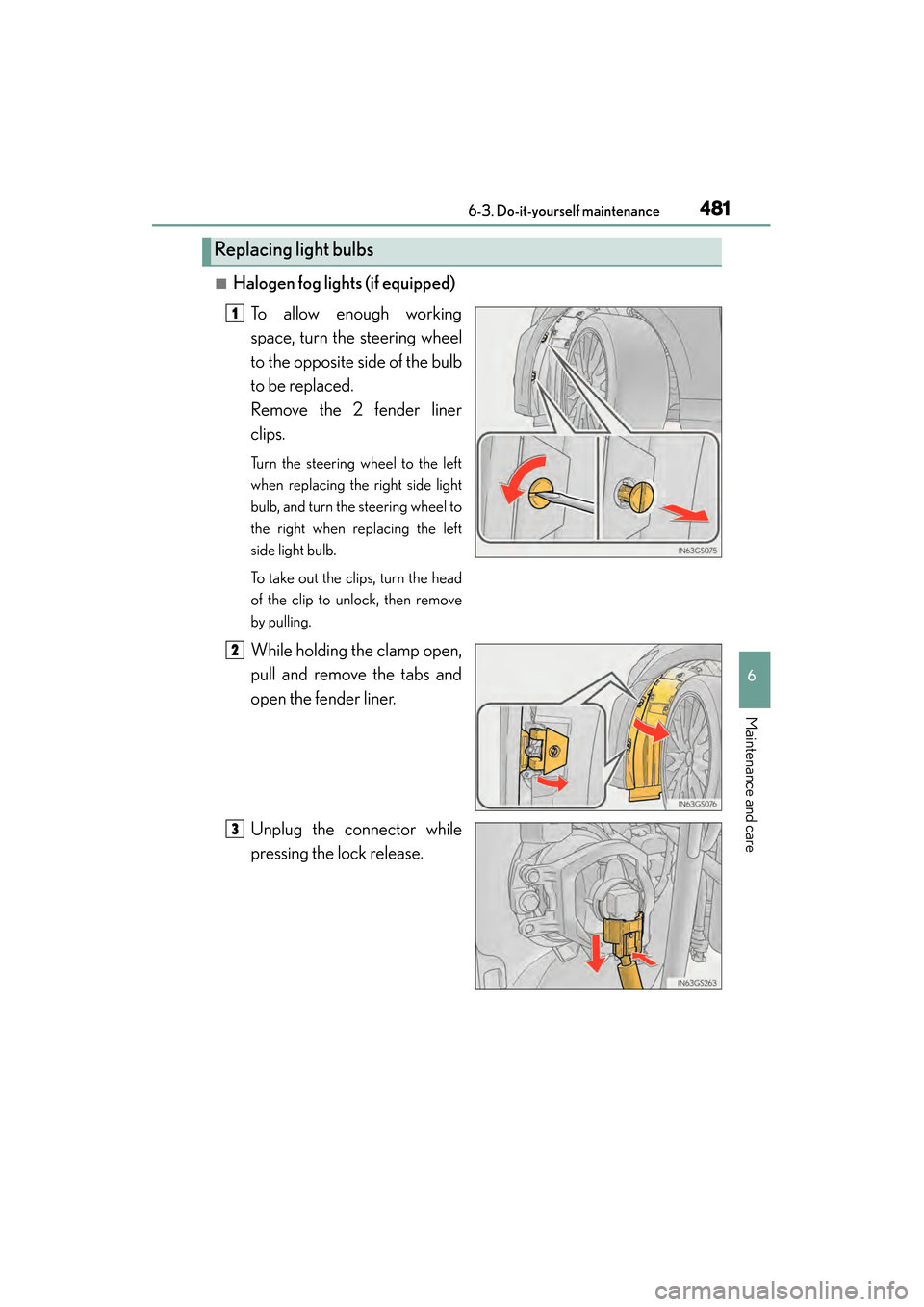
■Halogen fog lights (if equipped)To allow enough working
space, turn the steering wheel
to the opposite side of the bulb
to be replaced.
Remove the 2 fender liner
clips.
Turn the steering wheel to the left
when replacing the right side light
bulb, and turn the steering wheel to
the right when replacing the left
side light bulb.
To take out the clips, turn the head
of the clip to unlock, then remove
by pulling.
While holding the clamp open,
pull and remove the tabs and
open the fender liner.
Unplug the connector while
pressing the lock release.
Replacing light bulbs
1
2
3
GS450h_OM_OM30F70U_(U).book Page 481 Monday, January 19, 2015 9:34 AM
Page 483 of 654
482
GS450h_OM_OM30F70U_(U)
6-3. Do-it-yourself maintenance
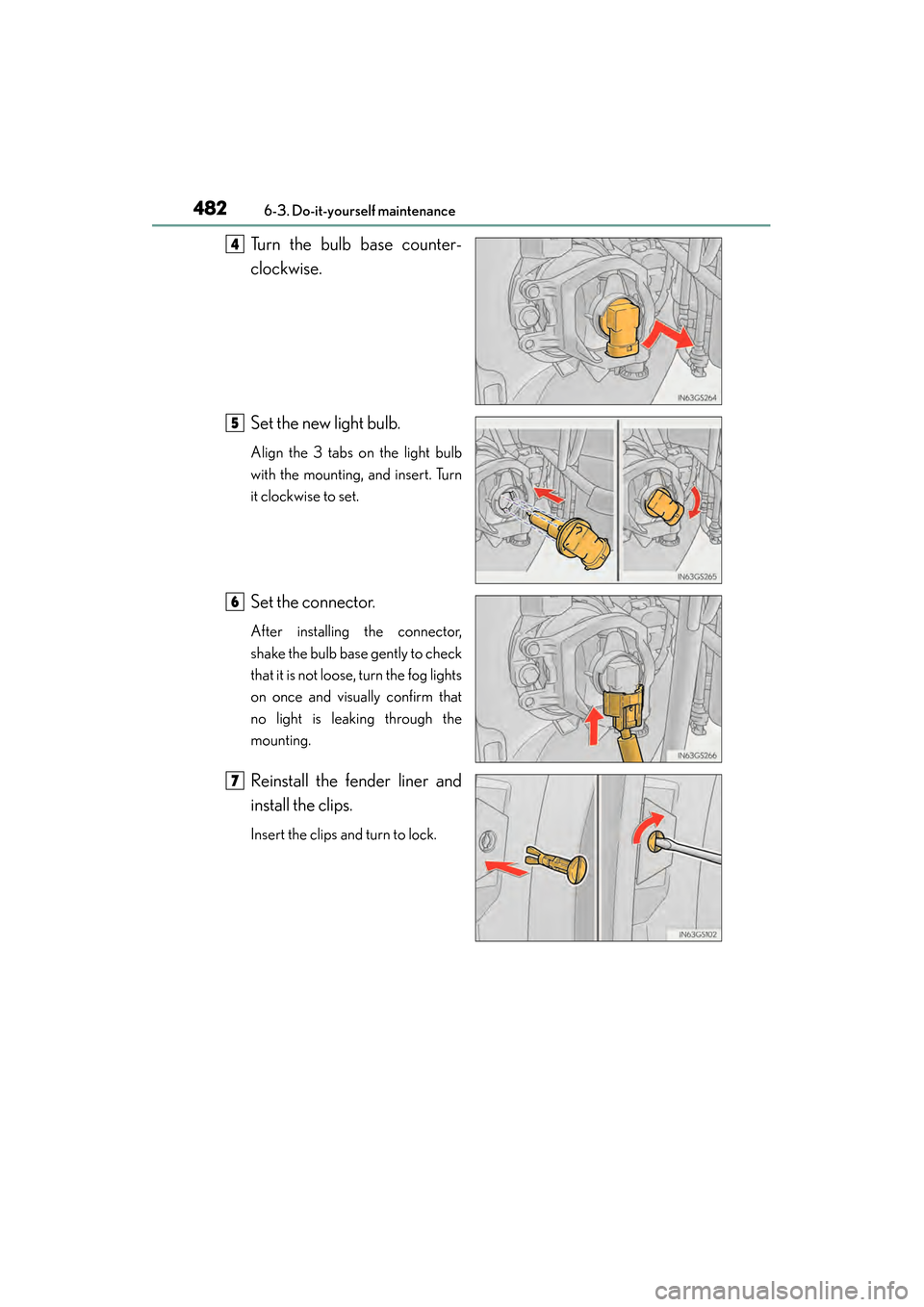
Turn the bulb base counter-
clockwise.
Set the new light bulb.
Align the 3 tabs on the light bulb
with the mounting, and insert. Turn
it clockwise to set.
Set the connector.
After installing the connector,
shake the bulb base gently to check
that it is not loose, turn the fog lights
on once and visually confirm that
no light is leaking through the
mounting.
Reinstall the fender liner and
install the clips.
Insert the clips and turn to lock.
4
5
6
7
GS450h_OM_OM30F70U_(U).book Page 482 Monday, January 19, 2015 9:34 AM