trunk Lexus GS450h 2016 Owner's Manual / LEXUS 2016 GS450H (OM30E99U) User Guide
[x] Cancel search | Manufacturer: LEXUS, Model Year: 2016, Model line: GS450h, Model: Lexus GS450h 2016Pages: 544, PDF Size: 11.6 MB
Page 115 of 544
115
GS450h_OM_OM30E99U_(U)
3
Operation of
each component
3-1. Key information
Keys .................................................... 116
3-2. Opening, closing and locking the doors and trunk
Doors ............................................... 120
Trunk ..................................................126
Smart access system with push-button start ............ 133
3-3. Adjusting the seats Front seats ........................................ 141
Driving position memory ......... 143
Head restraints ............................ 148
3-4. Adjusting the steering wheel and mirrors
Steering wheel ............................... 151
Inside rear view mirror...............152
Outside rear view mirrors ....... 154
3-5. Opening, closing the windows and moon roof
Power windows ............................ 158
Moon roof ........................................ 161
Page 116 of 544
116
GS450h_OM_OM30E99U_(U)
3-1. Key information
Keys
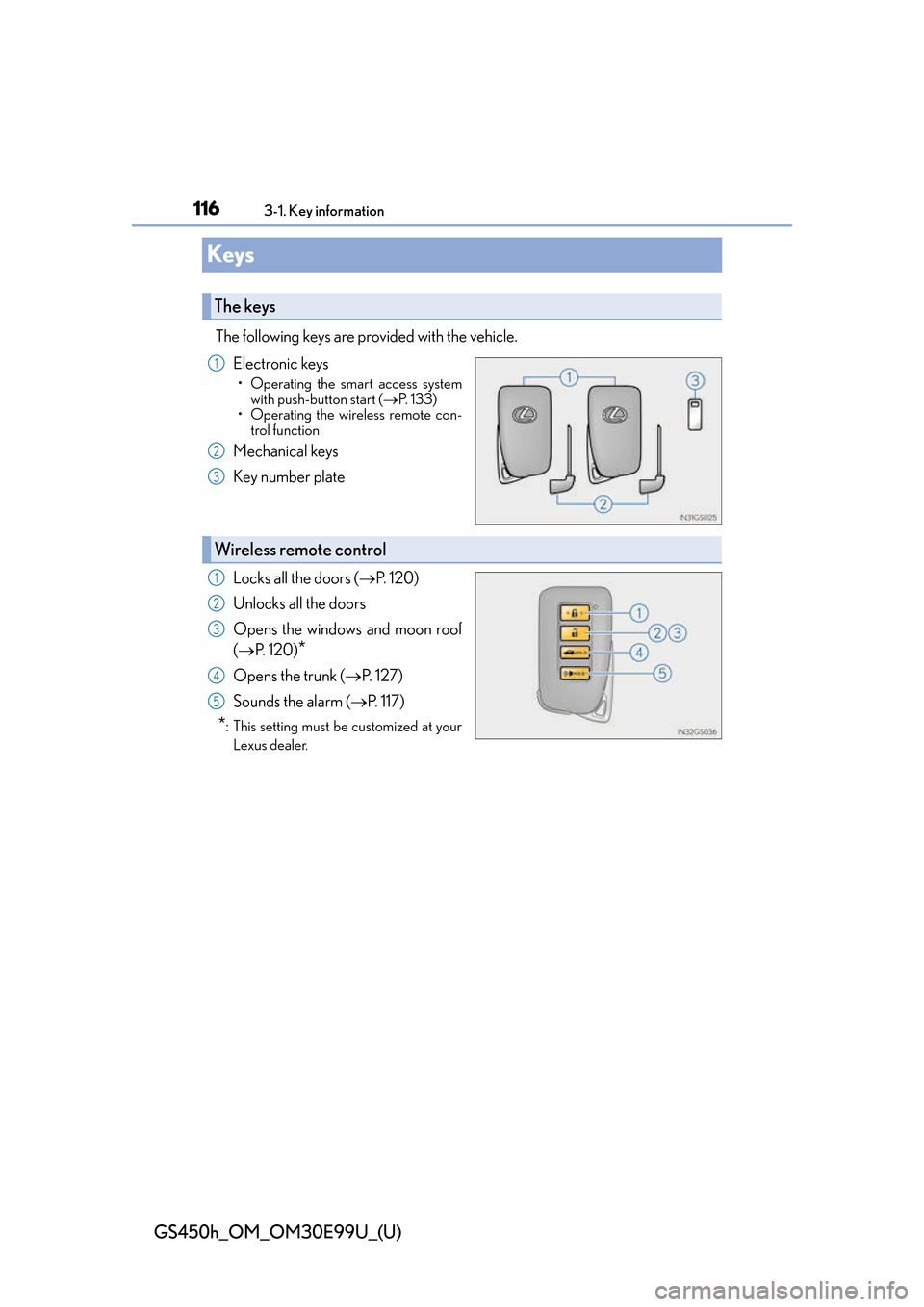
The following keys are provided with the vehicle.Electronic keys
• Operating the smart access systemwith push-button start ( P. 1 3 3 )
• Operating the wireless remote con-
trol function
Mechanical keys
Key number plate
Locks all the doors ( P. 1 2 0 )
Unlocks all the doors
Opens the windows and moon roof
( P. 1 2 0 )
*
Opens the trunk ( P. 1 2 7 )
Sounds the alarm ( P. 117)
*: This setting must be customized at your
Lexus dealer.
The keys
1
2
3
Wireless remote control
1
2
3
4
5
Page 117 of 544
GS450h_OM_OM30E99U_(U)
1173-1. Key information
3
Operation of each component
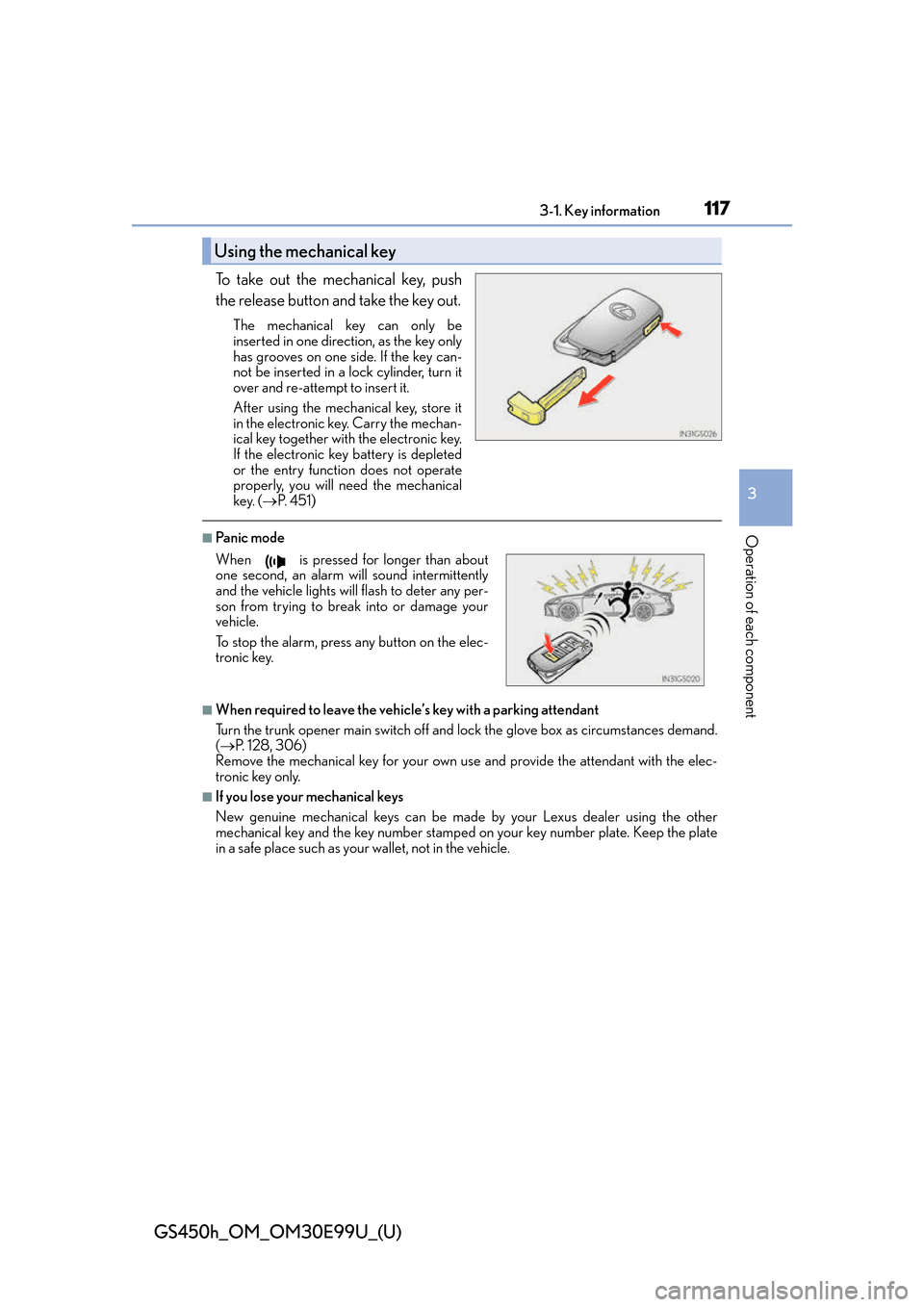
To take out the mechanical key, push
the release button and take the key out.
The mechanical key can only be
inserted in one direction, as the key only
has grooves on one side. If the key can-
not be inserted in a lock cylinder, turn it
over and re-attempt to insert it.
After using the mechanical key, store it
in the electronic key. Carry the mechan-
ical key together with the electronic key.
If the electronic key battery is depleted
or the entry function does not operate
properly, you will need the mechanical
key. (P. 4 5 1 )
■Panic mode
■When required to leave the vehicle’s key with a parking attendant
Turn the trunk opener main switch off and lock the glove box as circumstances demand.
( P. 1 2 8 , 3 0 6 )
Remove the mechanical key for your own use and provide the attendant with the elec-
tronic key only.
■If you lose your mechanical keys
New genuine mechanical keys can be made by your Lexus dealer using the other
mechanical key and the key number stamped on your key number plate. Keep the plate
in a safe place such as your wallet, not in the vehicle.
Using the mechanical key
When is pressed for longer than about
one second, an alarm will sound intermittently
and the vehicle lights will flash to deter any per-
son from trying to break into or damage your
vehicle.
To stop the alarm, press any button on the elec-
tronic key.
Page 120 of 544
120
GS450h_OM_OM30E99U_(U)
3-2. Opening, closing and locking the doors and trunk
Doors
◆Smart access system with push-button start
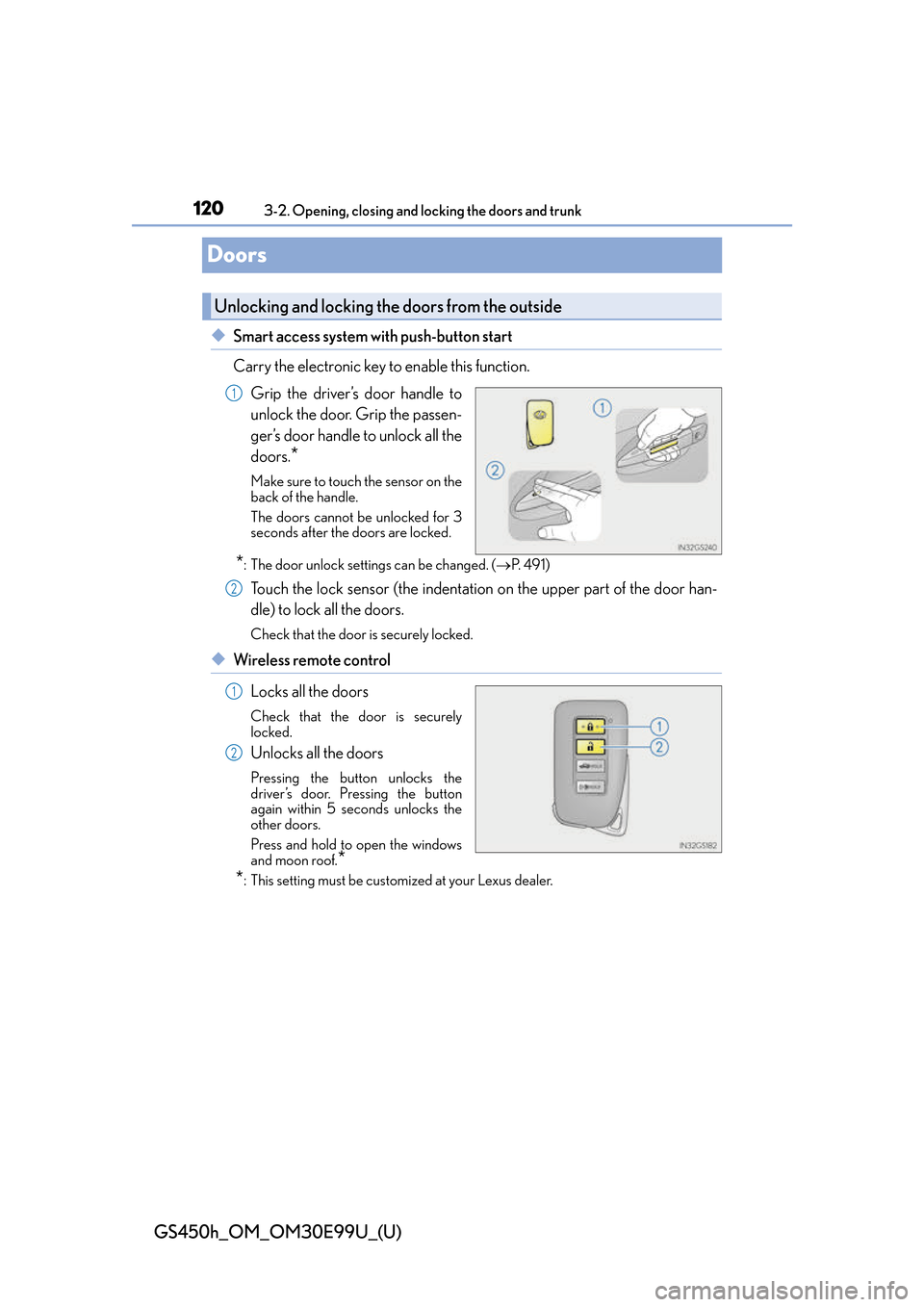
Carry the electronic key to enable this function.
Grip the driver’s door handle to
unlock the door. Grip the passen-
ger’s door handle to unlock all the
doors.
*
Make sure to touch the sensor on the
back of the handle.
The doors cannot be unlocked for 3
seconds after the doors are locked.
*: The door unlock settings can be changed. ( P. 4 9 1 )
Touch the lock sensor (the indentation on the upper part of the door han-
dle) to lock all the doors.
Check that the door is securely locked.
◆Wireless remote control
Locks all the doors
Check that the door is securely
locked.
Unlocks all the doors
Pressing the button unlocks the
driver’s door. Pressing the button
again within 5 seconds unlocks the
other doors.
Press and hold to open the windows
and moon roof.
*
*
: This setting must be customized at your Lexus dealer.
Unlocking and locking the doors from the outside
1
2
1
2
Page 121 of 544
GS450h_OM_OM30E99U_(U)
1213-2. Opening, closing and locking the doors and trunk
3
Operation of each component
■Operation signals
A buzzer sounds and the emergency flashers flash to indicate that the doors have been
locked/unlocked. (Locked: once; Unlocked: twice)
■Security feature
If a door is not opened within approximately 60 seconds after the vehicle is unlocked, the
security feature automatically locks the vehicle again.
■Welcome light illumination control
The side marker, parking, tail and license plat e lights automatically turn on at night when
the doors are unlocked using the entry functi on or wireless remote control if the light
switch is in the “AUTO” position.
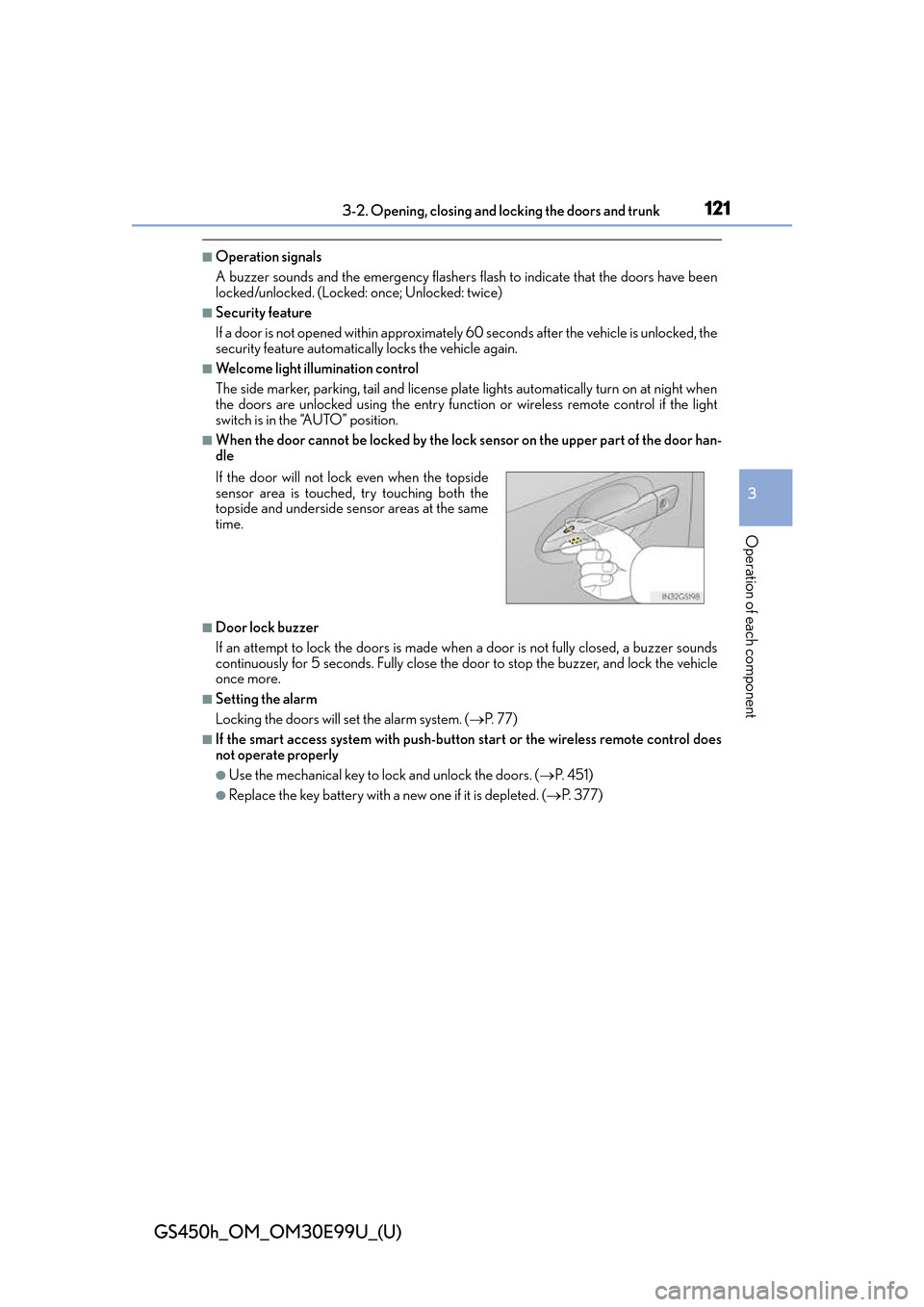
■When the door cannot be locked by the lock sensor on the upper part of the door han-
dle
■Door lock buzzer
If an attempt to lock the doors is made when a door is not fully closed, a buzzer sounds
continuously for 5 seconds. Fully close the door to stop the buzzer, and lock the vehicle
once more.
■Setting the alarm
Locking the doors will set the alarm system. ( P. 77)
■If the smart access system with push-butto n start or the wireless remote control does
not operate properly
●Use the mechanical key to lock and unlock the doors. ( P. 4 5 1 )
●Replace the key battery with a new one if it is depleted. ( P. 377)
If the door will not lock even when the topside
sensor area is touched, try touching both the
topside and underside sensor areas at the same
time.
Page 122 of 544
122
GS450h_OM_OM30E99U_(U)
3-2. Opening, closing and locking the doors and trunk
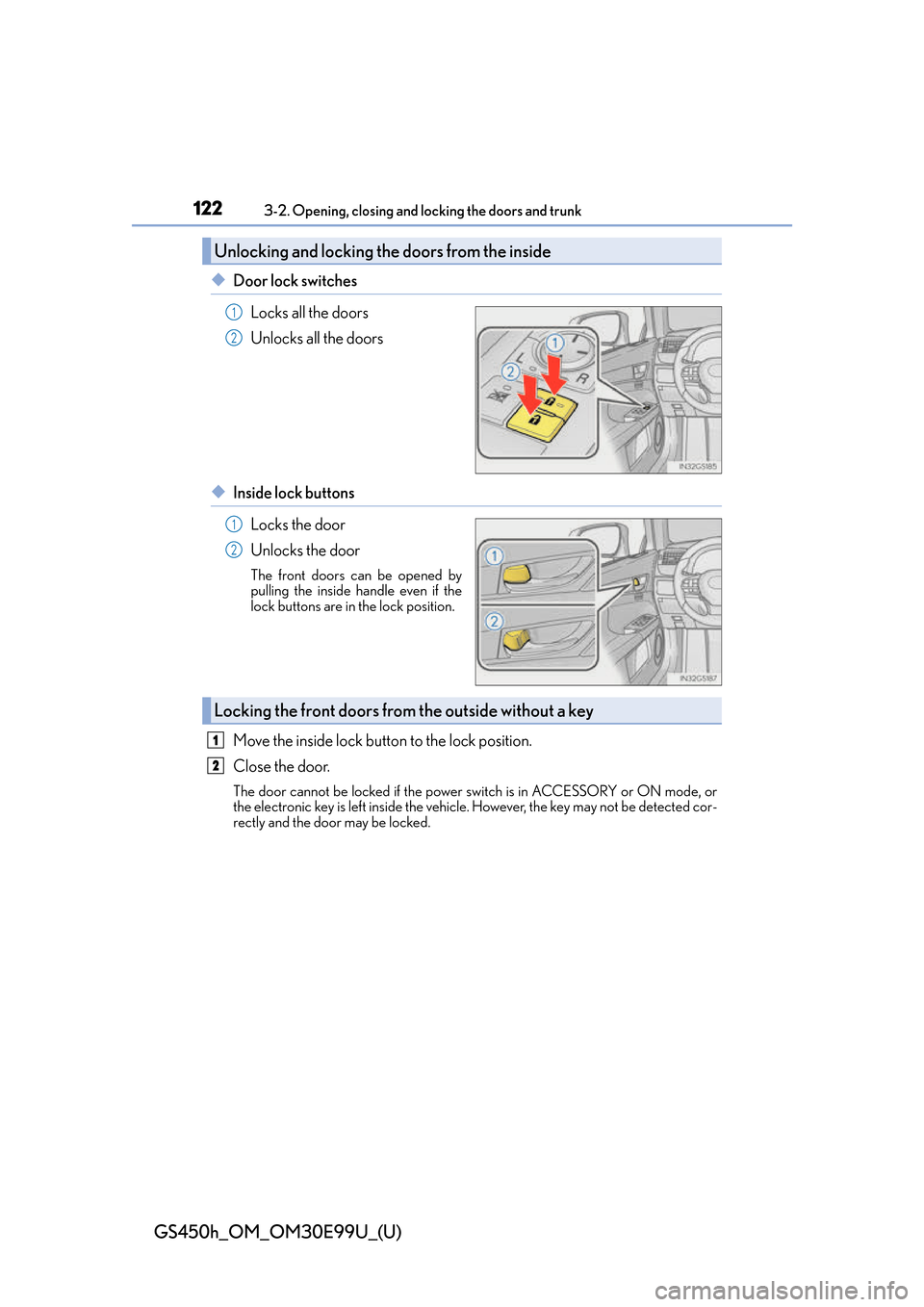
◆Door lock switches
Locks all the doors
Unlocks all the doors
◆Inside lock buttonsLocks the door
Unlocks the door
The front doors can be opened by
pulling the inside handle even if the
lock buttons are in the lock position.
Move the inside lock button to the lock position.
Close the door.
The door cannot be locked if the power switch is in ACCESSORY or ON mode, or
the electronic key is left inside the vehicle. However, the key may not be detected cor-
rectly and the door may be locked.
Unlocking and locking the doors from the inside
1
2
1
2
Locking the front doors from the outside without a key
1
2
Page 123 of 544
GS450h_OM_OM30E99U_(U)
1233-2. Opening, closing and locking the doors and trunk
3
Operation of each component
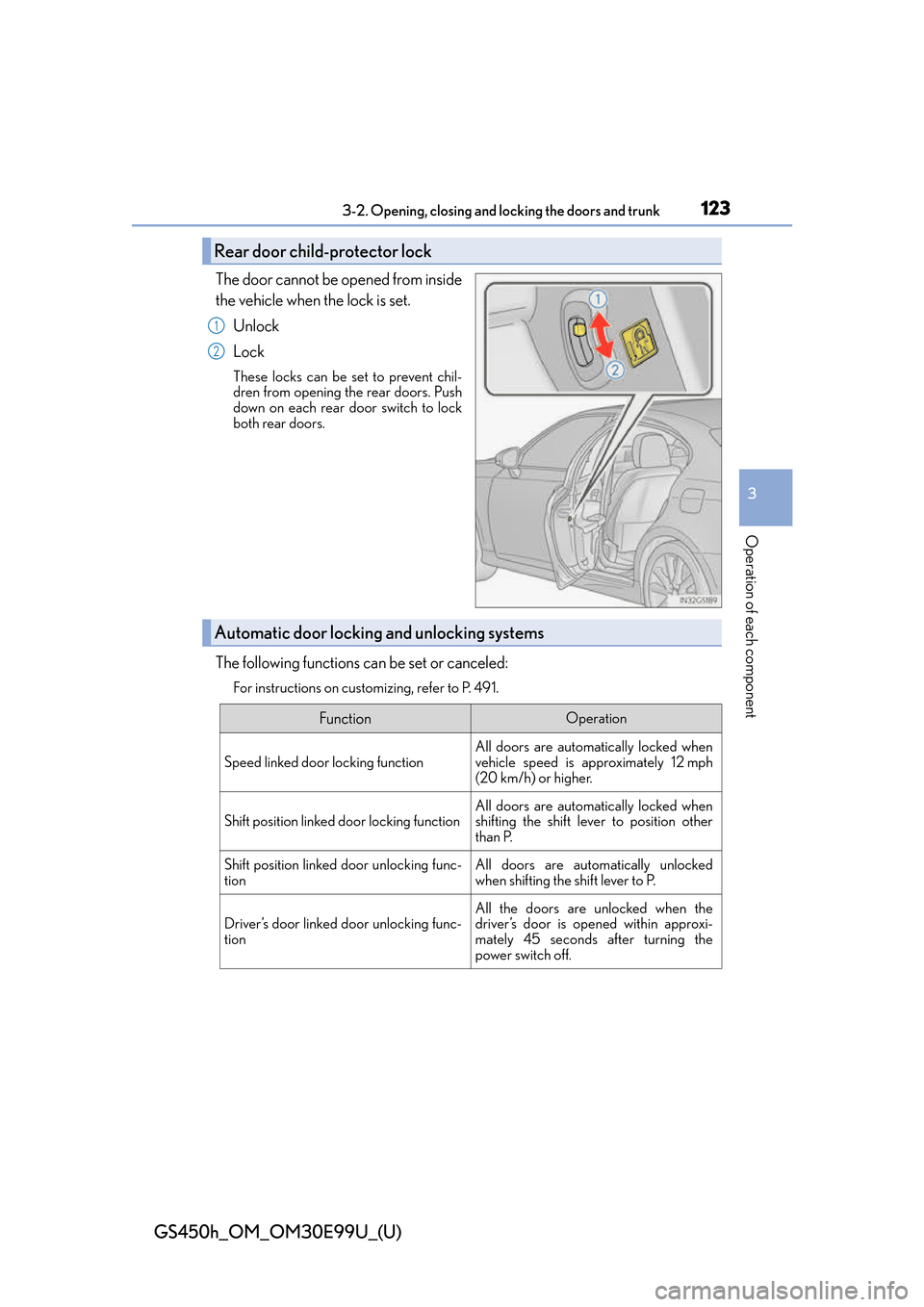
The door cannot be opened from inside
the vehicle when the lock is set.
Unlock
Lock
These locks can be set to prevent chil-
dren from opening the rear doors. Push
down on each rear door switch to lock
both rear doors.
The following functions can be set or canceled:
For instructions on customizing, refer to P. 491.
Rear door child-protector lock
1
2
Automatic door locking and unlocking systems
FunctionOperation
Speed linked door locking function
All doors are automatically locked when
vehicle speed is approximately 12 mph
(20 km/h) or higher.
Shift position linked door locking functionAll doors are automatically locked when
shifting the shift lever to position other
than P.
Shift position linked door unlocking func-
tionAll doors are automatically unlocked
when shifting the shift lever to P.
Driver’s door linked door unlocking func-
tionAll the doors are unlocked when the
driver’s door is opened within approxi-
mately 45 seconds after turning the
power switch off.
Page 124 of 544
124
GS450h_OM_OM30E99U_(U)
3-2. Opening, closing and locking the doors and trunk
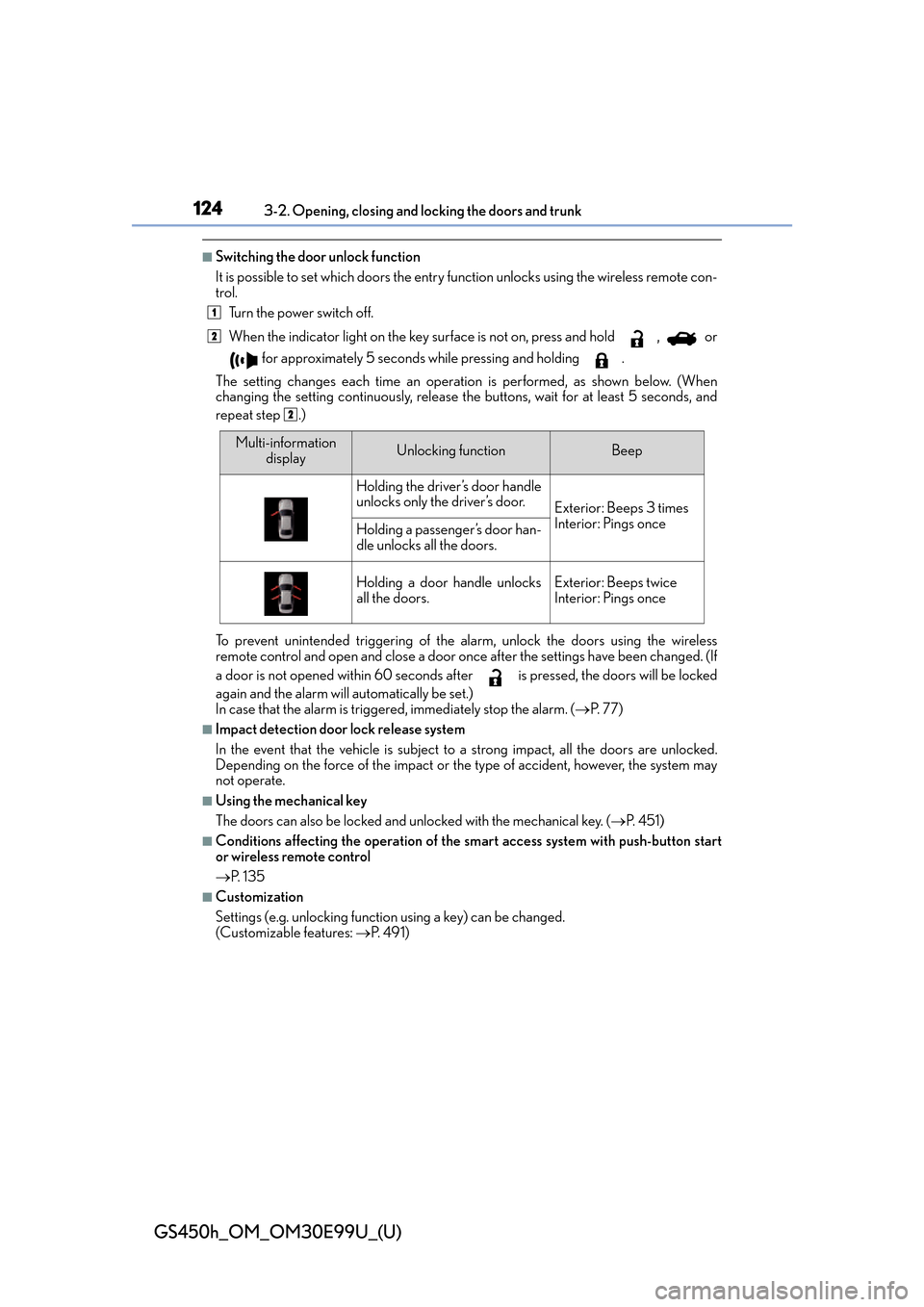
■Switching the door unlock function
It is possible to set which doors the entry fu nction unlocks using the wireless remote con-
trol.
Turn the power switch off.
When the indicator light on the key su rface is not on, press and hold , or
for approximately 5 seconds while pressing and holding .
The setting changes each time an operatio n is performed, as shown below. (When
changing the setting continuously, release the buttons, wait for at least 5 seconds, and
repeat step .)
To prevent unintended triggering of the alarm, unlock the doors using the wireless
remote control and open and close a door once after the settings have been changed. (If
a door is not opened within 60 seconds af ter is pressed, the doors will be locked
again and the alarm will automatically be set.)
In case that the alarm is triggered, immediately stop the alarm. ( P. 77)
■Impact detection door lock release system
In the event that the vehicle is subject to a strong impact, all the doors are unlocked.
Depending on the force of the impact or the type of accident, however, the system may
not operate.
■Using the mechanical key
The doors can also be locked and unlocked with the mechanical key. ( P. 4 5 1 )
■Conditions affecting the operation of the sm art access system with push-button start
or wireless remote control
P. 1 3 5
■Customization
Settings (e.g. unlocking function using a key) can be changed.
(Customizable features: P. 4 9 1 )
1
2
2
Multi-information
displayUnlocking functionBeep
Holding the driver’s door handle
unlocks only the driver’s door.
Exterior: Beeps 3 times
Interior: Pings once
Holding a passenger’s door han-
dle unlocks all the doors.
Holding a door handle unlocks
all the doors.Exterior: Beeps twice
Interior: Pings once
Page 125 of 544
GS450h_OM_OM30E99U_(U)
1253-2. Opening, closing and locking the doors and trunk
3
Operation of each component
WA R N I N G
■To prevent an accident
Observe the following precautions while driving the vehicle.
Failure to do so may result in a door openin g and an occupant throwing out of the vehi-
cle, resulting in death or serious injury.
●Ensure that all doors are properly closed and locked.
●Do not pull the inside handle of the doors while driving.
Be especially careful for the front doors, as the doors may be opened even if the
inside lock buttons ar e in locked position.
●Set the rear door child-protector locks when children are seated in the rear seats.
Page 126 of 544
126
GS450h_OM_OM30E99U_(U)
3-2. Opening, closing and locking the doors and trunk
Tr u n k
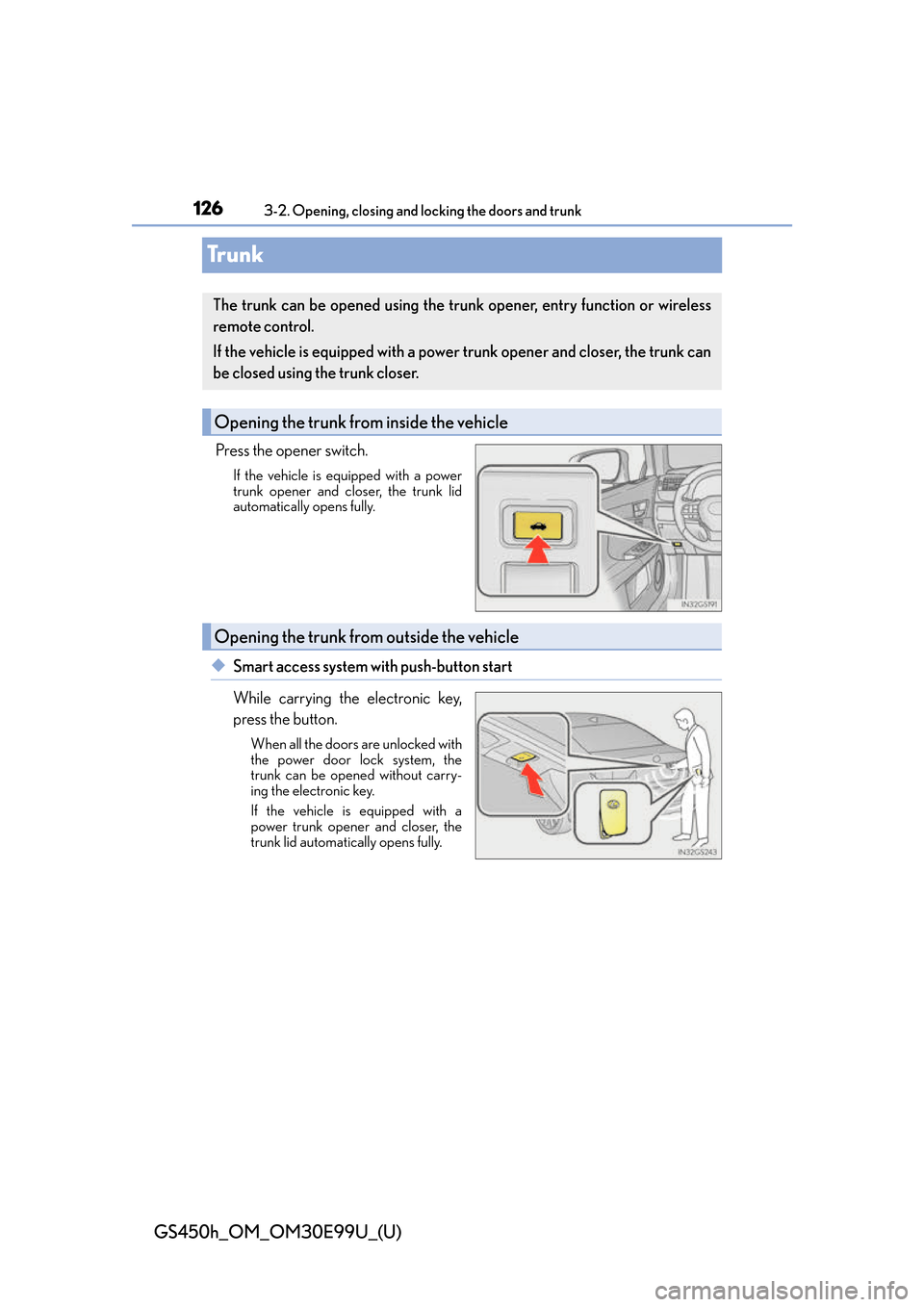
Press the opener switch.
If the vehicle is equipped with a power
trunk opener and closer, the trunk lid
automatically opens fully.
◆Smart access system with push-button start
While carrying the electronic key,
press the button.
When all the doors are unlocked with
the power door lock system, the
trunk can be opened without carry-
ing the electronic key.
If the vehicle is equipped with a
power trunk opener and closer, the
trunk lid automatically opens fully.
The trunk can be opened using the trunk opener, entry function or wireless
remote control.
If the vehicle is equipped with a power trunk opener and closer, the trunk can
be closed using the trunk closer.
Opening the trunk from inside the vehicle
Opening the trunk from outside the vehicle