seat memory Lexus GS450h 2016 Owner's Manual / LEXUS 2016 GS450H OWNERS MANUAL (OM30E99U)
[x] Cancel search | Manufacturer: LEXUS, Model Year: 2016, Model line: GS450h, Model: Lexus GS450h 2016Pages: 544, PDF Size: 11.6 MB
Page 2 of 544
TABLE OF CONTENTS2
GS450h_OM_OM30E99U_(U)
For your information ................................... 8
Reading this manual................................... 12
How to search ..............................................13
Pictorial index ............................................... 14
1-1. For safe useBefore driving................................. 26
For safety drive............................... 28
Seat belts .......................................... 30
SRS airbags ..................................... 35
Front passenger occupant classification system.................. 46
Safety information for children ................................... 52
Child restraint systems ............... 53
Installing child restraints..............57
Exhaust gas precautions ............ 65
1-2. Hybrid system Hybrid system features............... 66
Hybrid system precautions....... 70
1-3. Theft deterrent system Immobilizer system ....................... 74
Alarm .................................................. 77 2. Instrument cluster
Warning lights and indicators .............................. 80
Gauges and meters ..................... 86
Multi-information display .......... 93
Head-up display ............................ 101
Energy monitor/ consumption screen ................ 107
3-1. Key information Keys .................................................... 116
3-2. Opening, closing and locking the doors and trunk
Doors ................................................120
Trunk.................................................. 126
Smart access system with push-button start .............133
3-3. Adjusting the seats Front seats........................................ 141
Driving position memory..........143
Head restraints ............................ 148
3-4. Adjusting the steering wheel and mirrors
Steering wheel ............................... 151
Inside rear view mirror .............. 152
Outside rear view mirrors........154
3-5. Opening, closing the windows and moon roof
Power windows............................ 158
Moon roof ........................................ 161
1For safety and security
2Instrument cluster
3Operation of
each component
Page 115 of 544
115
GS450h_OM_OM30E99U_(U)
3
Operation of
each component
3-1. Key information
Keys .................................................... 116
3-2. Opening, closing and locking the doors and trunk
Doors ............................................... 120
Trunk ..................................................126
Smart access system with push-button start ............ 133
3-3. Adjusting the seats Front seats ........................................ 141
Driving position memory ......... 143
Head restraints ............................ 148
3-4. Adjusting the steering wheel and mirrors
Steering wheel ............................... 151
Inside rear view mirror...............152
Outside rear view mirrors ....... 154
3-5. Opening, closing the windows and moon roof
Power windows ............................ 158
Moon roof ........................................ 161
Page 143 of 544
143
GS450h_OM_OM30E99U_(U)3-3. Adjusting the seats
3
Operation of each component
Driving position memory
The seat and steering wheel are automati cally adjusted to allow the driver or
front passenger to enter and exit the vehicle easily.
■Driver’s seat
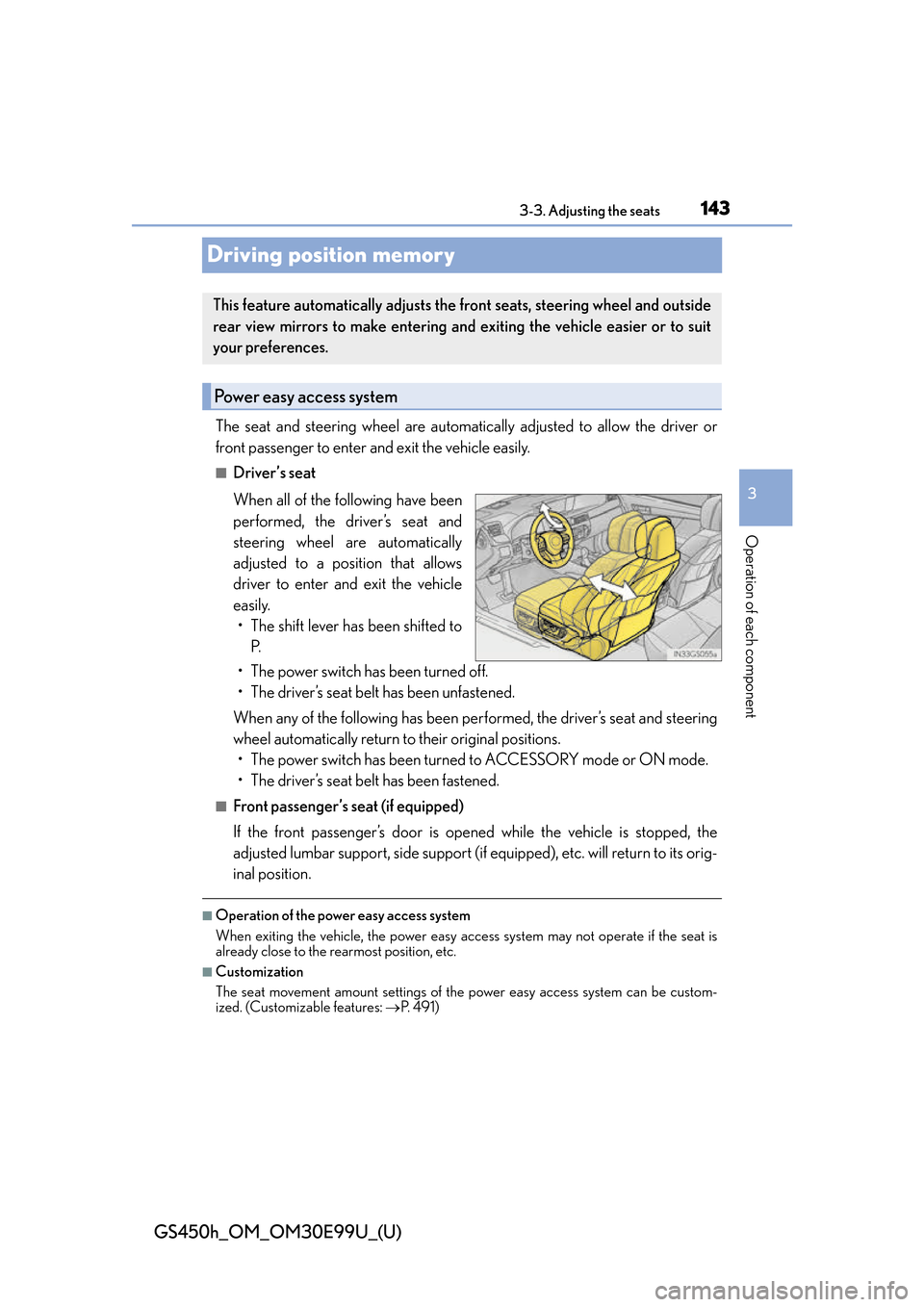
When all of the following have been
performed, the driver’s seat and
steering wheel are automatically
adjusted to a position that allows
driver to enter and exit the vehicle
easily. • The shift lever has been shifted to P.
• The power switch has been turned off.
• The driver’s seat belt has been unfastened.
When any of the following has been perf ormed, the driver’s seat and steering
wheel automatically return to their original positions. • The power switch has been turned to ACCESSORY mode or ON mode.
• The driver’s seat belt has been fastened.
■Front passenger’s seat (if equipped)
If the front passenger’s door is opened while the vehicle is stopped, the
adjusted lumbar support, side support (if equipped), et c. will return to its orig-
inal position.
■Operation of the power easy access system
When exiting the vehicle, the power easy acc ess system may not operate if the seat is
already close to the rearmost position, etc.
■Customization
The seat movement amount settings of the power easy access system can be custom-
ized. (Customizable features: P. 4 9 1 )
This feature automatically adjusts the front seats, steering wheel and outside
rear view mirrors to make entering and exiting the vehicle easier or to suit
your preferences.
Power easy access system
Page 144 of 544
![Lexus GS450h 2016 Owners Manual / LEXUS 2016 GS450H OWNERS MANUAL (OM30E99U) 144
GS450h_OM_OM30E99U_(U)
3-3. Adjusting the seats
Your preferred driving position (the position of the driver’s seat, steering wheel,
outside rear view mirrors and HUD [hea d-up display] [if equip](/img/36/15331/w960_15331-143.png "Lexus GS450h 2016 Owners Manual / LEXUS 2016 GS450H OWNERS MANUAL (OM30E99U) 144
GS450h_OM_OM30E99U_(U)
3-3. Adjusting the seats
Your preferred driving position (the position of the driver’s seat, steering wheel,
outside rear view mirrors and HUD [hea d-up display] [if equip")
144
GS450h_OM_OM30E99U_(U)
3-3. Adjusting the seats
Your preferred driving position (the position of the driver’s seat, steering wheel,
outside rear view mirrors and HUD [hea d-up display] [if equipped]) can be
recorded and recalled by pressing a button.
Three different driving positions can be recorded into memory.
■Recording procedure
Check that the shift lever is in P.
Turn the power switch to ON mode.
Adjust the driver’s seat, steering wheel, outside rear view mirrors and HUD
(head-up display) (if equipped) to the desired positions.
While pressing the “SET” button,
or within 3 seconds after the
“SET” button is pressed, press
button “1”, “2” or “3” until the
buzzer sounds.
If the selected button has already
been preset, the previously recorded
position will be overwritten.
Vehicles with the driving position memory for the front passenger’s seat: To
record the position of the front passenger’s seat, adjust the front passenger’s
seat to the desired position and perform step using the buttons on the front
passenger’s side.
■Recall procedureCheck that the shift lever is in P.
Turn the power switch to ON mode.
Press one of the buttons for the
driving position you want to recall
until the buzzer sounds.
Driving position memory
1
2
3
4
4
1
2
3
Page 145 of 544
GS450h_OM_OM30E99U_(U)
1453-3. Adjusting the seats
3
Operation of each component
■To stop the position recall operation part-way through
Perform any of the following:
●Press the “SET” button.
●Press button “1”, “2” or “3”.
●Operate any of the seat adjustment switches (only cancels seat position recall).
●Operate the tilt and telescopic steering co ntrol switch (only cancels steering wheel
position recall).
●Operate the head-up display position adju stment switch (if equipped) (only cancels
head-up display position recall).
■Seat positions that can be memorized ( P. 141)
Vehicles without seatback side support adjustment switch
The adjusted positions other than the position adjusted by lumbar support switch can be
recorded.
Vehicles with seatback side support adjustment switch
All adjusted positions can be recorded.
■Operating the driving position memory after turning the power switch off
Driver’s seat:
Recorded seat positions can be activated up to 180 seconds after the driver’s door is
opened and another 60 seconds after it is closed again.
Front passenger’s seat:
Recorded seat positions can be activated up to 180 seconds after the front passenger’s
door is opened.
■In order to correctly use the dr iving position memory function
If a seat position is already in the furthest po ssible position and the seat is operated in the
same direction, the recorded position may be slightly different when it is recalled.
Each electronic key can be registered to recall your preferred driving position.
■Registering procedure
Record your driving position to button “1”, “2” or “3” before performing the
following:
Carry only the key you want to regist er, and then close the driver’s door.
If 2 or more keys are in the vehicle, the driving position cannot be recorded
properly.
Check that the shift lever is in P.
Turn the power switch to ON mode.
Recall the driving position that you want to record.
Memory recall function (driver’s side only)
1
2
3
Page 146 of 544
146
GS450h_OM_OM30E99U_(U)
3-3. Adjusting the seats
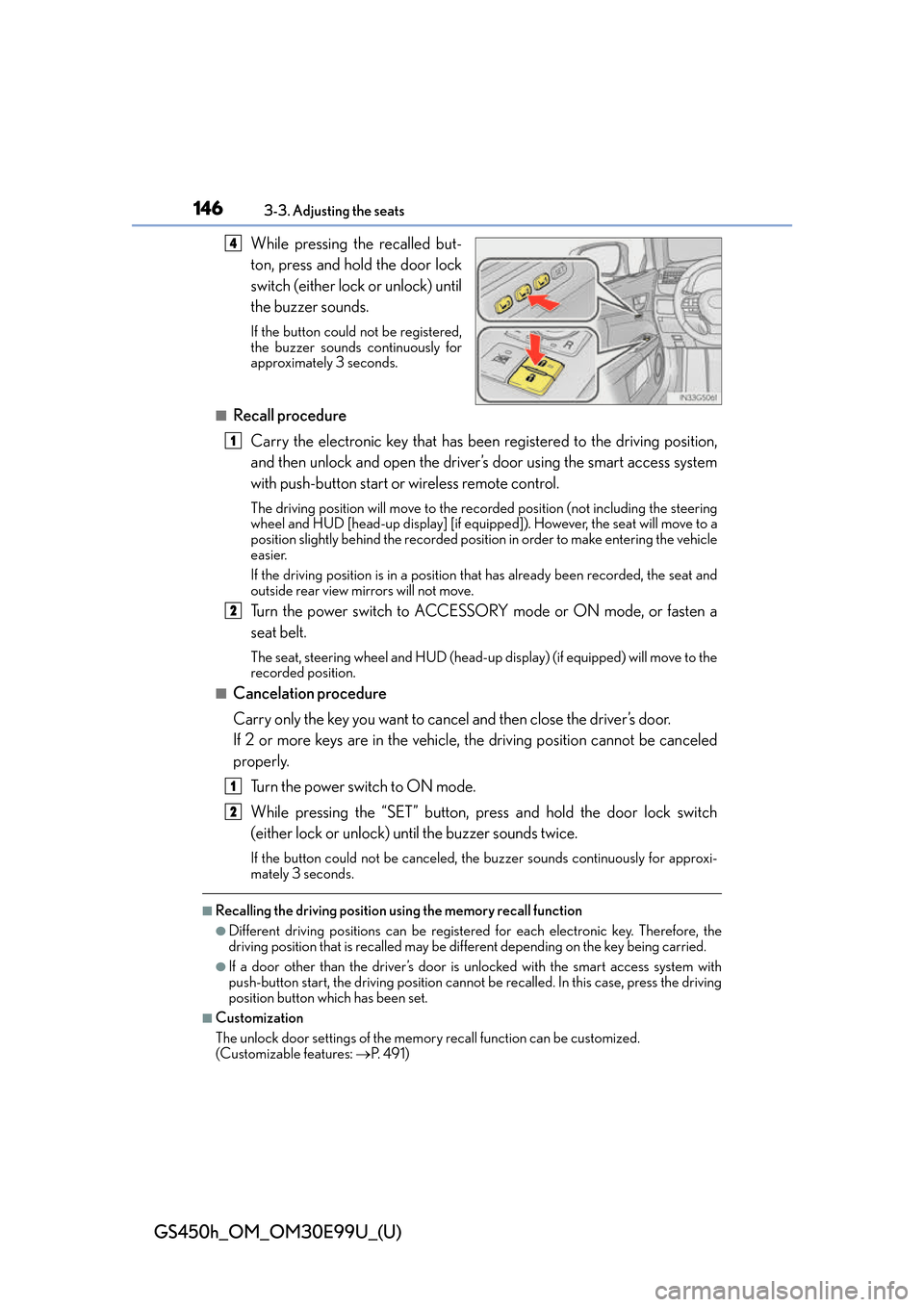
While pressing the recalled but-
ton, press and hold the door lock
switch (either lock or unlock) until
the buzzer sounds.
If the button could not be registered,
the buzzer sounds continuously for
approximately 3 seconds.
■Recall procedureCarry the electronic key that has been registered to the driving position,
and then unlock and open the driver’s door using the smart access system
with push-button start or wireless remote control.
The driving position will move to the reco rded position (not including the steering
wheel and HUD [head-up display] [if equipp ed]). However, the seat will move to a
position slightly behind the recorded positi on in order to make entering the vehicle
easier.
If the driving position is in a position th at has already been recorded, the seat and
outside rear view mirrors will not move.
Turn the power switch to ACCESSORY mode or ON mode, or fasten a
seat belt.
The seat, steering wheel and HUD (head-up display) (if equipped) will move to the
recorded position.
■Cancelation procedure
Carry only the key you want to cancel and then close the driver’s door.
If 2 or more keys are in the vehicle, the driving position cannot be canceled
properly.
Turn the power switch to ON mode.
While pressing the “SET” button, press and hold the door lock switch
(either lock or unlock) unt il the buzzer sounds twice.
If the button could not be canceled, the buzzer sounds continuously for approxi-
mately 3 seconds.
■Recalling the driving position using the memory recall function
●Different driving positions can be registered for each electronic key. Therefore, the
driving position that is recalled may be different depending on the key being carried.
●If a door other than the driver’s door is unlocked with the smart access system with
push-button start, the driving position cannot be recalled. In this case, press the driving
position button which has been set.
■Customization
The unlock door settings of the memory recall function can be customized.
(Customizable features: P. 4 9 1 )
4
1
2
1
2
Page 151 of 544
1513-4. Adjusting the steering wheel and mirrors
3
Operation of each component
GS450h_OM_OM30E99U_(U)
Steering wheel
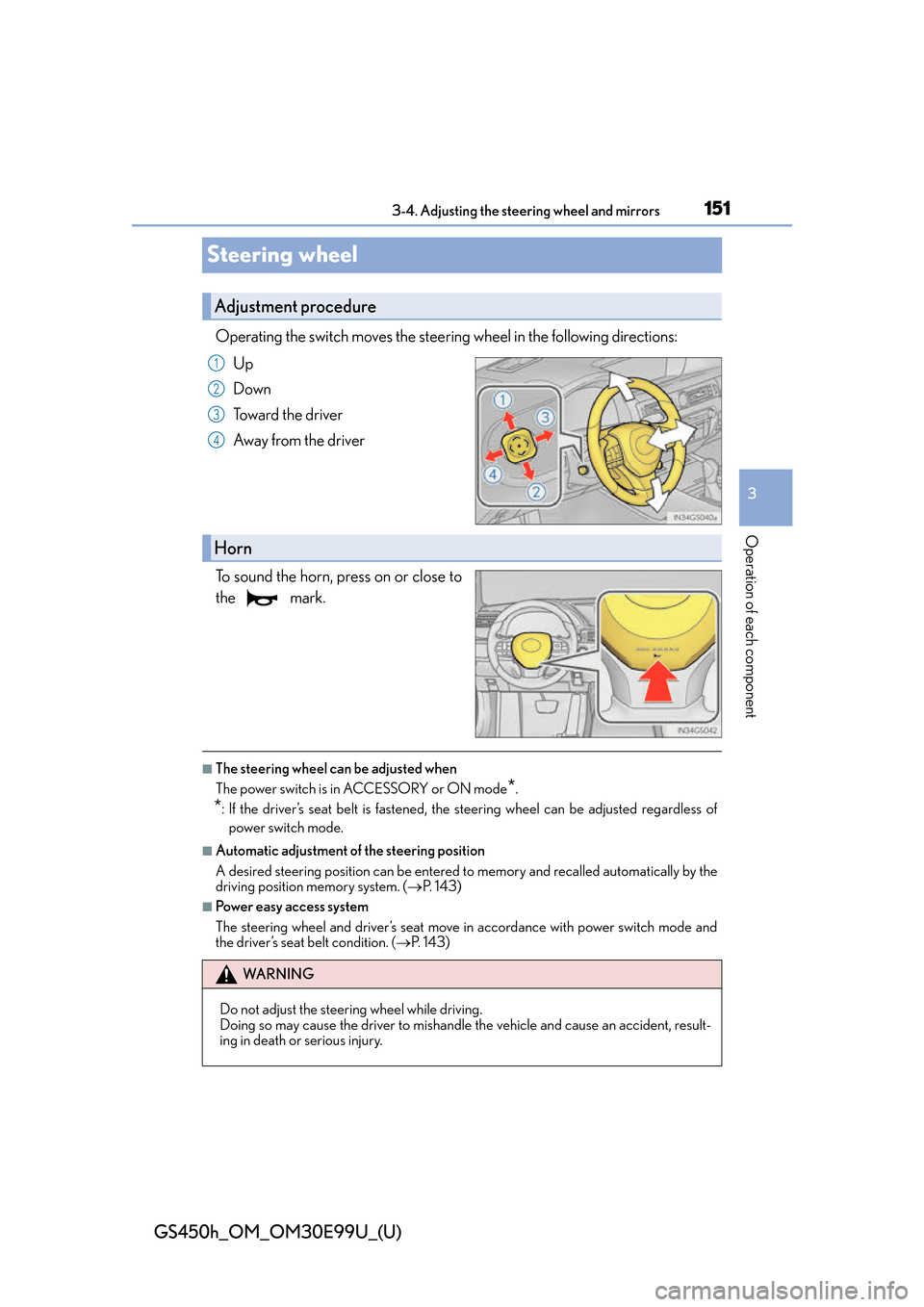
Operating the switch moves the steering wheel in the following directions:Up
Down
Toward the driver
Away from the driver
To sound the horn, press on or close to
the mark.
■The steering wheel can be adjusted when
The power switch is in ACCESSORY or ON mode
*.
*: If the driver’s seat belt is fastened, the steering wheel can be adjusted regardless of
power switch mode.
■Automatic adjustment of the steering position
A desired steering position can be entered to memory and recalled automatically by the
driving position memory system. ( P. 1 4 3 )
■Power easy access system
The steering wheel and driver’s seat move in accordance with power switch mode and
the driver’s seat belt condition. ( P. 1 4 3 )
Adjustment procedure
1
2
3
4
Horn
WA R N I N G
Do not adjust the steering wheel while driving.
Doing so may cause the driver to mishandle the vehicle and cause an accident, result-
ing in death or serious injury.
Page 497 of 544
GS450h_OM_OM30E99U_(U)
4978-2. Customization
8
Vehicle specifications
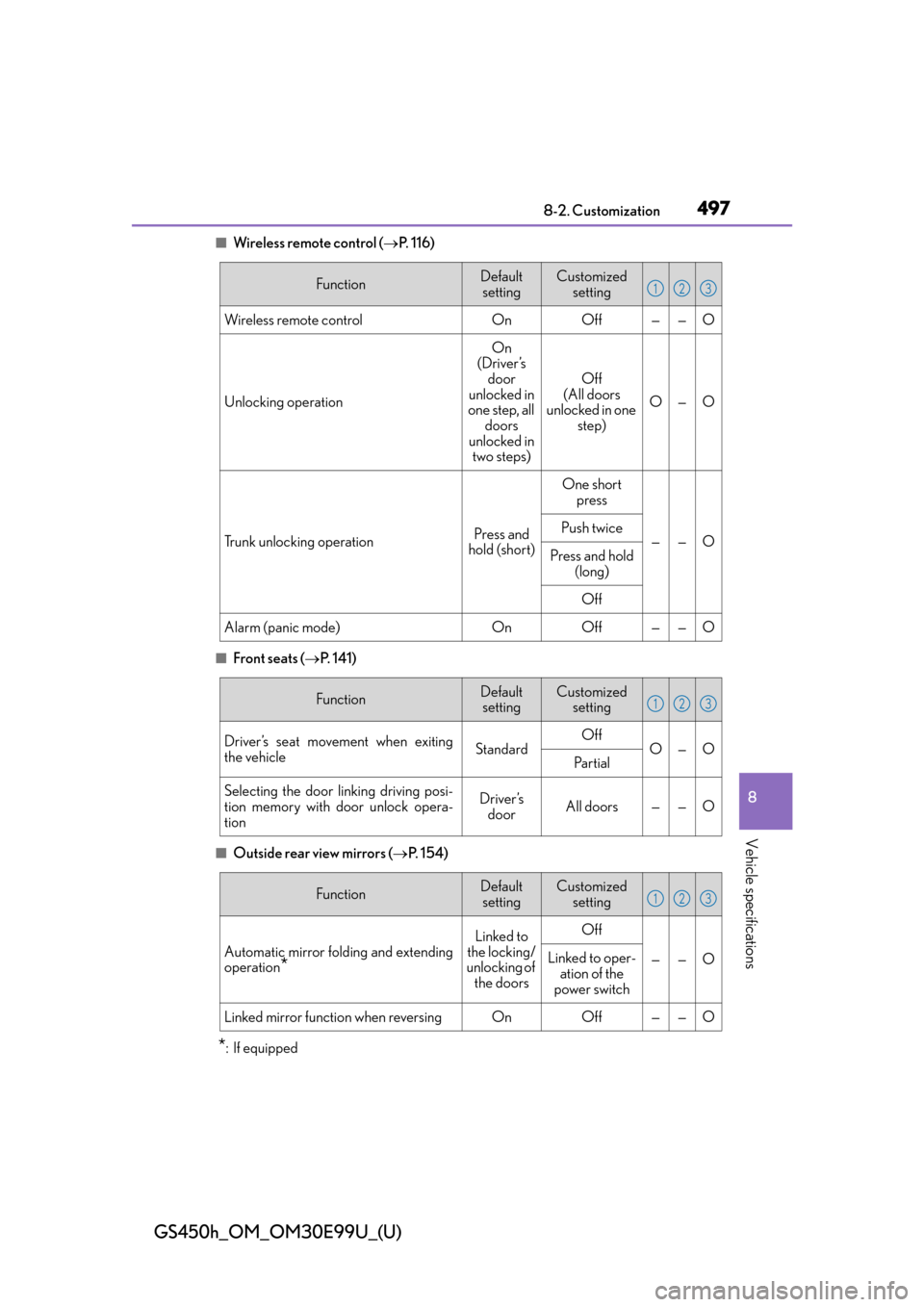
■Wireless remote control (P. 1 1 6 )
■Front seats ( P. 141)
■Outside rear view mirrors ( P. 1 5 4 )
*:If equipped
FunctionDefault
settingCustomized setting
Wireless remote controlOnOff——O
Unlocking operation
On
(Driver’s door
unlocked in
one step, all doors
unlocked in two steps)
Off
(All doors
unlocked in one step)
O—O
Trunk unlocking operationPress and
hold (short)
One short press
——OPush twice
Press and hold
(long)
Off
Alarm (panic mode)OnOff——O
123
FunctionDefaultsettingCustomized setting
Driver’s seat movement when exiting
the vehicleStandardOffO—OPa r t i a l
Selecting the door linking driving posi-
tion memory with door unlock opera-
tionDriver’s doorAll doors——O
123
FunctionDefault
settingCustomized setting
Automatic mirror folding and extending
operation*
Linked to
the locking/
unlocking of
the doorsOff
——OLinked to oper- ation of the
power switch
Linked mirror function when reversingOnOff——O
123
Page 527 of 544
527Alphabetical index
GS450h_OM_OM30E99U_(U)
Daytime running light system ........... 198
DefoggerFront windshield .................................. 291
Outside rear view mirrors .............. 291
Rear window ......................................... 291
Differential ................................................472
Dimensions ............................................. 466
Dinghy towing.......................................... 179
Display 12.3-inch display................................ 283
Drive information ..................................95
Dynamic radar cruise control with full-speed range ......................241
Energy monitor .................................... 107
LKA (Lane-Keeping Assist) .........236
Multi-information display .................. 93
Trip information .....................................86
Warning message ............................ 406
Do-it-yourself maintenance ............. 345
Door courtesy lights Location ................................................. 302
Door lock Doors ........................................................ 120
Smart access system with push-button start ............................. 133
Wireless remote control ................. 120 Doors .......................................................... 120
Automatic door locking and unlocking system .................... 123
Door glasses ......................................... 158
Door lock................................................. 122
Open door warning buzzer .......... 134
Outside rear view mirrors ..............154
Rear door child-p rotector .............. 123
Drive info 1/Drive info 2/ Drive info 3............................................. 98Drive information .................................. 95
Drive-start control .........................167, 191
Driver’s seat position memory.......... 143 Driving position memory................. 144
Memory recall function ....................145
Power easy access system ............. 143
Driving ........................................................ 166 Break-in tips ........................................... 167
Correct driving posture .................... 28
Driving mode select switch .......... 256
Hybrid vehicle driving tips .............272
Procedures .............................................166
Winter drive tips .................................274
DRS (Dynamic Rear Steering) ........ 267 Function .................................................. 267
Warning message.............................406
DVD player
*
Dynamic radar cruise control with full-speed rangeFunction .................................................... 241
Warning message.............................406
Dynamic Rear Steering (DRS) ........ 267 Function .................................................. 267
Warning message.............................406
D
*: Refer to the “NAVIGATION AND MULTIMEDIA SYSTEM OWNER’S MANUAL”.
Page 529 of 544
529Alphabetical index
GS450h_OM_OM30E99U_(U)
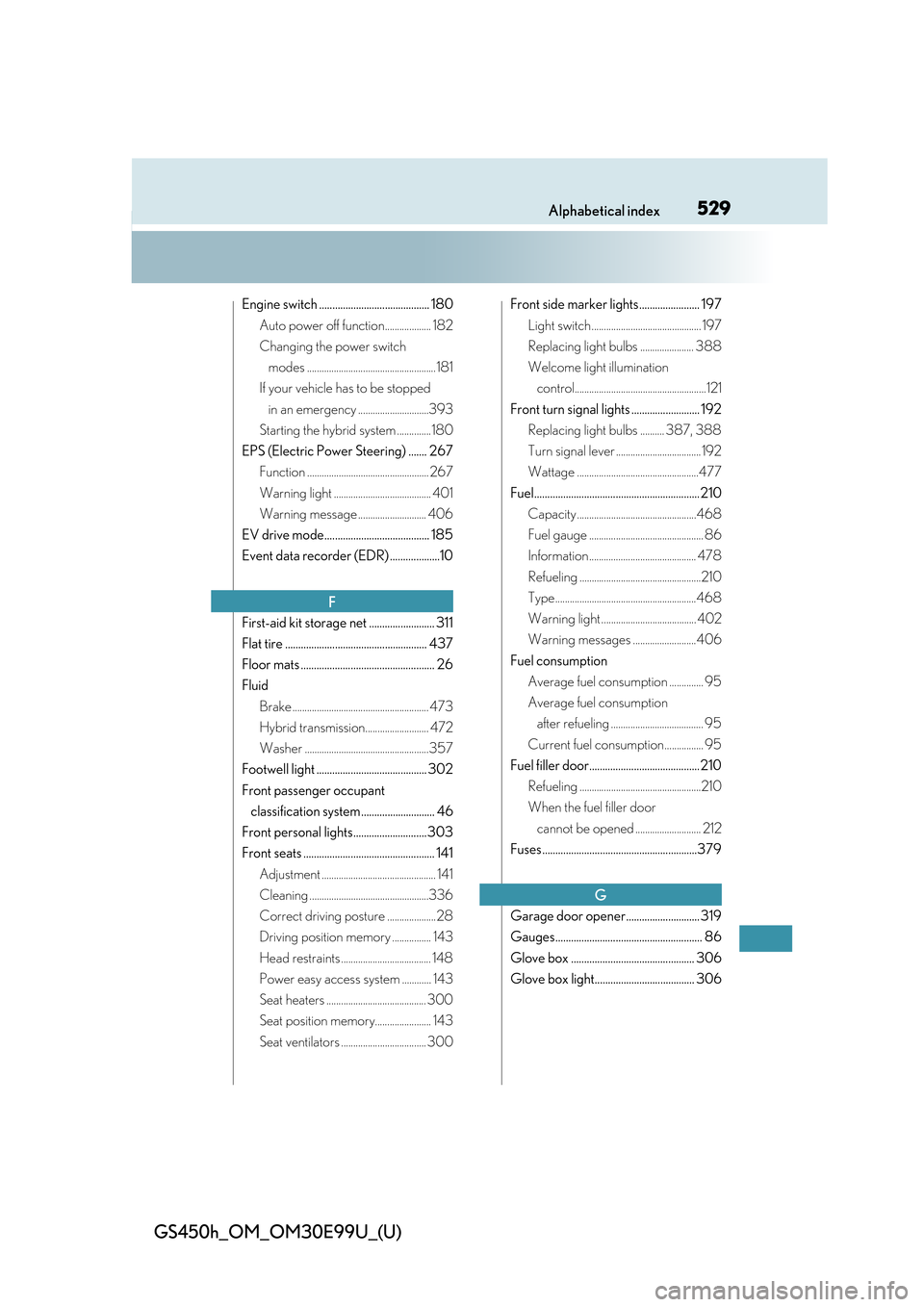
Engine switch .......................................... 180Auto power off function................... 182
Changing the power switch modes ..................................................... 181
If your vehicle has to be stopped in an emergency .............................393
Starting the hybrid system ..............180
EPS (Electric Power Steering) ....... 267 Function .................................................. 267
Warning light ........................................ 401
Warning message ............................ 406
EV drive mode........................................ 185
Event data recorder (EDR) ...................10
First-aid kit storage net ......................... 311
Flat tire ...................................................... 437
Floor mats ................................................... 26
Fluid Brake ........................................................ 473
Hybrid transmission.......................... 472
Washer ...................................................357
Footwell light .......................................... 302
Front passenger occupant classification system ............................ 46
Front personal lights............................ 303
Front seats .................................................. 141 Adjustment ............................................... 141
Cleaning .................................................336
Correct driving posture .................... 28
Driving position memory ................ 143
Head restraints ..................................... 148
Power easy access system ............ 143
Seat heaters ......................................... 300
Seat position memory....................... 143
Seat ventilators ................................... 300 Front side marker lights....................... 197
Light switch............................................. 197
Replacing light bulbs ...................... 388
Welcome light illumination control......................................................121
Front turn signal lights .......................... 192 Replacing light bulbs .......... 387, 388
Turn signal lever ................................... 192
Wattage ..................................................477
Fuel............................................................... 210 Capacity .................................................468
Fuel gauge ............................................... 86
Information............................................ 478
Refueling ..................................................210
Type..........................................................468
Warning light ....................................... 402
Warning messages ..........................406
Fuel consumption Average fuel consumption .............. 95
Average fuel consumption after refueling ...................................... 95
Current fuel consumption................ 95
Fuel filler door.......................................... 210 Refueling ..................................................210
When the fuel filler door cannot be opened ........................... 212
Fuses...........................................................379
Garage door opener............................ 319
Gauges........................................................ 86
Glove box ............................................... 306
Glove box light...................................... 306
F
G