light Lexus GS450h 2018 / LEXUS 2018 GS450H (OM30G62U) Owner's Guide
[x] Cancel search | Manufacturer: LEXUS, Model Year: 2018, Model line: GS450h, Model: Lexus GS450h 2018Pages: 548, PDF Size: 9.93 MB
Page 82 of 548
82
GS450h_OM_OM30G62U_(U)
2. Instrument cluster
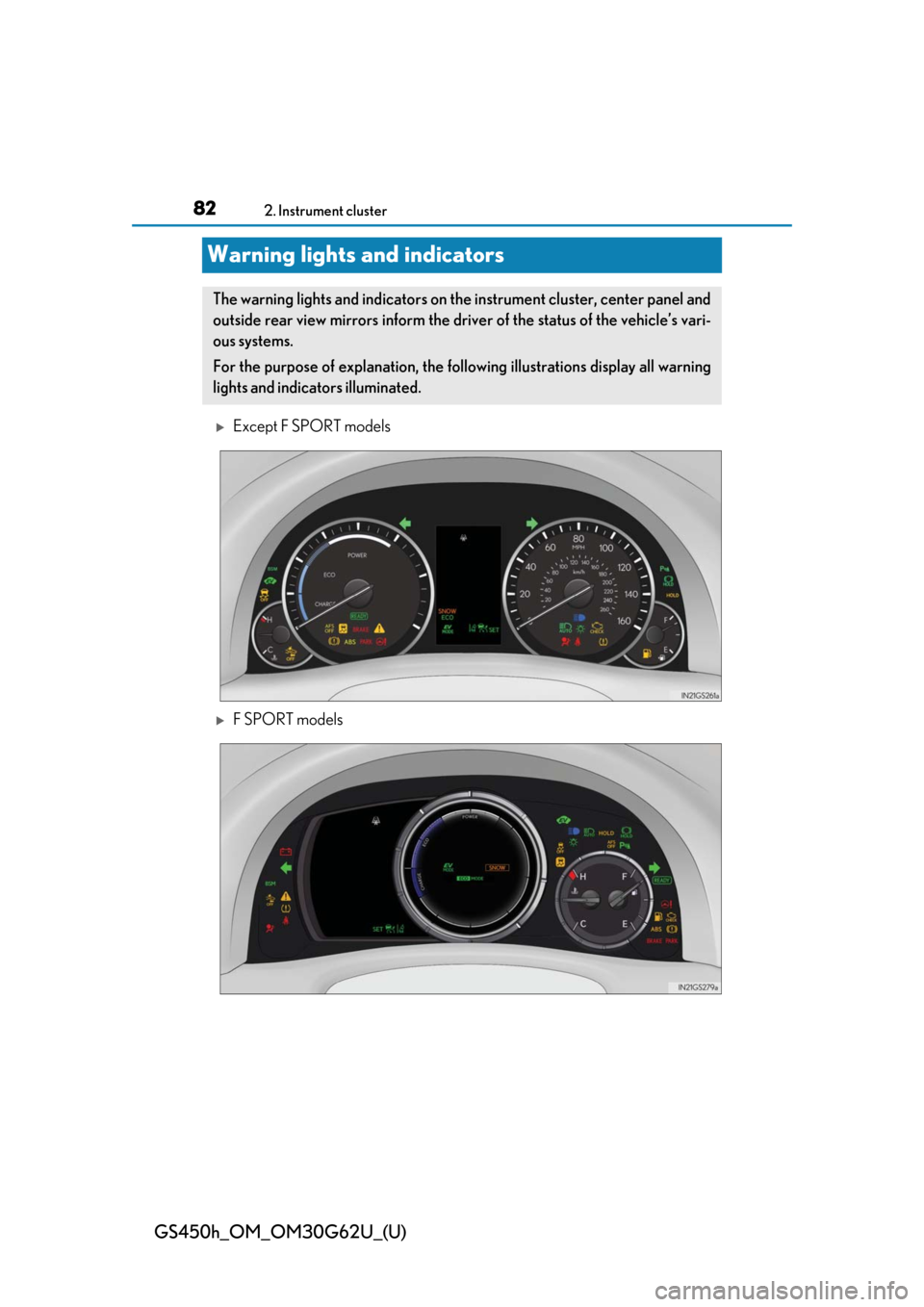
Warning lights and indicators
Except F SPORT models
F SPORT models
The warning lights and indicators on the instrument cluster, center panel and
outside rear view mirrors inform the driver of the status of the vehicle’s vari-
ous systems.
For the purpose of explanation, the following illustrations display all warning
lights and indicators illuminated.
Page 83 of 548
GS450h_OM_OM30G62U_(U)
832. Instrument cluster
2
Instrument cluster
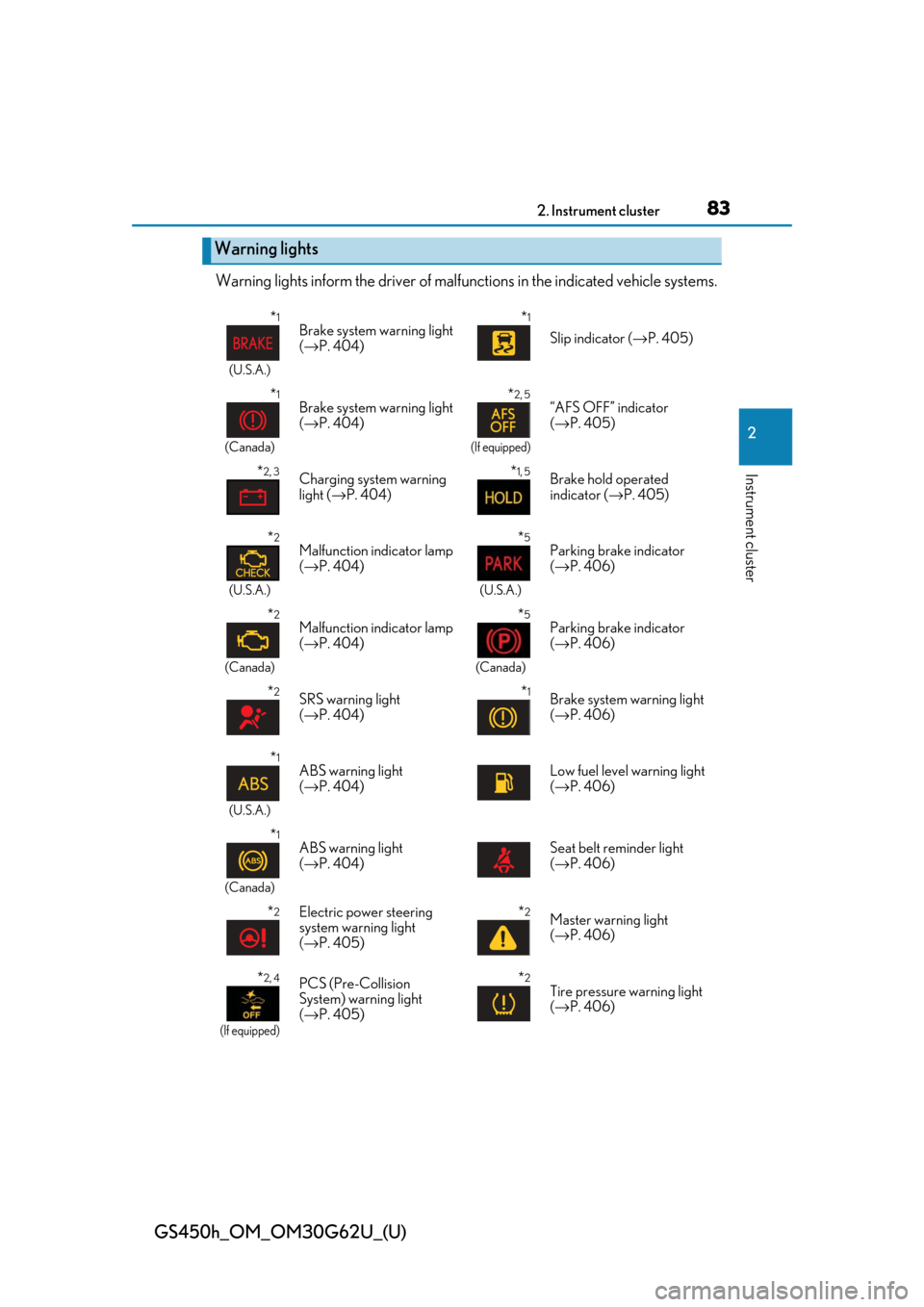
Warning lights inform the driver of malfunctions in the indicated vehicle systems.
Warning lights
*1
(U.S.A.)
Brake system warning light
(→ P. 404)*1
Slip indicator ( →P. 405)
*1
(Canada)
Brake system warning light
(→ P. 404)*2, 5
(If equipped)
“AFS OFF” indicator
(→ P. 405)
*2, 3Charging system warning
light ( →P. 404)*1, 5Brake hold operated
indicator ( →P. 405)
*2
(U.S.A.)
Malfunction indicator lamp
(→ P. 404)*5
(U.S.A.)
Parking brake indicator
(→ P. 406)
*2
(Canada)
Malfunction indicator lamp
(→ P. 404)*5
(Canada)
Parking brake indicator
(→ P. 406)
*2SRS warning light
(→ P. 404)*1Brake system warning light
(→ P. 406)
*1
(U.S.A.)
ABS warning light
(→ P. 404)Low fuel level warning light
(→ P. 406)
*1
(Canada)
ABS warning light
(→ P. 404)Seat belt reminder light
(→ P. 406)
*2Electric power steering
system warning light
(→ P. 405)*2Master warning light
(→ P. 406)
*2, 4
(If equipped)
PCS (Pre-Collision
System) warning light
(→ P. 405)*2Tire pressure warning light
(→ P. 406)
Page 84 of 548
84
GS450h_OM_OM30G62U_(U)
2. Instrument cluster
*1: These lights turn on when the power switch is turned to ON mode to indicate that asystem check is being performed. They will turn off after the “READY” indicator turns
on. There may be a malfunction in a system if a light does not come on, or turn off.
Have the vehicle inspected by your Lexus dealer.
*2: These lights turn on when the power switch is turned to ON mode to indicate that a system check is being performe d. They will turn off after the hybrid system is on, or
after a few seconds. There ma y be a malfunction in a system if a light does not come
on, or turn off. Have the vehicl e inspected by your Lexus dealer.
*3:F SPORT models
*4: The light flashes or illuminate s to indicate a malfunction.
*5: The light flashes to indicate a malfunction.
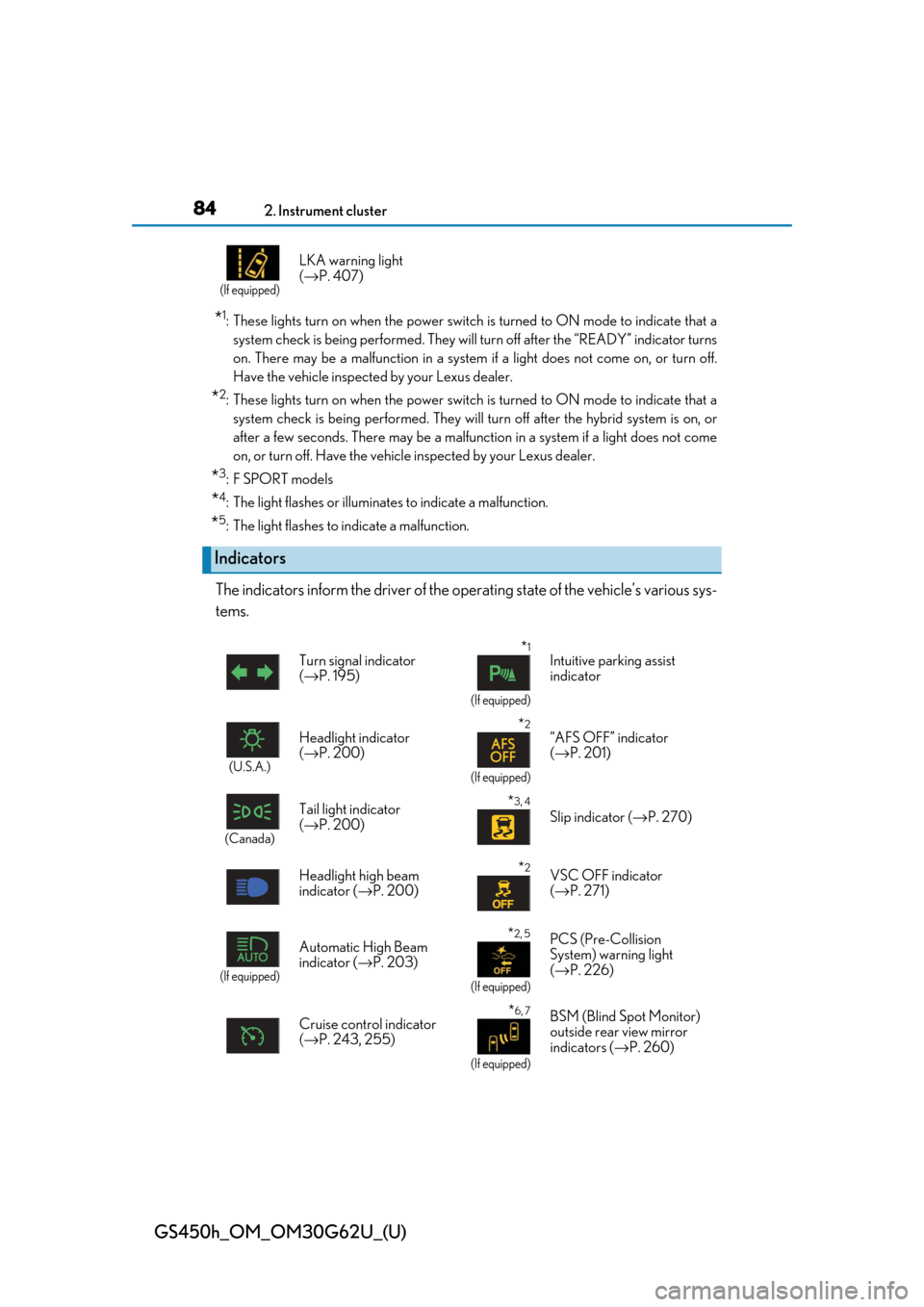
The indicators inform the driver of the op erating state of the vehicle’s various sys-
tems.
(If equipped)
LKA warning light
( → P. 407)
Indicators
Turn signal indicator
(→ P. 195)*1
(If equipped)
Intuitive parking assist
indicator
(U.S.A.)
Headlight indicator
(→ P. 200)*2
(If equipped)
“AFS OFF” indicator
(→ P. 201)
(Canada)
Tail light indicator
(→ P. 200) *3, 4
Slip indicator ( →P. 270)
Headlight high beam
indicator ( →P. 200)
*2VSC OFF indicator
(→ P. 271)
(If equipped)
Automatic High Beam
indicator ( →P. 203)*2, 5
(If equipped)
PCS (Pre-Collision
System) warning light
(→ P. 226)
Cruise control indicator
( → P. 243, 255)
*6, 7
(If equipped)
BSM (Blind Spot Monitor)
outside rear view mirror
indicators ( →P. 260)
Page 86 of 548
86
GS450h_OM_OM30G62U_(U)
2. Instrument cluster
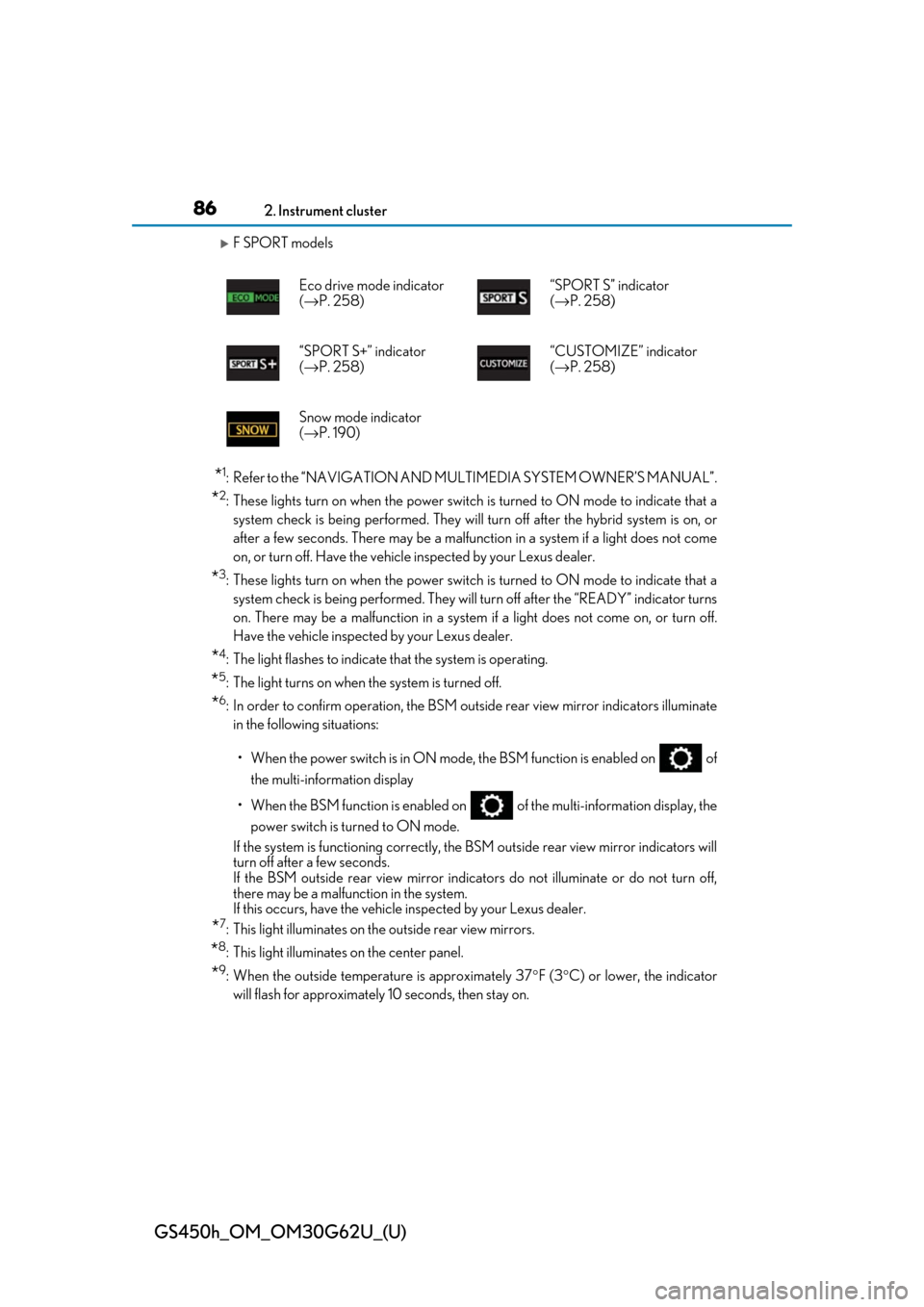
F SPORT models
*1: Refer to the “NAVIGATION AND MULTIMEDIA SYSTEM OWNER’S MANUAL”.
*2: These lights turn on when the power switch is turned to ON mode to indicate that a
system check is being performe d. They will turn off after the hybrid system is on, or
after a few seconds. There ma y be a malfunction in a system if a light does not come
on, or turn off. Have the vehicl e inspected by your Lexus dealer.
*3: These lights turn on when the power switch is turned to ON mode to indicate that a
system check is being performed. They will turn off after the “READY” indicator turns
on. There may be a malfunction in a system if a light does not come on, or turn off.
Have the vehicle inspected by your Lexus dealer.
*4: The light flashes to indicate that the system is operating.
*5: The light turns on when the system is turned off.
*6: In order to confirm operation, the BSM ou tside rear view mirror indicators illuminate
in the following situations:
• When the power switch is in ON mode , the BSM function is enabled on of
the multi-information display
• When the BSM function is enabled on of the multi-information display, the
power switch is turned to ON mode.
If the system is functioning correctly, the BSM outside rear view mirror indicators will
turn off after a few seconds.
If the BSM outside rear view mirror indicators do not illuminate or do not turn off,
there may be a malfunction in the system.
If this occurs, have the vehicle inspected by your Lexus dealer.
*7: This light illuminates on the outside rear view mirrors.
*8: This light illuminates on the center panel.
*9: When the outside temperature is approximately 37 °F (3 °C) or lower, the indicator
will flash for approximately 10 seconds, then stay on. Eco drive mode indicator
(
→ P. 258) “SPORT S” indicator
(
→ P. 258)
“SPORT S+” indicator
( → P. 258) “CUSTOMIZE” indicator
(
→ P. 258)
Snow mode indicator
( → P. 190)
Page 87 of 548

GS450h_OM_OM30G62U_(U)
872. Instrument cluster
2
Instrument cluster
WARNING
■If a safety system warning light does not come on
Should a safety system light such as the ABS and SRS warning light not come on when
you start the engine, this could mean that these systems are not available to help pro-
tect you in an accident, which could result in death or serious injury. Have the vehicle
inspected by your Lexus dealer immediately if this occurs.
Page 91 of 548
GS450h_OM_OM30G62U_(U)
912. Instrument cluster
2
Instrument cluster
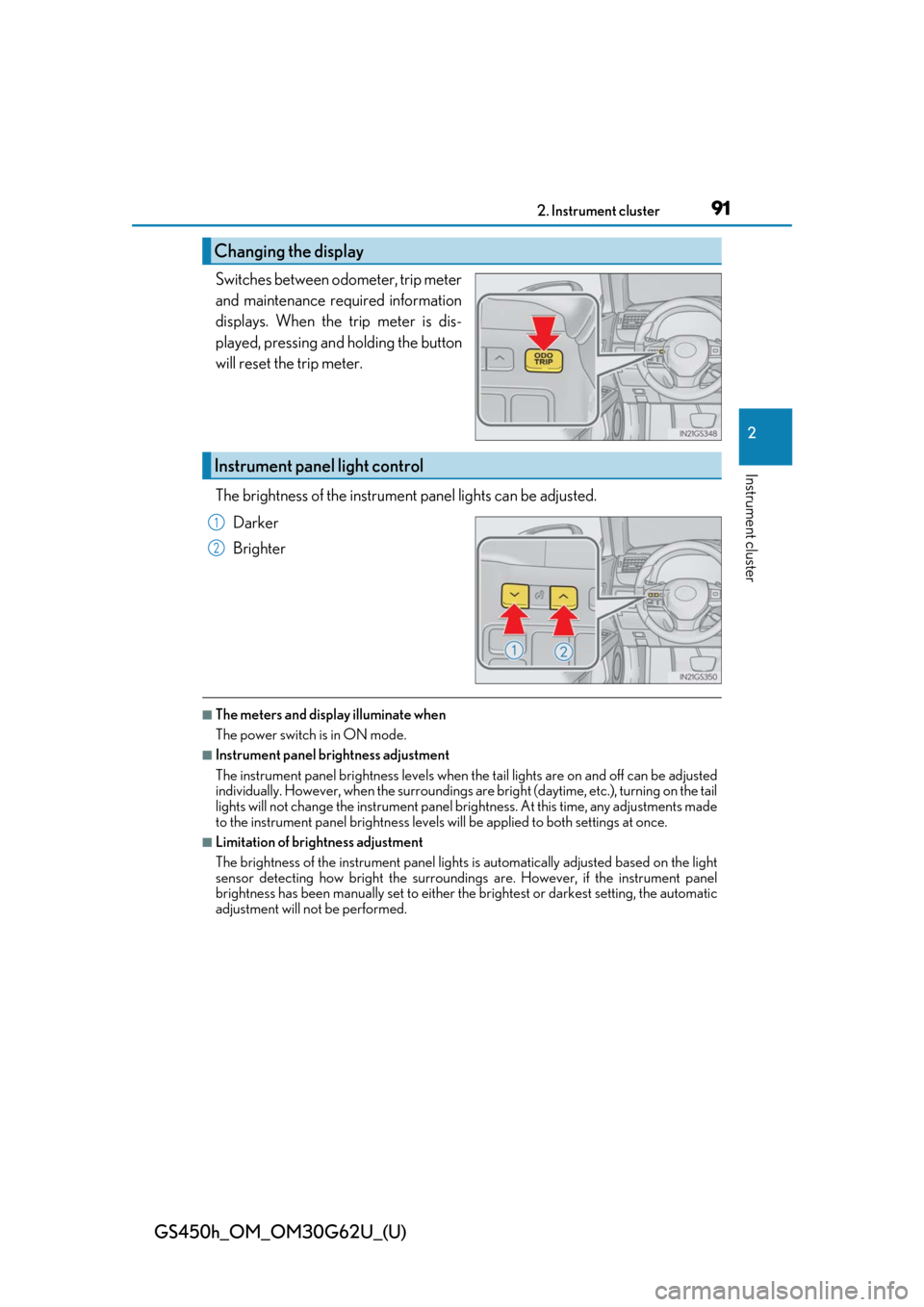
Switches between odometer, trip meter
and maintenance required information
displays. When the trip meter is dis-
played, pressing and holding the button
will reset the trip meter.
The brightness of the instrument panel lights can be adjusted.
Darker
Brighter
■The meters and display illuminate when
The power switch is in ON mode.
■Instrument panel brightness adjustment
The instrument panel brightness levels when the tail lights are on and off can be adjusted
individually. However, when the surroundings are bright (daytime, etc.), turning on the tail
lights will not change the inst rument panel brightness. At th is time, any adjustments made
to the instrument panel brightness levels will be applied to both settings at once.
■Limitation of brightness adjustment
The brightness of the instrument panel lights is automatically adjusted based on the light
sensor detecting how bright the surroundings are. However, if the instrument panel
brightness has been manually set to either the brightest or darkest setting, the automatic
adjustment will not be performed.
Changing the display
Instrument panel light control
1
2
Page 93 of 548
GS450h_OM_OM30G62U_(U)
932. Instrument cluster
2
Instrument cluster
■Tachometer
Hybrid System Indicator switches to the tachometer when driving mode is in sport mode.
The settings of the tachometer display can be changed on the multi-information display.
( → P. 95)
■Engine speed
On hybrid vehicles, engine speed is precisel y controlled in order to help improve fuel
efficiency and reduce exhaust emissions etc.
There are times when the engine speed that is displayed may differ even when vehicle
operation and driving conditions are the same.
■Outside temperature display
●In the following situations, the correct outside temperature may not be displayed, or the
display may take longer than normal to change.
• When stopped, or driving at low speeds (less than 12 mph [20 km/h])
• When the outside temperature has changed suddenly (at the entrance/exit of a garage, tunnel, etc.)
• When the vehicle is parked in direct sunlight
●When “--” or “E” is displayed, the system may be malfunctioning.
Take your vehicle to your Lexus dealer.
■Pop-up display
In some situations, a pop-up display will be temporarily displayed on the multi-informa-
tion display or the odometer/trip meter/maintenance required information screen.
The pop-up display function can be set on/off. ( →P. 495)
■Liquid crystal display
Small spots or light spots may appear on the display. This phenomenon is characteristic
of liquid crystal displays, and there is no problem continuing to use the display.
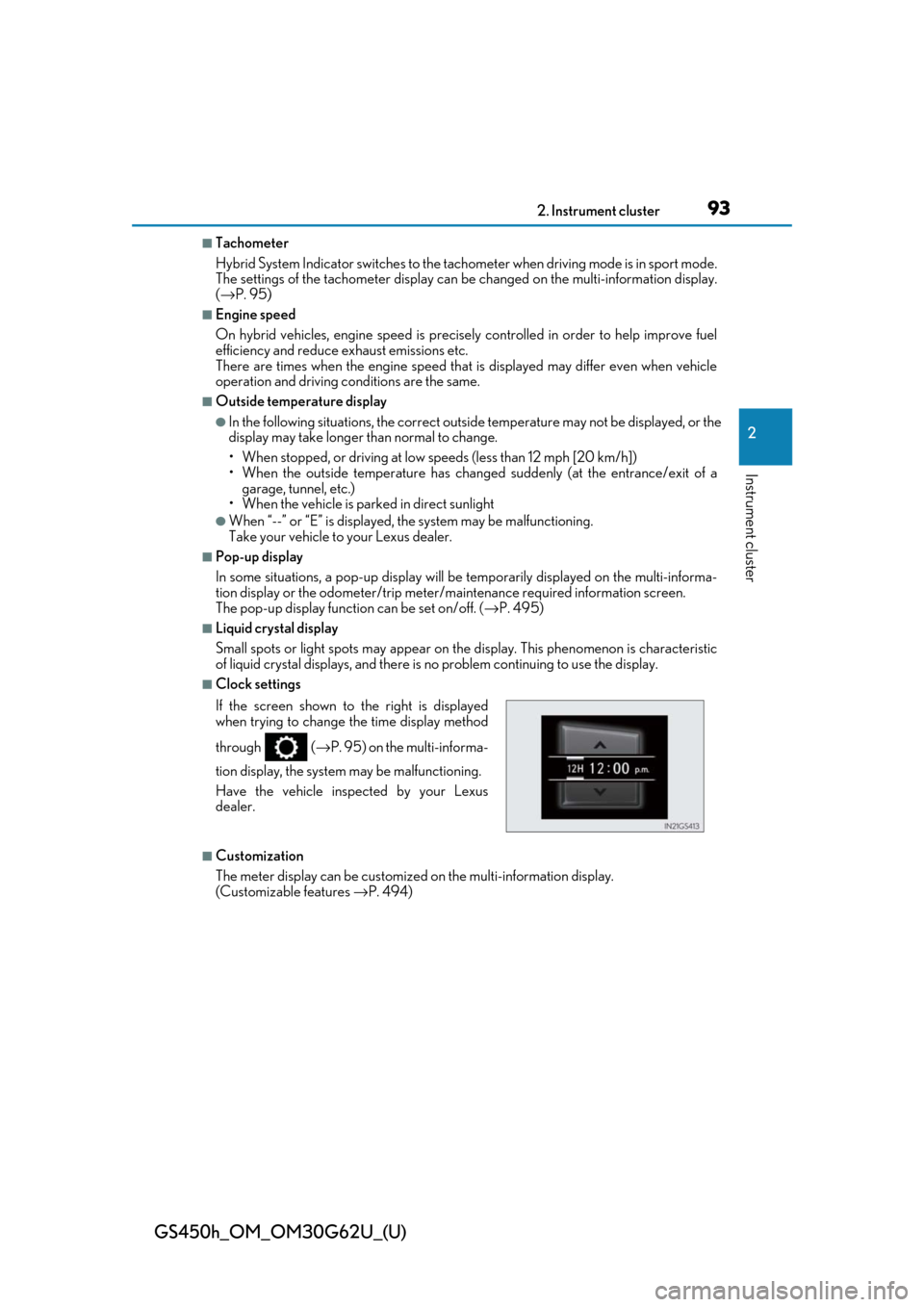
■Clock settings
■Customization
The meter display can be customized on the multi-information display.
(Customizable features →P. 494)
If the screen shown to the right is displayed
when trying to change the time display method
through (
→P. 95) on the multi-informa-
tion display, the system may be malfunctioning.
Have the vehicle inspected by your Lexus
dealer.
Page 99 of 548
GS450h_OM_OM30G62U_(U)
992. Instrument cluster
2
Instrument cluster
■Display off
A blank screen is displayed
*1: Displayed when the item is set in “Drive Info 1”, “Drive Info 2” or “Drive Info 3”.
( → P. 495)
*2: The function can be reset by pressing th e of the meter control switches for longer
than 1 second when the item to reset is displayed.
If there is more than one item that can be reset, the item selection screen will appear.
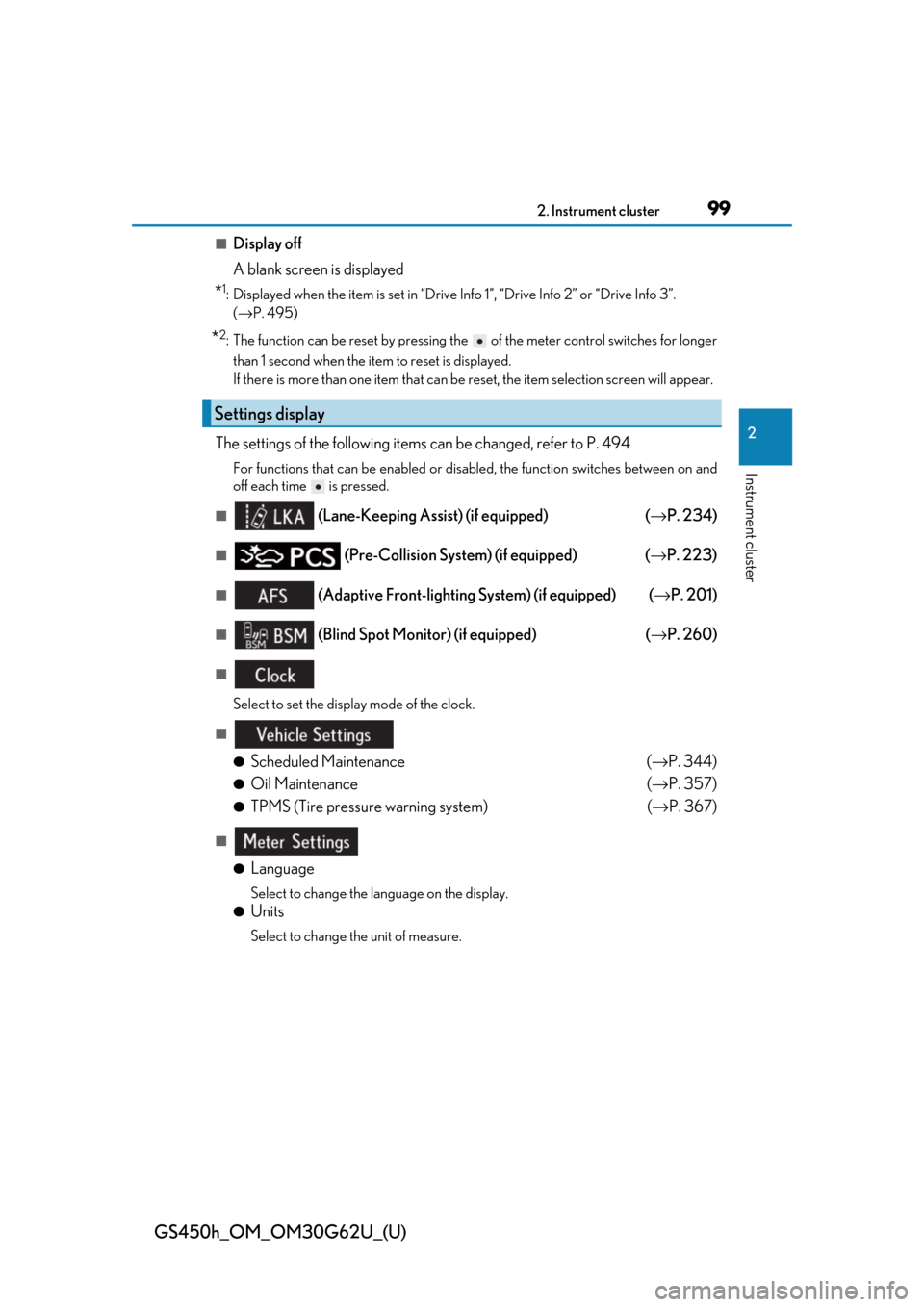
The settings of the following items can be changed, refer to P. 494
For functions that can be enabled or disabled, the function switches between on and
off each time is pressed.
■ (Lane-Keeping Assist) (if equipped) (→ P. 234)
■ (Pre-Collision System) (if equipped) ( →P. 223)
■ (Adaptive Front-lighting System) (if equipped) ( →P. 201)
■ (Blind Spot Monitor) (if equipped) (→ P. 260)
■
Select to set the display mode of the clock.
■
●
Scheduled Maintenance (→ P. 344)
●Oil Maintenance (→ P. 357)
●TPMS (Tire pressure warning system) (→ P. 367)
■
●
Language
Select to change the la nguage on the display.
●Units
Select to change the unit of measure.
Settings display
Page 111 of 548
GS450h_OM_OM30G62U_(U)
1112. Instrument cluster
2
Instrument cluster
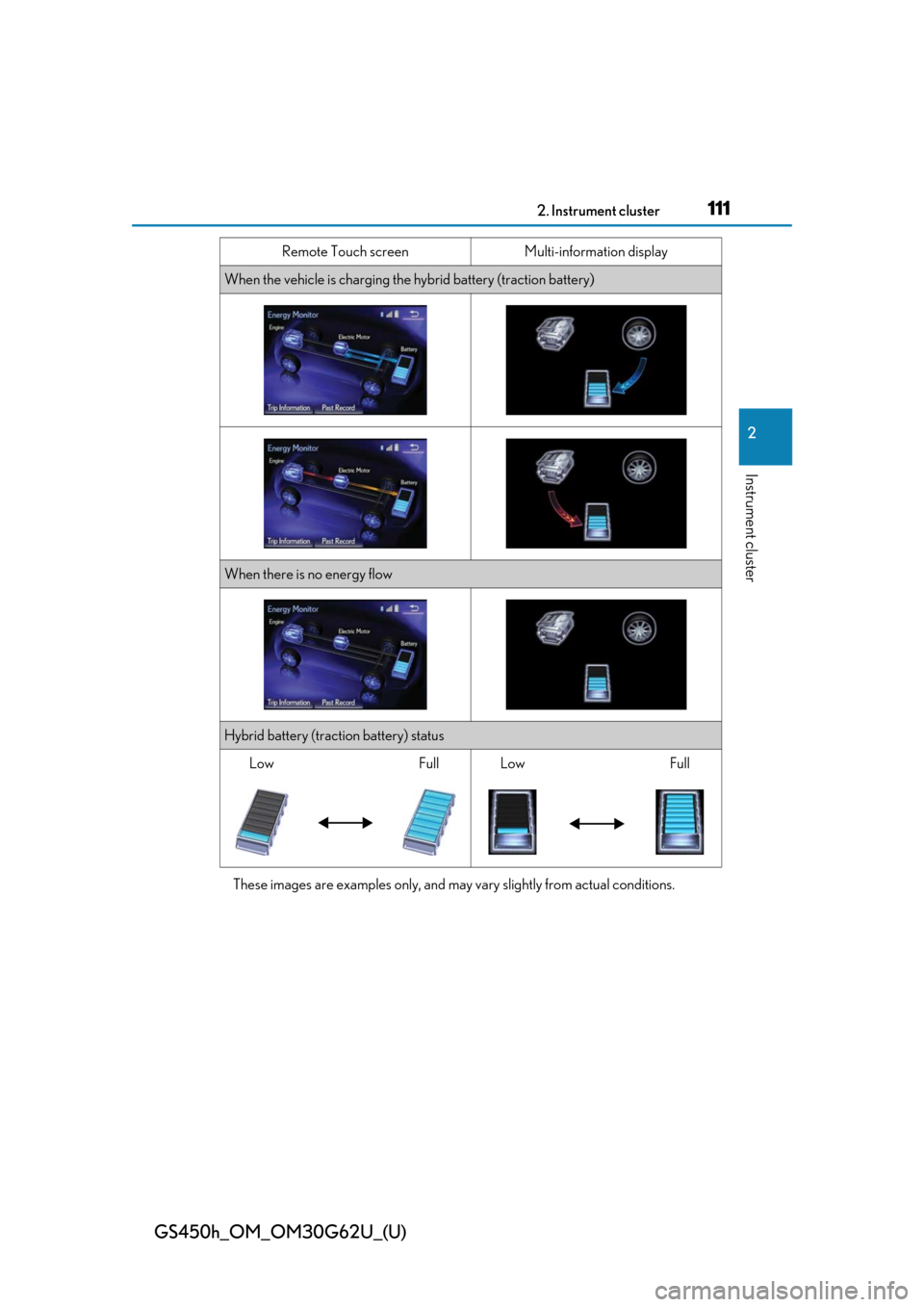
These images are examples only, and may vary slightly from actual conditions.
When the vehicle is charging the hybrid battery (traction battery)
When there is no energy flow
Hybrid battery (traction battery) status
LowFullLowFull
Remote Touch screen Multi-information display
Page 112 of 548
112
GS450h_OM_OM30G62U_(U)
2. Instrument cluster
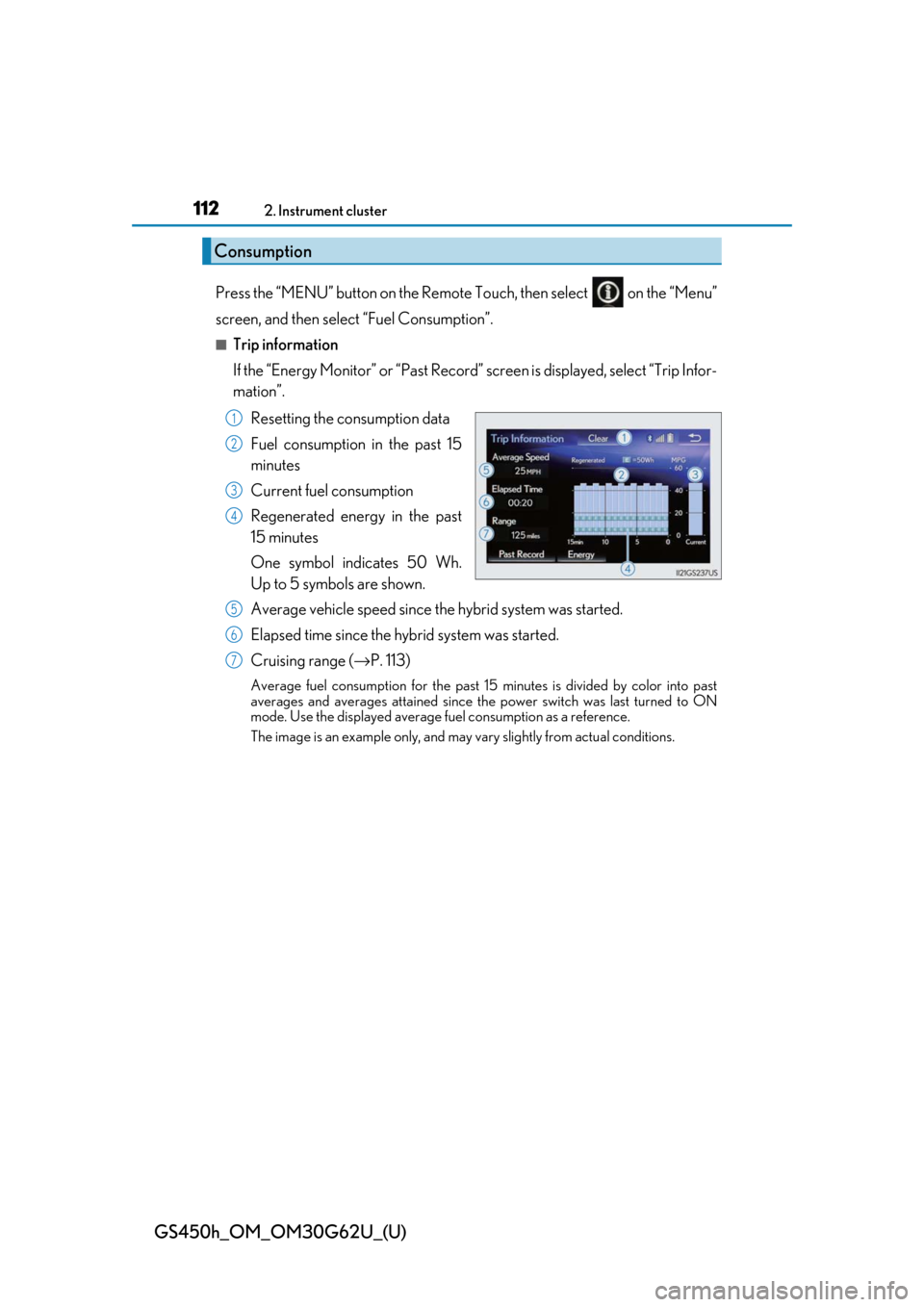
Press the “MENU” button on the Remote Touch, then select on the “Menu”
screen, and then select “Fuel Consumption”.
■Trip information
If the “Energy Monitor” or “Past Record” screen is displayed, select “Trip Infor-
mation”.
Resetting the consumption data
Fuel consumption in the past 15
minutes
Current fuel consumption
Regenerated energy in the past
15 minutes
One symbol indicates 50 Wh.
Up to 5 symbols are shown.
Average vehicle speed since the hybrid system was started.
Elapsed time since the hybrid system was started.
Cruising range (→ P. 113)
Average fuel consumption for the past 15 minutes is divided by color into past
averages and averages attained since th e power switch was last turned to ON
mode. Use the displayed average fuel consumption as a reference.
The image is an example only, and may va ry slightly from actual conditions.
Consumption
1
2
3
4
5
6
7