Eco Lexus GX460 2010 Owner's Manual
[x] Cancel search | Manufacturer: LEXUS, Model Year: 2010, Model line: GX460, Model: Lexus GX460 2010Pages: 830, PDF Size: 17.01 MB
Page 7 of 830
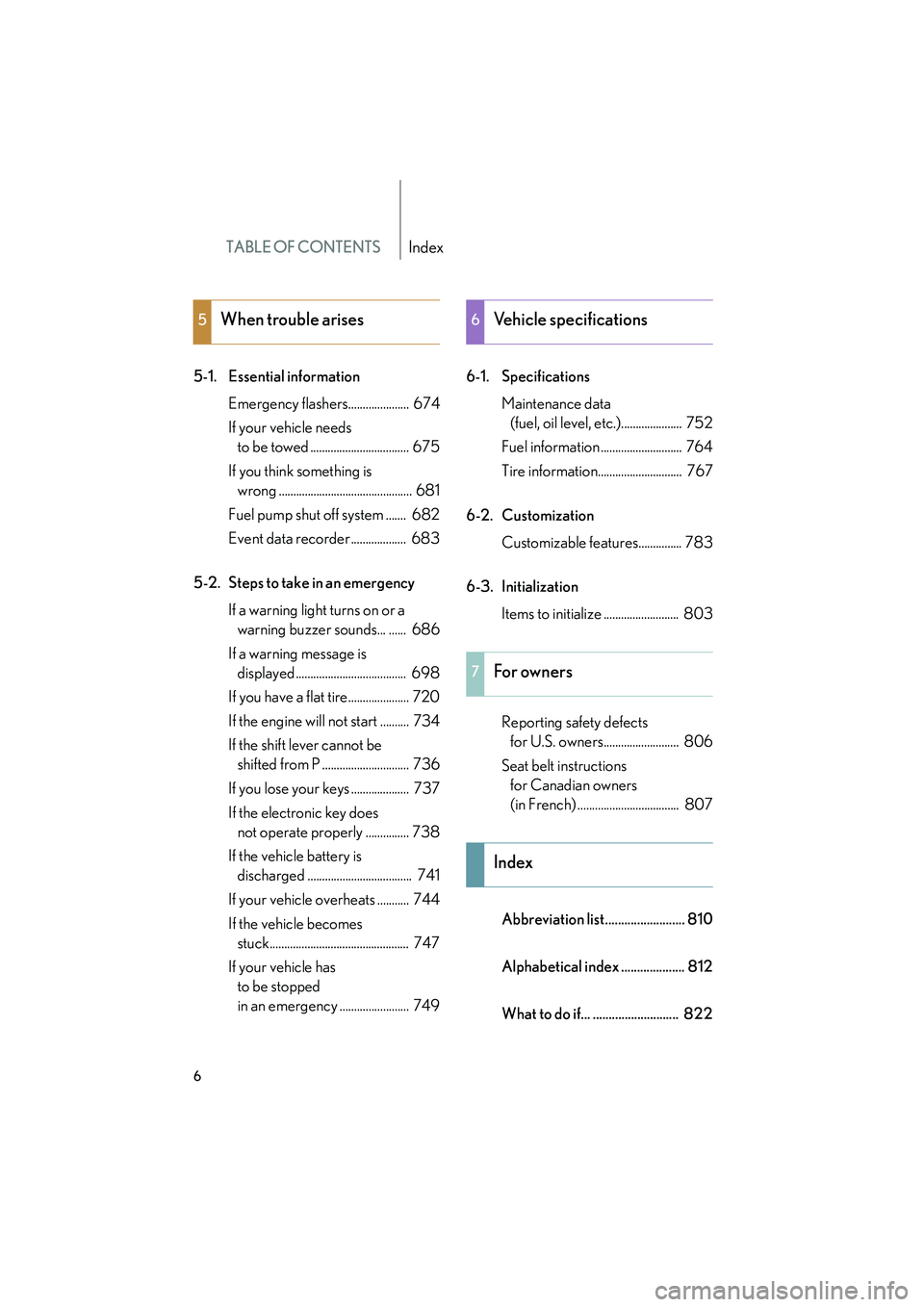
TABLE OF CONTENTSIndex
6
GX460_CANADA (OM60F29U)
5-1. Essential informationEmergency flashers..................... 674
If your vehicle needs to be towed .................................. 675
If you think something is wrong .............................................. 681
Fuel pump shut off system ....... 682
Event data recorder ................... 683
5-2. Steps to take in an emergency If a warning light turns on or a warning buzzer sounds... ...... 686
If a warning message is displayed ...................................... 698
If you have a flat tire..................... 720
If the engine will not start .......... 734
If the shift lever cannot be shifted from P .............................. 736
If you lose your keys .................... 737
If the electronic key does not operate properly ............... 738
If the vehicle battery is discharged .................................... 741
If your vehicle overheats ........... 744
If the vehicle becomes stuck................................................ 747
If your vehicle has to be stopped
in an emergency ........................ 749 6-1. Specifications
Maintenance data (fuel, oil level, etc.)..................... 752
Fuel information ............................ 764
Tire information............................. 767
6-2. Customization Customizable features............... 783
6-3. Initialization Items to initialize .......................... 803
Reporting safety defects for U.S. owners.......................... 806
Seat belt instructions for Canadian owners
(in French) ................................... 807
Abbreviation list......................... 810
Alphabetical index .................... 812
What to do if... ........................... 822
5When trouble arises6Vehicle specifications
7For owners
Index
GX460_CANADA.book Page 6 Thursday, February 4, 2010 11:54 AM
Page 11 of 830

10
GX460_CANADA (OM60F29U)
Pictorial indexInterior
Seat belts P. 86
SRS driver airbag P. 121
Floor mat P. 556
Rear air conditioning system∗
Outer second seat heater switches
∗
P. 400
P. 552
Head restraints P. 83
Front seats P. 64
SRS side airbags P. 121
Console box∗
Cool box
∗
P. 517
P. 528
Cup holders∗
Auxiliary box
∗
P. 522
P. 525
Rear seats P. 68
Armrest
Cup holders P. 554
P. 522
SRS knee airbag
P. 121
SRS front passenger airbag
P. 121
GX460_CANADA.book Page 10 Thursday, February 4, 2010 11:54 AM
Page 32 of 830
31
1-2. Opening, closing and locking the doors
1
Before driving
GX460_CANADA (OM60F29U)
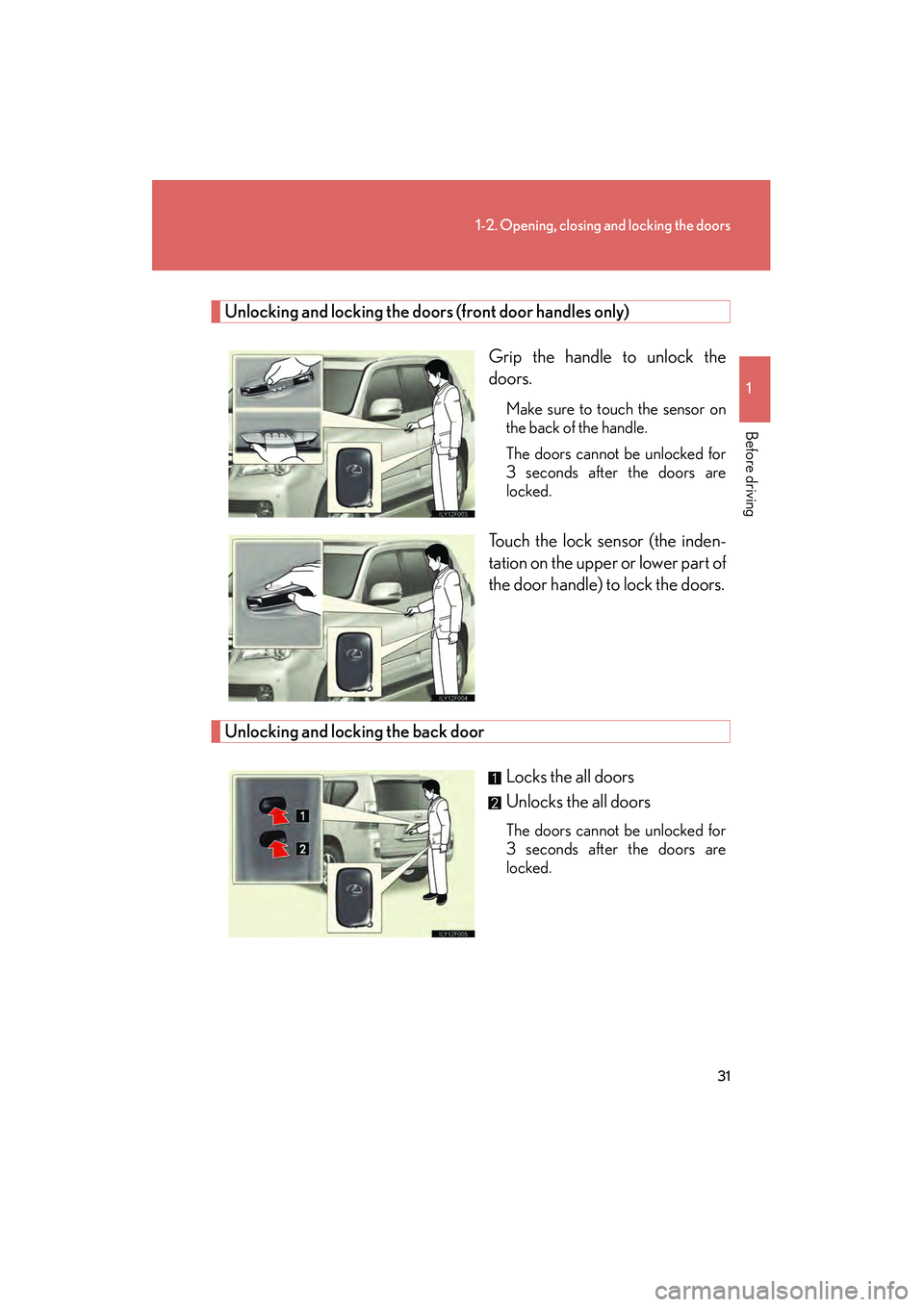
Unlocking and locking the doors (front door handles only)Grip the handle to unlock the
doors.
Make sure to touch the sensor on
the back of the handle.
The doors cannot be unlocked for
3 seconds after the doors are
locked.
Touch the lock sensor (the inden-
tation on the upper or lower part of
the door handle) to lock the doors.
Unlocking and locking the back door Locks the all doors
Unlocks the all doors
The doors cannot be unlocked for
3 seconds after the doors are
locked.
GX460_CANADA.book Page 31 Thursday, February 4, 2010 11:54 AM
Page 36 of 830
35
1-2. Opening, closing and locking the doors
1
Before driving
GX460_CANADA (OM60F29U)
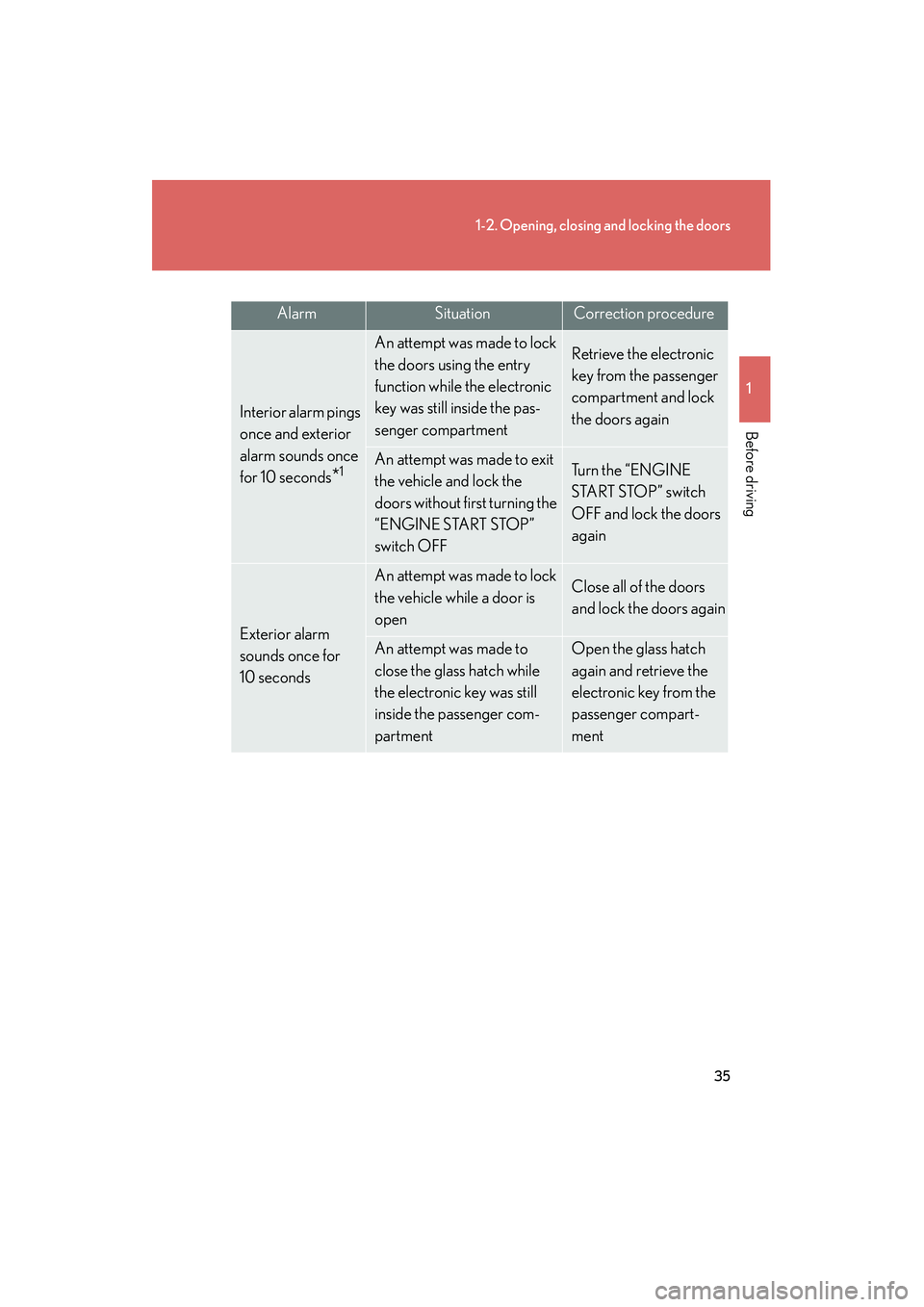
AlarmSituationCorrection procedure
Interior alarm pings
once and exterior
alarm sounds once
for 10 seconds
*1
An attempt was made to lock
the doors using the entry
function while the electronic
key was still inside the pas-
senger compartmentRetrieve the electronic
key from the passenger
compartment and lock
the doors again
An attempt was made to exit
the vehicle and lock the
doors without first turning the
“ENGINE START STOP”
switch OFFTu r n t h e “ E N G I N E
START STOP” switch
OFF and lock the doors
again
Exterior alarm
sounds once for
10 seconds
An attempt was made to lock
the vehicle while a door is
openClose all of the doors
and lock the doors again
An attempt was made to
close the glass hatch while
the electronic key was still
inside the passenger com-
partmentOpen the glass hatch
again and retrieve the
electronic key from the
passenger compart-
ment
GX460_CANADA.book Page 35 Thursday, February 4, 2010 11:54 AM
Page 39 of 830
38
1-2. Opening, closing and locking the doors
GX460_CANADA (OM60F29U)
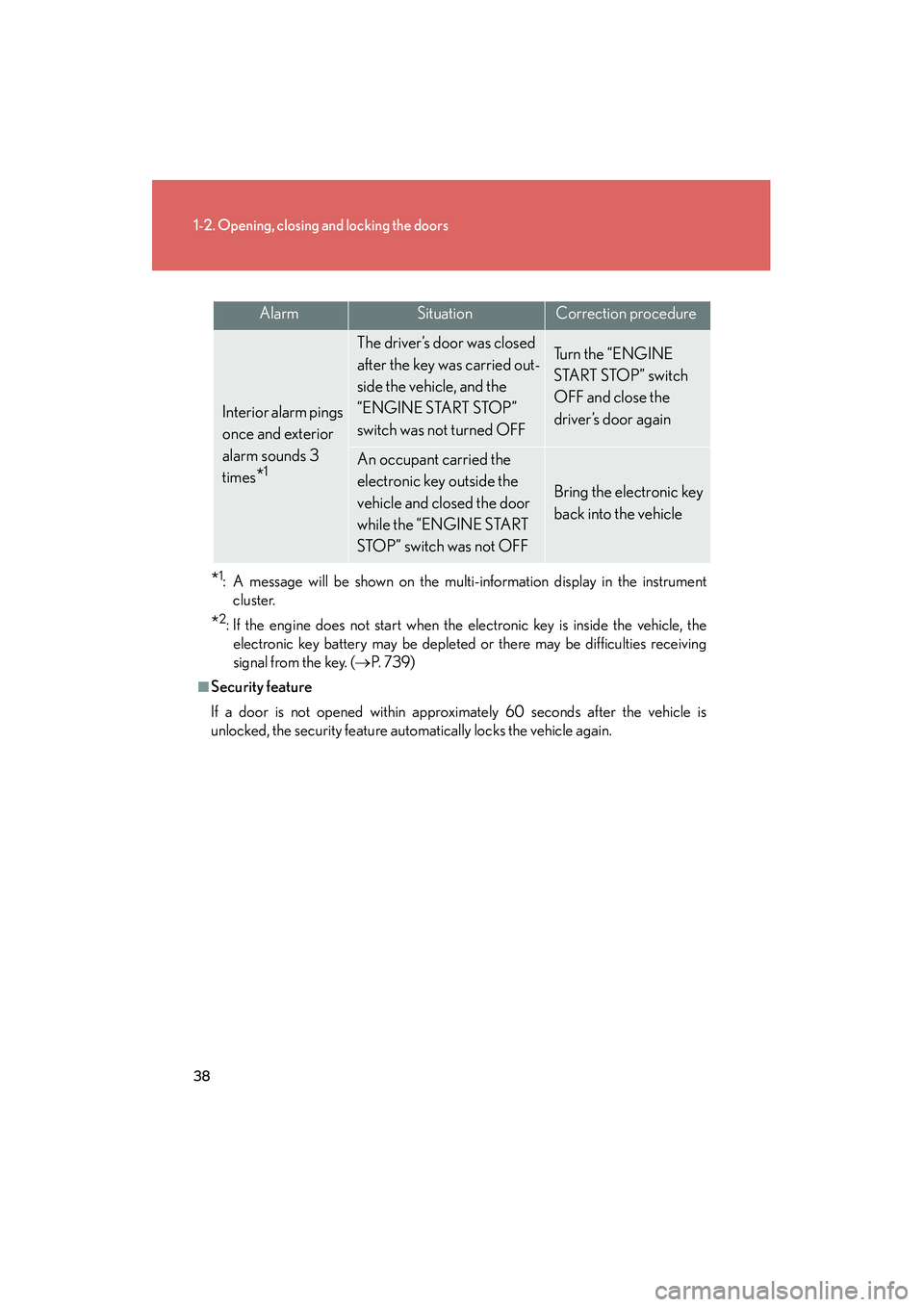
*1: A message will be shown on the multi-information display in the instrumentcluster.
*2: If the engine does not start when the electronic key is inside the vehicle, theelectronic key battery may be depleted or there may be difficulties receiving
signal from the key. ( →P. 7 3 9 )
■Security feature
If a door is not opened within approximately 60 seconds after the vehicle is
unlocked, the security feature automatically locks the vehicle again.
AlarmSituationCorrection procedure
Interior alarm pings
once and exterior
alarm sounds 3
times
*1
The driver’s door was closed
after the key was carried out-
side the vehicle, and the
“ENGINE START STOP”
switch was not turned OFFTu r n t h e “ E N G I N E
START STOP” switch
OFF and close the
driver’s door again
An occupant carried the
electronic key outside the
vehicle and closed the door
while the “ENGINE START
STOP” switch was not OFF
Bring the electronic key
back into the vehicle
GX460_CANADA.book Page 38 Thursday, February 4, 2010 11:54 AM
Page 40 of 830
39
1-2. Opening, closing and locking the doors
1
Before driving
GX460_CANADA (OM60F29U)
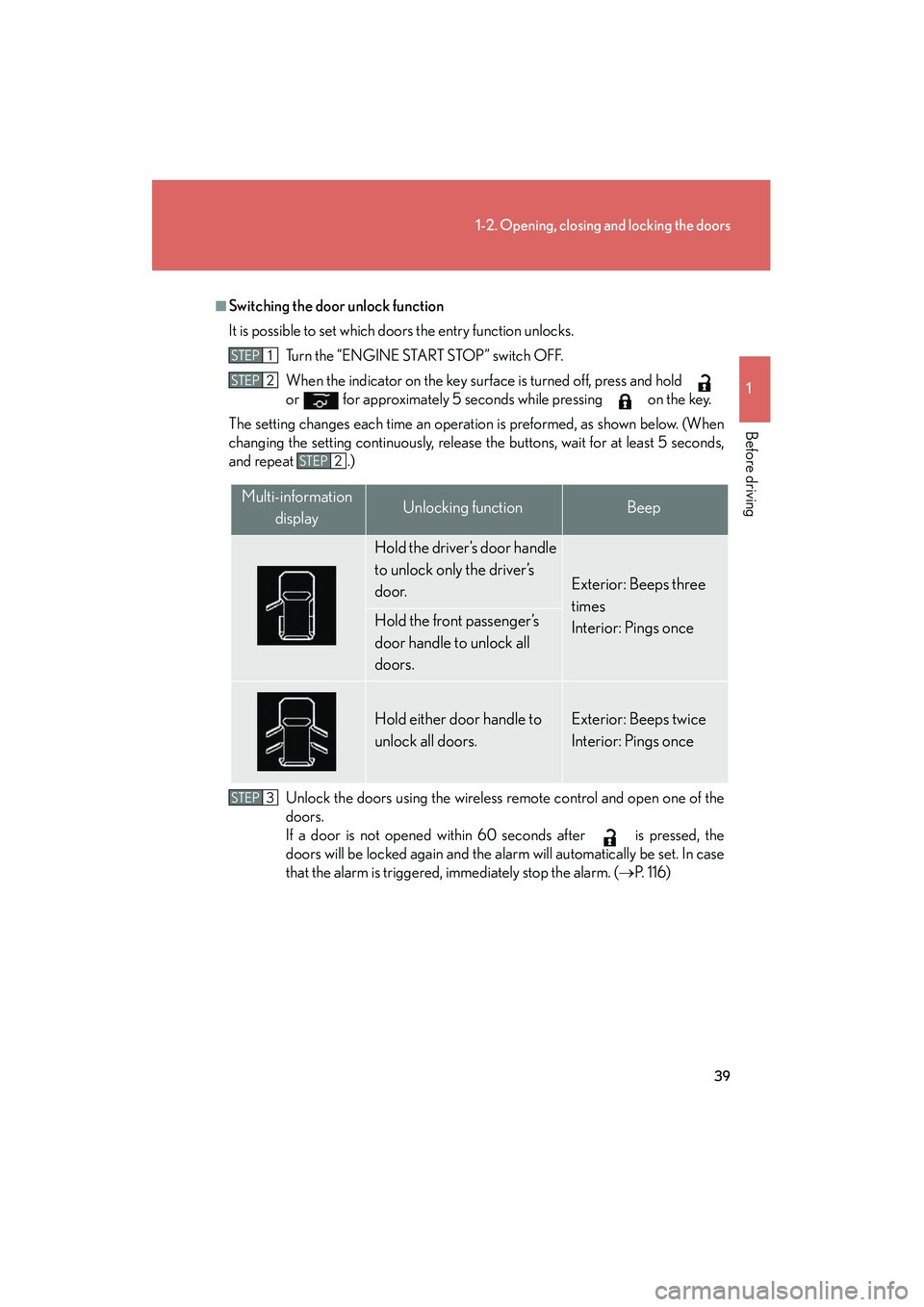
■Switching the door unlock function
It is possible to set which doors the entry function unlocks.Turn the “ENGINE START STOP” switch OFF.
When the indicator on the key surface is turned off, press and hold
or for approximately 5 seconds while pressing on the key.
The setting changes each time an operation is preformed, as shown below. (When
changing the setting continuously, release the buttons, wait for at least 5 seconds,
and repeat .)
Unlock the doors using the wireless remote control and open one of the
doors.
If a door is not opened within 60 seconds after is pressed, the
doors will be locked again and the alarm will automatically be set. In case
that the alarm is triggered, immediately stop the alarm. ( →P. 1 1 6 )
STEP1
STEP2
STEP2
Multi-information
displayUnlocking functionBeep
Hold the driver’s door handle
to unlock only the driver’s
door.
Exterior: Beeps three
times
Interior: Pings once
Hold the front passenger’s
door handle to unlock all
doors.
Hold either door handle to
unlock all doors.Exterior: Beeps twice
Interior: Pings once
STEP3
GX460_CANADA.book Page 39 Thursday, February 4, 2010 11:54 AM
Page 43 of 830

42
1-2. Opening, closing and locking the doors
GX460_CANADA (OM60F29U)
■Note for the entry function
●Even when the electronic key is within the effective range (detection areas), the
system may not operate properly in the following cases:
• The electronic key is too close to the window, near the ground, or in a highplace when the doors are locked or unlocked.
• The electronic key is near the ground or in a high place, or too close to the window when the glass hatch is opened.
• The electronic key is on the instrument panel, luggage cover or floor, or in the
glove box.
●As long as the electronic key is within the effective range, the doors may be
locked or unlocked by anyone. However, only the doors detecting the elec-
tronic key can be used to unlock the vehicle.
●The doors may lock or unlock if the electronic key is within the effective range
and a large amount of water splashes on the door handle, such as in the rain or
in a car wash. The doors will automatically be locked after approximately 60
seconds if a door is not opened and closed.
●If the wireless remote control is used to lock the doors when the electronic key
is near the vehicle, there is a possibility that the door may not be unlocked by the
entry function. (Use the wireless remote control to unlock the doors.)
GX460_CANADA.book Page 42 Thursday, February 4, 2010 11:54 AM
Page 44 of 830
43
1-2. Opening, closing and locking the doors
1
Before driving
GX460_CANADA (OM60F29U)
■Note for locking the doors
●Touching the door lock sensor while wearing gloves may delay or prevent lock
operation. Remove the gloves and touch the lock sensor again.
●When the lock operation is performed using the lock sensor, recognition signals
will be shown up to two consecutive times. After this, no recognition signals will
be given.
●If the door handle becomes wet while the electronic key is within the effective
range, the door may lock and unlock repeatedly. Place the key in a position 6 ft.
(2 m) or more separate from the vehicle while the vehicle is being washed. (Take
care to ensure that the key is not stolen.)
●If the electronic key is inside the vehicle and a door handle becomes wet during
a car wash, a message may be shown on the multi-information display and a
buzzer will sound outside the vehicle. To turn off the alarm, lock all the doors.
●The lock sensor may not work properly if it comes into contact with ice, snow,
mud, etc. Clean the lock sensor and attempt to operate it again, or use the lock
sensor on the lower part of the door handle.
●Fingernails may scrape against the door during operation of the door handle.
Be careful not to injure fingernails or damage the surface of the door.
GX460_CANADA.book Page 43 Thursday, February 4, 2010 11:54 AM
Page 46 of 830
45
1-2. Opening, closing and locking the doors
1
Before driving
GX460_CANADA (OM60F29U)
■Electronic key battery depletion
●The standard battery life is 1 to 2 years.
●If the battery becomes low, an alarm will sound in the cabin when the engine will
stop. (→P. 3 4 )
●As the electronic key always transmits radio waves, the battery will become
depleted even if the electronic key is not used. The following symptoms indicate
that the electronic key battery may be depleted. Replace the battery when nec-
essary. ( →P. 6 4 2 )
• The smart access system with push-button start or the wireless remote con- trol does not operate.
• The detection area becomes smaller.
• The LED indicator on the key surface does not turn on.
●To avoid serious deterioration, do not leave the electronic key within 3 ft. (1 m) of
the following electrical appliances that produce a magnetic field:
•TVs
• Personal computers
• Cellular phones, cordless phones and battery chargers
• Recharging cellular phones or cordless phones
• Glass top ranges
• Table lamps
■When the electronic key battery is fully depleted
→ P. 6 4 2
■Customization
Settings (e.g. smart access system with push-button start) can be changed.
(Customizable features →P. 7 8 3 )
GX460_CANADA.book Page 45 Thursday, February 4, 2010 11:54 AM
Page 49 of 830
48
1-2. Opening, closing and locking the doors
GX460_CANADA (OM60F29U)
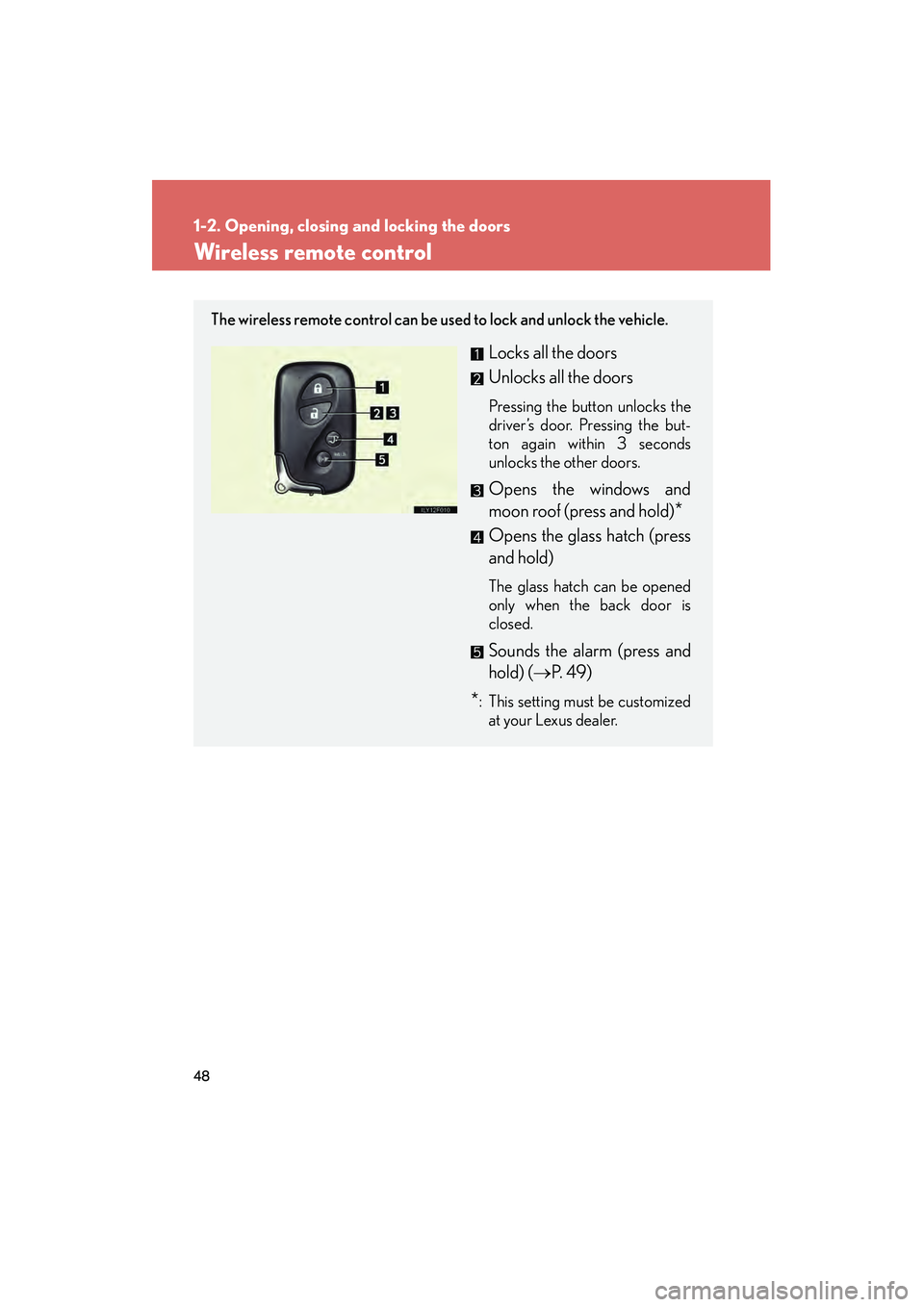
Wireless remote control
The wireless remote control can be used to lock and unlock the vehicle.
Locks all the doors
Unlocks all the doors
Pressing the button unlocks the
driver’s door. Pressing the but-
ton again within 3 seconds
unlocks the other doors.
Opens the windows and
moon roof (press and hold)
*
Opens the glass hatch (press
and hold)
The glass hatch can be opened
only when the back door is
closed.
Sounds the alarm (press and
hold) (→P. 4 9 )
*: This setting must be customized
at your Lexus dealer.
GX460_CANADA.book Page 48 Thursday, February 4, 2010 11:54 AM