Eco Lexus GX460 2010 Owner's Guide
[x] Cancel search | Manufacturer: LEXUS, Model Year: 2010, Model line: GX460, Model: Lexus GX460 2010Pages: 830, PDF Size: 17.01 MB
Page 103 of 830
102
1-4. Opening and closing the windows and moon roof
GX460_CANADA (OM60F29U)
■The power windows can be operated when
The “ENGINE START STOP” switch is in IGNITION ON mode.
■Operating the power windows after turning the engine off
The power windows can be operated for approximately 45 seconds even after the
“ENGINE START STOP” switch is turned to ACCESSORY mode or turned off.
They cannot, however, be operated once either front door is opened.
■Jam protection function
If an object becomes caught between the window and the window frame, window
travel is stopped and the window is opened slightly.
■Door lock linked window operation
●The power windows can be opened and closed using the mechanical key.
(→ P. 7 3 8 )
●The power windows can be opened using the wireless remote control.
(→ P. 4 8 )
■Customization
Settings (e.g. linked door lock operation) can be changed.
(Customizable features →P. 7 8 3 )
GX460_CANADA.book Page 102 Thursday, February 4, 2010 11:54 AM
Page 106 of 830
105
1-4. Opening and closing the windows and moon roof
1
Before driving
GX460_CANADA (OM60F29U)
■The moon roof can be operated when
The “ENGINE START STOP” switch is in IGNITION ON mode.
■Operating the moon roof after turning the engine off
The moon roof can be operated for approximately 45 seconds even after the
“ENGINE START STOP” switch is turned to ACCESSORY mode or turned off. It
cannot, however, be operated once either front door is opened.
■Jam protection function
If an object is detected between the moon roof and the frame while the moon roof is
closing or tilting down, travel is stopped and the moon roof opens slightly.
■Sunshade
The sunshade can be opened and closed manually. However, the sunshade will
open automatically when the moon roof is opened.
■Door lock linked moon roof operation
The moon roof can be opened and closed using the mechanical key. (→ P. 7 3 8 )
GX460_CANADA.book Page 105 Thursday, February 4, 2010 11:54 AM
Page 108 of 830
107
1-4. Opening and closing the windows and moon roof
1
Before driving
GX460_CANADA (OM60F29U)
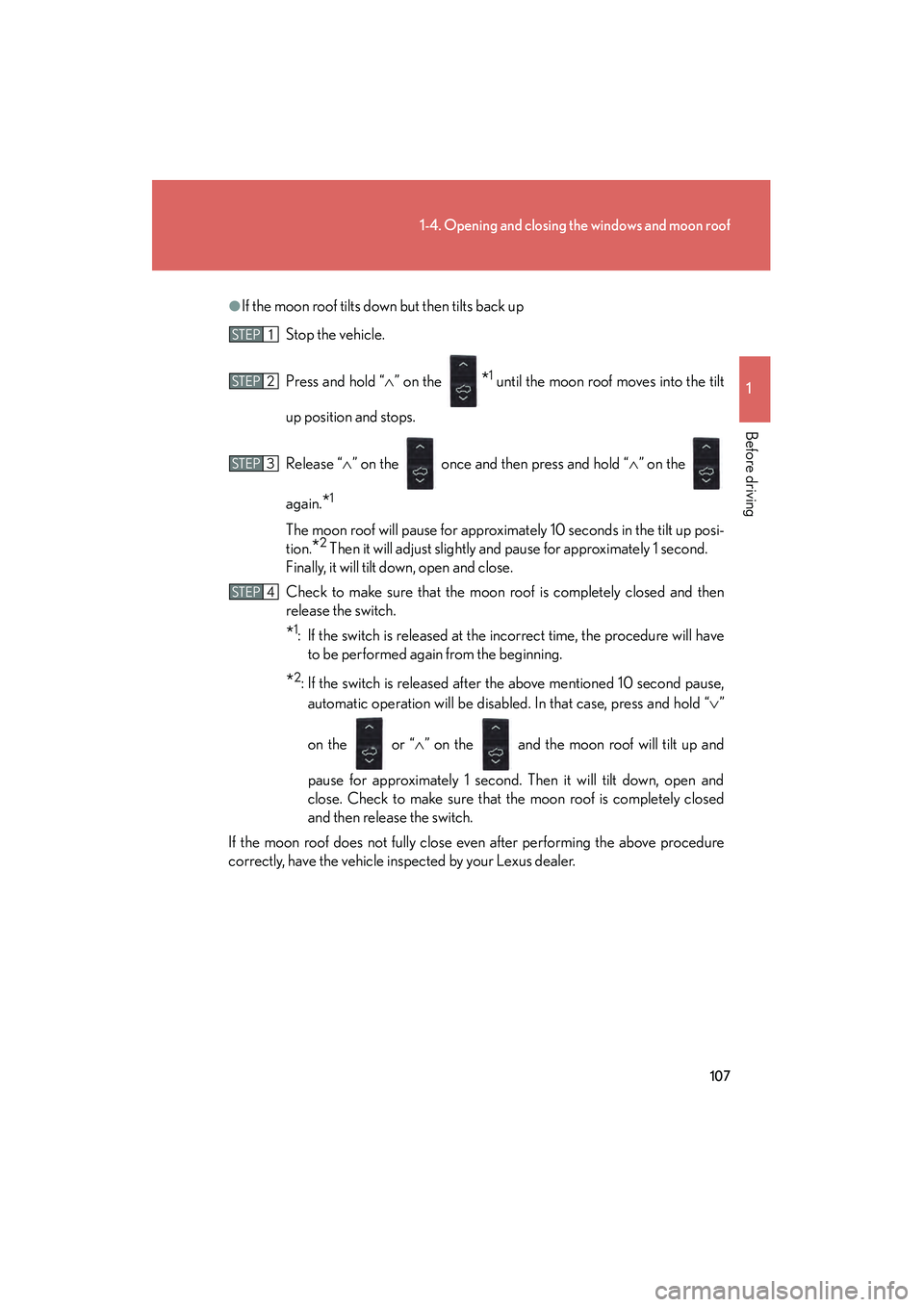
●If the moon roof tilts down but then tilts back upStop the vehicle.
Press and hold “ ∧” on the
*1 until the moon roof moves into the tilt
up position and stops.
Release “ ∧” on the once and then press and hold “ ∧” on the
again.
*1
The moon roof will pause for approximately 10 seconds in the tilt up posi-
tion.
*2 Then it will adjust slightly and pause for approximately 1 second.
Finally, it will tilt down, open and close.
Check to make sure that the moon roof is completely closed and then
release the switch.
*1: If the switch is released at the incorrect time, the procedure will have to be performed again from the beginning.
*2: If the switch is released after the above mentioned 10 second pause,
automatic operation will be disabled. In that case, press and hold “ ∨”
on the or “ ∧” on the and the moon roof will tilt up and
pause for approximately 1 second. Then it will tilt down, open and
close. Check to make sure that the moon roof is completely closed
and then release the switch.
If the moon roof does not fully close even after performing the above procedure
correctly, have the vehicle inspected by your Lexus dealer.
STEP1
STEP2
STEP3
STEP4
GX460_CANADA.book Page 107 Thursday, February 4, 2010 11:54 AM
Page 117 of 830

116
1-6. Theft deterrent system
GX460_CANADA (OM60F29U)
Alarm
The system sounds the alarm and flashes the lights when forced entry is
detected.
■Triggering of the alarm
The alarm is triggered in the following situations:
●A locked door or glass hatch is unlocked or opened in any way
other than using the entry function, wireless remote control or
mechanical key with the alarm being set. (The doors will lock
again automatically.)
● The hood is opened with the alarm being set.
■ Setting the alarm system
Vehicles without a navigation system Close the doors, glass hatch
and hood, and lock all the doors.
The system will be set automati-
cally after 30 seconds.
The indicator light changes from
being on to flashing when the
system is set.
GX460_CANADA.book Page 116 Thursday, February 4, 2010 11:54 AM
Page 118 of 830

117
1-6. Theft deterrent system
1
Before driving
GX460_CANADA (OM60F29U)
Vehicles with a navigation systemClose the doors, glass hatch
and hood, and lock all the doors.
The system will be set automati-
cally after 30 seconds.
The indicator light changes from
being on to flashing when the
system is set.
■Deactivating or stopping the alarm
Do one of the following to de activate or stop the alarms:
● Unlock the doors.
● Start the engine. (The alarm will be deactivated or stopped after a
few seconds.)
GX460_CANADA.book Page 117 Thursday, February 4, 2010 11:54 AM
Page 119 of 830
118
1-6. Theft deterrent system
GX460_CANADA (OM60F29U)
■System maintenance
The vehicle has a maintenance-free type alarm system.
■Items to check before locking the vehicle
To prevent unexpected triggering of the alarm and vehicle theft, make sure of the
following:
●Nobody is in the vehicle.
●The windows and moon roof are closed before the alarm is set.
●No valuables or other personal items are left in the vehicle.
■Triggering of the alarm
The alarm may be triggered in the following situations:
(Stopping the alarm deactivates the alarm system.)
●A person inside the vehicle opens a door or hood.
●The battery is recharged or replaced when the vehicle is locked.
■Alarm-operated door lock
●When the alarm is operating, the doors are locked automatically to prevent
intruders.
●Do not leave the key inside the vehicle when the alarm is operating, and make
sure the key is not inside the vehicle when recharging or replacing the battery.
■Alarm memory function
After the alarm is activated, when you unlock any door using a entry function, wire-
less remote control or mechanical key, the tail lights turn on for about 2 seconds to
inform you that the system was activated.
NOTICE
■To ensure the system operates correctly
Do not modify or remove the system. If modified or removed, the proper operation
of the system cannot be guaranteed.
GX460_CANADA.book Page 118 Thursday, February 4, 2010 11:54 AM
Page 121 of 830
120
1-7. Safety information
GX460_CANADA (OM60F29U)
CAUTION
■While driving
●Do not adjust the position of the driver’s seat.
Doing so could cause the driver to lose control of the vehicle.
●Do not place a cushion between the driver or passenger and the seatback.
A cushion may prevent correct posture from being achieved, and reduce the
effectiveness of the seat belt and head restraint, increasing the risk of death or
serious injury to the driver or passenger.
●Do not place anything under the front seats.
Objects placed under the front seats may become jammed in the seat tracks and
stop the seat from locking in place. This may lead to an accident, resulting in
death or serious injury. The adjustment mechanism may also be damaged.
■Adjusting the seat position
●Take care when adjusting the seat position to ensure that other passengers are
not injured by the moving seat.
●Do not put your hands under the seat or near the moving parts to avoid injury.
Fingers or hands may become jammed in the seat mechanism.
GX460_CANADA.book Page 120 Thursday, February 4, 2010 11:54 AM
Page 123 of 830
122
1-7. Safety information
GX460_CANADA (OM60F29U)
SRS side and curtain shield airbagsFront SRS side airbags
Can help protect the torso of the front seat occupants
Rear SRS side airbags (if equipped)
Can help protect the torso of the outer second seat occupants
SRS curtain shield airbags
Can help protect primarily the head of occupants in the outer seats
GX460_CANADA.book Page 122 Thursday, February 4, 2010 11:54 AM
Page 124 of 830
123
1-7. Safety information
1
Before driving
GX460_CANADA (OM60F29U)
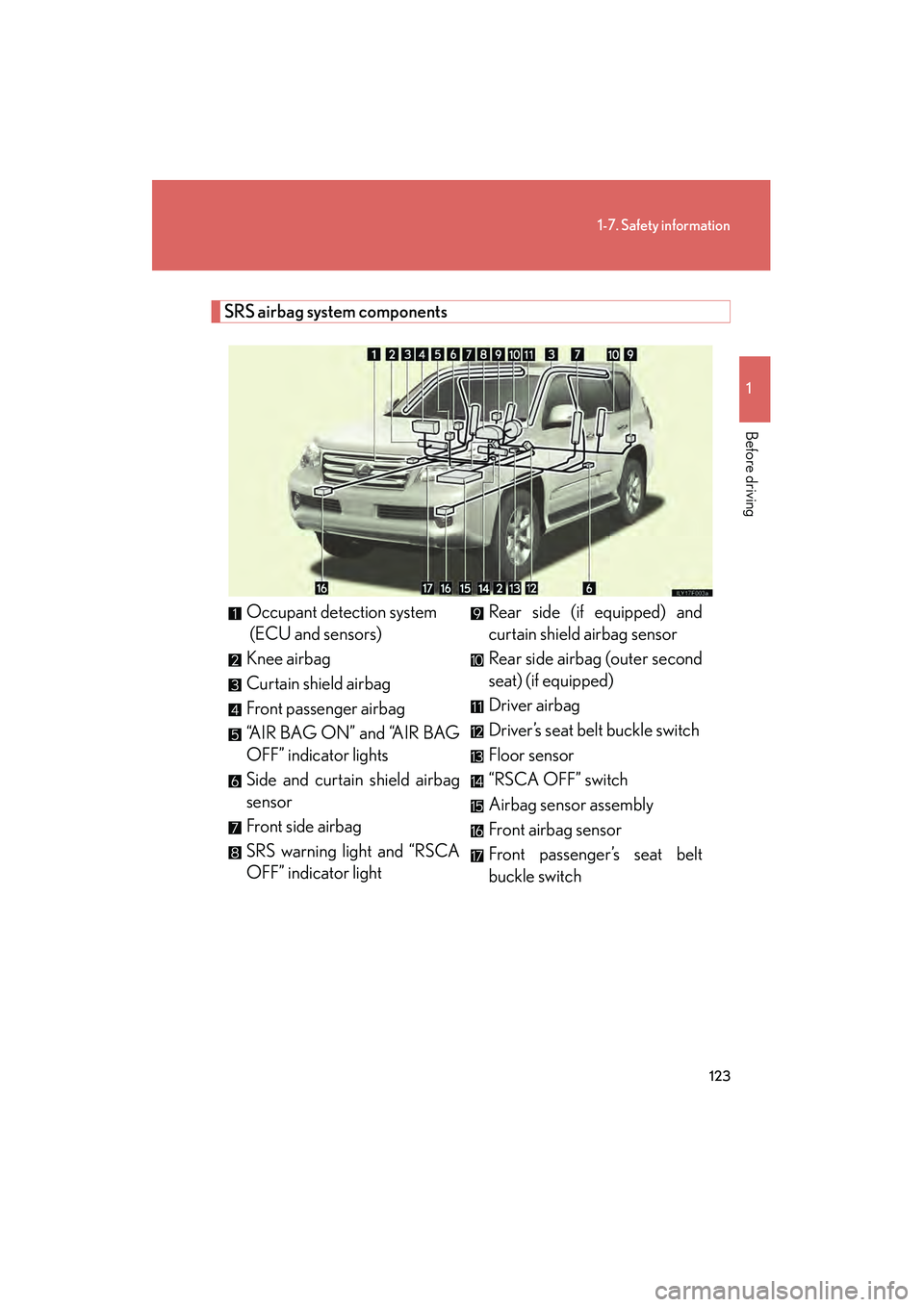
SRS airbag system componentsOccupant detection system
(ECU and sensors)
Knee airbag
Curtain shield airbag
Front passenger airbag
“AIR BAG ON” and “AIR BAG
OFF” indicator lights
Side and curtain shield airbag
sensor
Front side airbag
SRS warning light and “RSCA
OFF” indicator light Rear side (if equipped) and
curtain shield airbag sensor
Rear side airbag (outer second
seat) (if equipped)
Driver airbag
Driver’s seat belt buckle switch
Floor sensor
“RSCA OFF” switch
Airbag sensor assembly
Front airbag sensor
Front passenger’s seat belt
buckle switch
GX460_CANADA.book Page 123 Thursday, February 4, 2010 11:54 AM
Page 133 of 830
132
1-7. Safety information
GX460_CANADA (OM60F29U)
CAUTION
■SRS airbag precautions
Observe the following precautions regarding the SRS airbags.
Failure to do so may cause death or serious injury.
●The driver and all passengers in the vehicle must wear their seat belts properly.
The SRS airbags are supplemental devices to be used with the seat belts.
●The SRS driver airbag deploys with considerable force, and can cause death or
serious injury especially if the driver is very close to the airbag. The National
Highway Traffic Safety Administration (NHTSA) advises:
Since the risk zone for driver’s airbag is the first 2 - 3 in. (50 - 75 mm) of inflation,
placing yourself 10 in. (250 mm) from your driver airbag provides you with a
clear margin of safety. This distance is measured from the center of the steering
wheel to your breastbone. If you sit less than 10 in. (250 mm) away now, you can
change your driving position in several ways:
• Move your seat to the rear as far as you can while still reaching the pedalscomfortably.
• Slightly recline the back of the seat. Although vehicle designs vary, many drivers can achieve the 10 in. (250 mm)
distance, even with the driver seat all the way forward, simply by reclining the
back of the seat somewhat. If reclining the back of your seat makes it hard to
see the road, raise yourself by using a firm, non-slippery cushion, or raise the
seat if your vehicle has that feature.
• If your steering wheel is adjustable, tilt it downward. This points the airbag toward your chest instead of your head and neck.
The seat should be adjusted as recommended by NHTSA above, while still main-
taining control of the foot pedals, steering wheel, and your view of the instrument
panel controls.
GX460_CANADA.book Page 132 Thursday, February 4, 2010 11:54 AM