indicator Lexus GX460 2010 Manual PDF
[x] Cancel search | Manufacturer: LEXUS, Model Year: 2010, Model line: GX460, Model: Lexus GX460 2010Pages: 830, PDF Size: 17.01 MB
Page 391 of 830

390
3-1. Using the air conditioning system and defogger
GX460_CANADA (OM60F29U)Vehicles with a rear automatic air conditioning system
To turn on the air conditioning system and adjust the fan speed,
press “∧” on to increase the fan speed and “ ∨” to
decrease the fan speed.
Press to turn the fan off.
To adjust the temperature setting, press “ ∧” on the temperature
control button on the driver’s side to increase the temperature
and “ ∨” to decrease the temperature.
The air conditioning system switch es between individual and simulta-
neous modes each time the “3ZONE” button is pressed.
When the “3ZONE” button is pressed (the indicator on the “3ZONE”
button is on), the front passenger’s side temperature control button is
pressed or the “REAR/TEMP” button is pressed, the temperature for
the driver’s, front passenger’s and rear seats ( →P. 4 0 0 ) c a n b e
adjusted separately.
To change the air outlets, press “ <” or “ >” on .
The air outlets used are switched each time either side of the button is
pressed. The air flow shown on the display indicates the following:
STEP1
STEP2
STEP3
GX460_CANADA.book Page 390 Thursday, February 4, 2010 11:54 AM
Page 418 of 830

417
3-2. Using the audio system
3
Interior features
GX460_CANADA (OM60F29U)
Loading a CD■ Loading a CD
Press the “LOAD” button.
“WAIT” is shown on the display.
When the indicator on the slot turns from amber to green, insert a
CD.
The display changes from “WAIT” to “LOAD”.
■Loading multiple CDs
Press and hold the “LOAD” button until you hear a beep.
“WAIT” is shown on the display.
When the indicator on the slot turns from amber to green, insert a
CD.
The display changes from “WAIT” to “LOAD”.
The indicator on the slot turns to amber when the CD is being inserted.
When the indicator on the slot turns from amber to green, insert
the next CD.
Repeat the procedure for the remaining CDs.
To cancel the operation, press the “LOAD” button. If you do not insert a
disc within 15 seconds, loading will be canceled automatically.
STEP1
STEP2
STEP1
STEP2
STEP3
GX460_CANADA.book Page 417 Thursday, February 4, 2010 11:54 AM
Page 529 of 830
528
GX460_CANADA (OM60F29U)
3-7. Other interior features
Cool box∗
∗: If equipped
■The cool box can be operated when
The “ENGINE START STOP” switch is in IGNITION ON mode.
■When the cool box is turned on
Turning cool box on also turns on front air conditioning system.
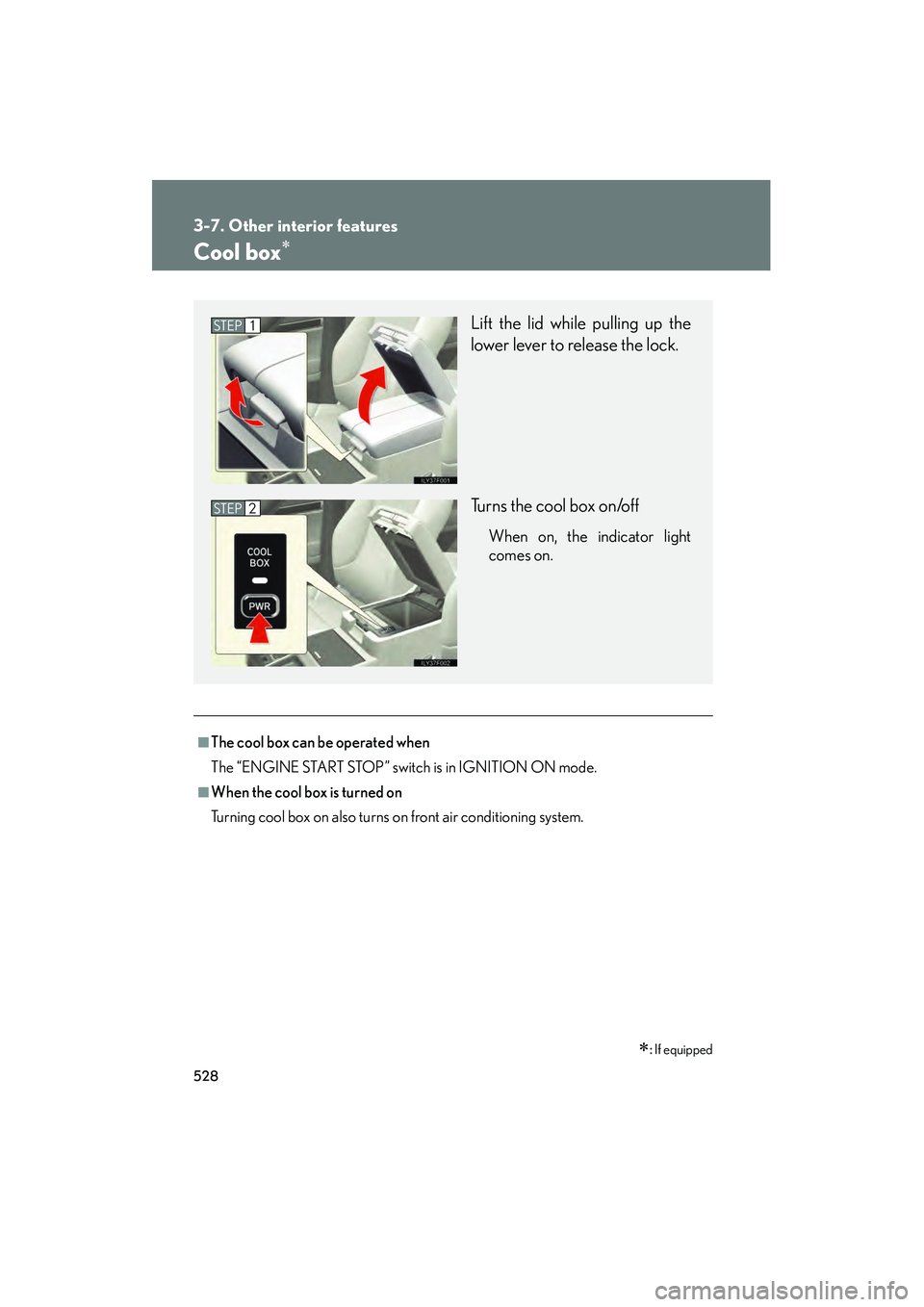
Lift the lid while pulling up the
lower lever to release the lock.
Turns the cool box on/off
When on, the indicator light
comes on.
STEP1
STEP2
GX460_CANADA.book Page 528 Thursday, February 4, 2010 11:54 AM
Page 530 of 830
529
3-7. Other interior features
3
Interior features
GX460_CANADA (OM60F29U)
■Items unsuitable for the cool box
●Drinks in unsealed containers
●Fragile items, perishables or anything with strong odor
●Owner’s manual, electronic devices, CDs, etc.
■When the indicator light flashes
The cool box is not operated when any of the following conditions occurs.
●When the air conditioning system is off
Turn the air conditioning system on also turns on the cool box.
●When outside air temperature is about 32 °F (0 °C) or below.
●When the “A/C ON” in the multi-information display (accessory meter)
(→ P. 3 8 4 ) a l s o f l a s h e s
Press the “A/C” button to turn off the c ooling and dehumidification function and
turn it on again.
If the indicator light continues to flash, there may be a malfunction in the system.
Turn the air conditioning system off and have it inspected by your Lexus dealer.
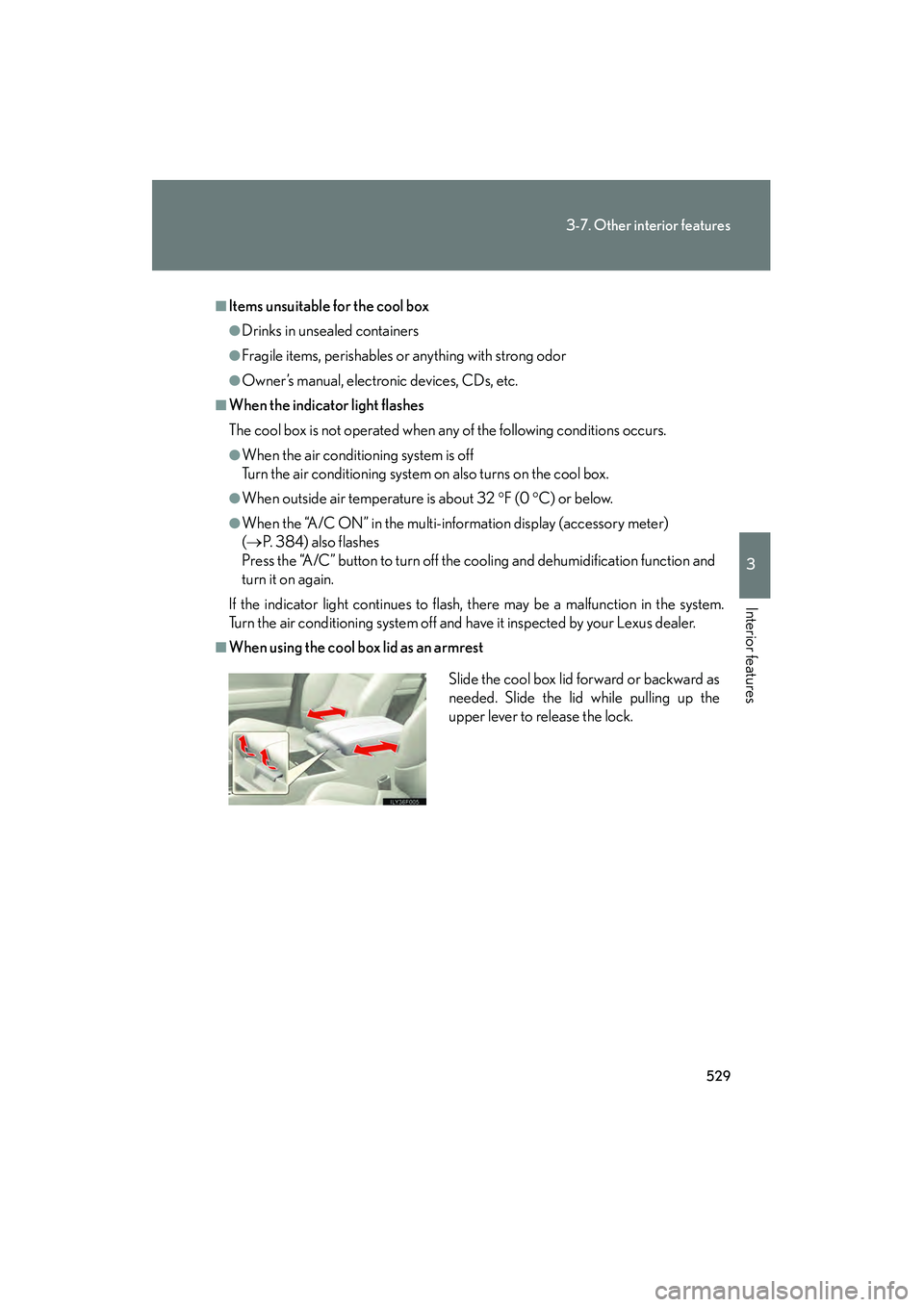
■When using the cool box lid as an armrest
Slide the cool box lid forward or backward as
needed. Slide the lid while pulling up the
upper lever to release the lock.
GX460_CANADA.book Page 529 Thursday, February 4, 2010 11:54 AM
Page 545 of 830

544
3-7. Other interior features
GX460_CANADA (OM60F29U)
■The power outlet can be used when
The engine is running.
■The indicator light changes according to the maximum available capacity as fol-
lows:
■When the power outlet is in operation
The sound of the cooling fan may be heard from the right side of the luggage com-
partment. This is normal and does not indicate a malfunction.
■If the engine is started with the power outlet main switch on
The maximum capacity of the power supply may decrease to below the standard, or
may be cut off completely, even when the vehicle is stationary.
■The protection circuit may be activated to cut the power supply if any of the fol-
lowing conditions apply:
●The engine is started with the power outlet main switch on.
●Use of electrical appliances exceeding the maximum capacity is attempted.
●A sound may be heard when the protection circuit is activated. This is normal
and does not indicate a malfunction.
●Electrical appliances, which consume power exceeding 100 W, have been used
continuously for a long time period.
●The total power usage by all electrical features (headlights, air conditioning,
etc.) has exceeded the total vehicle maximum for an extended period of time.120 V AC/400 W
120 V AC/100 W
GX460_CANADA.book Page 544 Thursday, February 4, 2010 11:54 AM
Page 550 of 830

549
3-7. Other interior features
3
Interior features
GX460_CANADA (OM60F29U)
Heated steering wheel∗
∗: If equipped
■The heated steering wheel can be used when
The “ENGINE START STOP” switch is in IGNITION ON mode.
■Timer
The heated steering wheel will automatically turn off after about 30 minutes.
■If the indicator light flashes
Press the button to turn the heated steering wheel off and then press the button
again. If the indicator light still flashes, a malfunction may be occurring. Turn the
heated steering wheel off and have the vehicle inspected by your Lexus dealer.
The heated steering wheel heats the leather portion of the steering wheel.
Turns the heater on/off
The indicator light comes on
when the heater is operating.
GX460_CANADA.book Page 549 Thursday, February 4, 2010 11:54 AM
Page 552 of 830
551
3-7. Other interior features
3
Interior features
GX460_CANADA (OM60F29U)
Seat heaters and ventilators
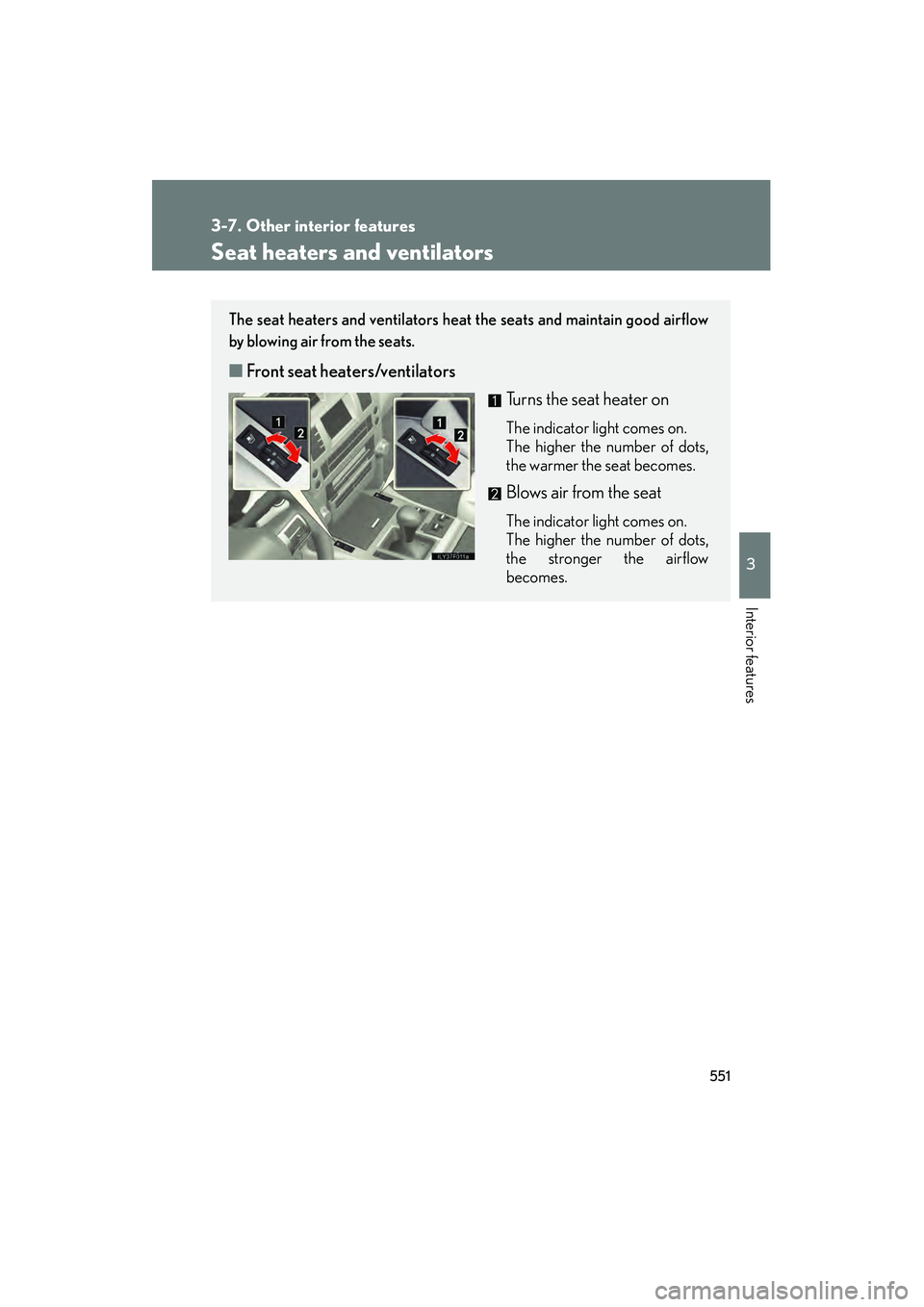
The seat heaters and ventilators heat the seats and maintain good airflow
by blowing air from the seats.
■Front seat heaters/ventilators
Turns the seat heater on
The indicator light comes on.
The higher the number of dots,
the warmer the seat becomes.
Blows air from the seat
The indicator light comes on.
The higher the number of dots,
the stronger the airflow
becomes.
GX460_CANADA.book Page 551 Thursday, February 4, 2010 11:54 AM
Page 553 of 830
552
3-7. Other interior features
GX460_CANADA (OM60F29U)
■The seat heaters/ventilators can be used when
The “ENGINE START STOP” switch is in IGNITION ON mode.
■When not in use
Turn the dial until the indicator light turns off.
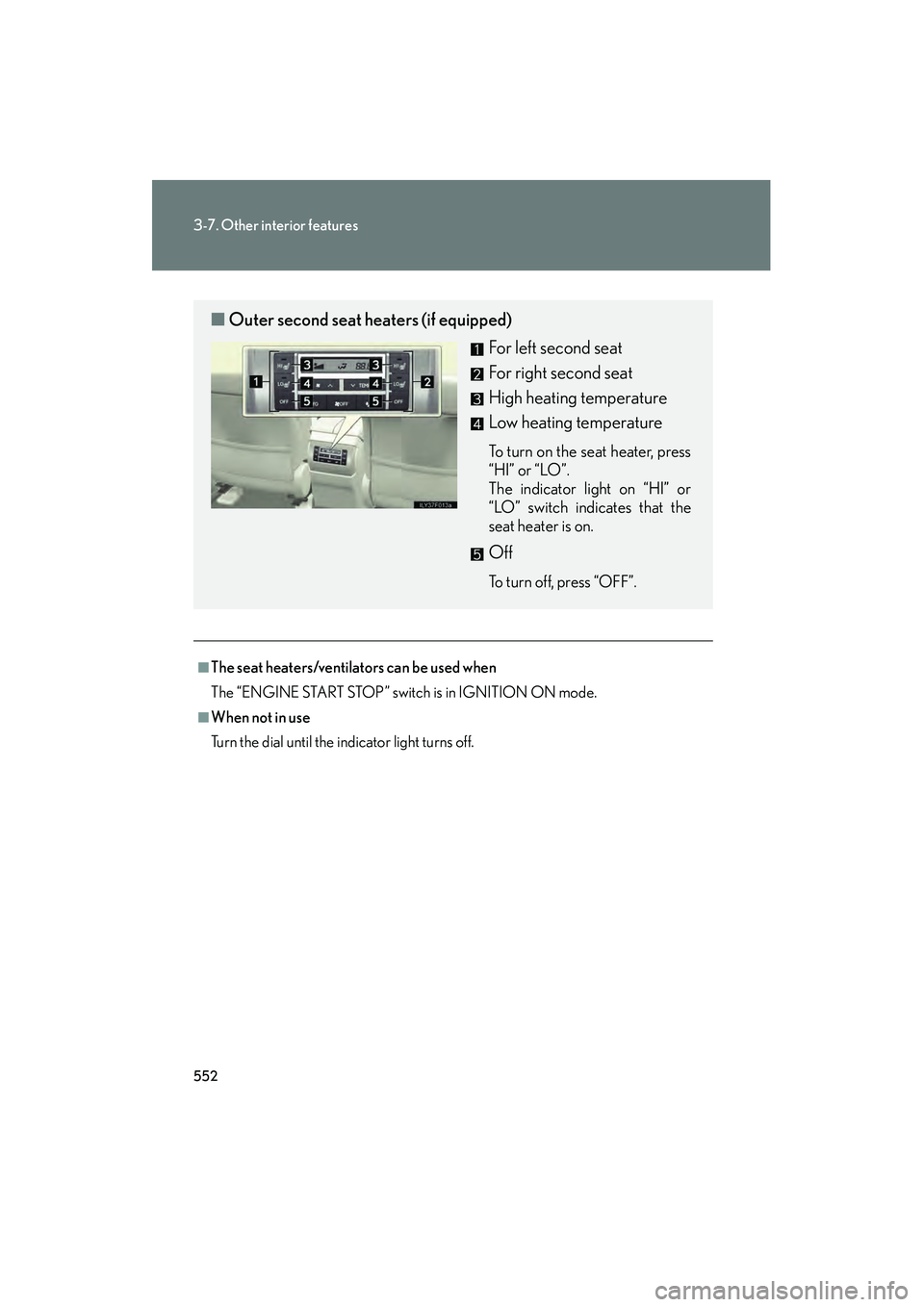
■Outer second seat heaters (if equipped)
For left second seat
For right second seat
High heating temperature
Low heating temperature
To turn on the seat heater, press
“HI” or “LO”.
The indicator light on “HI” or
“LO” switch indicates that the
seat heater is on.
Off
To turn off, press “OFF”.
GX460_CANADA.book Page 552 Thursday, February 4, 2010 11:54 AM
Page 568 of 830

567
3-7. Other interior features
3
Interior features
GX460_CANADA (OM60F29U)
Garage door opener
The garage door opener (HomeLink® Universal Transceiver) is manufactured
under license from HomeLink®.
Programming HomeLink® (for U.S. owners)
The HomeLink
® compatible transceiver in your vehicle has 3 buttons
which can be programmed to operate 3 different devices. Refer to the
programming method below appropriate for the device.
Indicator light
Buttons
The garage door opener can be programmed to operate garage doors,
gates, entry doors, door locks, home lighting systems, and security systems,
and other devices.
GX460_CANADA.book Page 567 Thursday, February 4, 2010 11:54 AM
Page 569 of 830
568
3-7. Other interior features
GX460_CANADA (OM60F29U)■
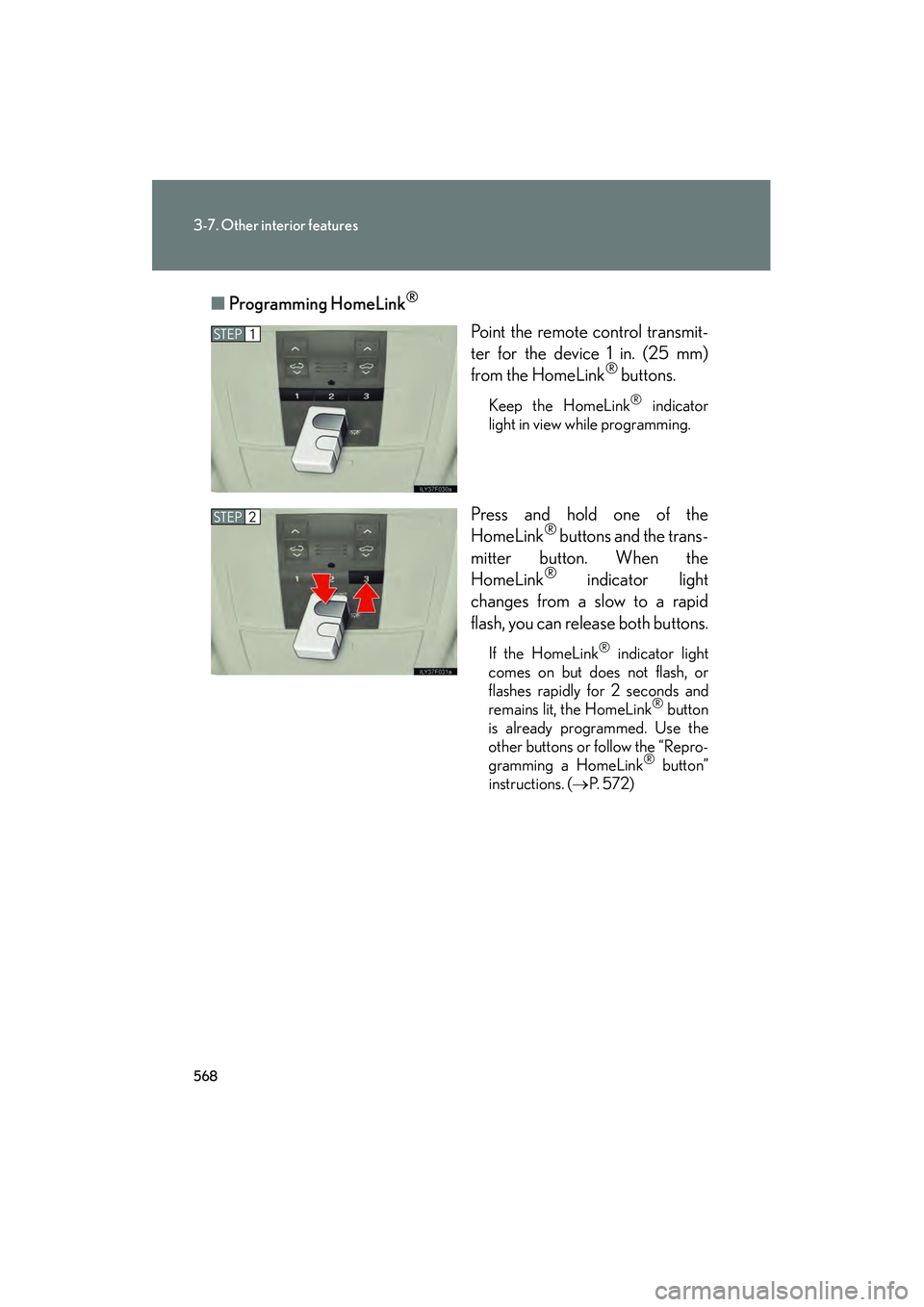
Programming HomeLink
®
Point the remote control transmit-
ter for the device 1 in. (25 mm)
from the HomeLink
® buttons.
Keep the HomeLink® indicator
light in view while programming.
Press and hold one of the
HomeLink® buttons and the trans-
mitter button. When the
HomeLink
® indicator light
changes from a slow to a rapid
flash, you can release both buttons.
If the HomeLink® indicator light
comes on but does not flash, or
flashes rapidly for 2 seconds and
remains lit, the HomeLink
® button
is already programmed. Use the
other buttons or follow the “Repro-
gramming a HomeLink
® button”
instructions. ( →P. 5 7 2 )
STEP1
STEP2
GX460_CANADA.book Page 568 Thursday, February 4, 2010 11:54 AM