high beam Lexus GX460 2010 Owner's Manual
[x] Cancel search | Manufacturer: LEXUS, Model Year: 2010, Model line: GX460, Model: Lexus GX460 2010Pages: 830, PDF Size: 17.01 MB
Page 4 of 830
1
2
3
4
5
6
7
3
GX460_CANADA (OM60F29U)
2-1. Driving proceduresDriving the vehicle ........................ 168
Engine (ignition) switch .............. 179
Automatic transmission.............. 186
Turn signal lever ............................ 192
Parking brake ................................. 193
Horn.................................................... 194
2-2. Instrument cluster Gauges and meters ..................... 195
Indicators and warning lights................................................. 198
Multi-information display (Optitron meters) ..................... 204
Multi-information display (Accessory meters)................... 212
2-3. Operating the lights and windshield wipers
Headlight switch ........................... 220
Automatic High Beam ............... 226
Fog light switch ............................. 233
Windshield wipers and washer............................................ 235
Rear window wiper and washer............................................ 239
Headlight cleaner switch ........... 241 2-4. Using other driving systems
Cruise control ............................... 242
Dynamic radar cruise control............................................ 246
Intuitive parking assist ................ 259
LDA (Lane Departure Alert) .......... 268
Rear view monitor system ........ 274
Wide view front & side monitor................................. 279
Multi-terrain Select ..................... 290
Multi-terrain Monitor ................. 298
Rear height control air suspension .................................... 310
AVS (Adaptive Variable Suspension System) .................. 316
Four-wheel drive system............ 317
Crawl Control ............................... 323
DAC (Downhill Assist Control system)........................................... 327
Driving assist systems................ 330
PCS (Pre-Collision System) .......... 338
2-5. Driving information Off-road precautions ................ 348
Cargo and luggage ..................... 353
Vehicle load limits........................ 359
Winter driving tips ........................ 361
Trailer towing ................................. 365
Dinghy towing .............................. 380
2When driving
GX460_CANADA.book Page 3 Thursday, February 4, 2010 11:54 AM
Page 9 of 830
8
GX460_CANADA (OM60F29U)
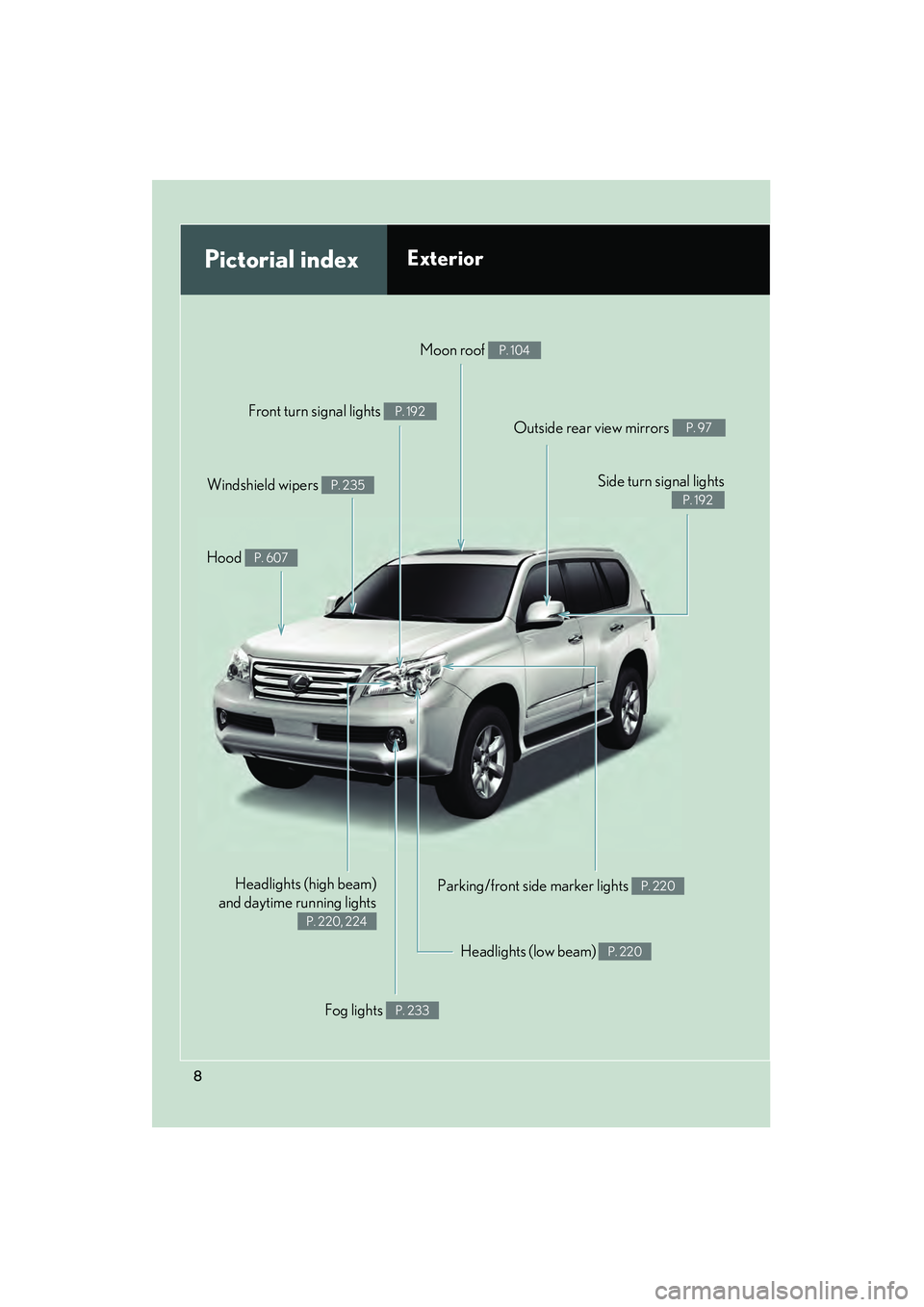
Headlights (high beam)
and daytime running lights
P. 220, 224
Pictorial indexExterior
Fog lights P. 233
Parking/front side marker lights P. 220
Headlights (low beam) P. 220
Hood P. 607
Windshield wipers P. 235
Moon roof P. 104
Outside rear view mirrors P. 97
Front turn signal lights P. 192
Side turn signal lights
P. 192
illustTOC_U.fm Page 8 Thursday, February 4, 2010 5:07 PM
Page 15 of 830
14
GX460_CANADA (OM60F29U)
Pictorial indexInstrument panel
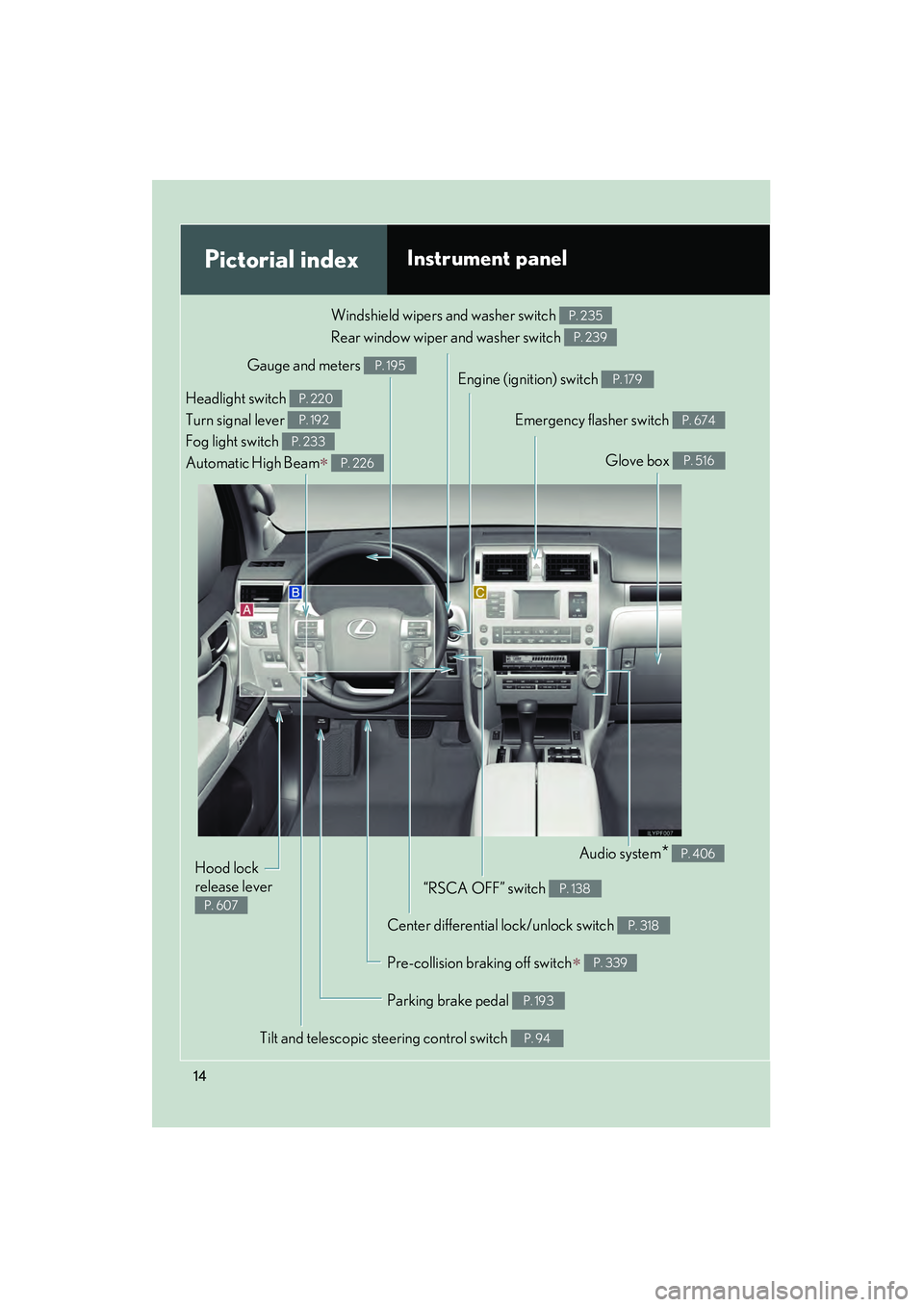
Gauge and meters P. 195Engine (ignition) switch P. 179
Windshield wipers and washer switch
Rear window wiper and washer switch P. 235
P. 239
Headlight switch
Turn signal lever
Fog light switch
Automatic High Beam
∗
P. 220
P. 192
P. 233
P. 226
Center differential lock/unlock switch P. 318
Audio system* P. 406
Glove box P. 516
“RSCA OFF” switch P. 138
Emergency flasher switch P. 674
Parking brake pedal P. 193
Hood lock
release lever
P. 607
Tilt and telescopic steering control switch P. 94
Pre-collision braking off switch∗ P. 339
illustTOC_U.fm Page 14 Thursday, February 4, 2010 5:20 PM
Page 167 of 830
166
GX460_CANADA (OM60F29U)
2-1. Driving proceduresDriving the vehicle ................. 168
Engine (ignition) switch ......... 179
Automatic transmission ........ 186
Turn signal lever....................... 192
Parking brake........................... 193
Horn............................................ 194
2-2. Instrument cluster Gauges and meters................ 195
Indicators and warning lights ......................................... 198
Multi-information display (Optitron meters) ............... 204
Multi-information display (Accessory meters) ............. 212
2-3. Operating the lights and windshield wipers
Headlight switch .................... 220
Automatic High Beam ......... 226
Fog light switch ....................... 233
Windshield wipers and washer .................................... 235
Rear window wiper and washer .................................... 239
Headlight cleaner switch ..... 241
GX460_CANADA.book Page 166 Thursday, February 4, 2010 11:54 AM
Page 201 of 830

200
2-2. Instrument cluster
GX460_CANADA (OM60F29U)
■Indicators
The indicators inform the driver of the operating state of the vehi-
cle’s various systems.
Turn signal indicator
(→ P. 1 9 2 )Cruise control indicator
(→ P. 242, 246)
Headlight high beam
indicator ( →P. 220)“SET” indicator
(→ P. 242, 246)
(U.S.A.)
Headlight indicator
(→ P. 220)
(if equipped)
Dynamic radar cruise
control indicator
(→ P. 2 4 6 )
(Canada)
Tail light indicator
(→ P. 220)
(if equipped)
“LDA” indicator
(→ P. 2 6 8 )
(if equipped)
Automatic High Beam
indicator ( →P. 2 2 6 )Slip indicator ( →P. 3 3 2 )
Fog light indicator
(→ P. 2 3 3 )VSC OFF indicator
(→ P. 333)
Eco Driving Indicator
Light ( →P. 2 1 0 )
(if equipped)
Multi-terrain Select
indicator ( →P. 2 9 0 )
*1*1, 2
*1
*1
GX460_CANADA.book Page 200 Thursday, February 4, 2010 11:54 AM
Page 223 of 830
222
2-3. Operating the lights and windshield wipers
GX460_CANADA (OM60F29U)
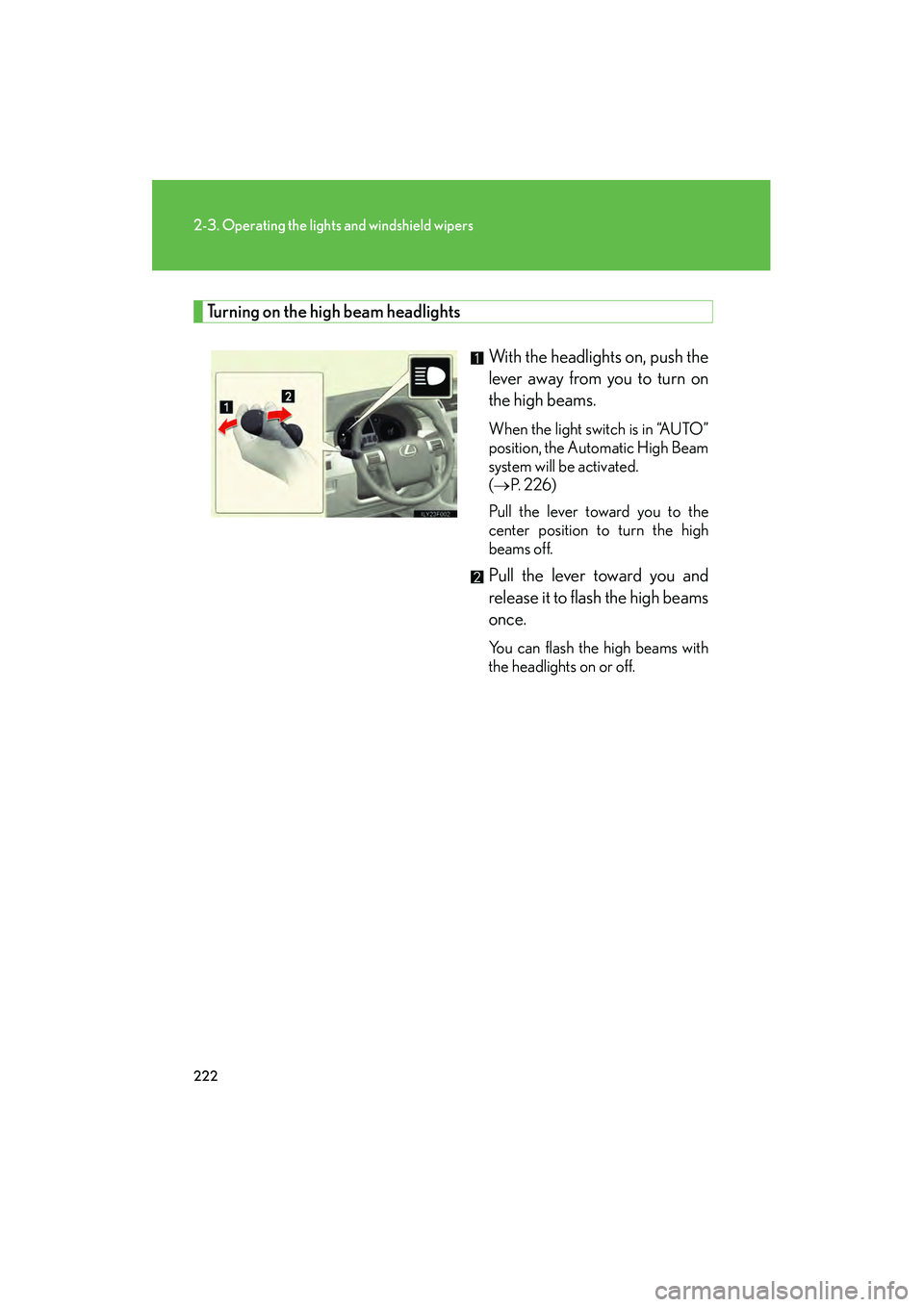
Turning on the high beam headlightsWith the headlights on, push the
lever away from you to turn on
the high beams.
When the light switch is in “AUTO”
position, the Automatic High Beam
system will be activated.
(→ P. 2 2 6 )
Pull the lever toward you to the
center position to turn the high
beams off.
Pull the lever toward you and
release it to flash the high beams
once.
You can flash the high beams with
the headlights on or off.
GX460_CANADA.book Page 222 Thursday, February 4, 2010 11:54 AM
Page 227 of 830
226
2-3. Operating the lights and windshield wipers
GX460_CANADA (OM60F29U)
Automatic High Beam∗
∗: If equipped
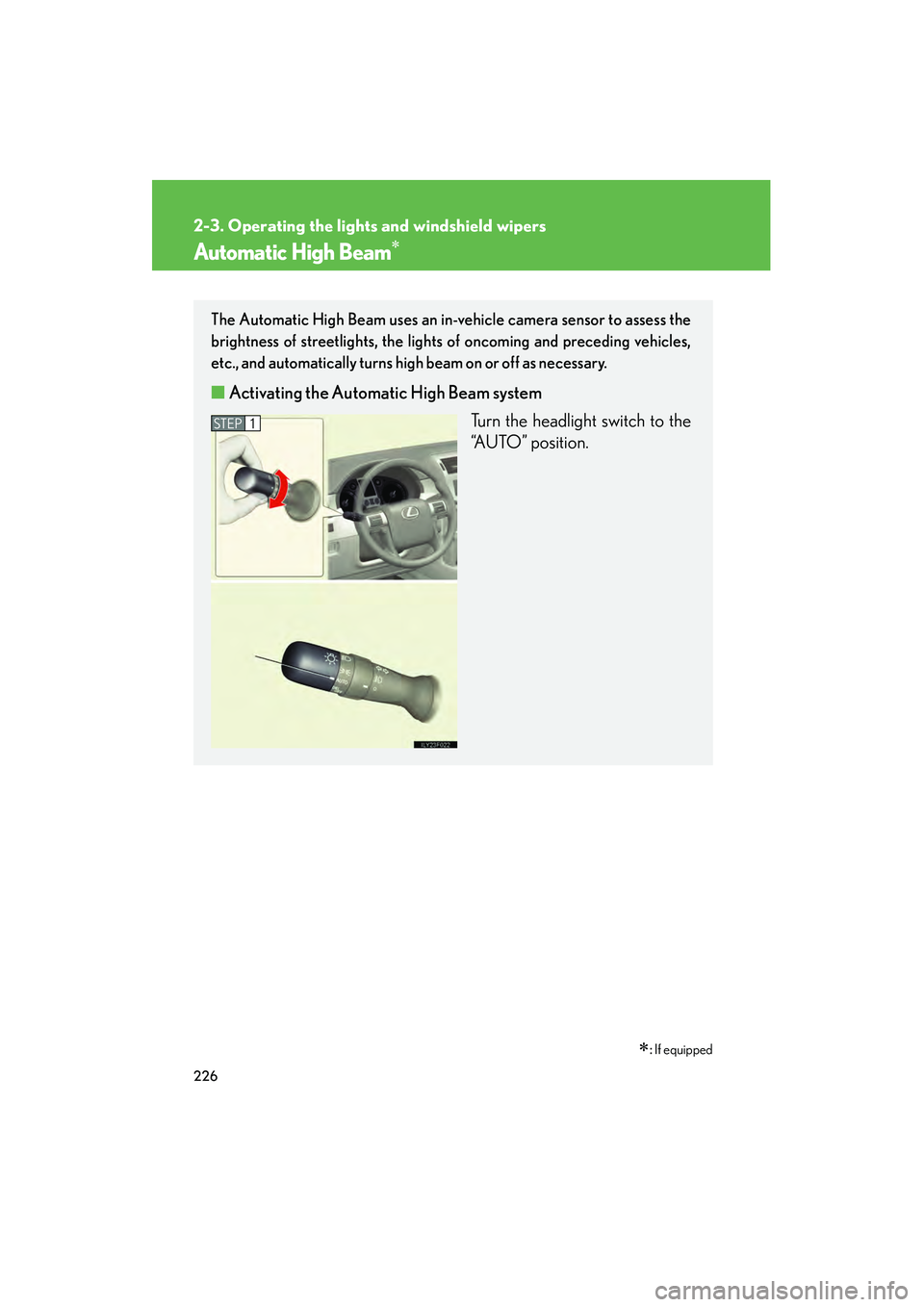
The Automatic High Beam uses an in-vehicle camera sensor to assess the
brightness of streetlights, the lights of oncoming and preceding vehicles,
etc., and automatically turns high beam on or off as necessary.
■ Activating the Automatic High Beam system
Turn the headlight switch to the
“AUTO” position.
STEP1
GX460_CANADA.book Page 226 Thursday, February 4, 2010 11:54 AM
Page 228 of 830

227
2-3. Operating the lights and windshield wipers
2
When driving
GX460_CANADA (OM60F29U)
Push the lever away from you.
The Automatic High Beam indi-
cator will come on when the
headlights are turned on auto-
matically to indicate that the sys-
tem is active.
■Turning the high beam on/off manually
Switching to low beam Pull the lever to original posi-
tion.
Switching to high beam Turn the light switch to
position.
STEP2
GX460_CANADA.book Page 227 Thursday, February 4, 2010 11:54 AM
Page 229 of 830

228
2-3. Operating the lights and windshield wipers
GX460_CANADA (OM60F29U)
■High beam automatic turn ing on or off conditions
When all of the following conditions are fulfilled, high beam will be
automatically turned on (after approximately 1 second):
● Vehicle speed is above approximately 20 mph (32 km/h).
● The area ahead of the vehicle is dark.
● There are no oncoming or preceding vehicles with headlights or
tail lights turned on.
If any of the following conditions are fulfilled, high beam will be auto-
matically turned off:
● Vehicle speed drops below approximately 20 mph (32 km/h).
● The area ahead of the vehicle is not dark.
● Oncoming or preceding vehicles have headlights or tail lights
turned on.
GX460_CANADA.book Page 228 Thursday, February 4, 2010 11:54 AM
Page 230 of 830
229
2-3. Operating the lights and windshield wipers
2
When driving
GX460_CANADA (OM60F29U)
■Limitations of the Automatic High Beam
Do not rely on the Automatic High Beam. Always drive safely, taking care to
observe your surroundings and turning high beam on or off manually if necessary.
■Camera sensor detection information
●High beam may not be automatically turned off in the following situations:
• When oncoming vehicles suddenly appear from a curve.
• When another vehicle cuts across in front of you.
●High beam may be turned off if an oncoming vehicle that is using fog lights with-
out using the headlights is detected.
●Houselights, streetlights, red traffic signals, and illuminated billboards or signs
may cause the high beam to turn off.
●The following factors may affect the amount of time taken to turn high beam on
or off:
• The brightness of headlights, fog lights, and tail lights of oncoming and pre-ceding vehicles
• Road conditions (wetness, ice, snow etc.)
• The number of passengers and amount of baggage
●High beam may be turned on or off when unexpected by the driver.
GX460_CANADA.book Page 229 Thursday, February 4, 2010 11:54 AM