lock Lexus GX460 2013 Specifications /
[x] Cancel search | Manufacturer: LEXUS, Model Year: 2013, Model line: GX460, Model: Lexus GX460 2013Pages: 844, PDF Size: 10.42 MB
Page 356 of 844

356
2-4. Using other driving systems
GX460_OM_OM60J63U_(U)
CAUTION
■Handling the driver monitor sensor (vehicles with driver monitor sensor)
Observe the following to ensure the driver monitor sensor can function effectively.
Failure to do so may result in a malfunction or may prevent the system from cor-
rectly determining the direction the driver is facing, resulting in an unexpected acci-
dent.
●Do not disassemble, damage, lift or pull on the sensor.
●Do not touch the sensor while driving.
●Do not wet or spill water on the sensor.
●Do not drop anything on or allow anything to hit against the sensor. Do not sub-
ject the sensor to an impact.
●Make sure that there are no scratches, dirt or stickers on the side of the sensor
that faces the driver.
●Do not place any objects in front of the si de of the sensor that faces the driver or
cover the sensor.
■Determining the direction the driver is fa cing (vehicles with driver monitor sen-
sor)
The direction the driver is facing may not be determined correctly if the following
conditions exist:
●There is an object between the driver mo nitor sensor and the driver’s face, such
as when the sensor is blocked.
●A part of the driver’s face is covered.
●The sensor or the driver’s face is exposed to intense light such as sunlight.
●The driving posture is improper.
Page 362 of 844

362
2-5. Driving information
GX460_OM_OM60J63U_(U)
NOTICE
■To prevent the water damage
Take all necessary safety measures to ensure that water damage to the engine or
other components does not occur.
●Water entering the engine air intake will cause severe engine damage.
●Water entering the automatic transmission will cause deterioration in shift quality,
locking up of your transmission accompanied by vibration, and ultimately dam-
age.
●Water can wash the grease from wheel bearings, causing rusting and premature
failure, and may also enter the differentials, transmission and transfer case, reduc-
ing the gear oil’s lubricating qualities.
■When you drive through water
If driving through water, such as when crossing shallow streams, first check the
depth of the water and the bottom of the riverbed for firmness. Drive slowly and
avoid deep water.
■Inspection after off-road driving
●Sand and mud that has accumulated in brake drums and around brake discs may
affect braking efficiency and may damage brake system components.
●Always perform a maintenance inspection after each day of off-road driving that
has taken you through rough terrain, sand, mud, or water. For scheduled mainte-
nance information, refer to the “Warrant y and Services Guide”, “Owner’s Manual
Supplement” or “Scheduled Maintenance”.
Page 367 of 844

367
2-5. Driving information
2
When driving
GX460_OM_OM60J63U_(U)
CAUTION
■Storage precautions
Observe the following precautions.
Failure to do so may result in death or serious injury.
●Stow cargo and luggage in the luggage compartment whenever possible.
●Do not stack cargo and luggage in the luggage compartment higher than the
seatbacks.
Such items may be thrown about and possib ly injure people in the vehicle in the
event of a sudden braking, sudd en swerving or an accident.
●Do not place cargo or luggage in or on the following locations as the item may
get under the brake or accelerator pedal and prevent the pedals from being
depressed properly, block the driver’s vision, or hit the driver or passengers,
causing an accident:
• At the feet of the driver
• On the front passenger or rear seats (when stacking items)
• On the luggage cover
• On the instrument panel
•On the dashboard
●Secure all items in the occupant compartment, as they may shift and injure some-
one in the event of a sudden braking, sudden swerving or an accident.
●When you fold down the rear seats, lo ng items should not be place directly
behind the front seats.
●Never allow anyone to ride in the luggage compartment. It is not designed for
passengers. They should ride in their seat s with their seat belts properly fastened.
Otherwise, they are much more likely to suffer death or serious bodily injury, in
the event of sudden braking or an accident.
■Roof luggage carrier precautions
To use the roof rails as a roof luggage carrier, you must fit the roof rails with two or
more genuine Lexus cross rails or their equivalent.
Follow the manufacturer’s instructions and precautions when installing the cross
rails or their equivalent.
Page 383 of 844

383
2-5. Driving information
2
When driving
GX460_OM_OM60J63U_(U)
Selecting trailer ballUse the correct trailer ball for your application. Trailer ball load rating
Matches or exceeds the gross
trailer weight rating of the trailer.
Ball diameter
Matches the size of the trailer cou-
pler. Most couplers are stamped
with the required trailer ball size.
Shank length
Protrudes beyond the bottom of
the lock washer and nut by at least
2 threads.
Shank diameter
Matches the ball mount hole diam-
eter size.
Trailer classTypical trailer ball
size
IV2 5/16 in.
II and III2 in.
I1 7/8 in.
Page 388 of 844

388
2-5. Driving information
GX460_OM_OM60J63U_(U)●
Always place wheel bloc ks under both the vehicle’s and the trailer’s
wheels when parking. Apply the pa rking brake firmly, and put the
transmission in P. Avoid parking on a slope, but if unavoidable, do so
only after performing the following:
Apply the brakes and keep them applied.
Have someone place wheel blocks under both the vehicle’s and
trailer’s wheels.
When the wheel blocks are in pl ace, release the brakes slowly
until the blocks absorb the load.
Apply the parking brake firmly.
Shift into P and turn off the engine.
● When restarting after parking on a slope:
With the transmission in P, start th e engine. Be sure to keep the
brake pedal pressed.
Shift into 3, 2, L, or R (if reversing).
Release the parking brake and br ake pedal, and slowly pull or
back away from the wheel blocks. Stop and apply the brakes.
Have someone retrieve the blocks.
STEP1
STEP2
STEP3
STEP4
STEP5
STEP1
STEP2
STEP3
STEP4
Page 397 of 844

Interior features3
397
GX460_OM_OM60J63U_(U)
3-5. Using the interior lightsInterior lights list ..................... 525
• Personal/interior light main switch ............................... 526
• Personal/interior lights ........ 527
3-6. Using the storage features List of storage features ......... 529
• Glove box .................................. 531
• Console box ............................. 532
• Coin holder............................... 534
• Bottle holders/door pockets ...................................... 535
• Cup holders.............................. 536
• Auxiliary boxes....................... 539 3-7. Other interior features
Cool box .................................... 541
Sun visors ................................. 544
Vanity mirror ........................... 545
Clock ......................................... 546
Conversation mirror............. 547
Power outlet (12 V DC)........ 548
Power outlet (120 V AC) ..... 550
Heated steering wheel ........ 555
Seat heaters and ventilators ............................. 557
Armrest .................................... 560
Coat hooks ................................ 561
Assist grips ............................... 562
Floor mat .................................. 563
Luggage compartment features .................................. 565
Garage door opener ............. 574
Compass .................................. 582
Safety Connect ...................... 587
Page 412 of 844

412
3-1. Using the air conditioning system and defogger
GX460_OM_OM60J63U_(U)
■When the “A/C ON” in the multi-information display (accessory meter) flashes
Press
the “A/C” button and turn off the cooling and dehumidification function and
turn it on again. There may be a problem in the air conditioning system if the indica-
tor light continues to flash. Turn the air co nditioning system off and have it inspected
by your Lexus dealer.
■Air conditioning odors
●During use, various odors from inside and outside the vehicle may enter into
and accumulate in the air conditioning sy stem. This may then cause odor to be
emitted from the vents.
●To reduce potential odors from occurring:
• It is recommended that the air conditioning system be set to outside air mode
prior to turning the vehicle off.
• The start timing of the blower may be delayed for a short period of time immediately after the air conditioning system is started in AUTO mode.
■Customization
Settings (e.g. enable/disable automatic op eration of the air conditioning compres-
sor when the “AUTO” switch ON) can be changed.
(Customizable features P. 7 8 8 )
CAUTION
■To prevent the windshield from fogging up
Do not use during cool air operatio n in extremely humid weather. The dif-
ference between the temperature of the outside air and that of the windshield can
cause the outer surface of the windshield to fog up, blocking your vision.
NOTICE
■To prevent battery discharge
Do not leave the air conditioning system on longer than necessary when the engine
is stopped.
Page 464 of 844
464
3-2. Using the audio system
GX460_OM_OM60J63U_(U)■
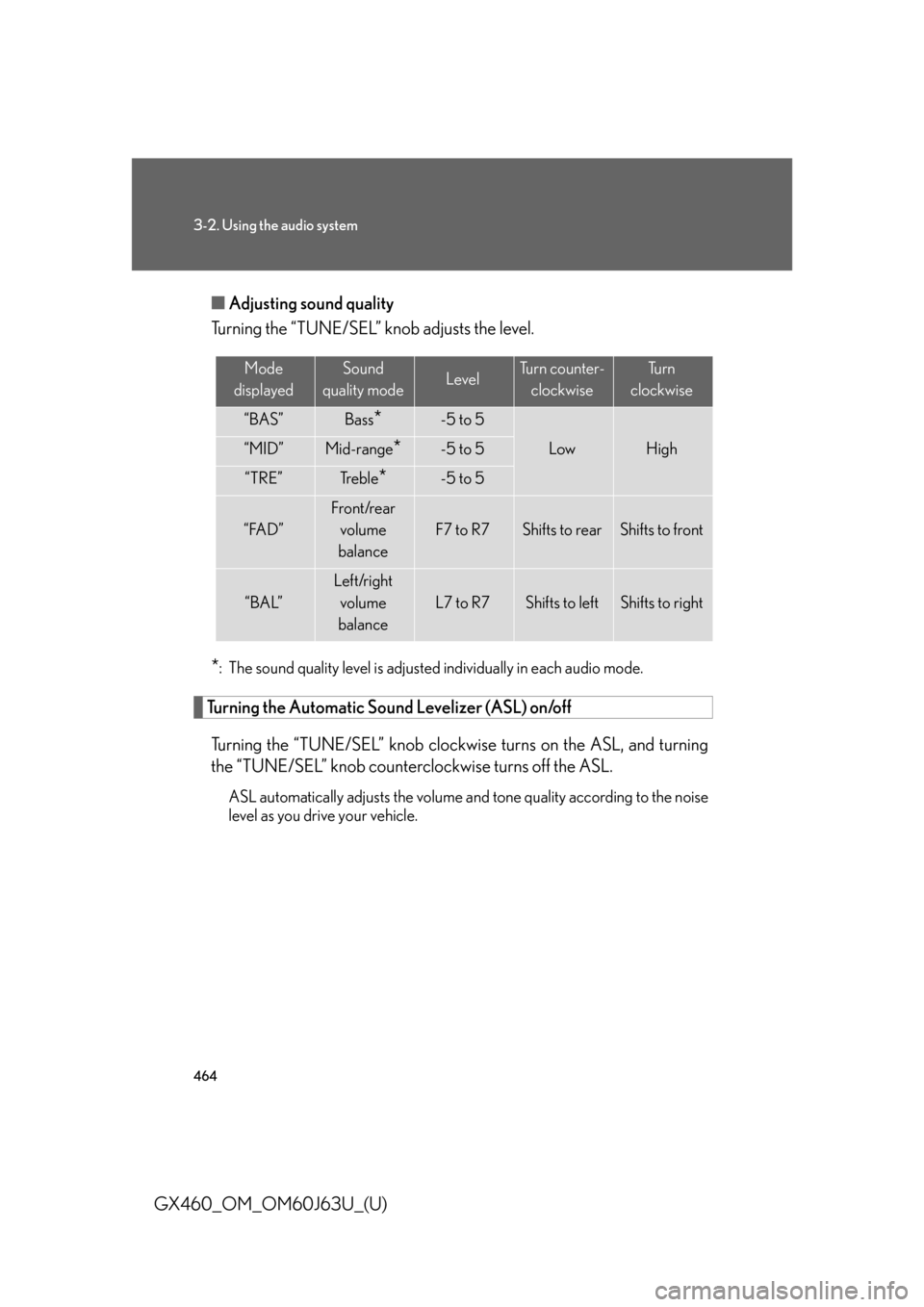
Adjusting sound quality
Turning the “TUNE/SEL” knob adjusts the level.
*: The sound quality level is adjusted individually in each audio mode.
Turning the Automatic Sound Levelizer (ASL) on/off
Turning the “TUNE/SEL” knob clockw ise turns on the ASL, and turning
the “TUNE/SEL” knob counterclockwise turns off the ASL.
ASL automatically adjusts the volume an d tone quality according to the noise
level as you drive your vehicle.
Mode
displayedSound
quality modeLevelTurn counter- clockwiseTu r n
clockwise
“BAS”Bass*-5 to 5
LowHigh“MID”Mid-range*-5 to 5
“TRE”Tr e b l e*-5 to 5
“FAD”
Front/rear volume
balance
F7 to R7Shifts to rearShifts to front
“BAL”
Left/right volume
balance
L7 to R7Shifts to leftShifts to right
Page 500 of 844

500
3-4. Using the hands-free system (for cellular phone)
GX460_OM_OM60J63U_(U)
“Setup”
“Security”
“Set PIN”Setting a PIN code
“Phbk Lock”Locking the phone book
“Phbk Unlock”Unlocking the phone book
“Phone
Setup”
“Pair Phone”Registering the cellular phone
to be used
“Connect”Selecting a cellular phone to be
used
“Change Name”Changing a registered name of
a cellular phone
“List Phones”Listing the registered cellular
phones
“Set Passkey”Changing the passkey
“Delete Phone”Deleting a registered cellular
phone
“System
Setup”
“Guidance Vol”Setting voice guidance volume
“Device Name”Displaying the Bluetooth®
device address and name
“Initialize”Initializing the system
First menuSecond
menuThird menuOperation detail
Page 501 of 844

501
3-4. Using the hands-free system (for cellular phone)
3
Interior features
GX460_OM_OM60J63U_(U)■
Using a short cut key
First menuSecond menuOperation detail
“Dial XXX (name)”-Dialing a name registered in the
phone book
“Phone book add
Entry”-Adding a new phone number
“Phone book Change
name”-Changing a registered name in
the phone book
“Phone book Delete
Entry”-Deleting the registered data
“Phone book List
names”-Listing the registered data
“Phone book Set
Speed Dial”-Setting speed dials
“Phone book Delete
Speed Dial”-Deleting speed dials
“Dial XXX (number)”-Dialing by inputting a number
“Phonebook”“Phonebook Unlock”Unlocking the phone book
“Phonebook Lock”Locking the phone book