AUX Lexus GX460 2013 Specifications /
[x] Cancel search | Manufacturer: LEXUS, Model Year: 2013, Model line: GX460, Model: Lexus GX460 2013Pages: 844, PDF Size: 10.42 MB
Page 465 of 844
465
3-2. Using the audio system
3
Interior features
GX460_OM_OM60J63U_(U)
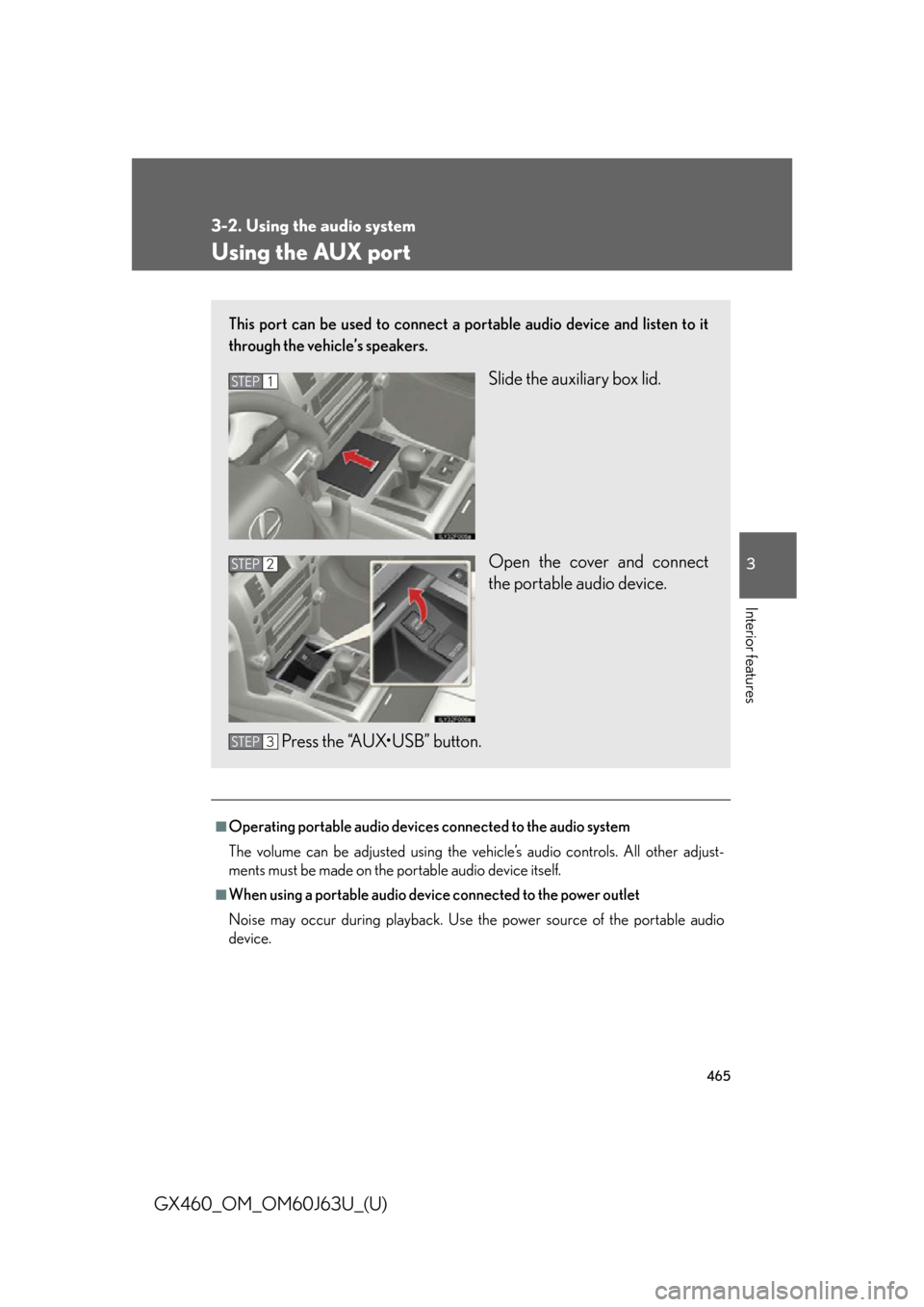
Using the AUX port
■Operating portable audio devices connected to the audio system
The volume can be adjusted using the vehicle’s audio controls. All other adjust-
ments must be made on the portable audio device itself.
■When using a portable audio device connected to the power outlet
Noise may occur during playback. Use the power source of the portable audio
device.
This port can be used to connect a po rtable audio device and listen to it
through the vehicle’s speakers.
Slide the auxiliary box lid.
Open the cover and connect
the portable audio device.
Press the “AUX•USB” button.STEP1
STEP2
STEP3
Page 467 of 844
467
3-2. Using the audio system
3
Interior features
GX460_OM_OM60J63U_(U)
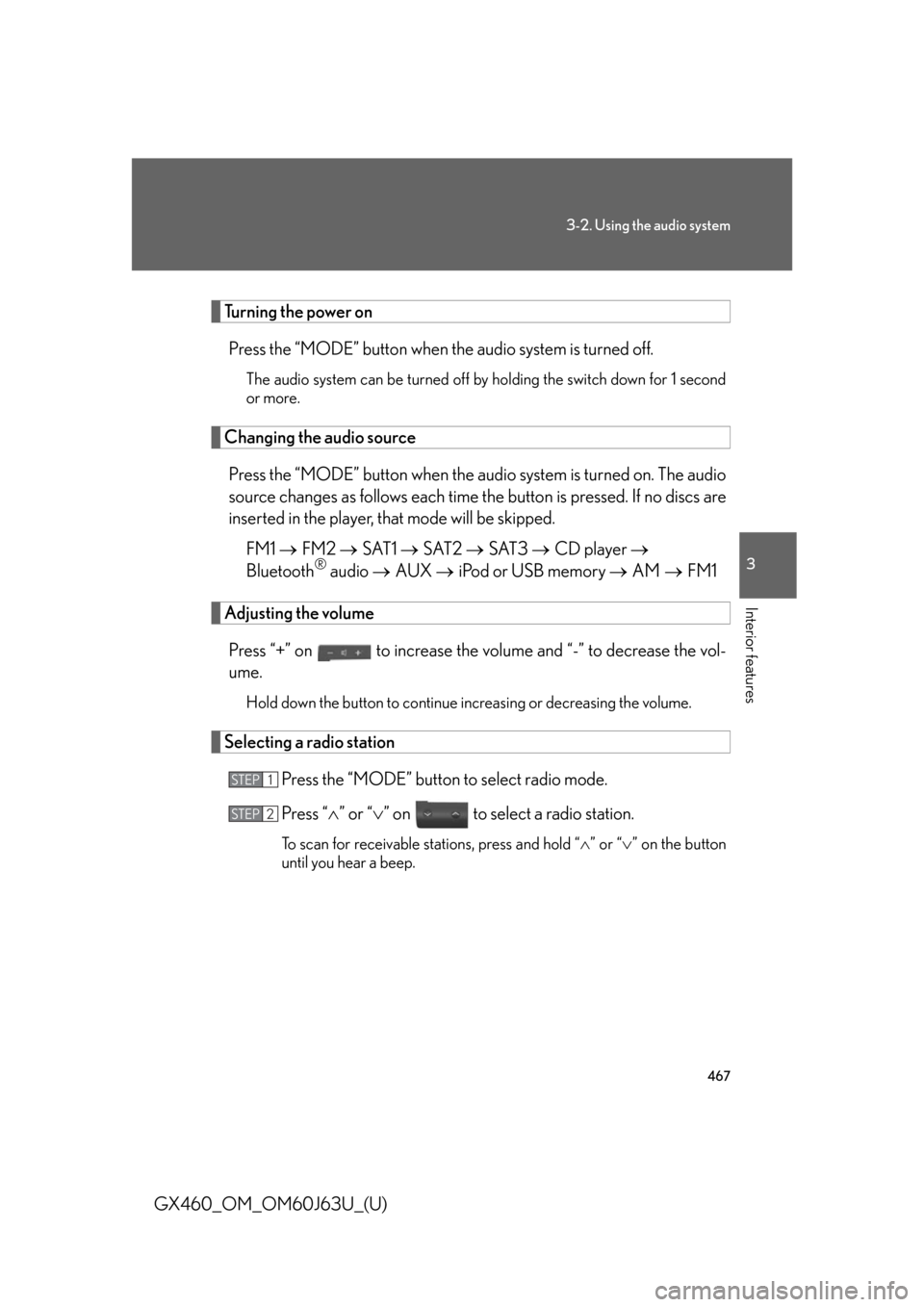
Turning the power onPress the “MODE” button when the audio system is turned off.
The audio system can be turned off by holding the switch down for 1 second
or more.
Changing the audio source
Press the “MODE” button when the au dio system is turned on. The audio
source changes as follows each time th e button is pressed. If no discs are
inserted in the player, that mode will be skipped.
FM1 FM2 SAT1 SAT2 SAT3 CD player
Bluetooth
® audio AUX iPod or USB memory AM FM1
Adjusting the volume
Press “+” on to increase the vo lume and “-” to decrease the vol-
ume.
Hold down the button to continue increasing or decreasing the volume.
Selecting a radio station
Press the “MODE” button to select radio mode.
Press “” or “ ” on to select a radio station.
To scan for receivable stations, press and hold “ ” or “ ” on the button
until you hear a beep.
STEP1
STEP2
Page 475 of 844

475
3-3. Using the Bluetooth® audio system
3
Interior features
GX460_OM_OM60J63U_(U)
Operating the system using voice commandsBy following voice guidance instructio ns output from the speaker, voice
commands enable to the operation of the Bluetooth
® audio system with-
out the need to check the display or operate the “TUNE/SEL” knob.
■ Operation procedure when using voice commands
Press the talk switch and follow voice guidance instructions.
■ Auxiliary commands when using voice commands
The following auxiliary commands ca n be used when operating the
system using a voice command:
“Cancel”: Exits the Bluetooth
® audio system
“Repeat”: Repeats the previous voice guidance instruction
“Go back”: Returns to the previous procedure
“Help”: Reads aloud the function summary if a help comment is regis-
tered for the selected function
Page 497 of 844

497
3-4. Using the hands-free system (for cellular phone)
3
Interior features
GX460_OM_OM60J63U_(U)
Operating the system using voice commandsBy following voice guidance instructio ns output from the speaker, voice
commands enable to the operation of the hands-free phone system with-
out the need to check the display or operate the “TUNE/SEL” knob.
■ Operation procedure when using voice commands
Press the talk switch and follow voice guidance instructions.
■ Auxiliary commands when using voice commands
The following auxiliary commands ca n be used when operating the
system using a voice command:
“Cancel”: Exits the hands-free phone system
“Repeat”: Repeats the previous voice guidance instruction
“Go back”: Returns to the previous procedure
“Help”: Reads aloud the function summary if a help comment is regis-
tered for the selected function
Using the hands-free phone system for the first time
Before using the hands-free phone sy stem, it is necessary to register a
cellular phone in the system. The system will enter phone registration
mode automatically when starting th e system with no cellular phone reg-
istered. Follow the procedure below to register (pair) a cellular phone:
Press the off-hook switch or the talk switch.
The introductory guidance and phone name registration instructions are
heard.
STEP1
Page 529 of 844

529
3
Interior features
GX460_OM_OM60J63U_(U)
3-6. Using the storage features
List of storage features
Cup holders
Auxiliary boxes
Bottle holders/door pockets
Glove box
Console box (if equipped)
Coin holder (if equipped)
Page 539 of 844

539
3-6. Using the storage features
3
Interior features
GX460_OM_OM60J63U_(U)
Auxiliary boxesTy p e A Press in the button and then pull
down the lid. The overhead con-
sole is useful for temporarily stor-
ing sunglasses and similar small
items.
Ty p e B Slide the auxiliary box lid.
Type C (for third left side seat of the vehicles with a DVD changer)
Auxiliary boxes
Page 540 of 844

540
3-6. Using the storage features
GX460_OM_OM60J63U_(U)
■Auxiliary box light (type B)
●The auxiliary box light turns on when the tail lights are on.
●The brightness of the auxiliary box light changes in conjunction with the instru-
ment cluster light. (P. 200)
■Closing the auxiliary box lid
CAUTION
■Caution while driving
●Keep the auxiliary boxes closed. In the event of sudden braking or sudden swerv-
ing, an accident may occur due to an occu pant being struck by an open auxiliary
box or the items stored inside.
●Do not place cups, aluminum cans or bottles in the box. They may be thrown out
of the box in the event of sudden braking, sudden swerving or an accident, result-
ing in injury. (type B and C)
■Items unsuitable for storing (type A)
●Do not store items heavier than 0.4 lb. (0.2 kg).
Doing so may cause the auxiliary box to open and the items inside may fall out,
resulting in an accident.
●Do not put large items in the overhead console.
The overhead console may not be able to be shut from the conversation mirror
state.
Slide the auxiliary box lid forward.
Auxiliary boxes
Page 548 of 844
548
3-7. Other interior features
GX460_OM_OM60J63U_(U)
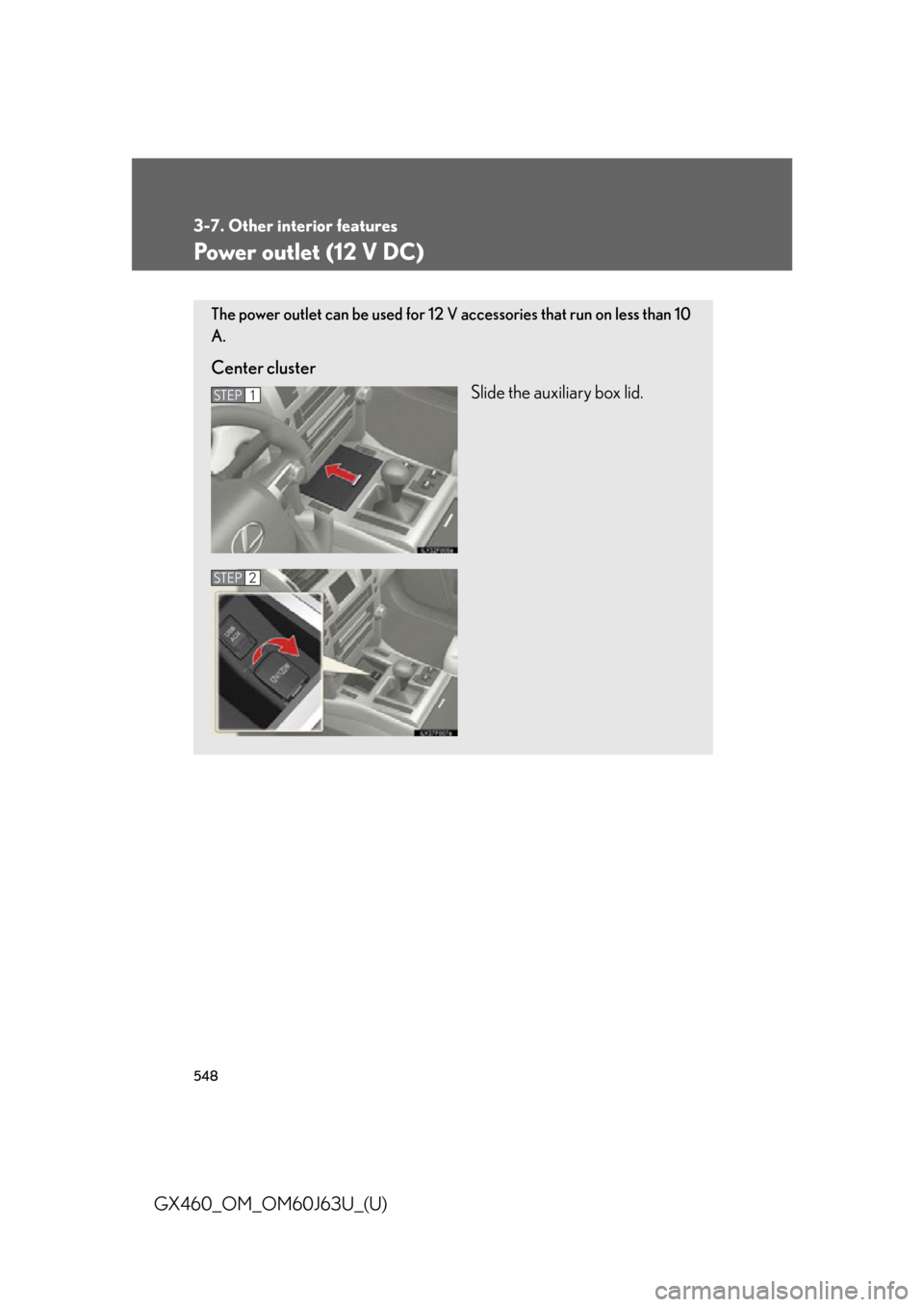
Power outlet (12 V DC)
The power outlet can be used for 12 V accessories that run on less than 10
A.
Center clusterSlide the auxiliary box lid.
STEP1
STEP2
Page 567 of 844

567
3-7. Other interior features
3
Interior features
GX460_OM_OM60J63U_(U)
■Auxiliary box (if equipped)
Remove the cover.
■ Luggage cover (if equipped)
Vehicles without third seats Attach the hooks to the head
restraints.
Vehicles with third seats Attach the hooks to the head
restraints.
When using the luggage cover,
the third seats must be fold
down. (P. 76 )
STEP1
STEP1
Page 572 of 844
572
3-7. Other interior features
GX460_OM_OM60J63U_(U)
CAUTION
■When the cargo hooks are not in use
To avoid injury, always return the cargo hooks to their stowed positions.
■Caution while driving
●Keep the auxiliary box closed. In the event of sudden braking or sudden swerv-
ing, an accident may occur due to an occu pant being struck by an open auxiliary
box or the items stored inside.
●Keep the both sides of the luggage cove r case locked. Otherwise, the luggage
cover may fly out in case of the sudden braking, sudden serving or an accident,
resulting in death or serious injury. (vehicles without third seats)
●When stowing the luggage cover in the luggage compartment, use the luggage
cover restraining bands to secure the le ft and right sides of the luggage cover.
Otherwise, the luggage cover may fly out in case of the sudden braking, sudden
serving or an accident, resulting in death or serious injury. (vehicles without third
seats)
■Caution for the luggage cover
Do not allow children to climb on the luggage cover. Climbing on the luggage
cover could result in damage to the luggage cover, possibly causing death or seri-
ous injury to the child.