turn off eco Lexus GX460 2016 Owner's Manual / LEXUS 2016 GX460 OWNERS MANUAL (OM60M73U)
[x] Cancel search | Manufacturer: LEXUS, Model Year: 2016, Model line: GX460, Model: Lexus GX460 2016Pages: 632, PDF Size: 8.93 MB
Page 5 of 632

5
1
8 7
6
5
4
3
2
GX460_OM_OM60M73U_(U)
9
6-1. Maintenance and care Cleaning and protecting the vehicle exterior ................ 438
Cleaning and protecting the vehicle inte rior....................441
6-2. Maintenance Maintenance requirements ............................ 444
General maintenance...............447
Emission inspection and maintenance (I/M)
programs .................................... 450
6-3. Do-it-yourself maintenance Do-it-yourself service precautions.................................. 451
Hood ............................................... 454
Engine compartment ............... 455
Tires.................................................. 468
Tire inflation pressure ................ 476
Wheels ...........................................480
Air conditioning filter ............... 482
Electronic key battery.............. 484
Checking and replacing fuses.............................................. 486
Headlight aim .............................. 489
Light bulbs ......................................491 7-1. Essential information
Emergency flashers .................. 502
If your vehicle has to be stopped in
an emergency .......................... 503
7-2. Steps to take in an emergency If your vehicle needs to be towed................................ 504
If you think something is wrong............................................ 510
Fuel pump shut off system ......... 511
If a warning light turns on or a warning buzzer
sounds ...........................................512
If a warning message is displayed .................................... 520
If you have a flat tire .................. 534
If the engine will not start .........547
If the shift lever cannot be shifted from P ........................... 549
If the electronic key does not operate properly ............. 550
If the vehicle battery is discharged ................................. 553
If your vehicle overheats ......... 556
If the vehicle becomes stuck ............................................. 559
6Maintenance and care7When trouble arises
Page 76 of 632
76
GX460_OM_OM60M73U_(U)2. Instrument cluster
*1: These lights turn on when the engine switch is turned to IGNITION ON mode to
indicate that a system check is being perfor med. They will turn off after the engine is
on, or after a few seconds. There may be a malfunction in a system if the lights do not
turn on, or turn off. Have the vehicle inspected by your Lexus dealer.
*2: The light flashes to indicate a malfunction.
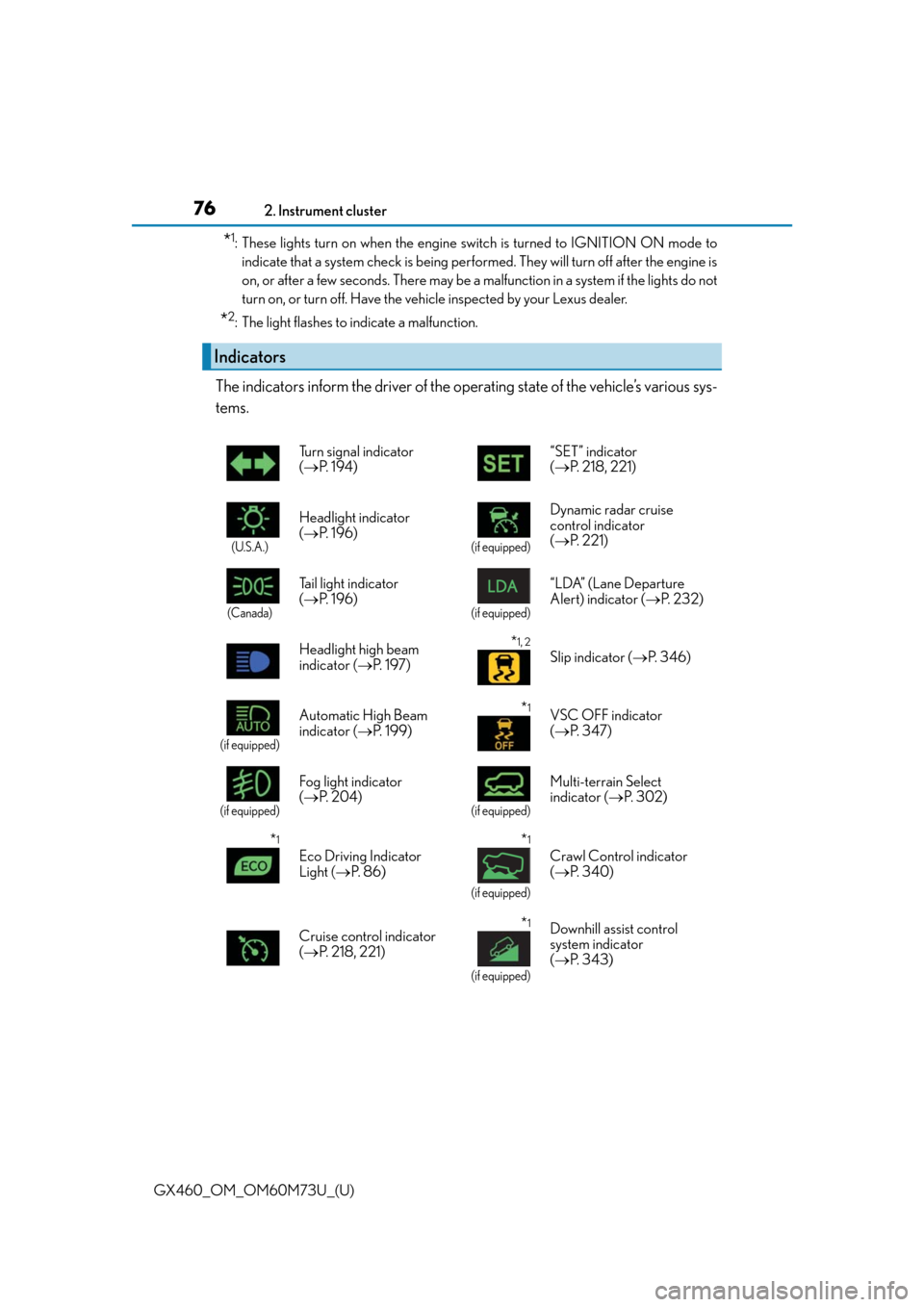
The indicators inform the driver of the operating state of the vehicle’s various sys-
tems.
Indicators
Turn signal indicator
( P. 1 9 4 ) “SET” indicator
(
P. 218, 221)
(U.S.A.)
Headlight indicator
( P. 1 9 6 )
(if equipped)
Dynamic radar cruise
control indicator
( P. 221)
(Canada)
Tail light indicator
( P. 1 9 6 )
(if equipped)
“LDA” (Lane Departure
Alert) indicator ( P. 232)
Headlight high beam
indicator ( P. 1 9 7 )
*1, 2
Slip indicator ( P. 3 4 6 )
(if equipped)
Automatic High Beam
indicator ( P. 1 9 9 )*1VSC OFF indicator
( P. 3 4 7 )
(if equipped)
Fog light indicator
( P. 2 0 4 )
(if equipped)
Multi-terrain Select
indicator ( P. 3 0 2 )
*1
Eco Driving Indicator
Light ( P. 8 6 )
*1
(if equipped)
Crawl Control indicator
( P. 3 4 0 )
Cruise control indicator
( P. 218, 221)
*1
(if equipped)
Downhill assist control
system indicator
( P. 3 4 3 )
Page 77 of 632

GX460_OM_OM60M73U_(U)
772. Instrument cluster
2
Instrument cluster
*1: These lights turn on when the engine switch is turned to IGNITION ON mode toindicate that a system check is being perfor med. They will turn off after the engine is
on, or after a few seconds. There may be a malfunction in a system if the lights do not
turn on, or turn off. Have the vehicle inspected by your Lexus dealer.
*2: The light flashes to indicate that the system is operating.
*3: The light turns on when the system is turn ed off. The light flashes quickly to indicate
that the system is operating.
*4: In order to confirm operation, the BSM outs ide rear view mirror indicators illumi-
nate in the following situations:
• When the engine switch is turned to IGNITION ON mode while the system is set to on.
• When the system is set to on while the engine switch is in IGNITION ON mode.
If the system is functioning correctly, the BSM outside rear view mirror indicators
will turn off after a few seconds.
If the BSM outside rear view mirror indicat ors do not illuminate or do not turn off,
there may be a malfunction with the system.
If this occurs, have the vehicle inspected by your Lexus dealer.
*5: This light illuminates on the outside rear view mirrors.
*6: This light illuminates on the center panel. “2nd STRT” indicator
(
P. 1 9 1 )
(if equipped)
“BSM” (Blind Spot
Monitor) indicator
( P. 3 5 1 )
Low speed four-wheel
drive indicator light
( P. 3 3 6 )
*4, 5
(if equipped)
BSM (Blind Spot Monitor)
outside rear view mirror
indicators ( P. 3 5 1 )
Center differential lock
indicator ( P. 3 3 7 )
*6Security indicator
( P. 6 8 , 7 0 )
(if equipped)
Intuitive parking assist
indicator ( P. 2 3 8 )*1, 6“A I R B A G O N / O F F ”
indicator ( P. 4 6 )
*1, 3
(if equipped)
Pre-collision system
warning light ( P. 3 6 2 )
Page 81 of 632

GX460_OM_OM60M73U_(U)
812. Instrument cluster
2
Instrument cluster
■The meters and display illuminate when
The engine switch is in IGNITION ON mode.
■Instrument cluster brightness adjustment
The instrument cluster brightness levels when the tail lights are on and off can be
adjusted.
■The brightness of the in strument cluster lights
When the tail lights are on, the brightness will change. However, when the surroundings
are bright (daytime, etc.) turn ing on the tail lights will not change the instrument cluster
brightness.
In addition, the brightness of the instrument cluster lights is automatically adjusted based
on the light sensor detecting ho w bright the surroundings are.
■When disconnecting and reconnecting battery terminals
The trip meter data will be reset.
If the trip meter was displayed last, the odometer will be displayed after resetting.
■Customization
Setting of sensitivity of the ambient light sensor used for dimming the meter lights can be
changed. (Customizable features: P. 5 8 6 )
NOTICE
■To prevent damage to the engine and its components
●Do not let the indicator needle of the tachometer enter the red zone, which indicates
the maximum engine speed.
●The engine may be overheating if the engine coolant temperature gauge is in the red
zone (H). In this case, immediately stop the vehicle in a safe place, and check the
engine after it has cooled completely. ( P. 5 5 6 )
Page 86 of 632
86
GX460_OM_OM60M73U_(U)2. Instrument cluster
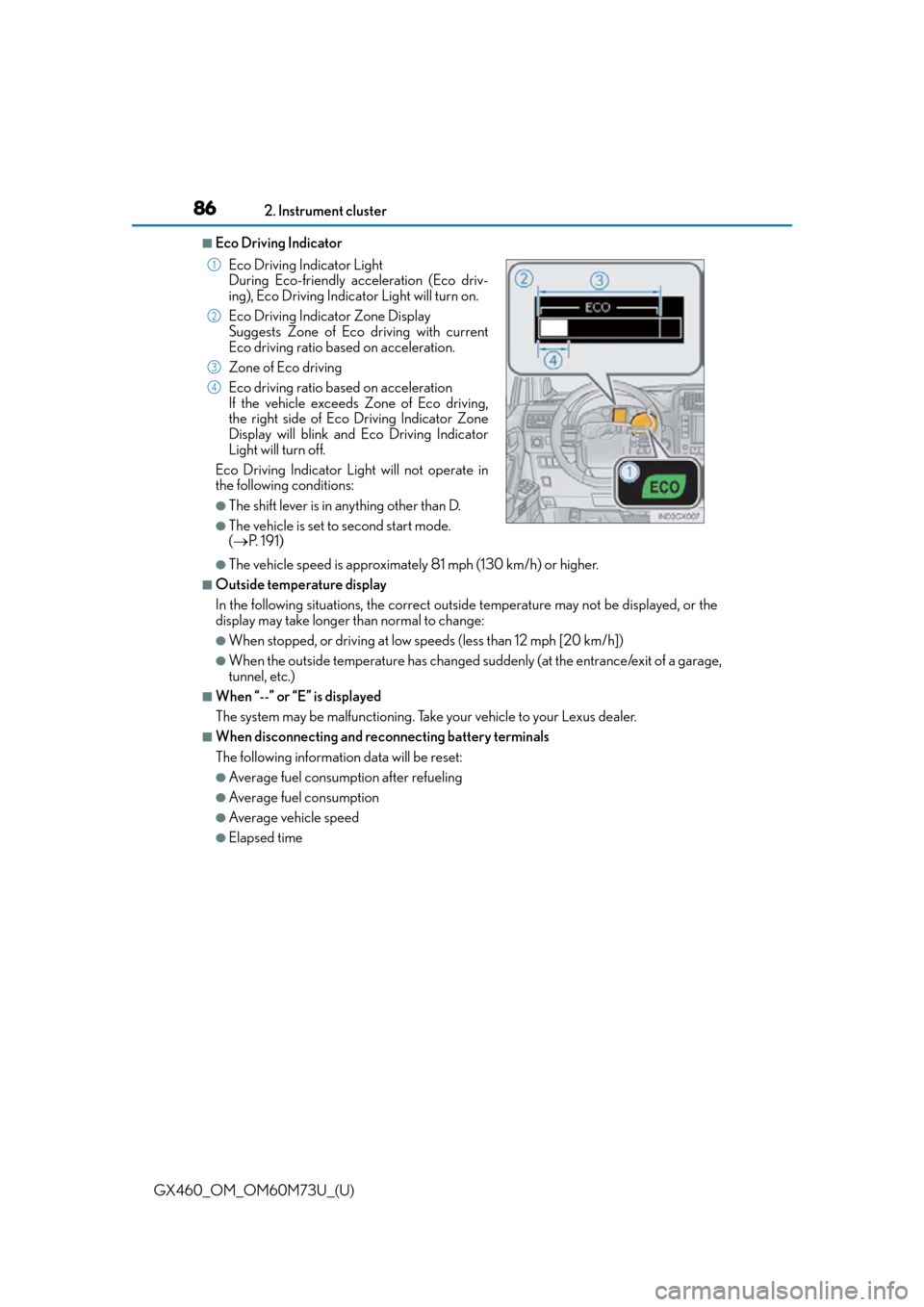
■Eco Driving Indicator
●The vehicle speed is approximately 81 mph (130 km/h) or higher.
■Outside temperature display
In the following situations, the correct outside temperature may not be displayed, or the
display may take longer than normal to change:
●When stopped, or driving at low speeds (less than 12 mph [20 km/h])
●When the outside temperature has changed suddenly (at the entrance/exit of a garage,
tunnel, etc.)
■When “--” or “E” is displayed
The system may be malfunctioning. Take your vehicle to your Lexus dealer.
■When disconnecting and reco
nnecting battery terminals
The following information data will be reset:
●Average fuel consumption after refueling
●Average fuel consumption
●Average vehicle speed
●Elapsed time Eco Driving Indicator Light
During Eco-friendly acceleration (Eco driv-
ing), Eco Driving Indicator Light will turn on.
Eco Driving Indicator Zone Display
Suggests Zone of Eco driving with current
Eco driving ratio based on acceleration.
Zone of Eco driving
Eco driving ratio based on acceleration
If the vehicle exceeds Zone of Eco driving,
the right side of Eco Driving Indicator Zone
Display will blink and Eco Driving Indicator
Light will turn off.
Eco Driving Indicator Light will not operate in
the following conditions:
●The shift lever is in anything other than D.
●The vehicle is set to second start mode.
( P. 1 9 1 )
1
2
3
4
Page 98 of 632
98
GX460_OM_OM60M73U_(U)3-2. Opening, closing and locking the doors
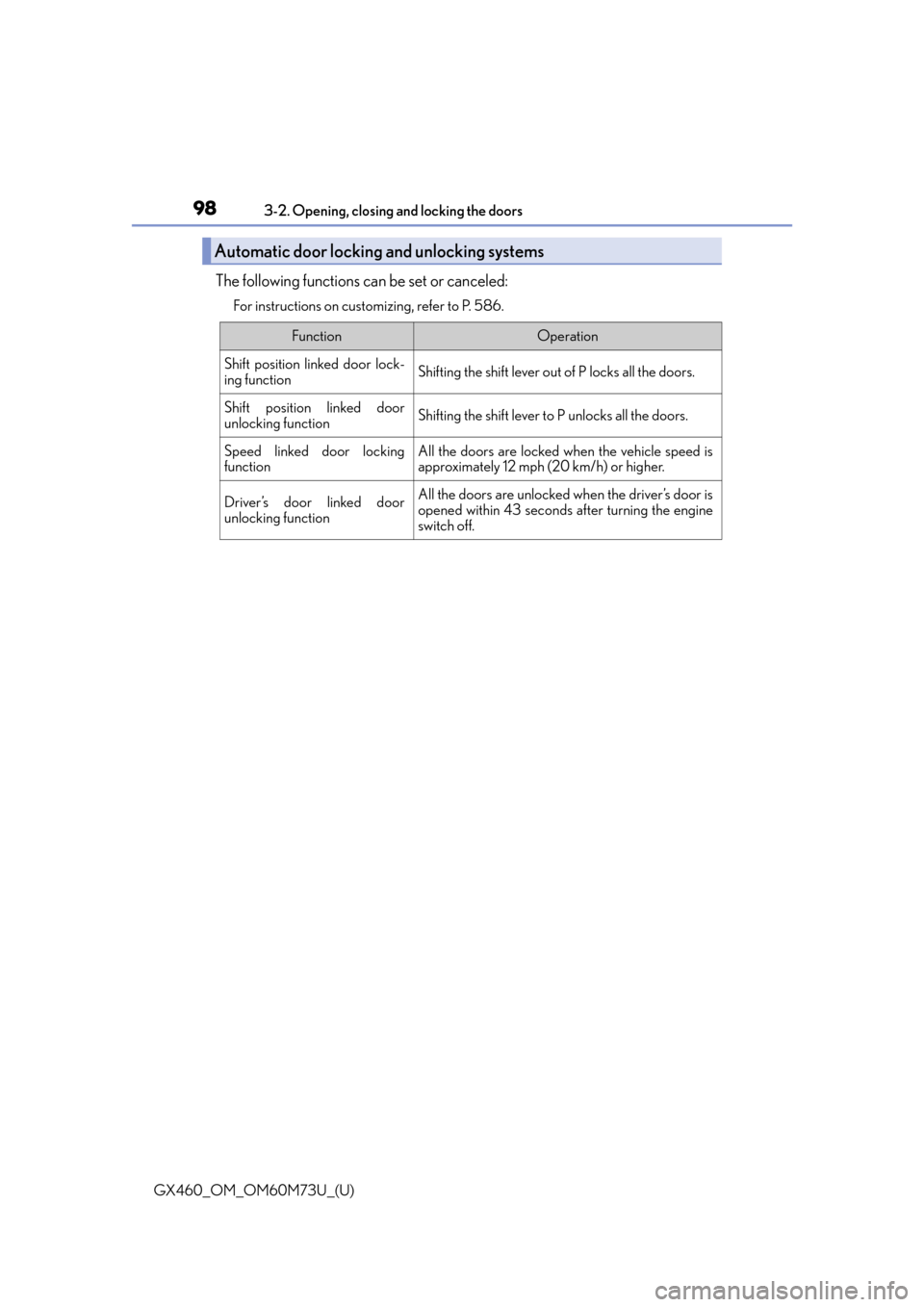
The following functions can be set or canceled:
For instructions on customizing, refer to P. 586.
Automatic door locking and unlocking systems
FunctionOperation
Shift position linked door lock-
ing functionShifting the shift lever out of P locks all the doors.
Shift position linked door
unlocking functionShifting the shift lever to P unlocks all the doors.
Speed linked door locking
functionAll the doors are locked when the vehicle speed is
approximately 12 mph (20 km/h) or higher.
Driver’s door linked door
unlocking functionAll the doors are unlocked when the driver’s door is
opened within 43 seconds after turning the engine
switch off.
Page 99 of 632
GX460_OM_OM60M73U_(U)
993-2. Opening, closing and locking the doors
3
Operation of each component
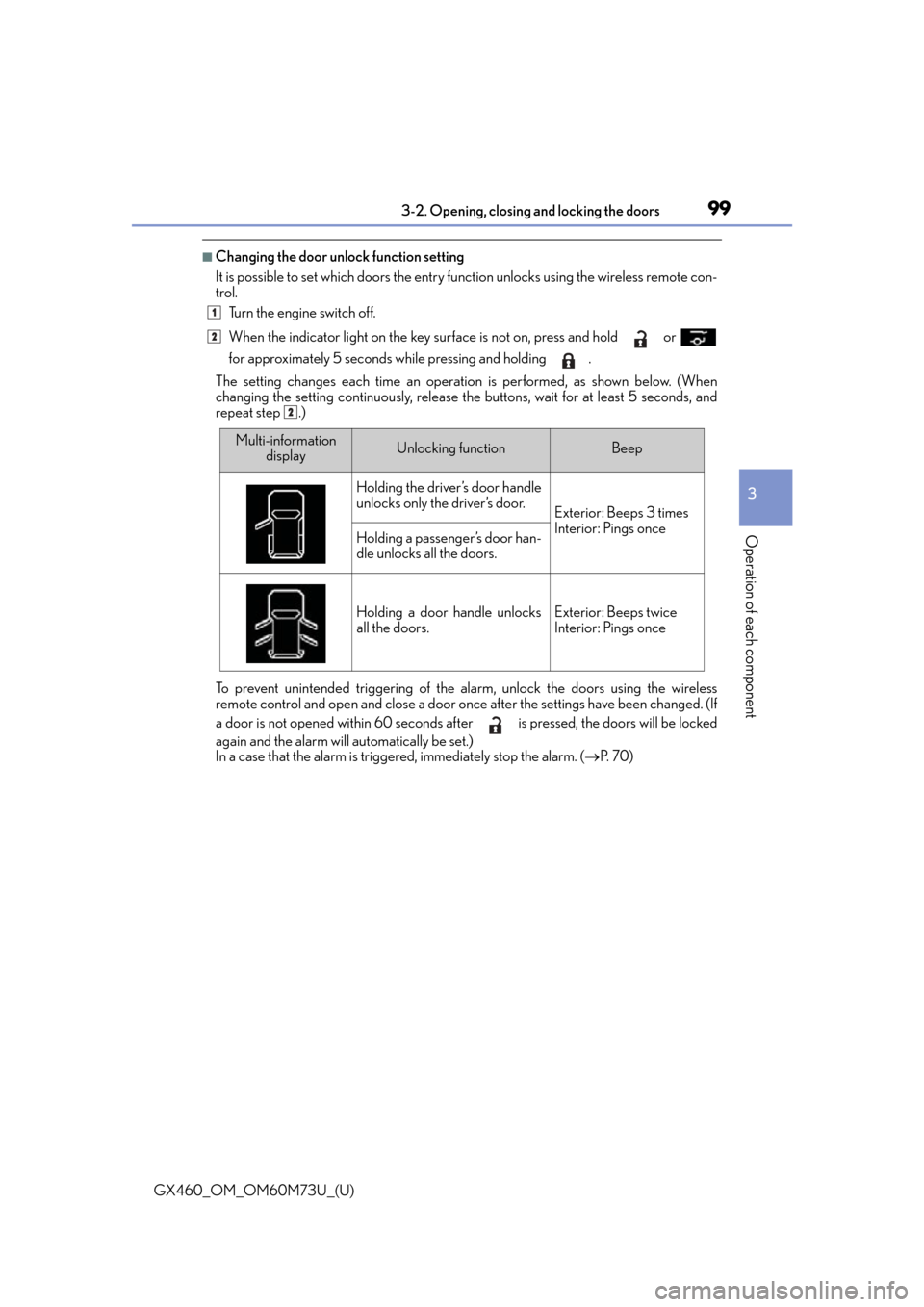
■Changing the door unlock function setting
It is possible to set which doors the entry fu nction unlocks using the wireless remote con-
trol.
Turn the engine switch off.
When the indicator light on the key surface is not on, press and hold or
for approximately 5 seconds while pressing and holding .
The setting changes each time an operatio n is performed, as shown below. (When
changing the setting continuously, release the buttons, wait for at least 5 seconds, and
repeat step .)
To prevent unintended triggering of the alarm, unlock the doors using the wireless
remote control and open and close a door once after the settings have been changed. (If
a door is not opened within 60 seconds af ter is pressed, the doors will be locked
again and the alarm will automatically be set.)
In a case that the alarm is triggered, immediately stop the alarm. ( P. 7 0 )
1
2
2
Multi-information
displayUnlocking functionBeep
Holding the driver’s door handle
unlocks only the driver’s door.
Exterior: Beeps 3 times
Interior: Pings once
Holding a passenger’s door han-
dle unlocks all the doors.
Holding a door handle unlocks
all the doors.Exterior: Beeps twice
Interior: Pings once
Page 112 of 632
112
GX460_OM_OM60M73U_(U)3-2. Opening, closing and locking the doors
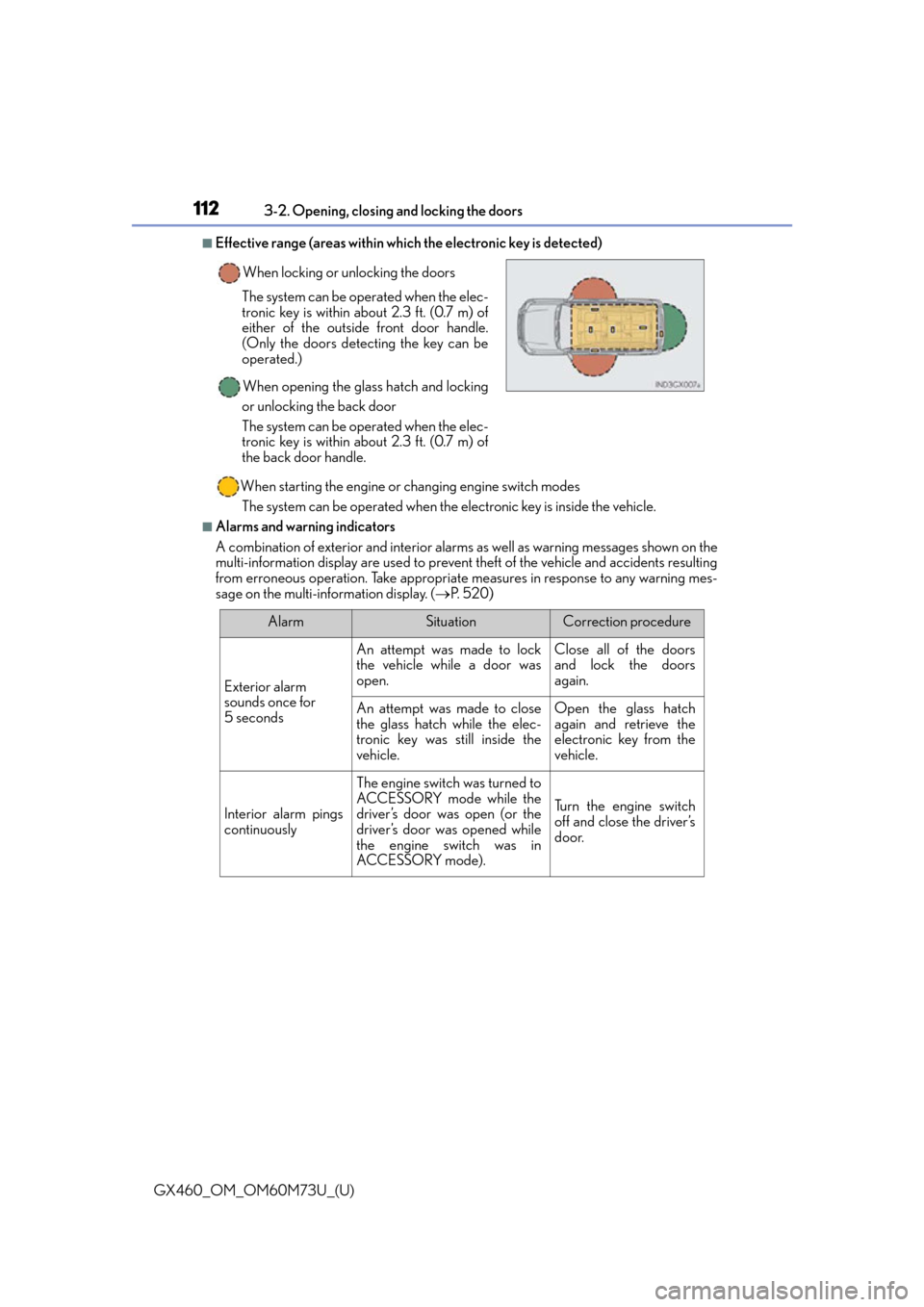
■Effective range (areas within whic
h the electronic key is detected)
When starting the engine or changing engine switch modes
The system can be operated when the electronic key is inside the vehicle.
■Alarms and warning indicators
A combination of exterior and interior alarms as well as warning messages shown on the
multi-information display are used to prevent theft of the vehicle and accidents resulting
from erroneous operation. Take appropriate measures in response to any warning mes-
sage on the multi-information display. ( P. 5 2 0 )
When locking or unlocking the doors
The system can be operated when the elec-
tronic key is within about 2.3 ft. (0.7 m) of
either of the outside front door handle.
(Only the doors detecting the key can be
operated.)
When opening the glass hatch and locking
or unlocking the back door
The system can be operated when the elec-
tronic key is within about 2.3 ft. (0.7 m) of
the back door handle.
AlarmSituationCorrection procedure
Exterior alarm
sounds once for
5 seconds
An attempt was made to lock
the vehicle while a door was
open.Close all of the doors
and lock the doors
again.
An attempt was made to close
the glass hatch while the elec-
tronic key was still inside the
vehicle.Open the glass hatch
again and retrieve the
electronic key from the
vehicle.
Interior alarm pings
continuously
The engine switch was turned to
ACCESSORY mode while the
driver’s door was open (or the
driver’s door was opened while
the engine switch was in
ACCESSORY mode).
Turn the engine switch
off and close the driver’s
door.
Page 114 of 632

114
GX460_OM_OM60M73U_(U)3-2. Opening, closing and locking the doors
■Note for the entry function
●Even when the electronic key is within the
effective range (detection areas), the system
may not operate properly in the following cases:
• The electronic key is too close to the window or outside door handle, near the
ground, or in a high place when the doors are locked or unlocked.
• The electronic key is near the ground or in a high place, or too close to the rear
bumper center when the glass hatch is opened.
• The electronic key is on the instrument pa nel, luggage cover or floor, or in the door
pockets or glove box when the engine is started or engine switch modes are
changed.
●Do not leave the electronic key on top of th e instrument panel or near the door pockets
when exiting the vehicle. Depending on the radio wave reception conditions, it may be
detected by the antenna outside the cabin and the doors will become lockable from the
outside, possibly trapping the el ectronic key inside the vehicle.
●As long as the electronic key is within the effective range, the doors may be locked or
unlocked by anyone. However, only the door s detecting the electronic key can be used
to unlock the vehicle.
●Even if the electronic key is not inside the vehicle, it may be possible to start the engine
if the electronic key is near the window.
●The doors may lock or unlock if a large amou nt of water splashes on the door handle,
such as in the rain or in a car wash, when th e electronic key is within the effective range.
(The doors will automatically be locked after approximately 60 seconds if the doors
are not opened and closed.)
●If the wireless remote control is used to lo ck the doors when the electronic key is near
the vehicle, there is a possibility that the door may not be unlocked by the entry func-
tion. (Use the wireless remote control to unlock the doors.)
●Touching the door lock sensor while wearing gloves may prevent lock operation.
●If the door handle becomes wet while the el ectronic key is within the effective range,
the door may lock and unlock repeatedly. Plac e the electronic key in a location 6 ft. (2
m) or more away from the vehicle. (Take care to ensure that the key is not stolen.)
●If the electronic key is insi de the vehicle and a door handle becomes wet during a car
wash, a message may be shown on the mult i-information display and a buzzer will
sound outside the vehicle. To turn off the alarm, lock all the doors.
●The lock sensor may not work properly if it comes into contact with ice, snow, mud, etc.
Clean the lock sensor and attempt to operate it again, or use the lock sensor on the
lower part of the door handle.
●Fingernails may scrape against the door during operation of the door handle.
Be careful not to injure fingernails or damage the surface of the door.
●A sudden approach to the effective range or door handle may prevent the doors from
being unlocked. In this case, return the door handle to the original position and check
that the doors unlock before pulling the door handle again.
●Unlocking the vehicle may take more time if another electronic key is within the effec-
tive range.
Page 133 of 632

GX460_OM_OM60M73U_(U)
1333-3. Adjusting the seats
3
Operation of each component
■To stop the position recall operation part-way through
Perform any of the following:
●Press the “SET” button.
●Press button “1” or “2”.
●Operate any of the seat adjustment switches (only cancels seat position recall).
●Operate the tilt and telescopic steering co ntrol switch (only cancels steering wheel
position recall).
■Seat positions that can be memorized ( P. 118)
The adjusted positions other than the position adjusted by lumbar support switch can be
recorded.
■Operating the driving position memory after turning the engine switch off
Recorded seat positions can be activated up to 180 seconds after the driver’s door is
opened and another 60 seconds after it is closed again.
■In order to correctly use the dr iving position memory function
If a seat position is already in the furthest po ssible position and the seat is operated in the
same direction, the recorded position may be slightly different when it is recalled.
Each electronic key can be registered to recall your preferred driving position.
■Registering procedure
Record your driving position to button “1” or “2” before performing the follow-
ing:
Carry only the key you want to regist er, and then close the driver’s door.
If 2 or more keys are in the vehicle, the driving position cannot be recorded
properly.
Check that the shift lever is in P.
Turn the engine switch to IGNITION ON mode.
Recall the driving position that you want to record.
Memory recall function
1
2
3