display Lexus GX460 2017 Navigation Manual
[x] Cancel search | Manufacturer: LEXUS, Model Year: 2017, Model line: GX460, Model: Lexus GX460 2017Pages: 403, PDF Size: 14.38 MB
Page 251 of 403
249
4. REAR SEAT ENTERTAINMENT SYSTEM OPERATION
GX460_Navi_OM60N98U_(U)16.05.30 14:27
4
AUDIO/VISUAL SYSTEM
1Display the audio source selection
screen. (→P.232)
2Select “Bluetooth*” .
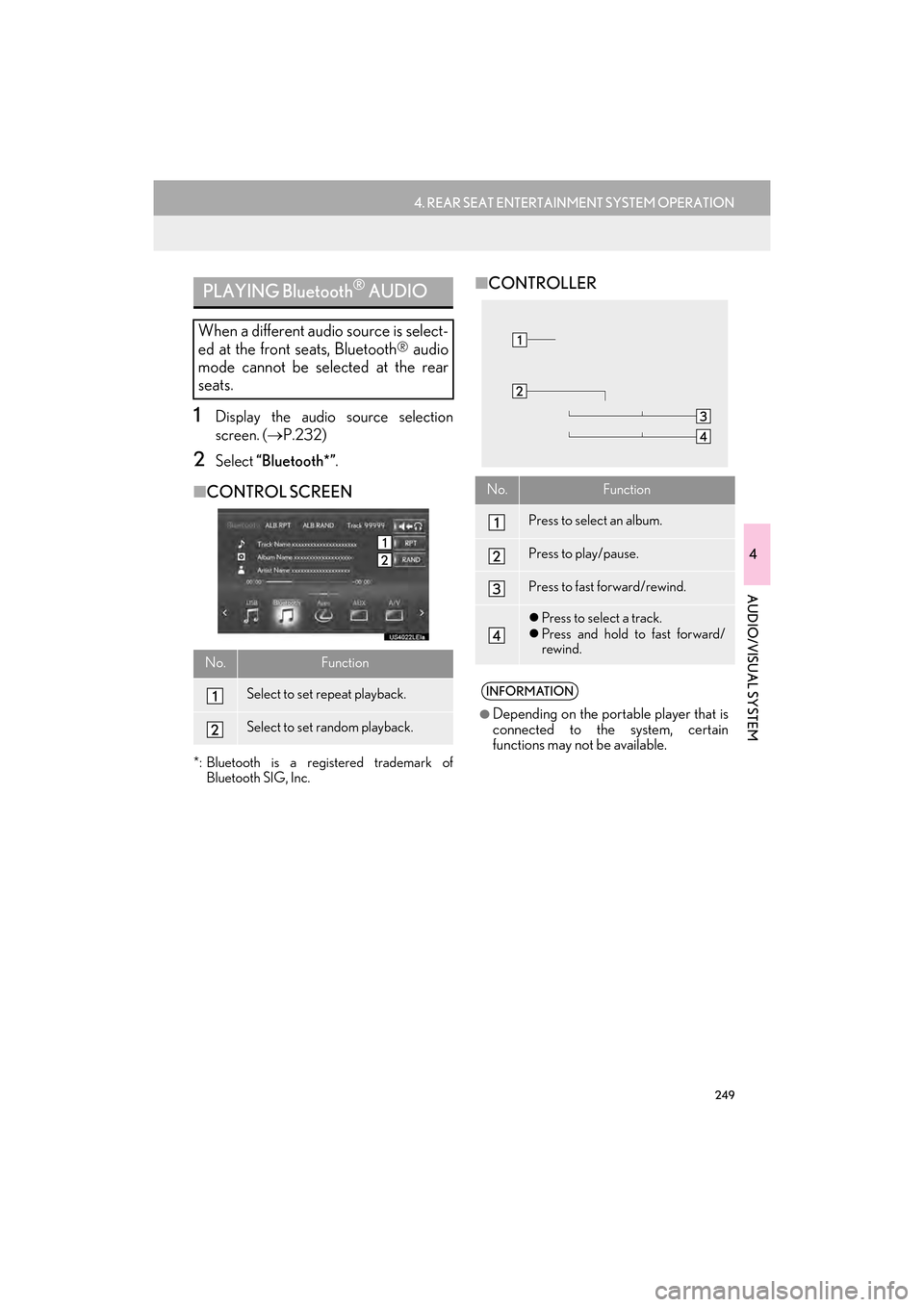
■CONTROL SCREEN
*: Bluetooth is a registered trademark of
Bluetooth SIG, Inc.
■CONTROLLERPLAYING Bluetooth® AUDIO
When a different audio source is select-
ed at the front seats, Bluetooth
® audio
mode cannot be selected at the rear
seats.
No.Function
Select to set repeat playback.
Select to set random playback.
No.Function
Press to select an album.
Press to play/pause.
Press to fast forward/rewind.
z Press to select a track.
z Press and hold to fast forward/
rewind.
INFORMATION
●
Depending on the portable player that is
connected to the system, certain
functions may not be available.
GX_Navi_OM60N98U_(U).book Page 249 Monday, May 30, 2016 2:28 PM
Page 252 of 403

250
4. REAR SEAT ENTERTAINMENT SYSTEM OPERATION
GX460_Navi_OM60N98U_(U)16.05.30 14:27
1Connecting a device to the AUX port.
(→ P.163)
2Display the audio source selection
screen. ( →P.232)
3Select “A U X ” .
1Connecting a device to the AUX port.
(→ P.163)
2Display the audio source selection
screen. ( →P.232)
3Select “A / V ”.
1Press and release the lid, connecting an
audio/visual device.
zThe A/V input port is composed of 3 input
ports.
2Display the audio source selection
screen. ( →P.232)
3Select “Rear-A/V”.
zVideo mode can be selected by using the
controller. (
→P. 2 5 1 )
USING THE AUX MODE
When a different audio source is select-
ed at the front seats, AUX mode cannot
be selected at the rear seats.
USING THE VIDEO MODE
The rear seat entertainment system
plays videos and sound when audio-vid-
eo equipment is connected to the port.
INFORMATION
●
The volume can be adjusted using the
vehicle’s audio controls. All other
operations must be made on the audio/
visual equipment itself. For details about
operation of audio/visual equipment,
refer to the manufacturer’s instructions.
USING THE AUX PORT
USING THE A/V INPUT PORT
ColorFunction
YellowVideo input port
WhiteLeft channel audio input port
RedRight channel audio input port
NOTICE
●When the A/V input port and/or head-
phone jack is not in use, keep the lid
closed. Inserting anything other than an
appropriate plug may cause electrical
failure or a short circuit.
GX_Navi_OM60N98U_(U).book Page 250 Monday, May 30, 2016 2:28 PM
Page 253 of 403

251
4. REAR SEAT ENTERTAINMENT SYSTEM OPERATION
GX460_Navi_OM60N98U_(U)16.05.30 14:27
4
AUDIO/VISUAL SYSTEM
1Press and release the lid, connecting an
audio/visual device.
2Display the audio source selection
screen. (→P.232)
3Select “Rear-HDMI” .
zVideo mode can be selected by using the
controller. (
→P. 2 5 1 )
■COMPATIBLE FORMAT
z Compatible video signal
480p,576p,VGA
z Compatible sound signal
LPCM 2ch
1Press the “INPUT” button.
zWhen the audio/visual device is connected
to A/V input port and HDMI port at the
same time, the mode will be switched by
pressing “INPUT” button each time.
z In video mode, different sound/visual
modes can be enjoyed for the left and right
screens when is off.
USING THE HDMI PORT
About the HDMI terminal, the interface
that is connected video and audio to sys-
tem and audio/visual device. You can
enjoy the high-definition video and au-
dio by connecting the single cable to the
HDMI terminal and the system.
NOTICE
●When the HDMI port and/or headphone
jack is not in use, keep the lid closed.
Inserting anything other than an appro-
priate plug may cause electrical failure or
a short circuit.
The terms HDMI and HDMI High-Defi-
nition Multimedia Interface, and the
HDMI Logo are trademarks or regis-
tered trademarks of HDMI Licensing
LLC in the United States and other
countries.
SELECTING THE VIDEO
MODE BY USING THE
CONTROLLER
GX_Navi_OM60N98U_(U).book Page 251 Monday, May 30, 2016 2:28 PM
Page 255 of 403

253
4. REAR SEAT ENTERTAINMENT SYSTEM OPERATION
GX460_Navi_OM60N98U_(U)16.05.30 14:27
4
AUDIO/VISUAL SYSTEM
1Press the “SETTING” button.
2Select “PAL Video” .
zThe “PAL Video” indicator is highlighted.
1Press the “SETTING” button.
2Select “LCD AI” .
zThe “LCD AI” indicator is highlighted.
CHANGING TO PAL FORMAT
Turn “PAL Video” on when PAL format
equipment is connected to the A/V in-
put port.SETTING LCD AI
Automatically determines the tone of
the video image and sets the contrast to
an optimum level, displaying a sharp im-
age.
INFORMATION
●
Because the image quality is
automatically adjusted when the “LCD
AI” indicator is on, brightness and
contrast adjustment becomes less
effective.
GX_Navi_OM60N98U_(U).book Page 253 Monday, May 30, 2016 2:28 PM
Page 256 of 403

254
4. REAR SEAT ENTERTAINMENT SYSTEM OPERATION
GX460_Navi_OM60N98U_(U)16.05.30 14:27
1Press the “SETTING” button.
2Select the “Screen Size” tab.
3Select “Normal 1” , “Normal 2” or “Full”. If “Check DISC” appears on the screen: It
indicates that the disc is dirty, damaged, or it
was inserted upside down. Clean the disc or
insert it correctly.
If “Region code error” appears on the
screen
: It indicates that the DVD region
code is not set properly. Insert a disc with a
region code of “ALL” or “1”.
If “DISC error” appears on the screen : The
following causes are possible:
• There is a problem inside the system. Eject the disc.
• The inside of the player unit may be too hot due to a very high ambient tempera-
ture. Eject the disc and allow the player to
cool down.
If “No supported data.” appears on the
screen : It indicates that the iPod or USB has
no playable data. If a disc which is not play-
able is inserted, “No supported data.” will
also appear on the screen. For appropriate
discs for the player: →P.268
If the malfunction is not rectified : Take
your vehicle to your Lexus dealer.
SCREEN SIZE SETTINGSIF THE REAR SEAT
ENTERTAINMENT SYSTEM
MALFUNCTIONS
If the rear seat entertainment system
malfunctions, the system will display a
message.
These are described below.
GX_Navi_OM60N98U_(U).book Page 254 Monday, May 30, 2016 2:28 PM
Page 261 of 403

259
6. SETUP
GX460_Navi_OM60N98U_(U)16.05.30 14:27
4
AUDIO/VISUAL SYSTEM
1Display the audio setting screen.
(→ P.258)
2Select “iPod Settings” .
3Select “Video Sound Input” .
4Select a screen button for the desired
setting.
1Display the audio setting screen.
(→ P.258)
2Select “External Video Settings” .
3Select “Video Signal Switch” .
4Select a screen button for the desired
setting.
iPod SETTINGSEXTERNAL VIDEO SETTINGS
GX_Navi_OM60N98U_(U).book Page 259 Monday, May 30, 2016 2:28 PM
Page 262 of 403

260
6. SETUP
GX460_Navi_OM60N98U_(U)16.05.30 14:27
1Display the audio setting screen.
(→ P.258)
2Select “Number of Radio Presets” .
3Select the button with the desired num-
ber to be displayed.
z“Default” : Select to default the settings.
1Display the audio setting screen.
(→ P.258)
2Select “Cover Art Settings” .
3Select the desired button to be set.
SETTING THE NUMBER OF
RADIO PRESETSCOVER ART SETTINGS
No.Function
Select on/off to set the cover art dis-
play in DISC mode.
Select on/off to set the cover art dis-
play in USB mode.
Select on/off to set the priority of the
Gracenote database in USB mode.
Select on/off to set the cover art dis-
play in iPod mode.
Select on/off to set the priority of the
Gracenote database in iPod mode.
INFORMATION
●
Images from the Gracenote database
displayed on the screen may be different
from the actual cover art.
GX_Navi_OM60N98U_(U).book Page 260 Monday, May 30, 2016 2:28 PM
Page 263 of 403
261
6. SETUP
GX460_Navi_OM60N98U_(U)16.05.30 14:27
4
AUDIO/VISUAL SYSTEM
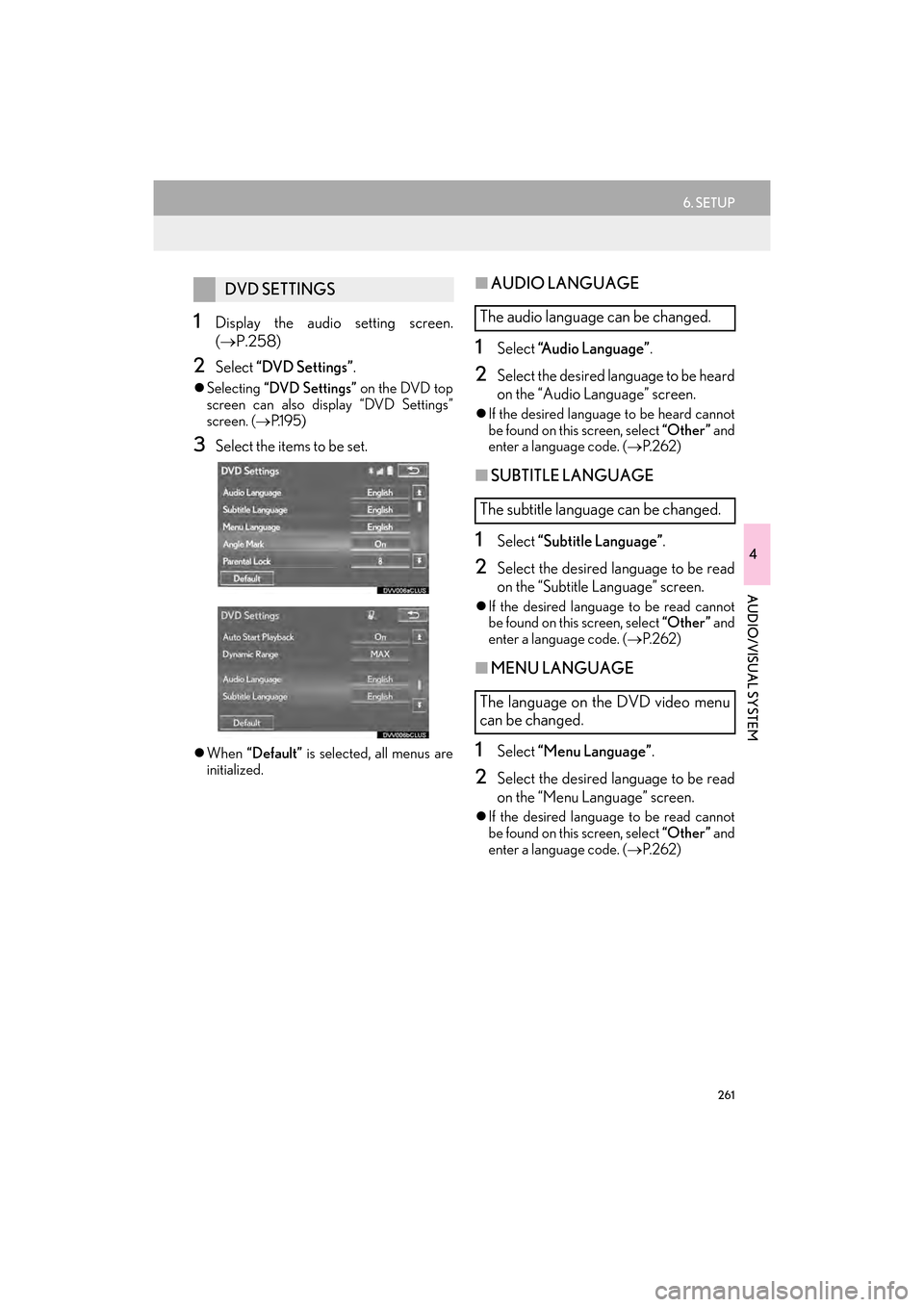
1Display the audio setting screen.
(→ P.258)
2Select “DVD Settings” .
zSelecting “DVD Settings” on the DVD top
screen can also display “DVD Settings”
screen. ( →P.1 9 5 )
3Select the items to be set.
zWhen “Default” is selected, all menus are
initialized.
■ AUDIO LANGUAGE
1Select “Audio Language” .
2Select the desired language to be heard
on the “Audio Language” screen.
zIf the desired language to be heard cannot
be found on this screen, select “Other ” and
enter a language code. ( →P. 2 6 2 )
■SUBTITLE LANGUAGE
1Select “Subtitle Language” .
2Select the desired language to be read
on the “Subtitle Language” screen.
zIf the desired language to be read cannot
be found on this screen, select “Other ” and
enter a language code. ( →P. 2 6 2 )
■MENU LANGUAGE
1Select “Menu Language” .
2Select the desired language to be read
on the “Menu Language” screen.
zIf the desired language to be read cannot
be found on this screen, select “Other ” and
enter a language code. ( →P. 2 6 2 )
DVD SETTINGS
The audio language can be changed.
The subtitle language can be changed.
The language on the DVD video menu
can be changed.
GX_Navi_OM60N98U_(U).book Page 261 Monday, May 30, 2016 2:28 PM
Page 277 of 403

275
7. TIPS FOR OPERATING THE AUDIO/VISUAL SYSTEM
GX460_Navi_OM60N98U_(U)16.05.30 14:27
4
AUDIO/VISUAL SYSTEM
zMP3 (MPEG Audio Layer 3), WMA
(Windows Media Audio) and AAC
(Advanced Audio Coding) are audio com-
pression standards.
z This system can play MP3/WMA/AAC
files on CD-R, CD-RW, DVD-R, DVD-RW
discs and USB memory.
z This system can play disc recordings com-
patible with ISO 9660 level 1 and level 2
and with the Romeo and Joliet file system.
z When naming an MP3/WMA/AAC file,
add an appropriate file extension (.mp3/
.wma/.m4a).
z This system plays back files with .mp3/
.wma/.m4a file extensions as MP3/WMA/
AAC files respectively. To prevent noise
and playback errors, use the appropriate
file extension.
z This system can play only the first session
when using multi-session compatible CDs.
z MP3 files are compatible with the ID3 Tag
Ve r. 1 . 0 , Ve r. 1 .1 , Ve r. 2 . 2 a n d Ve r. 2 . 3 f o r -
mats. This system cannot display disc title,
track title and artist name in other formats.
z WMA/AAC files can contain a WMA/
AAC tag that is used in the same way as an
ID3 tag. WMA/AAC tags carry informa-
tion such as track title and artist name.
z The emphasis function is available only
when playing MP3/WMA files recorded at
32, 44.1 and 48 kHz.
z This system can play back AAC files
encoded by iTunes. z
The sound quality of MP3/WMA files gen-
erally improves with higher bit rates. In
order to achieve a reasonable level of
sound quality, discs recorded with a bit rate
of at least 128 kbps are recommended.
z M3u playlists are not compatible with the
audio player.
z MP3i (MP3 interactive) and MP3PRO
formats are not compatible with the audio
player.
z The player is compatible with VBR (Vari-
able Bit Rate).
z When playing back files recorded as VBR
(Variable Bit Rate) files, the play time will
not be correctly displayed if the fast for-
ward or reverse operations are used.
z It is not possible to check folders that do not
include MP3/WMA/AAC files.
z MP3/WMA/AAC files in folders up to 8
levels deep can be played. However, the
start of playback may be delayed when
using discs containing numerous levels of
folders. For this reason, we recommend
creating discs with no more than 2 levels of
folders.
GX_Navi_OM60N98U_(U).book Page 275 Monday, May 30, 2016 2:28 PM
Page 283 of 403

281
1. VOICE COMMAND SYSTEM OPERATION
5
VOICE COMMAND SYSTEM
GX460_Navi_OM60N98U_(U)16.05.30 14:27
1Press the talk switch.
2Say the tab selection command or se-
lect the desired tab.
zCommands related with each function are
displayed on the screen of the each func-
tion tab.
3Say the desired command.
zRegistered POIs, registered names in the
contacts list etc., can be said in the place of
the “<>” next to the commands. ( →P. 2 8 9 )
For example: Say “Find nearby dining” ,
“Call John Smith” etc.
z If a desired outcome is not shown, or if no
selections are available, perform one of the
following to return to the previous screen:
•Say “Go back” .
•Select “Go Back” .
z To cancel voice recognition, select
, or press and hold the talk switch.
VOICE COMMAND SYSTEM
OPERATION
The voice commands of multifunction
can be confirmed by selecting a tab. The
tabs are found on the upper part of the
screen.
All commands that are not displayed on
the screen can be recognized on any
screens.
zVoice guidance for the voice command
system can be skipped by pressing the
talk switch.
zSaying “Help” prompts voice guidance to
offer examples of commands and opera-
tion methods.
GX_Navi_OM60N98U_(U).book Page 281 Monday, May 30, 2016 2:28 PM