display Lexus GX460 2017 Navigation Manual
[x] Cancel search | Manufacturer: LEXUS, Model Year: 2017, Model line: GX460, Model: Lexus GX460 2017Pages: 403, PDF Size: 14.38 MB
Page 297 of 403

6
295
1
2
3 4
56
7
8
GX460_Navi_OM60N98U_(U)16.05.30 14:27
1. RECEIVING DOPPLER WEATHER INFORMATION .................................. 296
DISPLAYING DOPPLER WEATHER
INFORMATION ................................................. 296
2. DATA SERVICES SETTINGS ............. 298
SETTING DOWNLOAD METHODS ........ 298
1INFORMATION DISPLAY
INFORMATION
GX_Navi_OM60N98U_(U).book Page 295 Monday, May 30, 2016 2:28 PM
Page 298 of 403

296
GX460_Navi_OM60N98U_(U)16.05.30 14:27
1. INFORMATION DISPLAY
1. RECEIVING DOPPLER WEATHER INFORMATION
1Press the “INFO/APPS” button.
2Select “Weather” .
3Check that the “Weather” screen is dis-
played.Doppler weather radar information can
be received via the HD radio or by the
LEXUS App Suite application on a
Bluetooth
® phone. For details about the
LEXUS App Suite application: →P.351
DISPLAYING DOPPLER
WEATHER INFORMATION
No.Function
Select to display the weather of the
current location. ( →P.297)
Select to display the weather of a de-
sired location in the recently
checked locations list.
Select to display the weather of a de-
sired location in the national cities
list.
Select to display the weather of a de-
sired location in the other local cities
list.
Select to display Doppler weather
radar information over the map.
GX_Navi_OM60N98U_(U).book Page 296 Monday, May 30, 2016 2:28 PM
Page 299 of 403

297
1. INFORMATION DISPLAY
6
INFORMATION
GX460_Navi_OM60N98U_(U)16.05.30 14:27
1Display the “Weather” screen.
(→ P.296)
2Select “Current Weather” .
3Select the desired tab to be displayed.
X When the “Current” tab is selected
X When the “3 Day” tab is selected
zWhen a specific day is selected, weather
information for that day will be displayed.
X When the “6/12 Hour” tab is selectedDISPLAYING THE WEATHER
OF THE CURRENT LOCATION
INFORMATION
●
If weather is set to the home screen, the
weather screen of the current location
will be displayed.
GX_Navi_OM60N98U_(U).book Page 297 Monday, May 30, 2016 2:28 PM
Page 300 of 403

298
1. INFORMATION DISPLAY
GX460_Navi_OM60N98U_(U)16.05.30 14:27
2. DATA SERVICES SETTINGS
1Press the “SETUP” button.
2Select “Data Services Settings” .
3Select the desired item to be set.
zSelect a checkbox on the right to set.
SETTING DOWNLOAD
METHODS
Data service information, which is com-
prised of traffic information and weather
information, can be received via the HD
radio and by the LEXUS App Suite ap-
plication on a Bluetooth
® phone. The
receiving method can be set to both or
only via the HD radio. For details about
the LEXUS App Suite application:
→ P.351
No.Function
Select to receive data service infor-
mation via both the HD radio and the
LEXUS App Suite application on a
Bluetooth
® phone. When both
methods are available, the HD radio
will be selected.
Select to receive data only via the
HD radio.
GX_Navi_OM60N98U_(U).book Page 298 Monday, May 30, 2016 2:28 PM
Page 301 of 403

7
299
1
2
3
4
5
6
7
8
GX460_Navi_OM60N98U_(U)16.05.30 14:27
1. QUICK REFERENCE ........................... 300
2. SOME BASICS ......................................... 301
REGISTERING/CONNECTING A Bluetooth® PHONE ..................................... 302
USING THE PHONE SWITCH/ MICROPHONE ................................................. 302
VOICE COMMAND SYSTEM...................... 303
ABOUT THE CONTACTS IN THE CONTACT LIST ................................ 304
WHEN SELLING OR DISPOSING OF THE VEHICLE ............................................. 304
3. CALLING ON THE Bluetooth®
PHONE.................................................... 305
BY FAVORITES LIST ........................................... 306
BY CALL HISTORY ............................................. 306
BY CONTACTS LIST .......................................... 307
BY DIAL PAD ............................................................ 310
BY OFF HOOK SWITCH ................................... 310
4. RECEIVING ON THE Bluetooth®
PHONE...................................................... 311
INCOMING CALLS ............................................... 311
5. TALKING ON THE Bluetooth®
PHONE..................................................... 312
INCOMING CALL WAITING ......................... 314
6. Bluetooth® PHONE MESSAGE
FUNCTION............................................. 315
RECEIVING A MESSAGE ................................. 316
CHECKING MESSAGES ................................... 317
REPLYING TO A MESSAGE
(QUICK REPLY)................................................... 318
CALLING THE MESSAGE SENDER ......... 320
1. PHONE/MESSAGE SETTINGS ....... 322
PHONE/MESSAGE SETTINGS SCREEN......................................... 322
“Sound Settings” SCREEN ................................. 323
“Contact/Call History Settings” SCREEN ................................................................. 324
“Messaging Settings” SCREEN ........................ 335
“Phone Display Settings” SCREEN .................. 337
1. TROUBLESHOOTING ........................ 338
1
PHONE OPERATION
(HANDS-FREE SYSTEM FOR
CELLULAR PHONES)
2SETUP
3WHAT TO DO IF...
PHONE
GX_Navi_OM60N98U_(U).book Page 299 Monday, May 30, 2016 2:28 PM
Page 302 of 403

300
GX460_Navi_OM60N98U_(U)16.05.30 14:27
1. PHONE OPERATION (HANDS-FREE SYSTEM FOR CELLULAR PHONES)
1. QUICK REFERENCE
The phone top screen can be used to make a phone call. To display the hands-free op-
eration screen, press the
button, or the switch on the steering wheel.
Several functions are available to operate on each screen that is displayed by selecting
the 4 tabs.
FunctionPage
Phone operation
Registering/connecting Bluetooth® device40
Calling on the Bluetooth® phone305
Receiving on the Bluetooth® phone311
Talking on the Bluetooth® phone312
Message functionUsing the Bluetooth® phone message function315
Setting up a phonePhone settings322
Bluetooth® settings45
GX_Navi_OM60N98U_(U).book Page 300 Monday, May 30, 2016 2:28 PM
Page 304 of 403

302
1. PHONE OPERATION (HANDS-FREE SYSTEM FOR CELLULAR PHONES)
GX460_Navi_OM60N98U_(U)16.05.30 14:27
XSteering switch
Volume control switch
z Press the “+” side to increase the volume.
z Press the “-” side to decrease the volume.
Off hook switch
On hook switch
REGISTERING/
CONNECTING A Bluetooth®
PHONE
To use the hands-free system for cellular
phones, it is necessary to register a cel-
lular phone with the system. ( →P.40)
Bluetooth® PHONE
CONDITION DISPLAY
The condition of the Bluetooth
® phone
appears on the upper right side of the
screen. ( →P.14)
USING THE PHONE SWITCH/
MICROPHONE
By pressing the phone switch, a call can
be received or ended without taking
your hands off the steering wheel.
GX_Navi_OM60N98U_(U).book Page 302 Monday, May 30, 2016 2:28 PM
Page 307 of 403

305
1. PHONE OPERATION (HANDS-FREE SYSTEM FOR CELLULAR PHONES)
GX460_Navi_OM60N98U_(U)16.05.30 14:27
7
PHONE
3. CALLING ON THE Bluetooth® PHONE
1Press the button.
2Select the desired tab to call from.
zThe phone top screen can be displayed by
pressing the
switch on the steering
wheel.
After a Bluetooth® phone has been reg-
istered, a call can be made using the
hands-free system. There are several
methods by which a call can be made, as
described below.
How to make a call listPage
By favorites list306
By call history306
By contacts list*307
By dial pad*310
By e-mail/SMS/MMS320
By POI call83
By off hook switch310
By LEXUS App Suite*364
By voice command system286
*: The operation cannot be performed while driving.
GX_Navi_OM60N98U_(U).book Page 305 Monday, May 30, 2016 2:28 PM
Page 308 of 403

306
1. PHONE OPERATION (HANDS-FREE SYSTEM FOR CELLULAR PHONES)
GX460_Navi_OM60N98U_(U)16.05.30 14:27
1Display the phone top screen.
(→ P.305)
2Select the “Favorites” tab and select the
desired contact.
3Select the desired number.
4Check that the “Call” screen is dis-
played.
1Display the phone top screen.
( → P.305)
2Select the “Call History” tab and select
or the desired contact.
z The icons of call type are displayed.
: Missed call
: Incoming call
: Outgoing call
BY FAVORITES LIST
Calls can be made using registered con-
tacts which can be selected from a con-
tact list. ( →P.332)
BY CALL HISTORY
Up to 30 of the latest call history items
(missed, incoming and outgoing) can be
selected from the “Call History” tab.
GX_Navi_OM60N98U_(U).book Page 306 Monday, May 30, 2016 2:28 PM
Page 309 of 403
307
1. PHONE OPERATION (HANDS-FREE SYSTEM FOR CELLULAR PHONES)
7
PHONE
GX460_Navi_OM60N98U_(U)16.05.30 14:27
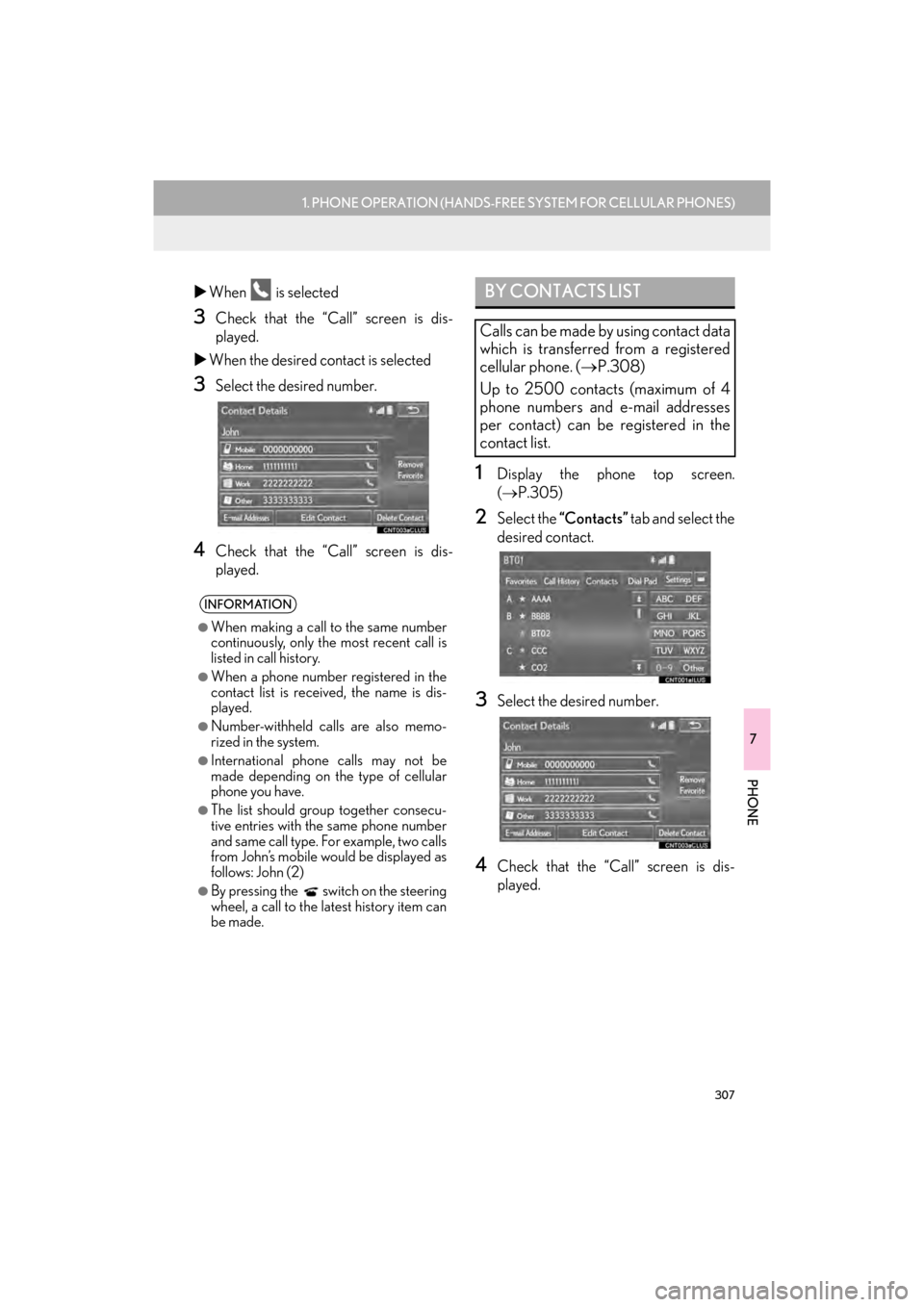
XWhen is selected
3Check that the “Call” screen is dis-
played.
X When the desired contact is selected
3Select the desired number.
4Check that the “Call” screen is dis-
played.
1Display the phone top screen.
(→ P.305)
2Select the “Contacts” tab and select the
desired contact.
3Select the desired number.
4Check that the “Call” screen is dis-
played.
INFORMATION
●
When making a call to the same number
continuously, only the most recent call is
listed in call history.
●When a phone number registered in the
contact list is received, the name is dis-
played.
●Number-withheld calls are also memo-
rized in the system.
●International phone calls may not be
made depending on the type of cellular
phone you have.
●The list should group together consecu-
tive entries with the same phone number
and same call type. For example, two calls
from John’s mobile would be displayed as
follows: John (2)
●By pressing the switch on the steering
wheel, a call to the latest history item can
be made.
BY CONTACTS LIST
Calls can be made by using contact data
which is transferred from a registered
cellular phone. ( →P.308)
Up to 2500 contacts (maximum of 4
phone numbers and e-mail addresses
per contact) can be registered in the
contact list.
GX_Navi_OM60N98U_(U).book Page 307 Monday, May 30, 2016 2:28 PM