Eco Lexus GX460 2017 Owners Manual
[x] Cancel search | Manufacturer: LEXUS, Model Year: 2017, Model line: GX460, Model: Lexus GX460 2017Pages: 644, PDF Size: 20.93 MB
Page 242 of 644
240
GX 460 _O M_ OM6 0F 6 8U _(U )4-5. Using the driving support systems
■Temporary cancelation of the LDA system
If any of the following occurs, the LDA system
will be temporarily canceled. The functions
will resume after the necessary operating conditions have returned.
●The turn signal lever is operated.
●The brake pedal is depressed.
●The vehicle speed deviates from the operating range of the LDA system.
●The lane lines cannot be recognized while driving.
●The wiper operates continuously.
●When the lane departure warning function is activated.
Once the lane departure warning function is activated, it will be temporarily canceled
and resume a few seconds later.
■The lane departure warning
Depending on the audio system sound level or air conditioning fan noise while the audio
system or air conditioning system is in use, it may be difficult to hear the warning sound.
■After the vehicle has been parked in the sun
The LDA system may not be available and a warning message ( →P. 531) will be dis-
played for a while after driving has started. When the temperature in the cabin decreases
and the temperature around the camera sensor ( →P. 238) becomes suitable for its
operation, the functions will begin to operate.
GX460_OM_OM60F68U_(U).book Page 240 Wednesday, June 8, 2016 6:37 PM
Page 243 of 644

GX 460 _O M_ OM6 0F 6 8U _(U )
2414-5. Using the driving support systems
4
Driving
■Conditions in which the function may not operate correctly
In the following conditions, th e camera sensor may be unable to recognize lane markers
causing the lane departure warning function to operate incorrectly. However, this does
not indicate a malfunction.
●When driving through an area with no lane markers, such as a tollbooth, a crossing or
before a ticket checkpoint
●When driving on a sharp curve
●When lane markers are extremely narrow or extremely wide
●When the vehicle leans to one side an unusual amount due to a heavy load or improper
tire inflation pressure
●When the following distance between your vehicle and the vehicle ahead is extremely
short
●When the lane markers are yellow (These ma y be more difficult for the system to rec-
ognize compared to white markers.)
●When the lane markers are broken, “Botts’ dots”, “Raised pavement marker” or stones
●When the lane markers are on a curb etc.
●When lane markers are obscured or partially obscured by sand, dirt, etc.
●When there are shadows on the road running parallel with lane markers, or if a shadow
covers the lane markers
●When driving on a particularly bright road surface, such as concrete
●When driving on a road surface that is bright due to reflected light
●When driving in a location where the light leve l changes rapidly, such as the entrance to
or exit from a tunnel
●When sunlight or the headlight s of oncoming vehicles are shining directly into the cam-
era lens
●When driving on roads that are branching or merging
●When driving on a road surface that is wet du e to rain, previous rainfall, standing water,
etc.
●When the vehicle experiences strong up-and-down motion such as when driving on an
extremely rough road or on a seam in the pavement
●When headlight brightness at nighttime is reduced due to dirt on the lenses, or when
the headlights are misaligned
●When driving on winding roads or roads that are uneven
●When driving on rough or unpaved roads
■When changing the tires
Depending on the tires used, such as snow tire, etc., sufficient performance may not be
maintainable.
■Warning messages and buzzers for LDA system
Warning messages and buzzers are used to indicate a system malfunction or to inform
the driver of the need for caution while driving. ( →P. 5 3 1 , 5 3 2 )
GX460_OM_OM60F68U_(U).book Page 241 Wednesday, June 8, 2016 6:37 PM
Page 263 of 644

GX 460 _O M_ OM6 0F 6 8U _(U )
2614-5. Using the driving support systems
4
Driving
CAUTION
■When using the rear view monitor system
The rear view monitor system is a supplemental device intended to assist the driver
when backing up. When backing up, be sure to check visually behind and all around
the vehicle before proceeding.
Observe the following precautions to avoid an accident that could result in death or
serious injuries.
●Never depend on the rear view monitor system entirely when backing up. The image
and the position of the guide lines displayed on the screen may differ from the actual
state.
Use caution, just as you would when backing up any vehicle.
●Be sure to back up slowly, depressing the brake pedal to control vehicle speed.
●The instructions given are only guide lines.
When and how much to turn the steering wh eel will vary according to traffic condi-
tions, road surface conditions, vehicle condit ion, etc. when parking. It is necessary to
be fully aware of this before using the rear view monitor system.
●When parking, be sure to check that the parking space will accommodate your vehi-
cle before maneuvering into it.
●Do not use the rear view monitor system in the following cases:
• On icy or slick road surfaces, or in snow
•When using tire chains
• When the back door is not closed completely
• On roads that are not flat or straight, such as curves or slopes.
●In low temperatures, the screen may darken or the image may become faint. The
image could distort when the vehicle is moving, or you may become unable to see the
image on the screen. Be sure to check direct visually and with the mirrors all around
the vehicle before proceeding.
●If the tire sizes are changed, the position of the fixed guide lines displayed on the
screen may change.
●The camera uses a special lens. The distances between objects and pedestrians that
appear in the image displayed on the scre en will differ from the actual distances.
( → P. 2 5 6 )
GX460_OM_OM60F68U_(U).book Page 261 Wednesday, June 8, 2016 6:37 PM
Page 288 of 644

286
GX 460 _O M_ OM6 0F 6 8U _(U )4-5. Using the driving support systems
CAUTION
■When using the Lexus parking assist monitor system
The parking assist monitor is a supplemental
device intended to assist the driver when
backing up. When backing up, be sure to check visually behind and all around the vehi-
cle before proceeding.
Observe the following precautions to avoid an accident that could result in death or
serious injuries.
●Never depend on the parking assist monitor entirely when backing up. The image
and the position of the guide lines displayed on the screen may differ from the actual
state.
Use caution, just as you would when backing up any vehicle.
●Be sure to back up slowly, depressing the brake pedal to control vehicle speed.
●If you seem likely to hit nearby vehicles, obstacles, people or mount the shoulder,
depress the brake pedal to stop the vehicle, then disable the assist system by select
on the screen to cancel the system.
●The instructions given are only guidelines.
When and how much to turn the steering wh eel will vary according to traffic condi-
tions, road surface conditions, vehicle condit ion, etc. when parking. It is necessary to
be fully aware of this before using the parking assist system.
●When parking, be sure to check that the parking space will accommodate your vehi-
cle before maneuvering into it.
●Do not use the parking assist monitor in the following cases:
• On icy or slick road surfaces, or in snow
•When using tire chains
• When the back door is not closed completely
• On roads that are not flat or straight, such as curves or slopes.
●In low temperatures, the screen may darken or the image may become faint. The
image could distort when the vehicle is moving, or you may become unable to see the
image on the screen. Be sure to check direct visually and with the mirrors all around
the vehicle before proceeding.
●If the tire sizes are changed, the position of the guide lines displayed on the screen
may change.
●The camera uses a special lens. The distances between objects and pedestrians that
appear in the image displayed on the scre en will differ from the actual distances.
( → P. 2 8 0 )
GX460_OM_OM60F68U_(U).book Page 286 Wednesday, June 8, 2016 6:37 PM
Page 307 of 644

GX 460 _O M_ OM6 0F 6 8U _(U )
3054-5. Using the driving support systems
4
Driving
CAUTION
■When using the wide view front & side monitor system
Observe the following precautions to avoid an accident that could result in death or
serious injuries.
●When attempting to use the side camera while the door mirror is folded in, the base
of the door mirror is displayed on the screen and the area in front of the vehicle can-
not be observed. The image displayed on the screen differs depending on the posi-
tion of the door mirror.
●The field of view of the camera is limited. Do not rely solely upon the wide view front &
side monitor.
As with unequipped vehicles, drive carefully while directly confirming the safety of
your surroundings.
●Always check visually to confirm your intended path is clear.
●The camera uses a special lens. The distances between objects and pedestrians that
appear in the image displayed on the sc reen will differ from the actual distances.
●When the monitor is in front view enlarged display mode, even if obstacles in the
image from the side monitor have disappeared, do not turn the steering wheel any
further until the vehicle has passed the obstacle. By turning the steering wheel further,
the vehicle may make a tight turn, causing the vehicle to make contact with the obsta-
cle.
●Do not drive the vehicle while only lookin g at the monitor screen under any circum-
stances.
Driving while only viewing the monitor screen may cause a collision or lead to an
accident, as the image displayed on the monitor screen may differ from actual condi-
tions. Make sure to visually check the surrounding areas with and without the mirror
while driving.
●Do not use the wide view front & side monitor in the following cases:
• On icy or slick road surfaces, or in snow.
• When the front passenger’s door is not closed completely
•When using tire chains
• On roads that is not flat, such as slopes
●In low temperatures, the screen may darken or the image may become faint. The
image could distort when the vehicle is moving, or you may become unable to see the
image on the screen. Be sure to check dire ct visually all around the vehicle before
proceeding.
●If the tires are changed, the position of the guide lines displayed on the screen may be
incorrect. When changing the tires, consult your Lexus dealer.
●Depending on the circumstances of the ve hicle (number of passengers, amount of
luggage, etc.), the position of the guide lines displayed on the screen may change. Be
sure to check visually behind and all around the vehicle before proceeding.
●When washing the vehicle, do not apply intensive bursts of water to the camera or
camera area. Doing so may result in the camera malfunctioning.
GX460_OM_OM60F68U_(U).book Page 305 Wednesday, June 8, 2016 6:37 PM
Page 313 of 644
GX 460 _O M_ OM6 0F 6 8U _(U )
3114-5. Using the driving support systems
4
Driving
■The Multi-terrain Select can be operated when
The Crawl Control is off.
■When using Multi-terrain Select
The following functions cannot be switched on or off.
●VSC
●Active TRAC
●Second start mode
A message will be shown on the multi-inform ation display stating that these functions
cannot be switched using the VSC OFF swit ch or the menu and “ENTER” switches.
■When selecting a terrain mode
If you are unsure which mode is appropriate, select MOGUL when the four-wheel drive
control switch is in L4 or select MUD & SAND when it is in H4.
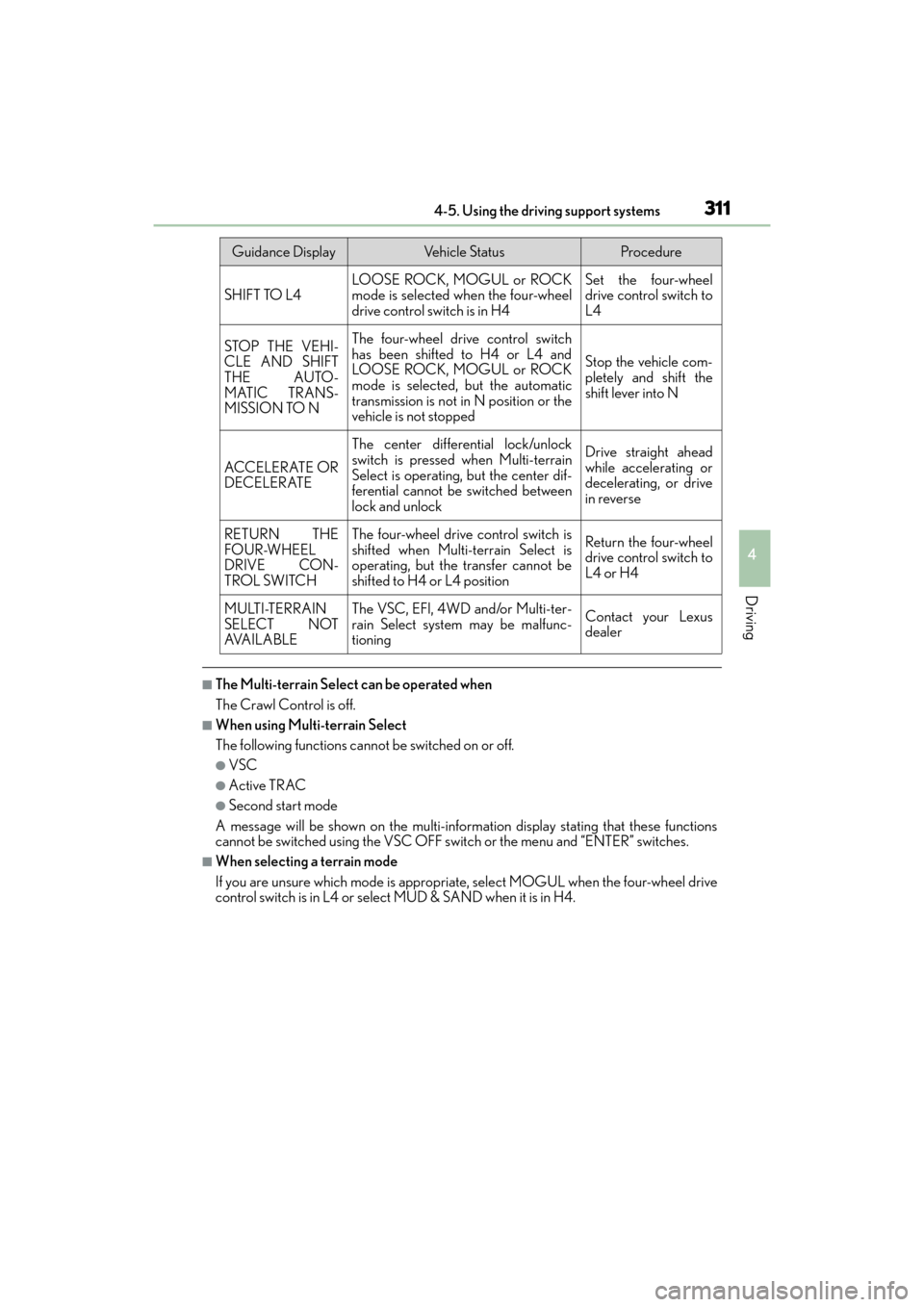
Guidance DisplayVehicle StatusProcedure
SHIFT TO L4LOOSE ROCK, MOGUL or ROCK
mode is selected when the four-wheel
drive control switch is in H4Set the four-wheel
drive control switch to
L4
STOP THE VEHI-
CLE AND SHIFT
THE AUTO-
MATIC TRANS-
MISSION TO NThe four-wheel drive control switch
has been shifted to H4 or L4 and
LOOSE ROCK, MOGUL or ROCK
mode is selected, but the automatic
transmission is not in N position or the
vehicle is not stopped
Stop the vehicle com-
pletely and shift the
shift lever into N
ACCELERATE OR
DECELERATE
The center differential lock/unlock
switch is pressed when Multi-terrain
Select is operating, but the center dif-
ferential cannot be switched between
lock and unlockDrive straight ahead
while accelerating or
decelerating, or drive
in reverse
RETURN THE
FOUR-WHEEL
DRIVE CON-
TROL SWITCHThe four-wheel drive control switch is
shifted when Multi-terrain Select is
operating, but the transfer cannot be
shifted to H4 or L4 positionReturn the four-wheel
drive control switch to
L4 or H4
MULTI-TERRAIN
SELECT NOT
AVA I L A B L EThe VSC, EFI, 4WD and/or Multi-ter-
rain Select system may be malfunc-
tioningContact your Lexus
dealer
GX460_OM_OM60F68U_(U).book Page 311 Wednesday, June 8, 2016 6:37 PM
Page 315 of 644
313
GX 460 _O M_ OM6 0F 6 8U _(U )4-5. Using the driving support systems
4
Driving
Multi-terrain Monitor∗
●By pressing the Multi-terrain Monitor sw
itch, the display can be shown, or the
display image can be changed between the front screen, wide view front &
side monitor screen, side-front simultaneous display monitor screen, side-
rear simultaneous display monitor screen or rear screen. (The screens that
can be selected differ depending on the shift position and the transfer mode.)
●By referring to the guidelines shown on the front monitor screen, you can
decide a driving line while assessing the distance to obstacles ahead of the
vehicle and confirm the projected path, and by using the wide view front &
side monitors, the side-front simultaneous display monitor and the side-rear
simultaneous display monitor to identify objects in the vicinity or course of the
tires, you can drive while preventing the vehicle from becoming stuck unex-
pectedly.
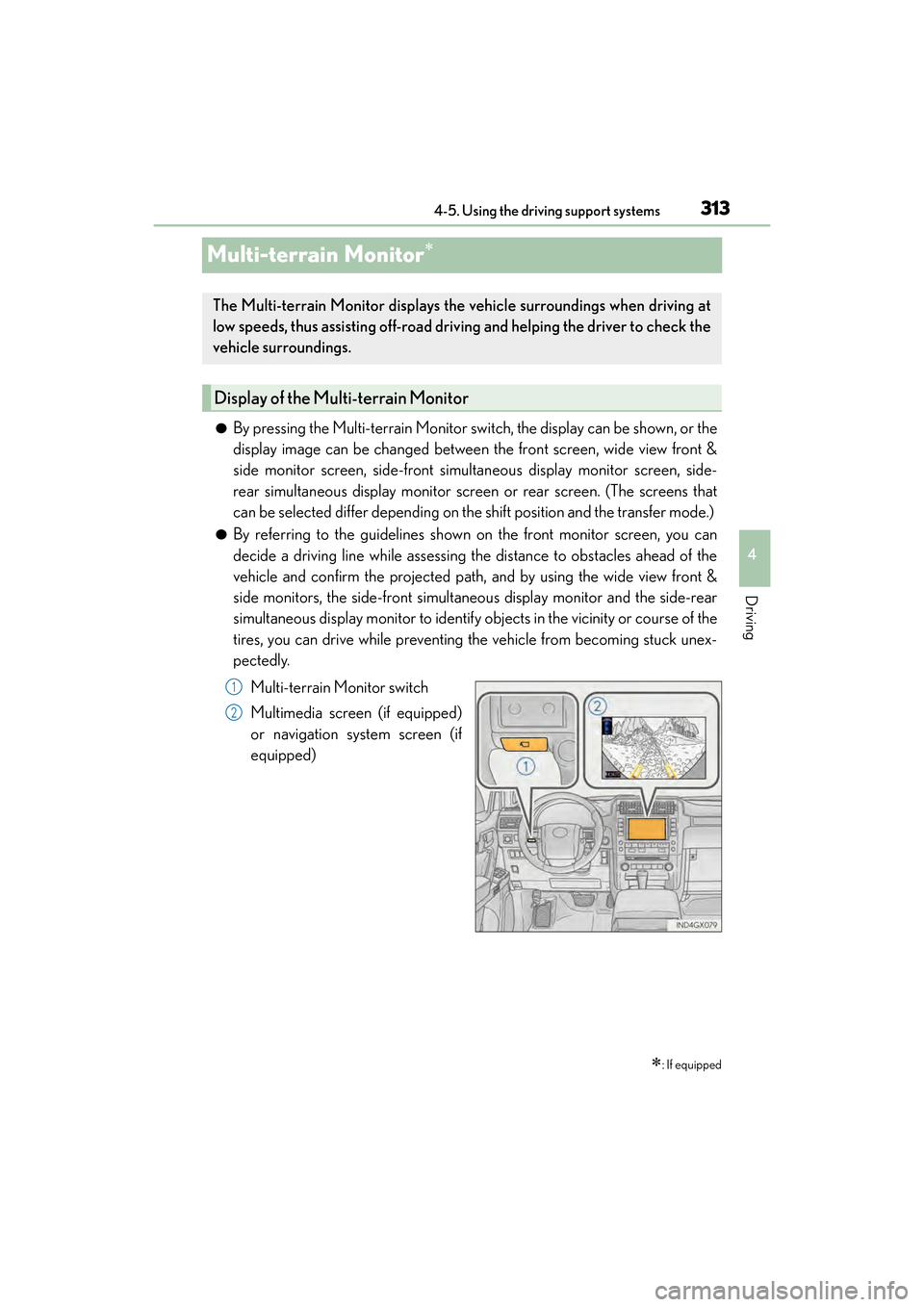
Multi-terrain Monitor switch
Multimedia screen (if equipped)
or navigation system screen (if
equipped)
∗: If equipped
The Multi-terrain Monitor displays the vehicle surroundings when driving at
low speeds, thus assisting off-road driv ing and helping the driver to check the
vehicle surroundings.
Display of the Multi-terrain Monitor
1
2
GX460_OM_OM60F68U_(U).book Page 313 Wednesday, June 8, 2016 6:37 PM
Page 335 of 644
GX 460 _O M_ OM6 0F 6 8U _(U )
3334-5. Using the driving support systems
4
Driving
CAUTION
■When using the Multi-terrain Monitor system
Observe the following precautions to avoid an accident that could result in death or
serious injuries:
●When attempting to use the side cameras while the door mirror is folded in, the base
of the door mirror is displayed on the screen and the area in front of the vehicle can-
not be observed. The image displayed on the screen differs depending on the posi-
tion of the door mirror.
●The field of view of the camera is limited. Do not rely solely upon the Multi-terrain
Monitor.
As with unequipped vehicles, drive carefully while directly confirming the safety of
your surroundings.
Take particular care to avoid parked cars and other obstacles.
●Do not drive the vehicle while only lookin g at the monitor screen under any circum-
stances.
Driving while only viewing the monitor screen may cause a collision or lead to an
accident, as the image displayed on the monitor screen may differ from actual condi-
tions. Make sure to visually check the surrounding areas with and without the mirror
while driving.
●Always check visually and with the mirrors to confirm your intended path is clear.
●The camera uses a special lens. The distances between objects and pedestrians that
appear in the image displayed on the sc reen will differ from the actual distances.
●These are just some of the functions of the Multi-terrain Monitor. The steering wheel
timing and amount the steering wheel should be turned differs depending on the road
condition and road surface. Use the Multi-terrain Monitor with full understanding of
the above conditions.
Always confirm that there is appropriate space before attempting to park the vehicle.
●Do not use the Multi-terrain Monitor in the following cases:
• On icy or slick road surfaces, or in snow
•When using tire chains
• When the back door is not closed completely
• On roads that are not flat or straight, such as curves or slopes.
●In low temperatures, the screen may darken or the image may become faint. The
image could distort when the vehicle is moving, or you may become unable to see the
image on the screen. Be sure to check dire ct visually all around the vehicle before
proceeding.
GX460_OM_OM60F68U_(U).book Page 333 Wednesday, June 8, 2016 6:37 PM
Page 342 of 644
340
GX 460 _O M_ OM6 0F 6 8U _(U )4-5. Using the driving support systems
CAUTION
■The rear height control air suspension must be turned off
Be sure to observe the following precautions. Otherwise, the automatic leveling func-
tion may cause vehicle height to change, an
d you may catch part of your body in the
vehicle, resulting in an accident:
●When jacking up the vehicle, installing tire chains or tying the vehicle with chains/
wires for transportation via flatbed truck, turn off the rear height control air suspen-
sion and stop the engine.
●When the vehicle must be towed or disconnecting a trailer, put the vehicle height in N
mode and turn off the rear height control air suspension.
●When the vehicle is stuck, turn off the rear height control air suspension.
■Selecting the correct height mode
●HI mode should only be used when drivin g on rough roads, for example when driving
off-road.
Because the vehicle’s center of gravity w ill become higher when in the mode, the
vehicle may become unstable when turning abruptly, resulting in an accident.
●Do not select HI mode when loading cargo on the roof luggage carrier.
Because the vehicle’s center of gravity w ill become higher when in the mode, the
vehicle may become unstable when turning abruptly, resulting in an accident.
●Before lowering vehicle height, check that there is no one under the vehicle.
NOTICE
■Be careful in any place where overhead space is limited
The vehicle height will rise when a higher mo de is selected or cargo is unloaded. This
may cause damage to the vehicle.
■Do not select LO mode when driving on bumpy roads
If the underbody of the vehicle touches a rugged road surface, the vehicle may be
damaged.
■Changing vehicle height
Do not change vehicle height frequently.
The compressor may overheat and stop operation.
■When on the extremely uneven roads with rocks
Sometimes the vehicle height is not adjusted because it is judged as uneven road driv-
ing.
GX460_OM_OM60F68U_(U).book Page 340 Wednesday, June 8, 2016 6:37 PM
Page 349 of 644

GX 460 _O M_ OM6 0F 6 8U _(U )
3474-5. Using the driving support systems
4
Driving
●LO (low mode)
Effective when traveling on rocks, or descending a slope of mogul and rub-
ble.
*
●MED (medium mode)
Effective when ascending a slope of mogul.
*
●HI (high mode)
Effective when ascending a slope of mogul and rubble, or traveling on snow,
dirt, mud, sand, gravel, grass etc.
*
The position between low and medium modes and the position between medium
and high modes can also be selected.
*: Depending on the road surface, may not be the most effective.
■The Crawl Control can be operated when
●The shift lever is in any gear other than P or N.
●The four-wheel drive control switch is in L4.
●The driver’s door is closed.
■Automatic system cancelation
In the following situations, the system is canceled automatically:
At that time, the buzzer will sound, the slip in dicator turns off, and the Crawl Control indi-
cator flashes.
A notification will be displayed on the mult i-information display for several seconds.
( → P. 5 2 8 )
●When the shift lever is moved to P or N.
●When the four-wheel drive control switch is in H4.
●When the driver’s door is opened.
When turning off Crawl Control while traveling, stop the vehicle before the Crawl Con-
trol indicator turns off, or drive extremely carefully.
■Function limit
●In the following situations, you will be able to use brake control to drive downhill at a
fixed low speed, but you will be unable to use engine control to drive uphill at a fixed low
speed.
• When the driving mode is set to second start mode.
• When the vehicle speed is higher than 6 mph (10 km/h).
●When the vehicle speed is higher than 15 mph (25 km/h), engine control and brake
control will stop temporarily. At that time, the Crawl Control indicator flashes.
Speed modes
GX460_OM_OM60F68U_(U).book Page 347 Wednesday, June 8, 2016 6:37 PM