Lock Lexus GX460 2017 Owners Manual
[x] Cancel search | Manufacturer: LEXUS, Model Year: 2017, Model line: GX460, Model: Lexus GX460 2017Pages: 644, PDF Size: 20.93 MB
Page 314 of 644
312
GX 460 _O M_ OM6 0F 6 8U _(U )4-5. Using the driving support systems
■When it is difficult to generate traction
MUD & SAND mode provides the largest amount of tire slippage, followed by LOOSE
ROCK, MOGUL and ROCK mode.
Drivability can be improved by selecting a mo
de which provides a smaller amount of tire
slippage than the current mode when the amount of tire slippage is large, or conversely
selecting a mode which provides a larger amou nt of tire slippage than the current mode
when the amount of tire slippage is small.
■When the vehicle is stuck
Switching the transfer and differential
For the operation of the following functions, refer to the following pages.
●Four-wheel drive system ( →P. 3 4 2 )
●Center differential lock ( →P. 3 4 3 )
■When the TRAC or Active TRAC operates continuously
→P. 3 5 4
■When the four-wheel drive cont rol switch is in L4 position
If the Multi-terrain Select system is not op erating and the four-wheel drive control switch
is in L4, “TRAC OFF” will be shown on the multi-information display.
■When there is a malfunction in the system
The slip indicator light will come on. Have the vehicle inspected by your Lexus dealer
immediately.
CAUTION
■When using the Multi-terrain Select
Observe the following precautions to avoid an accident that could result in death or
serious injuries:
●There is a chance that the selected mode may not be the most appropriate in terms of
road conditions such as pitch, slipperiness, undulation, etc. ( →P. 3 0 8 )
●Multi-terrain Select is not intended to expand the limits of the vehicle. Check the road
conditions thoroughly beforehand, and drive safely and carefully.
NOTICE
■Precaution for use
The Multi-terrain Select is intended for use during off-road driving. Do not use the sys-
tem at any other time.
GX460_OM_OM60F68U_(U).book Page 312 Wednesday, June 8, 2016 6:37 PM
Page 322 of 644

320
GX 460 _O M_ OM6 0F 6 8U _(U )4-5. Using the driving support systems
■Wide view front & side monitor display
Projected course line switching
button
*
The course line display mode will
change as follows each time the
switch is selected.
Ve h i c l e i c o n
Displays the image being shown by
the front monitor.
Front wheel contact point
Shows the position of the vehicle’s front tire.
Vehicle front edge line
Shows the position of the vehicle’s leading edge.
Projected course line* (yellow)
Displays a rough guide of the vehicle path that moves according to the steering
wheel position. Displayed along with the minimum projected turning circle.
Minimum projected turning circle* (blue)
Displays the smallest turning circle projected by the system if the steering wheel is
turned to full lock. Displayed when the steering wheel is turned to the right (further
than 90 ° from straight ahead).
Rear wheel contact point
Shows the position of the vehicle’s rear tire.
Vehicle width line (blue)
Indicates the width of the vehicle including the outside rear view mirror.
Automatic display mode*
Switches the projected course mode
*: When the shift lever is in R, it will not be displayed.
1
2
3
4
5
6
7
8
9
GX460_OM_OM60F68U_(U).book Page 320 Wednesday, June 8, 2016 6:37 PM
Page 336 of 644
334
GX 460 _O M_ OM6 0F 6 8U _(U )4-5. Using the driving support systems
CAUTION
■Conditions which may affect th
e Multi-terrain Monitor system
●If the tires are changed, the position of the guide lines displayed on the screen may be
incorrect. When changing the tires, consult your Lexus dealer.
●Depending on the circumstances of the ve hicle (number of passengers, amount of
luggage, etc.), the position of the guide lines displayed on the screen may change. Be
sure to check visually behind and all around the vehicle before proceeding.
●Depending on the overall length of the ve hicle (if a frontal protection system is
installed or the bumper has been replaced, etc.), the position of the distance guide-
lines displayed on the front monitor may chan ge. Be sure to check visually behind and
all around the vehicle before proceeding.
●When washing the vehicle, do not apply intensive bursts of water to the camera or
camera area. Doing so may result in the camera malfunctioning.
NOTICE
■When using the Multi-terrain Monitor
●Even if an obstacle is no longer visible on the side monitor, do not turn the steering
wheel further in the direction the vehicle is turning until the vehicle has moved com-
pletely past the obstacle. If the steering wheel is turned to full lock, the vehicle will turn
in the smallest possible turning circ le, and may collide with the obstacle.
●It may be difficult to judge distance with the image from the front camera due to the
characteristics of the lens. Drive carefully while checking the actual distance to the
obstacles displayed on the screen. Also, gi ve your full attention to sudden bumps in
the road.
GX460_OM_OM60F68U_(U).book Page 334 Wednesday, June 8, 2016 6:37 PM
Page 344 of 644
342
GX 460 _O M_ OM6 0F 6 8U _(U )4-5. Using the driving support systems
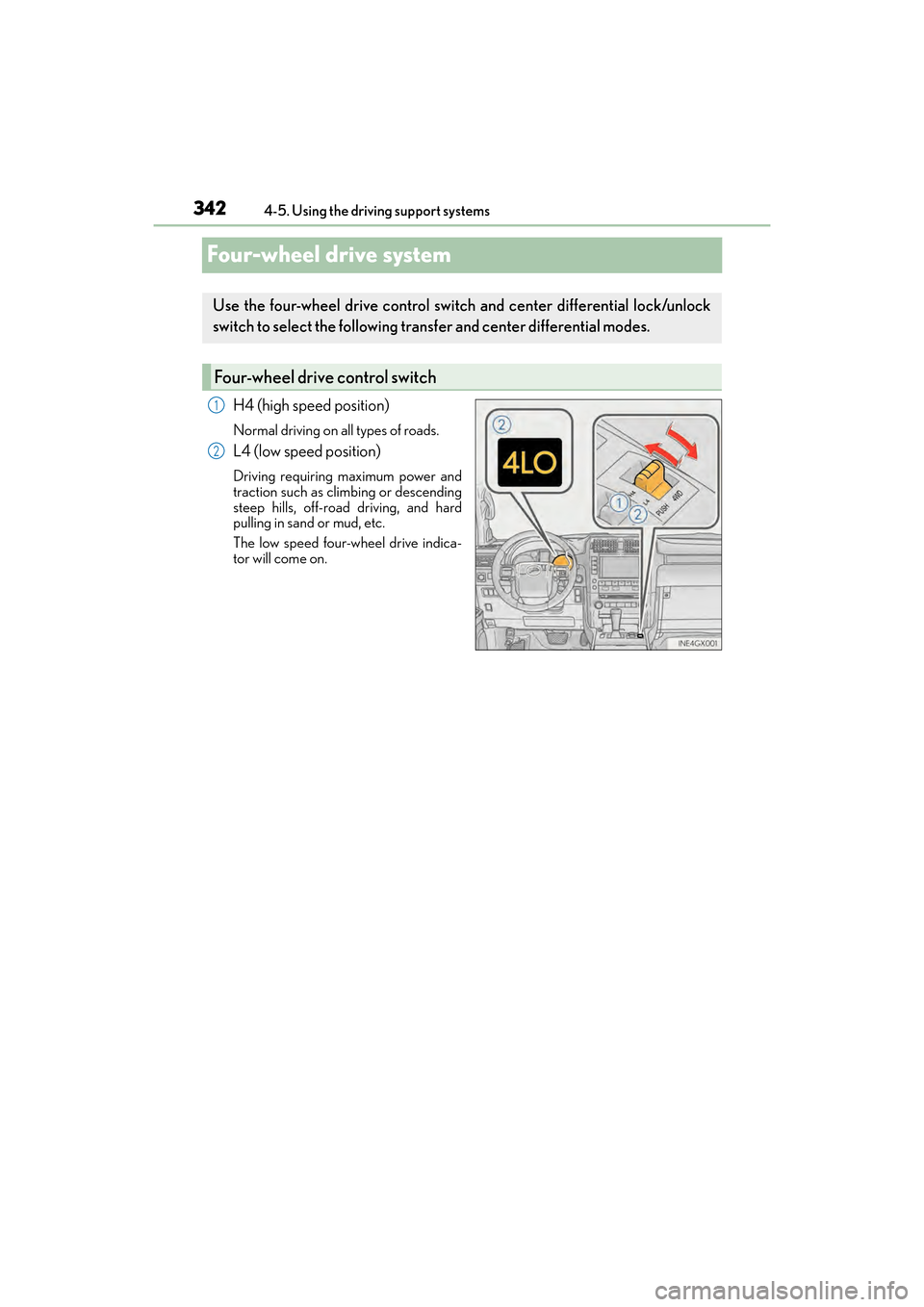
Four-wheel drive system
H4 (high speed position)
Normal driving on all types of roads.
L4 (low speed position)
Driving requiring maximum power and
traction such as climbing or descending
steep hills, off-road driving, and hard
pulling in sand or mud, etc.
The low speed four-wheel drive indica-
tor will come on.
Use the four-wheel drive control switch and center differential lock/unlock
switch to select the following transfer and center differential modes.
Four-wheel drive control switch
1
2
GX460_OM_OM60F68U_(U).book Page 342 Wednesday, June 8, 2016 6:37 PM
Page 345 of 644

GX 460 _O M_ OM6 0F 6 8U _(U )
3434-5. Using the driving support systems
4
Driving
Lock the center differential when your
vehicle’s wheels get stuck in a ditch or
when driving on a slippery or bumpy
surface.
The center differential lock indicator will
come on.
Unlock the center differential after the
wheels have been freed, or after moving
to a flat, non-slippery surface.
To unlock the center differential, push the switch again.
■Shifting from H4 to L4Stop the vehicle completely with brake pedal held down.
Shift the shift lever to N.
Push and shift the four-wheel drive control switch to L4.
Maintain this condition until the low sp eed four-wheel drive indicator turns on.
■Shifting from L4 to H4
Stop the vehicle completely with brake pedal held down.
Shift the shift lever to N.
Push and shift the four-wheel drive control switch to H4.
Maintain this condition until the low sp eed four-wheel drive indicator turns off.
Center differential lock/unlock switch
Shifting between H4 and L4
1
2
3
1
2
3
GX460_OM_OM60F68U_(U).book Page 343 Wednesday, June 8, 2016 6:37 PM
Page 346 of 644

344
GX 460 _O M_ OM6 0F 6 8U _(U )4-5. Using the driving support systems
■When the four-wheel drive control switch can be operated
●The engine switch is in IGNITION ON mode.
●The shift lever is in the N position.
●The vehicle is stopped completely.
■The low speed four-wheel drive indicator
●The indicator blinks while sw
itching between H4 and L4.
●If the low speed four-wheel drive indicator continues to blink when you operate the
four-wheel drive control switch to the H4 or L4 position, stop the vehicle completely,
shift the shift lever securely into N and then operate the switch again.
●If the shift lever is moved before the low speed four-wheel drive indicator turns on/off,
the transfer mode may not be shifted completely. The transfer mode disengages both
the front and rear drive shafts from the powertrain and allows the vehicle to move
regardless of the shift position. (At this time, the indicator blinks and the buzzer sounds.)
Therefore, the vehicle is free to roll even if the shift lever is in P. You or someone else
could be seriously injured. You must comple te the shifting of the transfer mode and
confirm that the indicator has turned off (H4) or turned on (L4).
●If the engine coolant temperature is too low, the four-wheel drive control system may
not be able to shift. When the engine is warmer operate the switch again.
If the indicator continue to blink even if doing so, have the vehicle inspected by your
Lexus dealer as soon as possible. There may be a trouble in the four-wheel drive system.
■When the transfer mode is switched to L4
Vehicles without Multi-terrain Select:
VSC is automatically turned off. (The VSC OFF indicator will come on.)
Vehicles with Multi-terrain Select:
VSC and TRAC/Active TRAC are automatically turned off. (The VSC OFF indicator will
come on and the “TRAC OFF” will be shown on the multi-information display.)
■When the center differential lock/unlock switch can be operated
The engine switch is in IGNITION ON mode.
■The center differential lock indicator
●The indicator blinks wh ile locking/unlocking the center differential.
●If the center differential lock indicator b links and the buzzer sounds when the center
differential is locked, stop the slipping or spinning and push the switch again.
If the indicator continue to blink even if doing so, have the vehicle inspected by your
Lexus dealer as soon as possible. There may be a trouble in the four-wheel drive system.
GX460_OM_OM60F68U_(U).book Page 344 Wednesday, June 8, 2016 6:37 PM
Page 347 of 644

GX 460 _O M_ OM6 0F 6 8U _(U )
3454-5. Using the driving support systems
4
Driving
■Locking/unlocking the center differential
●If the operation is not completed, the center differential lock indicator blinks. If the indi-
cator does not turn off when unlocking the center differential, drive straight ahead
while accelerating or decelerating, or drive in reverse.
●Avoid turning suddenly while the center differential is locked. If you do turn suddenly,
the difference in turning speeds between the front and rear wheels may have a similar
effect to braking, thus making driving difficult.
CAUTION
■While driving
Observe the following precautions. Failure to do so may cause an accident resulting in
death or serious injury.
●Never move the four-wheel drive control switch if the wheels have lost traction.
●Do not operate the center differential lock/unlock when the vehicle is turning or
when its wheels are spinning freely off the ground.
NOTICE
■To prevent damage to the center differential
●For normal driving on dry and hard surface roads, unlock the center differential.
●Unlock the center differential after the wheels are out of the ditch or off the slippery
or bumpy surface.
GX460_OM_OM60F68U_(U).book Page 345 Wednesday, June 8, 2016 6:37 PM
Page 353 of 644

351
GX 460 _O M_ OM6 0F 6 8U _(U )4-5. Using the driving support systems
4
Driving
Driving assist systems
◆ABS (Anti-lock Brake System)
Helps to prevent wheel lock when the brakes are applied suddenly, or if the brakes are
applied while driving on a slippery road surface
◆Multi Terrain ABS (Anti-lock Brake System) (vehicles with a Multi-terrain
Select system)
Helps to prevent wheel lock when the brakes are applied suddenly, or if the brakes are
applied while driving on a slippery road su
rface, or in off-road conditions (such as
rough roads, sand and mud)
The Multi Terrain ABS operates in synchr onization with the Multi-terrain Select
◆Brake assist
Generates an increased level of braking force after the brake pedal is depressed
when the system detects a panic stop situation
◆VSC (Vehicle Stability Control)
Helps the driver to control skidding when swerving suddenly or turning on slippery
road surfaces
◆TRAC (Traction Control) for H4 position
Helps to maintain drive power and prevent the drive wheels from spinning when start-
ing the vehicle or accelerating on slippery roads
To help enhance driving safety and performance, the following systems oper-
ate automatically in response to various driving situations. Be aware, however,
that these systems are supplementary and should not be relied upon too
heavily when operating the vehicle.
GX460_OM_OM60F68U_(U).book Page 351 Wednesday, June 8, 2016 6:37 PM
Page 374 of 644
372
GX 460 _O M_ OM6 0F 6 8U _(U )4-5. Using the driving support systems
■Automatic cancelation of pre-collision system
When a malfunction occurs due to sensor contaminations, etc. that results in the sensors
being unable to detect obstacles, the pre-collis
ion system will be automatically disabled.
In this case, the system will not activat e even if there is a collision possibility.
■Obstacles not detected
The system cannot detect plastic obstacles such as pylons. There may also be occasions
when the system cannot detect pedestrians, animals, bicycles, motorcycles, trees, or
snowdrifts.
■Conditions that may trigger the system even if there is no possibility of a collision
In any of the following situations where the fr ontal area of the radar sensor is interrupted,
the radar sensor may detect possibility of a frontal collision and the system may be acti-
vated.
●When passing by an oncoming vehicle in a curve or a turn to the right or the left
●When rapidly approaching an obstacle ahead (e.g. preceding vehicle, toll gate barrier,
etc.)
●When there is a structural object (billboard , low ceiling, fluorescent light, etc.) above
the uphill road ahead
●When driving on a narrow road or through under a low overhead structure (bridge,
tunnel, fly-under, etc.)
●When driving on an uneven road surface
●When there is a metal object, bump, or protrusion on the road surface
●When vehicle’s front part is raised or lowered depending on loading conditions
●When the direction of radar sensor is misaligned by strong impact applied on an area
around the radar sensor, etc.
●When there is an obstacle (guard rail, etc.) by the roadside at the entrance to a curve
●When the front of your vehicle is pointing upwards (caused by towing a trailer, during
emergency towing or putting a heavy load in the luggage compartment etc.)
When the system is activated in the situations described above, there is also a possibility
that the seat belts will retract quickly and th e brakes may be applied with a force greater
than normal. When the seat belt is locked in the restricted position, stop the vehicle in a
safe place, release the seat belt and refasten it.
■When there is a malfunction in the system, or if the system is temporarily unusable
Warning lights will turn on or flash, an d warning messages will be displayed.
( → P. 5 2 1 , 5 3 2 )
GX460_OM_OM60F68U_(U).book Page 372 Wednesday, June 8, 2016 6:37 PM
Page 378 of 644
376
GX 460 _O M_ OM6 0F 6 8U _(U )4-5. Using the driving support systems
CAUTION
■Handling the driver monitor sensor (v
ehicles with driver monitor sensor)
Observe the following to ensure the driver monitor sensor can function effectively.
Failure to do so may result in a malfunction or may prevent the system from correctly
determining the direction the driver is facing, resulting in an unexpected accident.
●Do not disassemble, damage, lift or pull on the sensor.
●Do not touch the sensor while driving.
●Do not wet or spill water on the sensor.
●Do not drop anything on or allow anything to hit against the sensor. Do not subject the
sensor to an impact.
●Make sure that there are no scratches, dirt or stickers on the side of the sensor that
faces the driver.
●Do not place any objects in front of the si de of the sensor that faces the driver or
cover the sensor.
■Determining the direction the driver is facing (vehicles with dr iver monitor sensor)
The direction the driver is facing may not be determined correctly if the following con-
ditions exist:
●There is an object between the driver monitor sensor and the driver’s face, such as
when the sensor is blocked.
●A part of the driver’s face is covered.
●The sensor or the driver’s face is exposed to intense light such as sunlight.
●The driving posture is improper.
NOTICE
■Precautions for cleaning the driver monitor sensor (vehicles with driver monitor sen-
sor)
●Gently wipe the sensor with a soft cloth to prevent damage.
●Wipe any excess dirt with a cloth dampened with neutral detergent, all liquids having
been wrung out of the cloth. After that, wipe again with a dry cloth.
●Do not use benzene, thinner, glass cleaners, wax, etc.
GX460_OM_OM60F68U_(U).book Page 376 Wednesday, June 8, 2016 6:37 PM