Lock Lexus GX460 2017 Manual Online
[x] Cancel search | Manufacturer: LEXUS, Model Year: 2017, Model line: GX460, Model: Lexus GX460 2017Pages: 644, PDF Size: 20.93 MB
Page 201 of 644

GX 460 _O M_ OM6 0F 6 8U _(U )
1994-2. Driving procedures
4
Driving
CAUTION
■When driving on slippery road surfaces
Do not accelerate or shift gears suddenly.
Sudden changes in engine braking may cause the vehicle to spin or skid, resulting in an
accident.
■To prevent an accident when releasing the shift lock
Before pressing the shift lock override button, make sure to set the parking brake and
depress the brake pedal.
If the accelerator pedal is accidentally depressed instead of the brake pedal when the
shift lock override button is pressed and the shift lever is shifted out of P, the vehicle
may suddenly start, possibly leading to an acc ident resulting in death or serious injury.
GX460_OM_OM60F68U_(U).book Page 199 Wednesday, June 8, 2016 6:37 PM
Page 206 of 644
204
GX 460 _O M_ OM6 0F 6 8U _(U )4-3. Operating the lights and wipers
■Daytime running light system
●To make your vehicle more visible to other drivers during daytime driving, the daytime
running lights turn on automatically whenev
er the engine is started and the parking
brake is released with the headlight switch off (type B only) or in the “AUTO” position.
(Illuminate brighter than the parking lights. ) Daytime running lights are not designed for
use at night.
For the U.S.A.: Daytime running lights can be turned off by operating the switch.
●Compared to turning on the headlights, the daytime running light system offers greater
durability and consumes less electricity, so it can help improve fuel economy.
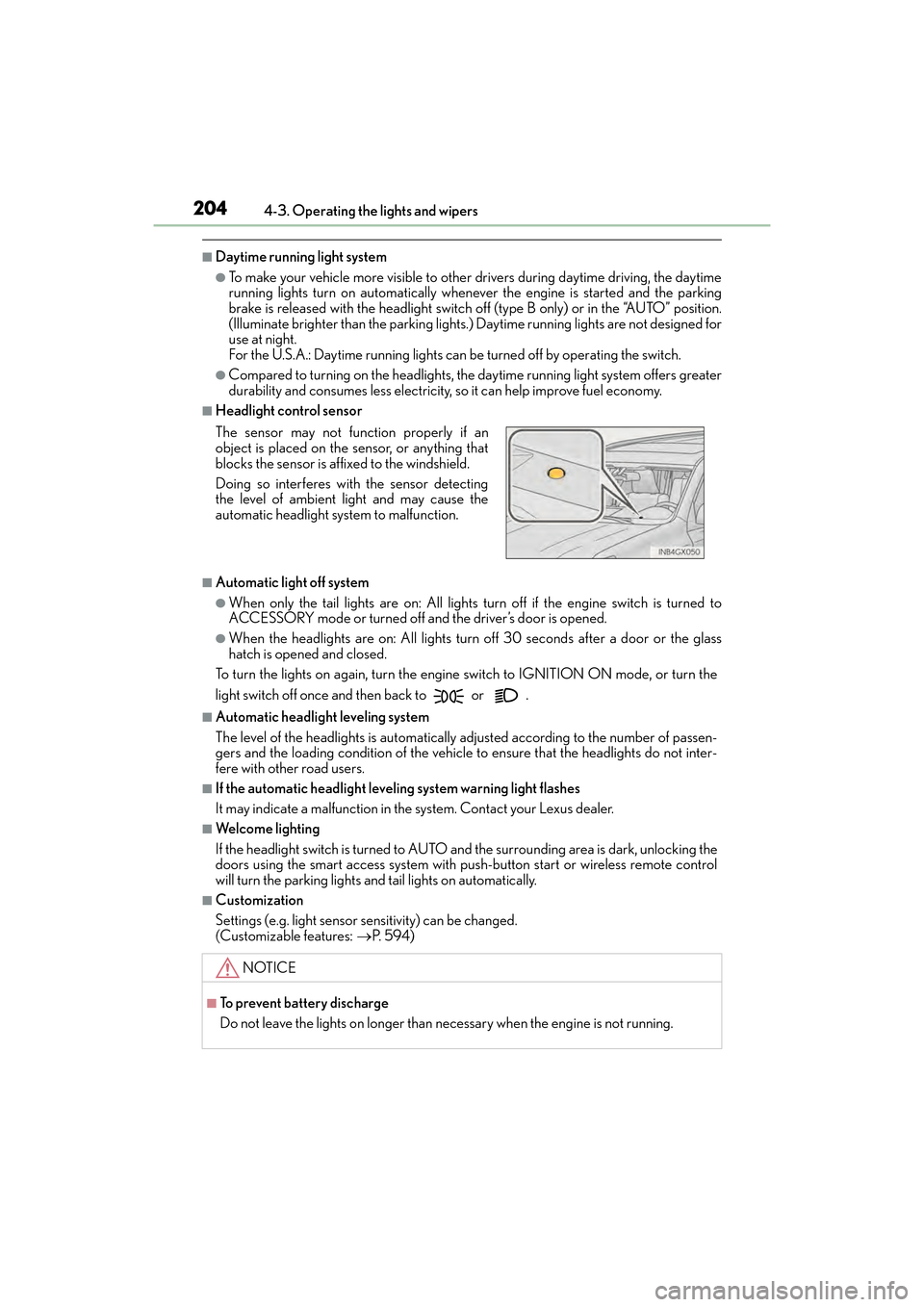
■Headlight control sensor
■Automatic light off system
●When only the tail lights are on: All lights turn off if the engine switch is turned to
ACCESSORY mode or turned of f and the driver’s door is opened.
●When the headlights are on: All lights turn off 30 seconds after a door or the glass
hatch is opened and closed.
To turn the lights on again, turn the engine switch to IGNITION ON mode, or turn the
light switch off once and then back to or .
■Automatic headlight leveling system
The level of the headlights is automatically adjusted according to the number of passen-
gers and the loading condition of the vehicle to ensure that the headlights do not inter-
fere with other road users.
■If the automatic headlight leveling system warning light flashes
It may indicate a malfunction in the system. Contact your Lexus dealer.
■Welcome lighting
If the headlight switch is turned to AUTO an d the surrounding area is dark, unlocking the
doors using the smart access system with push-button start or wireless remote control
will turn the parking lights an d tail lights on automatically.
■Customization
Settings (e.g. light sensor sensitivity) can be changed.
(Customizable features: →P. 5 9 4 )
The sensor may not function properly if an
object is placed on the sensor, or anything that
blocks the sensor is affixed to the windshield.
Doing so interferes with the sensor detecting
the level of ambient light and may cause the
automatic headlight system to malfunction.
NOTICE
■To prevent battery discharge
Do not leave the lights on longer than ne
cessary when the engine is not running.
GX460_OM_OM60F68U_(U).book Page 204 Wednesday, June 8, 2016 6:37 PM
Page 218 of 644
216
GX 460 _O M_ OM6 0F 6 8U _(U )4-3. Operating the lights and wipers
■Effects of vehicle speed on wiper operation
(vehicles with rain-sensing windshield wip-
ers)
With the settings other than “AUTO” also, the time until drip prevention wiper sweep
occurs is changed depending on vehicle speed.
With the low speed wiper operation selected, wiper operation will be switched from low
speed to intermittent wiper operation only when the vehicle is stationary. (However,
when the sensor sensitivity is adjusted to th e highest level, the mode cannot be switched.)
■If no windshield washer fluid sprays
Check that the washer nozzles are not blocked if there is washer fluid in the windshield
washer fluid reservoir.
CAUTION
■Caution regarding the use of windshield wipers in “AUTO” mode (vehicles with rain-
sensing windshield wipers)
The windshield wipers may operate unexpectedly if the sensor is touched or the wind-
shield is subject to vibration in “AUTO” mode. Take care that your fingers etc. anything
else does not become caught in the windshield wipers.
■Caution regarding the use of washer fluid
When it is cold, do not use the washer fl uid until the windshield becomes warm. The
fluid may freeze on the windshield and cause lo w visibility. This may lead to an accident,
resulting in death or serious injury.
NOTICE
■When the windshield is dry
Do not use the wipers, as they may damage the windshield.
■When the washer fluid tank is empty
Do not operate the switch continually as the washer fluid pump may overheat.
■When there is no washer fluid spray from the nozzle
Damage to the washer fluid pump may be caused if the lever is pulled toward you and
held continually.
■When a nozzle becomes blocked
Do not try to clear it with a pin or other object. The nozzle will be damaged.
GX460_OM_OM60F68U_(U).book Page 216 Wednesday, June 8, 2016 6:37 PM
Page 220 of 644
218
GX 460 _O M_ OM6 0F 6 8U _(U )4-3. Operating the lights and wipers
■The rear window wiper and washer can be operated when
●The engine switch is in IGNITION ON mode.
●The glass hatch is closed.
■If no windshield washer fluid sprays
Check that the washer nozzles are not blocked
if there is washer fluid in the windshield
washer fluid reservoir.
NOTICE
■When the rear window is dry
Do not use the wiper, as it may damage the rear window.
■When the washer fluid tank is empty
Do not operate the switch continually as the washer fluid pump may overheat.
GX460_OM_OM60F68U_(U).book Page 218 Wednesday, June 8, 2016 6:37 PM
Page 228 of 644
226
GX 460 _O M_ OM6 0F 6 8U _(U )4-5. Using the driving support systems
■Automatic cruise control cancelation
Cruise control will stop maintaining the vehicle speed in any of the following situations:
●Actual vehicle speed falls more than approximately 10 mph (16 km/h) below the preset
vehicle speed.
At this time, the memorized set speed is not retained.
●Actual vehicle speed is below approximately 25 mph (40 km/h).
●VSC is activated.
●The center differential lock/unlock is not completed within 5 seconds while the cruise
control system is on.
■If the warning message for the cruise contro
l is shown on the multi-information display
Press the “ON-OFF” button once to deactivate the system, and then press the button
again to reactivate the system.
If the cruise control speed cannot be set or if the cruise control cancels immediately after
being activated, there may be a malfunction in the cruise control system. Have the vehi-
cle inspected by your Lexus dealer.
CAUTION
■To avoid operating the cruise control by mistake
Switch the cruise control off using the “ON-OFF” button when not in use.
■Situations unsuitable for cruise control
Do not use cruise control in any of the following situations.
Doing so may result in loss of control and could cause an accident resulting in death or
serious injury.
●In heavy traffic
●On roads with sharp bends
●On winding roads
●On slippery roads, such as those covered with rain, ice or snow
●On steep hills
Vehicle speed may exceed the set speed when driving down a steep hill.
●When your vehicle is towing a trailer (with towing hitch) or during emergency towing
GX460_OM_OM60F68U_(U).book Page 226 Wednesday, June 8, 2016 6:37 PM
Page 235 of 644
GX 460 _O M_ OM6 0F 6 8U _(U )
2334-5. Using the driving support systems
4
Driving
■Dynamic radar cruise control can be set when
●The shift lever is in the D or range 4 or higher of S has been selected.
●Vehicle speed is above approximately 30 mph (50 km/h).
■Switching modes
The mode cannot be switched to constant speed control mode if vehicle-to-vehicle dis-
tance control mode has been used. The mode also cannot be switched from constant
speed control to vehicle-to-vehicle distance control mode. Turn the system off by press-
ing the “ON-OFF” button, and turn it on again.
■Accelerating after setting the vehicle speed
The vehicle can accelerate normally. After acceleration, the set speed resumes. How-
ever, during vehicle-to-vehicle distance control mode, the vehicle speed may decrease
below the set speed in order to maintain the distance to the vehicle ahead.
■Automatic cancelation of vehicle-to-vehicle distance control
Vehicle-to-vehicle distance control driving is automatically canceled in the following situ-
ations:
●Actual vehicle speed falls below approximately 25 mph (40 km/h).
●VSC is activated.
●The sensor cannot operate correctly because it is covered in some way.
●The windshield wipers are operating at high speed (when the wiper switch is set to the
“AUTO” mode or the high speed wiper operation position).
●When second start mode is set.
●Bad weather causes the detection function to become extremely unstable.
●Multi-terrain mode is selected other than OFF.
●The center differential lock/unlock is not completed within 5 seconds while the
dynamic radar cruise control system is on.
If vehicle-to-vehicle distance control driving is automatically canceled for any other rea-
son, there may be a malfunction in the system. Contact your Lexus dealer.
■Automatic cancelation of constant speed control
The cruise control will stop maintaining the vehicle speed in the following situations:
●Actual vehicle speed is more than approximately 10 mph (16 km/h) below the set vehi-
cle speed.
At this time, the memorized set speed is not retained.
●Actual vehicle speed falls below approximately 25 mph (40 km/h).
●VSC is activated.
●The center differential lock/unlock is not completed within 5 seconds while the
dynamic radar cruise control system is on.
GX460_OM_OM60F68U_(U).book Page 233 Wednesday, June 8, 2016 6:37 PM
Page 296 of 644

294
GX 460 _O M_ OM6 0F 6 8U _(U )4-5. Using the driving support systems
●Simultaneous display
Front wheel contact point
Shows the position of the vehicle’s
front tire.
Vehicle front edge line
Shows the position of the vehicle’s
leading edge.
Vehicle width line (blue)
Indicates the width of the vehicle
including the outside rear view mir-
ror.
Projected course line (yellow)
Displays a rough guide of the vehicle path that moves according to the steering
wheel position. Displayed along with the minimum projected turning circle.
Minimum projected turning circle (blue)
Displays the smallest turning circle projected by the system if the steering wheel is
turned to full lock. Displayed when the steering wheel is turned to the right (further
than 90 ° from straight ahead).
Rear wheel contact point
Shows the position of the vehicle’s rear tire.
Using the side monitor
1
2
3
4
5
6
GX460_OM_OM60F68U_(U).book Page 294 Wednesday, June 8, 2016 6:37 PM
Page 297 of 644

GX 460 _O M_ OM6 0F 6 8U _(U )
2954-5. Using the driving support systems
4
Driving
●Individual display
Front wheel contact point
Shows the position of the vehicle’s front tire.
Vehicle front edge line
Shows the position of the vehicle’s leading edge.
Vehicle width line (blue)
Indicates the width of the vehicle including the outside rear view mirror.
Projected course line (yellow)
Displays a rough guide of the vehicle path that moves according to the steering wheel
position. Displayed along with the minimum projected turning circle.
Minimum projected turning circle (blue)
Displays the smallest turning circle projected by the system if the steering wheel is
turned to full lock. Displayed when the steer ing wheel is turned to the right (further
than 90 ° from straight ahead).
Projected course line switching button
The course line display mode will change as follows each time the switch is selected.
When the shift lever is in R, it will not be displayed.
Rear wheel contact point
Shows the position of the vehicle’s rear tire.
Individual display mode switching button
Switches the full view display mode or Front view enlarged display mode.
XFull view display modeXFront view enlarged display mode
1
2
3
4
5
6
7
8
GX460_OM_OM60F68U_(U).book Page 295 Wednesday, June 8, 2016 6:37 PM
Page 308 of 644
306
GX 460 _O M_ OM6 0F 6 8U _(U )4-5. Using the driving support systems
NOTICE
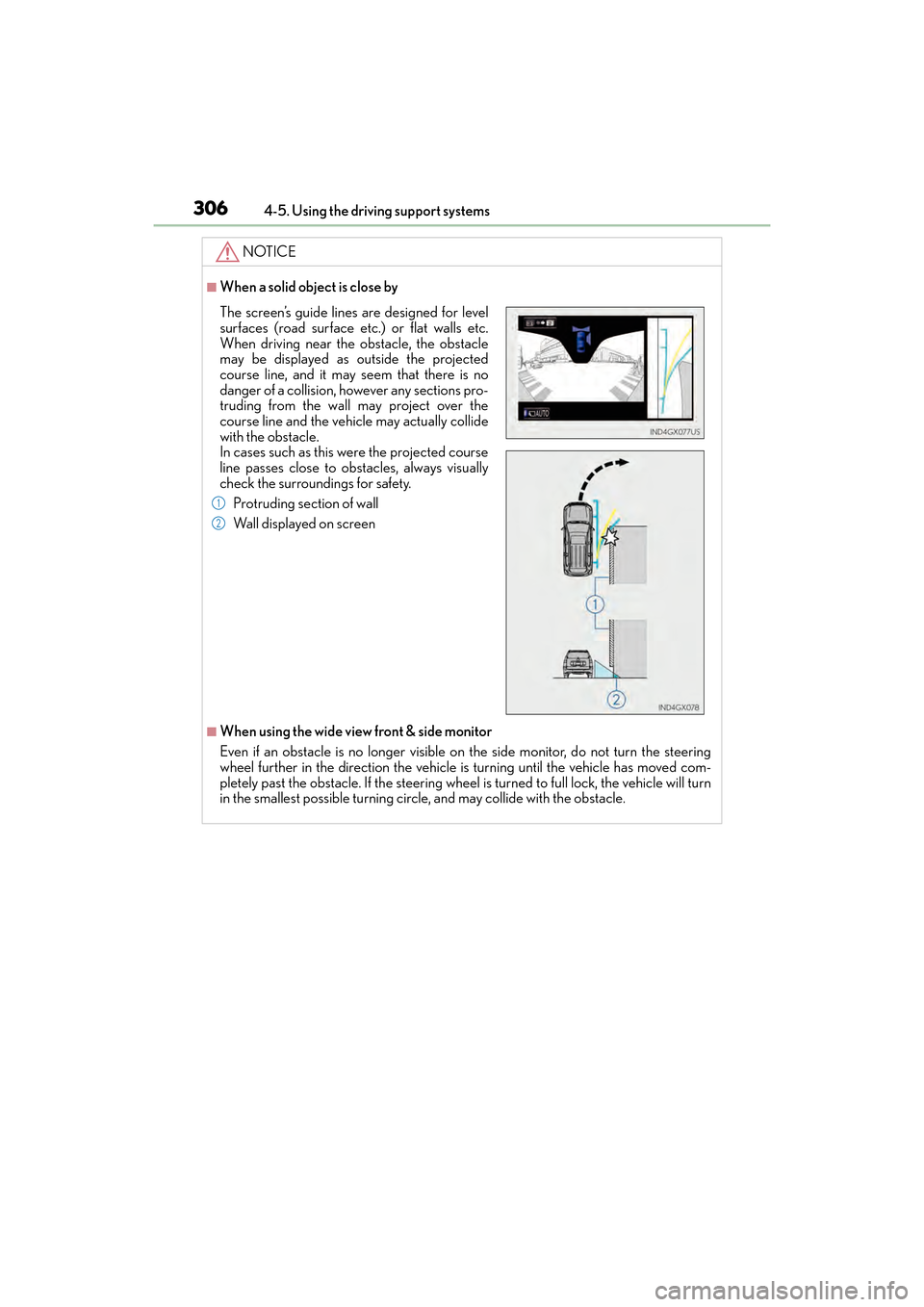
■When a solid object is close by
■When using the wide view front & side monitor
Even if an obstacle is no longer visible on
the side monitor, do not turn the steering
wheel further in the direction the vehicle is turning until the vehicle has moved com-
pletely past the obstacle. If th e steering wheel is turned to full lock, the vehicle will turn
in the smallest possible turning circ le, and may collide with the obstacle.
The screen’s guide lines are designed for level
surfaces (road surface etc.) or flat walls etc.
When driving near the obstacle, the obstacle
may be displayed as outside the projected
course line, and it may seem that there is no
danger of a collision, however any sections pro-
truding from the wall may project over the
course line and the vehicle may actually collide
with the obstacle.
In cases such as this were the projected course
line passes close to obstacles, always visually
check the surroundings for safety.
Protruding section of wall
Wall displayed on screen
1
2
GX460_OM_OM60F68U_(U).book Page 306 Wednesday, June 8, 2016 6:37 PM
Page 313 of 644
GX 460 _O M_ OM6 0F 6 8U _(U )
3114-5. Using the driving support systems
4
Driving
■The Multi-terrain Select can be operated when
The Crawl Control is off.
■When using Multi-terrain Select
The following functions cannot be switched on or off.
●VSC
●Active TRAC
●Second start mode
A message will be shown on the multi-inform ation display stating that these functions
cannot be switched using the VSC OFF swit ch or the menu and “ENTER” switches.
■When selecting a terrain mode
If you are unsure which mode is appropriate, select MOGUL when the four-wheel drive
control switch is in L4 or select MUD & SAND when it is in H4.
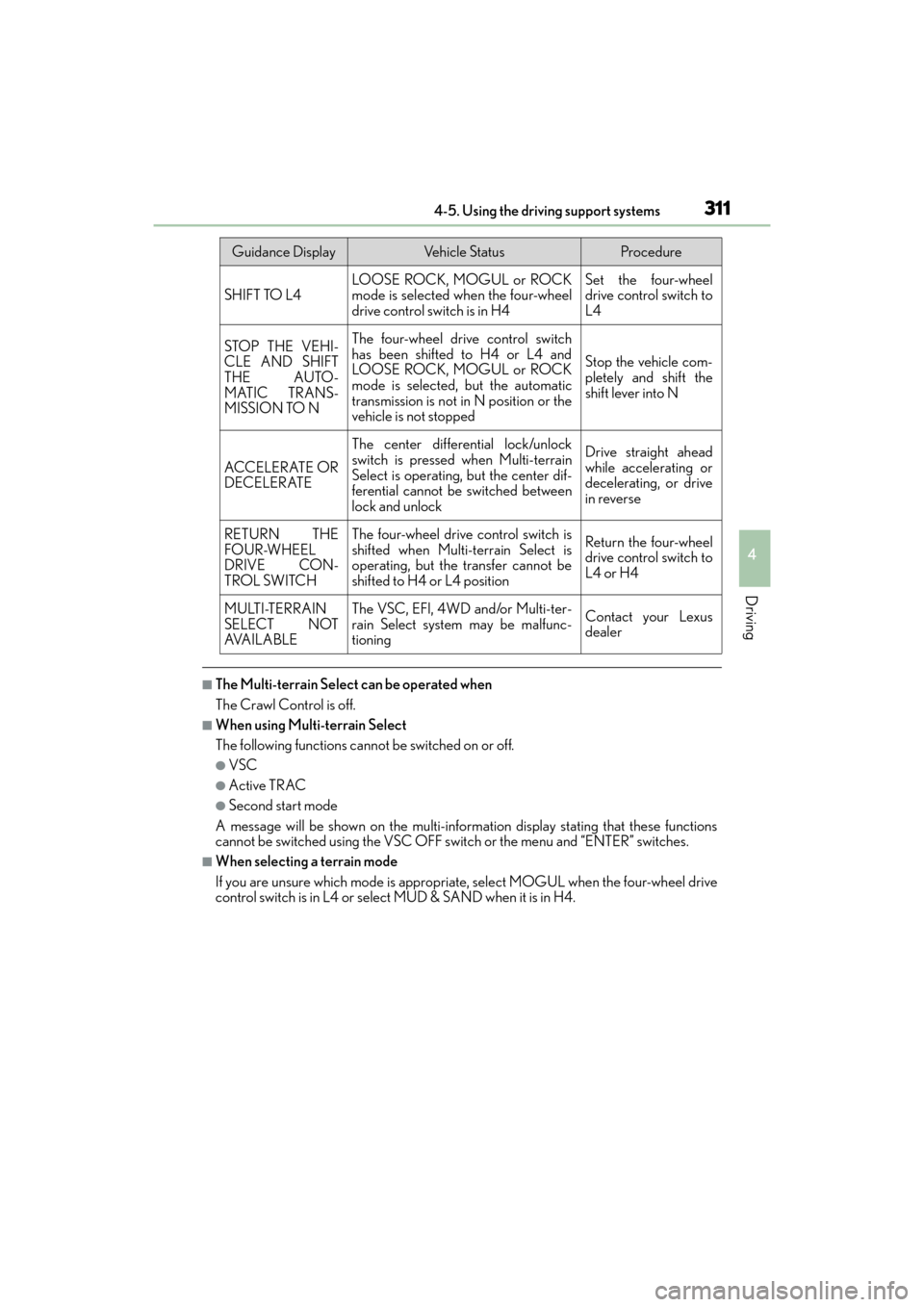
Guidance DisplayVehicle StatusProcedure
SHIFT TO L4LOOSE ROCK, MOGUL or ROCK
mode is selected when the four-wheel
drive control switch is in H4Set the four-wheel
drive control switch to
L4
STOP THE VEHI-
CLE AND SHIFT
THE AUTO-
MATIC TRANS-
MISSION TO NThe four-wheel drive control switch
has been shifted to H4 or L4 and
LOOSE ROCK, MOGUL or ROCK
mode is selected, but the automatic
transmission is not in N position or the
vehicle is not stopped
Stop the vehicle com-
pletely and shift the
shift lever into N
ACCELERATE OR
DECELERATE
The center differential lock/unlock
switch is pressed when Multi-terrain
Select is operating, but the center dif-
ferential cannot be switched between
lock and unlockDrive straight ahead
while accelerating or
decelerating, or drive
in reverse
RETURN THE
FOUR-WHEEL
DRIVE CON-
TROL SWITCHThe four-wheel drive control switch is
shifted when Multi-terrain Select is
operating, but the transfer cannot be
shifted to H4 or L4 positionReturn the four-wheel
drive control switch to
L4 or H4
MULTI-TERRAIN
SELECT NOT
AVA I L A B L EThe VSC, EFI, 4WD and/or Multi-ter-
rain Select system may be malfunc-
tioningContact your Lexus
dealer
GX460_OM_OM60F68U_(U).book Page 311 Wednesday, June 8, 2016 6:37 PM