vehicle Lexus GX460 2017 Owner's Manual
[x] Cancel search | Manufacturer: LEXUS, Model Year: 2017, Model line: GX460, Model: Lexus GX460 2017Pages: 644, PDF Size: 20.93 MB
Page 260 of 644

258
GX 460 _O M_ OM6 0F 6 8U _(U )4-5. Using the driving support systems
●When any part of the vehicle sags
When any part of the vehicle sags
due to the number of passengers
or the distribution of the load,
there is a margin of error between
the fixation guide lines on the
screen and the actual distance/
course on the road.
■When approaching three-dimensional objects
The distance guide lines are displayed according to flat surfaced objects (such
as the road). It is not possible to de
termine the position of three-dimensional
objects (such as vehicles) using the distance guide lines. When approaching a
three-dimensional object that extends outward (such as the flatbed of a truck),
be careful of the following.
●Vehicle width extension guide lines
Visually check the surroundings
and the area behind the vehicle.
In the case shown in the illustra-
tion, the truck appears to be out-
side of the vehicle width
extension guide lines and the
vehicle does not look as if it hits
the truck. However, the rear body
of the truck may actually cross
over the vehicle width extension
guide lines. In reality if you back
up as guided by the vehicle width
extension guide lines, the vehicle
may hit the truck.
A margin of error
GX460_OM_OM60F68U_(U).book Page 258 Wednesday, June 8, 2016 6:37 PM
Page 261 of 644
GX 460 _O M_ OM6 0F 6 8U _(U )
2594-5. Using the driving support systems
4
Driving
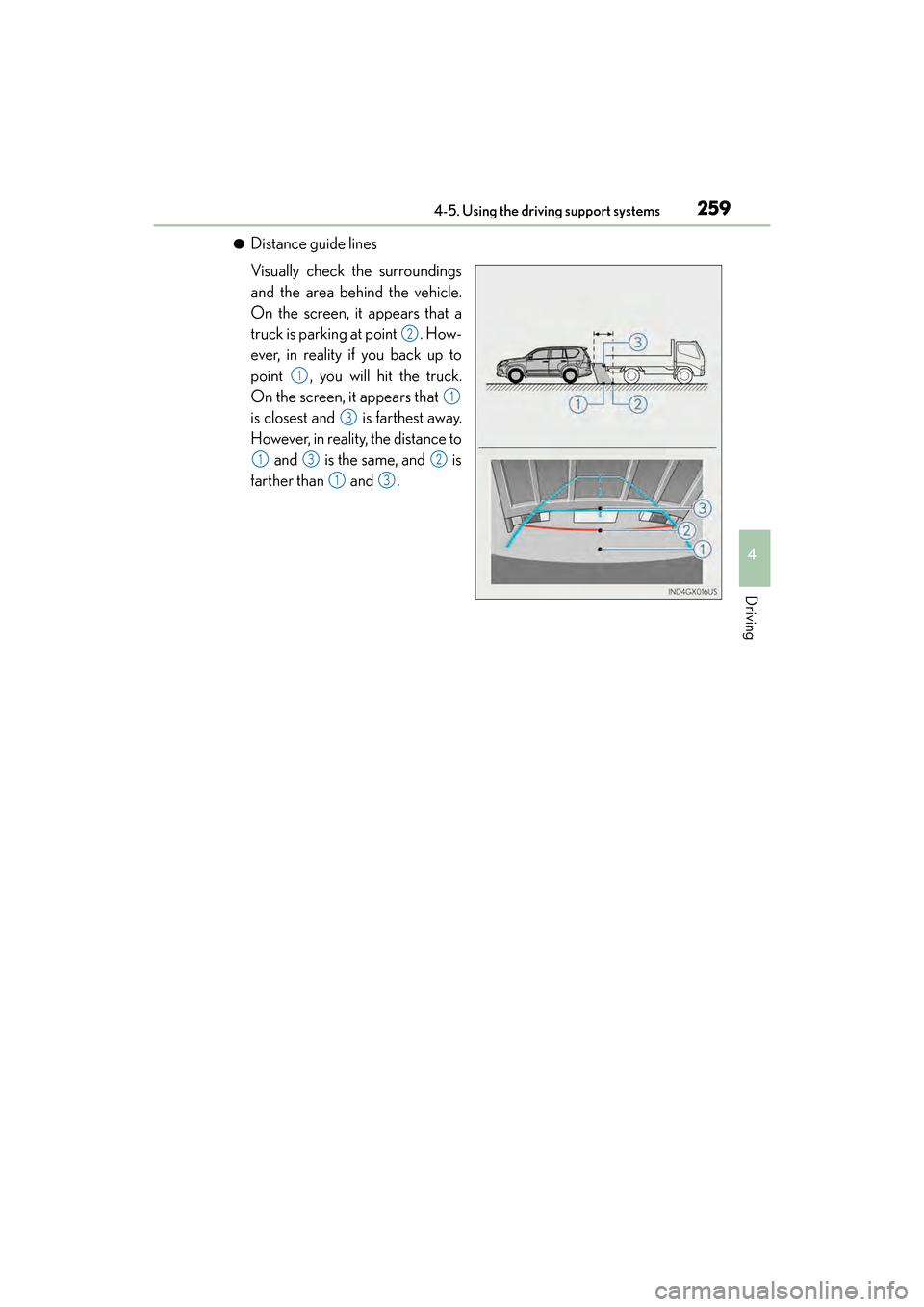
●Distance guide lines
Visually check the surroundings
and the area behind the vehicle.
On the screen, it appears that a
truck is parking at point . How-
ever, in reality if you back up to
point , you will hit the truck.
On the screen, it appears that
is closest and is farthest away.
However, in reality, the distance to and is the same, and is
farther than and .
2
1
1
3
132
13
GX460_OM_OM60F68U_(U).book Page 259 Wednesday, June 8, 2016 6:37 PM
Page 262 of 644

260
GX 460 _O M_ OM6 0F 6 8U _(U )4-5. Using the driving support systems
■If you notice any symptoms
If you notice any of the following symp
toms, refer to the likely cause and the
solution, and re-check.
If the symptom is not resolved by the solution, have the vehicle inspected by
your Lexus dealer.
Things you should know
Likely causeSolution
‰ The image is difficult to see
• The vehicle is in a dark area
• The temperature around the lens is
either high or low
• The outside temperature is low
• There are water droplets on the cam- era
• It is raining or humid
• Foreign matter (mud etc.) is adhering to the camera
• There are scratches on the camera
• Sunlight or headlights are shining directly into the camera
• The vehicle is under fluorescent lights, sodium lights, mercury lights etc.
If this happens due to these causes, it
does not indicate a malfunction.
Back up while visually checking the vehi-
cle’s surroundings. (Use the monitor
again once conditions have been
improved.)
The image on the rear view monitor sys-
tem screen can be adjusted, refer to the
“MULTIMEDIA OWNER’S MANUAL”
or “NAVIGATION SYSTEM OWNER’S
MANUAL”.
‰ The image is blurry
Dirt or foreign matter (such as water
droplets, snow, mud etc.) is adhering to
the camera.Flush the camera with a large quantity of
water and wipe the camera lens clean
with a soft and wet cloth.
‰The image is out of alignment
The camera or surrounding area has
received a strong impact.Have the vehicle inspected by your Lexus
dealer.
‰The fixed guide lines are very far out of alignment
The camera position is out of alignment.Have the vehicle inspected by your Lexus
dealer.
• The vehicle is tilted (there is a heavy
load on the vehicle, tire pressure is low
due to a tire puncture, etc.)
• The vehicle is used on an incline.If this happens due to these causes, it
does not indicate a malfunction.
Back up while visually checking the vehi-
cle’s surroundings.
GX460_OM_OM60F68U_(U).book Page 260 Wednesday, June 8, 2016 6:37 PM
Page 263 of 644

GX 460 _O M_ OM6 0F 6 8U _(U )
2614-5. Using the driving support systems
4
Driving
CAUTION
■When using the rear view monitor system
The rear view monitor system is a supplemental device intended to assist the driver
when backing up. When backing up, be sure to check visually behind and all around
the vehicle before proceeding.
Observe the following precautions to avoid an accident that could result in death or
serious injuries.
●Never depend on the rear view monitor system entirely when backing up. The image
and the position of the guide lines displayed on the screen may differ from the actual
state.
Use caution, just as you would when backing up any vehicle.
●Be sure to back up slowly, depressing the brake pedal to control vehicle speed.
●The instructions given are only guide lines.
When and how much to turn the steering wh eel will vary according to traffic condi-
tions, road surface conditions, vehicle condit ion, etc. when parking. It is necessary to
be fully aware of this before using the rear view monitor system.
●When parking, be sure to check that the parking space will accommodate your vehi-
cle before maneuvering into it.
●Do not use the rear view monitor system in the following cases:
• On icy or slick road surfaces, or in snow
•When using tire chains
• When the back door is not closed completely
• On roads that are not flat or straight, such as curves or slopes.
●In low temperatures, the screen may darken or the image may become faint. The
image could distort when the vehicle is moving, or you may become unable to see the
image on the screen. Be sure to check direct visually and with the mirrors all around
the vehicle before proceeding.
●If the tire sizes are changed, the position of the fixed guide lines displayed on the
screen may change.
●The camera uses a special lens. The distances between objects and pedestrians that
appear in the image displayed on the scre en will differ from the actual distances.
( → P. 2 5 6 )
GX460_OM_OM60F68U_(U).book Page 261 Wednesday, June 8, 2016 6:37 PM
Page 264 of 644
262
GX 460 _O M_ OM6 0F 6 8U _(U )4-5. Using the driving support systems
NOTICE
■How to use the camera
●The rear view monitor system may not operate properly in the following cases.
• If the back of the vehicle is hit, the position and mounting angle of the camera may
change.
• As the camera has a water proof construction, do not detach, disassemble or modify it. This may cause incorrect operation.
• When cleaning the camera lens, flush the camera with a large quantity of water
and wipe it with a soft and wet cloth. Strongly rubbing the camera lens may cause
the camera lens to be scratched and unable to transmit a clear image.
• Do not allow organic solvent, car wax, window cleaner or glass coat to adhere to the camera. If this happens, wipe it off as soon as possible.
• If the temperature changes rapidly, such as when hot water is poured on the vehi-
cle in cold weather, the system may not operate normally.
• When washing the vehicle, do not apply intensive bursts of water to the camera or camera area. Doing so may result in the camera malfunctioning.
• When the camera is used under fluorescen t lights, sodium light or mercury light
etc., the lights and the illuminated areas may appear to flicker.
●Do not expose the camera to strong impact as this could cause a malfunction. If this
happens, have the vehicle inspected by your Lexus dealer as soon as possible.
GX460_OM_OM60F68U_(U).book Page 262 Wednesday, June 8, 2016 6:37 PM
Page 265 of 644

263
GX 460 _O M_ OM6 0F 6 8U _(U )4-5. Using the driving support systems
4
Driving
Lexus parking assist monitor∗
The parking assist monitor assists with
the following 2 backing-up operations:
• Perpendicular parking (parking in a garage, etc.)
• Parallel parking (parking at the side of the road, etc.)
The screen illustrations used in this text ar e intended as examples, and may differ from
the image that is actually displayed on the screen.
The rear view image is displayed when
the shift position is in R and the engine
switch is in IGNITION ON mode.
The parking assist monitor system will
be deactivated when the shift lever is in
any position other than R.
When the shift lever is shifted to the R
position and any mode button (such as
“SETUP”) is pressed, the parking assist
monitor is canceled, and the screen is
switched to the mode of the button that
was pressed.
∗: If equipped
The parking assist monitor assists the driver by displaying an image of the view
behind the vehicle while backing up, for example while parking.
GX460_OM_OM60F68U_(U).book Page 263 Wednesday, June 8, 2016 6:37 PM
Page 269 of 644
GX 460 _O M_ OM6 0F 6 8U _(U )
2674-5. Using the driving support systems
4
Driving
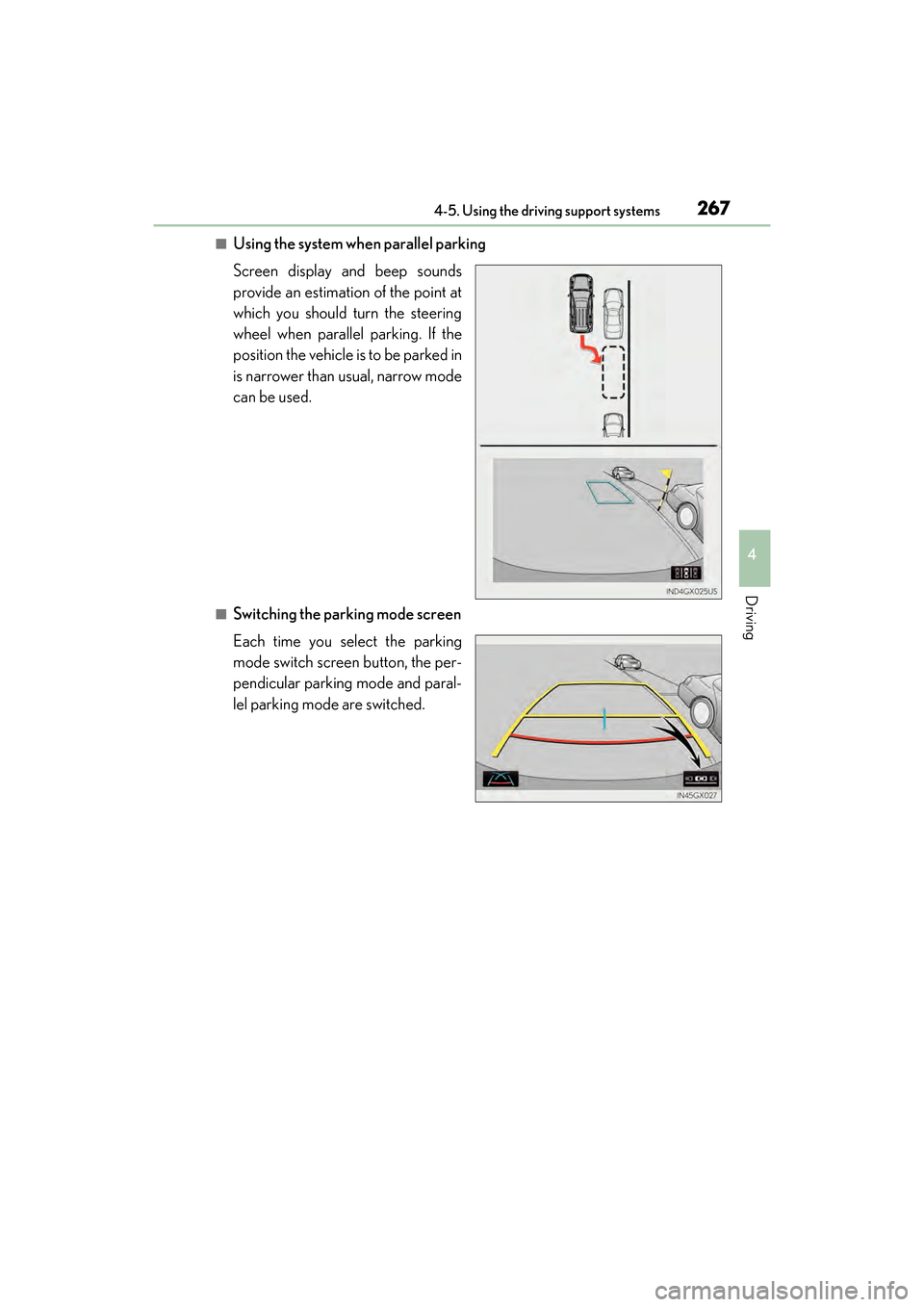
■Using the system when parallel parking
Screen display and beep sounds
provide an estimation of the point at
which you should turn the steering
wheel when parallel parking. If the
position the vehicle is to be parked in
is narrower than usual, narrow mode
can be used.
■Switching the parking mode screen
Each time you select the parking
mode switch screen button, the per-
pendicular parking mode and paral-
lel parking mode are switched.
GX460_OM_OM60F68U_(U).book Page 267 Wednesday, June 8, 2016 6:37 PM
Page 270 of 644

268
GX 460 _O M_ OM6 0F 6 8U _(U )4-5. Using the driving support systems
■Screen description
Vehicle width guide line
The line indicates a guide path when the vehicle is being backed straight up.
The displayed width is wider than the actual vehicle width.
The line aligns with the estimated course lines when the steering wheel is straight.
Estimated course lines
The lines show an estimated course when the steering wheel is turned.
Distance guide lines
The line moves, together with the estimated course lines, in sync with the steering
wheel. The line shows points approximately 1.5 ft. (0.5 m) (red) and approximately
3 ft. (1 m) (yellow) from the center of the edge of the bumper.
Distance guide line
The line shows distance behind the vehicle, a point approximately 1.5 ft. (0.5 m)
(blue) from the edge of the bumper.
Vehicle center guide line
The line indicates the estimated vehicle center on the ground.
Perpendicular parking (estimated course line display mode)
1
2
3
4
5
GX460_OM_OM60F68U_(U).book Page 268 Wednesday, June 8, 2016 6:37 PM
Page 271 of 644

GX 460 _O M_ OM6 0F 6 8U _(U )
2694-5. Using the driving support systems
4
Driving
■Parking operation
When parking in a space which is in the reverse direction to the space
described in the procedure below, the steering directions will be reversed.Shift the shift lever to the R position.
Turn the steering wheel so that
the estimated course lines are
within the parking space, and
back up slowly. Pa r k i n g s p a c e
Estimated course lines
When the rear position of the
vehicle has entered the parking
space, turn the steering wheel so
that the vehicle width guide lines
are within the left and right divid-
ing lines of the parking space. Vehicle width guide line
1
2
1
2
3
3
GX460_OM_OM60F68U_(U).book Page 269 Wednesday, June 8, 2016 6:37 PM
Page 272 of 644

270
GX 460 _O M_ OM6 0F 6 8U _(U )4-5. Using the driving support systems
Once the vehicle width guide lines and the parking space lines are parallel,
straighten the steering wheel and back up slowly until the vehicle has com-
pletely entered the parking space.
Stop the vehicle in an appropriate place, and finish parking.
■Screen description
Vehicle width guide lines
These lines indicate a guide path when the vehicle is being backed straight
up. The displayed width is wider than the actual vehicle width.
Parking assist guide lines
These lines indicate the path of the smallest turn possible behind the vehi-
cle.
These lines also indicate the approximate position of the steering wheel
when parking.
Distance guide line
This line (red) indicates points approximately 1.5 ft. (0.5 m) behind the rear
bumper of your vehicle.
Vehicle center guide line
The line indicates the estimated vehicle center on the ground.
Perpendicular parking (parking assist guide line display mode)
4
5
1
2
3
4
GX460_OM_OM60F68U_(U).book Page 270 Wednesday, June 8, 2016 6:37 PM