Terrain Lexus GX460 2017 User Guide
[x] Cancel search | Manufacturer: LEXUS, Model Year: 2017, Model line: GX460, Model: Lexus GX460 2017Pages: 644, PDF Size: 20.93 MB
Page 311 of 644
GX 460 _O M_ OM6 0F 6 8U _(U )
3094-5. Using the driving support systems
4
Driving
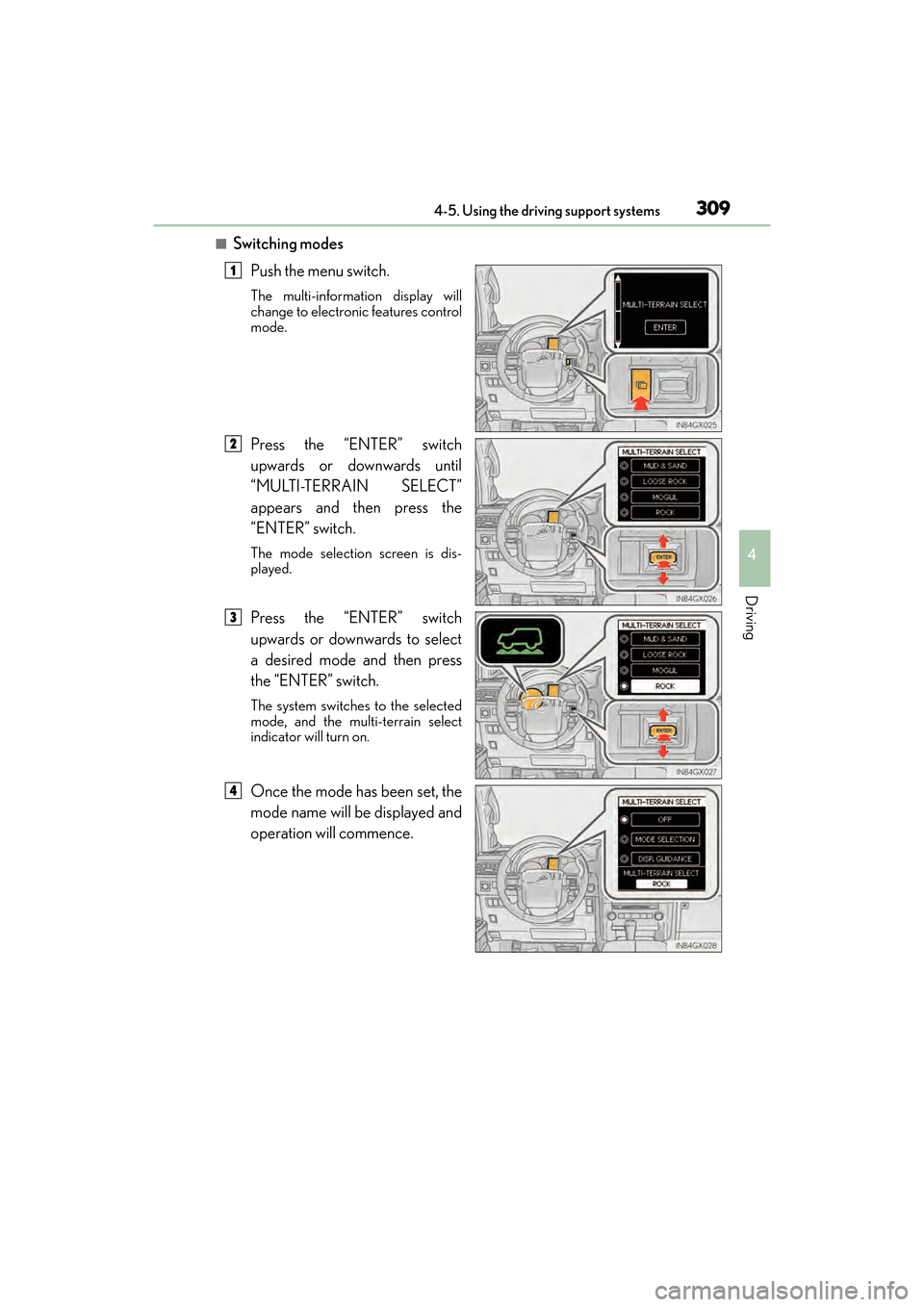
■Switching modesPush the menu switch.
The multi-information display will
change to electronic features control
mode.
Press the “ENTER” switch
upwards or downwards until
“MULTI-TERRAIN SELECT”
appears and then press the
“ENTER” switch.
The mode selection screen is dis-
played.
Press the “ENTER” switch
upwards or downwards to select
a desired mode and then press
the “ENTER” switch.
The system switches to the selected
mode, and the multi-terrain select
indicator will turn on.
Once the mode has been set, the
mode name will be displayed and
operation will commence.
1
2
3
4
GX460_OM_OM60F68U_(U).book Page 309 Wednesday, June 8, 2016 6:37 PM
Page 313 of 644
GX 460 _O M_ OM6 0F 6 8U _(U )
3114-5. Using the driving support systems
4
Driving
■The Multi-terrain Select can be operated when
The Crawl Control is off.
■When using Multi-terrain Select
The following functions cannot be switched on or off.
●VSC
●Active TRAC
●Second start mode
A message will be shown on the multi-inform ation display stating that these functions
cannot be switched using the VSC OFF swit ch or the menu and “ENTER” switches.
■When selecting a terrain mode
If you are unsure which mode is appropriate, select MOGUL when the four-wheel drive
control switch is in L4 or select MUD & SAND when it is in H4.
Guidance DisplayVehicle StatusProcedure
SHIFT TO L4LOOSE ROCK, MOGUL or ROCK
mode is selected when the four-wheel
drive control switch is in H4Set the four-wheel
drive control switch to
L4
STOP THE VEHI-
CLE AND SHIFT
THE AUTO-
MATIC TRANS-
MISSION TO NThe four-wheel drive control switch
has been shifted to H4 or L4 and
LOOSE ROCK, MOGUL or ROCK
mode is selected, but the automatic
transmission is not in N position or the
vehicle is not stopped
Stop the vehicle com-
pletely and shift the
shift lever into N
ACCELERATE OR
DECELERATE
The center differential lock/unlock
switch is pressed when Multi-terrain
Select is operating, but the center dif-
ferential cannot be switched between
lock and unlockDrive straight ahead
while accelerating or
decelerating, or drive
in reverse
RETURN THE
FOUR-WHEEL
DRIVE CON-
TROL SWITCHThe four-wheel drive control switch is
shifted when Multi-terrain Select is
operating, but the transfer cannot be
shifted to H4 or L4 positionReturn the four-wheel
drive control switch to
L4 or H4
MULTI-TERRAIN
SELECT NOT
AVA I L A B L EThe VSC, EFI, 4WD and/or Multi-ter-
rain Select system may be malfunc-
tioningContact your Lexus
dealer
GX460_OM_OM60F68U_(U).book Page 311 Wednesday, June 8, 2016 6:37 PM
Page 314 of 644
312
GX 460 _O M_ OM6 0F 6 8U _(U )4-5. Using the driving support systems
■When it is difficult to generate traction
MUD & SAND mode provides the largest amount of tire slippage, followed by LOOSE
ROCK, MOGUL and ROCK mode.
Drivability can be improved by selecting a mo
de which provides a smaller amount of tire
slippage than the current mode when the amount of tire slippage is large, or conversely
selecting a mode which provides a larger amou nt of tire slippage than the current mode
when the amount of tire slippage is small.
■When the vehicle is stuck
Switching the transfer and differential
For the operation of the following functions, refer to the following pages.
●Four-wheel drive system ( →P. 3 4 2 )
●Center differential lock ( →P. 3 4 3 )
■When the TRAC or Active TRAC operates continuously
→P. 3 5 4
■When the four-wheel drive cont rol switch is in L4 position
If the Multi-terrain Select system is not op erating and the four-wheel drive control switch
is in L4, “TRAC OFF” will be shown on the multi-information display.
■When there is a malfunction in the system
The slip indicator light will come on. Have the vehicle inspected by your Lexus dealer
immediately.
CAUTION
■When using the Multi-terrain Select
Observe the following precautions to avoid an accident that could result in death or
serious injuries:
●There is a chance that the selected mode may not be the most appropriate in terms of
road conditions such as pitch, slipperiness, undulation, etc. ( →P. 3 0 8 )
●Multi-terrain Select is not intended to expand the limits of the vehicle. Check the road
conditions thoroughly beforehand, and drive safely and carefully.
NOTICE
■Precaution for use
The Multi-terrain Select is intended for use during off-road driving. Do not use the sys-
tem at any other time.
GX460_OM_OM60F68U_(U).book Page 312 Wednesday, June 8, 2016 6:37 PM
Page 315 of 644
313
GX 460 _O M_ OM6 0F 6 8U _(U )4-5. Using the driving support systems
4
Driving
Multi-terrain Monitor∗
●By pressing the Multi-terrain Monitor sw
itch, the display can be shown, or the
display image can be changed between the front screen, wide view front &
side monitor screen, side-front simultaneous display monitor screen, side-
rear simultaneous display monitor screen or rear screen. (The screens that
can be selected differ depending on the shift position and the transfer mode.)
●By referring to the guidelines shown on the front monitor screen, you can
decide a driving line while assessing the distance to obstacles ahead of the
vehicle and confirm the projected path, and by using the wide view front &
side monitors, the side-front simultaneous display monitor and the side-rear
simultaneous display monitor to identify objects in the vicinity or course of the
tires, you can drive while preventing the vehicle from becoming stuck unex-
pectedly.
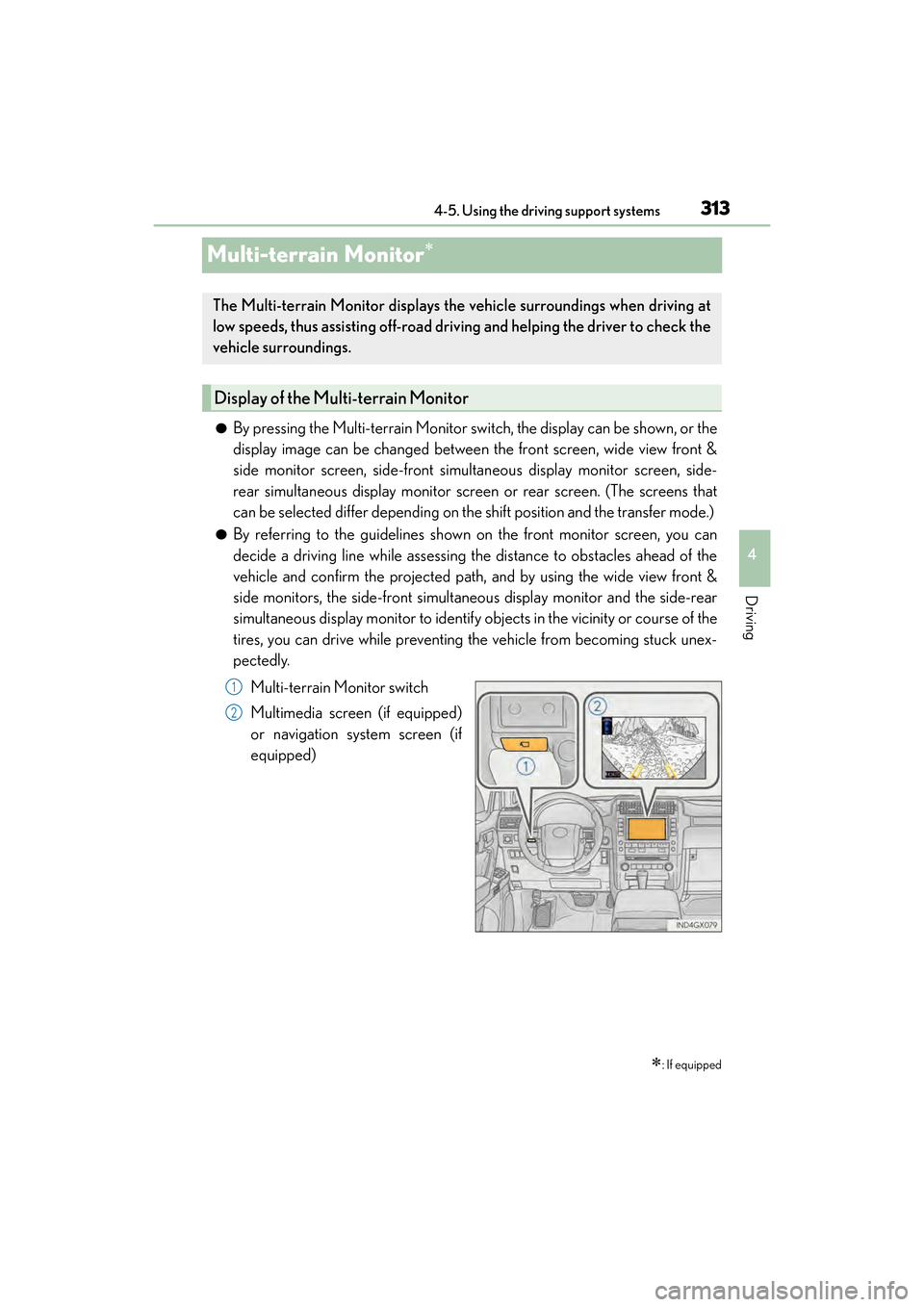
Multi-terrain Monitor switch
Multimedia screen (if equipped)
or navigation system screen (if
equipped)
∗: If equipped
The Multi-terrain Monitor displays the vehicle surroundings when driving at
low speeds, thus assisting off-road driv ing and helping the driver to check the
vehicle surroundings.
Display of the Multi-terrain Monitor
1
2
GX460_OM_OM60F68U_(U).book Page 313 Wednesday, June 8, 2016 6:37 PM
Page 316 of 644
314
GX 460 _O M_ OM6 0F 6 8U _(U )4-5. Using the driving support systems
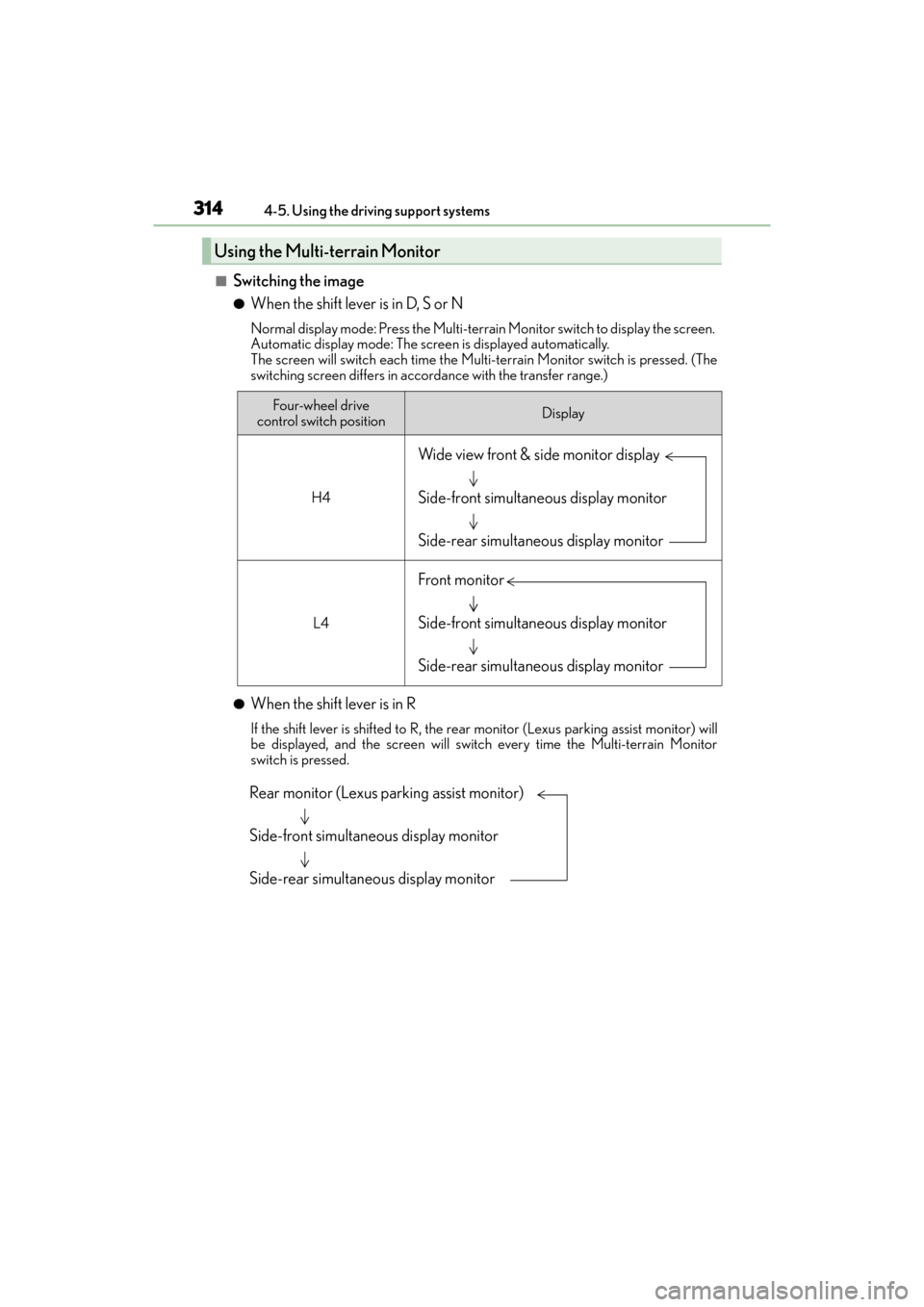
■Switching the image
●When the shift lever is in D, S or N
Normal display mode: Press the Multi-terrain Monitor switch to display the screen.
Automatic display mode: The screen is displayed automatically.
The screen will switch each time the Multi-terrain Monitor switch is pressed. (The
switching screen differs in accordance with the transfer range.)
●When the shift lever is in R
If the shift lever is shifted to R, the rear
monitor (Lexus parking assist monitor) will
be displayed, and the screen will switch every time the Multi-terrain Monitor
switch is pressed.
Using the Multi-terrain Monitor
Four-wheel drive
control switch positionDisplay
H4
L4
Wide view front & side monitor display
Side-front simultaneous display monitor
Side-rear simultaneous display monitor
Front monitor
Side-front simultaneous display monitor
Side-rear simultaneous display monitor
Rear monitor (Lexus parking assist monitor)
Side-front simultaneous display monitor
Side-rear simultaneous display monitor
GX460_OM_OM60F68U_(U).book Page 314 Wednesday, June 8, 2016 6:37 PM
Page 317 of 644
GX 460 _O M_ OM6 0F 6 8U _(U )
3154-5. Using the driving support systems
4
Driving
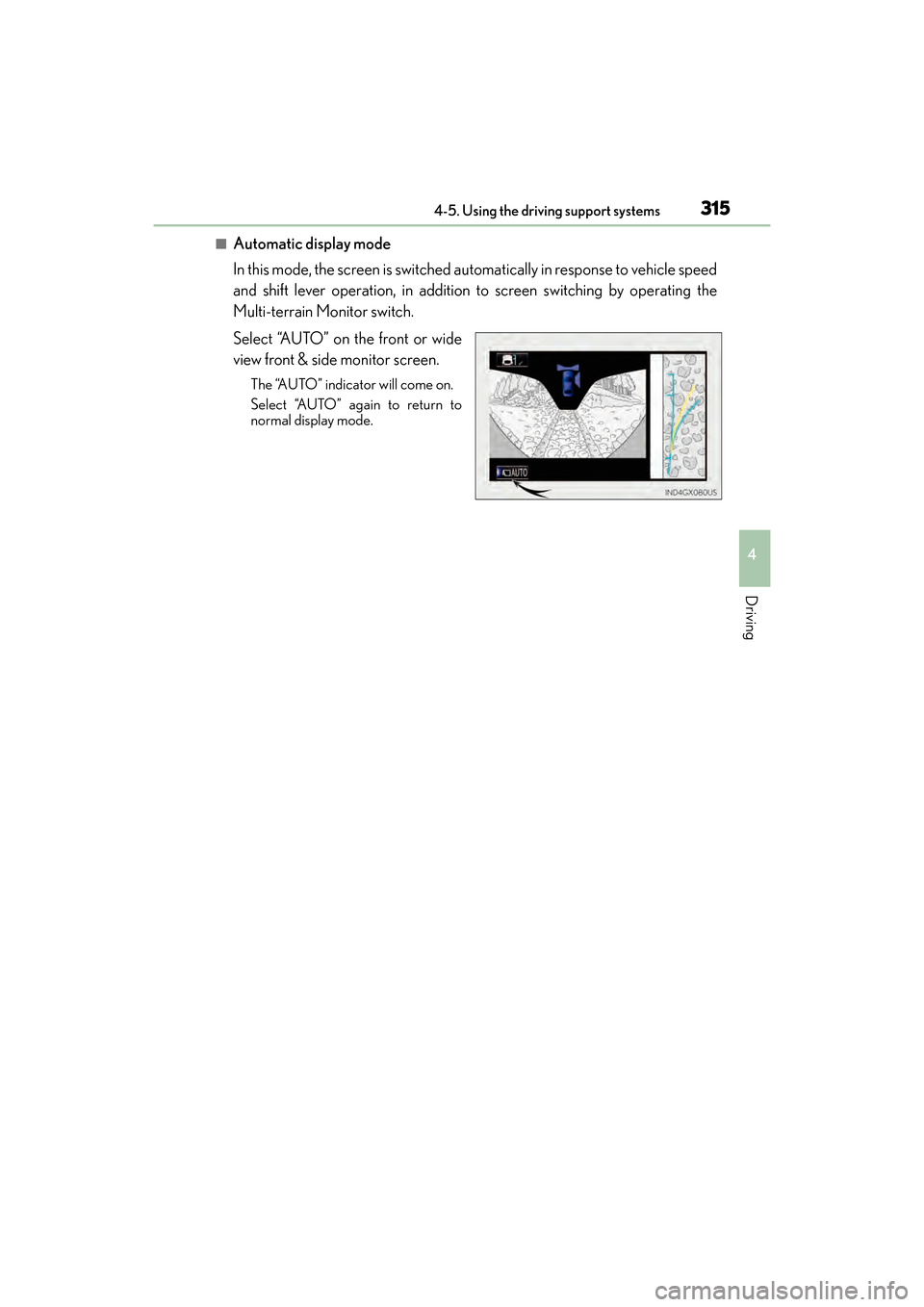
■Automatic display mode
In this mode, the screen is switched automatically in response to vehicle speed
and shift lever operation, in addition to screen switching by operating the
Multi-terrain Monitor switch.
Select “AUTO” on the front or wide
view front & side monitor screen.
The “AUTO” indicator will come on.
Select “AUTO” again to return to
normal display mode.
GX460_OM_OM60F68U_(U).book Page 315 Wednesday, June 8, 2016 6:37 PM
Page 327 of 644

GX 460 _O M_ OM6 0F 6 8U _(U )
3254-5. Using the driving support systems
4
Driving
■The Multi-terrain Monitor can be operated when
XNormal display mode
●The engine switch is in IGNITION ON mode.
●The vehicle speed is less than approximately 7 mph (12 km/h).
XAutomatic display mode
●When automatic display mode is selected
●When the shift lever is shifted to D, S or N
●When the shift lever is in D, S or N and th e vehicle speed is below approximately 6 mph
(10 km/h)
■Automatic system cancellation
In the following situations, the image is canceled automatically.
●When the vehicle speed exceeds approximately 7 mph (12 km/h).
After the vehicle speed exceeds approximately 7 mph (12 km/h), the image will con-
tinue to be displayed for a short time.
If the vehicle speed returns to below 7 mph (12 km/h) before the image extinguishes,
the image will continue to be displayed.
●When “SETUP” or another switch outside the screen has been pressed
●When the shift lever is in P or R.
■Insert display
An insert display is displayed when an obstac le is within the detection range of the intui-
tive parking assist. ( →P. 244)
■When folding or extending the door mirrors
The screen will be turned off temporarily while the door mirrors are folding or extending,
and the screen will return to normal after the door mirror operation has been completed.
GX460_OM_OM60F68U_(U).book Page 325 Wednesday, June 8, 2016 6:37 PM
Page 332 of 644
330
GX 460 _O M_ OM6 0F 6 8U _(U )4-5. Using the driving support systems
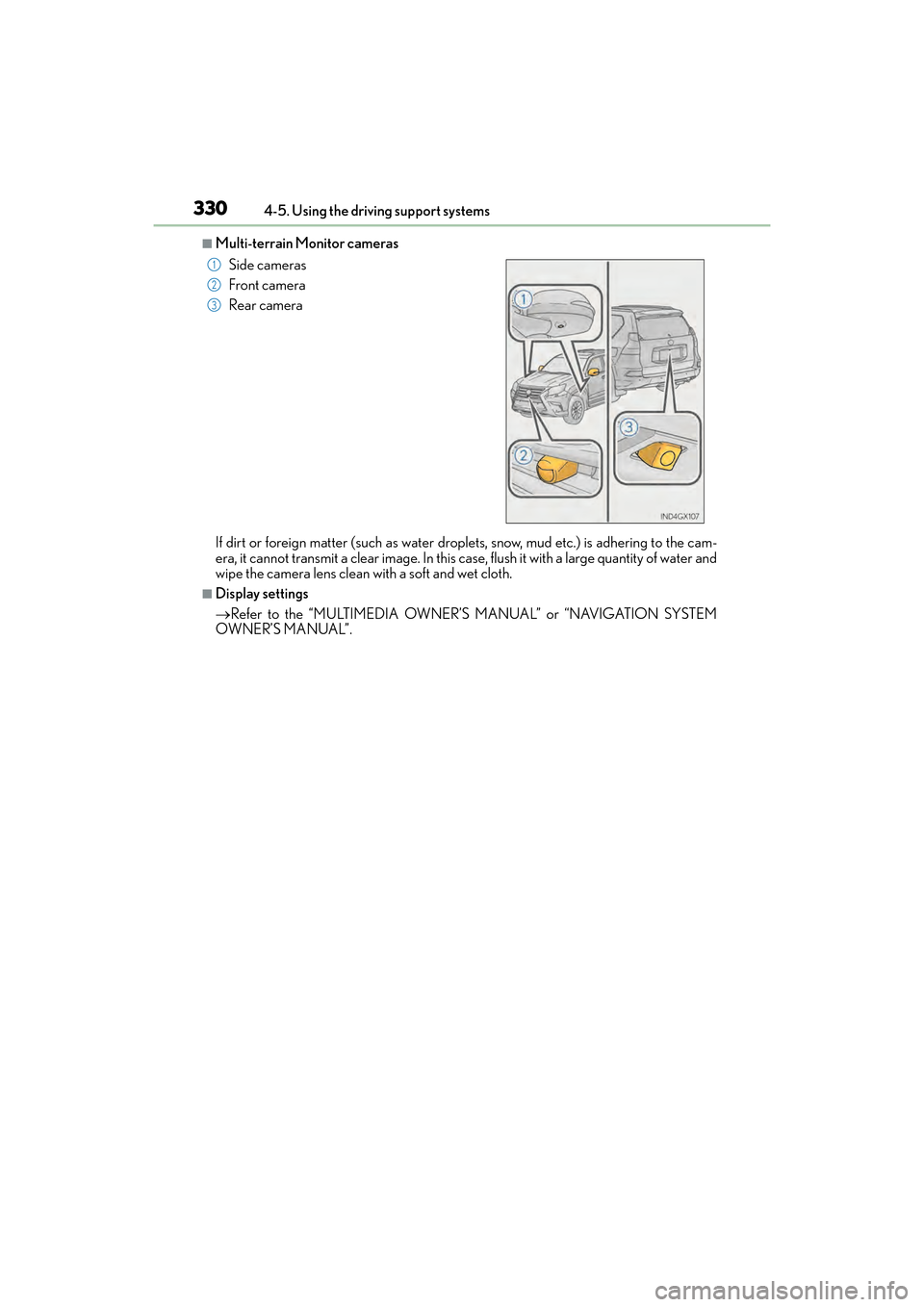
■Multi-terrain Monitor cameras
If dirt or foreign matter (such as water droplets, snow, mud etc.) is adhering to the cam-
era, it cannot transmit a clear image. In this case, flush it with a large quantity of water and
wipe the camera lens clean with a soft and wet cloth.
■Display settings
→
Refer to the “MULTIMEDIA OWNER’S MANUAL” or “NAVIGATION SYSTEM
OWNER’S MANUAL”. Side cameras
Front camera
Rear camera
1
2
3
GX460_OM_OM60F68U_(U).book Page 330 Wednesday, June 8, 2016 6:37 PM
Page 333 of 644

GX 460 _O M_ OM6 0F 6 8U _(U )
3314-5. Using the driving support systems
4
Driving
■If you notice any symptoms
If you notice any of the following symptoms, refer to the likely cause and the
solution, and re-check.
If the symptom is not resolved by the solution, have the vehicle inspected by
your Lexus dealer.
Things you should know
Likely causeSolution
‰ The image is difficult to see
• The vehicle is in a dark area
• The temperature around the lens is
either high or low
• The outside temperature is low
• There are water droplets on the cam- era
• It is raining or humid
• Foreign matter (mud etc.) is adhering to the camera
• There are scratches on the camera
• Sunlight or headlights are shining directly into the camera
• The vehicle is under fluorescent lights, sodium lights, mercury lights etc.
If this happens due to these causes, it
does not indicate a malfunction.
Drive carefully while visually checking the
vehicle’s surroundings. (Use the monitor
again once conditions have been
improved.)
The image on the Multi-terrain Monitor
screen can be adjusted, refer to the
“MULTIMEDIA OWNER’S MANUAL”
or “NAVIGATION SYSTEM OWNER’S
MANUAL”.
‰ The image is blurry
Dirt or foreign matter (such as water
droplets, snow, mud etc.) is adhering to
the camera.
If dirt or foreign matter (such as water
droplets, snow, mud etc.) is adhering to
the camera, it cannot transmit a clear
image. In this case, flush it with a large
quantity of water and wipe the camera
lens clean with a soft and wet cloth.
‰The image is out of alignment
The camera or surrounding area has
received a strong impact.Have the vehicle inspected by your Lexus
dealer.
‰Motion blur occurs on the screen and the display is darker than usual
The display is cold.Do not rely solely upon the Multi-terrain
Monitor. Drive carefully while directly
confirming your surroundings.
‰Switch sound effects do not work
The multimedia or navigation system vol-
ume setting is low or muted.Increase the volume in the multimedia or
navigation system volume settings.
GX460_OM_OM60F68U_(U).book Page 331 Wednesday, June 8, 2016 6:37 PM
Page 335 of 644
GX 460 _O M_ OM6 0F 6 8U _(U )
3334-5. Using the driving support systems
4
Driving
CAUTION
■When using the Multi-terrain Monitor system
Observe the following precautions to avoid an accident that could result in death or
serious injuries:
●When attempting to use the side cameras while the door mirror is folded in, the base
of the door mirror is displayed on the screen and the area in front of the vehicle can-
not be observed. The image displayed on the screen differs depending on the posi-
tion of the door mirror.
●The field of view of the camera is limited. Do not rely solely upon the Multi-terrain
Monitor.
As with unequipped vehicles, drive carefully while directly confirming the safety of
your surroundings.
Take particular care to avoid parked cars and other obstacles.
●Do not drive the vehicle while only lookin g at the monitor screen under any circum-
stances.
Driving while only viewing the monitor screen may cause a collision or lead to an
accident, as the image displayed on the monitor screen may differ from actual condi-
tions. Make sure to visually check the surrounding areas with and without the mirror
while driving.
●Always check visually and with the mirrors to confirm your intended path is clear.
●The camera uses a special lens. The distances between objects and pedestrians that
appear in the image displayed on the sc reen will differ from the actual distances.
●These are just some of the functions of the Multi-terrain Monitor. The steering wheel
timing and amount the steering wheel should be turned differs depending on the road
condition and road surface. Use the Multi-terrain Monitor with full understanding of
the above conditions.
Always confirm that there is appropriate space before attempting to park the vehicle.
●Do not use the Multi-terrain Monitor in the following cases:
• On icy or slick road surfaces, or in snow
•When using tire chains
• When the back door is not closed completely
• On roads that are not flat or straight, such as curves or slopes.
●In low temperatures, the screen may darken or the image may become faint. The
image could distort when the vehicle is moving, or you may become unable to see the
image on the screen. Be sure to check dire ct visually all around the vehicle before
proceeding.
GX460_OM_OM60F68U_(U).book Page 333 Wednesday, June 8, 2016 6:37 PM