Terrain Lexus GX460 2017 Owner's Manual
[x] Cancel search | Manufacturer: LEXUS, Model Year: 2017, Model line: GX460, Model: Lexus GX460 2017Pages: 644, PDF Size: 20.93 MB
Page 5 of 644
3
1
8 7
6
5
4
3
2
GX 460 _O M_ OM6 0F 6 8U _(U )
9
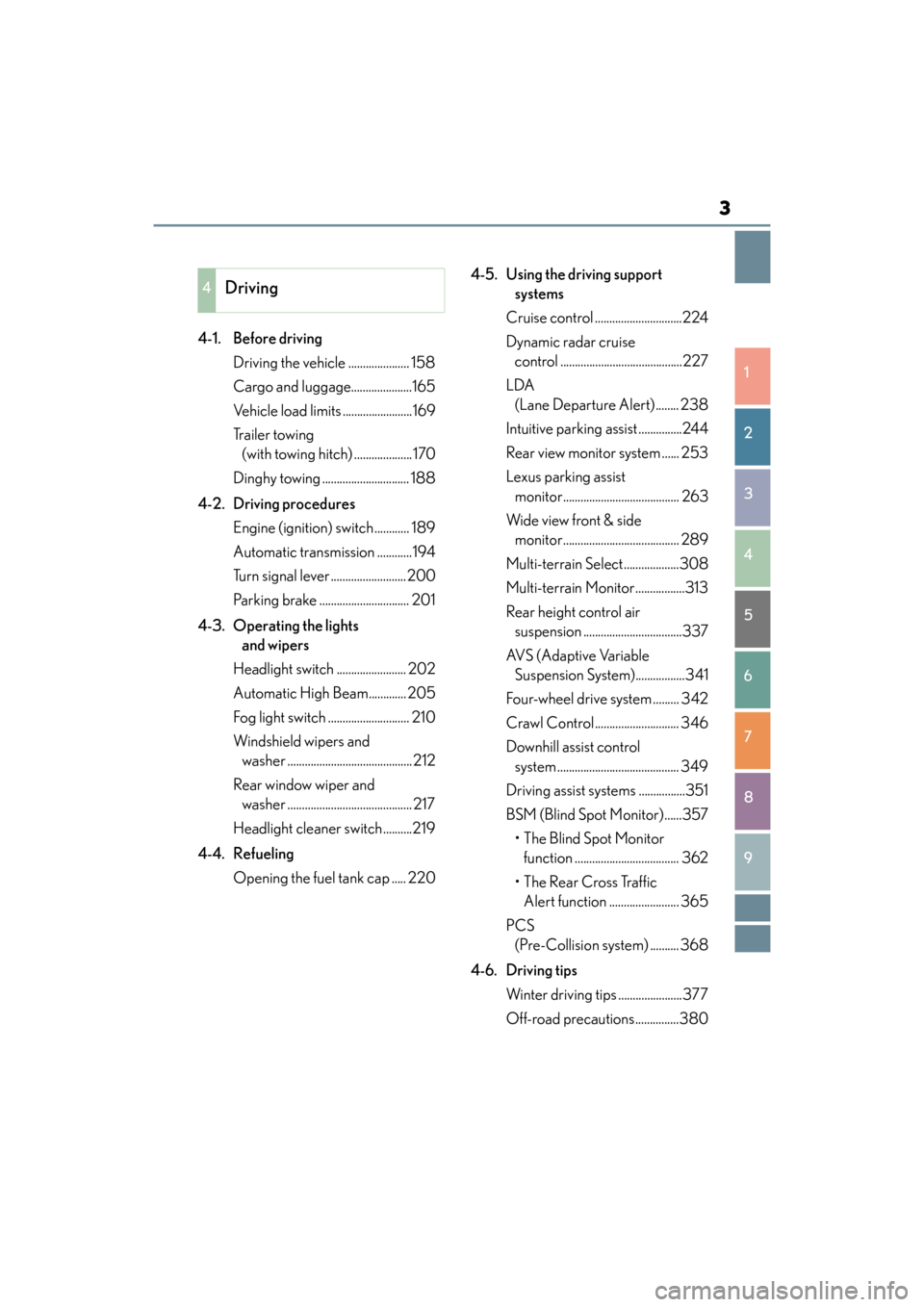
4-1. Before driving Driving the vehicle ..................... 158
Cargo and luggage.....................165
Vehicle load limits ........................169
Tr a i l e r t o w i n g (with towing hitch) .................... 170
Dinghy towing .............................. 188
4-2. Driving procedures Engine (ignition) switch ............ 189
Automatic transmission ............194
Turn signal lever ..........................200
Parking brake ............................... 201
4-3. Operating the lights and wipers
Headlight switch ........................ 202
Automatic High Beam............. 205
Fog light switch ............................ 210
Windshield wipers and washer ...........................................212
Rear window wiper and washer ........................................... 217
Headlight cleaner switch ..........219
4-4. Refueling Opening the fuel tank cap ..... 220 4-5. Using the driving support
systems
Cruise control ..............................224
Dynamic radar cruise control ..........................................227
LDA (Lane Departure Alert)........ 238
Intuitive parking assist ...............244
Rear view monitor system ...... 253
Lexus parking assist monitor........................................ 263
Wide view front & side monitor........................................ 289
Multi-terrain Select...................308
Multi-terrain Monitor.................313
Rear height control air suspension ..................................337
AVS (Adaptive Variable Suspension System).................341
Four-wheel drive system ......... 342
Crawl Control ............................. 346
Downhill assist control system .......................................... 349
Driving assist systems ................351
BSM (Blind Spot Monitor)......357 •The Blind Spot Monitor function .................................... 362
• The Rear Cross Traffic Alert function ........................ 365
PCS (Pre-Collision system) .......... 368
4-6. Driving tips Winter driving tips ......................377
Off-road precautions...............380
4Driving
GX460_OM_OM60F68U_(U).book Page 3 Wednesday, June 8, 2016 6:37 PM
Page 21 of 644
19Pictorial index
GX 460 _O M_ OM6 0F 6 8U _(U )
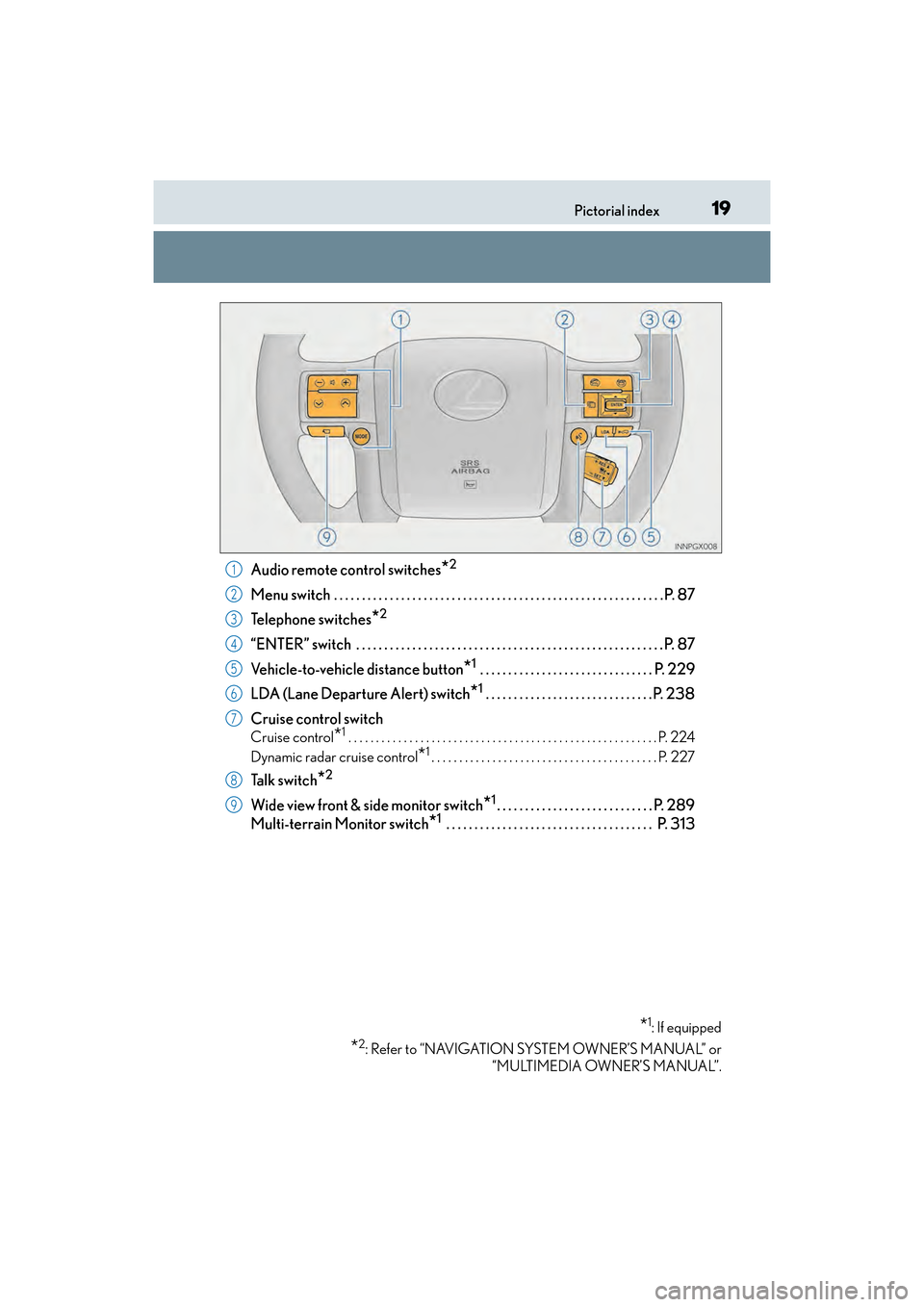
Audio remote control switches*2
Menu switch . . . . . . . . . . . . . . . . . . . . . . . . . . . . . . . . . . . . . . . . . . . . . . . . . . . . . . . . . . .P. 87
Telephone switches
*2
“ENTER” switch . . . . . . . . . . . . . . . . . . . . . . . . . . . . . . . . . . . . . . . . . . . . . . . . . . . . . . . P. 87
Vehicle-to-vehicle distance button
*1 . . . . . . . . . . . . . . . . . . . . . . . . . . . . . . . P. 229
LDA (Lane Departure Alert) switch
*1 . . . . . . . . . . . . . . . . . . . . . . . . . . . . . . P. 238
Cruise control switch
Cruise control*1 . . . . . . . . . . . . . . . . . . . . . . . . . . . . . . . . . . . . . . . . . . . . . . . . . . . . . . . . P. 224
Dynamic radar cruise control
*1. . . . . . . . . . . . . . . . . . . . . . . . . . . . . . . . . . . . . . . . . P. 227
Talk switch*2
Wide view front & side monitor switch*1. . . . . . . . . . . . . . . . . . . . . . . . . . . . P. 289
Multi-terrain Monitor switch
*1 . . . . . . . . . . . . . . . . . . . . . . . . . . . . . . . . . . . . . P. 313
*1: If equipped
*2: Refer to “NAVIGATION SYSTEM OWNER’S MANUAL” or “MULTIMEDIA OWNER’S MANUAL”.
1
2
3
4
5
6
7
8
9
GX460_OM_OM60F68U_(U).book Page 19 Wednesday, June 8, 2016 6:37 PM
Page 82 of 644
80
GX 460 _O M_ OM6 0F 6 8U _(U )2. Instrument cluster
*1: These lights turn on when the engine switch is turned to IGNITION ON mode to
indicate that a system check is being performed. They will turn off after the engine is
on, or after a few seconds. There may be a malfunction in a system if the lights do not
turn on, or turn off. Have the vehicle inspected by your Lexus dealer.
*2: The light flashes to indicate a malfunction.
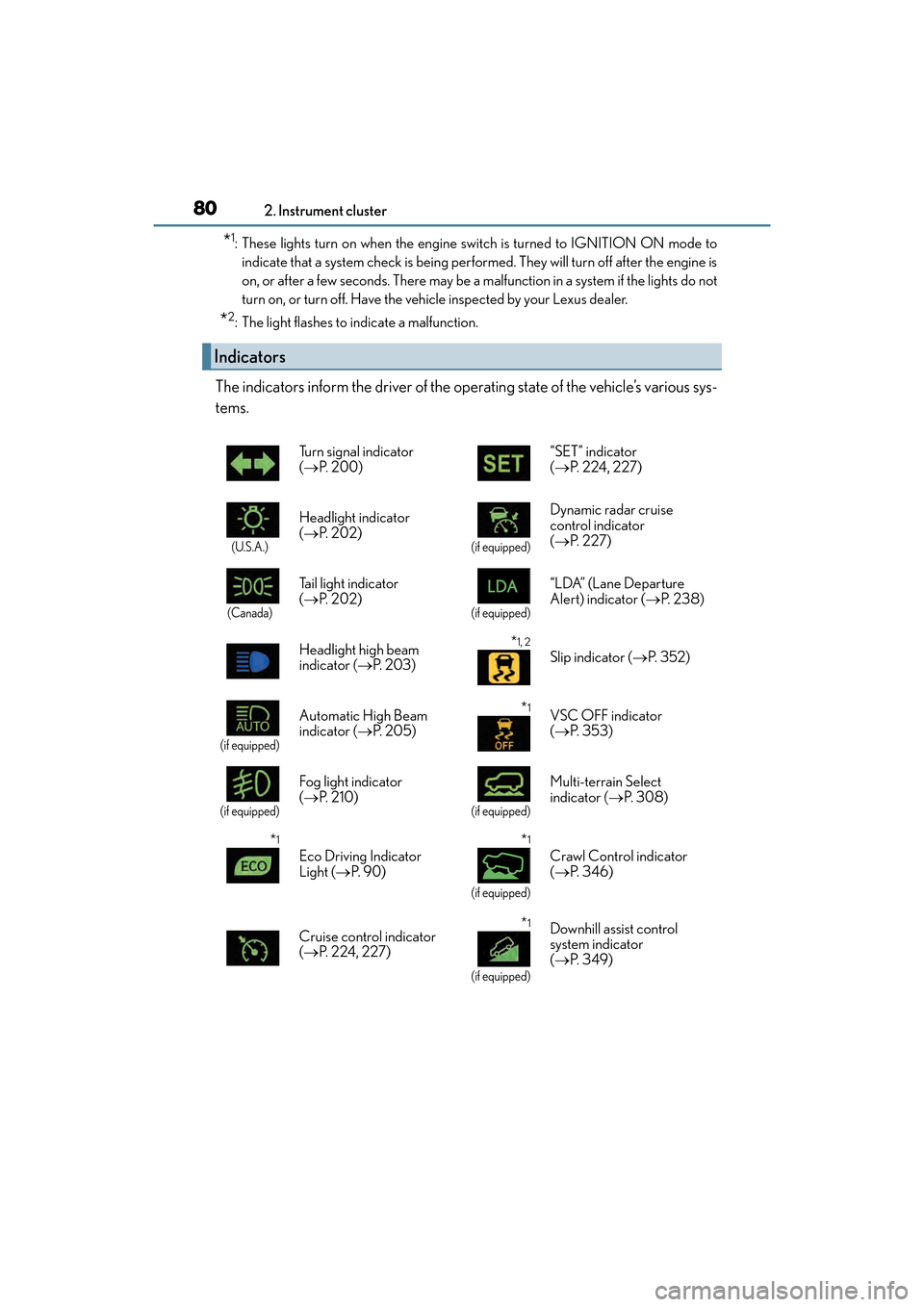
The indicators inform the driver of the operating state of the vehicle’s various sys-
tems.
Indicators
Turn signal indicator
(→ P. 2 0 0 ) “SET” indicator
(
→ P. 2 2 4 , 2 2 7 )
(U.S.A.)
Headlight indicator
(→ P. 202)
(if equipped)
Dynamic radar cruise
control indicator
(→ P. 2 2 7 )
(Canada)
Tail light indicator
(→ P. 202)
(if equipped)
“LDA” (Lane Departure
Alert) indicator (→ P. 2 3 8 )
Headlight high beam
indicator ( →P. 2 0 3 )
*1, 2
Slip indicator ( →P. 3 5 2 )
(if equipped)
Automatic High Beam
indicator ( →P. 2 0 5 )*1VSC OFF indicator
(→ P. 3 5 3 )
(if equipped)
Fog light indicator
(→ P. 2 1 0 )
(if equipped)
Multi-terrain Select
indicator ( →P. 3 0 8 )
*1
Eco Driving Indicator
Light ( →P. 9 0 )
*1
(if equipped)
Crawl Control indicator
(→ P. 3 4 6 )
Cruise control indicator
( → P. 2 2 4 , 2 2 7 )
*1
(if equipped)
Downhill assist control
system indicator
(→ P. 3 4 9 )
GX460_OM_OM60F68U_(U).book Page 80 Wednesday, June 8, 2016 6:37 PM
Page 84 of 644

82
GX 460 _O M_ OM6 0F 6 8U _(U )2. Instrument cluster
CAUTION
■If a safety system warning light does not come on
Should a safety system light such as th
e ABS/Multi Terrain ABS and the SRS warning
light not come on when you start the engine, this could mean that these systems are not
available to help protect you in an acciden t, which could result in death or serious
injury. Have the vehicle inspected by your Lexus dealer immediately if this occurs.
GX460_OM_OM60F68U_(U).book Page 82 Wednesday, June 8, 2016 6:37 PM
Page 90 of 644

88
GX 460 _O M_ OM6 0F 6 8U _(U )2. Instrument cluster
■Average fuel consumption and Eco
Driving Indicator Zone Display
(→ P. 9 0 )
Displays the average fuel consumption since the function was reset
• The function can be reset by pressing th e “ENTER” switch for longer than 1 second
when the average fuel consumption is displayed.
• Use the displayed average fuel consumption as a reference.
■Average vehicle speed
Displays the average vehicle speed since the engine was started or the func-
tion was reset
The function can be reset by pressing the “ENTER” switch for longer than 1 second
when the average vehicle speed is displayed.
■Elapsed time
Displays the elapsed time since the function was last reset
The function can be reset by pressing the “ENTER” switch for longer than 1 second
when the elapsed time is displayed.
■Display off
A blank screen is displayed
■Multi-terrain Select (if equipped) ( →P. 3 0 8 )
■Intuitive parking assist (if equipped) ( →P. 2 4 4 )
■BSM (Blind Spot Monitor) (if equipped) ( →P. 3 5 7 )
■Second start mode ( →P. 1 9 5 )
Electronic features control contents
GX460_OM_OM60F68U_(U).book Page 88 Wednesday, June 8, 2016 6:37 PM
Page 159 of 644
157
GX 460 _O M_ OM6 0F 6 8U _(U )
4Driving
4-1. Before drivingDriving the vehicle ......................158
Cargo and luggage .................... 165
Vehicle load limits ....................... 169
Trailer towing (with towing hitch).................... 170
Dinghy towing...............................188
4-2. Driving procedures Engine (ignition) switch ............ 189
Automatic transmission ............ 194
Turn signal lever ......................... 200
Parking brake ................................ 201
4-3. Operating the lights and wipers
Headlight switch .........................202
Automatic High Beam ............ 205
Fog light switch............................. 210
Windshield wipers and washer........................................... 212
Rear window wiper and washer........................................... 217
Headlight cleaner switch ......... 219
4-4. Refueling Opening the fuel tank cap ......220 4-5. Using the driving support
systems
Cruise control ............................. 224
Dynamic radar cruise control ......................................... 227
LDA (Lane Departure Alert) ........238
Intuitive parking assist .............. 244
Rear view monitor system ...... 253
Lexus parking assist monitor ........................................ 263
Wide view fro nt & side monitor ........................................ 289
Multi-terrain Select .................. 308
Multi-terrain Monitor ................ 313
Rear height control air suspension ................................. 337
AVS (Adaptive Variable Suspension System) ................ 341
Four-wheel drive system ......... 342
Crawl Control ............................. 346
Downhill assist control system .......................................... 349
Driving assist systems................ 351
BSM (Blind Spot Monitor) ..... 357 • The Blind Spot Monitor function .................................... 362
• The Rear Cross Traffic Alert function......................... 365
PCS (Pre-Collision system) ..........368
4-6. Driving tips Winter driving tips ......................377
Off-road precautions .............. 380
GX460_OM_OM60F68U_(U).book Page 157 Wednesday, June 8, 2016 6:37 PM
Page 235 of 644
GX 460 _O M_ OM6 0F 6 8U _(U )
2334-5. Using the driving support systems
4
Driving
■Dynamic radar cruise control can be set when
●The shift lever is in the D or range 4 or higher of S has been selected.
●Vehicle speed is above approximately 30 mph (50 km/h).
■Switching modes
The mode cannot be switched to constant speed control mode if vehicle-to-vehicle dis-
tance control mode has been used. The mode also cannot be switched from constant
speed control to vehicle-to-vehicle distance control mode. Turn the system off by press-
ing the “ON-OFF” button, and turn it on again.
■Accelerating after setting the vehicle speed
The vehicle can accelerate normally. After acceleration, the set speed resumes. How-
ever, during vehicle-to-vehicle distance control mode, the vehicle speed may decrease
below the set speed in order to maintain the distance to the vehicle ahead.
■Automatic cancelation of vehicle-to-vehicle distance control
Vehicle-to-vehicle distance control driving is automatically canceled in the following situ-
ations:
●Actual vehicle speed falls below approximately 25 mph (40 km/h).
●VSC is activated.
●The sensor cannot operate correctly because it is covered in some way.
●The windshield wipers are operating at high speed (when the wiper switch is set to the
“AUTO” mode or the high speed wiper operation position).
●When second start mode is set.
●Bad weather causes the detection function to become extremely unstable.
●Multi-terrain mode is selected other than OFF.
●The center differential lock/unlock is not completed within 5 seconds while the
dynamic radar cruise control system is on.
If vehicle-to-vehicle distance control driving is automatically canceled for any other rea-
son, there may be a malfunction in the system. Contact your Lexus dealer.
■Automatic cancelation of constant speed control
The cruise control will stop maintaining the vehicle speed in the following situations:
●Actual vehicle speed is more than approximately 10 mph (16 km/h) below the set vehi-
cle speed.
At this time, the memorized set speed is not retained.
●Actual vehicle speed falls below approximately 25 mph (40 km/h).
●VSC is activated.
●The center differential lock/unlock is not completed within 5 seconds while the
dynamic radar cruise control system is on.
GX460_OM_OM60F68U_(U).book Page 233 Wednesday, June 8, 2016 6:37 PM
Page 248 of 644

246
GX 460 _O M_ OM6 0F 6 8U _(U )4-5. Using the driving support systems
When the sensors detect an obstacle, a graphic is shown on the multi-informa-
tion display, multimedia screen (if equipped) and navigation system screen (if
equipped) depending on the position and distance to the obstacle.
XMulti-information display
Front corner sensor operation
Front center sensor operation
Rear corner sensor operation
Rear center sensor operation
XMultimedia screen or navigation system screen
Intuitive parking assist display
When the rear view monitor sys-
tem
*, Lexus parking assist monitor*
or Multi-terrain Monitor* is not dis-
played.
A graphic is automatically displayed
when an obstacle is detected. The
screen can be set so that the graphic is
not displayed. ( →P. 2 4 9 )
Insert display
When the rear view monitor sys-
tem
*, Lexus parking assist monitor*
or Multi-terrain Monitor* is dis-
played.
A simplified image is displayed on the
upper corner of the screen when an
obstacle is detected.
*: If equipped
Display
1
2
3
4
1
2
GX460_OM_OM60F68U_(U).book Page 246 Wednesday, June 8, 2016 6:37 PM
Page 252 of 644
250
GX 460 _O M_ OM6 0F 6 8U _(U )4-5. Using the driving support systems
■The intuitive parking assist can be operated when
●Front corner sensors:
• The engine switch is
in IGNITION ON mode.
• The shift lever is in a position other than P.
• The vehicle speed is less than approximately 6 mph (10 km/h). (At any speed when the shift lever is in R)
●Front center sensors:
• The engine switch is in IGNITION ON mode.
• The shift lever is in a position other than P or R.
• The vehicle speed is less than about 6 mph (10 km/h).
●Rear corner and rear center sensors:
• The engine switch is in IGNITION ON mode.
• The shift lever is in R.
■Intuitive parking assist display
When an obstacle is detected while the rear view monitor system, Lexus parking assist
monitor or Multi-terrain Monitor is in use, the warning indicator will appear in the upper
corner of the screen even if the display setting has been set to off.
■Sensor detection information
●The sensor’s detection areas are limited to the areas around the vehicle’s bumper.
●Certain vehicle conditions and the surround ing environment may affect the ability of a
sensor to correctly detect an obstacle. Particular instances where this may occur are
listed below.
• There is dirt, snow or ice on the sensor . (Wiping the sensors will resolve this prob-
lem.)
• The sensor is frozen. (Thawing th e area will resolve this problem.)
In especially cold weather, if a sensor is frozen the screen may show an abnormal
display, or obstacles may not be detected.
• The sensor is covered in any way.
• The vehicle is leaning co nsiderably to one side.
• On an extremely bumpy road, on an incline, on gravel, or on grass.
• The vicinity of the vehicle is noisy due to vehicle horns, motorcycle engines, air brakes of large vehicles, or other loud noises producing ultrasonic waves.
• There is another vehicle equipped with parking assist sensors in the vicinity.
• The sensor is coated with a sheet of spray or heavy rain.
• The vehicle is equipped with a fender pole or wireless antenna.
• The bumper or sensor receives a strong impact.
• The vehicle is approaching a tall or curved curb.
• In harsh sunlight or intense cold weather.
• The area directly under the bumpers is not detected.
• If obstacles draw too close to the sensor.
• A non-genuine Lexus suspension (lowered suspension etc.) is installed.
• People may not be detected if they are wearing certain types of clothing.
In addition to the examples above, there are instances in which, because of their shape,
signs and other objects may be judged by a sensor to be closer than they are.
GX460_OM_OM60F68U_(U).book Page 250 Wednesday, June 8, 2016 6:37 PM
Page 310 of 644

308
GX 460 _O M_ OM6 0F 6 8U _(U )4-5. Using the driving support systems
Multi-terrain Select∗
Select a mode that most closely matches the type of terrain on which you are
driving from among 4 modes.
Engine control and brake control can be optimized in accordance with the
selected mode.
Menu switch
“ENTER” switch
Multi-information display
Displays status information including
operating status and road type
selection.
Multi-terrain Select indicator
■Selectable modes
A mode which matches the road conditions can be selected from among the
following 4 modes.
∗: If equipped
Multi-terrain Select is a system that helps drivability in off-road situations.
1
2
3
4
ModeRoad Conditions
MUD & SANDSuitable for muddy roads, sandy roads, snow-covered roads, dirt
trails and other slippery or dirty conditions
LO OSE ROCKSuitable for slippery conditions consisting of mixtures of earth
and loose rock
MOGULSuitable for a wide range of off-road conditions, particularly very
bumpy conditions
ROCKSuitable for rocky terrain
GX460_OM_OM60F68U_(U).book Page 308 Wednesday, June 8, 2016 6:37 PM