mirror Lexus GX460 2017 Owner's Guide
[x] Cancel search | Manufacturer: LEXUS, Model Year: 2017, Model line: GX460, Model: Lexus GX460 2017Pages: 644, PDF Size: 20.93 MB
Page 210 of 644

208
GX 460 _O M_ OM6 0F 6 8U _(U )4-3. Operating the lights and wipers
●In the situations below, the system may not be able to correctly detect the surrounding
brightness levels, and may flash or expose nearby pedestrians to the high beam. There-
fore, you should consider turning the high be
am on or off manually rather than relying
on the Automatic High Beam system.
• In bad weather (rain, snow, fog, sandstorms etc.)
• The windshield is obscured by fog, mist, ice, dirt etc.
• The windshield is cracked or damaged.
• The inside rear view mirror or camera sensor is deformed or dirty.
• The camera sensor temperature is extremely high.
• Surrounding brightness levels are equal to those of headlights, tail lights or fog lights.
• Vehicles ahead have headlights that are either switched off, dirty, are changing color, or are not aimed properly.
• When driving through an area of interm ittently changing brightness and darkness
• When frequently and repeated ly driving ascending/descending roads, or roads with
rough, bumpy or uneven surfaces (such as stone-paved roads, gravel tracks etc.)
• When frequently and repeatedly taking curves or driving on a winding road
• There is a highly reflective object ahead of the vehicle, such as a sign or a mirror.
• The back of a vehicle ahead is highly reflective, such as a container on a truck.
• The vehicle’s headlights are damaged or dirty.
• The vehicle is listing or tilting, due to a flat tire, a trailer being towed etc.
• The Automatic High Beam indicator is flashing.
• The high beam and low beam are repeatedly being switched between in an abnor- mal manner.
• The driver believes that the high beam may be causing problems or distress to other
drivers or pedestrians nearby.
■If the Automatic High Beam indicator flashes...
It may indicate a malfunction in the system. Contact your Lexus dealer.
■Temporary lowering sensor sensitivity
The sensitivity of the sensor can be temporarily lowered.
To lower the sensitivity, push and hold the “AUTO” button on the inside rear view mirror
for 15 to 20 seconds, and release. The indicator light on the inside rear view mirror will
flash to indicate that the sensitivity has been lowered.
When the engine switch is turned off, the sens itivity will be returned to its normal level.
■Customization that can be configured at your Lexus dealer
The Automatic High Beam can be turned off.
GX460_OM_OM60F68U_(U).book Page 208 Wednesday, June 8, 2016 6:37 PM
Page 211 of 644

GX 460 _O M_ OM6 0F 6 8U _(U )
2094-3. Operating the lights and wipers
4
Driving
NOTICE
■Camera sensor
●Do not apply window tinting or stickers to the camera sensor or the area of wind-
shield near the camera sensor.
●Do not place items on the da shboard. There is a possibility that the camera sensor will
mistake items reflected in the windshield fo r streetlights, the headlights of other vehi-
cles, etc.
●Do not install a parking tag or any other accessories near or around the inside rear
view mirror and the camera sensor.
●Do not overload the vehicle.
●Do not modify the vehicle.
●Do not replace windshield with a non-genuine windshield.
Contact your Lexus dealer.
Observe the following to ensure that the Auto-
matic High Beam functions correctly.
●Do not touch the camera sensor.
●Do not subject the inside rear view mirror or
the camera sensor to a strong impact.
●Do not disassemble the camera sensor.
●Do not spill liquid onto the inside rear view
mirror or the camera sensor.
GX460_OM_OM60F68U_(U).book Page 209 Wednesday, June 8, 2016 6:37 PM
Page 263 of 644

GX 460 _O M_ OM6 0F 6 8U _(U )
2614-5. Using the driving support systems
4
Driving
CAUTION
■When using the rear view monitor system
The rear view monitor system is a supplemental device intended to assist the driver
when backing up. When backing up, be sure to check visually behind and all around
the vehicle before proceeding.
Observe the following precautions to avoid an accident that could result in death or
serious injuries.
●Never depend on the rear view monitor system entirely when backing up. The image
and the position of the guide lines displayed on the screen may differ from the actual
state.
Use caution, just as you would when backing up any vehicle.
●Be sure to back up slowly, depressing the brake pedal to control vehicle speed.
●The instructions given are only guide lines.
When and how much to turn the steering wh eel will vary according to traffic condi-
tions, road surface conditions, vehicle condit ion, etc. when parking. It is necessary to
be fully aware of this before using the rear view monitor system.
●When parking, be sure to check that the parking space will accommodate your vehi-
cle before maneuvering into it.
●Do not use the rear view monitor system in the following cases:
• On icy or slick road surfaces, or in snow
•When using tire chains
• When the back door is not closed completely
• On roads that are not flat or straight, such as curves or slopes.
●In low temperatures, the screen may darken or the image may become faint. The
image could distort when the vehicle is moving, or you may become unable to see the
image on the screen. Be sure to check direct visually and with the mirrors all around
the vehicle before proceeding.
●If the tire sizes are changed, the position of the fixed guide lines displayed on the
screen may change.
●The camera uses a special lens. The distances between objects and pedestrians that
appear in the image displayed on the scre en will differ from the actual distances.
( → P. 2 5 6 )
GX460_OM_OM60F68U_(U).book Page 261 Wednesday, June 8, 2016 6:37 PM
Page 274 of 644
272
GX 460 _O M_ OM6 0F 6 8U _(U )4-5. Using the driving support systems
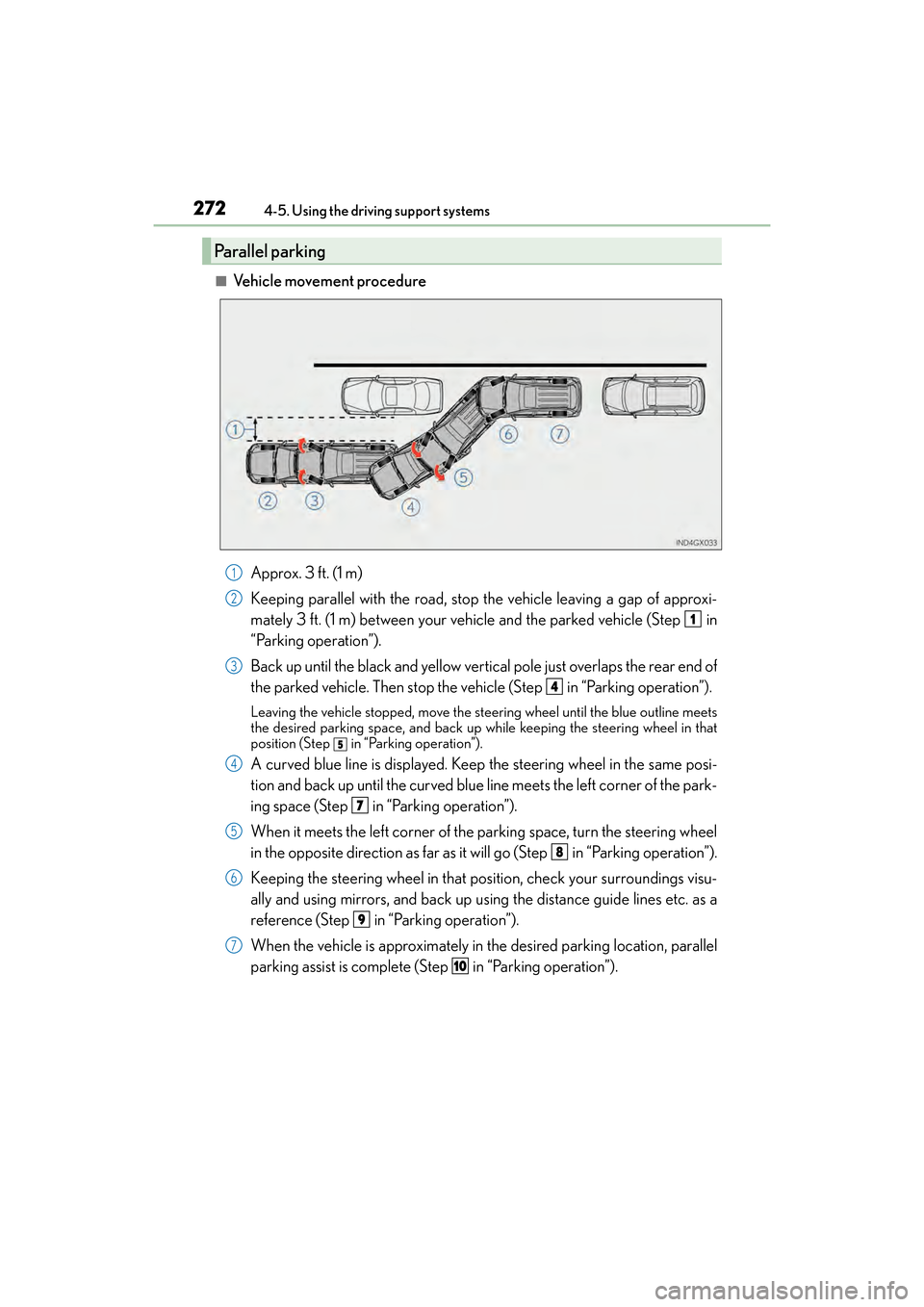
■Vehicle movement procedure
Approx. 3 f t. (1 m)
Keeping parallel with the road, stop the vehicle leaving a gap of approxi-
mately 3 ft. (1 m) between your vehicle and the parked vehicle (Step in
“Parking operation”).
Back up until the black and yellow vertical pole just overlaps the rear end of
the parked vehicle. Then stop the vehicle (Step in “Parking operation”).
Leaving the vehicle stopped, move the st eering wheel until the blue outline meets
the desired parking space, and back up while keeping the steering wheel in that
position (Step
in “Parking operation”).
A curved blue line is displayed. Keep the steering wheel in the same posi-
tion and back up until the curved blue line meets the left corner of the park-
ing space (Step in “Parking operation”).
When it meets the left corner of the parking space, turn the steering wheel
in the opposite direction as far as it will go (Step in “Parking operation”).
Keeping the steering wheel in that position, check your surroundings visu-
ally and using mirrors, and back up using the distance guide lines etc. as a
reference (Step in “Parking operation”).
When the vehicle is approximately in the desired parking location, parallel
parking assist is complete (Step in “Parking operation”).
Parallel parking
1
2
1
3
4
5
4
7
5
8
6
9
7
10
GX460_OM_OM60F68U_(U).book Page 272 Wednesday, June 8, 2016 6:37 PM
Page 279 of 644
GX 460 _O M_ OM6 0F 6 8U _(U )
2774-5. Using the driving support systems
4
Driving
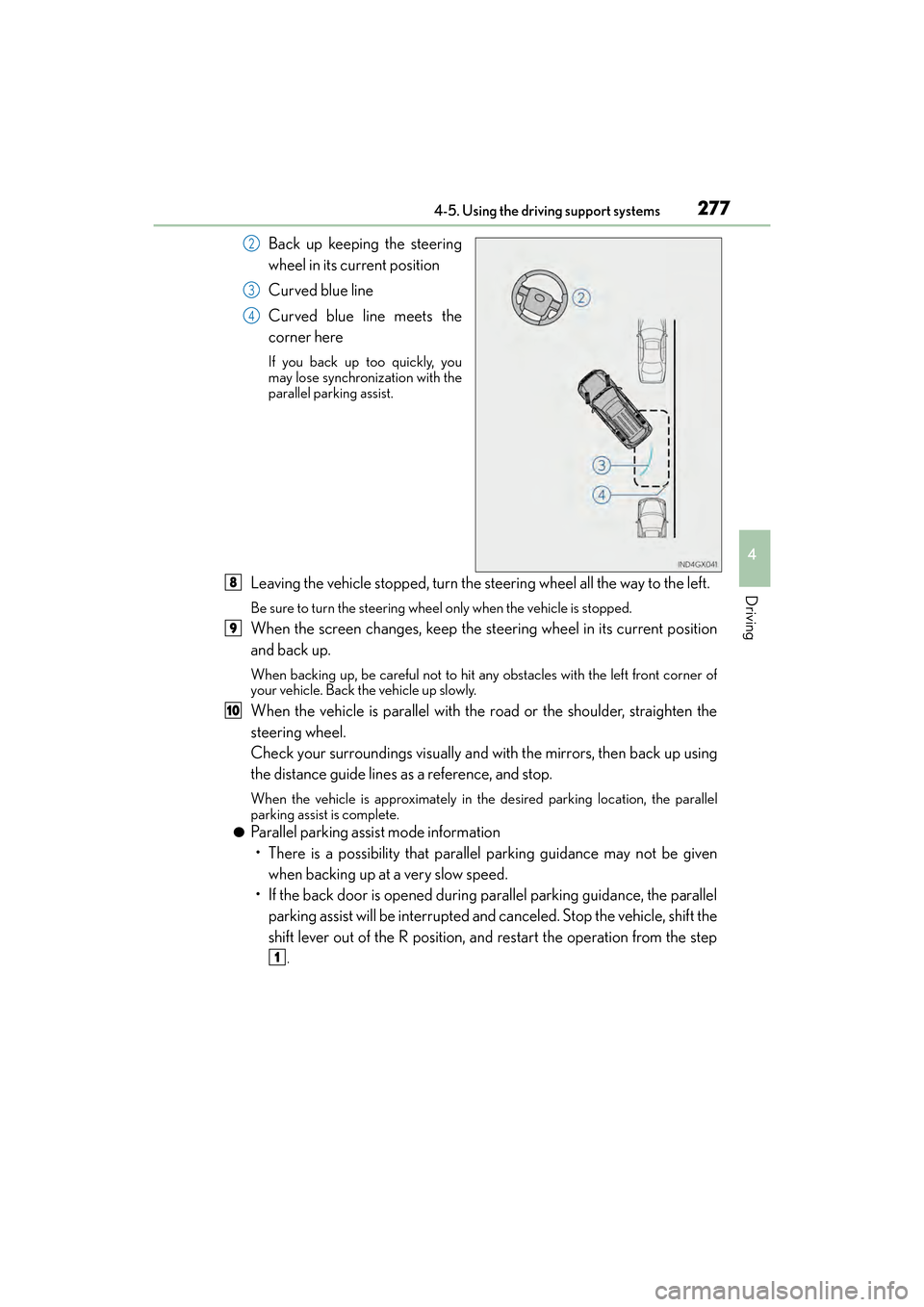
Back up keeping the steering
wheel in its current position
Curved blue line
Curved blue line meets the
corner here
If you back up too quickly, you
may lose synchronization with the
parallel parking assist.
Leaving the vehicle stopped, turn the steering wheel all the way to the left.
Be sure to turn the steering wheel only when the vehicle is stopped.
When the screen changes, keep the steering wheel in its current position
and back up.
When backing up, be careful not to hit any obstacles with the left front corner of
your vehicle. Back the vehicle up slowly.
When the vehicle is parallel with the road or the shoulder, straighten the
steering wheel.
Check your surroundings visually and with the mirrors, then back up using
the distance guide lines as a reference, and stop.
When the vehicle is approximately in th e desired parking location, the parallel
parking assist is complete.
●Parallel parking assist mode information
• There is a possibility that parallel parking guidance may not be given
when backing up at a very slow speed.
• If the back door is opened during parallel parking guidance, the parallel parking assist will be interrupted and canceled. Stop the vehicle, shift the
shift lever out of the R position, and restart the operation from the step
.
2
3
4
8
9
10
1
GX460_OM_OM60F68U_(U).book Page 277 Wednesday, June 8, 2016 6:37 PM
Page 280 of 644
278
GX 460 _O M_ OM6 0F 6 8U _(U )4-5. Using the driving support systems
●Canceling parallel parking assist
Select .
●Vehicles with intuitive parking assist
If intuitive parking assist detects an object while you attempt to park in a
parking space on the right, the blac
k and yellow vertical pole could be
obscured by intuitive parking assist display. In this event, turn intuitive park-
ing assist switch off ( →P. 245), and operate the vehicle while checking the
safety of the surrounding area direct visually and with mirror. After the
operation, turn the switch on.
●If the message “Steering wheel turned too far, please return.” is displayed
The steering wheel has been turned too far, and the system cannot func-
tion. Return the steering wheel to its original position.
If the message is displayed before the outline is positioned over the desired
parking space, it is likely that the vehicle is too far away from the shoulder.
Check that there is a gap of approximately 3 ft. (1 m) between your vehicle
and the parked vehicle.
GX460_OM_OM60F68U_(U).book Page 278 Wednesday, June 8, 2016 6:37 PM
Page 288 of 644

286
GX 460 _O M_ OM6 0F 6 8U _(U )4-5. Using the driving support systems
CAUTION
■When using the Lexus parking assist monitor system
The parking assist monitor is a supplemental
device intended to assist the driver when
backing up. When backing up, be sure to check visually behind and all around the vehi-
cle before proceeding.
Observe the following precautions to avoid an accident that could result in death or
serious injuries.
●Never depend on the parking assist monitor entirely when backing up. The image
and the position of the guide lines displayed on the screen may differ from the actual
state.
Use caution, just as you would when backing up any vehicle.
●Be sure to back up slowly, depressing the brake pedal to control vehicle speed.
●If you seem likely to hit nearby vehicles, obstacles, people or mount the shoulder,
depress the brake pedal to stop the vehicle, then disable the assist system by select
on the screen to cancel the system.
●The instructions given are only guidelines.
When and how much to turn the steering wh eel will vary according to traffic condi-
tions, road surface conditions, vehicle condit ion, etc. when parking. It is necessary to
be fully aware of this before using the parking assist system.
●When parking, be sure to check that the parking space will accommodate your vehi-
cle before maneuvering into it.
●Do not use the parking assist monitor in the following cases:
• On icy or slick road surfaces, or in snow
•When using tire chains
• When the back door is not closed completely
• On roads that are not flat or straight, such as curves or slopes.
●In low temperatures, the screen may darken or the image may become faint. The
image could distort when the vehicle is moving, or you may become unable to see the
image on the screen. Be sure to check direct visually and with the mirrors all around
the vehicle before proceeding.
●If the tire sizes are changed, the position of the guide lines displayed on the screen
may change.
●The camera uses a special lens. The distances between objects and pedestrians that
appear in the image displayed on the scre en will differ from the actual distances.
( → P. 2 8 0 )
GX460_OM_OM60F68U_(U).book Page 286 Wednesday, June 8, 2016 6:37 PM
Page 297 of 644

GX 460 _O M_ OM6 0F 6 8U _(U )
2954-5. Using the driving support systems
4
Driving
●Individual display
Front wheel contact point
Shows the position of the vehicle’s front tire.
Vehicle front edge line
Shows the position of the vehicle’s leading edge.
Vehicle width line (blue)
Indicates the width of the vehicle including the outside rear view mirror.
Projected course line (yellow)
Displays a rough guide of the vehicle path that moves according to the steering wheel
position. Displayed along with the minimum projected turning circle.
Minimum projected turning circle (blue)
Displays the smallest turning circle projected by the system if the steering wheel is
turned to full lock. Displayed when the steer ing wheel is turned to the right (further
than 90 ° from straight ahead).
Projected course line switching button
The course line display mode will change as follows each time the switch is selected.
When the shift lever is in R, it will not be displayed.
Rear wheel contact point
Shows the position of the vehicle’s rear tire.
Individual display mode switching button
Switches the full view display mode or Front view enlarged display mode.
XFull view display modeXFront view enlarged display mode
1
2
3
4
5
6
7
8
GX460_OM_OM60F68U_(U).book Page 295 Wednesday, June 8, 2016 6:37 PM
Page 302 of 644
300
GX 460 _O M_ OM6 0F 6 8U _(U )4-5. Using the driving support systems
■The wide view front & side monitor can be operated when
XNormal display mode
●The engine switch is in IGNITION ON mode.
●The vehicle speed is less than approximately 7 mph (12 km/h).
XAutomatic display mode
●The engine switch is in IGNITION ON mode.
●When automatic display mode is selected
●When the shift lever is shifted to D, S or N
●When the shift lever is in D, S or N and th
e vehicle speed is below approximately 6 mph
(10 km/h)
■Automatic system cancelation
In the following situations, the image is canceled automatically.
●When the vehicle speed exceeds approximately 7 mph (12 km/h).
Automatic display mode: If the vehicle speed returns to below 6 mph (10 km/h), the
image will be displayed.
●When the shift lever is in P or R.
●When another switch outside the screen has been pressed
■When the outside rear view mirrors have been folded
The side monitor screen can be displayed even if the outside rear view mirrors have been
folded. In this case, there will be a slight difference between the image displayed when
the outside rear view mirrors are extended and when the outside rear view mirrors have
been folded.
When the side monitor screen is in front view enlarged display mode and the outside
rear view mirror is retracted, the monitor automatically switches to full view display
mode. After this, even if the outside rear view mirror is restored to its original position, the
monitor does not automatically switch to front view enlarged display mode.
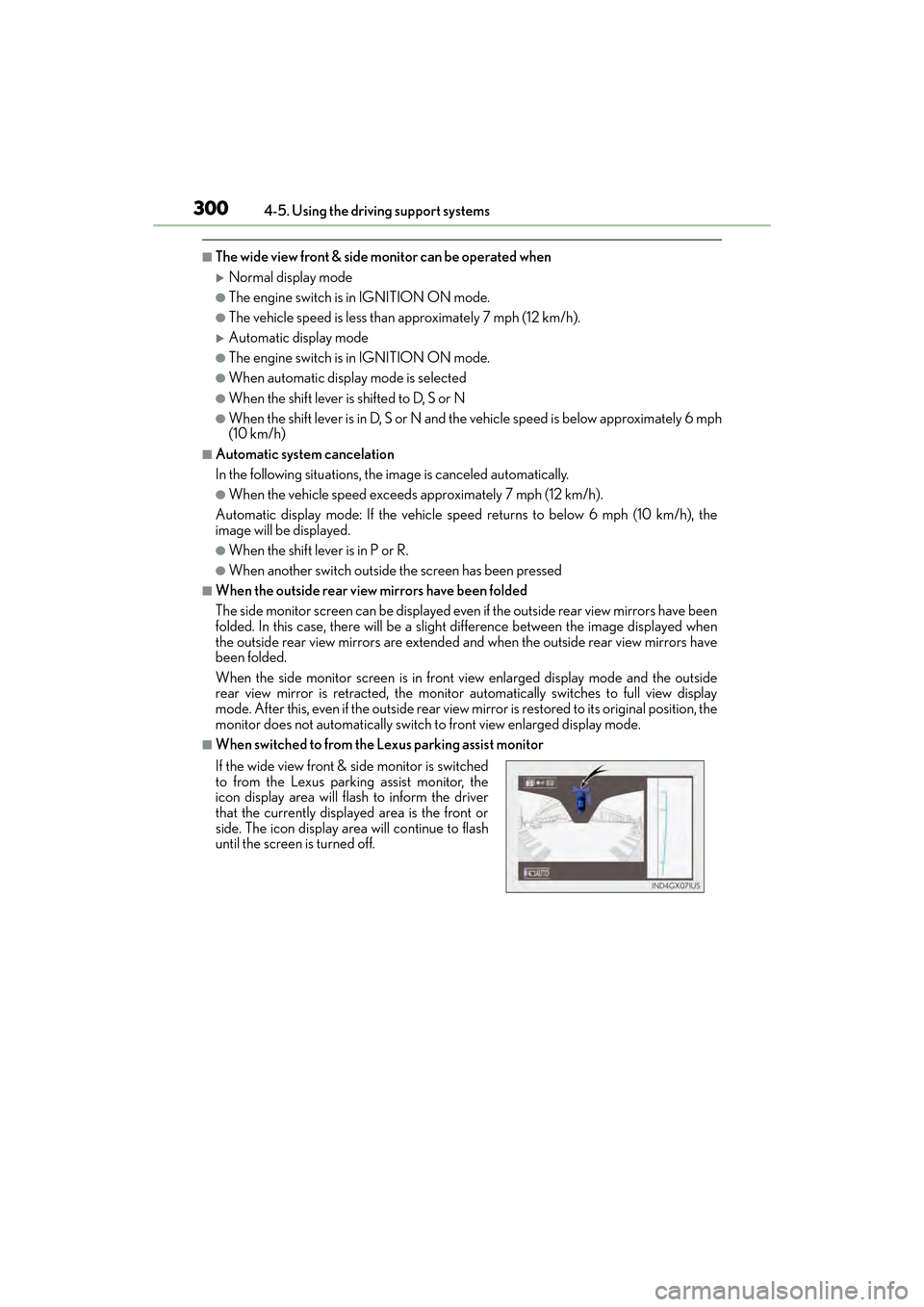
■When switched to from the Lexus parking assist monitor
If the wide view front & side monitor is switched
to from the Lexus parking assist monitor, the
icon display area will flash to inform the driver
that the currently displayed area is the front or
side. The icon display area will continue to flash
until the screen is turned off.
GX460_OM_OM60F68U_(U).book Page 300 Wednesday, June 8, 2016 6:37 PM
Page 307 of 644

GX 460 _O M_ OM6 0F 6 8U _(U )
3054-5. Using the driving support systems
4
Driving
CAUTION
■When using the wide view front & side monitor system
Observe the following precautions to avoid an accident that could result in death or
serious injuries.
●When attempting to use the side camera while the door mirror is folded in, the base
of the door mirror is displayed on the screen and the area in front of the vehicle can-
not be observed. The image displayed on the screen differs depending on the posi-
tion of the door mirror.
●The field of view of the camera is limited. Do not rely solely upon the wide view front &
side monitor.
As with unequipped vehicles, drive carefully while directly confirming the safety of
your surroundings.
●Always check visually to confirm your intended path is clear.
●The camera uses a special lens. The distances between objects and pedestrians that
appear in the image displayed on the sc reen will differ from the actual distances.
●When the monitor is in front view enlarged display mode, even if obstacles in the
image from the side monitor have disappeared, do not turn the steering wheel any
further until the vehicle has passed the obstacle. By turning the steering wheel further,
the vehicle may make a tight turn, causing the vehicle to make contact with the obsta-
cle.
●Do not drive the vehicle while only lookin g at the monitor screen under any circum-
stances.
Driving while only viewing the monitor screen may cause a collision or lead to an
accident, as the image displayed on the monitor screen may differ from actual condi-
tions. Make sure to visually check the surrounding areas with and without the mirror
while driving.
●Do not use the wide view front & side monitor in the following cases:
• On icy or slick road surfaces, or in snow.
• When the front passenger’s door is not closed completely
•When using tire chains
• On roads that is not flat, such as slopes
●In low temperatures, the screen may darken or the image may become faint. The
image could distort when the vehicle is moving, or you may become unable to see the
image on the screen. Be sure to check dire ct visually all around the vehicle before
proceeding.
●If the tires are changed, the position of the guide lines displayed on the screen may be
incorrect. When changing the tires, consult your Lexus dealer.
●Depending on the circumstances of the ve hicle (number of passengers, amount of
luggage, etc.), the position of the guide lines displayed on the screen may change. Be
sure to check visually behind and all around the vehicle before proceeding.
●When washing the vehicle, do not apply intensive bursts of water to the camera or
camera area. Doing so may result in the camera malfunctioning.
GX460_OM_OM60F68U_(U).book Page 305 Wednesday, June 8, 2016 6:37 PM