mirror Lexus GX460 2017 Owner's Guide
[x] Cancel search | Manufacturer: LEXUS, Model Year: 2017, Model line: GX460, Model: Lexus GX460 2017Pages: 644, PDF Size: 20.93 MB
Page 309 of 644
GX 460 _O M_ OM6 0F 6 8U _(U )
3074-5. Using the driving support systems
4
Driving
NOTICE
■How to use the camera
●The wide view front & side monitor may not operate properly in the following cases.
• If the front of the vehicle or the passenger side outside rear view mirror is hit, thecamera’s position and mounting angle may change. Contact your Lexus dealer.
• As the camera has a water proof construction, do not detach, disassemble or modify it. This may cause incorrect operation.
• When cleaning the camera lens, flush the camera with a large quantity of water
and wipe it with a soft and wet cloth. Strongly rubbing the camera lens may cause
the camera lens to be scratched and unable to transmit a clear image.
• Do not allow organic solvent, car wax, window cleaner or glass coat to adhere to the camera. If this happens, wipe it off as soon as possible.
• If the temperature changes rapidly, such as when hot water is poured on the vehi-
cle in cold weather, the system may not operate normally.
• When washing the vehicle, do not apply intensive bursts of water to the camera or camera area. Doing so may result in the camera malfunctioning.
• When the camera is used under fluorescen t lights, sodium light or mercury light
etc., the lights and the illuminated areas may appear to flicker.
• The camera can be damaged by flying rocks and other debris.
●Do not expose the camera to strong impact as this could cause a malfunction. If this
happens, have the vehicle inspected by your Lexus dealer as soon as possible.
GX460_OM_OM60F68U_(U).book Page 307 Wednesday, June 8, 2016 6:37 PM
Page 322 of 644

320
GX 460 _O M_ OM6 0F 6 8U _(U )4-5. Using the driving support systems
■Wide view front & side monitor display
Projected course line switching
button
*
The course line display mode will
change as follows each time the
switch is selected.
Ve h i c l e i c o n
Displays the image being shown by
the front monitor.
Front wheel contact point
Shows the position of the vehicle’s front tire.
Vehicle front edge line
Shows the position of the vehicle’s leading edge.
Projected course line* (yellow)
Displays a rough guide of the vehicle path that moves according to the steering
wheel position. Displayed along with the minimum projected turning circle.
Minimum projected turning circle* (blue)
Displays the smallest turning circle projected by the system if the steering wheel is
turned to full lock. Displayed when the steering wheel is turned to the right (further
than 90 ° from straight ahead).
Rear wheel contact point
Shows the position of the vehicle’s rear tire.
Vehicle width line (blue)
Indicates the width of the vehicle including the outside rear view mirror.
Automatic display mode*
Switches the projected course mode
*: When the shift lever is in R, it will not be displayed.
1
2
3
4
5
6
7
8
9
GX460_OM_OM60F68U_(U).book Page 320 Wednesday, June 8, 2016 6:37 PM
Page 327 of 644

GX 460 _O M_ OM6 0F 6 8U _(U )
3254-5. Using the driving support systems
4
Driving
■The Multi-terrain Monitor can be operated when
XNormal display mode
●The engine switch is in IGNITION ON mode.
●The vehicle speed is less than approximately 7 mph (12 km/h).
XAutomatic display mode
●When automatic display mode is selected
●When the shift lever is shifted to D, S or N
●When the shift lever is in D, S or N and th e vehicle speed is below approximately 6 mph
(10 km/h)
■Automatic system cancellation
In the following situations, the image is canceled automatically.
●When the vehicle speed exceeds approximately 7 mph (12 km/h).
After the vehicle speed exceeds approximately 7 mph (12 km/h), the image will con-
tinue to be displayed for a short time.
If the vehicle speed returns to below 7 mph (12 km/h) before the image extinguishes,
the image will continue to be displayed.
●When “SETUP” or another switch outside the screen has been pressed
●When the shift lever is in P or R.
■Insert display
An insert display is displayed when an obstac le is within the detection range of the intui-
tive parking assist. ( →P. 244)
■When folding or extending the door mirrors
The screen will be turned off temporarily while the door mirrors are folding or extending,
and the screen will return to normal after the door mirror operation has been completed.
GX460_OM_OM60F68U_(U).book Page 325 Wednesday, June 8, 2016 6:37 PM
Page 335 of 644
GX 460 _O M_ OM6 0F 6 8U _(U )
3334-5. Using the driving support systems
4
Driving
CAUTION
■When using the Multi-terrain Monitor system
Observe the following precautions to avoid an accident that could result in death or
serious injuries:
●When attempting to use the side cameras while the door mirror is folded in, the base
of the door mirror is displayed on the screen and the area in front of the vehicle can-
not be observed. The image displayed on the screen differs depending on the posi-
tion of the door mirror.
●The field of view of the camera is limited. Do not rely solely upon the Multi-terrain
Monitor.
As with unequipped vehicles, drive carefully while directly confirming the safety of
your surroundings.
Take particular care to avoid parked cars and other obstacles.
●Do not drive the vehicle while only lookin g at the monitor screen under any circum-
stances.
Driving while only viewing the monitor screen may cause a collision or lead to an
accident, as the image displayed on the monitor screen may differ from actual condi-
tions. Make sure to visually check the surrounding areas with and without the mirror
while driving.
●Always check visually and with the mirrors to confirm your intended path is clear.
●The camera uses a special lens. The distances between objects and pedestrians that
appear in the image displayed on the sc reen will differ from the actual distances.
●These are just some of the functions of the Multi-terrain Monitor. The steering wheel
timing and amount the steering wheel should be turned differs depending on the road
condition and road surface. Use the Multi-terrain Monitor with full understanding of
the above conditions.
Always confirm that there is appropriate space before attempting to park the vehicle.
●Do not use the Multi-terrain Monitor in the following cases:
• On icy or slick road surfaces, or in snow
•When using tire chains
• When the back door is not closed completely
• On roads that are not flat or straight, such as curves or slopes.
●In low temperatures, the screen may darken or the image may become faint. The
image could distort when the vehicle is moving, or you may become unable to see the
image on the screen. Be sure to check dire ct visually all around the vehicle before
proceeding.
GX460_OM_OM60F68U_(U).book Page 333 Wednesday, June 8, 2016 6:37 PM
Page 338 of 644
336
GX 460 _O M_ OM6 0F 6 8U _(U )4-5. Using the driving support systems
NOTICE
■How to use the camera
●The Multi-terrain Monitor system may not operate properly in the following cases.
• If the front or the rear of the vehicle or the outside rear view mirror has been hit,
the camera’s position and mounting angle may have changed.
• As the camera has a water proof construction, do not detach, disassemble or modify it. This may cause incorrect operation.
• When cleaning the camera lens, flush the camera with a large quantity of water
and wipe it with a soft and wet cloth. Strongly rubbing the camera lens may cause
the camera lens to be scratched and unable to transmit a clear image.
• Do not allow organic solvent, car wax, window cleaner or glass coat to adhere to the camera. If this happens, wipe it off as soon as possible.
• If the temperature changes rapidly, such as when hot water is poured on the vehi-
cle in cold weather, the system may not operate normally.
• When washing the vehicle, do not apply intensive bursts of water to the camera or camera area. Doing so may result in the camera malfunctioning.
• When the camera is used under fluorescen t lights, sodium light or mercury light
etc., the lights and the illuminated areas may appear to flicker.
• The camera can be damaged by flying rocks and other debris.
●Do not expose the camera to strong impact as this could cause a malfunction. If this
happens, have the vehicle inspected by your Lexus dealer as soon as possible.
GX460_OM_OM60F68U_(U).book Page 336 Wednesday, June 8, 2016 6:37 PM
Page 360 of 644
358
GX 460 _O M_ OM6 0F 6 8U _(U )4-5. Using the driving support systems
The Blind Spot Monitor on/off screen and indicator
The Blind Spot Monitor system can be turn
ed on/off on the multi-information display.
When the system is set to on, the indicator illuminates in the meter. The Blind Spot
Monitor function and the Rear Cross Traffic Alert function are turned on/off simulta-
neously.
Outside rear view mirror indicator
The Blind Spot Monitor function:
When a vehicle is detected in the blind spot, the outside rear view mirror indicator
comes on while the turn signal lever is not operated. If the turn signal lever is operated
toward the detected side, the outside rear view mirror indicator flashes.
The Rear Cross Traffic Alert function:
When a vehicle approaching from the right or left rear of the vehicle is detected, the
outside rear view mirror indicators flash.
The Rear Cross Traffic Alert buzzer (The Rear Cross Traffic Alert function
only)
When a vehicle approaching from the right or left rear of the vehicle is detected, a
buzzer sounds from behind the rear seat.
1
2
3
GX460_OM_OM60F68U_(U).book Page 358 Wednesday, June 8, 2016 6:37 PM
Page 362 of 644
360
GX 460 _O M_ OM6 0F 6 8U _(U )4-5. Using the driving support systems
■The outside rear view mirror indicators visibility
When under strong sunlight, the outside rear
view mirror indicator may be difficult to
see.
■The Rear Cross Traffic Alert buzzer hearing
The Rear Cross Traffic Alert buzzer may be difficult to hear over loud noises such as high
audio volume.
■When there is a malfunction in the Blind Spot Monitor
If a system malfunction is detected due to any of the following reasons, warning mes-
sages will be displayed: ( →P. 5 3 1 , 5 3 2 )
●There is a malfunction with the sensors
●The sensors have become dirty
●The outside temperature is extremely high or low
●The sensor voltage has become abnormal
■Certification for the Blind Spot Monitor
XFor vehicles sold in the U.S.A., Hawaii, Guam, Puerto Rico and Saipan
XFor vehicles sold in Canada
GX460_OM_OM60F68U_(U).book Page 360 Wednesday, June 8, 2016 6:37 PM
Page 364 of 644
362
GX 460 _O M_ OM6 0F 6 8U _(U )4-5. Using the driving support systems
The Blind Spot Monitor function uses rada
r sensors to detect vehicles that are
traveling in an adjacent lane in the area that is not reflected in the outside rear
view mirror (the blind spot), and advises the driver of the vehicles existence via
the outside rear view mirror indicator.
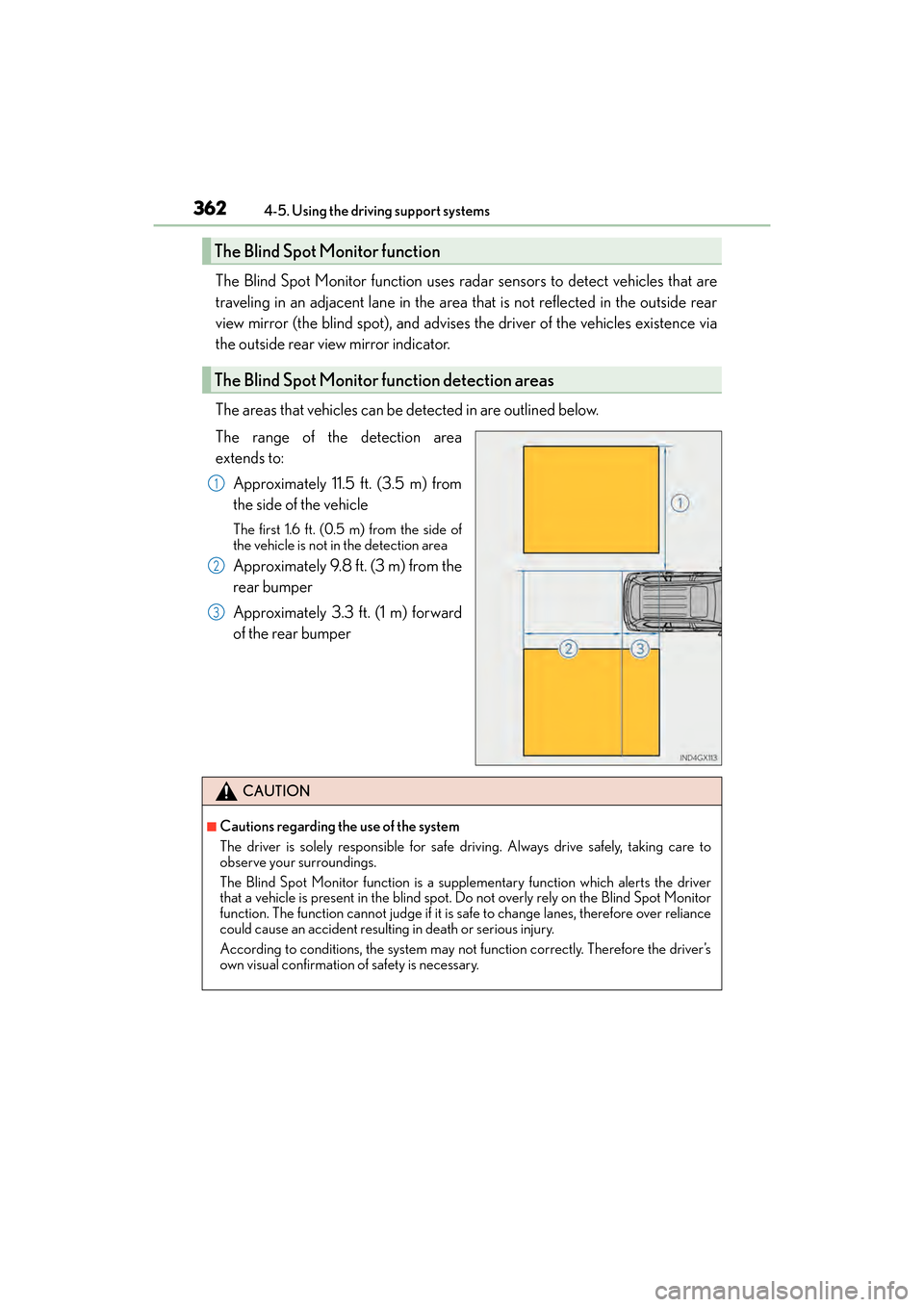
The areas that vehicles can be detected in are outlined below.
The range of the detection area
extends to:
Approximately 11.5 ft. (3.5 m) from
the side of the vehicle
The first 1.6 ft. (0.5 m) from the side of
the vehicle is not in the detection area
Approximately 9.8 ft. (3 m) from the
rear bumper
Approximately 3.3 ft. (1 m) forward
of the rear bumper
The Blind Spot Monitor function
The Blind Spot Monitor function detection areas
1
2
3
CAUTION
■Cautions regarding the use of the system
The driver is solely responsible for safe driving. Always drive safely, taking care to
observe your surroundings.
The Blind Spot Monitor function is a supplementary function which alerts the driver
that a vehicle is present in the blind spot. Do not overly rely on the Blind Spot Monitor
function. The function cannot judge if it is sa fe to change lanes, therefore over reliance
could cause an accident resulting in death or serious injury.
According to conditions, the system may not function correctly. Therefore the driver’s
own visual confirmation of safety is necessary.
GX460_OM_OM60F68U_(U).book Page 362 Wednesday, June 8, 2016 6:37 PM
Page 367 of 644
GX 460 _O M_ OM6 0F 6 8U _(U )
3654-5. Using the driving support systems
4
Driving
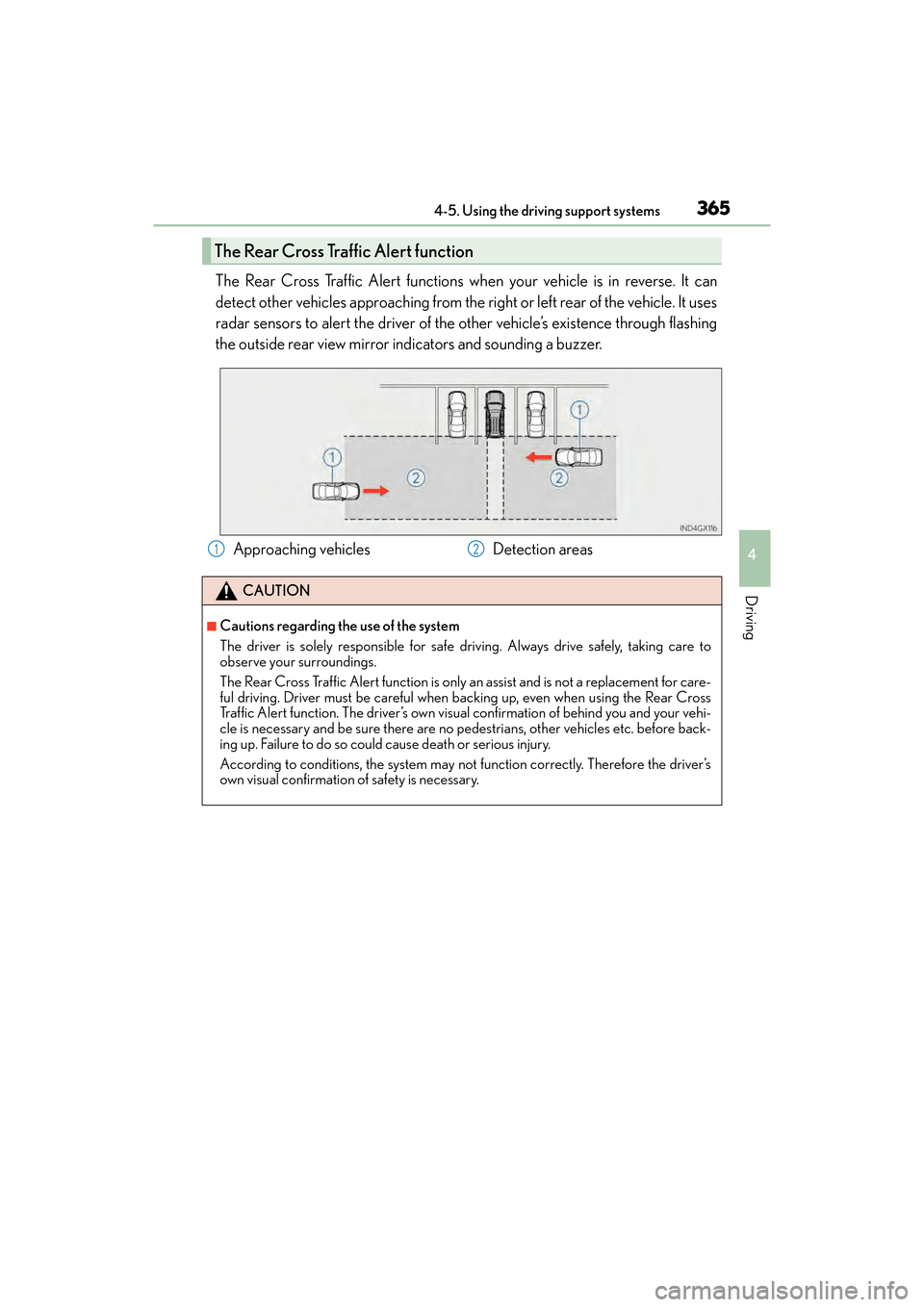
The Rear Cross Traffic Alert functions when your vehicle is in reverse. It can
detect other vehicles approaching from the right or left rear of the vehicle. It uses
radar sensors to alert the driver of the other vehicle’s existence through flashing
the outside rear view mirror indicators and sounding a buzzer.
The Rear Cross Traffic Alert function
Approaching vehiclesDetection areas
CAUTION
■Cautions regarding the use of the system
The driver is solely responsible for safe driving. Always drive safely, taking care to
observe your surroundings.
The Rear Cross Traffic Alert function is only an assist and is not a replacement for care-
ful driving. Driver must be careful when backing up, even when using the Rear Cross
Traffic Alert function. The driver’s own visual confirmation of behind you and your vehi-
cle is necessary and be sure there are no pedestrians, other vehicles etc. before back-
ing up. Failure to do so could cause death or serious injury.
According to conditions, the system may not function correctly. Therefore the driver’s
own visual confirmation of safety is necessary.
12
GX460_OM_OM60F68U_(U).book Page 365 Wednesday, June 8, 2016 6:37 PM
Page 387 of 644
385
GX 460 _O M_ OM6 0F 6 8U _(U )
5Interior features
5-1. Using the air conditioning system and defogger
Front automatic air conditioning system .............. 386
Rear air conditioning system ..........................................396
Heated steering wheel/seat heaters/seat ventilators.........399
5-2. Using the interior lights Interior lights list..........................402• Personal/interior lights main switch .............................403
• Personal/interior lights...... 404 5-3. Using the storage features
List of storage features ............405• Glove box ...............................406
• Console box...........................406
• Coin holder ........................... 408
• Cup holders/bottle holders/ door pockets......................... 408
• Auxiliary boxes ...................... 410
Luggage compartment features..........................................412
5-4. Using the other interior features
Other interior features ............. 419 • Cool box ................................... 419
• Sun visors ..................................421
• Vanity mirror ............................421
• Conversation mirror........... 422
• Clock ........................................ 422
• Power outlets ......................... 423
• Armrest .....................................427
• Coat hooks ............................. 428
• Assist grips.............................. 428
• Compass ................................. 429
Garage door opener................ 433
LEXUS Enform Safety Connect ...................................... 439
GX460_OM_OM60F68U_(U).book Page 385 Wednesday, June 8, 2016 6:37 PM