side view mirrors Lexus GX460 2018 / LEXUS 2018 GX460 (OM60Q09U) User Guide
[x] Cancel search | Manufacturer: LEXUS, Model Year: 2018, Model line: GX460, Model: Lexus GX460 2018Pages: 640, PDF Size: 11.04 MB
Page 147 of 640
1473-4. Adjusting the steering wheel and mirrors
3
Operation of each component
GX460_OM_OM60Q09U_(U)
Outside rear view mirrors
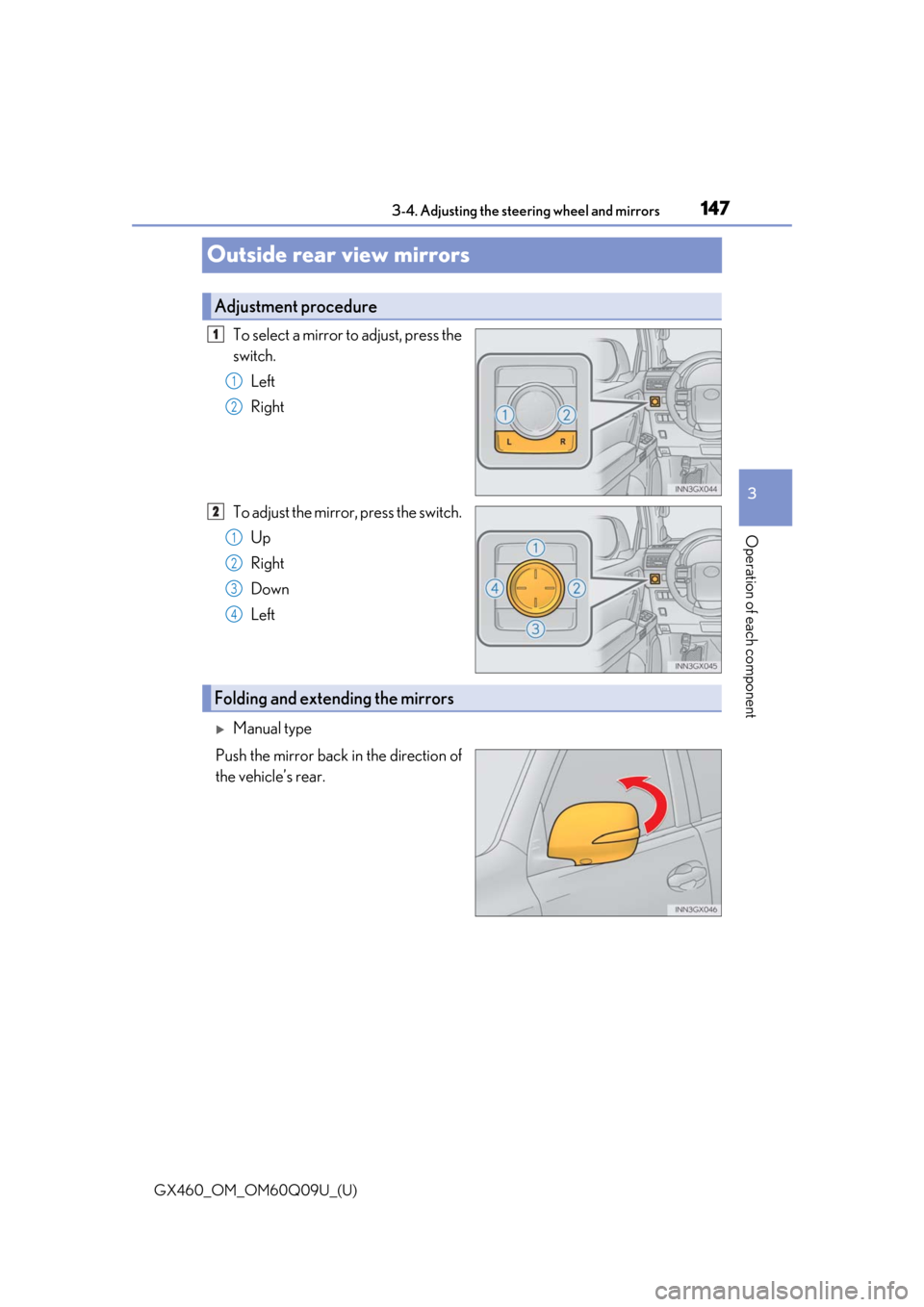
To select a mirror to adjust, press the
switch.Left
Right
To adjust the mirror, press the switch. Up
Right
Down
Left
Manual type
Push the mirror back in the direction of
the vehicle’s rear.
Adjustment procedure
1
1
2
2
1
2
3
4
Folding and extending the mirrors
Page 148 of 640
1483-4. Adjusting the steering wheel and mirrors
GX460_OM_OM60Q09U_(U)
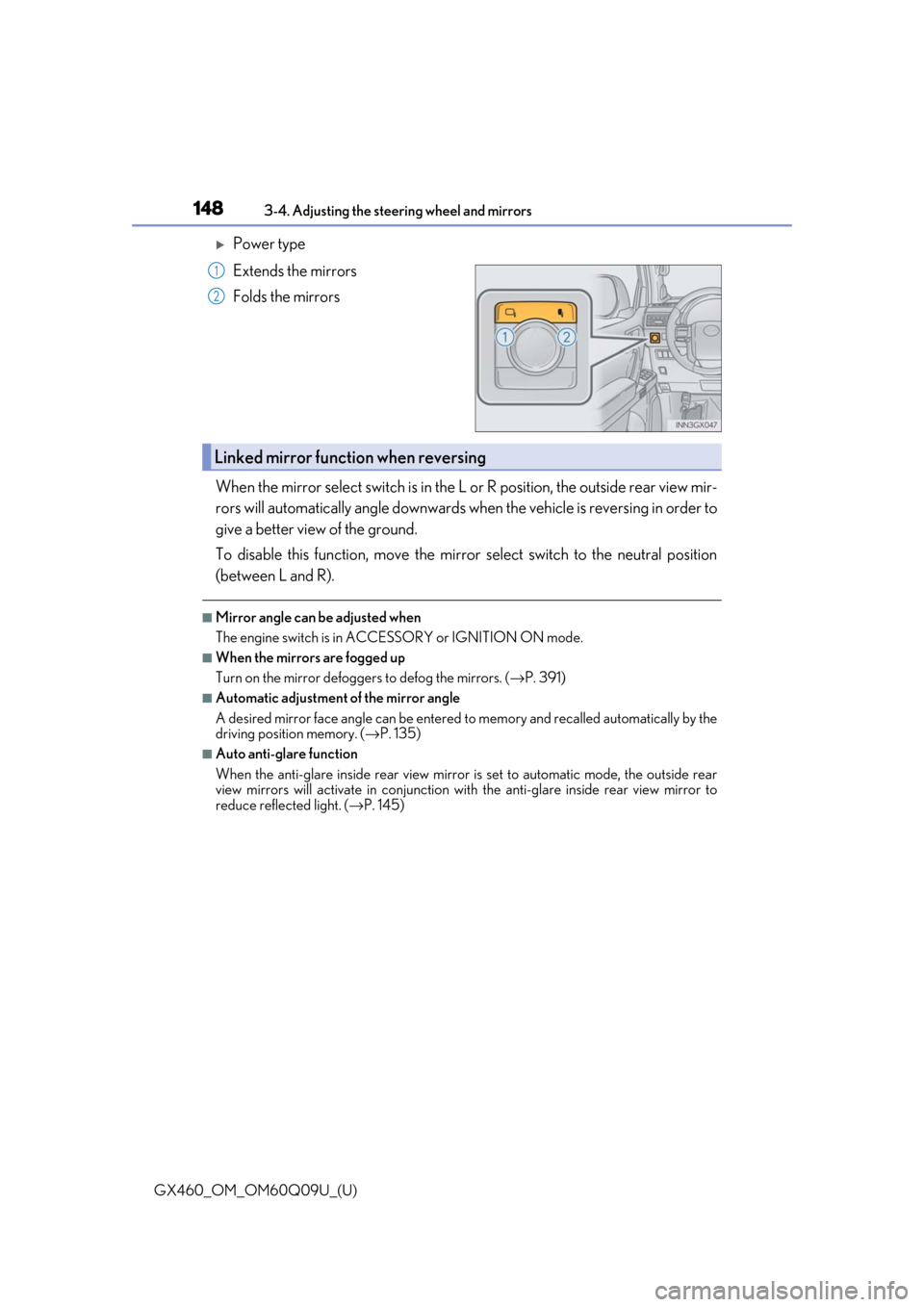
Power type
Extends the mirrors
Folds the mirrors
When the mirror select switch is in the L or R position, the outside rear view mir-
rors will automatically angle downwards wh en the vehicle is reversing in order to
give a better view of the ground.
To disable this function, move the mirror select switch to the neutral position
(between L and R).
■Mirror angle can be adjusted when
The engine switch is in ACCESSORY or IGNITION ON mode.
■When the mirrors are fogged up
Turn on the mirror defoggers to defog the mirrors. ( →P. 391)
■Automatic adjustment of the mirror angle
A desired mirror face angle can be entered to memory and recalled automatically by the
driving position memory. ( →P. 135)
■Auto anti-glare function
When the anti-glare inside re ar view mirror is set to automatic mode, the outside rear
view mirrors will activate in conjunction with the anti-glare inside rear view mirror to
reduce reflected light. ( →P. 145)
1
2
Linked mirror function when reversing
Page 149 of 640

1493-4. Adjusting the steering wheel and mirrors
3
Operation of each component
GX460_OM_OM60Q09U_(U)
CAUTION
■Important points while driving
Observe the following precautions while driving.
Failing to do so may result in loss of control of the vehicle and cause an accident, result-
ing in death or serious injury.
●Do not adjust the mirrors while driving.
●Do not drive with the mirrors folded.
●Both the driver and passenger side mirrors must be extended and properly adjusted
before driving.
■When a mirror is moving
To avoid personal injury and mirror malfunctio n, be careful not to get your hand caught
by the moving mirror.
■When the mirror defoggers are operating
Do not touch the rear view mirror surfaces, as they can become very hot and burn you.
NOTICE
■If ice should jam the mirror
Do not operate the control or scrape the mirror face. Use a spray de-icer to free the
mirror.
Page 160 of 640

160
GX460_OM_OM60Q09U_(U)4-1. Before driving
CAUTION
Observe the following precautions.
Failure to do so may result in death or serious injury.
■When starting the vehicle
Always keep your foot on the brake pedal
while stopped with the engine running. This
prevents the vehicle from creeping.
■When driving the vehicle
●Do not drive if you are unfamiliar with the location of the brake and accelerator ped-
als to avoid depressing the wrong pedal.
• Accidentally depressing the accelerator pedal instead of the brake pedal will
result in sudden acceleration that may lead to an accident.
• When backing up, you may twist your body around, leading to a difficulty in oper-
ating the pedals. Make sure to operate the pedals properly.
• Make sure to keep a correct driving po sture even when moving the vehicle only
slightly. This allows you to depress th e brake and accelerator pedals properly.
• Depress the brake pedal using your right foot. Depressing the brake pedal using your left foot may delay re sponse in an emergency, resulting in an accident.
●Do not drive the vehicle over or stop the vehicle near flammable materials.
The exhaust system and exhaust gases can be extremely hot. These hot parts may
cause a fire if there is any flammable material nearby.
●During normal driving, do not turn off the engine. Turning the engine off while driving
will not cause loss of steering or braking control, but the power assist to these systems
will be lost. This will make it more difficult to steer and brake, so you should pull over
and stop the vehicle as soon as it is safe to do so.
However, in the event of an emergency, such as if it becomes impossible to stop the
vehicle in the normal way: →P. 511
●Use engine braking (downshift) to maintain a safe speed when driving down a steep
hill.
Using the brakes continuously may cause th e brakes to overheat and lose effective-
ness. ( →P. 194)
●Do not adjust the positions of the steering wheel, the seat, or the inside or outside rear
view mirrors while driving.
Doing so may result in a loss of vehicle control.
●Always check that all passengers’ arms, heads or other parts of their body are not
outside the vehicle.
●Do not drive in excess of the speed limit. Even if the legal speed limit permits it, do not
drive over 85 mph (140 km/h) unless your vehicle has high-speed capability tires.
Driving over 85 mph (140 km/h ) may result in tire failure, loss of control and possible
injury. Be sure to consult a tire dealer to determine whether the tires on your vehicle
are high-speed capability tires or no t before driving at such speeds.
Page 292 of 640
292
GX460_OM_OM60Q09U_(U)4-5. Using the driving support systems
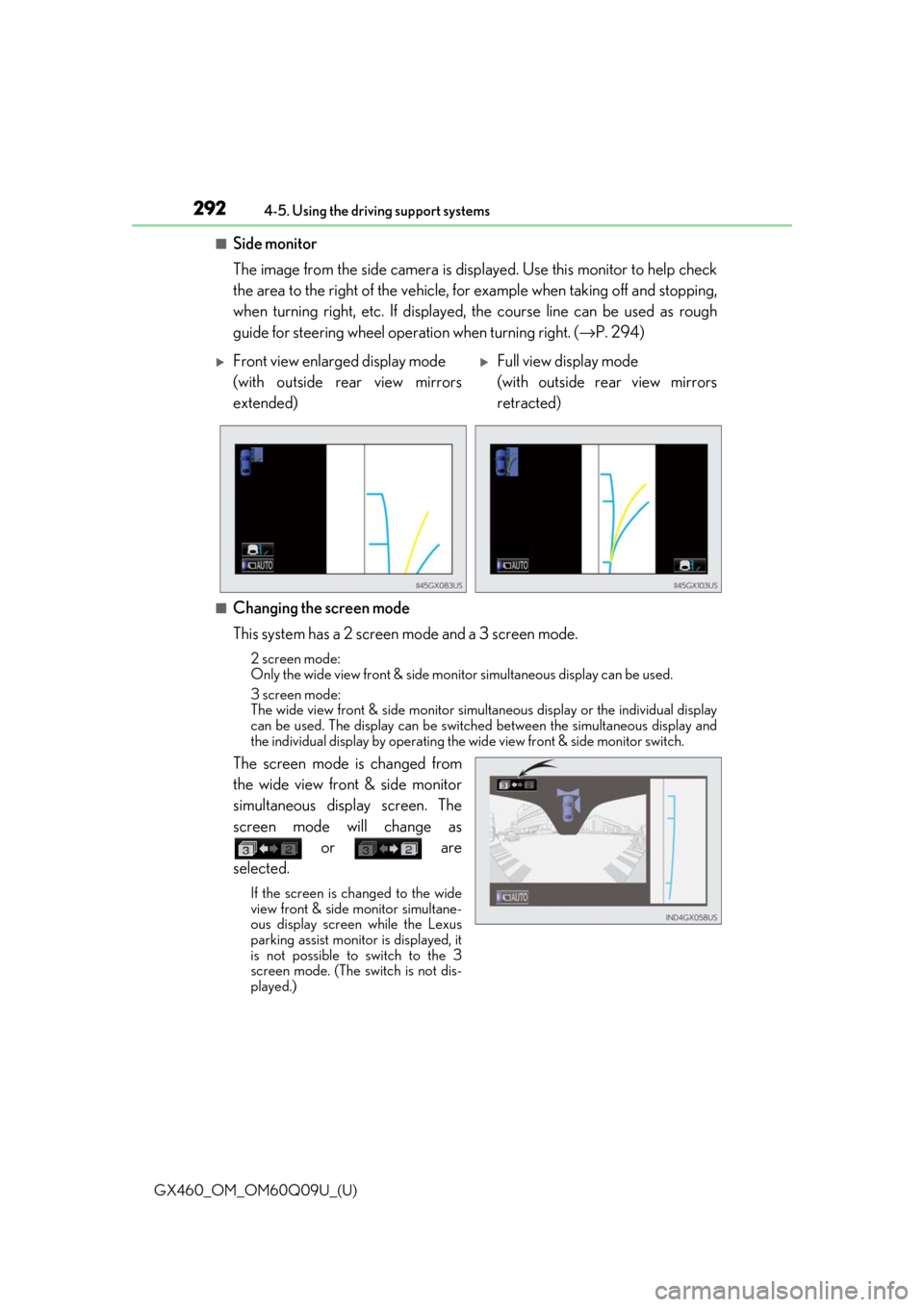
■Side monitor
The image from the side camera is displayed. Use this monitor to help check
the area to the right of the vehicle, for example when taking off and stopping,
when turning right, etc. If displayed,
the course line can be used as rough
guide for steering wheel operat ion when turning right. (→P. 294)
■Changing the screen mode
This system has a 2 screen mode and a 3 screen mode.
2 screen mode:
Only the wide view front & side moni tor simultaneous display can be used.
3 screen mode:
The wide view front & side monitor simult aneous display or the individual display
can be used. The display can be switched between the simultaneous display and
the individual display by operating the wide view front & side monitor switch.
The screen mode is changed from
the wide view front & side monitor
simultaneous display screen. The
screen mode will change as
or are
selected.
If the screen is changed to the wide
view front & side monitor simultane-
ous display screen while the Lexus
parking assist monitor is displayed, it
is not possible to switch to the 3
screen mode. (The switch is not dis-
played.)
Front view enlarged display mode
(with outside rear view mirrors
extended)Full view display mode
(with outside rear view mirrors
retracted)
Page 295 of 640
GX460_OM_OM60Q09U_(U)
2954-5. Using the driving support systems
4
Driving
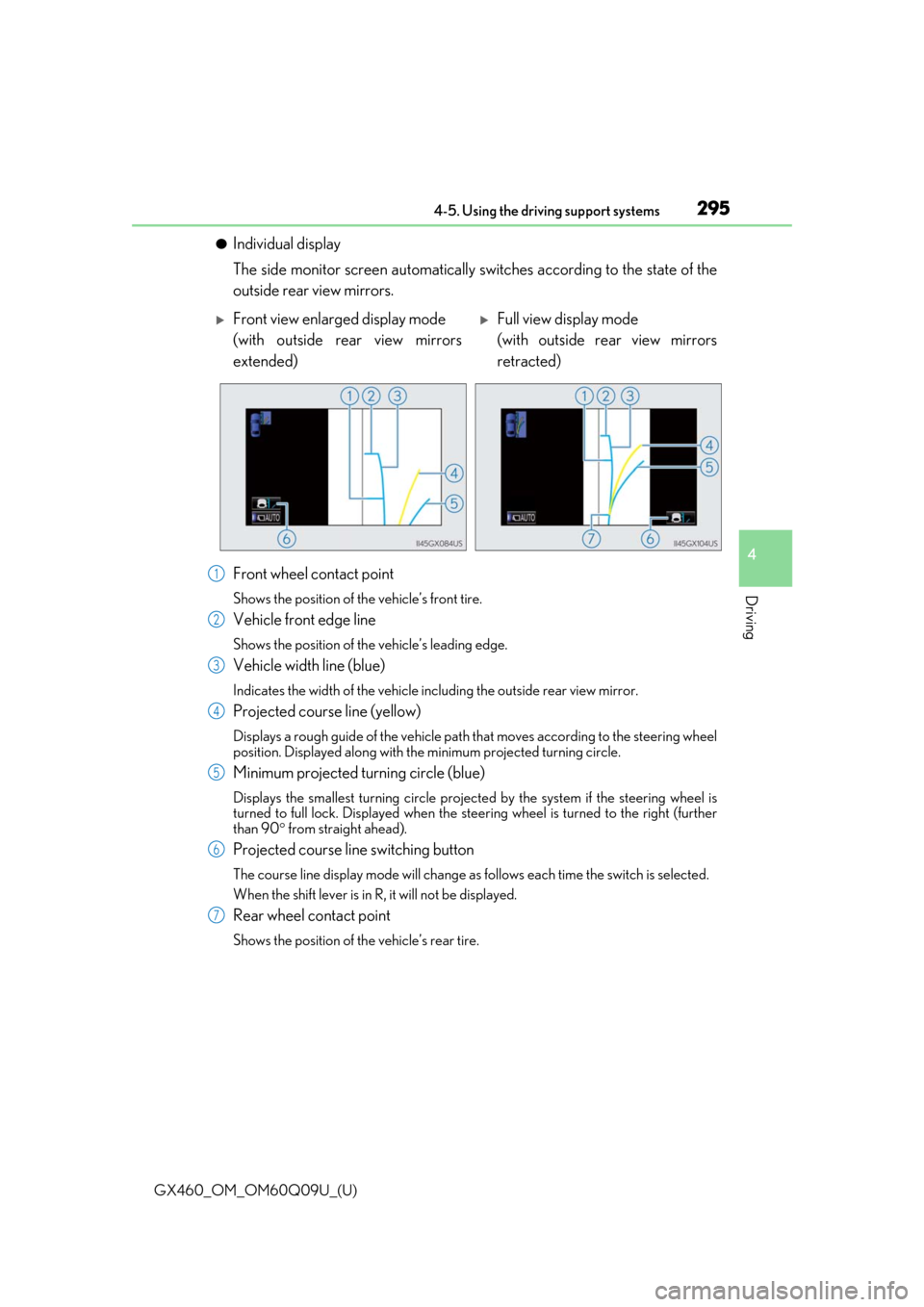
●Individual display
The side monitor screen automatically switches according to the state of the
outside rear view mirrors.
Front wheel contact point
Shows the position of th e vehicle’s front tire.
Vehicle front edge line
Shows the position of the vehicle’s leading edge.
Vehicle width line (blue)
Indicates the width of the vehicle including the outside rear view mirror.
Projected course line (yellow)
Displays a rough guide of the vehicle path that moves according to the steering wheel
position. Displayed along with the minimum projected turning circle.
Minimum projected turning circle (blue)
Displays the smallest turning circle projec ted by the system if the steering wheel is
turned to full lock. Displayed when the stee ring wheel is turned to the right (further
than 90 ° from straight ahead).
Projected course line switching button
The course line display mode will change as follows each time the switch is selected.
When the shift lever is in R, it will not be displayed.
Rear wheel contact point
Shows the position of the vehicle’s rear tire.
Front view enlarged display mode
(with outside rear view mirrors
extended)Full view display mode
(with outside rear view mirrors
retracted)
1
2
3
4
5
6
7
Page 300 of 640
300
GX460_OM_OM60Q09U_(U)4-5. Using the driving support systems
■The wide view front & side monitor can be operated when
Normal display mode
●The engine switch is in IGNITION ON mode.
●The vehicle speed is less than approximately 7 mph (12 km/h).
Automatic display mode
●The engine switch is in IGNITION ON mode.
●When automatic display mode is selected
●When the shift lever is shifted to D, S or N
●When the shift lever is in D, S or N and th
e vehicle speed is below approximately 6 mph
(10 km/h)
■Automatic system cancelation
In the following situations, the image is canceled automatically.
●When the vehicle speed exceeds approximately 7 mph (12 km/h).
Automatic display mode: If the vehicle speed returns to below 6 mph (10 km/h), the
image will be displayed.
●When the shift lever is in P or R.
●When another switch outside the screen has been pressed
■When the outside rear view mirrors have been folded
The side monitor screen can be displayed even if the outside rear view mirrors have been
folded. In this case, there will be a slight difference between the image displayed when
the outside rear view mirrors are extended and when the outside rear view mirrors have
been folded.
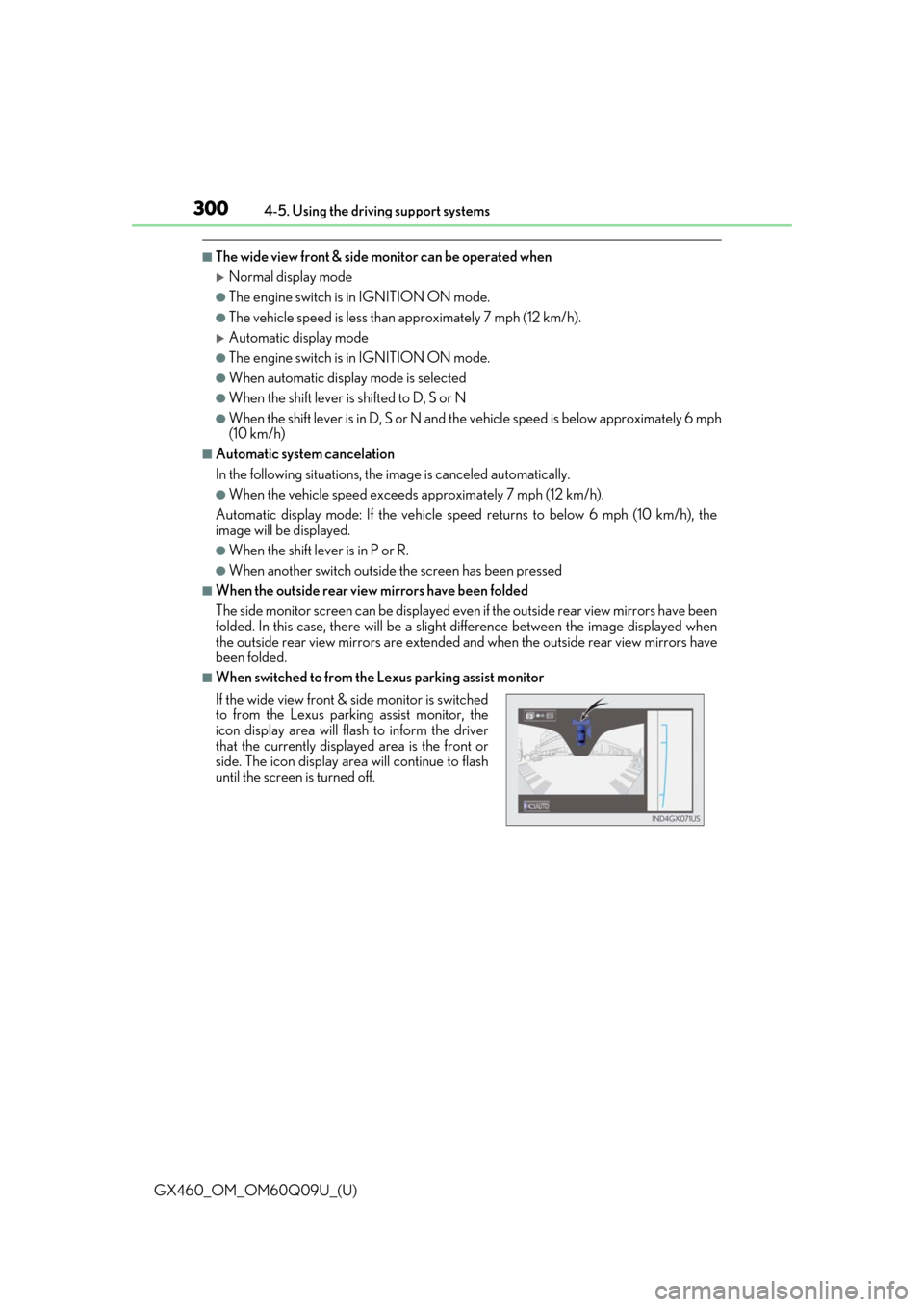
■When switched to from the Lexus parking assist monitor
If the wide view front & side monitor is switched
to from the Lexus parking assist monitor, the
icon display area will fl ash to inform the driver
that the currently displa yed area is the front or
side. The icon display area will continue to flash
until the screen is turned off.
Page 333 of 640

GX460_OM_OM60Q09U_(U)
3334-5. Using the driving support systems
4
Driving
CAUTION
■When using the Multi-terrain Monitor system
Observe the following precautions to avoid an accident that could result in death or
serious injuries:
●When attempting to use the side cameras while the door mirror is folded in, the base
of the door mirror is displayed on the screen and the area in front of the vehicle can-
not be observed. The image displayed on the screen differs depending on the posi-
tion of the door mirror.
●The field of view of the camera is limited. Do not rely solely upon the Multi-terrain
Monitor.
As with unequipped vehicles, drive carefully while directly confirming the safety of
your surroundings.
Take particular care to avoid parked cars and other obstacles.
●Do not drive the vehicle while only lookin g at the monitor screen under any circum-
stances.
Driving while only viewing the monitor scr een may cause a collision or lead to an
accident, as the image displa yed on the monitor screen may differ from actual condi-
tions. Make sure to visually check the surrounding areas with and without the mirror
while driving.
●Always check visually and with the mirrors to confirm your intended path is clear.
●The camera uses a special lens. The distances between objects and pedestrians that
appear in the image displayed on the screen will differ from the actual distances.
●These are just some of the functions of th e Multi-terrain Monitor. The steering wheel
timing and amount the steering wheel should be turned differs depending on the road
condition and road surface. Use the Multi- terrain Monitor with full understanding of
the above conditions.
Always confirm that there is appropriate sp ace before attempting to park the vehicle.
●Do not use the Multi-terrain Monitor in the following cases:
• On icy or slick road surfaces, or in snow
• When using tire chains
• When the back door is not closed completely
• On roads that are not flat or stra ight, such as curves or slopes.
●In low temperatures, the screen may darken or the image may become faint. The
image could distort when the vehicle is movi ng, or you may become unable to see the
image on the screen. Be sure to check dire ct visually all around the vehicle before
proceeding.
Page 391 of 640

GX460_OM_OM60Q09U_(U)
3915-1. Using the air conditioning system and defogger
5
Interior features
■Defogging the rear window and outside rear view mirrors
Defoggers are used to defog the rear window, and to remove raindrops, dew
and frost from the outside rear view mirrors.
Press .
The defoggers will automatically turn off after a period of time.
■Micro dust and pollen filter mode
Pollen is removed from the air and the air flows to the upper part of the body.
Touch on the option control screen.
When the micro dust and pollen filter mo de is on, is displayed on the air
conditioning control screen.
In order to prevent the windshield from fo gging up when the outside air is cold, the
dehumidification function may operate.
The pollens are filtered out even if the mi cro dust and pollen filter mode is turned
off.
■Windshield wiper de-icer (if equipped)
This feature is used to prevent ice fr om building up on the windshield and
wiper blades.
Touch on the option control screen.
When the windshield wiper de-icer is on , is displayed on the air condition-
ing control screen.
The windshield wiper de-icer will automati cally turn off after a period of time.
Page 628 of 640

628Alphabetical index
GX460_OM_OM60Q09U_(U)
Condenser .............................................. 469
Console box ........................................... 406
Cool box ....................................................419
Cooling system ..................................... 467Engine overheating.......................... 564
Conversation mirror ........................... 422
Crawl Control ....................................... 346
Cruise control Cruise control...................................... 225
Dynamic radar cruise control......228
Cup holders ............................................408
Curtain shield airbags ........................... 36
Current fuel consumption ................... 87
Customizable features ....................... 594
DAC (Downhill Assist Control system)................................................... 349
Daytime running light system .......... 204
Defogger Front windshield ................................ 390
Outside rear view mirrors .............. 391
Rear window ......................................... 391
Differential ............................................... 575
Dimension ............................................... 570
Display Multi-information display ..................86
Trip information ..................................... 87
Warning message ............................ 528
Do-it-yourself maintenance ............. 459
Doors............................................................ 98 Back door ........................................... 105
Door glasses ......................................... 150
Door lock ..................................................98
Open door warning light............... 522
Outside rear view mirrors ...............147
Rear door child-protector................ 101 Driver’s seat position memory.......... 135
Driving ........................................................158
AVS switch ............................................. 341
Break-in tips ...........................................159
Correct posture .................................... 28
Procedures ............................................ 158
Winter drive tips .................................377
Dynamic radar cruise control ......... 228
Eco Driving Indicator ............................ 90
EDR (Event data recorder)................... 10
Electronic key ............................................94 Battery-saving function ......................117
If the electronic key does not operate properly ........................... 558
Replacing the battery ........................491
Emergency, in case of If the electronic key does not operate properly ........................... 558
If the engine will not start ...............556
If the vehicle has discharged battery ..........................561
If the warning buzzer sounds .................................................520
If the warning light turns on ..........520
If you have a flat tire .......................... 542
If you lose your keys......................... 622
If you think something is wrong.................................................... 518
If your vehicle becomes stuck...................................................... 567
If your vehicle needs to be towed ..................................................... 512
If your vehicle overheats ................ 564
D
E