warning Lexus GX460 2018 / LEXUS 2018 GX460 (OM60Q09U) Owner's Guide
[x] Cancel search | Manufacturer: LEXUS, Model Year: 2018, Model line: GX460, Model: Lexus GX460 2018Pages: 640, PDF Size: 11.04 MB
Page 198 of 640
198
GX460_OM_OM60Q09U_(U)4-2. Driving procedures
■If the shift lever cannot be shifted from P
First, check whether the brak
e pedal is being depressed.
If the shift lever cannot be shifted with your foot on the brake pedal, there may be a prob-
lem with the shift lock system. Have the vehicle inspected by your Lexus dealer, immedi-
ately.
The following steps may be used as an emergency measure to ensure that the shift lever
can be shifted.
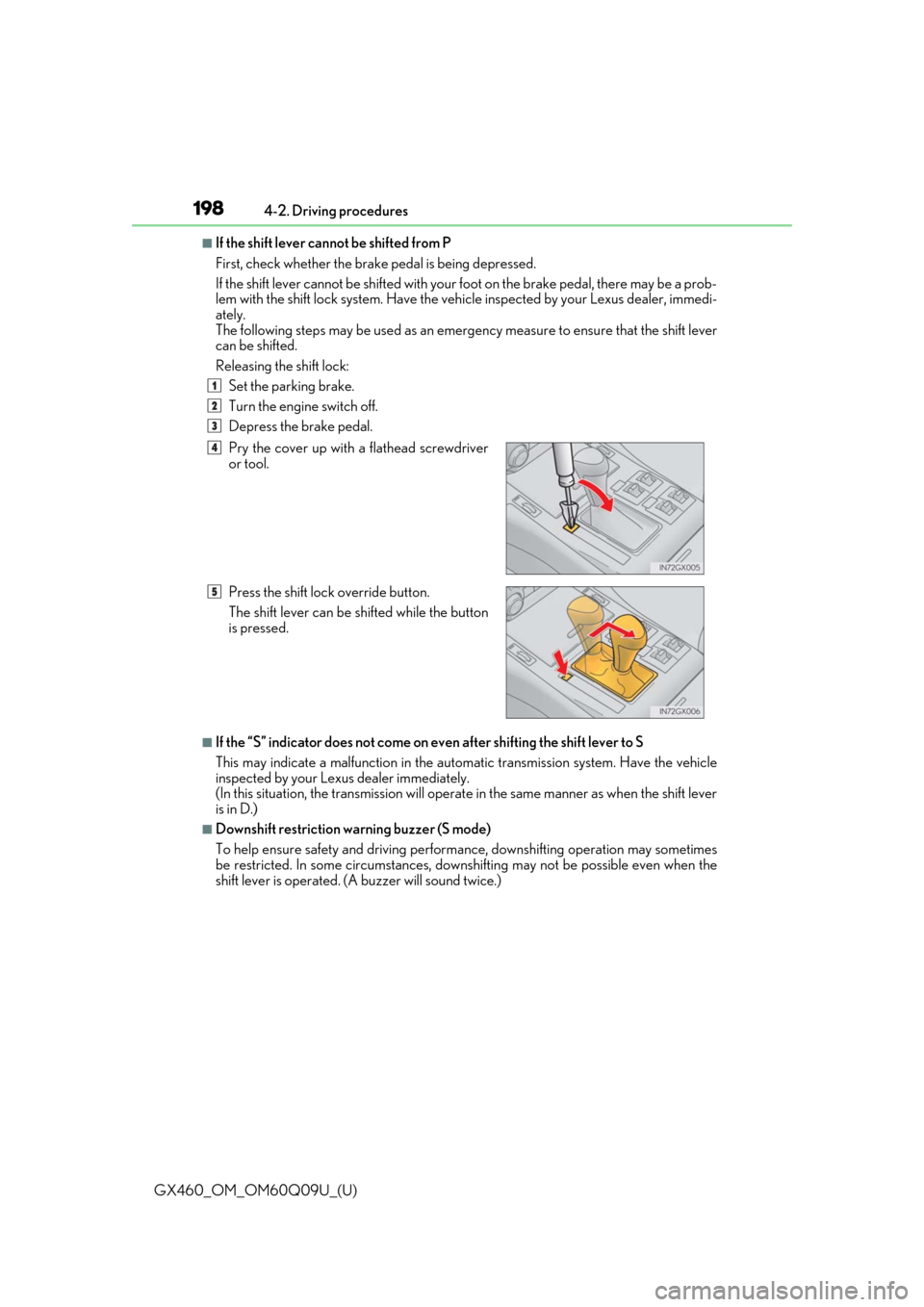
Releasing the shift lock: Set the parking brake.
Turn the engine switch off.
Depress the brake pedal.
■If the “S” indicator does not come on ev en after shifting the shift lever to S
This may indicate a malfunction in the automatic transmission system. Have the vehicle
inspected by your Lexus dealer immediately.
(In this situation, the transmission will operat e in the same manner as when the shift lever
is in D.)
■Downshift restriction warning buzzer (S mode)
To help ensure safety and driving performance, downshifti ng operation may sometimes
be restricted. In some circum stances, downshifting may not be possible even when the
shift lever is operated. (A buzzer will sound twice.) Pry the cover up with
a flathead screwdriver
or tool.
Press the shift lock override button.
The shift lever can be shifted while the button
is pressed.
1
2
3
4
5
Page 201 of 640
201
GX460_OM_OM60Q09U_(U)4-2. Driving procedures
4
Driving
Parking brake
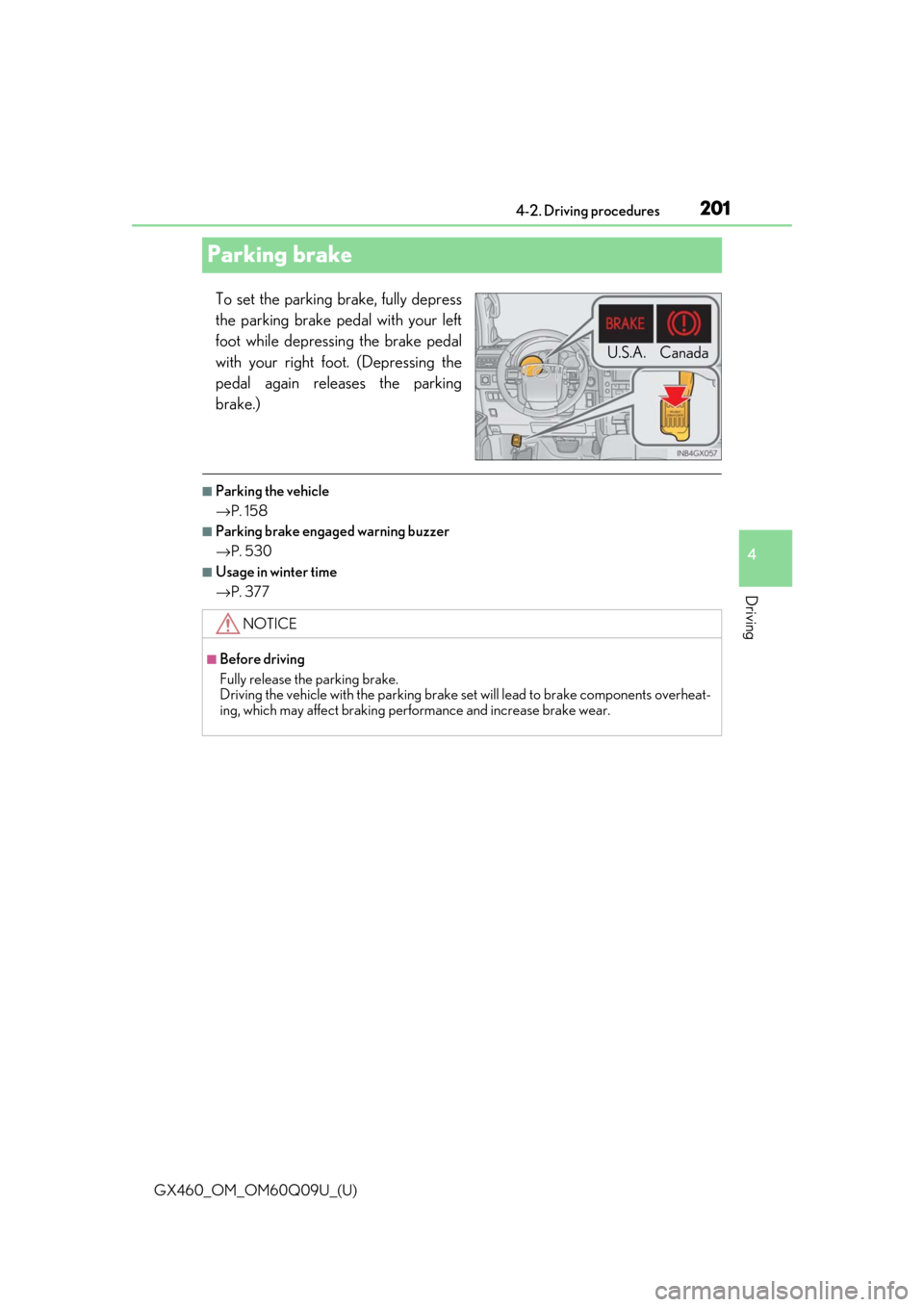
To set the parking brake, fully depress
the parking brake pedal with your left
foot while depressing the brake pedal
with your right foot. (Depressing the
pedal again releases the parking
brake.)
■Parking the vehicle
→
P. 158
■Parking brake engaged warning buzzer
→P. 530
■Usage in winter time
→P. 377
U.S.A. Canada
NOTICE
■Before driving
Fully release the parking brake.
Driving the vehicle with the parking brake se t will lead to brake components overheat-
ing, which may affect braking performance and increase brake wear.
Page 205 of 640

GX460_OM_OM60Q09U_(U)
2054-3. Operating the lights and wipers
4
Driving
■Automatic headlight leveling system
The level of the headlights is automatically adjusted according to the number of passen-
gers and the loading condition of the vehicle to ensure that the headlights do not inter-
fere with other road users.
■If the automatic headlight levelin g system warning light flashes
It may indicate a malfun ction in the system. Contact your Lexus dealer.
■Welcome lighting
If the headlight switch is turned to AUTO and the surrounding area is dark, unlocking the
doors using the smart access system with pu sh-button start or wireless remote control
will turn the parking lights and tail lights on automatically.
■Customization
Settings (e.g. light sensor sensitivity) can be changed.
(Customizable features: →P. 594)
NOTICE
■To prevent battery discharge
Do not leave the lights on longer than ne cessary when the engine is not running.
Page 227 of 640

GX460_OM_OM60Q09U_(U)
2274-5. Using the driving support systems
4
Driving
■Automatic cruise control cancelation
Cruise control will stop maintaining the vehicle speed in an y of the following situations:
●Actual vehicle speed falls more than appr oximately 10 mph (16 km/h) below the preset
vehicle speed.
At this time, the memorized set speed is not retained.
●Actual vehicle speed is below approximately 25 mph (40 km/h).
●VSC is activated.
●The center differential lock/unlock is not completed within 5 seconds while the cruise
control system is on.
■If the warning message for the cruise contro l is shown on the multi-information display
Press the “ON-OFF” button once to deactivate the system, and then press the button
again to reactivate the system.
If the cruise control speed cannot be set or if the cruise control cancels immediately after
being activated, there may be a malfunction in the cruise control system. Have the vehi-
cle inspected by your Lexus dealer.
CAUTION
■To avoid operating the cruise control by mistake
Switch the cruise control off using th e “ON-OFF” button when not in use.
■Situations unsuitable for cruise control
Do not use cruise control in any of the following situations.
Doing so may result in loss of control and could cause an accident resulting in death or
serious injury.
●In heavy traffic
●On roads with sharp bends
●On winding roads
●On slippery roads, such as thos e covered with rain, ice or snow
●On steep hills
Vehicle speed may exceed the set speed when driving down a steep hill.
●When your vehicle is towing a trailer (wit h towing hitch) or during emergency towing
Page 232 of 640

232
GX460_OM_OM60Q09U_(U)4-5. Using the driving support systems
Example of constant speed cruising
When there are no vehicles ahead
The vehicle travels at the speed set by the driver. The desired vehicle-to-vehicle dis-
tance can also be set by operating the vehicle-to-vehicle distance control.
Example of deceleration cruising
When the vehicle ahead is driving slower than the set speed
When a vehicle is detected running ahead
of you, the system automatically deceler-
ates your vehicle. When a greater reduction in vehicle speed is necessary, the system
applies the brakes. A warning tone warns yo u when the system cannot decelerate suf-
ficiently to prevent your vehicle from closing in on the vehicle ahead.
Example of follow-up cruising
When following a vehicle driving slower than the set speed
The system continues follow-up cruising while adjusting for chan ges in the speed of
the vehicle ahead in order to maintain the ve hicle-to-vehicle distance set by the driver.
Example of acceleration
When there are no longer any vehicles ahead driving slower than the set
speed
The system accelerates until the set speed is reached. The system then returns to con-
stant speed cruising.
When your vehicle is too close to a vehicle ahead, and sufficient automatic
deceleration via the cruise control is not possible, the display will flash and the
buzzer will sound to alert th e driver. An example of this would be if another driver
cuts in front of you while you are followi ng a vehicle. Apply the brakes to ensure
an appropriate vehicle-to-vehicle distance.
■Warnings may not occur when
In the following instances, there is a possibility that the warnings will not occur:
●When the speed of the vehicle ahead matches or exceeds your vehicle
speed
●When the vehicle ahead is traveling at an extremely slow speed
●Immediately after the cruise control speed was set
●As the instant the accelerator is applied
Approach warning
1
2
3
4
Page 235 of 640
GX460_OM_OM60Q09U_(U)
2354-5. Using the driving support systems
4
Driving
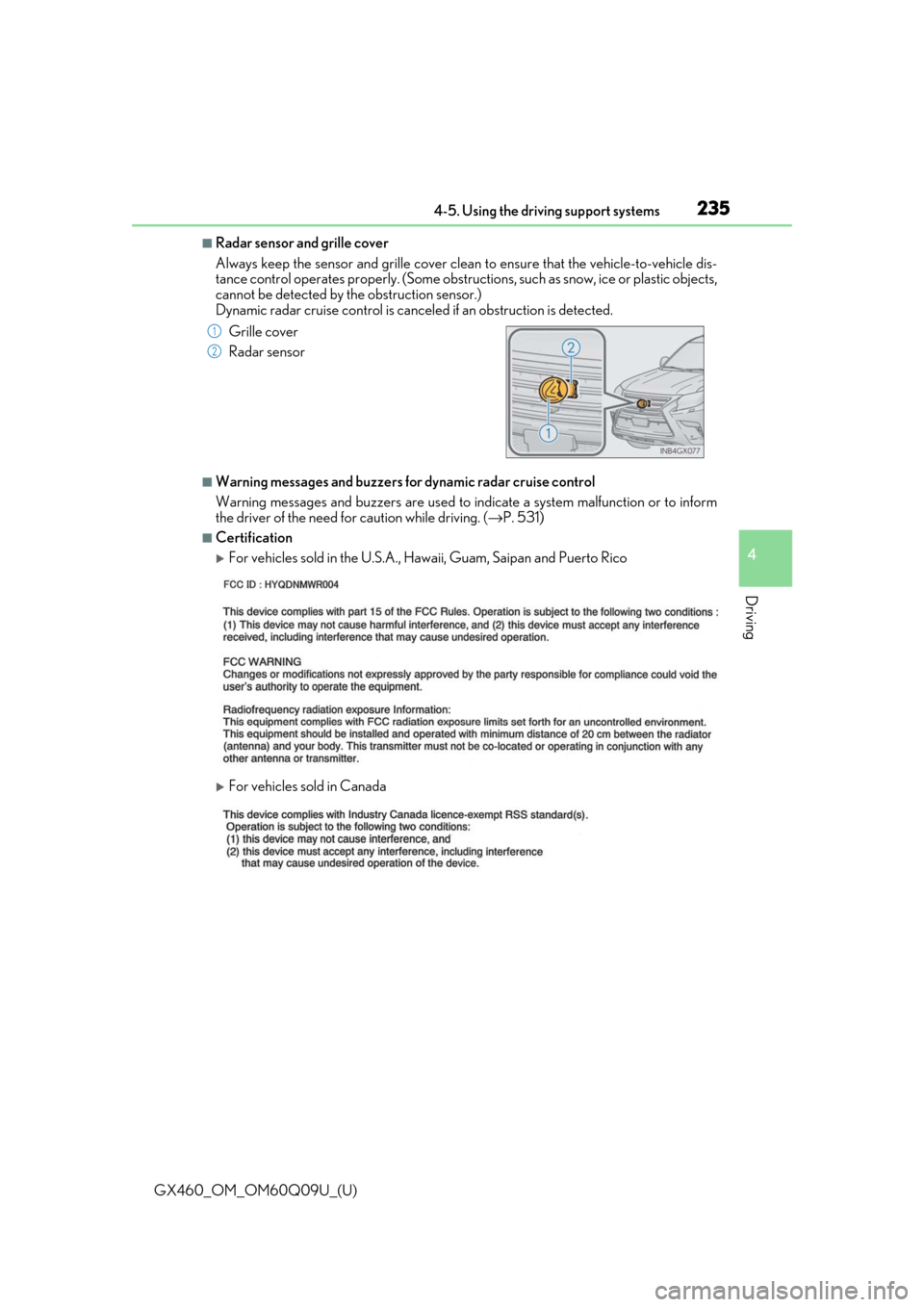
■Radar sensor and grille cover
Always keep the sensor and grille cover clean to ensure that the vehicle-to-vehicle dis-
tance control operates properly. (Some obstructions, such as snow, ice or plastic objects,
cannot be detected by the obstruction sensor.)
Dynamic radar cruise control is canceled if an obstruction is detected.
■Warning messages and buzzers for dynamic radar cruise control
Warning messages and buzzers are used to indicate a system malfunction or to inform
the driver of the need for caution while driving. ( →P. 531)
■Certification
For vehicles sold in the U.S.A., Ha waii, Guam, Saipan and Puerto Rico
For vehicles sold in Canada Grille cover
Radar sensor
1
2
Page 237 of 640
GX460_OM_OM60Q09U_(U)
2374-5. Using the driving support systems
4
Driving
CAUTION
■To avoid inadvertent cruise control activation
Switch the cruise control off using the “ON-OFF” button when not in use.
■Situations unsuitable for dynamic radar cruise control
Do not use dynamic radar cruise contro l in any of the following situations.
Doing so may result in inappropriate speed control and could cause an accident result-
ing in death or serious injury.
●In heavy traffic
●On roads with sharp bends
●On winding roads
●On slippery roads, such as thos e covered with rain, ice or snow
●On steep downhills, or where there are sudden changes between sharp up and down
gradients
Vehicle speed may exceed the set speed when driving down a steep hill.
●At entrances to expressways
●When weather conditions are bad enough that they may prevent the sensors from
functioning correctly (fog, snow, sandstorm, heavy rain, etc.)
●When an approach warning buzzer is heard often
●When your vehicle is towing a trailer (wit h towing hitch) or during emergency towing
■When the sensor may not be correctly detecting the vehicle ahead
Apply the brakes as necessary when any of the following types of vehicles are in front of
you.
As the sensor may not be able to correctly detect these types of vehicles, the approach
warning (→ P. 232) will not be activated, and a fatal or serious accident may result.
●Vehicles that cut in suddenly
●Vehicles traveling at low speeds
●Vehicles that are not moving
●Vehicles with small rear ends (trailers with no load on board etc.)
●Motorcycles traveling in the same lane
Page 241 of 640

GX460_OM_OM60Q09U_(U)
2414-5. Using the driving support systems
4
Driving
■Temporary cancelation of the LDA system
If any of the following occurs, the LDA system will be temporarily canceled. The functions
will resume after the necessary oper ating conditions have returned.
●The turn signal lever is operated.
●The brake pedal is depressed.
●The vehicle speed deviates from the operating range of the LDA system.
●The lane lines cannot be recognized while driving.
●The wiper operates continuously.
●When the lane departure warning function is activated.
Once the lane departure warning function is activated, it will be temporarily canceled
and resume a few seconds later.
■The lane departure warning
Depending on the audio system sound level or air conditioning fan noise while the audio
system or air conditioning system is in use, it may be difficult to hear the warning sound.
■After the vehicle has been parked in the sun
The LDA system may not be available and a warning message ( →P. 531) will be dis-
played for a while after driving has started. When the temperature in the cabin decreases
and the temperature around the camera sensor ( →P. 239) becomes suitable for its
operation, the functions will begin to operate.
Page 242 of 640

242
GX460_OM_OM60Q09U_(U)4-5. Using the driving support systems
■Conditions in which the func
tion may not operate correctly
In the following conditions, the camera sensor may be unable to recognize lane markers
causing the lane departure wa rning function to operate incorrectly. However, this does
not indicate a malfunction.
●When driving through an area with no lane markers, such as a tollbooth, a crossing or
before a ticket checkpoint
●When driving on a sharp curve
●When lane markers are extremely narrow or extremely wide
●When the vehicle leans to one side an unus ual amount due to a heavy load or improper
tire inflation pressure
●When the following distance between your vehicle and the vehicle ahead is extremely
short
●When the lane markers are yellow (These may be more difficult for the system to rec-
ognize compared to white markers.)
●When the lane markers are broken, “Botts’ dots”, “Raised pavement marker” or stones
●When the lane markers are on a curb etc.
●When lane markers are obscured or partially obscured by sand, dirt, etc.
●When there are shadows on the road running parallel with lane markers, or if a shadow
covers the lane markers
●When driving on a particularly bright road surface, such as concrete
●When driving on a road surface that is bright due to reflected light
●When driving in a location where the light level changes rapidly, such as the entrance to
or exit from a tunnel
●When sunlight or the headlight s of oncoming vehicles are shining directly into the cam-
era lens
●When driving on roads that are branching or merging
●When driving on a road surface that is wet du e to rain, previous rainfall, standing water,
etc.
●When the vehicle experiences strong up-and-down motion such as when driving on an
extremely rough road or on a seam in the pavement
●When headlight brightness at nighttime is reduced due to dirt on the lenses, or when
the headlights are misaligned
●When driving on winding road s or roads that are uneven
●When driving on rough or unpaved roads
■When changing the tires
Depending on the tires used, such as snow tire, etc., sufficient performance may not be
maintainable.
■Warning messages and buzzers for LDA system
Warning messages and buzzers are used to indicate a system malfunction or to inform
the driver of the need for caution while driving. ( →P. 531, 532)
Page 251 of 640

GX460_OM_OM60Q09U_(U)
2514-5. Using the driving support systems
4
Driving
■The intuitive parking assist can be operated when
●Front corner sensors:
• The engine switch is in IGNITION ON mode.
• The shift lever is in a position other than P.
• The vehicle speed is less than approximately 6 mph (10 km/h).
(At any speed when the shift lever is in R)
●Front center sensors:
• The engine switch is in IGNITION ON mode.
• The shift lever is in a position other than P or R.
• The vehicle speed is less than about 6 mph (10 km/h).
●Rear corner and rear center sensors:
• The engine switch is in IGNITION ON mode.
• The shift lever is in R.
■Intuitive parking assist display
When an obstacle is detected while the rear view monitor system, Lexus parking assist
monitor or Multi-terrain Monitor is in use, the warning indicator will appear in the upper
corner of the screen even if the display setting has been set to off.
■Sensor detection information
●The sensor’s detection areas are limited to the areas around the vehicle’s bumper.
●Certain vehicle conditions and the surrounding environment may affect the ability of a
sensor to correctly detect an obstacle. Pa rticular instances where this may occur are
listed below.
• There is dirt, snow or ice on the sensor . (Wiping the sensors will resolve this prob-
lem.)
• The sensor is frozen. (Thawing the area will resolve this problem.) In especially cold weather, if a sensor is frozen the screen may show an abnormal
display, or obstacles may not be detected.
• The sensor is covered in any way.
• The vehicle is leaning considerably to one side.
• On an extremely bumpy road, on an incline, on gravel, or on grass.
• The vicinity of the vehicle is noisy due to vehicle horns, motorcycle engines, air brakes of large vehicles, or other loud noises producing ultrasonic waves.
• There is another vehicle equipped with parking assist sensors in the vicinity.
• The sensor is coated with a sheet of spray or heavy rain.
• The vehicle is equipped with a fender pole or wireless antenna.
• The bumper or sensor re ceives a strong impact.
• The vehicle is approaching a tall or curved curb.
• In harsh sunlight or intense cold weather.
• The area directly under the bumpers is not detected.
• If obstacles draw too close to the sensor.
• A non-genuine Lexus suspension (low ered suspension etc.) is installed.
• People may not be detected if they are wearing certain types of clothing.
In addition to the examples above, there ar e instances in which, because of their shape,
signs and other objects may be judged by a sensor to be closer than they are.