park assist Lexus GX460 2018 Owner's Manual / LEXUS 2018 GX460 OWNER'S MANUAL (OM60Q09U)
[x] Cancel search | Manufacturer: LEXUS, Model Year: 2018, Model line: GX460, Model: Lexus GX460 2018Pages: 640, PDF Size: 11.04 MB
Page 3 of 640

3
1
8 7
6
5
4
3
2
GX460_OM_OM60Q09U_(U)
9
4-1. Before driving Driving the vehicle ..................... 158
Cargo and luggage ....................165
Vehicle load limits .......................169
Trailer towing (with towing hitch) ....................170
Dinghy towing .............................. 188
4-2. Driving procedures Engine (ign ition) switch ............ 189
Automatic transmission ............194
Turn signal lever .........................200
Parking brake ............................... 201
4-3. Operating the lights and wipers
Headlight switch ........................ 202
Automatic High Beam............. 206
Fog light switch .............................. 211
Windshield wipers and washer ...........................................213
Rear window wiper and washer .......................................... 218
Headlight cleaner switch........ 220
4-4. Refueling Opening the fuel tank cap ....... 221 4-5. Using the driving support
systems
Cruise control ............................. 225
Dynamic radar cruise control ......................................... 228
LDA (Lane Departure Alert) ........ 239
Intuitive parking assist.............. 245
Rear view monito r system...... 254
Lexus parking assist monitor........................................ 264
Wide view front & side monitor........................................ 290
Multi-terrain Select...................308
Multi-terrain Monitor.................313
Rear height control air suspension ................................. 337
AVS (Adaptive Variable Suspension System) ................341
Four-wheel drive system ........ 342
Crawl Control............................. 346
Downhill assist control system.......................................... 349
Driving assist systems ................351
BSM (Blind Spot Monitor)..... 357
• The Blind Spot Monitor function .................................... 362
• The Rear Cross Traffic Alert function......................... 365
PCS (Pre-Collision system).......... 368
4-6. Driving tips Winter driving tips......................377
Off-road precau tions...............380
4Driving
Page 15 of 640
15Pictorial index
GX460_OM_OM60Q09U_(U)
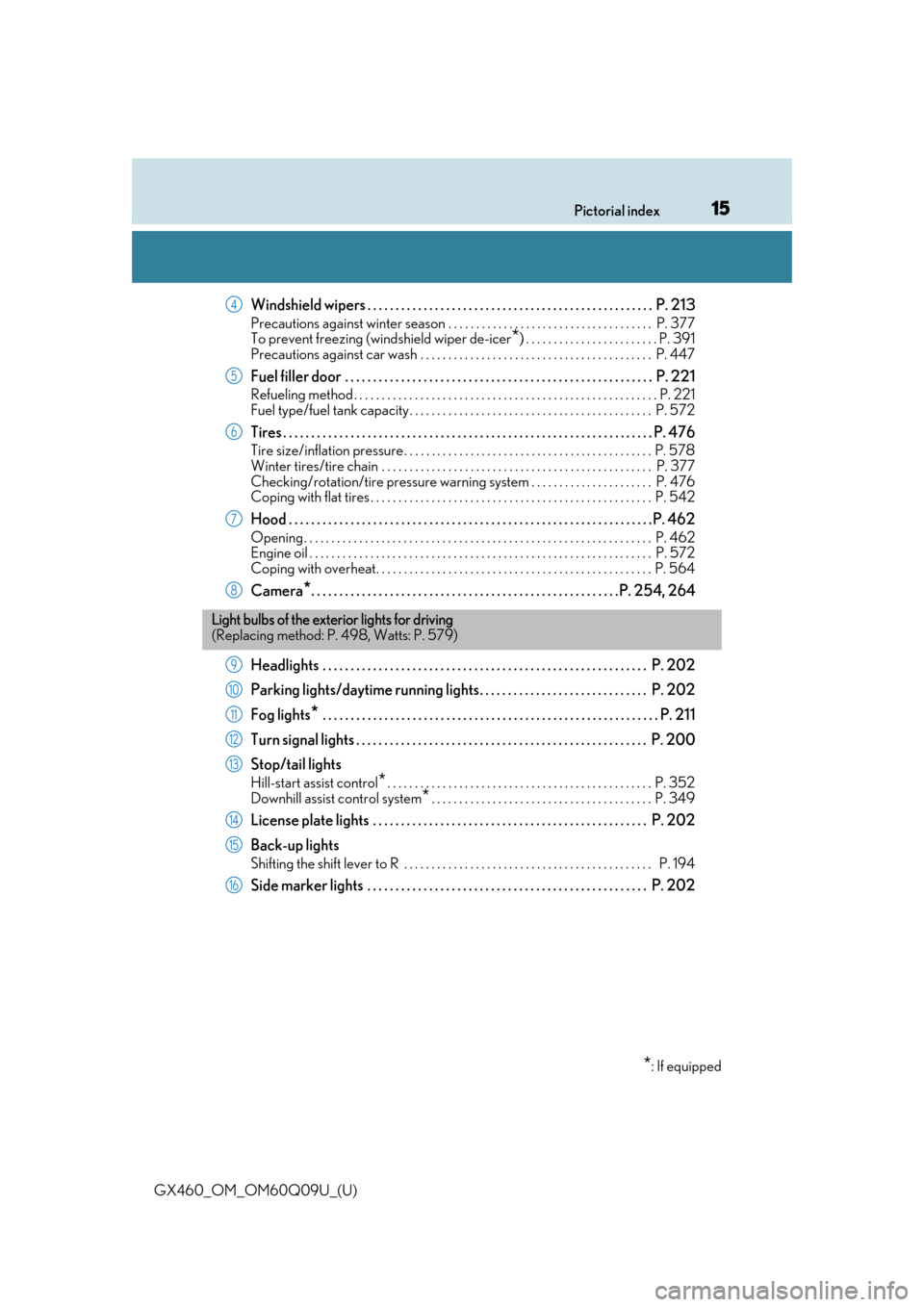
Windshield wipers . . . . . . . . . . . . . . . . . . . . . . . . . . . . . . . . . . . . . . . . . . . . . . . . . . . P. 213
Precautions against winter season . . . . . . . . . . . . . . . . . . . . . . . . . . . . . . . . . . . . . P. 377
To prevent freezing (windshield wiper de-icer
*) . . . . . . . . . . . . . . . . . . . . . . . . P. 391
Precautions against car wash . . . . . . . . . . . . . . . . . . . . . . . . . . . . . . . . . . . . . . . . . . P. 447
Fuel filler door . . . . . . . . . . . . . . . . . . . . . . . . . . . . . . . . . . . . . . . . . . . . . . . . . . . . . . . P. 221
Refueling method . . . . . . . . . . . . . . . . . . . . . . . . . . . . . . . . . . . . . . . . . . . . . . . . . . . . . . . P. 221
Fuel type/fuel tank capacity . . . . . . . . . . . . . . . . . . . . . . . . . . . . . . . . . . . . . . . . . . . . P. 572
Tires . . . . . . . . . . . . . . . . . . . . . . . . . . . . . . . . . . . . . . . . . . . . . . . . . . . . . . . . . . . . . . . . . . P. 476
Tire size/inflation pressure . . . . . . . . . . . . . . . . . . . . . . . . . . . . . . . . . . . . . . . . . . . . . P. 578
Winter tires/tire chain . . . . . . . . . . . . . . . . . . . . . . . . . . . . . . . . . . . . . . . . . . . . . . . . . P. 37 7
Checking/rotation/tire pressure warning system . . . . . . . . . . . . . . . . . . . . . . P. 476
Coping with flat tires . . . . . . . . . . . . . . . . . . . . . . . . . . . . . . . . . . . . . . . . . . . . . . . . . . . P. 542
Hood . . . . . . . . . . . . . . . . . . . . . . . . . . . . . . . . . . . . . . . . . . . . . . . . . . . . . . . . . . . . . . . . .P. 462
Opening. . . . . . . . . . . . . . . . . . . . . . . . . . . . . . . . . . . . . . . . . . . . . . . . . . . . . . . . . . . . . . . P. 462
Engine oil . . . . . . . . . . . . . . . . . . . . . . . . . . . . . . . . . . . . . . . . . . . . . . . . . . . . . . . . . . . . . . P. 572
Coping with overheat. . . . . . . . . . . . . . . . . . . . . . . . . . . . . . . . . . . . . . . . . . . . . . . . . . P. 564
Camera*. . . . . . . . . . . . . . . . . . . . . . . . . . . . . . . . . . . . . . . . . . . . . . . . . . . . . . .P. 254, 264
Headlights . . . . . . . . . . . . . . . . . . . . . . . . . . . . . . . . . . . . . . . . . . . . . . . . . . . . . . . . . . P. 202
Parking lights/daytime running lights. . . . . . . . . . . . . . . . . . . . . . . . . . . . . . P. 202
Fog lights
* . . . . . . . . . . . . . . . . . . . . . . . . . . . . . . . . . . . . . . . . . . . . . . . . . . . . . . . . . . . . P. 211
Turn signal lights . . . . . . . . . . . . . . . . . . . . . . . . . . . . . . . . . . . . . . . . . . . . . . . . . . . . P. 20 0
Stop/tail lights
Hill-start assist control*. . . . . . . . . . . . . . . . . . . . . . . . . . . . . . . . . . . . . . . . . . . . . . . . P. 352
Downhill assist control system
*. . . . . . . . . . . . . . . . . . . . . . . . . . . . . . . . . . . . . . . . P. 349
License plate lights . . . . . . . . . . . . . . . . . . . . . . . . . . . . . . . . . . . . . . . . . . . . . . . . . P. 202
Back-up lights
Shifting the shift lever to R . . . . . . . . . . . . . . . . . . . . . . . . . . . . . . . . . . . . . . . . . . . . . P. 194
Side marker lights . . . . . . . . . . . . . . . . . . . . . . . . . . . . . . . . . . . . . . . . . . . . . . . . . . P. 202
4
5
6
7
8
Light bulbs of the exte rior lights for driving
(Replacing method: P. 498, Watts: P. 579)
*: If equipped
9
10
11
12
13
14
15
16
Page 81 of 640
GX460_OM_OM60Q09U_(U)
812. Instrument cluster
2
Instrument cluster
*1: These lights turn on when the engine switch is turned to IGNITION ON mode toindicate that a system check is being perfor med. They will turn off after the engine is
on, or after a few seconds. There may be a ma lfunction in a system if the lights do not
turn on, or turn off. Have the vehi cle inspected by your Lexus dealer.
*2: The light flashes to indicate that the system is operating.
*3: The light turns on when the system is turn ed off. The light flashes quickly to indicate
that the system is operating.
*4: In order to confirm operation, the BSM outside rear view mirror indicators illumi- nate in the following situations:
• When the engine switch is turned to IGNITION ON mode while the system is set to on.
• When the system is set to on while the engine switch is in IGNITION ON mode.
If the system is functioning correctly, th e BSM outside rear view mirror indicators
will turn off after a few seconds.
If the BSM outside rear view mirror indicators do not illuminate or do not turn off,
there may be a malfunction with the system.
If this occurs, have the vehicle inspected by your Lexus dealer.
*5: This light illuminates on the outside rear view mirrors.
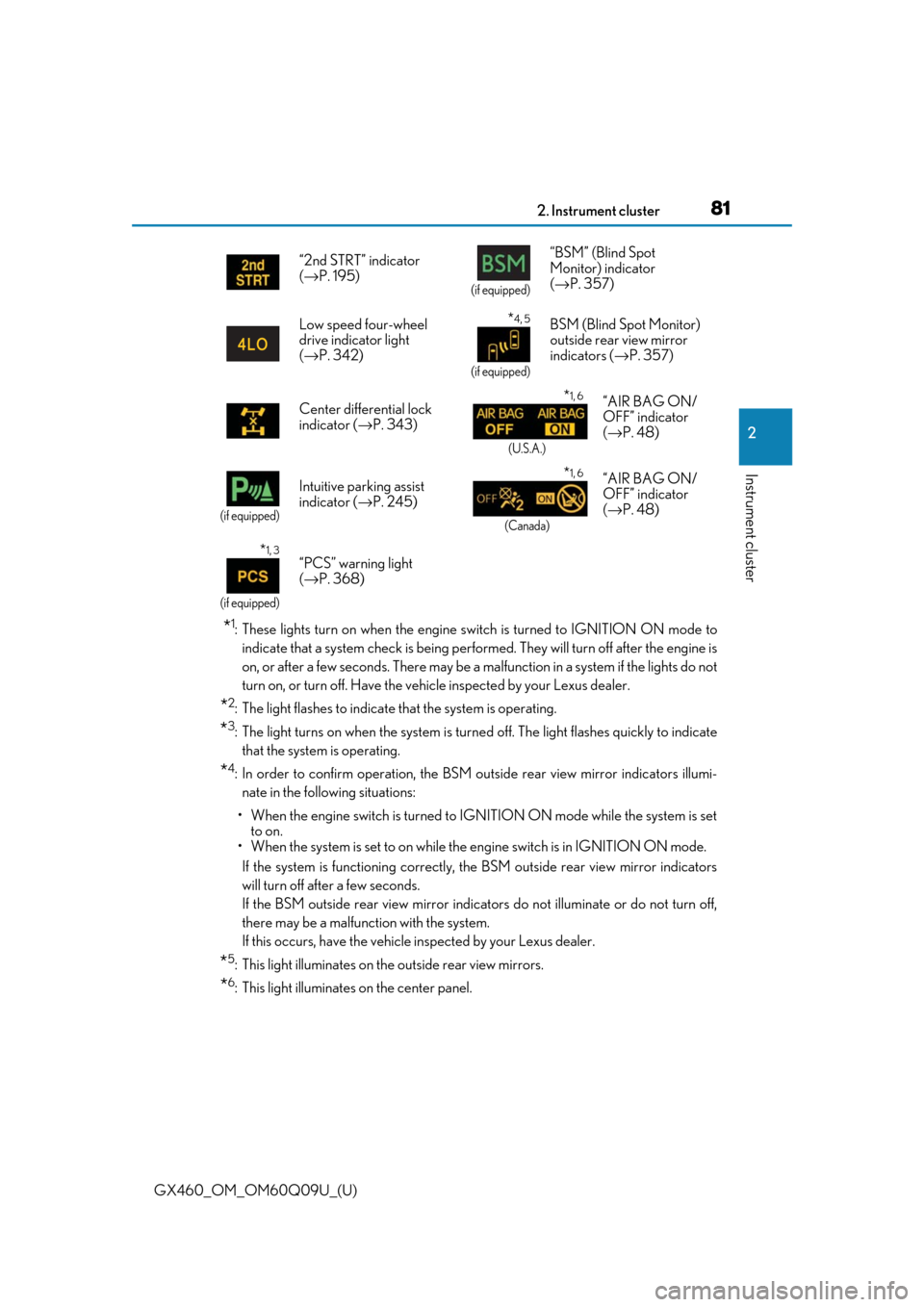
*6: This light illuminates on the center panel.“2nd STRT” indicator
(
→ P. 195)
(if equipped)
“BSM” (Blind Spot
Monitor) indicator
(→ P. 357)
Low speed four-wheel
drive indicator light
( → P. 342)
*4, 5
(if equipped)
BSM (Blind Spot Monitor)
outside rear view mirror
indicators ( →P. 357)
Center differential lock
indicator ( →P. 343)
*1, 6
(U.S.A.)
“AIR BAG ON/
OFF” indicator
(→ P. 48)
(if equipped)
Intuitive parking assist
indicator ( →P. 245)*1, 6
(Canada)
“AIR BAG ON/
OFF” indicator
(→ P. 48)
*1, 3
(if equipped)
“PCS” warning light
(→ P. 368)
Page 89 of 640

GX460_OM_OM60Q09U_(U)
892. Instrument cluster
2
Instrument cluster
■Dynamic radar cruise control display* (if equipped) (→P. 228)
■LDA (Lane Departure Alert) display* (if equipped) ( →P. 239)
■Intuitive parking assist display* (if equipped) ( →P. 245)
■Crawl Control display* (if equipped) ( →P. 346)
■Warning messages ( →P. 528)
Automatically displayed when a malfunction occurs in one of the vehicles sys-
tems.
■Customization
Settings (e.g. available language) can be changed.
(Customizable features: → P. 594)
*: Automatically displayed when the system is used
■Electronic features control can be turned on/off when
Engine switch is in IGNITION ON mode.
■System check display
After turning the engine switch to IGNITION ON mode, “CHECKING” is displayed
while system operation is checked. When the system check is complete, the normal
screen will return.
■Conditions for ending electronic features control
In the following situations, the electronic features control will end automatically:
●The menu switch is pressed
●Intuitive parking assist display starts operating
●The Crawl Control is operated
●The dynamic radar cruise control is operated
●A warning message appears after the electronic features control screen is displayed
Other contents
Page 157 of 640

157
GX460_OM_OM60Q09U_(U)
4Driving
4-1. Before drivingDriving the vehicle ......................158
Cargo and luggage .................... 165
Vehicle load limits ....................... 169
Trailer towing (with towing hitch) ................... 170
Dinghy towing ..............................188
4-2. Driving procedures Engine (ignition) switch ............ 189
Automatic transmission............ 194
Turn signal lever......................... 200
Parking brake ............................... 201
4-3. Operating the lights and wipers
Headlight switch .........................202
Automatic High Beam ............ 206
Fog light switch ..............................211
Windshield wipers and washer........................................... 213
Rear window wiper and washer........................................... 218
Headlight cleaner switch ........220
4-4. Refueling Opening the fuel tank cap....... 221 4-5. Using the driving support
systems
Cruise control ............................. 225
Dynamic radar cruise control ......................................... 228
LDA (Lane Departure Alert) ........ 239
Intuitive parking assist .............. 245
Rear view monitor system ...... 254
Lexus parking assist monitor ........................................ 264
Wide view front & side monitor ........................................290
Multi-terrain Select .................. 308
Multi-terrain Monitor ................ 313
Rear height control air suspension ................................. 337
AVS (Adaptive Variable Suspension System)................ 341
Four-wheel drive system ........ 342
Crawl Control ............................. 346
Downhill assist control system .......................................... 349
Driving assist systems ............... 351
BSM (Blind Spot Monitor) ..... 357 • The Blind Spot Monitor function .................................... 362
• The Rear Cross Traffic Alert function ......................... 365
PCS (Pre-Collision system) ..........368
4-6. Driving tips Winter driving tips ..................... 377
Off-road precautions .............. 380
Page 159 of 640

GX460_OM_OM60Q09U_(U)
1594-1. Before driving
4
Driving
■When starting off on a uphill (vehicles with hill-start assist control system)
The hill-start assist control is available. (→ P. 352)
■Driving in the rain
●Drive carefully when it is raining, because visibility will be reduced, the windows may
become fogged-up, and the road will be slippery.
●Drive carefully when it starts to rain, beca use the road surface will be especially slip-
pery.
●Refrain from high speeds when driving on an expressway in the rain, because there may
be a layer of water between the tires and th e road surface, preventing the steering and
brakes from operating properly.
■Engine speed while driving
In the following conditions, th e engine speed may become high while driving. This is due
to automatic up-shifting control or down-shi fting implementation to meet driving condi-
tions. It does not indica te sudden acceleration.
●The vehicle is judged to be driving uphill or downhill
●When the accelerator pedal is released
■Breaking in your new Lexus
To extend the life of the vehicle, observin g the following precautions is recommended:
●For the first 200 miles (300 km):
Avoid sudden stops.
●For the first 500 miles (800 km):
Do not tow a trailer.
●For the first 600 miles (1000 km):
• Do not drive at extremely high speeds.
• Avoid sudden acceleration.
• Do not drive continuously in the low gears.
• Do not drive at a constant speed for extended periods.
■Drum-in-disc type parking brake system
Your vehicle has a drum-in-disc type parking brake system.
This type of brake system needs bedding-down of the brake shoes periodically or when-
ever the parking brake shoes and/or drum are replaced.
Have your Lexus dealer, perform the bedding-down operation.
■Operating your vehicle in a foreign country
Comply with the relevant vehicle registration laws and confirm the availability of the cor-
rect fuel. ( →P. 572)
■When turning off the engine
Emission system operating sounds may cont inue for a short time after the engine is
turned off. This is not a malfunction, and helps to ensure optimal performance of the
emission system.
Page 163 of 640

GX460_OM_OM60Q09U_(U)
1634-1. Before driving
4
Driving
CAUTION
Observe the following precautions.
Failure to do so may result in death or serious injury.
■When taking a nap in the vehicle
Always turn the engine off. Otherwise, if you accidentally move the shift lever or
depress the accelerator pedal, this could cause an accident or fire due to engine over-
heating. Additionally, if the ve hicle is parked in a poorly ventilated area, exhaust gases
may collect and enter the vehicle, leading to death or a serious health hazard.
■When braking
●When the brakes are wet, drive more cautiously.
Braking distance increases when the brakes are wet, and this may cause one side of
the vehicle to brake differently than the other side. Also, the parking brake may not
securely hold the vehicle.
●If the power brake assist function does not operate, do not follow other vehicles
closely and avoid hills or sharp turns that re quire braking. In this case, braking is still
possible, but the brake pedal should be depressed more firmly than usual. Also, the
braking distance will increase. Have your brakes fixed immediately.
●Do not pump the brake pedal if the engine stalls.
Each push on the brake pedal uses up the reserve for the power-assisted brakes.
●The brake system consists of 2 individual hy draulic systems: If one of the systems fails,
the other will still operate. In this case, the brake pedal should be depressed more
firmly than usual and the bra king distance will increase.
Have your brakes fixed immediately.
■If the vehicle becomes stuck
Do not spin the wheels excessive ly when any of the tires is up in the air, or the vehicle is
stuck in sand, mud, etc. This may damage the driveline components or propel the vehi-
cle forward or backward, causing an accident.
Page 245 of 640
245
GX460_OM_OM60Q09U_(U)4-5. Using the driving support systems
4
Driving
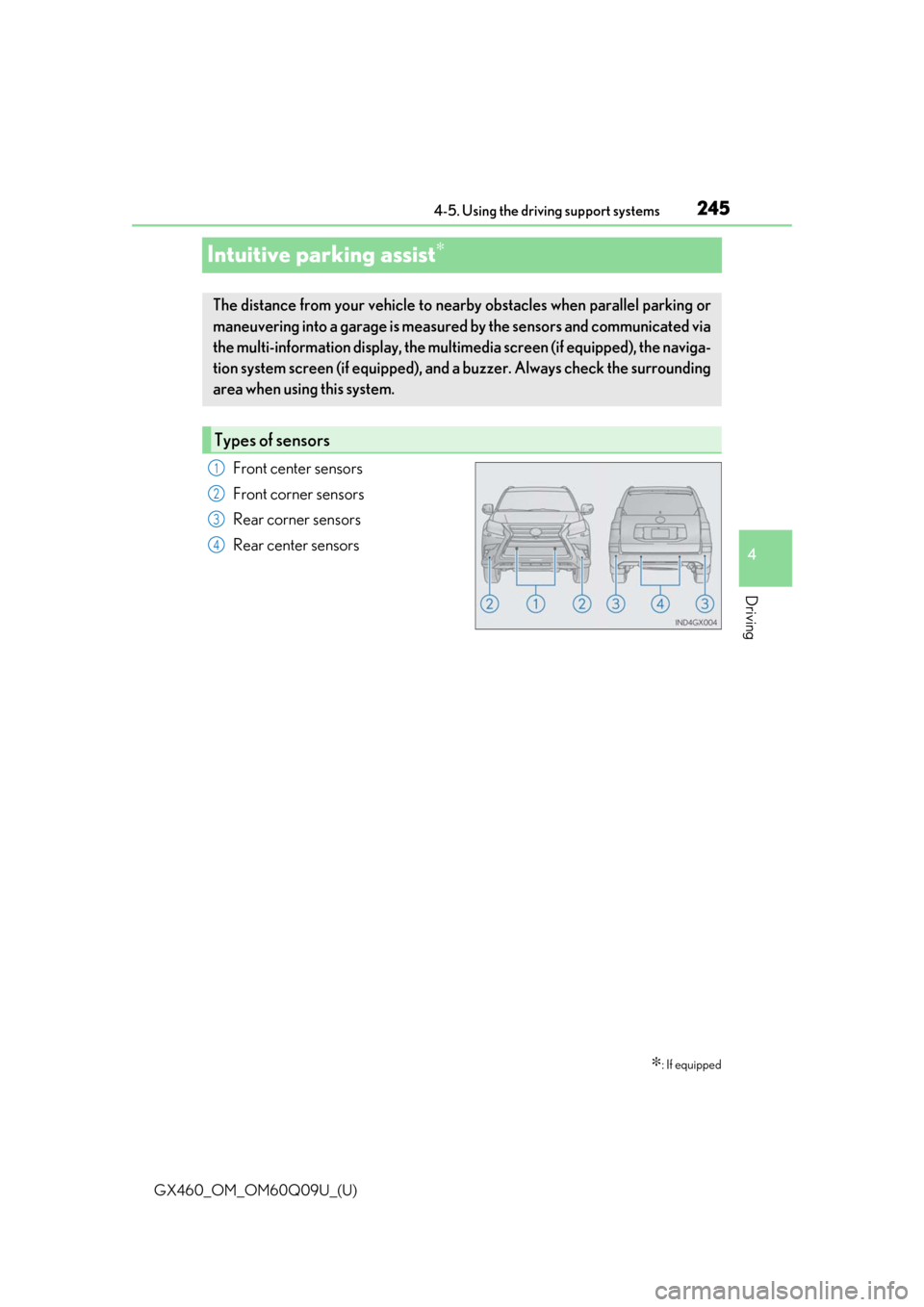
Intuitive parking assist∗
Front center sensors
Front corner sensors
Rear corner sensors
Rear center sensors
∗: If equipped
The distance from your vehicle to nearby obstacles when parallel parking or
maneuvering into a garage is measured
by the sensors and communicated via
the multi-information display, the multi media screen (if equipped), the naviga-
tion system screen (if equipped), and a buzzer. Always check the surrounding
area when using this system.
Types of sensors
1
2
3
4
Page 246 of 640
246
GX460_OM_OM60Q09U_(U)4-5. Using the driving support systems
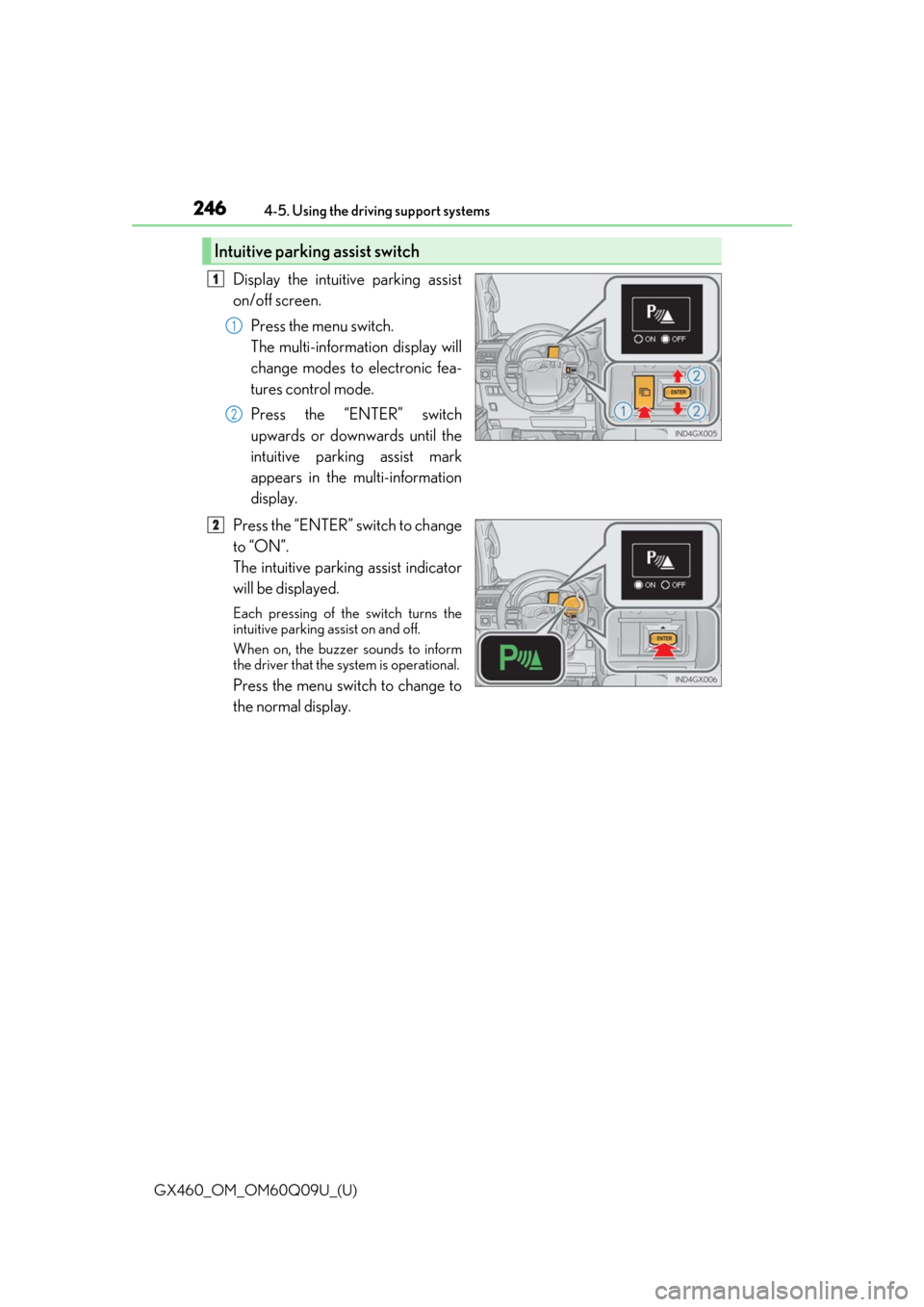
Display the intuitive parking assist
on/off screen.
Press the menu switch.
The multi-information display will
change modes to electronic fea-
tures control mode.
Press the “ENTER” switch
upwards or downwards until the
intuitive parking assist mark
appears in the multi-information
display.
Press the “ENTER” switch to change
to “ON”.
The intuitive parking assist indicator
will be displayed.
Each pressing of the switch turns the
intuitive parking assist on and off.
When on, the buzzer sounds to inform
the driver that the system is operational.
Press the menu switch to change to
the normal display.
Intuitive parking assist switch
1
1
2
2
Page 247 of 640
GX460_OM_OM60Q09U_(U)
2474-5. Using the driving support systems
4
Driving
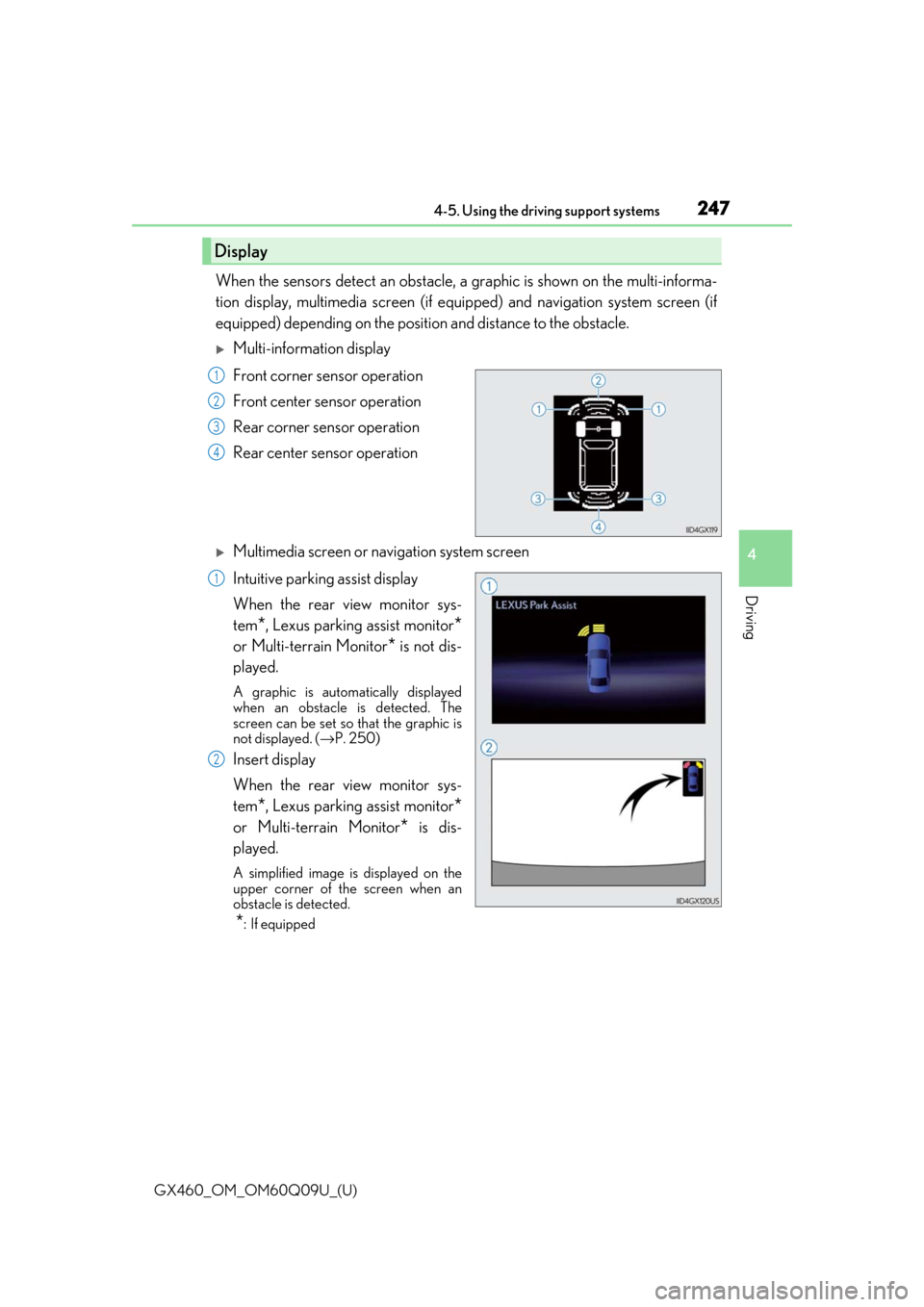
When the sensors detect an obstacle, a graphic is shown on the multi-informa-
tion display, multimedia screen (if equi pped) and navigation system screen (if
equipped) depending on the position and distance to the obstacle.
Multi-information display
Front corner sensor operation
Front center sensor operation
Rear corner sensor operation
Rear center sensor operation
Multimedia screen or navigation system screen
Intuitive parking assist display
When the rear view monitor sys-
tem
*, Lexus parking assist monitor*
or Multi-terrain Monitor* is not dis-
played.
A graphic is automatically displayed
when an obstacle is detected. The
screen can be set so that the graphic is
not displayed. ( →P. 250)
Insert display
When the rear view monitor sys-
tem
*, Lexus parking assist monitor*
or Multi-terrain Monitor* is dis-
played.
A simplified image is displayed on the
upper corner of th e screen when an
obstacle is detected.
*: If equipped
Display
1
2
3
4
1
2