park assist Lexus GX460 2020 / LEXUS 2020 GX460 (OM60R27U) User Guide
[x] Cancel search | Manufacturer: LEXUS, Model Year: 2020, Model line: GX460, Model: Lexus GX460 2020Pages: 620, PDF Size: 12.41 MB
Page 270 of 620
270
GX460_OM_OM60R27U_(U)4-5. Using the driving support systems
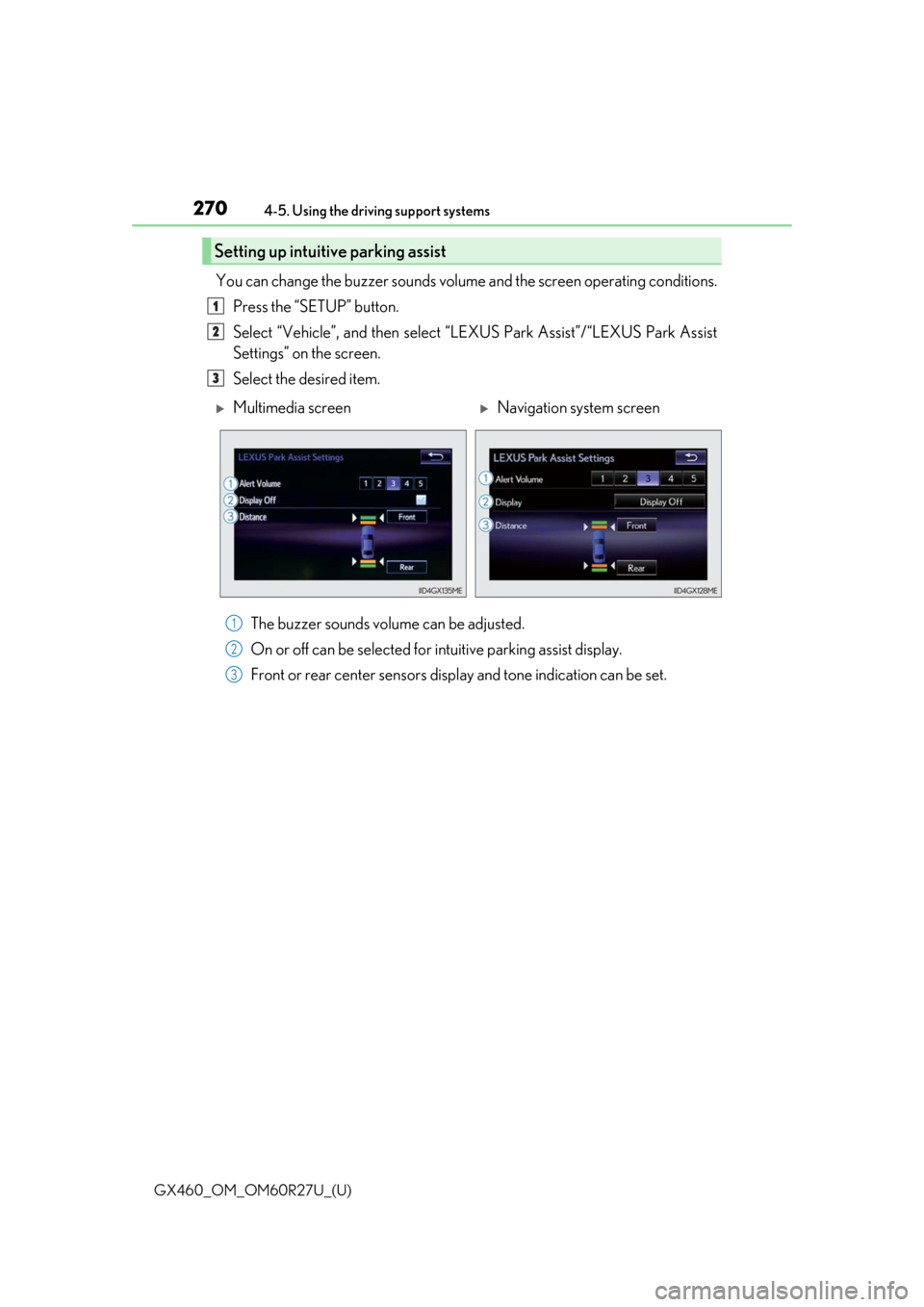
You can change the buzzer sounds volum
e and the screen operating conditions.
Press the “SETUP” button.
Select “Vehicle”, and then select “L EXUS Park Assist”/“LEXUS Park Assist
Settings” on the screen.
Select the desired item.
The buzzer sounds volume can be adjusted.
On or off can be selected for intuitive parking assist display.
Front or rear center sensors disp lay and tone indication can be set.
Setting up intuitive parking assist
1
2
3
Multimedia screenNavigation system screen
1
2
3
Page 271 of 620

GX460_OM_OM60R27U_(U)
2714-5. Using the driving support systems
4
Driving
■The intuitive parking assist can be operated when
●Front corner sensors:
• The engine switch is in IGNITION ON mode.
• The shift lever is in a position other than P.
• The vehicle speed is less than approximately 6 mph (10 km/h).
(At any speed when the shift lever is in R)
●Front center sensors:
• The engine switch is in IGNITION ON mode.
• The shift lever is in a position other than P or R.
• The vehicle speed is less than about 6 mph (10 km/h).
●Rear corner and rear center sensors:
• The engine switch is in IGNITION ON mode.
• The shift lever is in R.
■Intuitive parking assist display
When an obstacle is detected while the rear view monitor system, Lexus parking assist
monitor or Multi-terrain Monitor is in use, the warning indicator will appear in the upper
corner of the screen even if the display setting has been set to off.
■Sensor detection information
●The sensor’s detection areas are limited to the areas around the vehicle’s bumper.
●Certain vehicle conditions and the surrounding environment may affect the ability of a
sensor to correctly detect an obstacle. Pa rticular instances where this may occur are
listed below.
• There is dirt, snow or ice on the sensor . (Wiping the sensors will resolve this prob-
lem.)
• The sensor is frozen. (Thawing the area will resolve this problem.) In especially cold weather, if a sensor is frozen the screen may show an abnormal
display, or obstacles may not be detected.
• The sensor is covered in any way.
• The vehicle is leaning considerably to one side.
• On an extremely bumpy road, on an incline, on gravel, or on grass.
• The vicinity of the vehicle is noisy due to vehicle horns, motorcycle engines, air brakes of large vehicles, or other loud noises producing ultrasonic waves.
• There is another vehicle equipped with parking assist sensors in the vicinity.
• The sensor is coated with a sheet of spray or heavy rain.
• The vehicle is equipped with a fender pole or wireless antenna.
• The bumper or sensor re ceives a strong impact.
• The vehicle is approaching a tall or curved curb.
• In harsh sunlight or intense cold weather.
• The area directly under the bumpers is not detected.
• If obstacles draw too close to the sensor.
• A non-genuine Lexus suspension (low ered suspension etc.) is installed.
• People may not be detected if they are wearing certain types of clothing.
In addition to the examples above, there ar e instances in which, because of their shape,
signs and other objects may be judged by a sensor to be closer than they are.
Page 272 of 620

272
GX460_OM_OM60R27U_(U)4-5. Using the driving support systems
●The shape of the obstacle may prevent a sensor from detecting it. Pay particular atten-
tion to the following obstacles:
• Wires, fences, ropes, etc.
• Cotton, snow and other materi
als that absorb sound waves
• Sharply-angled objects
• Low obstacles
• Tall obstacles with upper sections projecting outwards in the direction of your vehi-
cle
●The following situations may occur during use.
• Depending on the shape of the obstacle and other factors, the detection distance
may shorten, or detect ion may be impossible.
• Obstacles may not be detected if they are too close to the sensor.
• There will be a short delay between obstacle detection and display. Even at slow speeds, there is a possibility th at the obstacle will come within the sensor’s detection
areas before the display is shown and the buzzer sounds.
• Thin posts or objects lower than the sens or may not be detected when approached,
even if they have been detected once.
• It might be difficult to hear beeps due to th e volume of audio system or air flow noise
of the air conditioning system.
■If “Clean Park Sonar”/“Clean Parking Assist Sensor” is displayed on the multi-informa-
tion display
A sensor may be dirty or covered with snow or ic e. In such cases, if it is removed from the
sensor, the system should return to normal.
Also, due to the sensor being frozen at low temperatures, a malfunction display may
appear or an obstacle may no t be detected. If the sensor thaws out, the system should
return to normal.
■If “Check Park Sonar System”/ “Parking Assist Malfunction” is displayed on the multi-
information display
Depending on the malfunction of the sensor, the device may not be working normally.
Have the vehicle inspected by your Lexus dealer.
■Certification for the intuitive parking assist (Canada only)
This ISM device complies with Canadian ICES-001.
■Customization
Settings (e.g. buzzer sounds volume) can be changed.
(Customizable features: P. 576)
Page 273 of 620

GX460_OM_OM60R27U_(U)
2734-5. Using the driving support systems
4
Driving
WARNING
■When using the intuitive parking assist
Observe the following precautions.
Failing to do so may result in the vehicle being unable to be driven safely and possibly
cause an accident.
●Do not use the sensor at speeds in excess of 6 mph (10 km/h).
●The sensors’ detection areas and reaction ti mes are limited. When moving forward or
reversing, check the areas surrounding the vehicle (especially the sides of the vehi-
cle) for safety, and drive slowly, using the brake to control the vehicle’s speed.
●Do not install accessories within the sensors’ detection areas.
NOTICE
■When using intuitive parking assist
In the following situations, the system may not function correctly due to a sensor mal-
function etc. Have the vehicle checked by your Lexus dealer.
●A buzzer does not sound when you tu rn the intuitive parking assist on.
●The intuitive parking assist operation disp lay flashes, and a buzzer sounds when no
obstacles are detected.
●If the area around a sensor co llides with something, or is subjected to strong impact.
●If the bumper collides with something.
●If the display shows continuously without a beep.
●If a display error occurs, first check the sensor.
If the error occurs even if there is no ice, sn ow or mud on the sensor, it is likely that the
sensor is malfunctioning.
■Notes when washing the vehicle
Do not apply intensive bursts of water or steam to the sensor area.
Doing so may result in th e sensor malfunctioning.
Page 274 of 620
274
GX460_OM_OM60R27U_(U)4-5. Using the driving support systems
Rear view monitor system
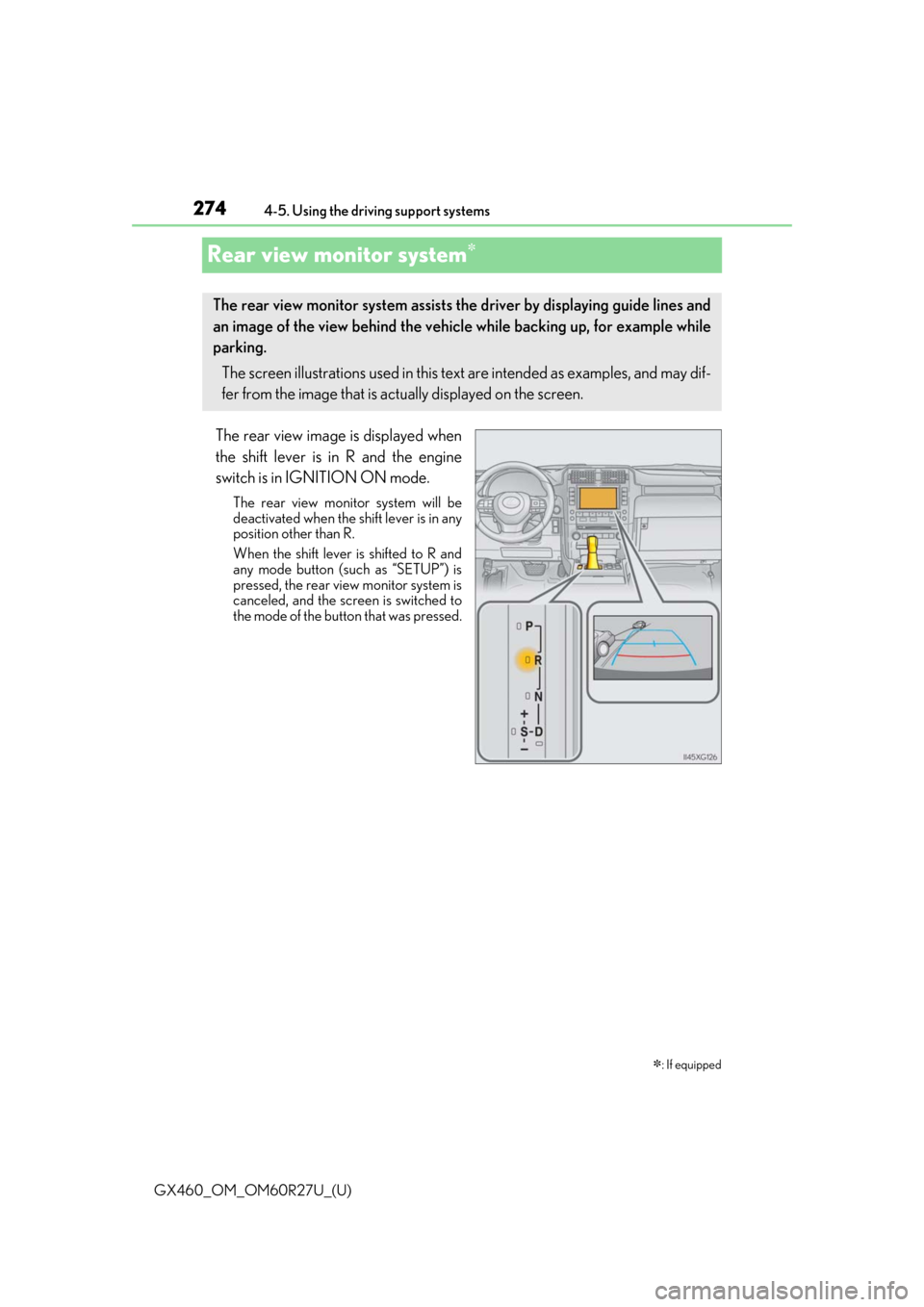
The rear view image is displayed when
the shift lever is in R and the engine
switch is in IGNITION ON mode.
The rear view monitor system will be
deactivated when the sh
ift lever is in any
position other than R.
When the shift lever is shifted to R and
any mode button (such as “SETUP”) is
pressed, the rear view monitor system is
canceled, and the screen is switched to
the mode of the button that was pressed.
: If equipped
The rear view monitor system assists th e driver by displaying guide lines and
an image of the view behind the vehi cle while backing up, for example while
parking.
The screen illustrations used in this text are intended as examples, and may dif-
fer from the image that is actually displayed on the screen.
Page 282 of 620

282
GX460_OM_OM60R27U_(U)4-5. Using the driving support systems
WARNING
■When using the rear view monitor system
The rear view monitor system
is a supplemental device intended to assist the driver
when backing up. When backin g up, be sure to check visually behind and all around
the vehicle before proceeding.
Observe the following precautions to avoid an accident that could result in death or
serious injuries.
●Never depend on the rear view monitor system entirely when backing up. The image
and the position of the guide lines displaye d on the screen may differ from the actual
state.
Use caution, just as you woul d when backing up any vehicle.
●Be sure to back up slowly, depressing the brake pedal to control vehicle speed.
●The instructions given are only guide lines.
When and how much to turn the steering wheel will vary according to traffic condi-
tions, road surface conditions, vehicle condit ion, etc. when parking. It is necessary to
be fully aware of this before us ing the rear view monitor system.
●When parking, be sure to check that the parking space will accommodate your vehi-
cle before maneuvering into it.
●Do not use the rear view monitor system in the following cases:
• On icy or slick road surfaces, or in snow
• When using tire chains
• When the back door is not closed completely
• On roads that are not flat or stra ight, such as curves or slopes.
●In low temperatures, the screen may darken or the image may become faint. The
image could distort when the vehicle is movi ng, or you may become unable to see the
image on the screen. Be sure to check dire ct visually and with the mirrors all around
the vehicle before proceeding.
●If the tire sizes are changed, the position of the fixed guide lines displayed on the
screen may change.
●The camera uses a special lens. The distances between objects and pedestrians that
appear in the image displayed on the screen will differ from the actual distances.
( P. 277)
Page 288 of 620
288
GX460_OM_OM60R27U_(U)4-5. Using the driving support systems
Multi-terrain Monitor
The following screens can be select
ed according to driving conditions.
• Screens that can be selected vary depend ing on conditions such as shift posi-
tion and vehicle speed. ( P. 294)
• Depending on the displayed screen, the display can be switched from normal to wide view display.
: If equipped
The Multi-terrain Monitor helps the driver to check the vehicle surroundings.
It assists in determining the conditions around the driver in a variety of situa-
tions, such as when judging conditions during off-road driving or checking for
obstacles when parking.
WARNING
■When using the Multi-terrain Monitor system
Observe the following precautions to avoid an accident that could result in death or
serious injuries.
●Never rely solely on the Multi-terrain Monitor. As with unequipped vehicles, drive
carefully while directly confirming the safety of your surroundings and the area to the
rear of the vehicle. Take particular care to avoid parked cars and other obstacles.
●Due to the characteristics of the camera lens, the actual position and distance of peo-
ple and other obstacles will differ from those shown on the Multi-terrain Monitor
screen. Directly confirm the safety of your surroundings before driving.
●Do not drive while only looking at the scre en. When driving, make sure to directly
confirm the safety of your surroundings, su ch as by visually checking the area and
using the vehicle’s mirrors.
●In low temperatures, the screen may darken or the images may become faint.
Images of moving objects in particular may distort or disappear from the screen.
Therefore, make sure to drive carefully while directly visually confirming the safety of
your surroundings.
Multi-terrain Monitor screens
Page 300 of 620
300
GX460_OM_OM60R27U_(U)4-5. Using the driving support systems
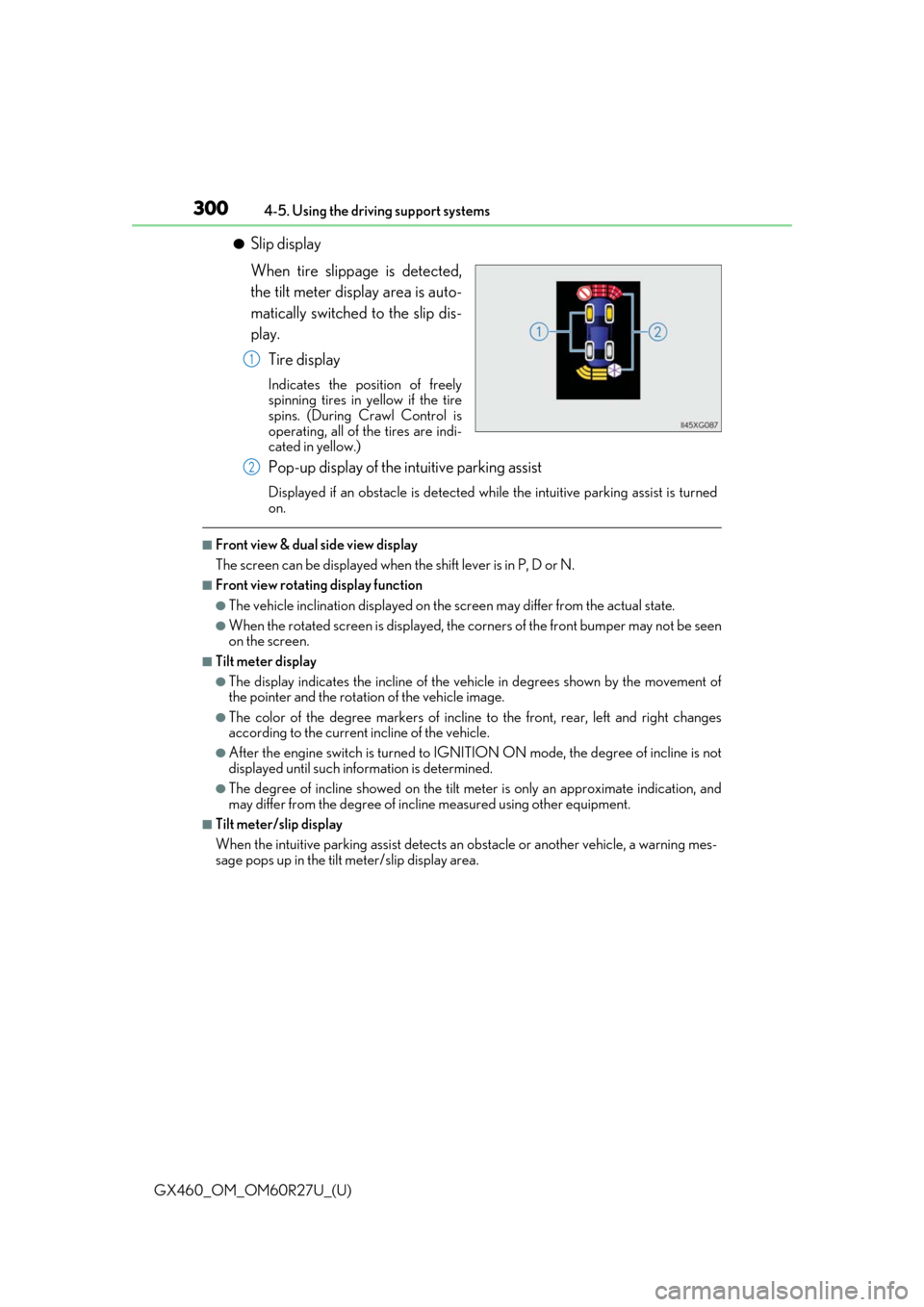
●Slip display
When tire slippage is detected,
the tilt meter display area is auto-
matically switched to the slip dis-
play.
Tire display
Indicates the position of freely
spinning tires in yellow if the tire
spins. (During Crawl Control is
operating, all of the tires are indi-
cated in yellow.)
Pop-up display of the intuitive parking assist
Displayed if an obstacle is detected wh ile the intuitive parking assist is turned
on.
■Front view & dual side view display
The screen can be displayed when the shift lever is in P, D or N.
■Front view rotating display function
●The vehicle inclination displayed on the screen may differ from the actual state.
●When the rotated screen is displayed, the corners of the front bumper may not be seen
on the screen.
■Tilt meter display
●The display indicates the incline of the vehicle in degrees shown by the movement of
the pointer and the rotation of the vehicle image.
●The color of the degree markers of incline to the front, rear, left and right changes
according to the current incline of the vehicle.
●After the engine switch is turned to IGNITI ON ON mode, the degree of incline is not
displayed until such info rmation is determined.
●The degree of incline showed on the tilt meter is only an approximate indication, and
may differ from the degree of incline measured using other equipment.
■Tilt meter/slip display
When the intuitive parking assi st detects an obstacle or another vehicle, a warning mes-
sage pops up in the tilt meter/slip display area.
1
2
Page 303 of 620
GX460_OM_OM60R27U_(U)
3034-5. Using the driving support systems
4
Driving
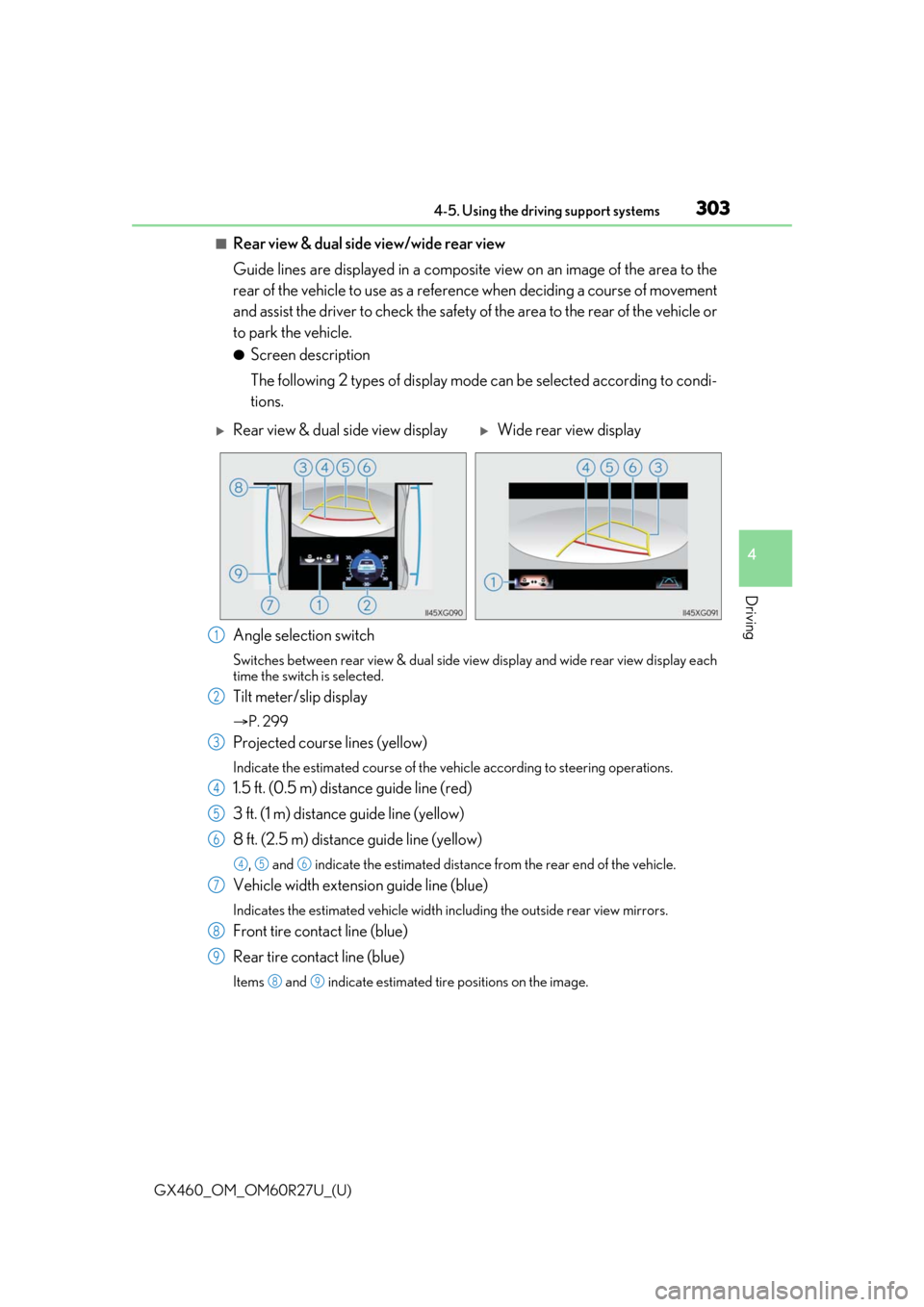
■Rear view & dual side view/wide rear view
Guide lines are displayed in a composite view on an image of the area to the
rear of the vehicle to use as a refere nce when deciding a course of movement
and assist the driver to check the safety of the area to the rear of the vehicle or
to park the vehicle.
●Screen description
The following 2 types of display mode can be selected according to condi-
tions.
Angle selection switch
Switches between rear view & dual side vi ew display and wide rear view display each
time the switch is selected.
Tilt meter/slip display
P. 299
Projected course lines (yellow)
Indicate the estimated course of the vehicle according to steering operations.
1.5 ft. (0.5 m) distance guide line (red)
3 ft. (1 m) distance guide line (yellow)
8 ft. (2.5 m) distan ce guide line (yellow)
, and indicate the estimated distance from the rear end of the vehicle.
Vehicle width extension guide line (blue)
Indicates the estimated vehicle width including the outside rear view mirrors.
Front tire contact line (blue)
Rear tire contact line (blue)
Items and indicate estimated tire positions on the image.
Rear view & dual side view displayWide rear view display
1
2
3
4
5
6
456
7
8
9
89
Page 307 of 620
GX460_OM_OM60R27U_(U)
3074-5. Using the driving support systems
4
Driving
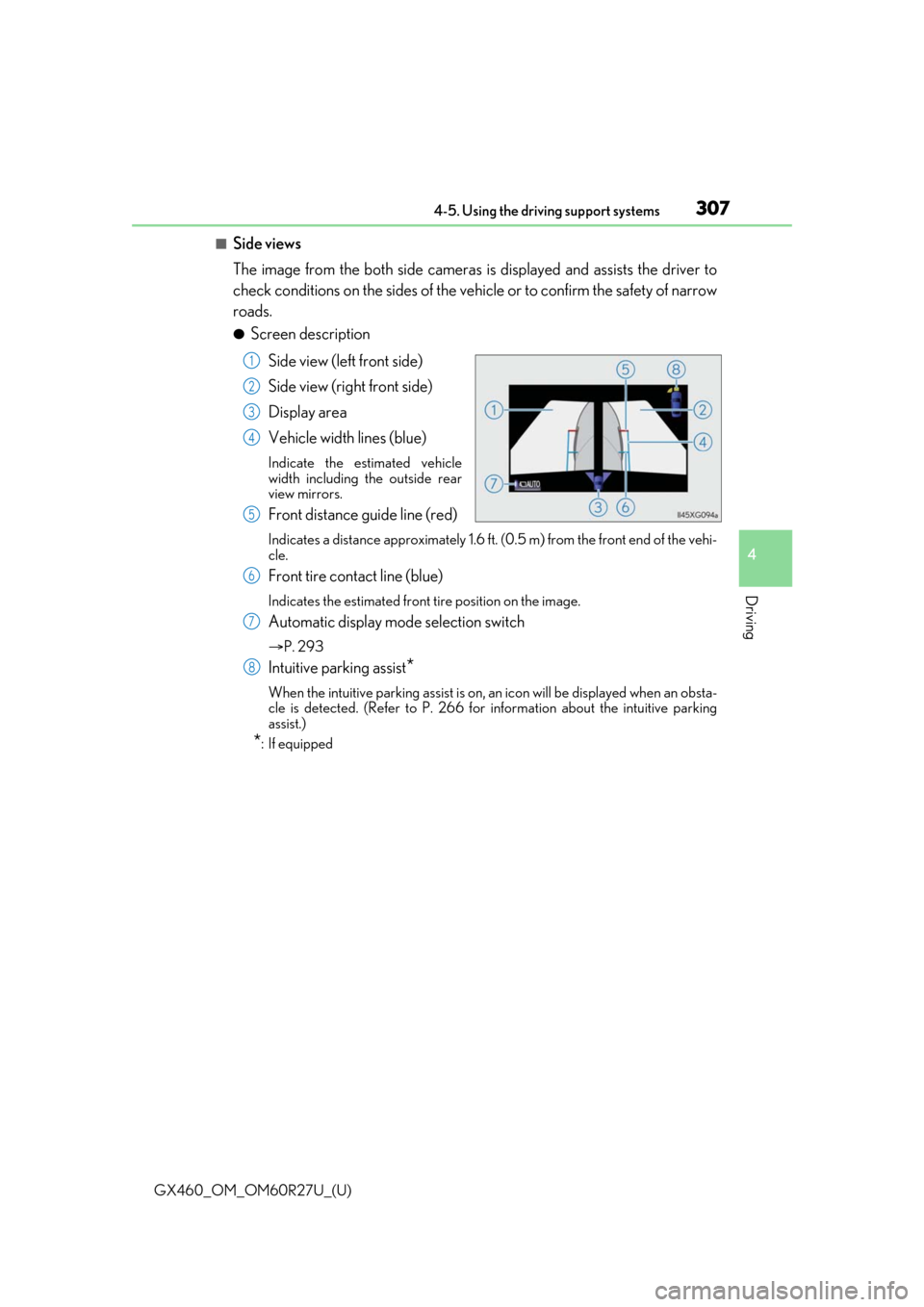
■Side views
The image from the both side cameras is displayed and assists the driver to
check conditions on the sides of the vehicle or to confirm the safety of narrow
roads.
●Screen description
Side view (left front side)
Side view (right front side)
Display area
Vehicle width lines (blue)
Indicate the estimated vehicle
width including the outside rear
view mirrors.
Front distance guide line (red)
Indicates a distance approximately 1.6 ft. (0.5 m) from the front end of the vehi-
cle.
Front tire contact line (blue)
Indicates the estimated front tire position on the image.
Automatic display mode selection switch
P. 293
Intuitive parking assist*
When the intuitive parking assist is on, an icon will be displayed when an obsta-
cle is detected. (Refer to P. 266 for information about the intuitive parking
assist.)
*: If equipped
1
2
3
4
5
6
7
8