park assist Lexus GX460 2020 / LEXUS 2020 GX460 (OM60R27U) Owner's Guide
[x] Cancel search | Manufacturer: LEXUS, Model Year: 2020, Model line: GX460, Model: Lexus GX460 2020Pages: 620, PDF Size: 12.41 MB
Page 310 of 620
310
GX460_OM_OM60R27U_(U)4-5. Using the driving support systems
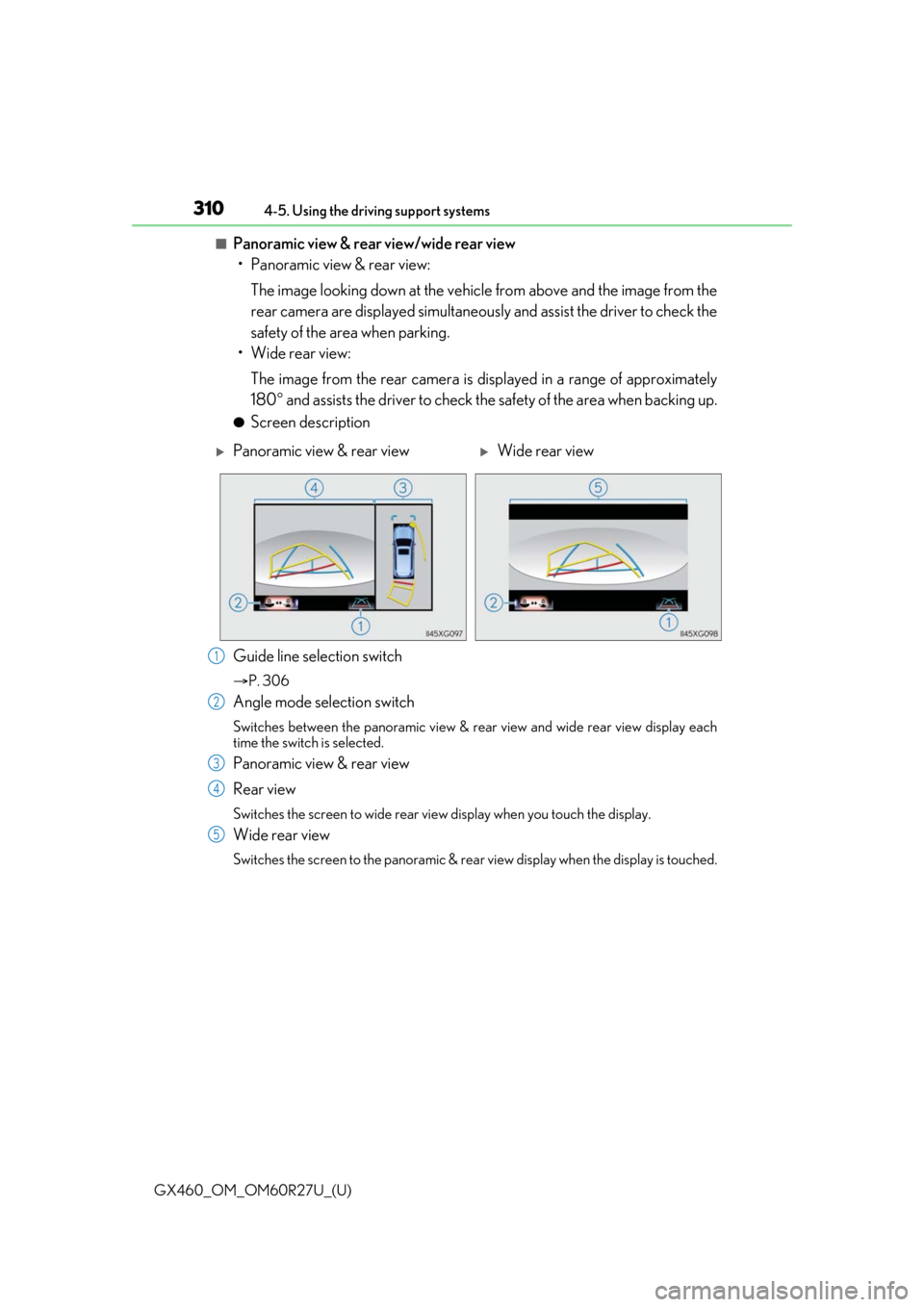
■Panoramic view & rear view/wide rear view
• Panoramic view & rear view:
The image looking down at the vehicl e from above and the image from the
rear camera are displayed simultaneously and assist the driver to check the
safety of the area when parking.
• Wide rear view:
The image from the rear camera is displayed in a range of approximately
180 and assists the driver to check the safety of the area when backing up.
●Screen description
Guide line selection switch
P. 306
Angle mode selection switch
Switches between the panoramic view & rear view and wide rear view display each
time the switch is selected.
Panoramic view & rear view
Rear view
Switches the screen to wide rear view display when you touch the display.
Wide rear view
Switches the screen to the panoramic & rear view display when the display is touched.
Panoramic view & rear viewWide rear view
1
2
3
4
5
Page 311 of 620
GX460_OM_OM60R27U_(U)
3114-5. Using the driving support systems
4
Driving
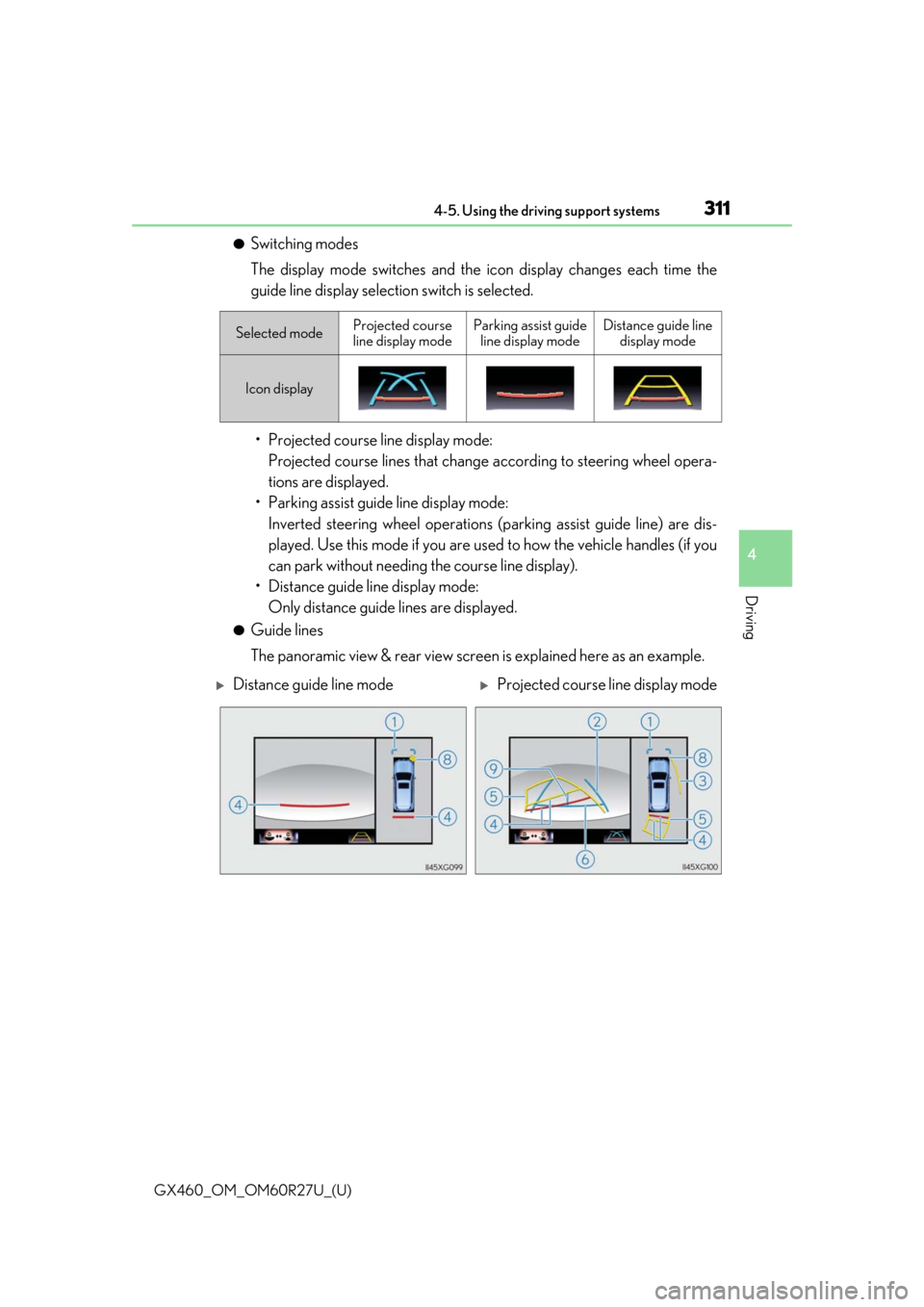
●Switching modes
The display mode switches and the icon display changes each time the
guide line display selection switch is selected.• Projected course line display mode: Projected course lines that change according to steering wheel opera-
tions are displayed.
• Parking assist guide line display mode: Inverted steering wheel operations (p arking assist guide line) are dis-
played. Use this mode if you are used to how the vehicle handles (if you
can park without needing the course line display).
• Distance guide line display mode: Only distance guide lines are displayed.
●Guide lines
The panoramic view & rear view screen is explained here as an example.
Selected modeProjected course
line display modeParking assist guide line display modeDistance guide line display mode
Icon display
Distance guide line modeProjected course line display mode
Page 312 of 620
312
GX460_OM_OM60R27U_(U)4-5. Using the driving support systems
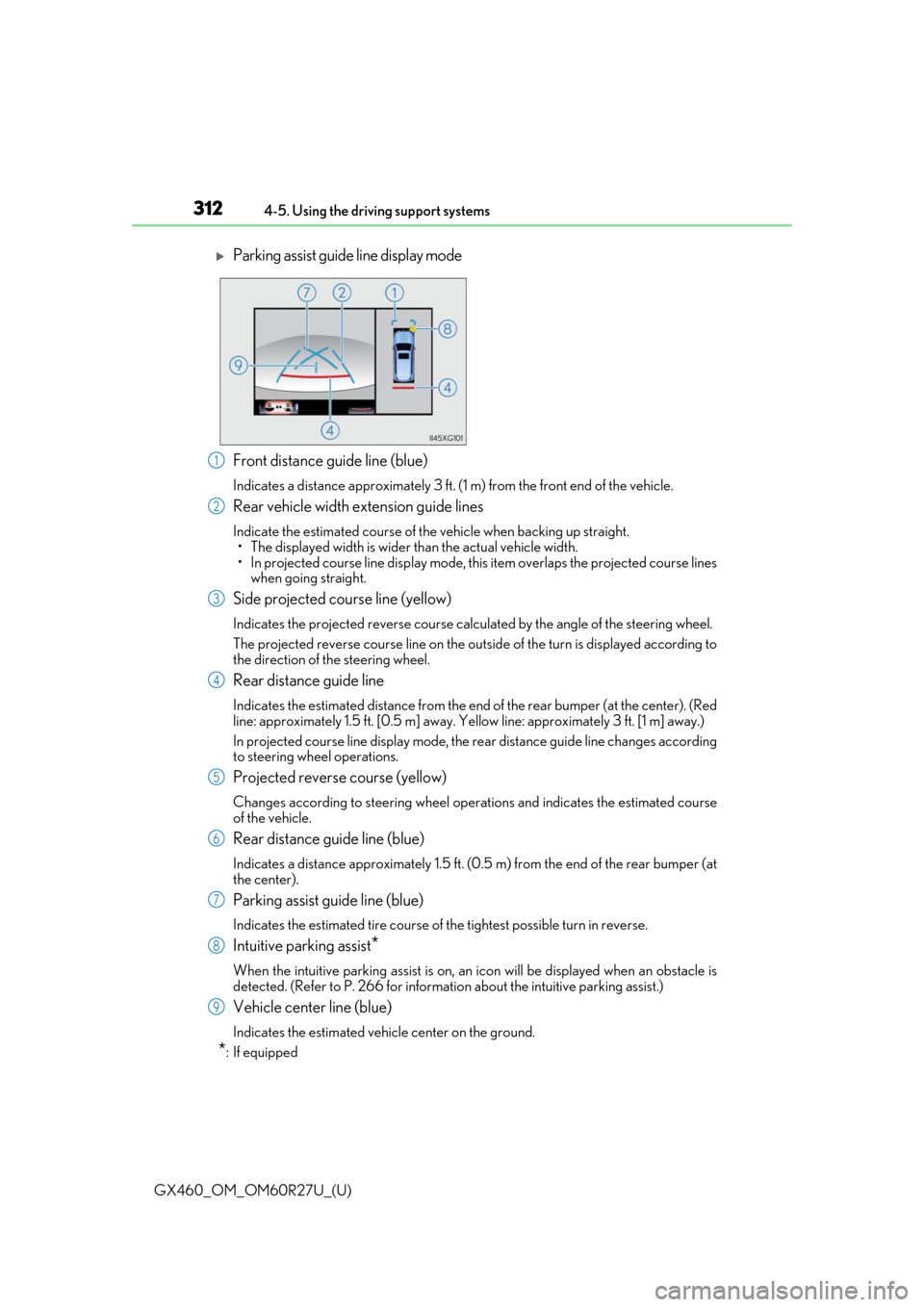
Front distance guide line (blue)
Indicates a distance approximately 3 ft. (1 m) from the front end of the vehicle.
Rear vehicle width extension guide lines
Indicate the estimated course of the vehicle when backing up straight.
• The displayed width is wider than the actual vehicle width.
• In projected course line disp lay mode, this item overlaps the projected course lines
when going straight.
Side projected course line (yellow)
Indicates the projected reverse course calcu lated by the angle of the steering wheel.
The projected reverse course line on the outside of the turn is displayed according to
the direction of the steering wheel.
Rear distance guide line
Indicates the estimated distance from the end of the rear bumper (at the center). (Red
line: approximately 1.5 ft. [0.5 m] away. Ye llow line: approximately 3 ft. [1 m] away.)
In projected course line display mode, the re ar distance guide line changes according
to steering wheel operations.
Projected reverse course (yellow)
Changes according to steering wheel operations and indicates the estimated course
of the vehicle.
Rear distance guide line (blue)
Indicates a distance approximately 1.5 ft. (0.5 m) from the end of the rear bumper (at
the center).
Parking assist guide line (blue)
Indicates the estimated tire course of the tightest possible turn in reverse.
Intuitive parking assist*
When the intuitive parking assist is on, an icon will be displayed when an obstacle is
detected. (Refer to P. 266 for informat ion about the intuitive parking assist.)
Vehicle center line (blue)
Indicates the estimated vehicle center on the ground.
*: If equipped
Parking assist guide line display mode
1
2
3
4
5
6
7
8
9
Page 314 of 620
314
GX460_OM_OM60R27U_(U)4-5. Using the driving support systems
Once the vehicle width extension gu
ide lines and the parking space lines
are parallel, straighten the steering wh eel and back up slowly until the vehi-
cle has completely entered the parking space.
Stop the vehicle in an approp riate place, and finish parking.
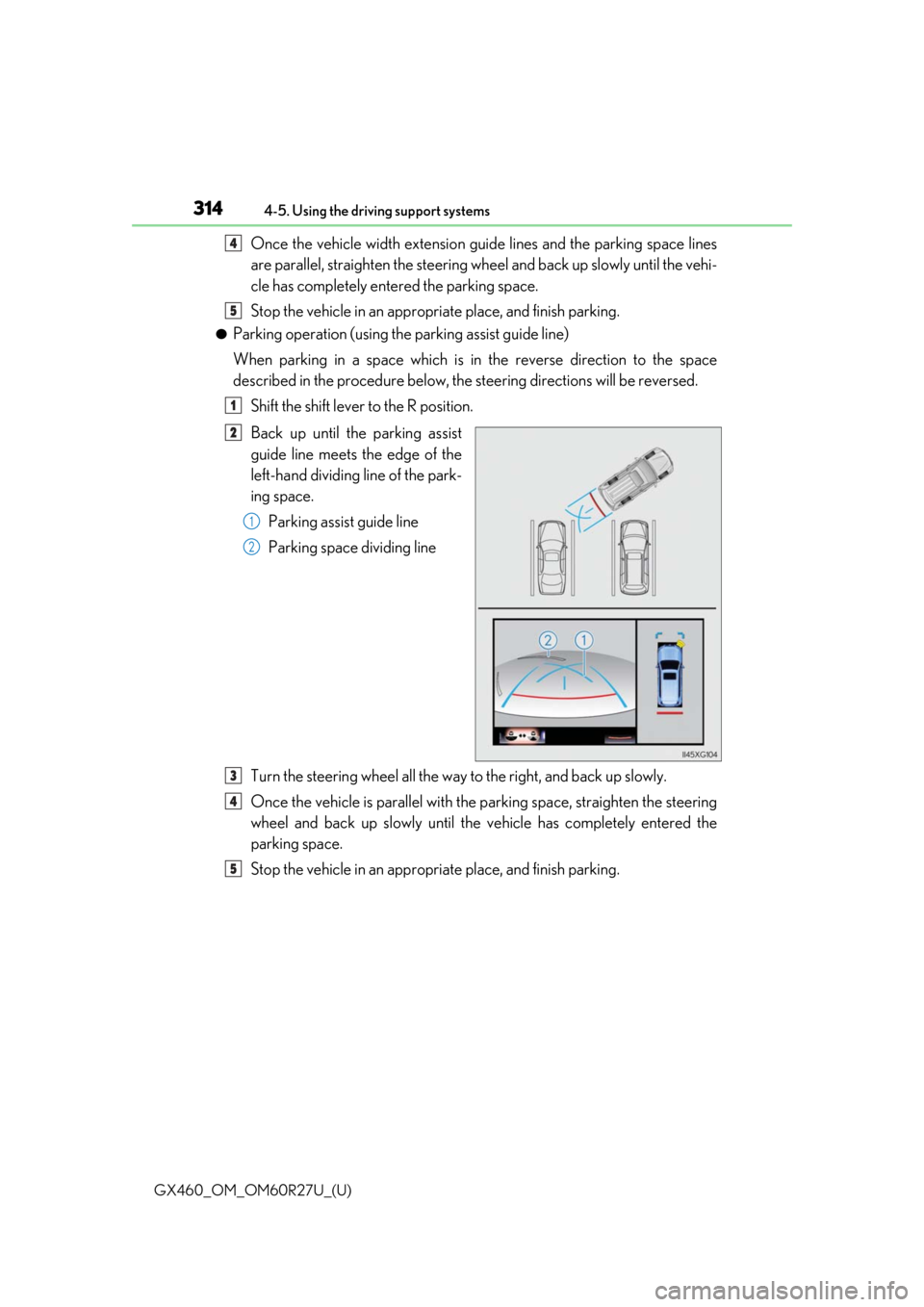
●Parking operation (using the parking assist guide line)
When parking in a space which is in the reverse direction to the space
described in the procedure below, the steering directions will be reversed.
Shift the shift lever to the R position.
Back up until the parking assist
guide line meets the edge of the
left-hand dividing line of the park-
ing space. Parking assist guide line
Parking space dividing line
Turn the steering wheel all the way to the right, and back up slowly.
Once the vehicle is parallel with the parking space, straighten the steering
wheel and back up slowly until the vehicle has completely entered the
parking space.
Stop the vehicle in an approp riate place, and finish parking.
4
5
1
2
1
2
3
4
5
Page 316 of 620
316
GX460_OM_OM60R27U_(U)4-5. Using the driving support systems
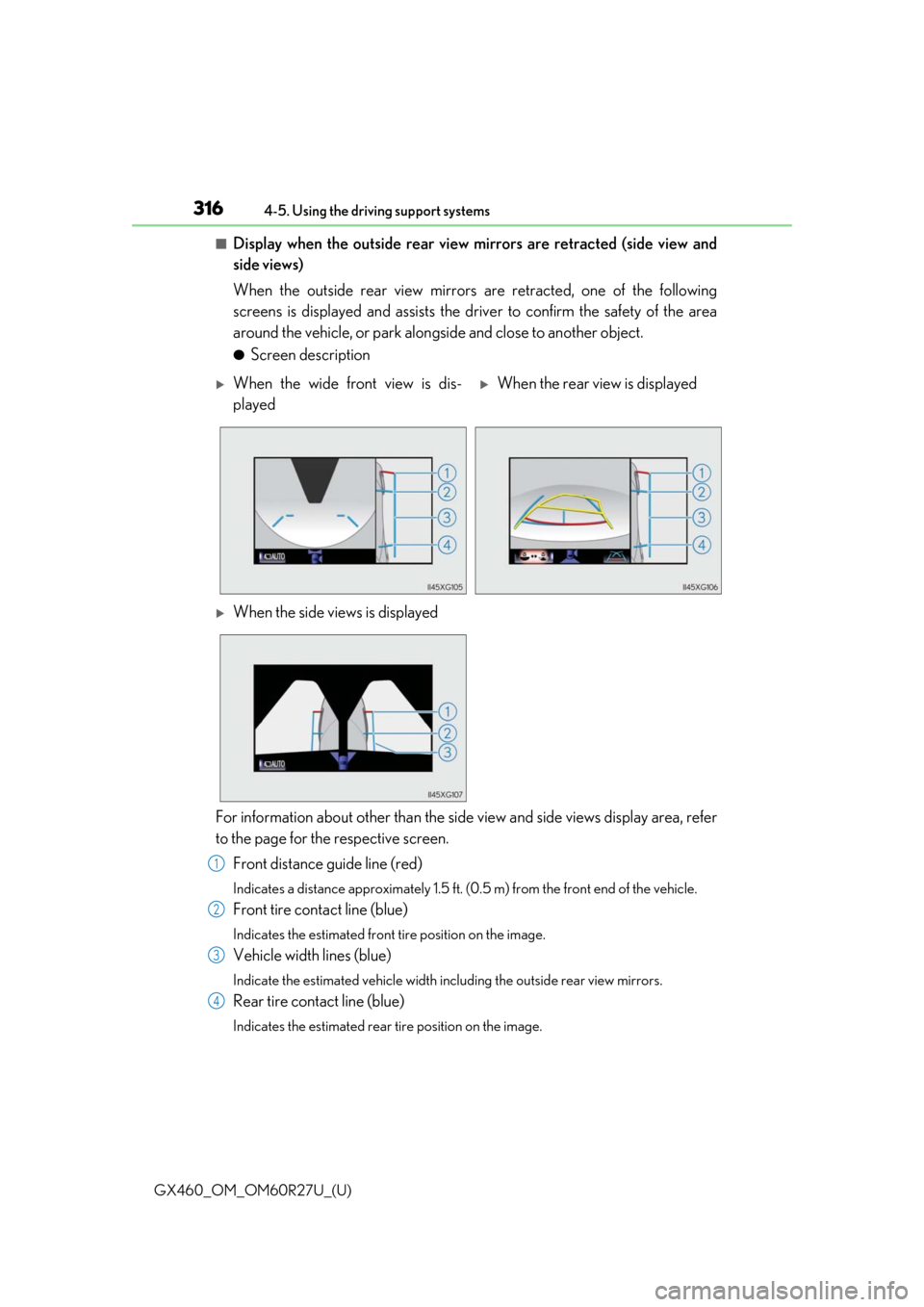
■Display when the outside rear view mirrors are retracted (side view and
side views)
When the outside rear view mirrors are retracted, one of the following
screens is displayed and assists the driv
er to confirm the safety of the area
around the vehicle, or park alongside and close to another object.
●Screen description
For information about other than the side view and side views display area, refer
to the page for the respective screen. Front distance guide line (red)
Indicates a distance approximately 1.5 ft. (0.5 m) from the front end of the vehicle.
Front tire contact line (blue)
Indicates the estimated front tire position on the image.
Vehicle width lines (blue)
Indicate the estimated vehicle width including the outside rear view mirrors.
Rear tire contact line (blue)
Indicates the estimated rear tire position on the image.
When the wide front view is dis-
playedWhen the rear view is displayed
When the side views is displayed
1
2
3
4
Page 318 of 620
318
GX460_OM_OM60R27U_(U)4-5. Using the driving support systems
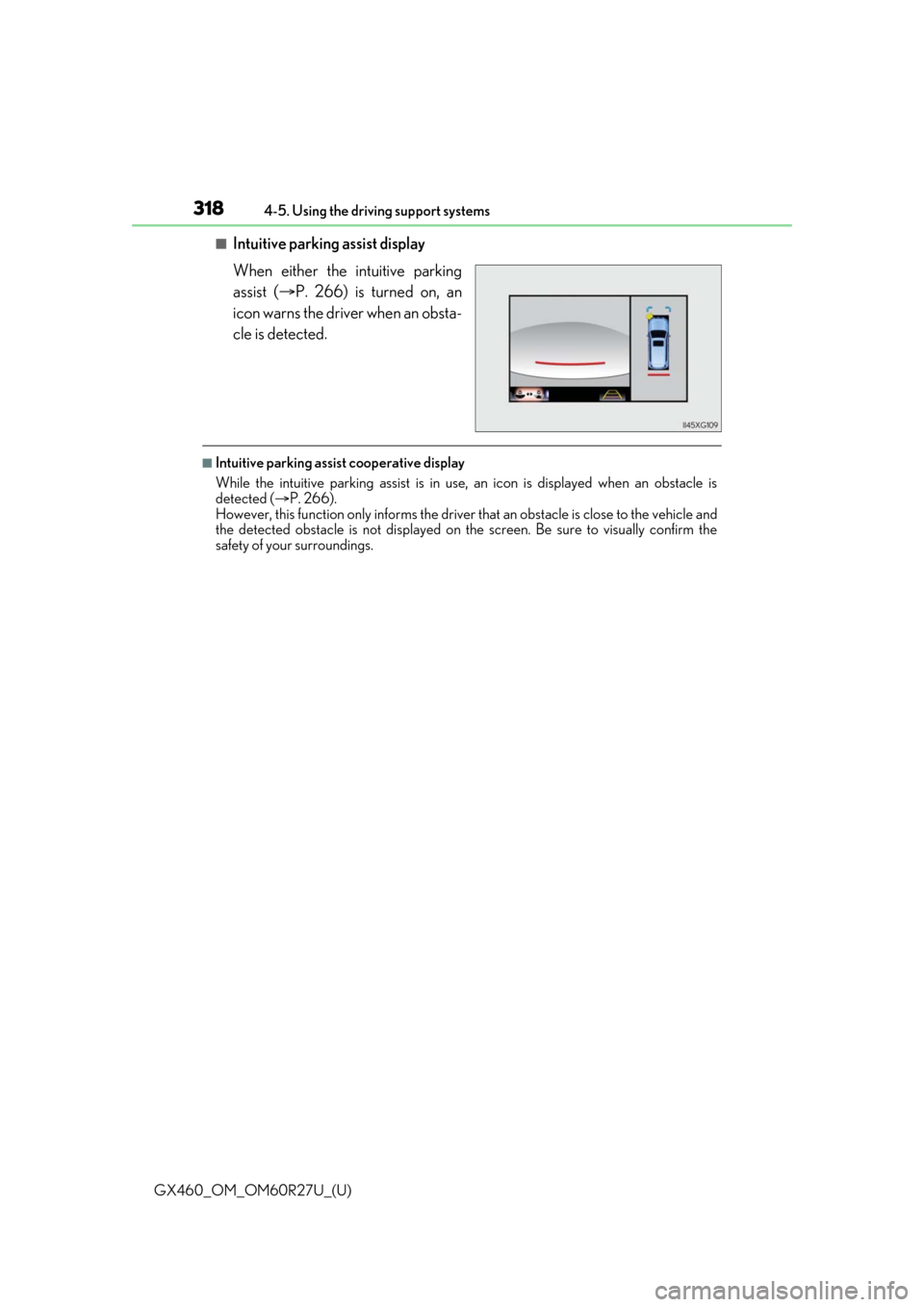
■Intuitive parking assist display
When either the intuitive parking
assist (
P. 266) is turned on, an
icon warns the driver when an obsta-
cle is detected.
■Intuitive parking assist cooperative display
While the intuitive parking assist is in use, an icon is displayed when an obstacle is
detected ( P. 266).
However, this function only informs the driver that an obstacle is close to the vehicle and
the detected obstacle is not displayed on th e screen. Be sure to visually confirm the
safety of your surroundings.
Page 328 of 620
328
GX460_OM_OM60R27U_(U)4-5. Using the driving support systems
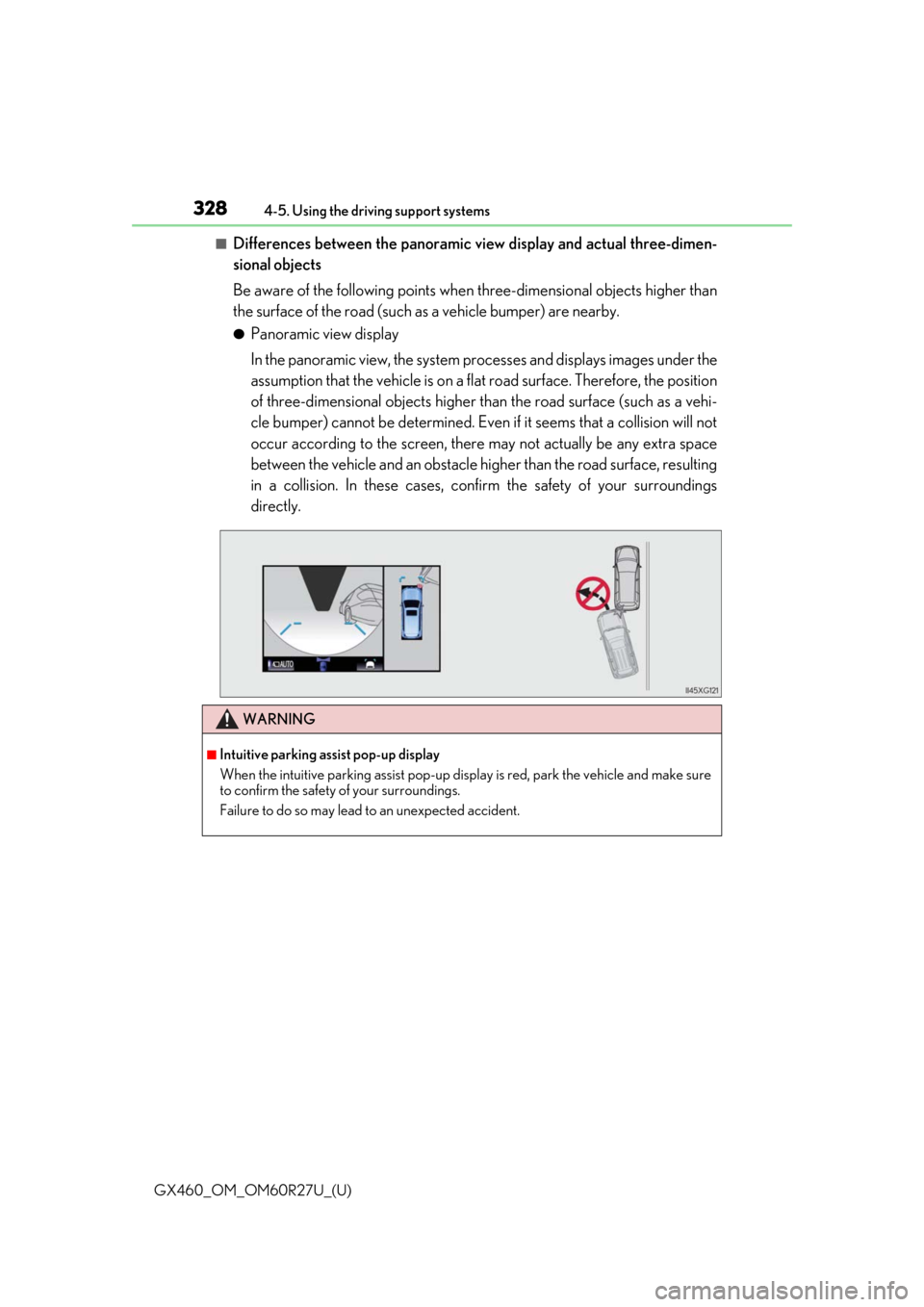
■Differences between the panoramic view display and actual three-dimen-
sional objects
Be aware of the following points when
three-dimensional objects higher than
the surface of the road (such as a vehicle bumper) are nearby.
●Panoramic view display
In the panoramic view, the system processes and displays images under the
assumption that the vehicle is on a fl at road surface. Therefore, the position
of three-dimensional objects higher th an the road surface (such as a vehi-
cle bumper) cannot be determined. Even if it seems that a collision will not
occur according to the screen, there may not actually be any extra space
between the vehicle and an obstacle higher than the road surface, resulting
in a collision. In these cases, confir m the safety of your surroundings
directly.
WARNING
■Intuitive parking assist pop-up display
When the intuitive parking assist pop-up disp lay is red, park the vehicle and make sure
to confirm the safety of your surroundings.
Failure to do so may lead to an unexpected accident.
Page 506 of 620
5067-2. Steps to take in an emergency
GX460_OM_OM60R27U_(U)
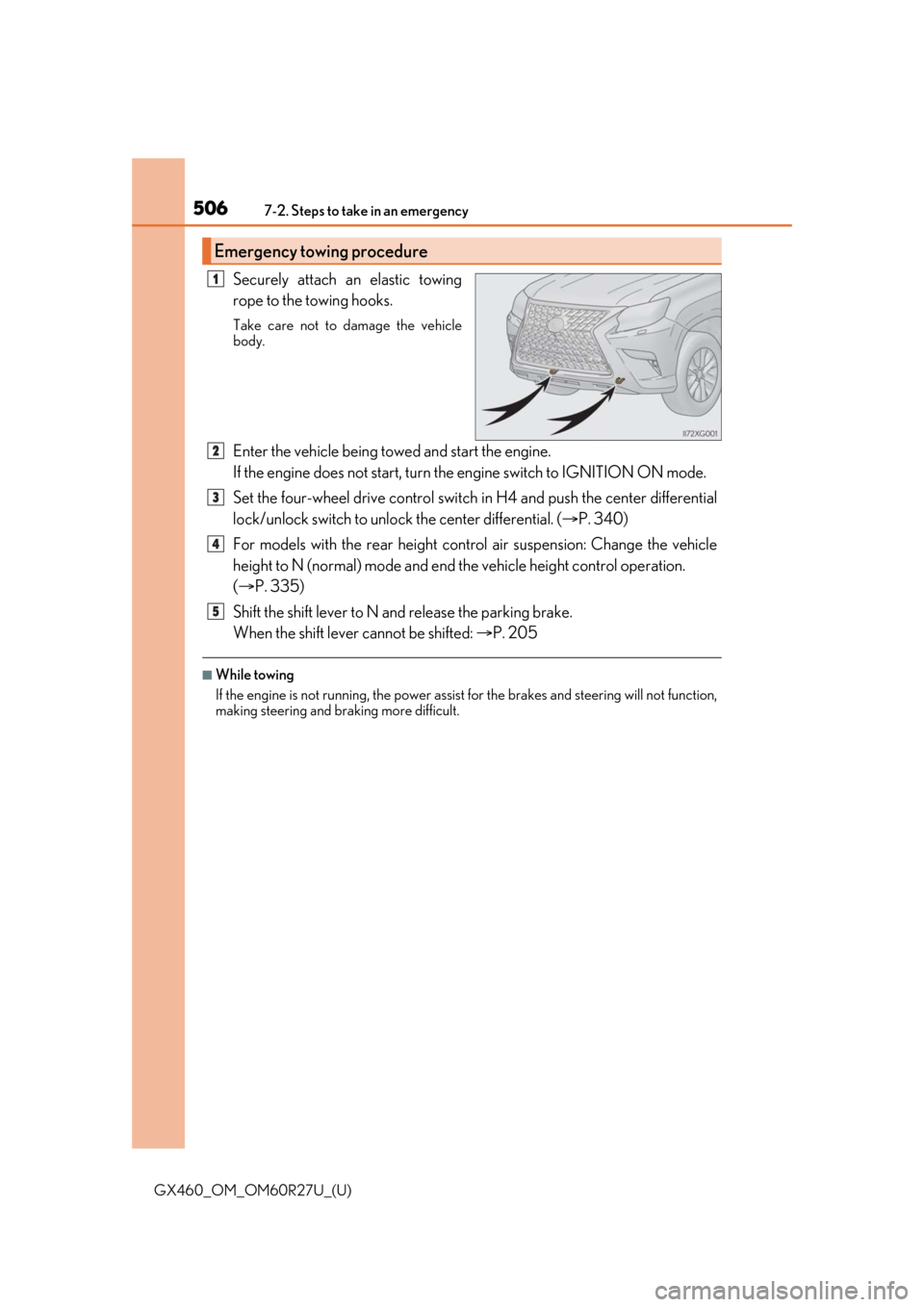
Securely attach an elastic towing
rope to the towing hooks.
Take care not to damage the vehicle
body.
Enter the vehicle being towed and start the engine.
If the engine does not start, turn the engine switch to IGNITION ON mode.
Set the four-wheel drive control switch in H4 and push the center differential
lock/unlock switch to unlock the center differential. (P. 340)
For models with the rear height cont rol air suspension: Change the vehicle
height to N (normal) mode and end th e vehicle height control operation.
( P. 335)
Shift the shift lever to N and release the parking brake.
When the shift lever cannot be shifted: P. 205
■While towing
If the engine is not running, the power assist for the brakes and steering will not function,
making steering and br aking more difficult.
Emergency towing procedure
1
2
3
4
5
Page 512 of 620
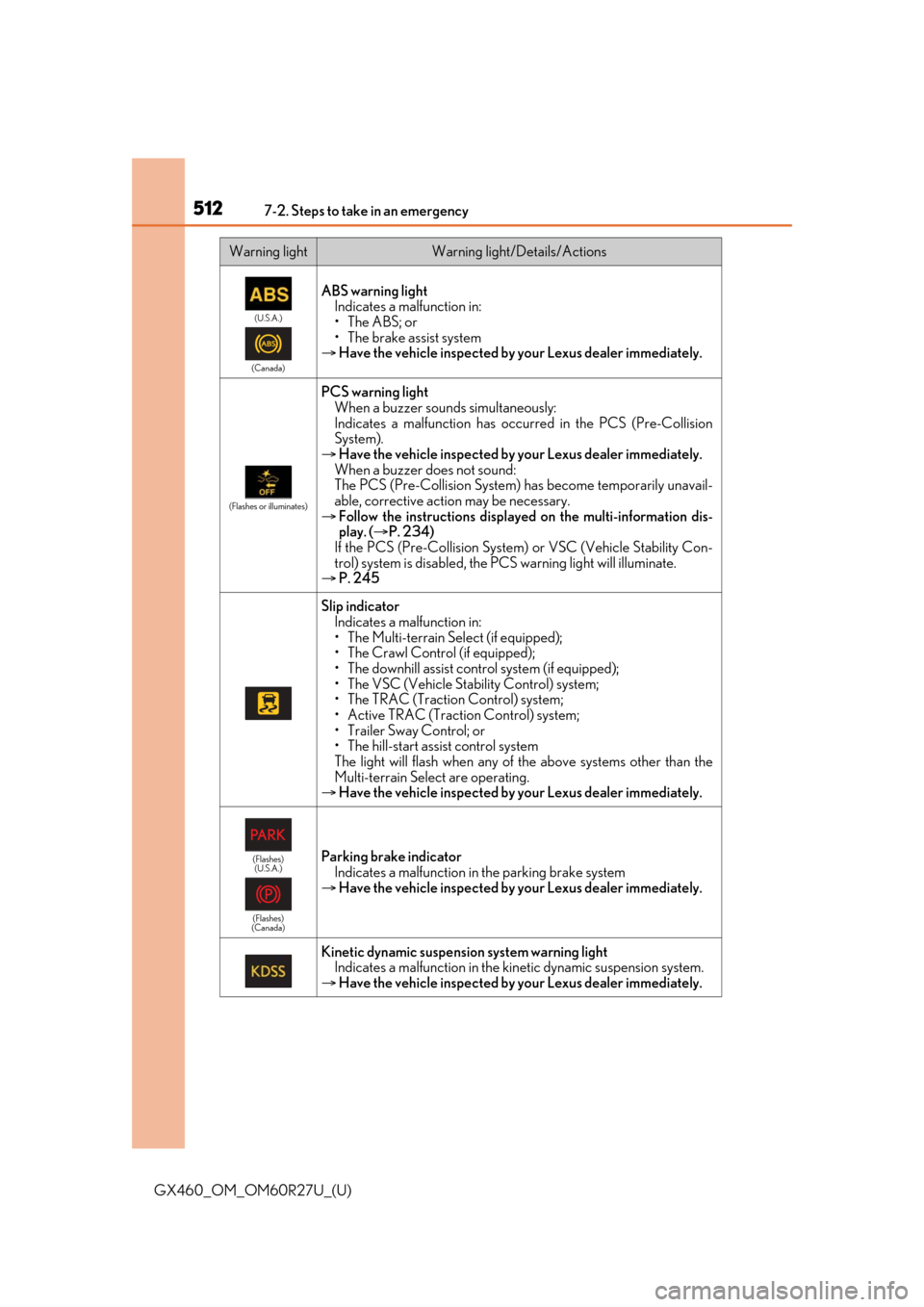
5127-2. Steps to take in an emergency
GX460_OM_OM60R27U_(U)
(U.S.A.)
(Canada)
ABS warning light Indicates a malfunction in:
• The ABS; or
• The brake assist system
Have the vehicle inspected by your Lexus dealer immediately.
(Flashes or illuminates)
PCS warning light
When a buzzer sounds simultaneously:
Indicates a malfunction has occu rred in the PCS (Pre-Collision
System).
Have the vehicle inspected by your Lexus dealer immediately.
When a buzzer does not sound:
The PCS (Pre-Collision System) has become temporarily unavail-
able, corrective action may be necessary.
Follow the instructions displayed on the multi-information dis-
play. ( P. 234)
If the PCS (Pre-Collision System ) or VSC (Vehicle Stability Con-
trol) system is disabled, the PC S warning light will illuminate.
P. 245
Slip indicator
Indicates a malfunction in:
• The Multi-terrain Select (if equipped);
• The Crawl Control (if equipped);
• The downhill assist cont rol system (if equipped);
• The VSC (Vehicle Stability Control) system;
• The TRAC (Traction Control) system;
• Active TRAC (Traction Control) system;
• Trailer Sway Control; or
• The hill-start assist control system
The light will flash when any of the above systems other than the
Multi-terrain Select are operating.
Have the vehicle inspected by your Lexus dealer immediately.
(Flashes)
(U.S.A.)
(Flashes)
(Canada)Parking brake indicator
Indicates a malfunction in the parking brake system
Have the vehicle inspected by your Lexus dealer immediately.
Kinetic dynamic suspension system warning light
Indicates a malfunction in the kin etic dynamic suspension system.
Have the vehicle inspected by your Lexus dealer immediately.
Warning lightWarning light/Details/Actions
Page 584 of 620
584
GX460_OM_OM60R27U_(U)8-2. Customization
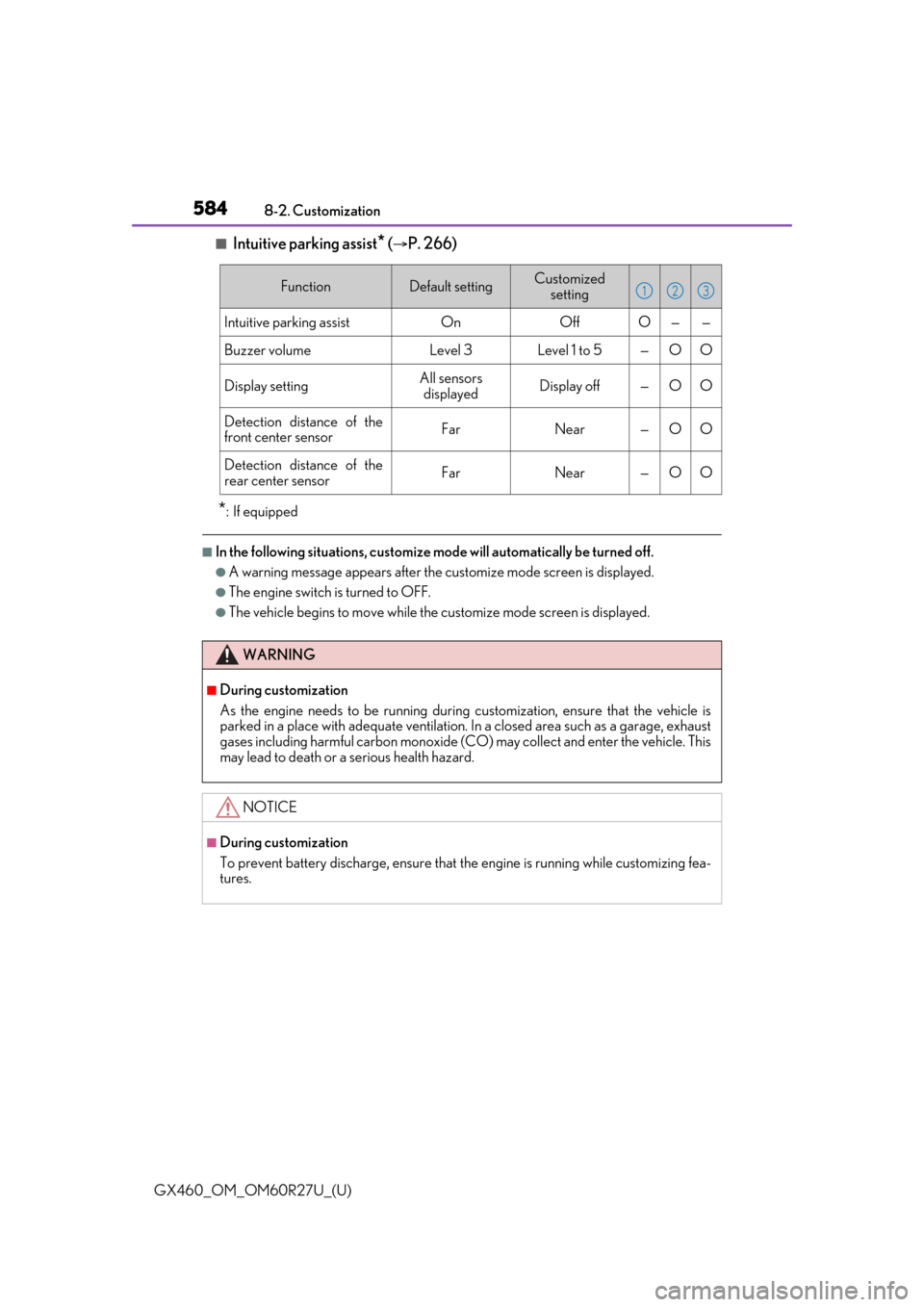
■Intuitive parking assist* (P. 266)
*: If equipped
■In the following situations, customize mode will automatically be turned off.
●A warning message appears after the cu
stomize mode screen is displayed.
●The engine switch is turned to OFF.
●The vehicle begins to move while the customize mode screen is displayed.
FunctionDefault settingCustomized
setting
Intuitive parking assistOnOffO——
Buzzer volumeLevel 3Level 1 to 5—OO
Display settingAll sensors displayedDisplay off—OO
Detection distance of the
front center sensorFarNear—OO
Detection distance of the
rear center sensorFarNear—OO
123
WARNING
■During customization
As the engine needs to be running during customization, ensure that the vehicle is
parked in a place with adequate ventilation. In a closed area such as a garage, exhaust
gases including harmful carbon monoxide (CO) may collect and enter the vehicle. This
may lead to death or a serious health hazard.
NOTICE
■During customization
To prevent battery discharge, ensure that the engine is running while customizing fea-
tures.