tires Lexus GX460 2020 / LEXUS 2020 GX460 (OM60R27U) User Guide
[x] Cancel search | Manufacturer: LEXUS, Model Year: 2020, Model line: GX460, Model: Lexus GX460 2020Pages: 620, PDF Size: 12.41 MB
Page 237 of 620

GX460_OM_OM60R27U_(U)
2374-5. Using the driving support systems
4
Driving
WARNING
■Pre-collision braking
●When the pre-collision braking function is operating, a large amount of braking force
will be applied.
●If the vehicle is stopped by the operation of the pre-collision braking function, the pre-
collision braking function operation will be canceled after approximately 2 seconds.
Depress the brake pedal as necessary.
●The pre-collision braking fu nction may not operate if certain operations are per-
formed by the driver. If the accelerator pedal is being depressed strongly or the steer-
ing wheel is being turned, the system may de termine that the driver is taking evasive
action and possibly prevent the pre-coll ision braking function from operating.
●In some situations, while the pre-collision braking function is operating, operation of
the function may be canceled if the accele rator pedal is depressed strongly or the
steering wheel is turned and the system de termines that the driver is taking evasive
action.
●If the brake pedal is being depressed, the sy stem may determine that the driver is tak-
ing evasive action and possibly delay the op eration timing of the pre-collision braking
function.
■When to disable the pre-collision system
In the following situations, di sable the system, as it may not operate properly, possibly
leading to an accident resultin g in death or serious injury:
●When the vehicle is being towed
●When your vehicle is towing another vehicle
●When transporting the vehicle via truck, bo at, train or similar means of transportation
●When the vehicle is raised on a lift with the engine running and the tires are allowed to
rotate freely
●When inspecting the vehicle using a drum tester such as a chassis dynamometer or
speedometer tester, or when using an on vehicle wheel balancer
●When a strong impact is applied to the fron t bumper or front grille, due to an accident
or other reasons
●If the vehicle cannot be driven in a stable manner, such as when the vehicle has been
in an accident or is malfunctioning
●When the vehicle is driven in a sporty manner or off-road
●When the tires are not properly inflated
●When the tires are very worn
●When tires of a size other than specified are installed
●When tire chains are installed
●When a compact spare tire or an emergency tire puncture repair kit is used
●If equipment (snow plow, etc.) that may obstruct the radar sensor or camera sensor is
temporarily installed to the vehicle
Page 244 of 620
244
GX460_OM_OM60R27U_(U)4-5. Using the driving support systems
• After the engine has started the vehicle has not been driven for a certain amount of time
• While making a left/right turn and for a few seconds after making a left/right turn
• While driving on a curve and for a few seconds after driving on a curve
• If your vehicle is skidding
• If the wheels are misaligned
• If a wiper blade is blocking the camera sensor
• The vehicle is wobbling.
• The vehicle is being driven at extremely high speeds.
• When driving on a hill
• If the radar sensor or ca mera sensor is misaligned
●In some situations such as the following, sufficient braking forc e may not be obtained,
preventing the system from performing properly:
• If the braking functions cannot operate to their full extent, such as when the brake parts are extremely cold, extremely hot, or wet
• If the vehicle is not properly maintained (brakes or tires are excessively worn,
improper tire inflation pressure, etc.)
• When the vehicle is being driven on a gravel road or other slippery surface
●Some pedestrians such as the following may not be detected by the radar sensor and
camera sensor, preventing the system from operating properly:
• Pedestrians shorter than approximately 3.2 ft. (1 m) or taller than approximately
6.5 ft. (2 m)
• Pedestrians wearing oversized clothing (a ra in coat, long skirt, etc.), making their sil-
houette obscure
• Pedestrians who are carrying large baggage, holding an umbrella, etc., hiding part
of their body
• Pedestrians who are bending forward or squatting
• Pedestrians who are pushing a stroller , wheelchair, bicycle or other vehicle
• Groups of pedestrians which are close together
• Pedestrians who are wearing white and look extremely bright
• Pedestrians in the dark, such as at night or while in a tunnel
• Pedestrians whose clothing appears to be nearly the same color or brightness as
their surroundings
• Pedestrians near walls, fences , guardrails, or large objects
• Pedestrians who are on a metal object (manhole cover, steel plate, etc.) on the road
• Pedestrians who are walking fast
• Pedestrians who are changing speed abruptly
• Pedestrians running out from be hind a vehicle or a large object
• Pedestrians who are extremely close to the side of the vehicle (outside rear view mirror, etc.)
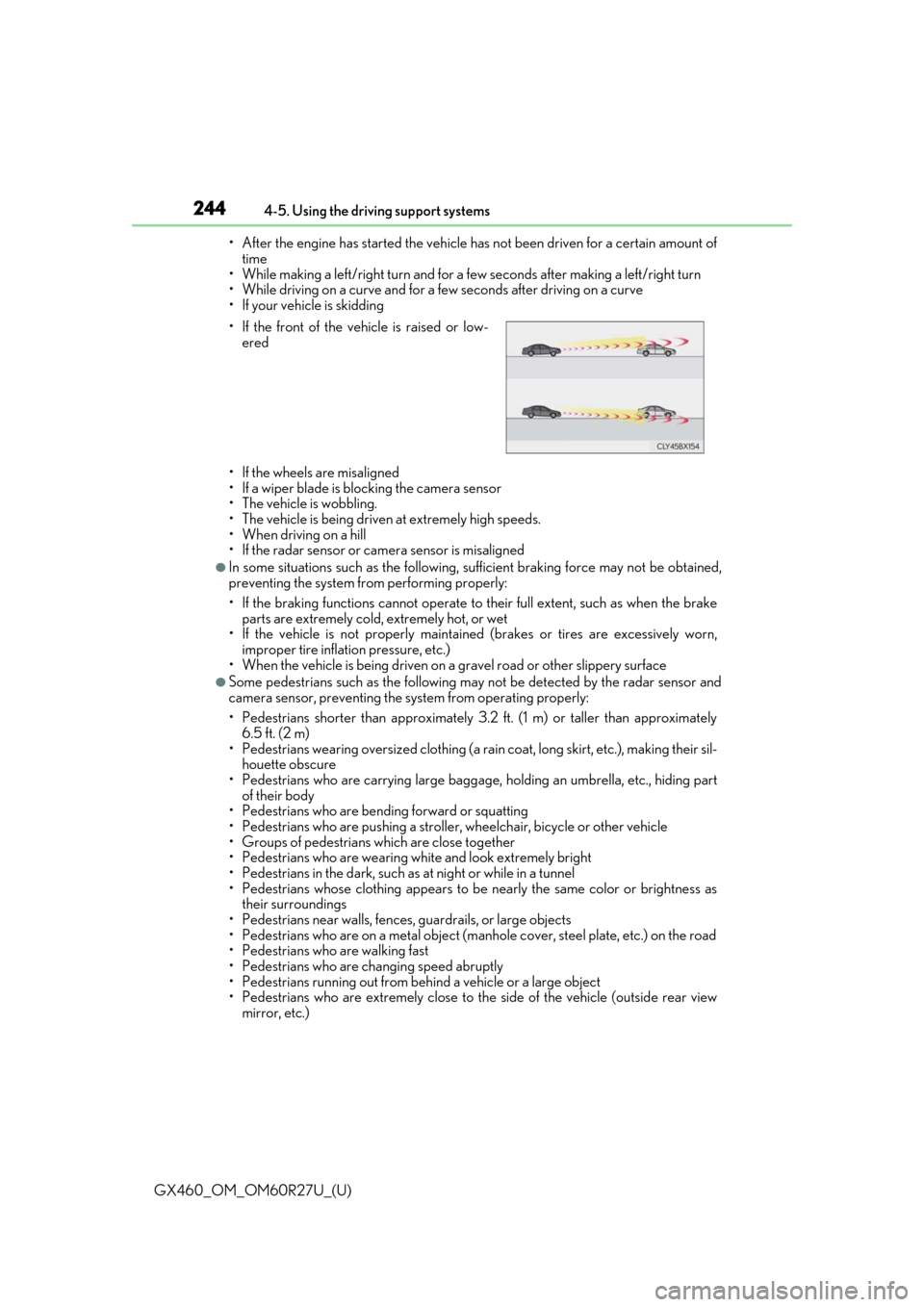
• If the front of the vehicle is raised or low-
ered
Page 298 of 620
298
GX460_OM_OM60R27U_(U)4-5. Using the driving support systems
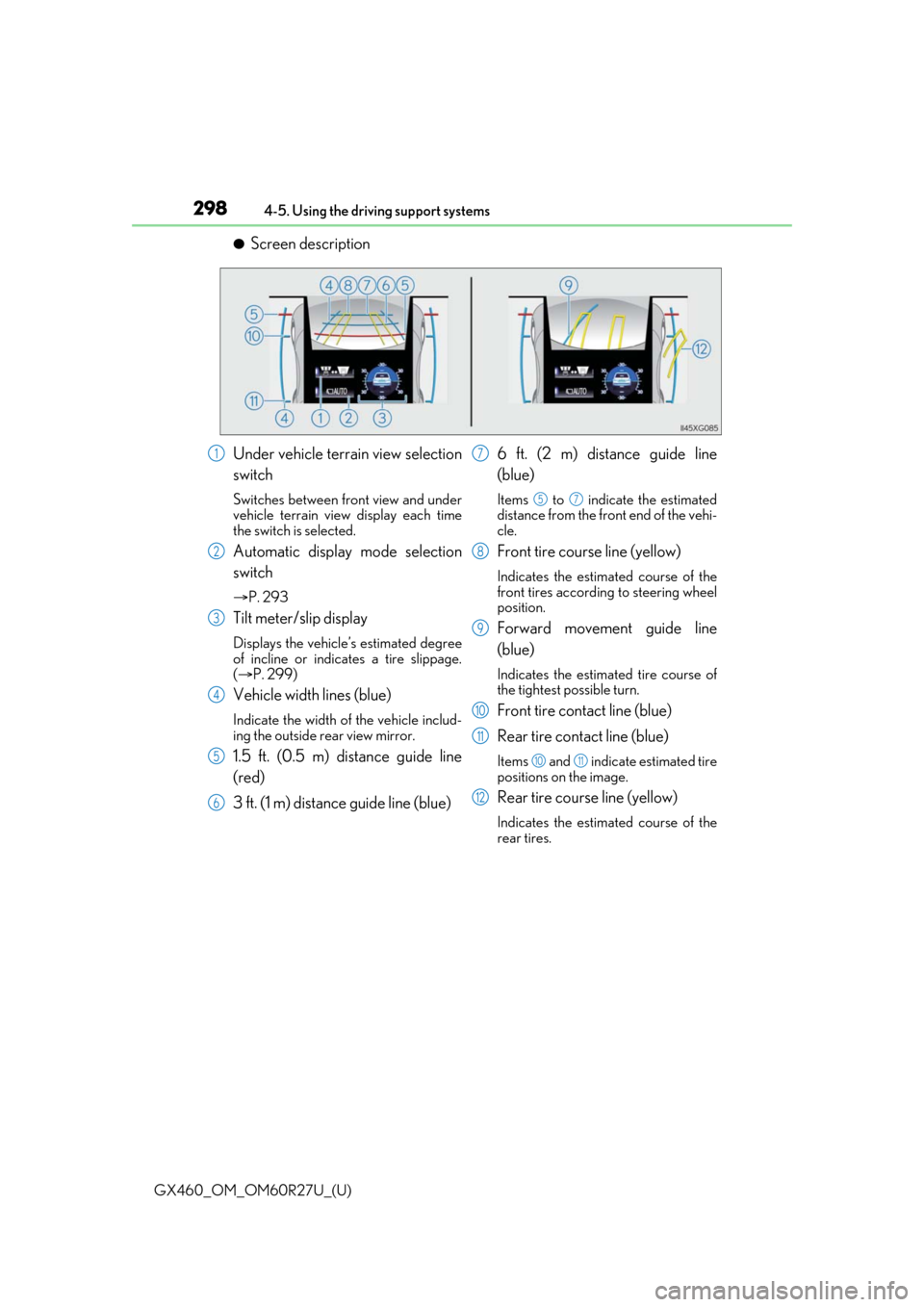
●Screen description
Under vehicle terrain view selection
switch
Switches between front view and under
vehicle terrain view display each time
the switch is selected.
Automatic display mode selection
switch
P. 293
Tilt meter/slip display
Displays the vehicle’s estimated degree
of incline or indicates a tire slippage.
( P. 299)
Vehicle width lines (blue)
Indicate the width of the vehicle includ-
ing the outside rear view mirror.
1.5 ft. (0.5 m) distance guide line
(red)
3 ft. (1 m) distance guide line (blue) 6 ft. (2 m) distance guide line
(blue)
Items to indicate the estimated
distance from the front end of the vehi-
cle.
Front tire course line (yellow)
Indicates the estimated course of the
front tires according to steering wheel
position.
Forward movement guide line
(blue)
Indicates the estimated tire course of
the tightest possible turn.
Front tire contact line (blue)
Rear tire contact line (blue)
Items and indicate estimated tire
positions on the image.
Rear tire course line (yellow)
Indicates the estimated course of the
rear tires.
1
2
3
4
5
6
7
57
8
9
10
11
1011
12
Page 300 of 620
300
GX460_OM_OM60R27U_(U)4-5. Using the driving support systems
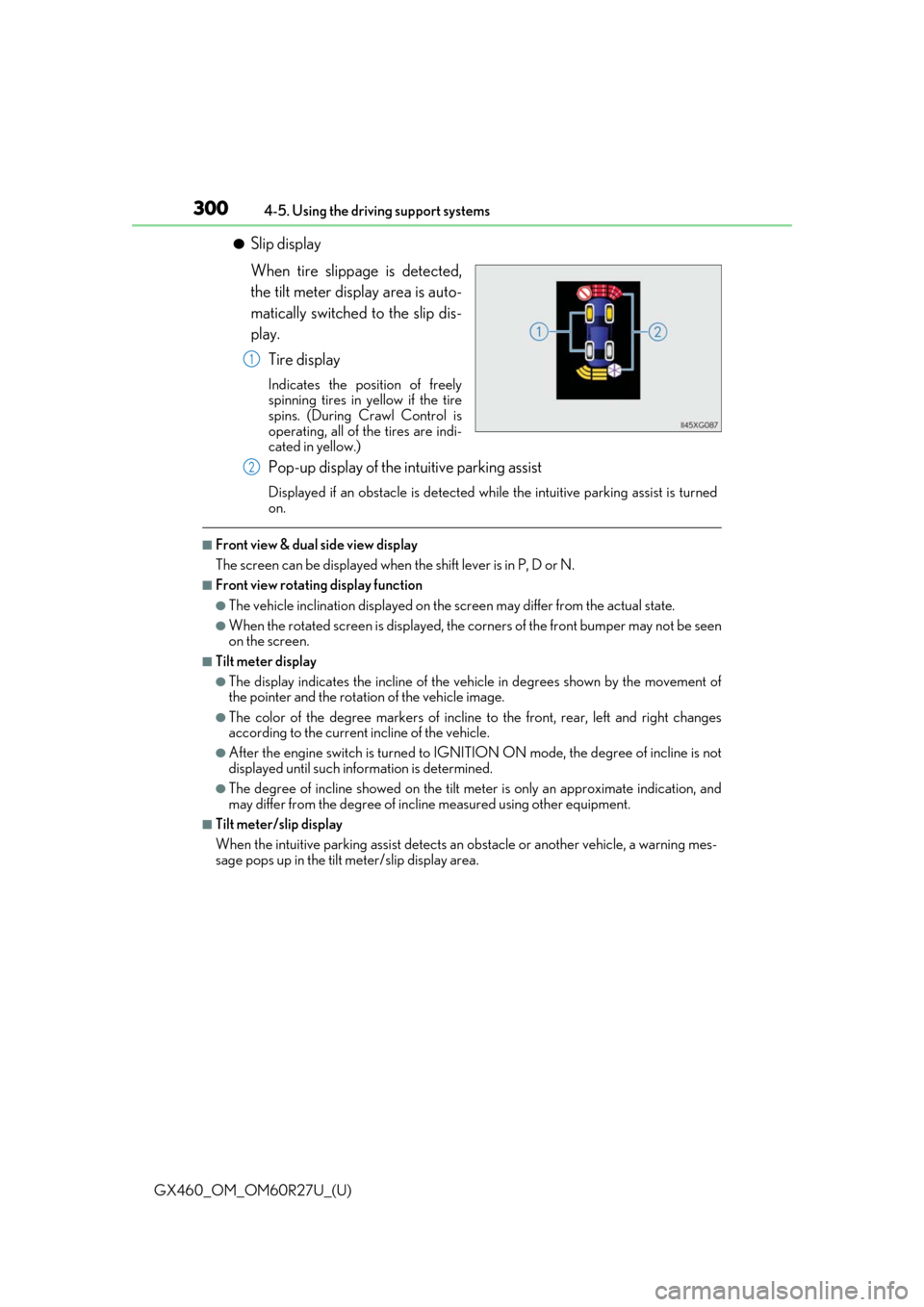
●Slip display
When tire slippage is detected,
the tilt meter display area is auto-
matically switched to the slip dis-
play.
Tire display
Indicates the position of freely
spinning tires in yellow if the tire
spins. (During Crawl Control is
operating, all of the tires are indi-
cated in yellow.)
Pop-up display of the intuitive parking assist
Displayed if an obstacle is detected wh ile the intuitive parking assist is turned
on.
■Front view & dual side view display
The screen can be displayed when the shift lever is in P, D or N.
■Front view rotating display function
●The vehicle inclination displayed on the screen may differ from the actual state.
●When the rotated screen is displayed, the corners of the front bumper may not be seen
on the screen.
■Tilt meter display
●The display indicates the incline of the vehicle in degrees shown by the movement of
the pointer and the rotation of the vehicle image.
●The color of the degree markers of incline to the front, rear, left and right changes
according to the current incline of the vehicle.
●After the engine switch is turned to IGNITI ON ON mode, the degree of incline is not
displayed until such info rmation is determined.
●The degree of incline showed on the tilt meter is only an approximate indication, and
may differ from the degree of incline measured using other equipment.
■Tilt meter/slip display
When the intuitive parking assi st detects an obstacle or another vehicle, a warning mes-
sage pops up in the tilt meter/slip display area.
1
2
Page 301 of 620
GX460_OM_OM60R27U_(U)
3014-5. Using the driving support systems
4
Driving
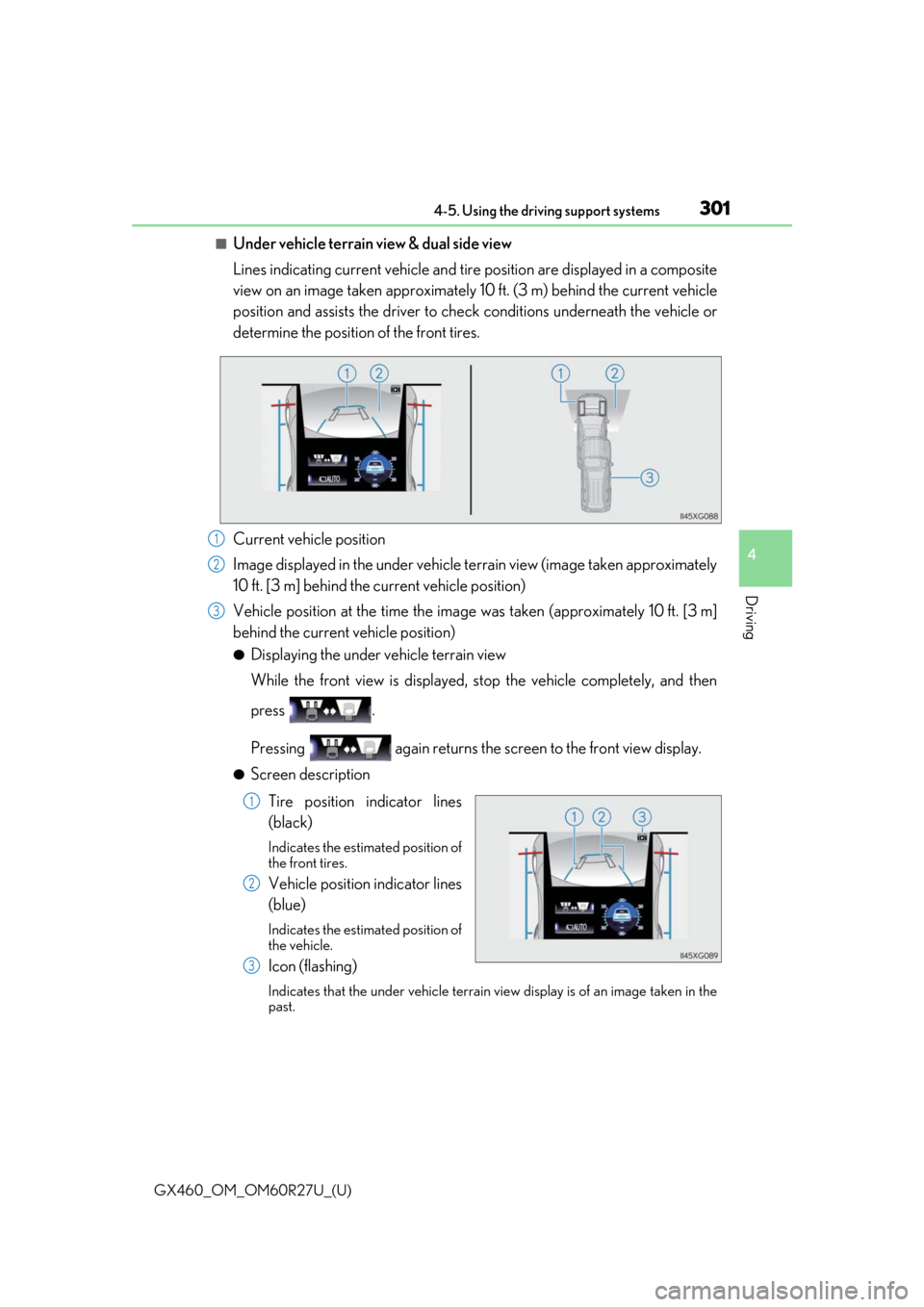
■Under vehicle terrain view & dual side view
Lines indicating current vehicle and tire position are displayed in a composite
view on an image taken approximately 10 ft. (3 m) behind the current vehicle
position and assists the driver to chec k conditions underneath the vehicle or
determine the position of the front tires.
Current vehicle position
Image displayed in the under vehicle terrain view (image taken approximately
10 ft. [3 m] behind the current vehicle position)
Vehicle position at the time the image was taken (approximately 10 ft. [3 m]
behind the current vehicle position)
●Displaying the under vehicle terrain view
While the front view is displayed, stop the vehicle completely, and then
press .
Pressing again returns the scr een to the front view display.
●Screen description
Tire position indicator lines
(black)
Indicates the estimated position of
the front tires.
Vehicle position indicator lines
(blue)
Indicates the estimated position of
the vehicle.
Icon (flashing)
Indicates that the under vehicle terrain view display is of an image taken in the
past.
1
2
3
1
2
3
Page 319 of 620

GX460_OM_OM60R27U_(U)
3194-5. Using the driving support systems
4
Driving
Observe the following precautions. Failure to do so may result in an unexpected
accident. Also, when driving, make sure to directly confirm the safety of your sur-
roundings and the area to the rear of the vehicle.
When using the Multi-terrain Monitor
WARNING
■Conditions under which the Multi-te rrain Monitor should not be used
Do not use the Multi-terrain Monitor in the following situations. The system may not
operate properly, resulting in an unexpected accident.
●When driving on an icy, snow-covered or otherwise slippery road surface
●When using tire chains or a spare tire
●When either front door or the back door is not completely closed
●When driving on an uneven road, such as a hill
●When tires or suspension parts other than those specified are equipped
When the tires are replaced, the position indicated by the guide lines displayed on the
screen may differ.
■Guide lines
The tire position indicator lines and vehicl e position indicator lines may differ from
actual vehicle positions depending on the number of passengers, cargo weight, road
grade, road surface conditions, brightness of the surrounding environment, etc. Always
drive the vehicle while confirming the safety of your surroundings.
Page 332 of 620

332
GX460_OM_OM60R27U_(U)4-5. Using the driving support systems
■Using under vehicle terrain view
●The images displayed were prev
iously taken approximately 10 ft. (3 m) behind the cur-
rent vehicle position.
Therefore, actual conditions may differ from those shown on the screen in the following
situations.
• An obstacle has appeared after the image was taken
• Loose material like sand or snow has crumbled or shifted
• An obstacle has moved
• There is a puddle, tract of mud, etc., within the display range
• The vehicle slips
●In the following situations, actual tire posi tions and vehicle position may differ from
those indicated by the tire position indicator lines and vehicle position indicator lines.
• Tires have been replaced
• Optional equipment has been installed
WARNING
■Guide lines
The displayed guide lines are composed with the image that was previously taken and
may differ from the actual state.
Always drive the vehicle while confirming your surroundings.
Page 355 of 620

GX460_OM_OM60R27U_(U)
3554-5. Using the driving support systems
4
Driving
WARNING
■The ABS/Multi Terrain ABS does not operate effectively when
●The limits of tire gripping performance have been exceeded (such as excessively
worn tires on a snow covered road).
●The vehicle hydroplanes while driving at high speed on wet or slick roads.
■Stopping distance when the ABS/Multi Terra in ABS is operating may exceed that of
normal conditions
The ABS/Multi Terrain ABS is not designed to shorten the vehicle’s stopping distance.
Always maintain a safe distance from the vehicle in front of you, especially in the follow-
ing situations:
●When driving on dirt, grav el or snow-covered roads
●When driving with tire chains
●When driving over bumps in the road
●When driving over roads with potholes or uneven surfaces
■TRAC/Active TRAC/VSC may no t operate effectively when
Directional control an d power may not be achievable wh ile driving on slippery road
surfaces, even if the TRAC/Active TRAC/VSC system is operating.
Drive the vehicle carefully in conditions where stability and power may be lost.
■Hill-start assist control does not operate effectively when
Do not overly rely on the hill-start assist control. The hill-start assist control may not
operate effectively on steep inclines and roads covered with ice.
■When the TRAC/Active TRAC/VSC/Tra iler Sway Control is activated
The slip indicator light flas hes. Always drive carefully.
Reckless driving may cause an accident. Exercise particular care when the indicator
light flashes.
■When the TRAC/Active TRAC/VSC/Trailer Sway Control systems are turned off
Be especially careful and drive at a speed appropriate to the road conditions. As these
are the systems to help ensure vehicle stab ility and driving force, do not turn the
TRAC/Active TRAC/VSC/Trailer Sway Co ntrol systems off unless necessary.
Trailer Sway Control is part of the VSC syst em and will not operate if VSC is turned off
or experiences a malfunction.
Page 356 of 620

356
GX460_OM_OM60R27U_(U)4-5. Using the driving support systems
WARNING
■Replacing tires
Make sure that all tires are
of the specified size, brand, tread pattern and total load
capacity. In addition, make sure that the tire s are inflated to the recommended tire infla-
tion pressure level.
The ABS/Multi Terrain ABS, TRAC/Active TRAC, Trailer Sway Control and VSC sys-
tems will not function correctly if diff erent tires are installed on the vehicle.
Contact your Lexus dealer for further in formation when replacing tires or wheels.
■Handling of tires and the suspension
Using tires with any kind of problem or modi fying the suspension will affect the driving
assist systems, and may cause a system to malfunction.
■Trailer Sway Control precaution
The Trailer Sway Control system is not able to reduce trailer sway in all situations.
Depending on many factors such as the condit ions of the vehicle, trailer, road surface
and driving environment, the Trailer Sway Control system may not be effective. Refer to
your trailer owner’s manual for information on how to tow your trailer properly.
■If trailer sway occurs
Observe the following precautions.
Failing to do so may cause death or serious injury.
●Firmly grip the steering wh eel. Steer straight ahead.
Do not try to control trailer sway by turning the steering wheel.
●Begin releasing the accelerator pedal immediately but very gradually to reduce
speed.
Do not increase speed. Do not apply vehicle brakes.
If you make no extreme correction with the steering or brakes, your vehicle and trailer
should stabilize. ( P. 191)
Page 367 of 620
367
GX460_OM_OM60R27U_(U)4-6. Driving tips
4
Driving
Winter driving tips
●Use fluids that are appropriate to
the prevailing outside temperatures.
•Engine oil
• Engine coolant
• Washer fluid
●Have a service technician inspect the condition of the battery.
●Have the vehicle fitted with four snow tires or purchase a set of tire chains for
the rear tires.
Ensure that all tires are the same size and br and, and that chains match the size of the
tires.
Perform the following according to the driving conditions:
●Do not try to forcibly open a window or move a wiper that is frozen. Pour
warm water over the frozen area to me lt the ice. Wipe away the water imme-
diately to prevent it from freezing.
●To ensure proper operation of the c limate control system fan, remove any
snow that has accumulated on the air inlet vents in front of the windshield.
●Check for and remove any excess ice or snow that may have accumulated on
the exterior lights, vehicle’s roof, chassi s, around the tires or on the brakes.
●Remove any snow or mud from the bottom of your shoes before getting in the
vehicle.
Carry out the necessary preparations an d inspections before driving the vehi-
cle in winter. Always drive the vehicle in a manner appropriate to the prevail-
ing weather conditions.
Pre-winter preparations
Before driving the vehicle