key Lexus GX460 2020 / LEXUS 2020 GX460 (OM60R27U) Service Manual
[x] Cancel search | Manufacturer: LEXUS, Model Year: 2020, Model line: GX460, Model: Lexus GX460 2020Pages: 620, PDF Size: 12.41 MB
Page 394 of 620
394
GX460_OM_OM60R27U_(U)5-2. Using the interior lights
■Illuminated entry system
The lights automatically turn on/off according
to engine switch mode, the presence of the
electronic key, whether the doors are locked/unlocked, and whether the doors are
open/closed.
■To prevent battery discharge
If the following lights remain on when the engine switch is turned off the lights will go off
automatically after 20 minutes:
●Personal/interior light
●Inside door handle lights
●Footwell lights
●Running board lights
■Customization
Settings (e.g. adjust the time elapsed before th e interior lights automatically turn off) can
be changed. (Customizable features: P. 576)
NOTICE
To prevent battery discharge, do not leave th e lights on longer than necessary when the
engine is not running.
Page 396 of 620
396
GX460_OM_OM60R27U_(U)5-3. Using the storage features
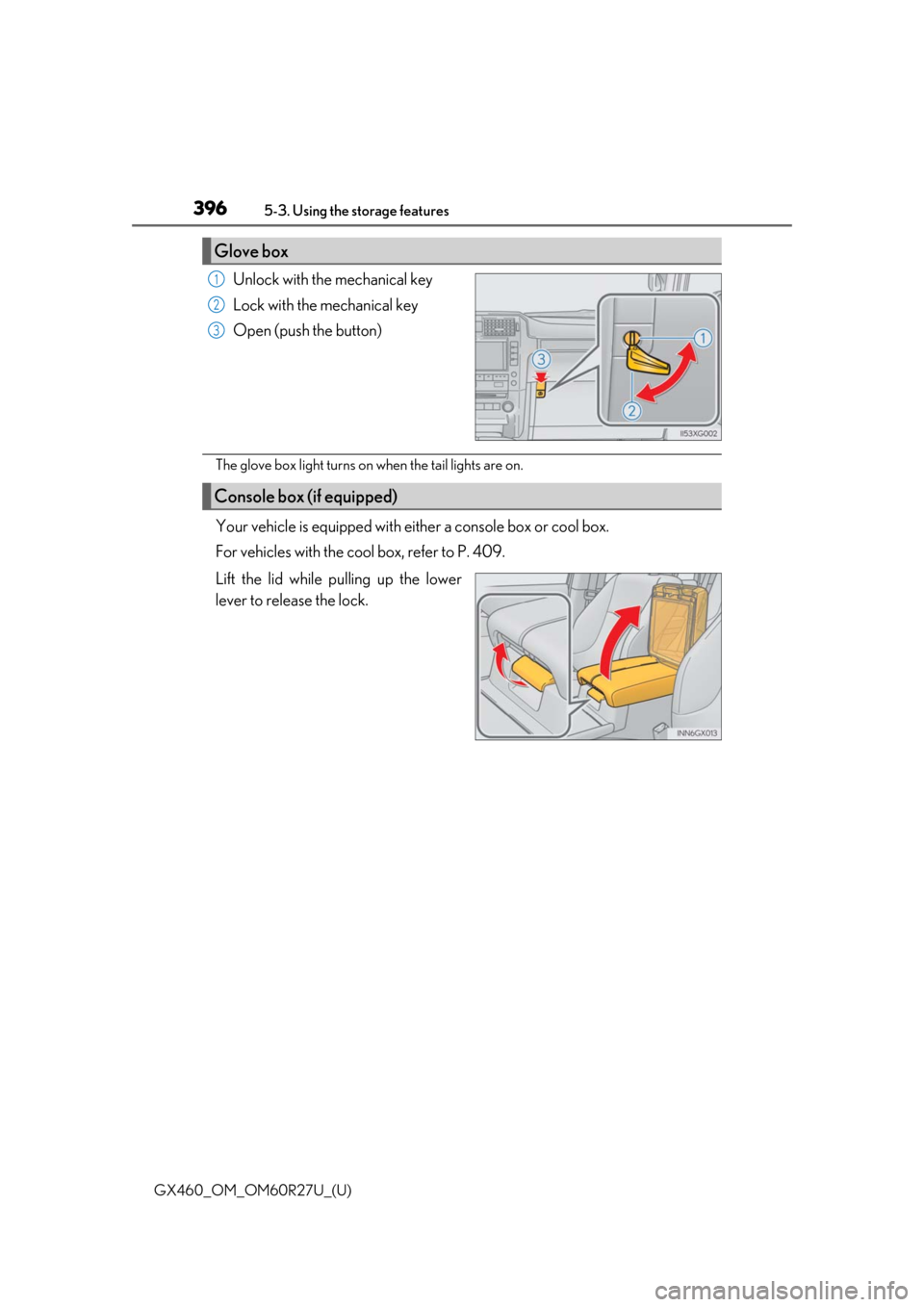
Unlock with the mechanical key
Lock with the mechanical key
Open (push the button)
The glove box light turns on when the tail lights are on.
Your vehicle is equipped with either a console box or cool box.
For vehicles with the cool box, refer to P. 409.
Lift the lid while pulling up the lower
lever to release the lock.
Glove box
1
2
3
Console box (if equipped)
Page 433 of 620

433
GX460_OM_OM60R27U_(U)
6Maintenance and care
6-1. Maintenance and careCleaning and protecting the vehicle exterior ................ 434
Cleaning and protecting the vehicle interior.................. 437
6-2. Maintenance Maintenance requirements ............................ 440
General maintenance.............. 443
Emission inspection and maintenance (I/M)
programs .................................... 446
6-3. Do-it-yourself maintenance Do-it-yourself service precautions................................ 447
Hood ...............................................450
Engine compartment ................ 451
Tires ................................................. 464
Tire inflation pressure............... 476
Wheels .......................................... 480
Air conditioning filter ............... 482
Electronic key battery ..............484
Checking and replacing fuses ..............................................486
Headlight aim ..............................489
Light bulbs...................................... 491
Page 461 of 620
GX460_OM_OM60R27U_(U)
4616-3. Do-it-yourself maintenance
6
Maintenance and care
■Before recharging
When recharging, the battery produces hydrogen gas which is flammable and explosive.
Therefore, observe the following before recharging:
●If recharging with the battery installed on the vehicle, be sure to disconnect the ground
cable.
●Make sure the power switch on the charger is off when connecting and disconnecting
the charger cables to the battery.
■After recharging/reconnecting the battery
The engine may not start. Follow the procedure below to initialize the system.
Shift the shift lever to P
Open and close any of the doors.
Restart the engine.
●Unlocking the doors using the smart access system with push-button start may not be
possible immediately after reconnecting the battery. If this happens, use the wireless
remote control or the mechanical key to lock/unlock the doors.
●Start the engine with the engine switch in ACCESSORY mode. The engine may not
start with the engine switch turned off. However, the engine will operate normally from
the second attempt.
●The engine switch mode is recorded by the vehicle. If the battery is reconnected, the
vehicle will return the engine switch mode to the status it was in before the battery was
disconnected. Make sure to turn off the engine before disconnect the battery. Take
extra care when connecting the battery if the engine switch mode prior to discharge is
unknown.
If the system will not start even after mult iple attempts, contact your Lexus dealer.
WARNING
■Chemicals in the battery
Batteries contain poisonous and corrosive sulfuric acid and may produce hydrogen
gas which is flammable and explosive. To reduce the risk of death or serious injury, take
the following precautions while working on or near battery:
●Do not cause sparks by touching the battery terminals with tools.
●Do not smoke or light a match near the battery.
●Avoid contact with eyes, skin and clothes.
●Never inhale or swallow electrolyte.
●Wear protective safety glasses when working near the battery.
●Keep children away from the battery.
■Where to safely charge the battery
Always charge the battery in an open area . Do not charge the battery in a garage or
closed room where there is not sufficient ventilation.
1
2
3
Page 484 of 620
484
GX460_OM_OM60R27U_(U)6-3. Do-it-yourself maintenance
Electronic key battery
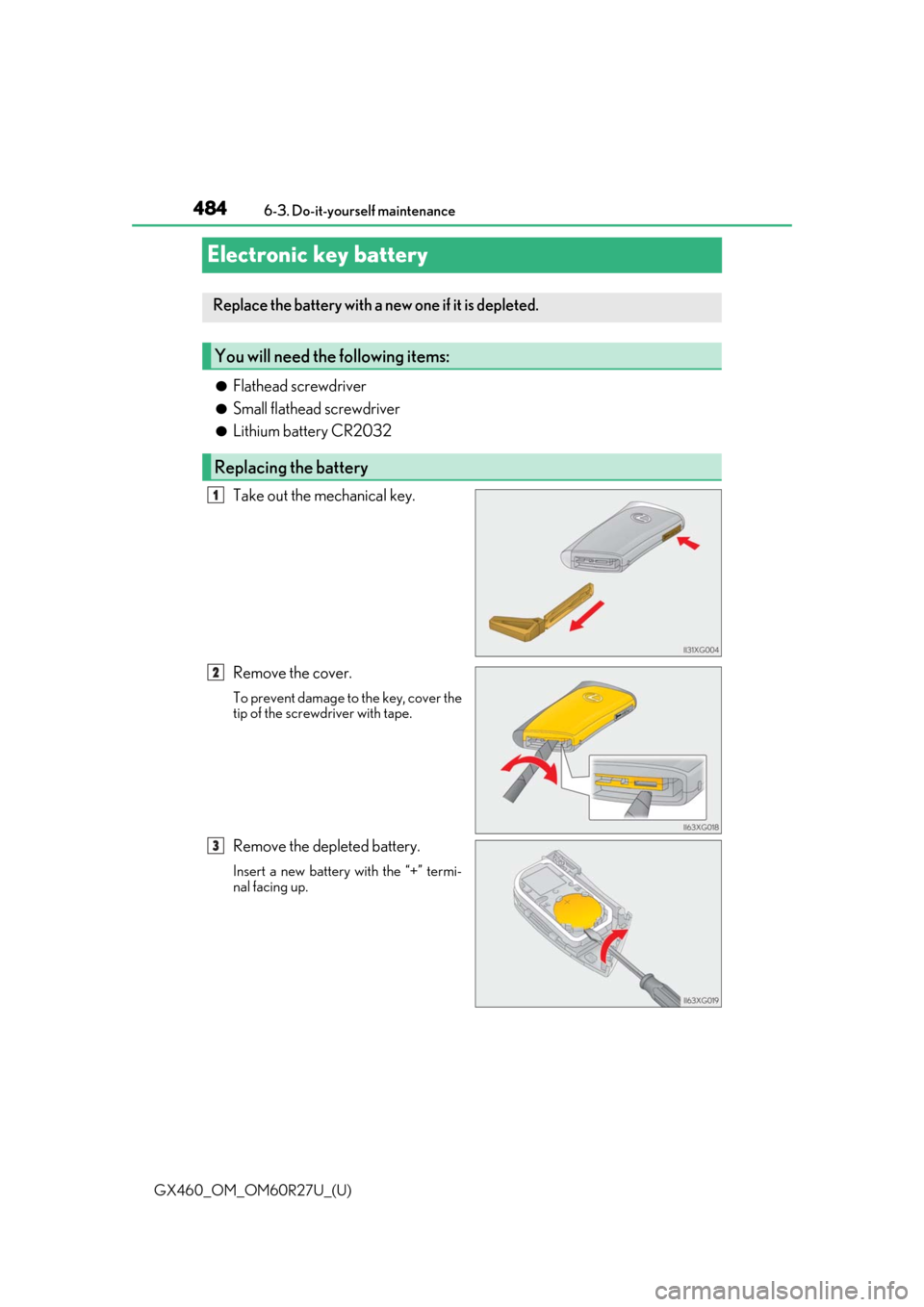
●Flathead screwdriver
●Small flathead screwdriver
●Lithium battery CR2032
Take out the mechanical key.
Remove the cover.
To prevent damage to the key, cover the
tip of the screwd
river with tape.
Remove the depleted battery.
Insert a new battery with the “+” termi-
nal facing up.
Replace the battery with a new one if it is depleted.
You will need the following items:
Replacing the battery
1
2
3
Page 485 of 620
GX460_OM_OM60R27U_(U)
4856-3. Do-it-yourself maintenance
6
Maintenance and care
■Use a CR2032 lithium battery
●Batteries can be purchased at your Lexus dealer, loca l electrical appliance shops or
camera stores.
●Replace only with the same or equivalent type recommended by the manufacturer.
●Dispose of used batteries according to the local laws.
■If the electronic key battery is depleted
The following symptoms may occur:
●The smart access system with push-button start and wireless remote control will not
function properly.
●The operational rang e will be reduced.
WARNING
■Removed battery and other parts
These parts are small and if swallowed by a child, they can cause choking. Keep away
from children. Failure to do so coul d result in death or serious injury.
NOTICE
■For normal operation after replacing the battery
Observe the following precautions to prevent accidents:
●Always work with dry hands.
Moisture may cause the battery to rust.
●Do not touch or move any other co mponent inside the remote control.
●Do not bend either of the battery terminals.
Page 499 of 620

499
GX460_OM_OM60R27U_(U)
7When trouble arises
7-1. Essential informationEmergency flashers ................. 500
If your vehicle has to be stopped in
an emergency ........................... 501
If the vehicle is trapped in rising water ................................502
7-2. Steps to take in an emergency If your vehicle needs to be towed................................503
If you think something is wrong ...........................................509
Fuel pump shut off system ....... 510
If a warning light turns on or a warning buzzer
sounds............................................. 511
If a warning message is displayed.....................................520
If you have a flat tire .................. 524
If the engine will not start ........538
If the electronic key does not operate properly .............540
If the vehicle battery is discharged ................................. 543
If your vehicle overheats ......... 546
If the vehicle becomes stuck ............................................. 549
Page 522 of 620
5227-2. Steps to take in an emergency
GX460_OM_OM60R27U_(U)
■If “Front Camera Unavailable” or “Front Camera Unavailable See Owner’s Manual” is
displayed
The following systems may be suspended until the problem shown in the message is
resolved. (P. 234, 511)
●PCS (Pre-Collision System)
●LDA (Lane Departure Alert)
●Automatic High Beam
●Dynamic radar cruise control
■If “Radar Cruise Control Unavailable” is shown
The dynamic radar cruise control sy stem cannot be used temporarily.
Use the system when it becomes available again.
■If “Maintenance Required Soon” is shown (U.S.A. only)
Indicates that all maintenance according to the driven distance on the maintenance
schedule
* should be performed s oon. Comes on approximatel y 4500 miles (7200 km)
after the message has been reset. If necessary, perform main tenance. Please reset the
message after the maintenance is performed. ( P. 441)
*: Refer to the separate “Scheduled Maintena nce” or “Owner’s Manual Supplement” for
the maintenance interval applicable to your vehicle.
■If “Maintenance Required Visit Your Dealer” is shown (U.S.A. only)
Indicates that all maintenance is required to correspond to the driven distance on the
maintenance schedule
*.
Comes on approximately 5000 miles (8000 km) after the message has been reset.
(The indicator will not work properly unless the message has been reset.) Perform the
necessary maintenance. Please reset the message after the maintenance is performed.
( P. 441)
*: Refer to the separate “Scheduled Maintena nce” or “Owner’s Manual Supplement” for
the maintenance interval applicable to your vehicle.
■If “Oil Maintenance Required Soon” is shown
Indicates that the engine oil should be scheduled to be changed.
Check the engine oil and change it if necessa ry. After changing the engine oil, make sure
to reset the message. ( P. 454)
■If “OIL MAINTENANCE REQU IRED” “Oil Maintenance Required Visit Your Dealer”
is shown
Indicates that the engine oil should be scheduled to be changed.
Check and change the engine o il, and oil filter by your Lexus dealer. After changing the
engine oil, make sure to reset the message. ( P. 454)
■If “Check Access System with Elec. Key” is shown
The smart access system with push-button star t may be malfunctioning. Have the vehicle
inspected by your Lexus dealer immediately.
Page 540 of 620
540
GX460_OM_OM60R27U_(U)7-2. Steps to take in an emergency
If the electronic key does not operate properly
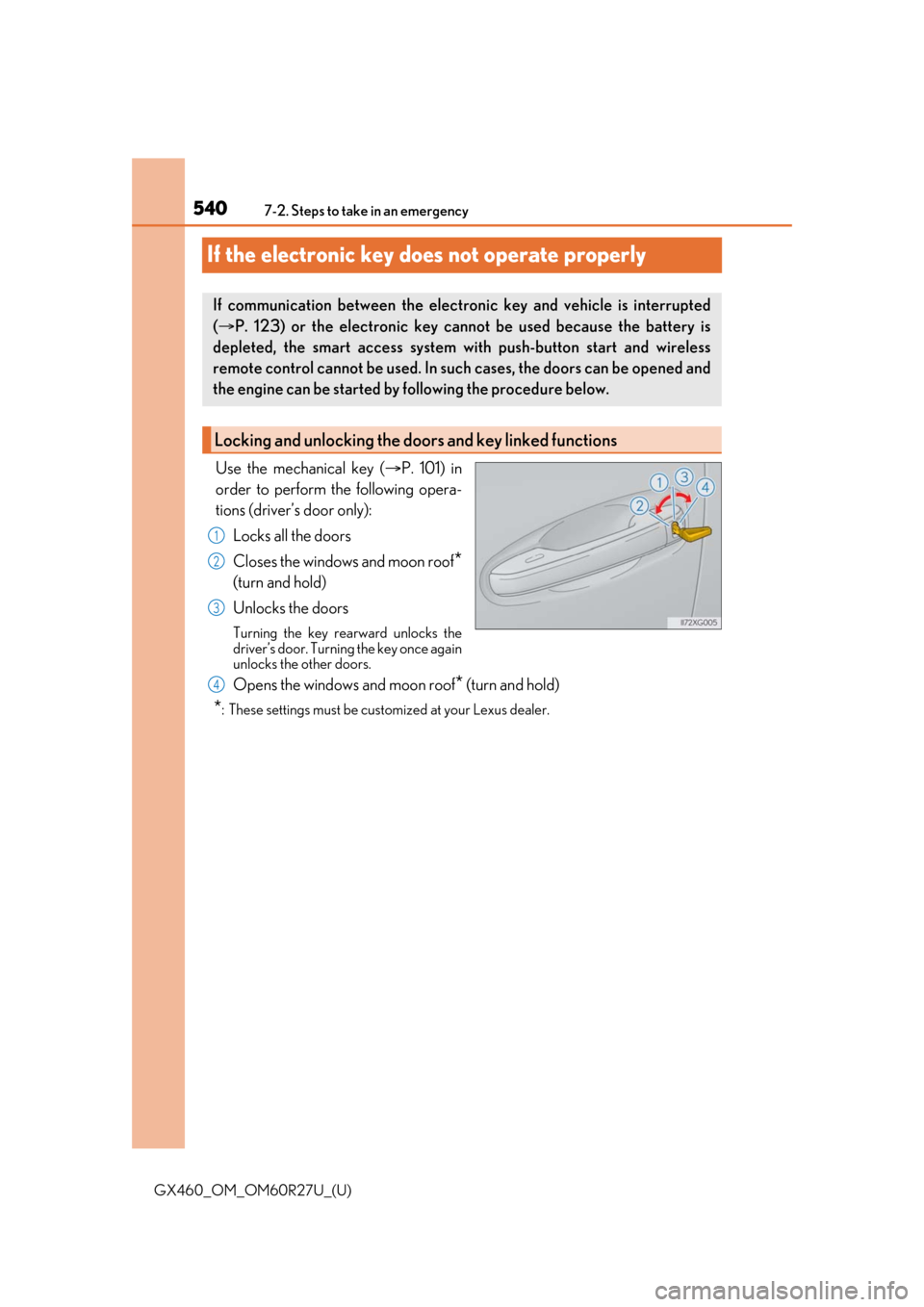
Use the mechanical key (
P. 101) in
order to perform the following opera-
tions (driver’s door only):
Locks all the doors
Closes the windows and moon roof
*
(turn and hold)
Unlocks the doors
Turning the key rearward unlocks the
driver’s door. Turning the key once again
unlocks the other doors.
Opens the windows and moon roof* (turn and hold)
*: These settings must be cust omized at your Lexus dealer.
If communication between the electronic key and vehicle is interrupted
( P. 123) or the electronic key ca nnot be used because the battery is
depleted, the smart access system with push-button start and wireless
remote control cannot be used. In such cases, the doors can be opened and
the engine can be started by following the procedure below.
Locking and unlocking the doors and key linked functions
1
2
3
4
Page 541 of 620
5417-2. Steps to take in an emergency
GX460_OM_OM60R27U_(U)
7
When trouble arises
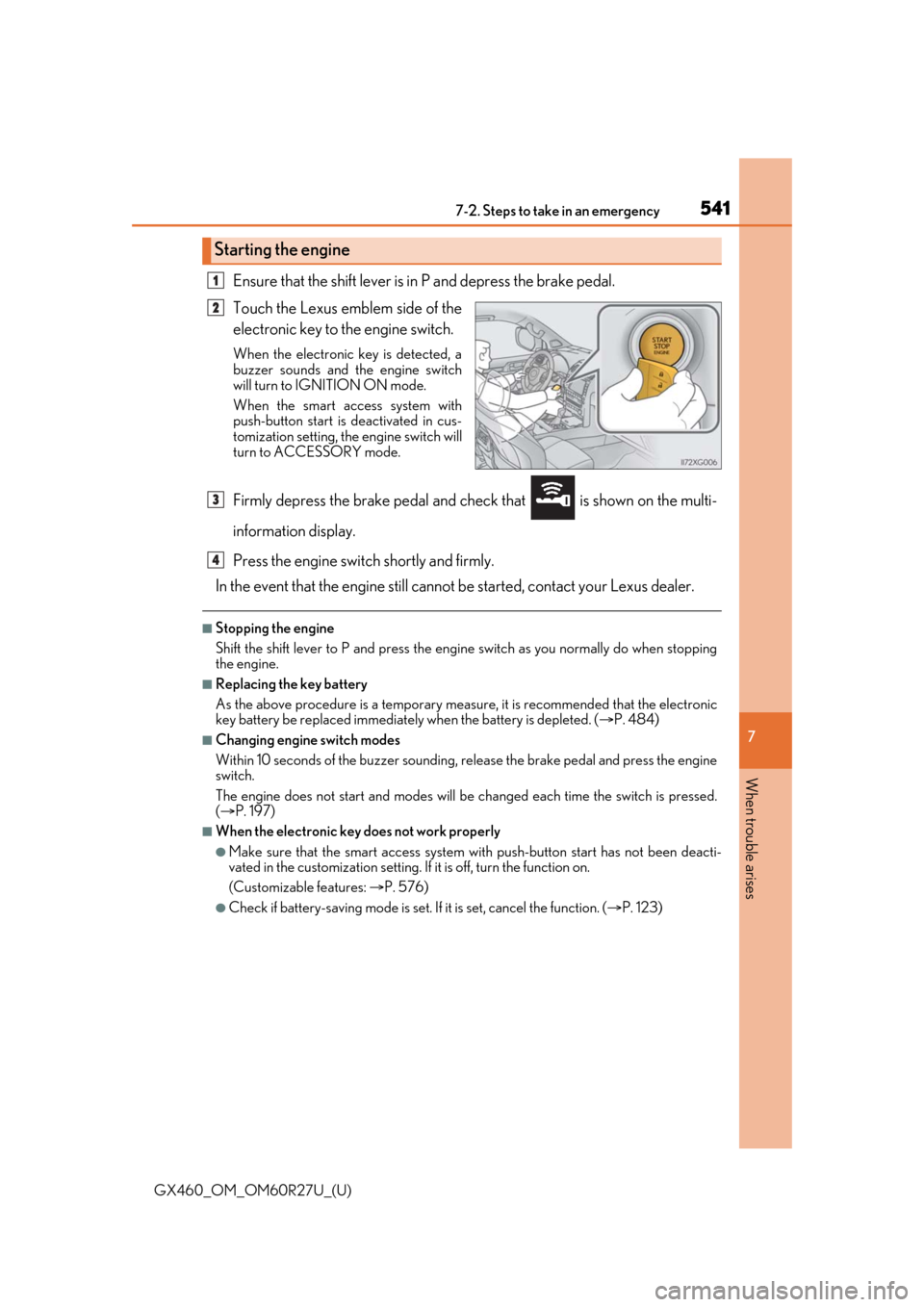
Ensure that the shift lever is in P and depress the brake pedal.
Touch the Lexus emblem side of the
electronic key to the engine switch.
When the electronic key is detected, a
buzzer sounds and the engine switch
will turn to IGNITION ON mode.
When the smart access system with
push-button start is deactivated in cus-
tomization setting, the engine switch will
turn to ACCESSORY mode.
Firmly depress the brake pedal and check that is shown on the multi-
information display.
Press the engine switch shortly and firmly.
In the event that the engine still cannot be started, contact your Lexus dealer.
■Stopping the engine
Shift the shift lever to P and press the engine switch as you normally do when stopping
the engine.
■Replacing the key battery
As the above procedure is a temporary measure, it is recommended that the electronic
key battery be replaced immediately when the battery is depleted. ( P. 484)
■Changing engine switch modes
Within 10 seconds of the buzzer sounding, release the brake pedal and press the engine
switch.
The engine does not start and modes will be changed each time the switch is pressed.
( P. 197)
■When the electronic key does not work properly
●Make sure that the smart access system wi th push-button start has not been deacti-
vated in the customization setting. If it is off, turn the function on.
(Customizable features: P. 576)
●Check if battery-saving mode is set. If it is set, cancel the function. (P. 123)
Starting the engine
1
2
3
4