air condition Lexus GX460 2020 Owner's Manual / LEXUS 2020 GX460 OWNER'S MANUAL (OM60R27U)
[x] Cancel search | Manufacturer: LEXUS, Model Year: 2020, Model line: GX460, Model: Lexus GX460 2020Pages: 620, PDF Size: 12.41 MB
Page 4 of 620

TABLE OF CONTENTS4
GX460_OM_OM60R27U_(U)
5-1. Using the air conditioning system and defogger
Front automatic air conditioning system ............... 376
Rear air conditioning system.......................................... 386
Heated steering wheel/seat heaters/seat ve ntilators ....... 389
5-2. Using the interior lights Interior lights list ......................... 392• Personal/interior lights main switch ............................. 393
• Personal/interior lights ..... 393
5-3. Using the storage features List of storage features ............ 395
• Glove box ............................... 396
• Console box .......................... 396
• Coin holder ............................ 398
• Cup holders/bottle holders/door pockets........ 398
• Auxiliary boxes .....................400
Luggage compartment features ....................................... 402 5-4. Using the other interior
features
Other interior features ............ 409 • Cool box.................................. 409
• Sun visors ................................... 411
• Vanity mirror ............................ 411
• Conversation mirror ............ 412
• Clock .......................................... 412
• Power outlets ..........................413
• USB charging ports .............. 417
• Armrest......................................419
• Coat hooks............................. 420
• Assist grips ............................. 420
Compass ......................................... 421
Garage door opener ............... 425
5Interior features
Page 5 of 620

5
1
8 7
6
5
4
3
2
GX460_OM_OM60R27U_(U)
9
6-1. Maintenance and care Cleaning and protecting the vehicle exterior ................ 434
Cleaning and protecting the vehicle interior.................. 437
6-2. Maintenance Maintenance requirements ............................ 440
General mainte nance.............. 443
Emission inspection and maintenance (I/M)
programs.................................... 446
6-3. Do-it-yourself maintenance Do-it-yourself service precautions................................ 447
Hood ............................................... 450
Engine compartment .................451
Tires ................................................. 464
Tire inflation pressure .............. 476
Wheels ...........................................480
Air conditioning filter ............... 482
Electronic key battery.............. 484
Checking and replacing fuses.............................................. 486
Headlight aim .............................. 489
Light bulbs ......................................491 7-1. Essential information
Emergency flashers ..................500
If your vehicle has to be stopped in
an emergency ........................... 501
If the vehicle is trapped in rising water ................................ 502
7-2. Steps to take in an emergency If your vehicle needs to be towed ............................... 503
If you think something is wrong........................................... 509
Fuel pump shut off system....... 510
If a warning light turns on or a warning buzzer
sounds ............................................ 511
If a warning message is displayed .................................... 520
If you have a flat tire .................. 524
If the engine will not start ........538
If the electronic key does not operate properly ............. 540
If the vehicle battery is discharged................................. 543
If your vehicle overheats......... 546
If the vehicle becomes stuck ............................................. 549
6Maintenance and care7When trouble arises
Page 10 of 620

10
GX460_OM_OM60R27U_(U)This vehicle is equipped with an event data recorder (EDR). The main purpose of an EDR
is to record, in certain crash or near crash-like situations, such as an air bag deployment
or hitting a road obstacle, data that will a
ssist in understanding how a vehicle’s systems
performed. The EDR is designed to record data related to vehicle dynamics and safety
systems for a short period of ti me, typically 30 seconds or less.
The EDR in this vehicle is desi gned to record such data as:
• How various systems in your vehicle were operating;
• Whether or not the driver and passenge r safety belts were buckled/fastened;
• How far (if at all) the driver was depressi ng the accelerator and/or brake pedal; and,
• How fast the vehicle was traveling.
These data can help provide a better understanding of the circumstances in which
crashes and injuries occur.
NOTE: EDR data are recorded by your vehicle only if a non-trivial crash situation occurs;
no data are recorded by the EDR under norm al driving conditions and no personal data
(e.g., name, gender, age, and crash location) are recorded. However, other parties, such
as law enforcement, could combine the EDR data with the type of personally identifying
data routinely acquired during a crash investigation.
To read data recorded by an EDR, special equipment is required, and access to the vehi-
cle or the EDR is needed. In addition to the vehicle manufacturer, other parties, such as
law enforcement, that have the special equipm ent, can read the information if they have
access to the vehicle or the EDR.
●Disclosure of the EDR data
Lexus will not disclose the data recorded in an EDR to a third party except when:
• An agreement from the vehicle’s owner (or the lessee for a leased vehicle) is obtained
• In response to an official request by the police, a court of law or a government
agency
• For use by Lexus in a lawsuit
However, if necessary, Lexus may:
• Use the data for research on vehicle safety performance
• Disclose the data to a third party for rese arch purposes without disclosing informa-
tion about the specific vehicle or vehicle owner
Event data recorder
Page 17 of 620

17Pictorial index
GX460_OM_OM60R27U_(U)
Multi-information display . . . . . . . . . . . . . . . . . . . . . . . . . . . . . . . . . . . . . . . . . . . . . P. 91
Display . . . . . . . . . . . . . . . . . . . . . . . . . . . . . . . . . . . . . . . . . . . . . . . . . . . . . . . . . . . . . . . . . . .P. 91
When the warning messages are displayed . . . . . . . . . . . . . . . . . . . . . . . . . . . . P. 520
Parking brake . . . . . . . . . . . . . . . . . . . . . . . . . . . . . . . . . . . . . . . . . . . . . . . . . . . . . . P. 20 8
Applying/releasing . . . . . . . . . . . . . . . . . . . . . . . . . . . . . . . . . . . . . . . . . . . . . . . . . . . . P. 2 08
Precautions against winter season . . . . . . . . . . . . . . . . . . . . . . . . . . . . . . . . . . . . . P. 368
Warning buzzer/message . . . . . . . . . . . . . . . . . . . . . . . . . . . . . . . . . . . . . . . . P. 208, 512
Turn signal lever . . . . . . . . . . . . . . . . . . . . . . . . . . . . . . . . . . . . . . . . . . . . . . . . . . . . .P. 2 07
Headlight switch . . . . . . . . . . . . . . . . . . . . . . . . . . . . . . . . . . . . . . . . . . . . . . . . . . . . P. 209
Headlights/parking lights/tail lights/daytime running lights . . . . . . . . . . . . P. 209
Fog lights
*1 . . . . . . . . . . . . . . . . . . . . . . . . . . . . . . . . . . . . . . . . . . . . . . . . . . . . . . . . . . . . . P. 2 17
Windshield wiper and washer switch . . . . . . . . . . . . . . . . . . . . . . . . . . . . . . . P. 218
Rear window wiper and washer switch . . . . . . . . . . . . . . . . . . . . . . . . . . . . .P. 222
Usage . . . . . . . . . . . . . . . . . . . . . . . . . . . . . . . . . . . . . . . . . . . . . . . . . . . . . . . . . . . . P. 218, 222
Adding washer fluid . . . . . . . . . . . . . . . . . . . . . . . . . . . . . . . . . . . . . . . . . . . . . . . . . . . P. 46 3
Warning messages . . . . . . . . . . . . . . . . . . . . . . . . . . . . . . . . . . . . . . . . . . . . . . . . . . . . P. 463
Emergency flasher switch . . . . . . . . . . . . . . . . . . . . . . . . . . . . . . . . . . . . . . . . . . P. 500
Fuel filler door opener. . . . . . . . . . . . . . . . . . . . . . . . . . . . . . . . . . . . . . . . . . . . . . . P. 227
Hood lock release lever . . . . . . . . . . . . . . . . . . . . . . . . . . . . . . . . . . . . . . . . . . . . P. 450
Tilt and telescopic steering contro l switch . . . . . . . . . . . . . . . . . . . . . . . . . . P. 149
Adjustment . . . . . . . . . . . . . . . . . . . . . . . . . . . . . . . . . . . . . . . . . . . . . . . . . . . . . . . . . . . . . P. 149
Driving position memory. . . . . . . . . . . . . . . . . . . . . . . . . . . . . . . . . . . . . . . . . . . . . . . . . P. 141
Air conditioning system . . . . . . . . . . . . . . . . . . . . . . . . . . . . . . . . . . . . . . . . . . . . . P. 376
Usage . . . . . . . . . . . . . . . . . . . . . . . . . . . . . . . . . . . . . . . . . . . . . . . . . . . . . . . . . . . . . . . . . P. 376
Rear window defogger . . . . . . . . . . . . . . . . . . . . . . . . . . . . . . . . . . . . . . . . . . . . . . . . . P. 381
Audio system*2
Hands-free system*2
*1: If equipped
*2: Refer to “NAVIGATION SY STEM OWNER’S MANUAL” or
“MULTIMEDIA OWNER’S MANUAL”.
4
5
6
7
8
9
10
11
12
13
Page 22 of 620
22Pictorial index
GX460_OM_OM60R27U_(U)
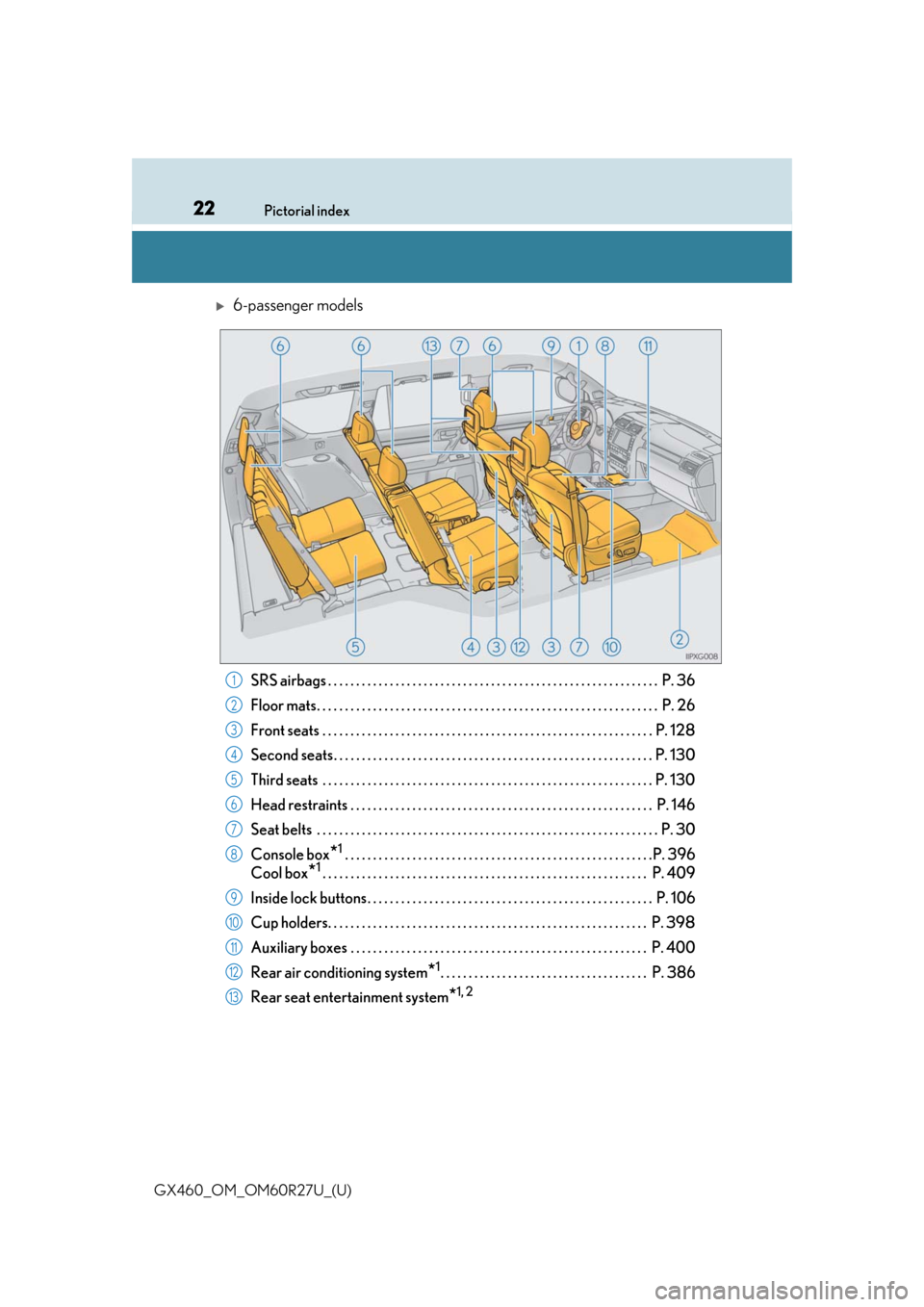
6-passenger models
SRS airbags . . . . . . . . . . . . . . . . . . . . . . . . . . . . . . . . . . . . . . . . . . . . . . . . . . . . . . . . . . . P. 36
Floor mats. . . . . . . . . . . . . . . . . . . . . . . . . . . . . . . . . . . . . . . . . . . . . . . . . . . . . . . . . . . . . P. 26
Front seats . . . . . . . . . . . . . . . . . . . . . . . . . . . . . . . . . . . . . . . . . . . . . . . . . . . . . . . . . . . P. 128
Second seats. . . . . . . . . . . . . . . . . . . . . . . . . . . . . . . . . . . . . . . . . . . . . . . . . . . . . . . . . P . 130
Third seats . . . . . . . . . . . . . . . . . . . . . . . . . . . . . . . . . . . . . . . . . . . . . . . . . . . . . . . . . . . P. 130
Head restraints . . . . . . . . . . . . . . . . . . . . . . . . . . . . . . . . . . . . . . . . . . . . . . . . . . . . . . P. 146
Seat belts . . . . . . . . . . . . . . . . . . . . . . . . . . . . . . . . . . . . . . . . . . . . . . . . . . . . . . . . . . . . . P. 30
Console box
*1 . . . . . . . . . . . . . . . . . . . . . . . . . . . . . . . . . . . . . . . . . . . . . . . . . . . . . . .P. 396
Cool box
*1. . . . . . . . . . . . . . . . . . . . . . . . . . . . . . . . . . . . . . . . . . . . . . . . . . . . . . . . . . P. 409
Inside lock buttons . . . . . . . . . . . . . . . . . . . . . . . . . . . . . . . . . . . . . . . . . . . . . . . . . . . P. 106
Cup holders. . . . . . . . . . . . . . . . . . . . . . . . . . . . . . . . . . . . . . . . . . . . . . . . . . . . . . . . . P. 398
Auxiliary boxes . . . . . . . . . . . . . . . . . . . . . . . . . . . . . . . . . . . . . . . . . . . . . . . . . . . . . P. 40 0
Rear air conditioning system
*1. . . . . . . . . . . . . . . . . . . . . . . . . . . . . . . . . . . . . P. 386
Rear seat entertainment system
*1, 2
1
2
3
4
5
6
7
8
9
10
11
12
13
Page 44 of 620
441-1. For safe use
GX460_OM_OM60R27U_(U)
■SRS airbag deployment conditions (SRS front airbags)
●The SRS front airbags will deploy in the event of an impact that exceeds the set thresh-
old level (the level of force corresponding to an approximately 12 - 18 mph [20 - 30
km/h] frontal collision with a fixed wa ll that does not move or deform).
However, this threshold velocity will be cons iderably higher in the following situations:
• If the vehicle strikes an object, such as a parked vehicle or sign pole, which can move
or deform on impact
• If the vehicle is involved in an underride collision, such as a collision in which the
front of the vehicle “underrides”, or goes under, the bed of a truck
●Depending on the type of collision, it is possi ble that only the seat belt pretensioners will
activate.
●The SRS front airbags for the fr ont passenger will not activate if there is no passenger
sitting in the front passenger seat. However, the SRS front airbags for the front passen-
ger may deploy if luggage is put in the seat, even if the seat is unoccupied.
■SRS airbag deployment conditions (S RS side and curtain shield airbags)
●The SRS side and curtain shield airbags w ill deploy in the event of an impact that
exceeds the set threshold level (the level of force corresponding to the impact force
produced by an approximately 3300 lb. [15 00 kg] vehicle colliding with the vehicle
cabin from a direction perpendicular to the vehicle orientation at an approximate
speed of 12 - 18 mph [20 - 30 km/h]).
●Both SRS curtain shield airbags will de ploy in the event of vehicle rollover.
●All SRS side and curtain shield airbags will de ploy in the event of a severe frontal colli-
sion.
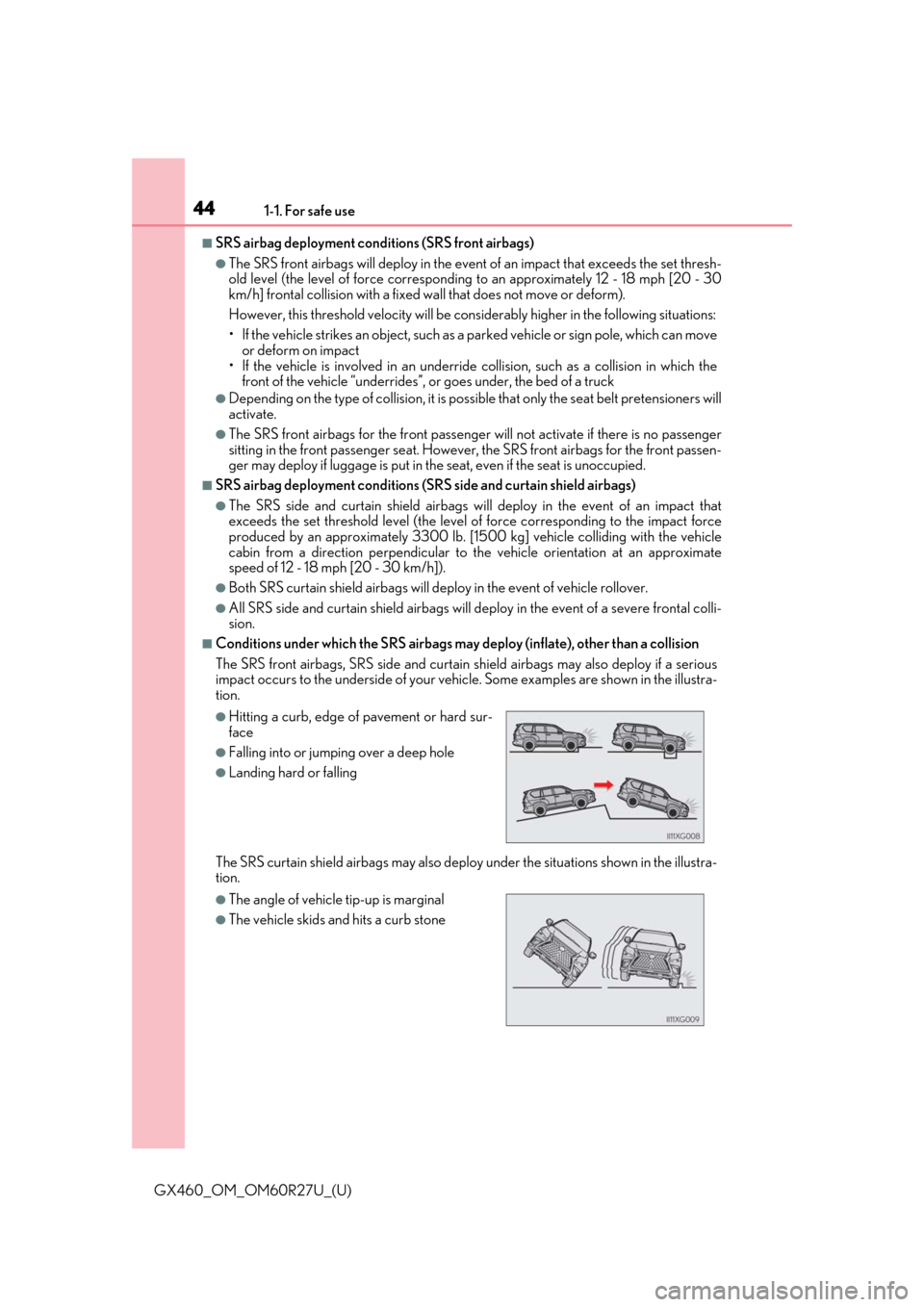
■Conditions under which the SRS airbags may deploy (inflate), other than a collision
The SRS front airbags, SRS side and curtain sh ield airbags may also deploy if a serious
impact occurs to the undersid e of your vehicle. Some exampl es are shown in the illustra-
tion.
The SRS curtain shield airbags may also deploy under the situations shown in the illustra-
tion.
●Hitting a curb, edge of pavement or hard sur-
face
●Falling into or jumping over a deep hole
●Landing hard or falling
●The angle of vehicle tip-up is marginal
●The vehicle skids and hits a curb stone
Page 47 of 620
471-1. For safe use
GX460_OM_OM60R27U_(U)
1
For safety and security
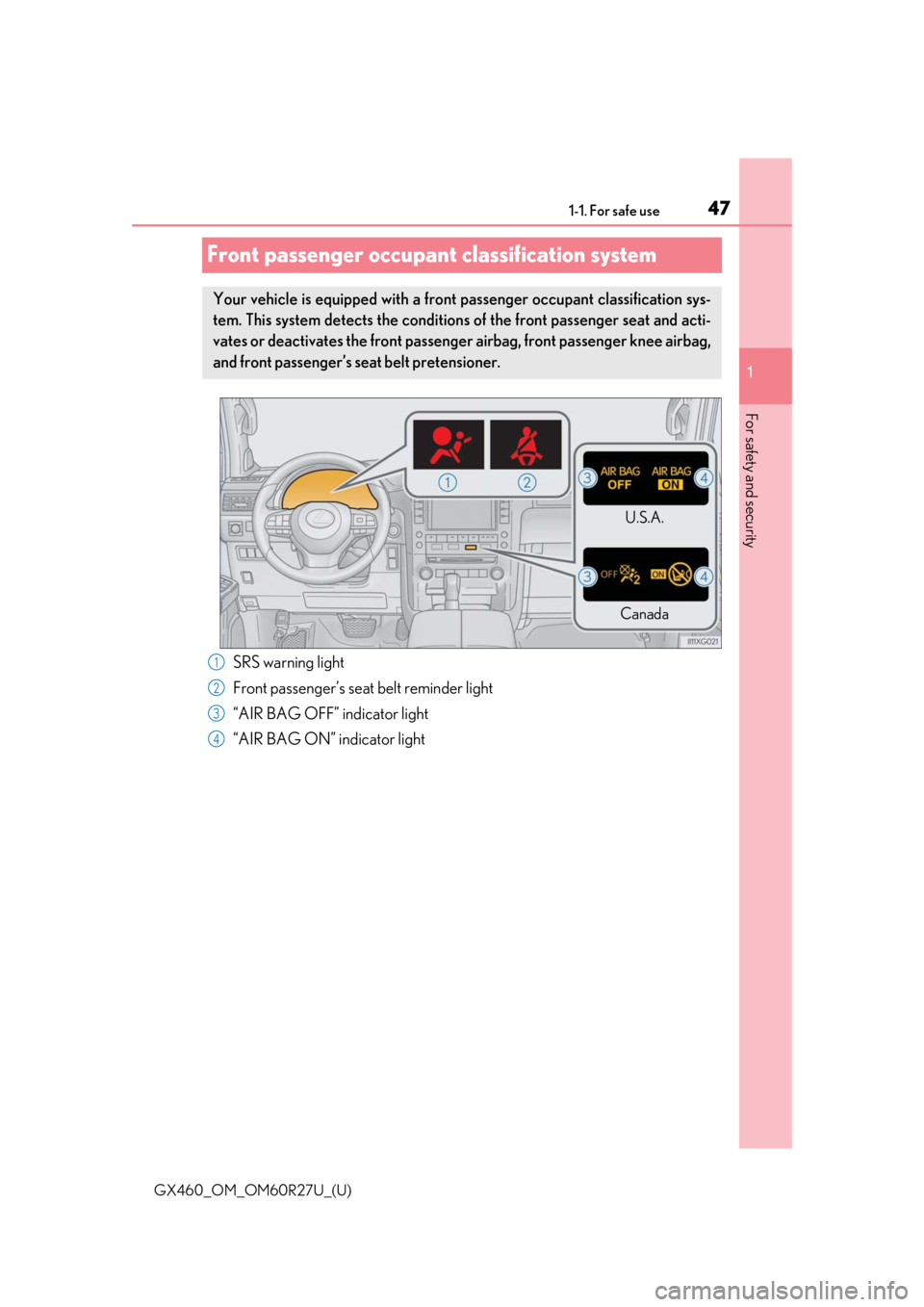
Front passenger occupant classification system
Your vehicle is equipped with a front passenger occupant classification sys-
tem. This system detects the conditions of the front passenger seat and acti-
vates or deactivates the front passenger airbag, front passenger knee airbag,
and front passenger’s seat belt pretensioner.
U.S.A.
Canada
SRS warning light
Front passenger’s seat belt reminder light
“AIR BAG OFF” indicator light
“AIR BAG ON” indicator light1
2
3
4
Page 48 of 620
481-1. For safe use
GX460_OM_OM60R27U_(U)
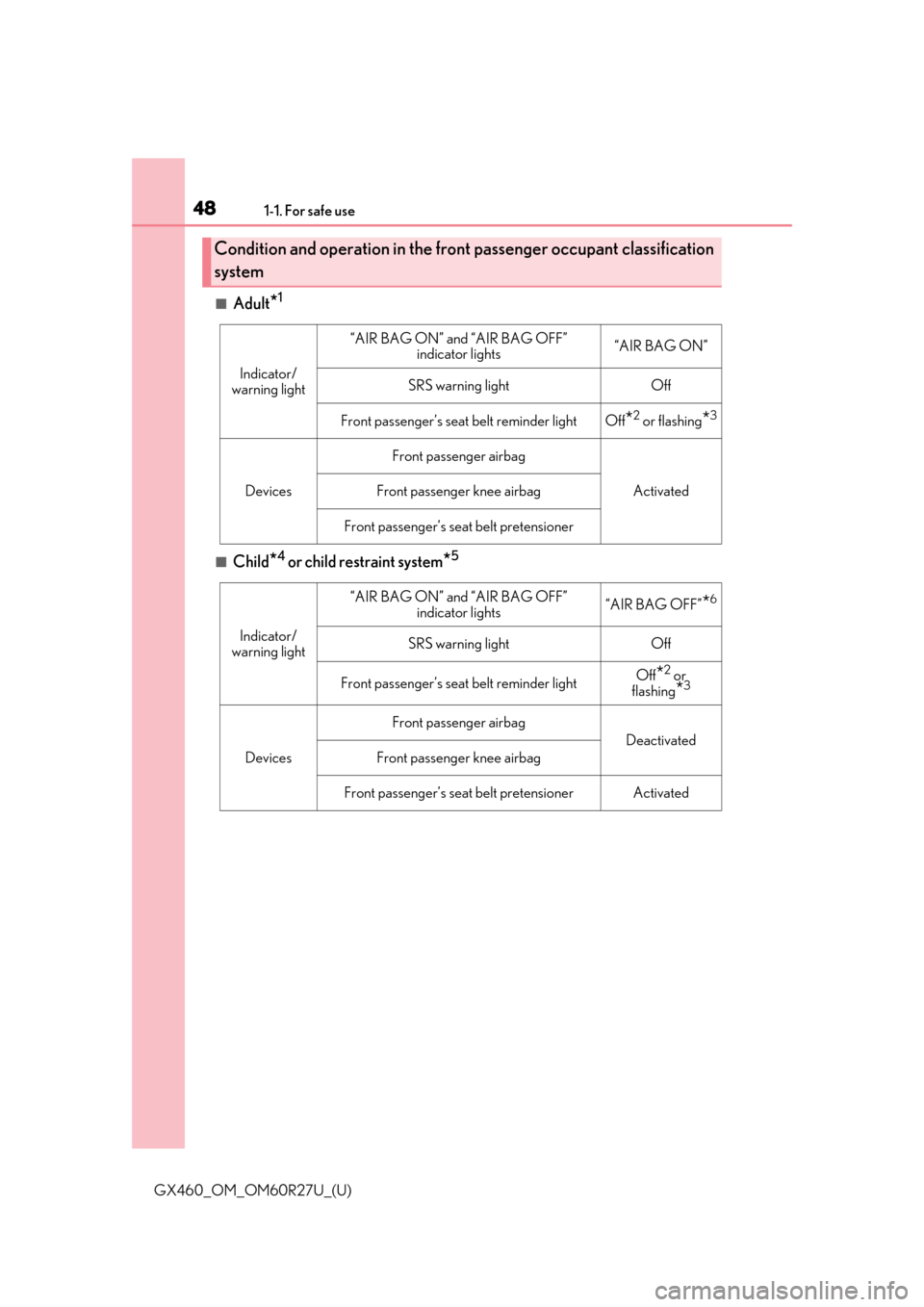
■Adult*1
■Child*4 or child restraint system*5
Condition and operation in the front passenger occupant classification
system
Indicator/
warning light
“AIR BAG ON” and “AIR BAG OFF” indicator lights“AIR BAG ON”
SRS warning lightOff
Front passenger’s seat belt reminder lightOff*2 or flashing*3
Devices
Front passenger airbag
ActivatedFront passenger knee airbag
Front passenger’s seat belt pretensioner
Indicator/
warning light
“AIR BAG ON” and “AIR BAG OFF” indicator lights“AIR BAG OFF”*6
SRS warning lightOff
Front passenger’s seat belt reminder lightOff*2 or
flashing*3
Devices
Front passenger airbag
Deactivated
Front passenger knee airbag
Front passenger’s seat belt pretensionerActivated
Page 74 of 620

741-2. LEXUS Enform
GX460_OM_OM60R27U_(U)
■Automatic Collision Notification
In case of either airbag deployment or severe rear-end collision, the system is
designed to automatically call the re sponse center. The responding agent
receives the vehicle’s location and attempts to speak with the vehicl\
e occu-
pants to assess the level of emergency. If the occupants are unable to commu-
nicate, the agent automatically treats the call as an emergency, contacts the
nearest emergency services provider to describe the situation, and requests
that assistance be sent to the location.
■Stolen Vehicle Location
If your vehicle is stolen, Safety Conn ect can work with local authorities to
assist them in locating and recovering the vehicle. After filing a police report,
call the Safety Connect response ce nter at 1-800-25-LEXUS (1-800-255-
3987) in the United Stat es, 1-877-539-8777 in Pu erto Rico or 1-800-265-
3987 in Canada, and follow the prompts for Safety Connect to initiate this
service.
In addition to assisting law enforcemen t with recovery of a stolen vehicle,
Safety-Connect-equipped vehicle locatio n data may, under certain circum-
stances, be shared with third parties to locate your vehicle. Further informa-
tion is available at Lexus.com.
■Emergency Assistance Button (“SOS”)
In the event of an emergency on the ro ad, push the “SOS” button to reach the
Safety Connect response center. Th e answering agent will determine your
vehicle’s location, assess the emergency, and dispatch the necessary assis-
tance required.
If you accidentally press the “SOS” button, tell the response-center agent that you
are not experiencing an emergency.
■Enhanced Roadside Assistance
Enhanced Roadside Assistance adds GP S data to the already included war-
ranty-based Lexus roadside service.
Subscribers can press the “SOS” button to reach a Safety Connect response-
center agent, who can help with a wide range of needs, such as: towing, flat
tire, fuel delivery, etc. For a descript ion of the Roadside Assistance services
and their limitations, please see the Safety Connect Terms and Conditions,
which are available at Lexus.com.
Safety Connect services
Page 123 of 620

GX460_OM_OM60R27U_(U)
1233-2. Opening, closing and locking the doors
3
Operation of each component
■Battery-saving function
The battery-saving function will be activated in order to prevent the electronic key bat-
tery and the vehicle battery from being discharged while the vehicle is not in operation
for a long time.
●In the following situations, the smart acce ss system with push-button start may take
some time to unlock the doors.
• The electronic key has been le ft in an area of approximately 6 ft. (2 m) of the outside
of the vehicle for 10 minutes or longer.
• The smart access system with push-button st art has not been used for 5 days or lon-
ger.
●If the smart access system with push-button start has not been used for 14 days or lon-
ger, the doors cannot be unlocked at any doors except the driver’s door. In this case,
take hold of the driver’s d oor handle, or use the wireless remote control or the mechan-
ical key, to unlock the doors.
■Electronic Key Battery-Saving Function
●When battery-saving mode is set, battery de pletion is minimized by stopping the elec-
tronic key from re ceiving radio waves.
●Electronic keys that will not be used for long periods of time can be set to the battery-
saving mode in advance.
■Conditions affe cting operation
The smart access system with push-button st art uses weak radio waves. In the following
situations, the communication between the electronic key and the vehicle may be
affected, preventing the smar t access system with push-but ton start, wireless remote
control and engine immobilizer system from operating properly.
(Ways of coping: P. 540)
●When the electronic key battery is depleted
●Near a TV tower, electric power plant, gas st ation, radio station, large display, airport or
other facility that generates strong radio wave s or electrical noise
●When the electronic key is in contact with, or is covered by the following metallic
objects
• Cards to which aluminum foil is attached
• Cigarette boxes that have aluminum foil inside
• Metallic wallets or bags
•Coins
• Hand warmers made of metal
• Media such as CDs and DVDs
●When other wireless keys (that emit radio waves) are being used nearby Press twice while pr essing and holding
. Confirm that the el ectronic key indi-
cator flashes 4 times.
While the battery-saving mode is set, the
smart access system with push-button start
cannot be used. To cancel the function, press
any of the electronic key buttons.