stop Lexus GX470 2007 Using other driving systems / LEXUS 2007 GX470 QUICK REFERENCE MANUAL
[x] Cancel search | Manufacturer: LEXUS, Model Year: 2007, Model line: GX470, Model: Lexus GX470 2007Pages: 58, PDF Size: 3.36 MB
Page 8 of 58
Topic 1
Entering and Exiting
8
Entering and Exiting
When Driving
Rain and
Night Driving
Driving Comfort
Opening and Closing
What to do if ...
Customizing
Yo u r L e x u s
Before DrivingBefore Driving
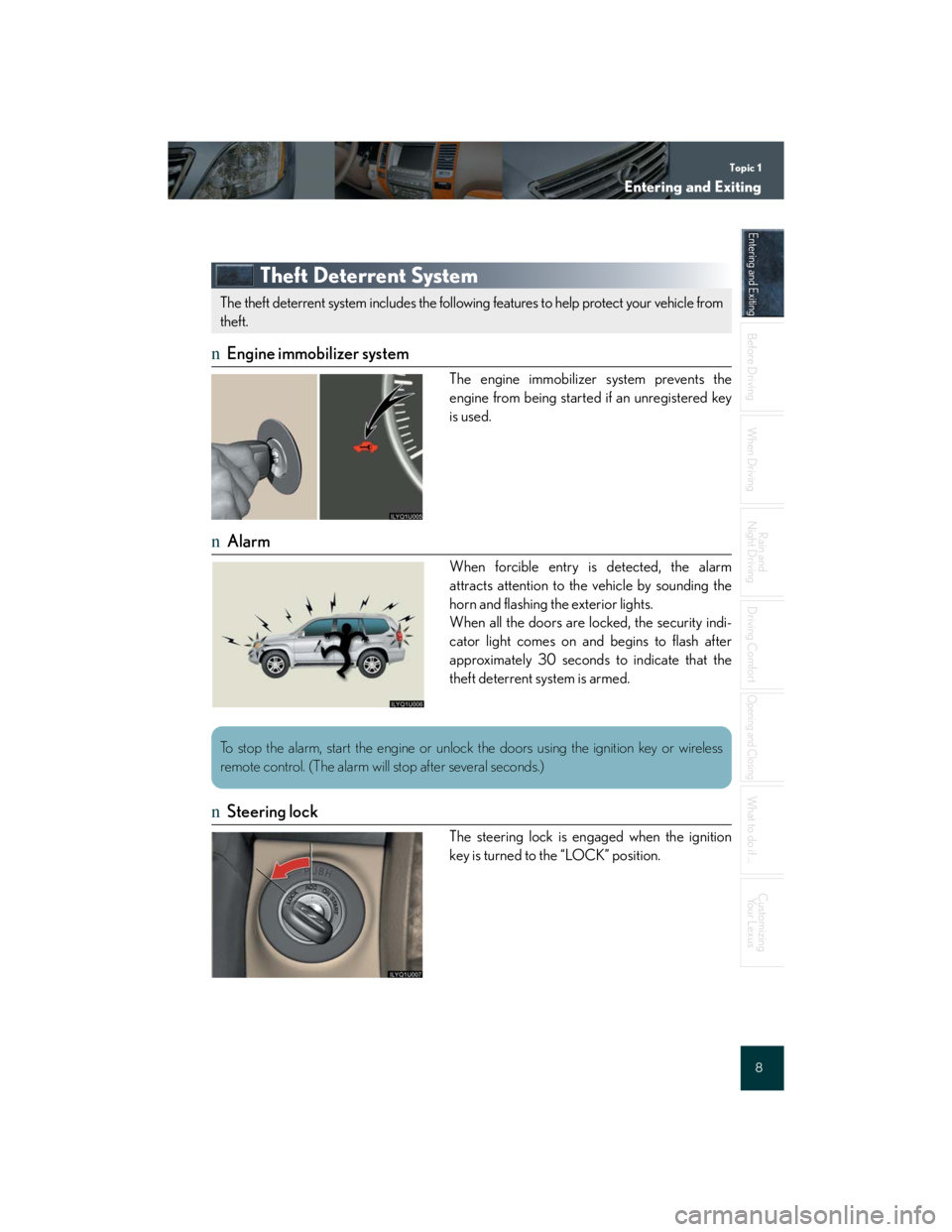
Theft Deterrent System
nEngine immobilizer system
The engine immobilizer system prevents the
engine from being started if an unregistered key
is used.
nAlarm
When forcible entry is detected, the alarm
attracts attention to the vehicle by sounding the
horn and flashing the exterior lights.
When all the doors are locked, the security indi-
cator light comes on and begins to flash after
approximately 30 seconds to indicate that the
theft deterrent system is armed.
nSteering lock
The steering lock is engaged when the ignition
key is turned to the “LOCK” position.
The theft deterrent system includes the following features to help protect your vehicle from
theft.
To stop the alarm, start the engine or unlock the doors using the ignition key or wireless
remote control. (The alarm will stop after several seconds.)
Page 21 of 58

Topic 3
When Driving
21
Starting
nStarting the engine
Make sure the parking brake is engaged and the
shift lever is in “P”.
Depress the brake pedal.
Turn the ignition key to the “START” position.
nStopping the engine
Engage the parking brake and shift the shift lever to “P”.
Turn the ignition key to the “LOCK” position.
nIgnition switch
“LOCK”
“A C C ”
Some electrical components such as the audio
system can be used.
“ON”
“START”1
2
3
4
Once you turn the ignition key to the “START” position and release it, the cranking hold
function continues to crank the engine until it starts.
Page 22 of 58

Topic 3
When Driving
22
Entering and Exiting
Before DrivingBefore Driving
When DrivingWhen Driving
Rain and
Night Driving
Driving Comfort
Opening and Closing
What to do if ...
Customizing
Yo u r L e x u s
Automatic Transmission
nShift positions
PPa r k
RReverse
NNeutral (drive not engaged)
DDrive
4Position for engine braking
3, 2Position for more powerful engine braking
LPosition for maximum engine braking
The vehicle can only be shifted out of P when
the ignition switch is in the “ON” position and
the brake pedal is depressed.
Downshifting increases engine power for uphill
driving, or engine braking for downhill driving and
stopping.
Parking Brake
To s e t: pull the parking brake lever firmly upward.
To r e l e a s e: press and hold the lock release button
and lift the lever slightly before lower-
ing it as far as it will go.
Page 27 of 58

Topic 3
When Driving
27
Powe r O u t l e t s
n12V DC
Designed for use with car accessories. The igni-
tion switch must be in the “ACC” or “ON” posi-
tion for this power outlet to be used.
n115V AC
Designed for use with electrical appliances. The
ignition switch must be in the “ON” position to
use this power outlet.
To use the power outlet, push the “AC 115V”
switch on the instrument panel.
Four-Wheel Drive Control Lever
“L” (low speed position)
Use this position for maximum power and
traction.
“N” (neutral position)
No power is delivered to the wheels. The vehi-
cle must be stopped.
“H” (high speed position)
Use this position for normal driving on all types
of roads.
To shift between “H” and “L”, stop the vehicle, put
the shift lever in “N” and move the four-wheel
drive control lever.
Do not use the power outlet longer than necessary when the engine is not running.
1
2
3
Page 39 of 58

Topic 5
Driving Comfort
39
Rear Seat Entertainment System (If Equipped)
nDisplay
Press the lock release button.
The angle can be adjusted between 90° and
125°.
nDVD player
Eject
Disc slot
nRemote control
Mode select (power on)
Cursor position
Enter
Track/chapter select
Play/pause
Rewind
Title/disc menu number search
Po w e r o f f
Folder select
Fast for ward
Stop
The rear seat entertainment system is designed to allow rear passengers to enjoy audio and
DVD video separate from the front audio system.
1
2
1
2
3
4
5
6
7
8
9
10
11
Page 48 of 58

Topic 6
Opening and Closing
48
Entering and Exiting
Before DrivingBefore Driving
When Driving
Rain and
Night Driving
Driving Comfort
Opening and ClosingOpening and Closing
What to do if ...
Customizing
Yo u r L e x u s
Back Door
Pull the handle to open the back door.
Powe r Wi n d ows
Powe r w i n d ow s w i t c h e s
To o p e n : press the switch.
To c l o s e : pull the switch up.
To fully raise or lower a window automati-
cally, pull the switch all the way up or push it
all the way down.
Window lock switch
The window lock switch disables all win-
dows other than the driver’s door window.
Moon Roof
nOpening and closing
Open
Push the switch for approximately 1 second.
Close
Push the switch for approximately 1 second.
To stop operation partway, push either side of
the switch.
1
2
1
2
Page 49 of 58

Topic 6
Opening and Closing
49
nTilt up and down
Ti l t d o w n
Push the switch for approximately 1 second.
Ti l t u p
Push the switch for approximately 1 second.
To stop operation partway, push either side of
the switch.
Fuel Tank Cap
Pull the lever to open the fuel filler door.
Turn the fuel tank cap counterclockwise by 90
degrees (to the pressure point), then turn it an
additional 30 degrees.
Pause briefly before removing the cap.
1
2
Page 51 of 58

What to do if ...
51
List of Warning/Indicator Lights
Stop the vehicle immediately. Continuing to drive the vehicle may be dangerous.
(U.S.A.)
Brake system warning light
(Canada)
Stop the vehicle immediately.
Charging system warning lightLow engine oil pressure warn-
ing light
Have the vehicle inspected immediately.
(U.S.A.)Malfunction
indicator lampVSC/TRAC warning light
(Canada)Automatic transmission fluid
temperature warning light
SRS warning lightUnengaged “Park” warning
light
(U.S.A.)
ABS warning light
Kinetic dynamic suspension
system warning light
(if equipped)
(Canada)
For further information, refer to the Owner's Manual.