power Lexus HS250h 2010 Basic Information Before Operation / LEXUS 2010 HS250H (OM75006U) User Guide
[x] Cancel search | Manufacturer: LEXUS, Model Year: 2010, Model line: HS250h, Model: Lexus HS250h 2010Pages: 608, PDF Size: 9.89 MB
Page 34 of 608

34
1-1. Hybrid system
These images are examples only, and may vary slightly from actual conditions.
Navigation screenMulti-information
display
When the vehicle is
powered by the
electric motor
(traction motor)
When the vehicle is
powered by both
the gasoline engine
and the electric
motor (traction
motor)
When the vehicle is
powered by the
gasoline engine
When the vehicle is
charging the hybrid
battery (traction
battery)
When there is no
energy flow
Hybrid battery
(traction battery)
statusLowFullLowFull
Page 48 of 608
48
1-3. Opening, closing and locking the doors
■Alarms and warning indicators
A combination of exterior and interior alarms as well as warning messages shown
on the multi-information display is used to prevent theft of the vehicle and accidents
resulting from erroneous operation. Take appropriate measures in response to any
warning message on the multi-information display. ( P. 5 0 1 )
The following table describes circumstances and correction procedures when only
alarms are sounded.
■Security feature
If a door is not opened within approx imately 60 seconds after the vehicle is
unlocked, the security feature automatically locks the vehicle again.
■Battery-saving function
The battery-saving function will be activa ted in order to prevent the electronic key
battery and the 12-volt battery from being discharged while the vehicle is not in
operation for a long time.
●In the following situations, the smart access system with pu sh-button start may
take some time to unlock the doors.
• The electronic key has been left in an area of approximately 6 ft. (2 m) of the
outside of the vehicle for 10 minutes or longer.
• The smart access system with push-button start has not been used for 5 days or longer.
AlarmSituationCorrection procedure
Exterior alarm
sounds once for 10
seconds.An attempt was made to lock
the vehicle while a door was
open.Close all of the doors
and lock the doors
again.
Interior alarm pings
repeatedly
The “POWER” switch was
turned to ACCESSORY
mode while the driver’s door
is open (The driver’s door
was opened when the
“POWER” switch is in
ACCESSORY mode.)
Turn the “POWER”
switch off and close the
driver’s door.
Page 49 of 608

49
1-3. Opening, closing and locking the doors
1
Before driving
●If the smart access system with push-button start has not been used for 14 days
or longer, the doors cannot be unlocked at any doors except the driver’s door. In
this case, take hold of the driver’s door handle, or use the wireless remote con-
trol or the mechanical key, to unlock the doors.
■Conditions affecting operation
The smart access system with push-button start uses weak radio waves. In the fol-
lowing situations, the communication between the electronic key and the vehicle
may be affected, preventing the smart access system with push-button start, wire-
less remote control and immobilize r system from operating properly.
(Ways of coping: P. 5 3 3 )
●When the electronic key battery is depleted
●Near a TV tower, electric power plant, gas station, radio station, large display,
airport or other facility that generates strong radio waves or electrical noise
●When carrying a portable radio, cellular phone, cordless phone or other wire-
less communication devices
●When the electronic key is in contact wi th, or is covered by the following metal-
lic objects
• Cards to which aluminum foil is attached
• Cigarette boxes that have aluminum foil inside
• Metallic wallets or bags
•Coins
• Hand warmers made of metal
• Media such as CDs and DVDs
●When other wireless key (that emit radio waves) is being used nearby
●When carrying the electronic key together with the following devices that emit
radio waves
• Another vehicle’s electronic key or a wireless key that emits radio waves
• Personal computers or person al digital assistants (PDAs)
• Digital audio players
• Portable game systems
●If window tint with a metallic content or metallic objects are attached to the rear
window
Page 50 of 608

50
1-3. Opening, closing and locking the doors
■Note for the entry function
●Even when the electronic key is within the effective range (detection areas), the
system may not operate properly in the following cases:
• The electronic key is too close to the window or outside door handle, near the
ground, or in a high place when the doors are locked or unlocked.
• The electronic key is near the ground or in a high place, or too close to the rear bumper center when the trunk is unlocked.
• The electronic key is on the instrument panel, rear package tray or floor, or in the door pockets or glove box when the hybrid system is started or
“POWER” switch modes are changed.
●As long as the electronic key is within the effective range, the doors may be
locked or unlocked by anyone.
●Even if the electronic key is not inside th e vehicle, it may be possible to start the
hybrid system if the electronic key is near the window.
●The doors may unlock if a large amount of water splashes on the door handle,
such as in the rain or in a car wash when the electronic key is within the effective
range. (The door will automatically be locked after approximately 60 seconds if
the doors are not opened and closed.)
●Gripping the door handle when wearing a glove may not unlock the door.
●If the wireless remote control is used to lock the doors when the electronic key
is near the vehicle, there is a possibility that the door may not be unlocked by the
entry function. (Use the wireless re mote control to unlock the doors.)
●A sudden approach to the effective range or door handle may prevent the
doors from being unlocked. In this case, return the door handle to the original
position and check that the doors unlock before pulling the door handle again.
■Notes for locking the doors
●Touching the door lock sensor while we aring gloves may delay or prevent lock
operation. Remove the gloves and touch the lock sensor again.
●When the lock operation is performed using the lock sensor, recognition signals
will be shown up to two consecutive times. After this, no recognition signals will
be given.
●If the door handle becomes wet while the electronic key is within the effective
range, the door may lock and unlock repeatedly. Place the key in a position 6 ft.
(2 m) or more separate from the vehicle while the vehicle is being washed. (Take
care to ensure that the key is not stolen.)
Page 58 of 608

58
1-3. Opening, closing and locking the doors
Locking the front doors from the outside without a key
Move the inside lock button to the lock position.
Close the door.
The door cannot be locked if the “POWER” switch is in ACCESSORY or
ON mode, or the electr
onic key is left inside the vehicle.
The key may not be detected correctly and the door may be locked.
Rear door child-protector lock
The door cannot be opened from
inside the vehicle when the lock is
set.
These locks can be set to prevent
children from opening the rear
doors. Push down on each rear
door switch to lock both rear
doors.
■Impact detection door lock release system
In the event that the vehicle is subject to a strong impact, all the doors are unlocked.
Dep
ending on the force of the impact or the type of accident, however, the system
may not operate.
■Using the mechanical key
The doors can also be locked and unlocked with the mechanical key. ( P.
5 3 3 )
■If a wrong key is used
The key cylinder rotates freely to isolate inside mechanism.
■Customization
Settings (e.g. unlocking function using a key) can be changed.
(Customizable features P. 5 7 2 )
Page 65 of 608
65
1-4. Adjustable components (seats, mirrors, steering wheel)
1
Before driving
Power easy access system (vehicles with driving position memory)
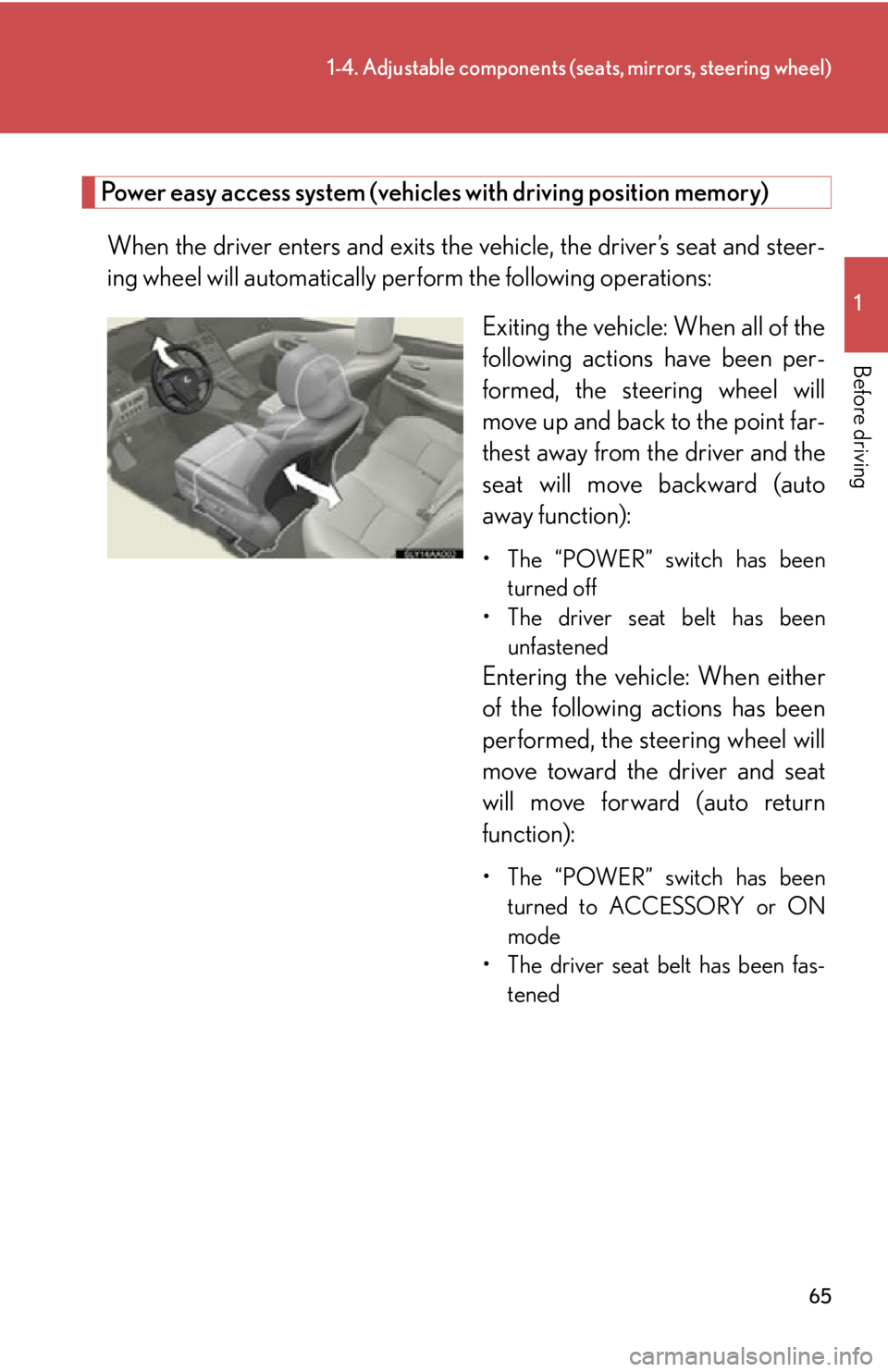
When the driver enters and exits the vehicle, the driver’s seat and steer -
ing wheel will automatically perf orm the follo
wing operations:
Exiting the vehicle: When all of the
follo
wing actions have been per -
formed, the steering wheel will
mo
ve up and back to the point far -
thest away from the driver and the
seat will mo
ve backward (auto
away function):
• The “POWER” switch has been
turned off
• The driver seat belt has been unfastened
Entering the vehi cle: When either
of the following actions has been
performed, the steering wheel will
move toward the driver and seat
will move forward (auto return
function):
• The “POWER” switch has been
turned to ACCESSORY or ON
mode
• The driver seat belt has been fas -
tened
Page 68 of 608

68
1-4. Adjustable components (seats, mirrors, steering wheel)
Driving position memory (driver’s seat)
: If equipped
Your preferred driving position (the po sition of the driver’s seat, steering
wheel and outside rear view mirrors) can be memorized and recalled with
the touch of a button. It is also possible to set this function to activate auto
-
matically when the doors are unlocked.
Three different driving positions can be entered into memory.
■ Entering a position to memory
Check that the shift position is in P.
Turn the “POWER” switch to ON mode.
Adjust the driver’s seat, steering wheel and outside r
ear view
mirrors to the desired positions.
While pressing and holding the
“
SET” button, or within 3 sec -
onds of pressing the “SET” but -
ton, press button 1, 2 or 3 until
the signal beeps.
If the selected button has
already been preset, the previ -
ously recorded position will be
o
verwritten.
■ Recalling the memorized position
Check that the shift position is in P.
Turn the “POWER” switch to ON mode.
Press button 1, 2 or 3 until the
signal beeps to r
ecall the
desired position.
Page 69 of 608

69
1-4. Adjustable components (seats, mirrors, steering wheel)
1
Before driving
Linking driving position memory with door unlock operation
Record your driving position to button 1, 2 or 3 before performing the fol-
lowing:
Carry only the key (including the card k
ey) to which you want to link the
driving position. If 2 or more keys are in the vehi cle, the driving position
cannot be linked properly.
Shift the shift position to P and close the driv
er’s door. Turn the
“POWER” switch to ON mode.
Press the desired button (1, 2 or 3)
to r
ecall the position. Then, while
keep pressing the button, press the
driver’s door lock switches (either
lock or unlock) until the signal
beeps.
The driving position is recalled
when the driver’s door is unlocked
using the entry function or wireless
remote control and the driver’s
door is opened.
Page 70 of 608

70
1-4. Adjustable components (seats, mirrors, steering wheel)
■Operating the driving position memory after turning the “POWER” switch off
Memorized positions (except for the steeri ng
wheel position) can be activated up
to 180 seconds after the driver’s door is opened and another 60 seconds after it is
closed again, even after turning the “POWER” switch off.
■Canceling the linked do or unlock operation
Turn the “POWER” switch to ON mode and close the driver’s door.
While pressing the “SET” button, press the driver’s door lock switches
(either lock or unlock) until the signal beeps.
■Stopping seat position op eration part-way through
Perform any of the following operations:
●Press the “SET” button.
●Press button 1, 2 or 3.
●Adjust the seat using the switches (only cancels seat position recall).
●Adjust the steering wheel using the tilt and telescopic steering control switch
(only cancels steering wheel position recall).
■Correct seat position
When the seat is in the most forward or most ba
ckward position, and the seat is
being moved in those directions, the syst em may not correctly recognize the cur-
rent position and the memorized posi ti
on will not be correctly recalled.
■Customization
If a seat position is memorized, the driv er seat will mo
ve back the set distance
( P. 5 7 2
) from that memorized position.
CAUTION
■Seat adjustment caution
Take care during seat adjustment so that th e seat does not strike the rear passenger
or squeeze your body against the steering wheel.
Page 79 of 608

79
1
1-4. Adjustable components (seats, mirrors, steering wheel)
Before driving
Steering wheel
: If equipped
The steering wheel can be adjusted to a comfortable position.
■Manual adjustment
Hold the steering wheel and
push the lever down.
Adjust to the ideal position by
mo
ving the steering wheel hori -
zontally and vertically.
After adjustment, pull the lever
up to secure the steering wheel.
■ Power adjustment
Operating the switch moves the s teering wheel in the following direc -
tions:
Up
Down
Away from the driver
Toward the driver