power Lexus HS250h 2010 Basic Information Before Operation / LEXUS 2010 HS250H (OM75006U) Service Manual
[x] Cancel search | Manufacturer: LEXUS, Model Year: 2010, Model line: HS250h, Model: Lexus HS250h 2010Pages: 608, PDF Size: 9.89 MB
Page 155 of 608

155
2-1. Driving procedures
2
When driving
■Selecting a driving mode
The following modes can be selected to suit driving conditions:
Eco mode
Suitable for improving the fuel
economy, because the torque
corresponding to the accelera-
tor pedal depression amount
can be gener
ated more
smoothly than it is in normal
conditions and the operation of
the air conditioning system will
be minimized.
When the Eco mode switch is
pr
essed, the “ECO MODE”
indicator comes on in the meter.
Power mode
Suitable when the vehicle needs
to drive powerfully or travels in
mountainous areas.
When the power mode switch is
pr
essed, the “PWR MODE”
indicator comes on in the meter.
Page 156 of 608

156
2-1. Driving procedures
■For the shift positions
●When the “POWER” switch is off, the shift position cannot be changed.
●When the “POWER” switch is in ON mo de, the shift position can only be
changed to N.
●When the “READY” indicator is on, the sh ift position can be changed from P to
D, N or R.
●The shift position can only be changed to B directly from D.
In addition, if the shift position is change d in any of
the following situations, the
buzzer will sound and the shifting operation wi ll be disabled or the shift position will
automatically change to N. When this happens, select an appropriate shift position.
● Situations where the shifting operation will be disabled:
• When the shift lever is changed from P to
another position without depress-
ing the brake pedal.
• When the shift position is changed from P or N to B.
● Situations where the shift position will automatically change to N:
• When the P position switch is pressed while the vehicle is running.
• When shift position R is selected when the vehicle is moving forward.
• When shift position D is selected when the vehicle is moving in reverse.
• When the shift position is changed from R to B.
■Reverse warning buzzer
When shifting into R, a buzzer will sound to inform the
driver that the shift position is
in R.
■About engine braking
When shift position B is selected, releasing the accelerator pedal will apply engine
br
aking.
• When the vehicle is driven at high sp eeds, comp
ared to ordinary gasoline-
fueled vehicles, the engine braking deceleration is felt less than that of other
vehicles.
• The vehicle can be accelerated even when shift position B is selected.
If the vehicle is driven continuously in the B posi
tion, fuel efficiency will become low.
Usually, select the D position.
Page 157 of 608
157
2-1. Driving procedures
2
When driving
■Power mode automatic deactivation
Power mode is automatically deactivated if the “POWER” switch is turned off after
driving in power mode.
■Customization
Settings (e.g. Reverse warning buzzer) can be changed.
(Customizable features P. 5 7 2 )
CAUTION
■When driving on slippery road surfaces
Do not accelerate or shift gears suddenly.
Sudden changes in engine braking may cause the vehicle to spin or skid, resulting in
an accident.
■For the shift lever
Do not hang anything on the shift lever.
Doing so could prevent the shift lever fr om returning to position, causing unex-
pected accidents to occur when the vehicle is in motion.
NOTICE
■Situations where P position control system malfunctions are possible
If any of the following situations occurs, P position control system malfunctions are
possible.
Immediately stop the vehicle in a safe place on level ground, apply the parking
brake, and then contact your Lexus dealer.
●When the “P Lock Malfunction” warnin g message appears on the multi-informa-
tion display. ( P. 5 0 2 )
●When the P position switch indicator flashes.
●When the shift position symb ols (such as P and R) are flashing on the shift posi-
tion indicator.
●When the shift position indicator remains off.
■When in heavy traffic
If shift position N is sele cted, the hybrid battery (traction battery) will not be
charged. To help prevent the battery from discharging, avoid leaving the N position
selected for an extended period of time.
Page 159 of 608

159
2-1. Driving procedures
2
When driving
Turn signal lever
■Turn signals can be operated when
The “POWER” switch is in ON mode.
■If the indicator flashes faster than usual
Check that a light bulb in the front or rear
turn signal lights has not burned out.
The turn signal lever can be used to show the following intention of the
driver:
Right turn
Left turn
Lane change to the right
(push and hold the lever part-
way)
The right hand signals will flash
until you release the lever.
Lane change to the left (push
and hold the lever partway)
The left hand signals will flash
until you release the lever.
Page 162 of 608
162
2-2. Instrument cluster
Gauges and meters
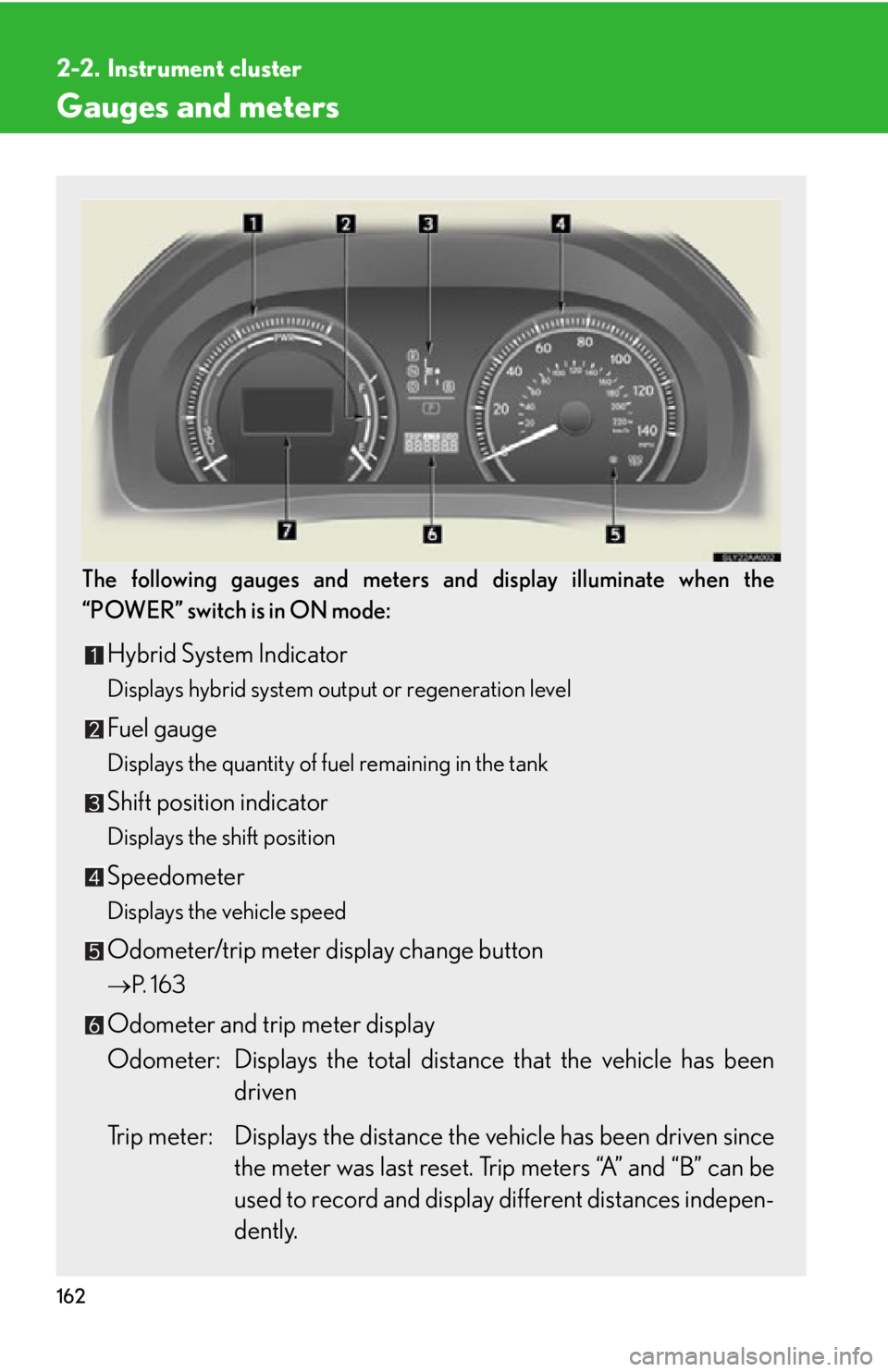
The following gauges and meters and display illuminate when the
“POWER” switch is in ON mode:
Hybrid System Indicator
Displays hybrid system output or regeneration level
Fuel gauge
Displays the quantity of fuel remaining in the tank
Shift position indicator
Displays the shift position
Speedometer
Displays the vehicle speed
Odometer/trip meter display change button
P. 1 6 3
Odometer and trip meter display
Odometer: Displays the total distan ce that the v
ehicle has been
driven
Trip meter: Displays the distance th e v
ehicle has been driven since
the meter was last reset. Trip meters “A” and “B” can be
used to record and display different distances indepen -
dently.
Page 164 of 608
164
2-2. Instrument cluster
■Limitations of brightness adjustment
The brightness of the instrument panel lights is automatically adjusted based on the
light sensor detecting how bright the surroundings are. However, if the instrument
panel brightness has been manually set to either the brightest or dimmest setting,
the automatic adjustment will not be performed.
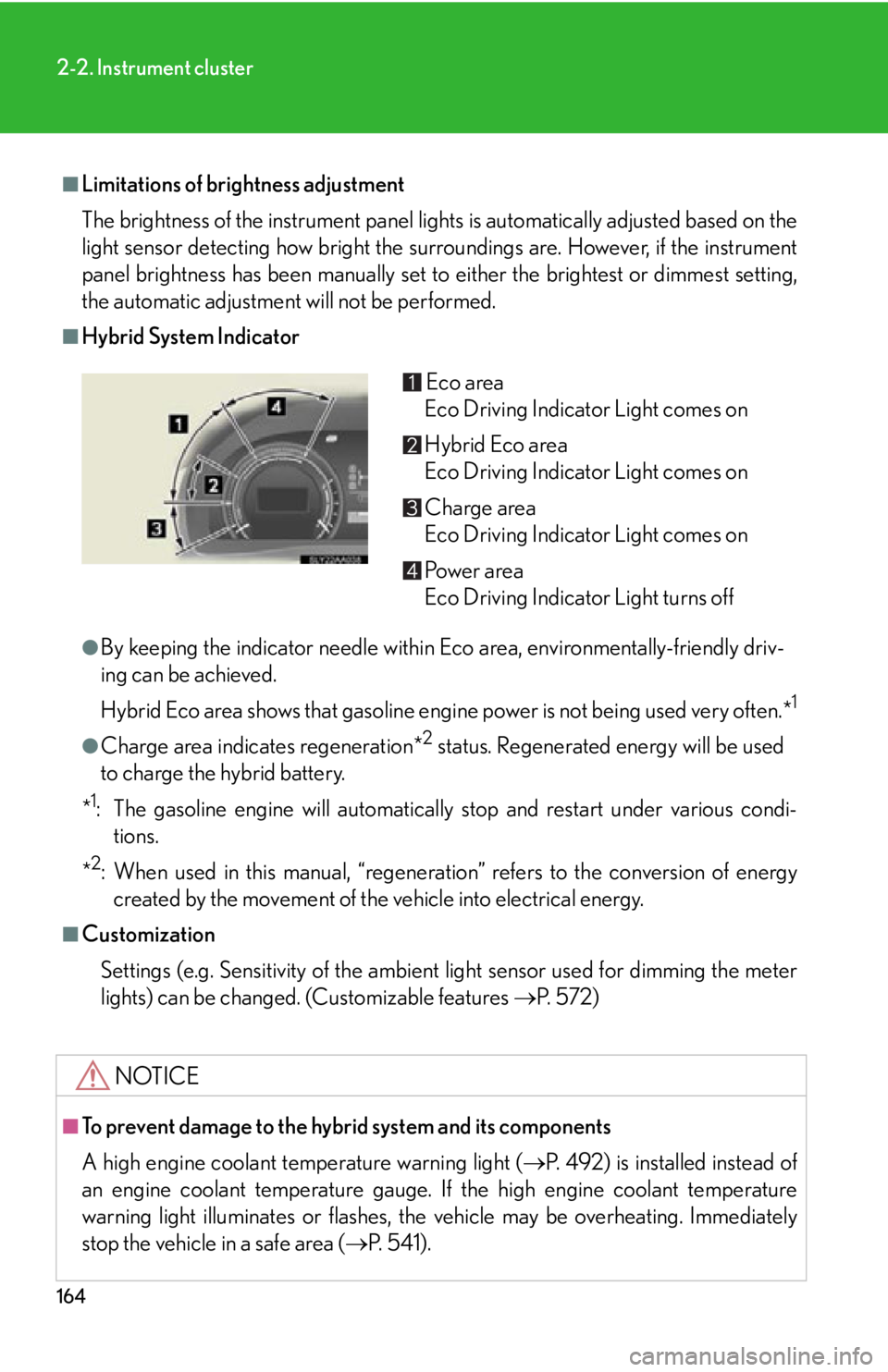
■Hybrid System Indicator
●By keeping the indicator needle within Eco area, environmentally-friendly driv-
ing can be achieved.
Hybrid Eco area shows that gasoline engine power is not being used very often.*
1
●Charge area indicates regeneration*2 status. Regenerated energy will be used
to charge the hybrid battery.
*
1: The gasoline engine will automatically stop and restart under various condi- tions.
*
2: When used in this manual, “regeneration” refers to the conversion of energy created by the movement of the vehicle into electrical energy.
■Customization
Settings (e.g. Sensitivity of the ambient light sensor used for dimming the meter
lights) can be changed. (Customizable features P. 5 7 2 )
NOTICE
■To prevent damage to the hybrid system and its components
A high engine coolant temperature warning light ( P. 492) is installed instead of
an engine coolant temperature gauge. If the high engine coolant temperature
warning light illuminates or flashes, the vehicle may be overheating. Immediately
stop the vehicle in a safe area ( P. 5 4 1 ) .
Eco area
Eco Driving Indicator Light comes on
Hybrid Eco area
Eco Driving Indicator Light comes on
Charge area
Eco Driving Indicator Light comes on
Po w e r a r e a
Eco Driving Indicator Light turns off
Page 167 of 608
167
2-2. Instrument cluster
2
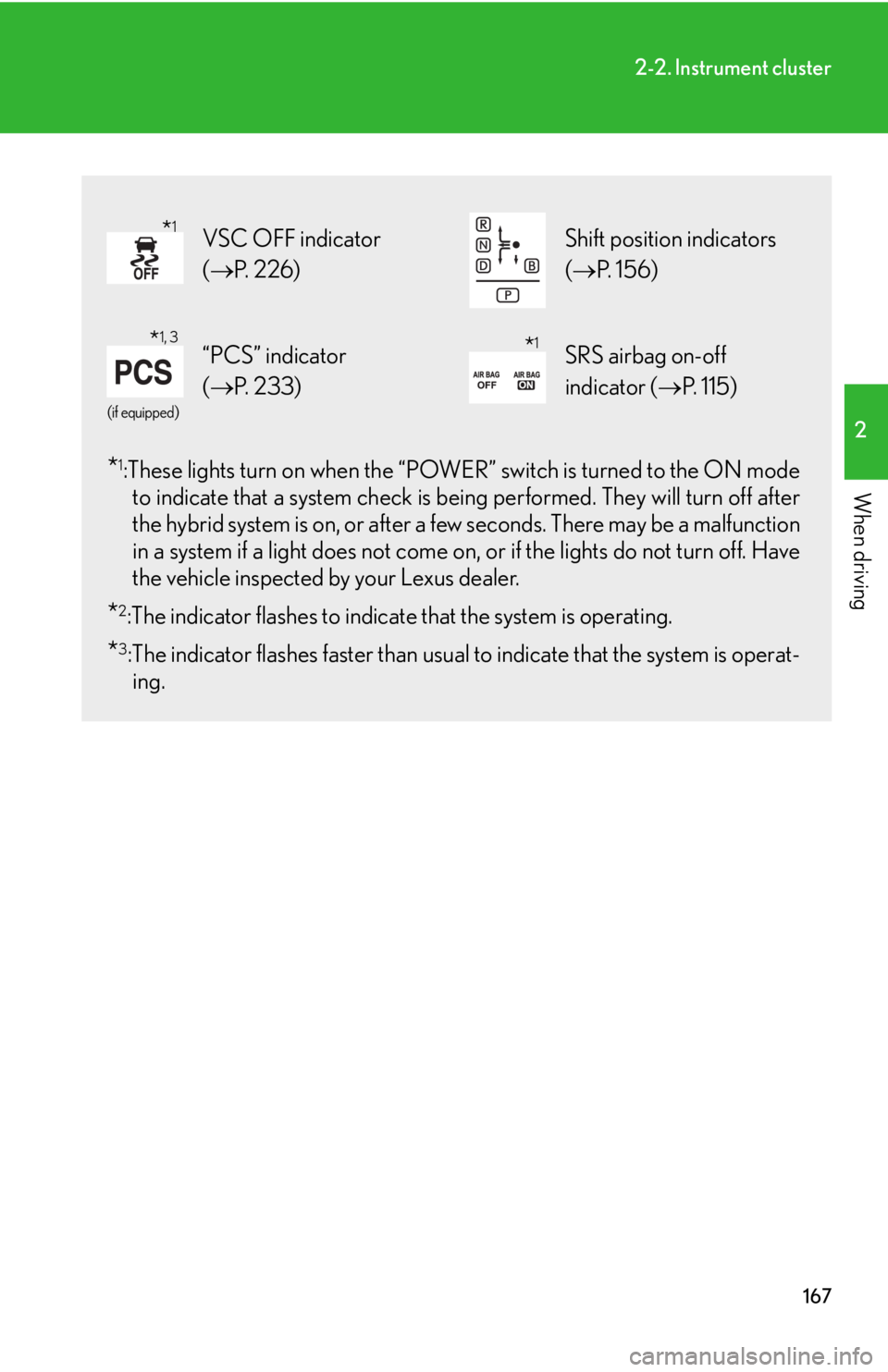
When driving*1:These lights turn on when the “POWER” switch is turned to the ON mode to indicate that a system check is be ing performed. They will turn off after
the hybrid system is on, or after a fe w seconds. There may be a malfunction
in a system if a light does not come on, or if the lights do not turn off. Have
the vehicle inspected by your Lexus dealer.
*2:The indicator flashes to indicate that the system is operating.
*3:The indicator flashes faster than usua l to indicate that the system is operat-
ing.
VSC OFF indicator
( P. 2 2 6 ) Shift position indicators
( P. 1 5 6 )
(if equipped)
“PCS” indicator
( P. 2 3 3 )SRS airbag on-off
indicator ( P. 115)
*1
*1, 3*1
Page 168 of 608
168
2-2. Instrument cluster
CAUTION
■If a safety system warning light does not come on
Should a safety system light such as the ABS and SRS airbag warning light not
come on when you start the hybrid system , this could mean that these systems are
not available to help protect you in an accid ent, which could result in death or seri-
ous injury. Have the vehicle inspected by your Lexus dealer immediately if this
occurs.
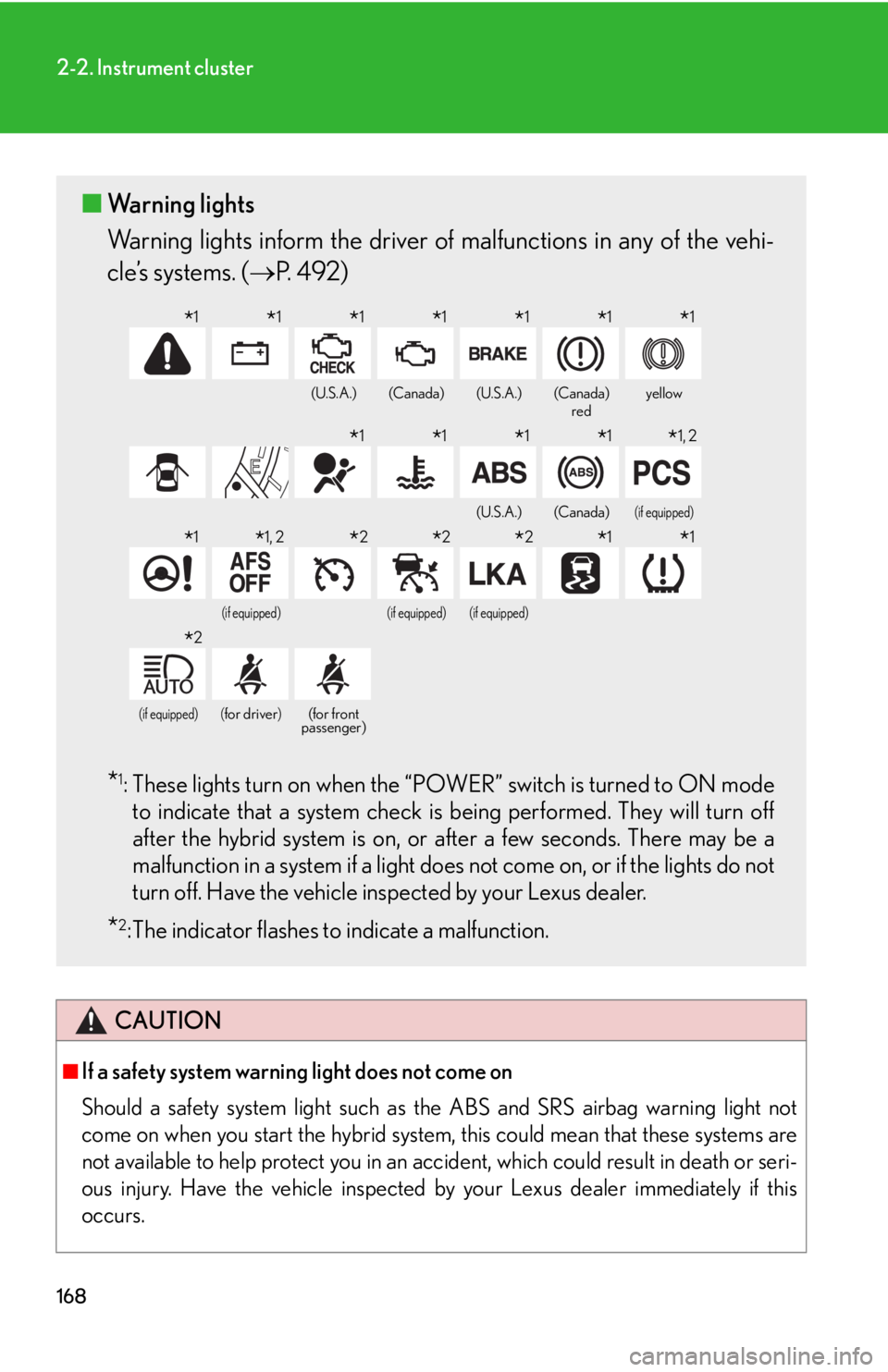
■ Warning lights
Warning lights inform the driver of malfunctions in any of the vehi-
cle’s systems. ( P. 4 9 2 )
*1: These lights turn on when the “POWER” switch is turned to ON mode
to indicate that a system check is being performed. They will turn off
after the hybrid system is on, or after a few seconds. There may be a
malfunction in a system if a light does not come on, or if the lights do not
turn off. Have the vehicle inspected by your Lexus dealer.
*2: The indicator flashes to indicate a malfunction.
(U.S.A.)(Canada)(U.S.A.)(Canada)
redyellow
(U.S.A.)(Canada)(if equipped)
(if equipped)(if equipped)(if equipped)
(if equipped)(for driver)(for front
passenger)
*1*1*1*1*1*1*1
*1*1*1*1*1, 2
*1*1, 2*2*2*2*1*1
*2
Page 173 of 608

173
2-2. Instrument cluster
2
When driving
■Average vehicle speed
Displays the average vehicle speed since the function was reset
The function can be reset by pushing the “ENTER” switch for longer than 1
second when the average vehicle speed is displayed.
■ Outside temperature
Displays the outside temperature
■ T
ire inflation pressure
Displays inflation pressure of each tir
e. There is no correlation between
the order of the displayed values and the tire positions.
It may take a few minutes to display the tire inflation pressure after the
“POWER” switch is turned to ON mode. It may also take a few minutes to
display the tire inflation pressure after the inflation pressure has been
adjusted.
■Electronic feature control can be turned on/off when
The “POWER” switch is in ON mode.
■Conditions for ending electronic feature control
In the following situations, the electronic feature control will end:
●The menu switch is pressed
●The radar cruise control is operated (if equipped)
●The lane keeping assist is operated (if equipped)
●Intuitive parking assist starts operating (if equipped)
●No action is performed for some time after the electronic feature control
screen is displayed
●A warning message appears after the electronic feature control screen is dis -
played
Page 186 of 608
186
2-3. Operating the lights and windshield wipers
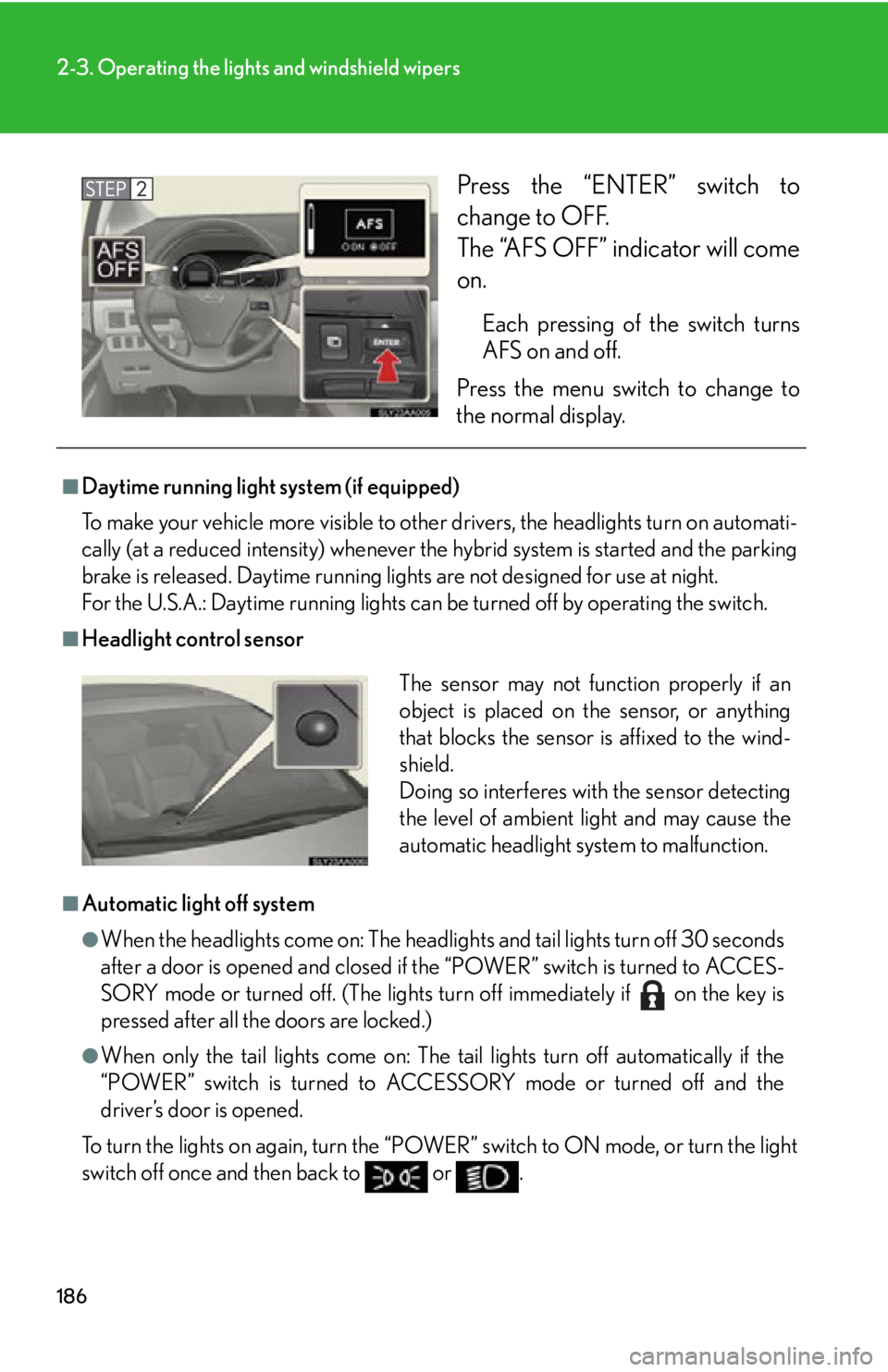
Press the “ENTER” switch to
change to OFF.
The “AFS OFF” indicator will come
on.
Each pressing of the switch turns
AFS on and off.
Press the menu switch to change to
the norma
l display.
■Daytime running light system (if equipped)
To make your vehicle more visible to othe r dr
ivers, the headlights turn on automati-
cally (at a reduced intensity) whenever the hy
brid system is started and the parking
brake is released. Daytime running ligh ts are not designed for use at night.
For the U.S.A.: Daytime running lights can be turned off by operating the switch.
■Headlight control sensor
■Automatic light off system
●When the headlights come on: The headligh ts and tail lights turn off 30 seconds
after a door is opened and closed if the “POWER” switch is turned to ACCES -
SORY mode or turned off. (The lights turn off immediately if on the key is
pressed after all the doors are locked.)
●When only the tail lights come on: The tail lights turn off automatically if the
“POWER” switch is turned to ACCESSORY mode or turned off and the
driver’s door is opened.
To turn the lights on again, turn the “POWER” s
witch to ON mode, or turn the light
switch off once and then back to or .
The sensor may not function properly if an
object is placed on the sensor, or anything
that blocks the sensor is affixed to the wind-
shield.
Doing so interferes with the sensor detecting
the level of ambient light and may cause the
automatic headlight system to malfunction.