power Lexus HS250h 2010 Basic Information Before Operation / LEXUS 2010 HS250H (OM75006U) Repair Manual
[x] Cancel search | Manufacturer: LEXUS, Model Year: 2010, Model line: HS250h, Model: Lexus HS250h 2010Pages: 608, PDF Size: 9.89 MB
Page 251 of 608
Interior features3
251
3-3. Using the Bluetooth® audio
system
Bluetooth
® audio system ...... 311
Using the Bluetooth®
audio system .......................... 314
Operating a Bluetooth
®
enabled portable player..... 319
Setting up a Bluetooth
®
enabled portable player... 322
Bluetooth
® audio system
setup ........................................ 327
3-4. Using the hands-free phone system (for cellular phones)
Hands-free system for
cellular phones.................... 328
Using the hands-free
system (for cellular
phones) .................................. 332
Making a phone call ............. 340
Setting a cellular phone ....... 345
Security and system
setup ....................................... 350
Using the phone book........... 354 3-5. Using the interior lights
Interior lights list .................... 360
•Interior lights ......................... 361
• Personal lights ...................... 361
3-6. Using the storage features List of
storage features......... 363
• Glove box .............................. 364
• Console box ......................... 365
• Cup holders .......................... 367
• Bottle holders....................... 369
• Auxiliary boxes .................... 370
3-7. Other interior features Sun visors
.................................. 371
Vanity mirrors ......................... 372
Clock ......................................... 373
Power outlets ........................... 374
Seat heaters and
ventilators ............................. 375
Armrest ..................................... 377
Rear sunshade ........................ 378
Floor mat .................................. 380
Trunk compartment
features ................................... 381
Garage door opener ............ 383
Compass ................................... 391
Safety Connect ...................... 395
Page 257 of 608

257
3-1. Using the air conditioning system and defogger
3
Interior features
Front side outlets
Direct air flow to the left or right,
up or down.
Turn the knob to open or close
the vent.
Rear outlets Direct air flow to the left or right,
up or down.
Turn the knob to open or close
the vent.
■Air conditioning system settings
When the “POWER” switch is turned on, the a
ir conditioning system settings will be
set to those that were in use the last time the “POWER” switch was turned off.
●Air conditioning system settings are memorized individually on each electronic
key, so the settings reproduced will be specific to the key that is used.
●This feature is customizable at your Lexus dealer.
■Using automatic mode
Fan speed is adjusted automatically acco r
ding to the temperature setting and ambi-
ent conditions. As a result, the following may occur:
●The system may switch automatically to recirculated air mode when the coolest
temperature setting is selected when the ambient temperature is high.
●Immediately after the button is pressed, the fan may stop for a while until warm
or cool air is ready to flow.
●Cool air may flow to the area around the upper body when the heater is on.
Page 260 of 608

260
3-1. Using the air conditioning system and defogger
Rear window defogger switch
■Operating conditions
The “POWER” switch is in ON mode.
■The outside rear view mirror defoggers
Turning the rear window defogger on will turn the outside rear view mirror defog -
gers on.
CAUTION
■When the outside rear view mirror defoggers are on
Do not touch the outside surface of the rear view mirrors, as they can become very
hot and burn you.
Defoggers are used to defog the rear window, and to remove raindrops,
dew and frost from the outside rear view mirrors.
Turns the rear window and out-
side rear view mirror defoggers
on/
off
The defoggers will automatically
turn off after 15 minutes.
Page 261 of 608
261
3-1. Using the air conditioning system and defogger
3
Interior features
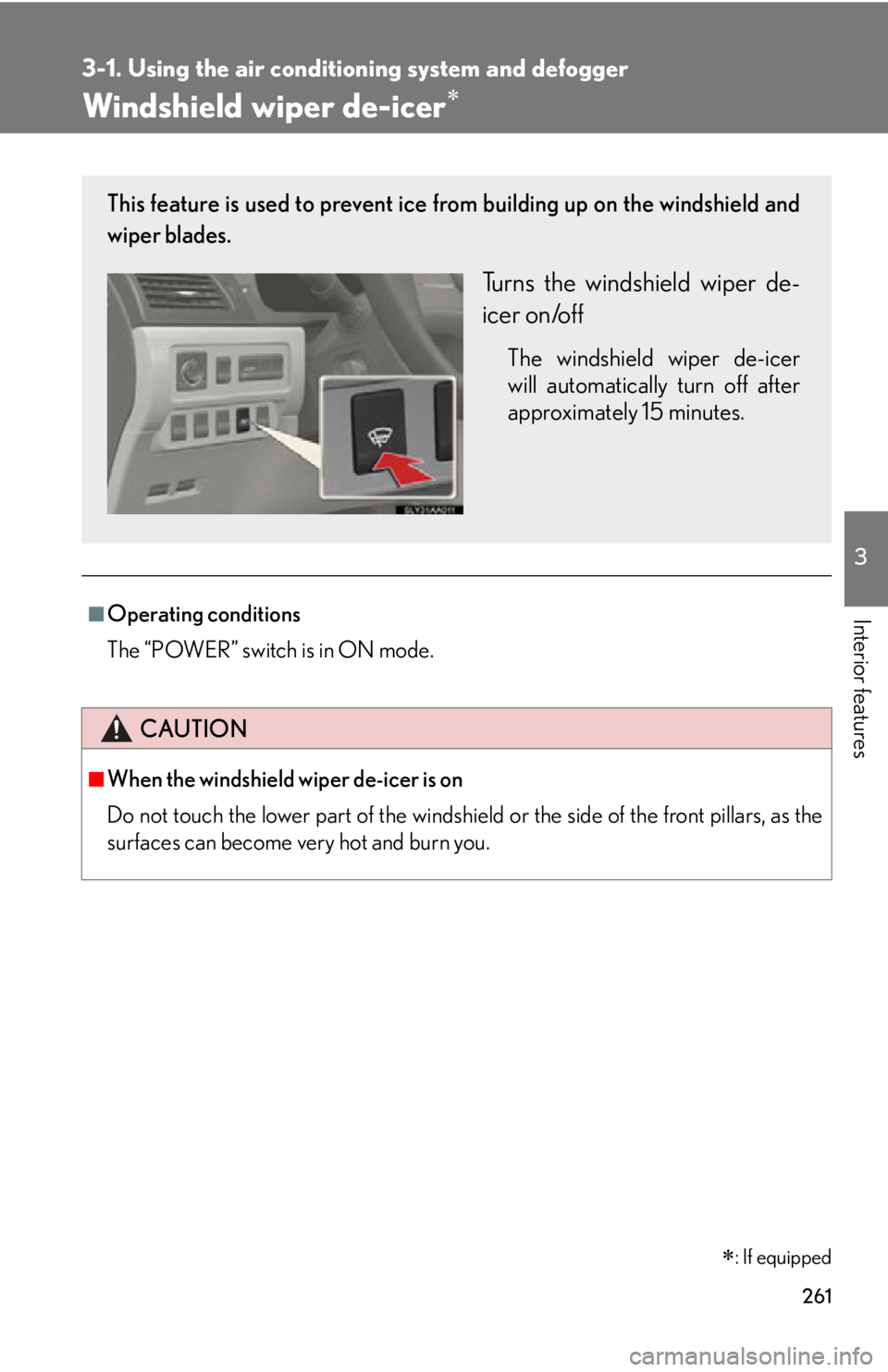
Windshield wiper de-icer
: If equipped
■Operating conditions
The “POWER” switch is in ON mode.
CAUTION
■When the windshield wiper de-icer is on
Do not touch the lower part of the windshield or the side of the front pillars, as the
surfaces can become very hot and burn you.
This feature is used to prevent ice fr om building up on the windshield and
wiper blades.
Turns the windshield wiper de-
icer on/off
The windshield wiper de-icer
will automatically turn off after
approximately 15 minutes.
Page 307 of 608
307
3-2. Using the audio system
3
Interior features
Using the AUX adapter
■Operating portable audio devices connected to the audio system
The volume can be adjusted using the veh
icle’s audio controls. All other adjust-
ments must be made on the portable audio device itself.
■When using a portable audio devi ce connected to the power outlet
Noise may occur during playback. Use the power source of the portable audio
de
vice.
■Routing portable audio device cables
P.
2 9 3
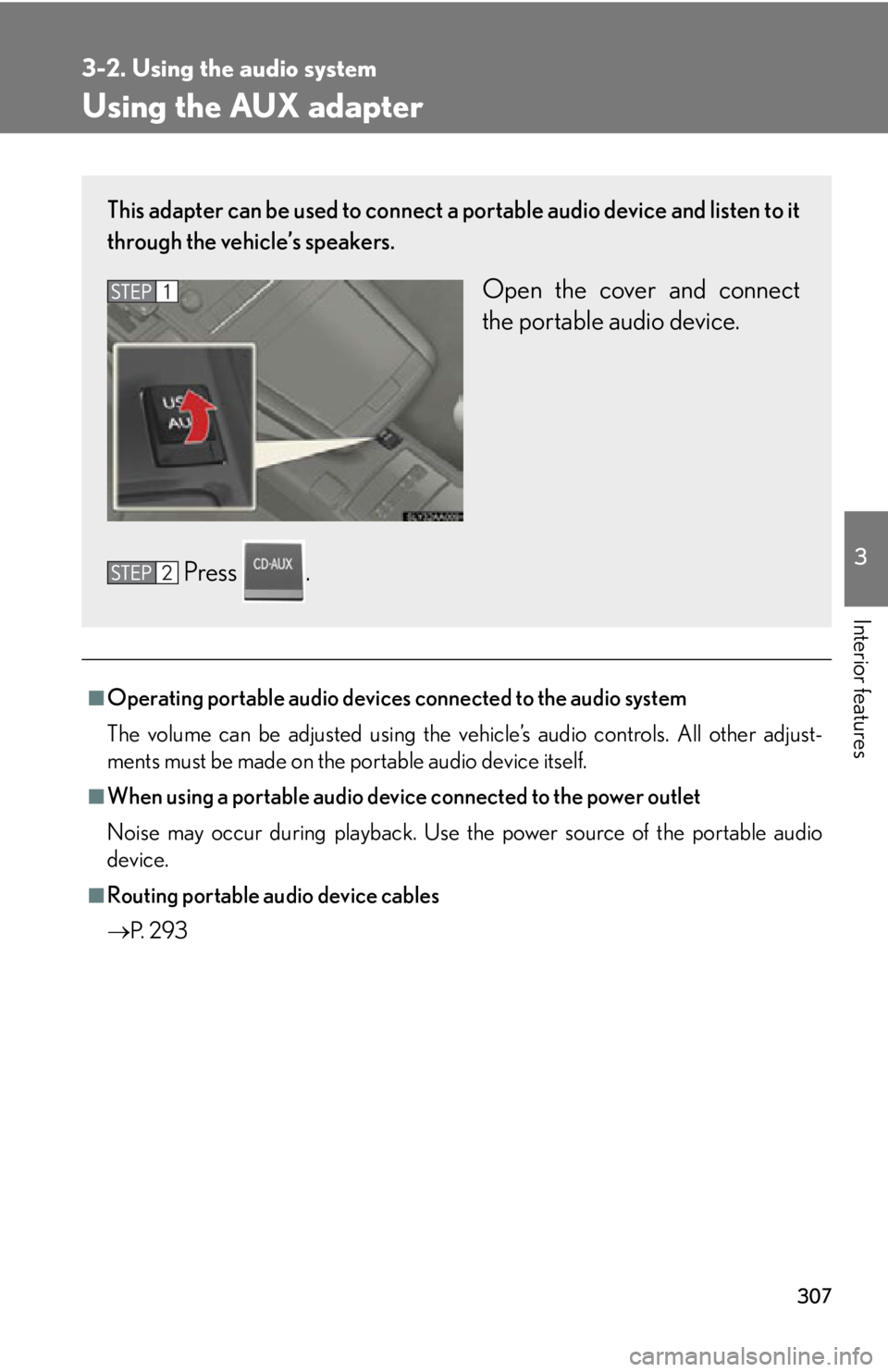
This adapter can be used to connect a po rtable audio device and listen to it
through the vehicle’s speakers.
Open the cover and connect
the portable audio device.
Press .
Page 308 of 608
308
3-2. Using the audio system
Using the steering wheel audio switches
Turning the power on
Press when the audio system is turned off.
The audio system can be turned off by holding the switch down for 1 second
or more.
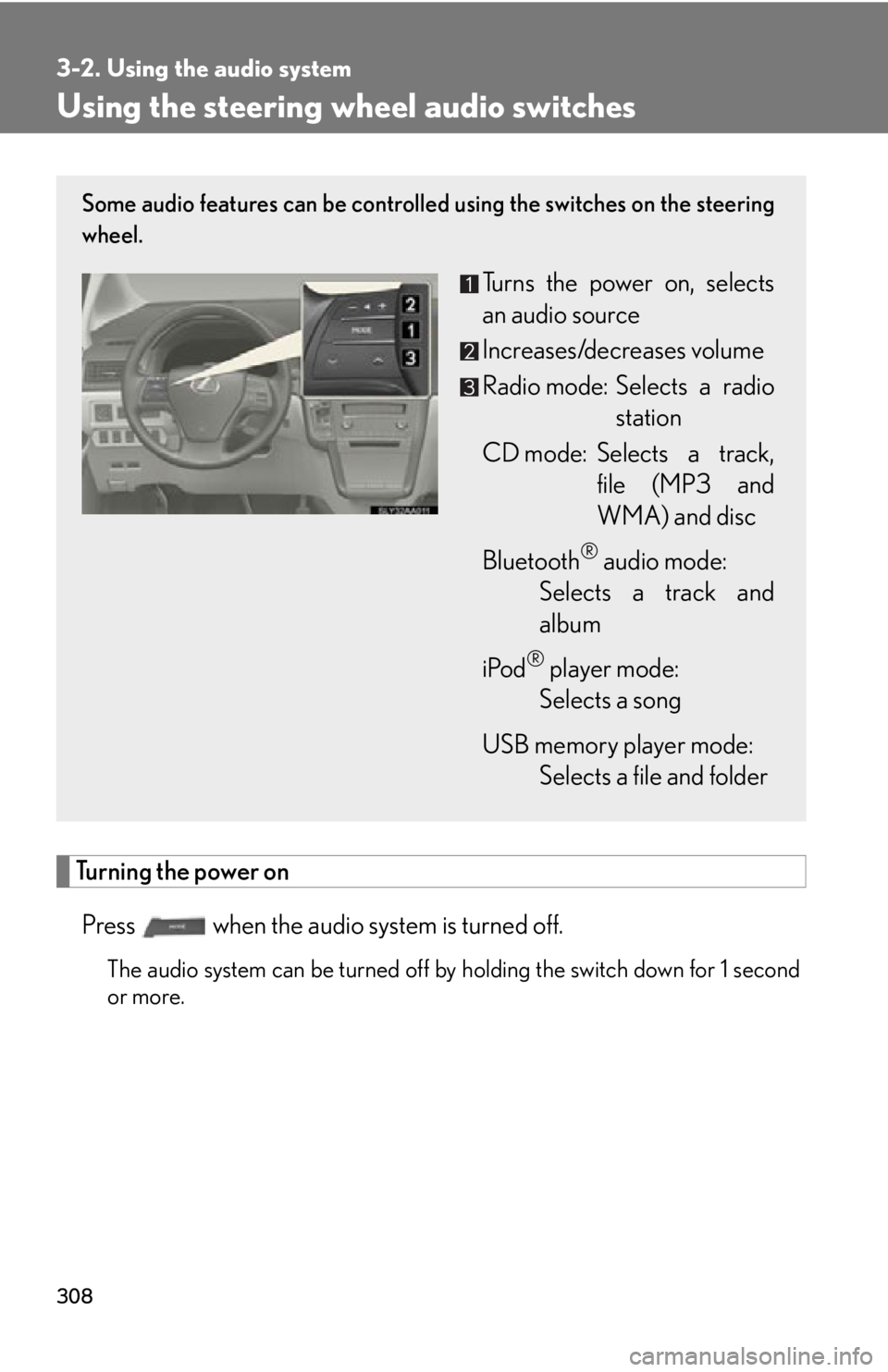
Some audio features can be controlled using the switches on the steering
wheel.
Turns the power on, selects
an audio source
Increases/decreases volume
Radio mode: Selects a radio station
CD mode: Selects a track, file (MP3 and
WM
A) and disc
Bluetooth
® audio mode:
Selects a track and
albu
m
iPod
® player mode:
Selects a song
USB memory player mode:
Selects a file and folder
Page 323 of 608

323
3-3. Using the Bluetooth® audio system
3
Interior features
Registering a portable player
Select “Pair Audio Player (Pair Audio)” using a voice command or , and perform the procedure for r
egistering a portable player.
( P. 316 )
Selecting a portable player to be used
Select “Connect Audio Player (Connect)” using a voice com-
mand or .
Select the portable player to be used b
y either of the following
methods, and select “Confirm” b
y using a voice command or
:
a. Press the talk switch and say the name of the desir
ed portable
player.
b. Press the talk switch and sa y “List A
udio Players”. When the
name of the desired portable pl ayer is read aloud, press the
talk switch.
Press the talk switch and say “From Car” or “From Audio player”,
and select “Confirm” by using a voice command or .
If “From Car” is selected, the portable player will be automatically con -
nected whenever the “POWER” switch is in either ACCESSORY or
IGNITION ON
mode.
Page 362 of 608

362
3-5. Using the interior lights
■Illuminated entry system
The lights automatically turn on/off according to “POWER” switch mode, the pres-
ence of the electronic key, whether the doors are locked/unlocked, and whether
the do
ors are opened/closed.
■To prevent 12-volt battery discharge
If the interior lights remain on when the do or is
not fully closed and the interior light
switch (door position on/ off) is on, the li ghts will go off automatically after 20 min -
utes.
■Customization
Settings (e.g. the time elapsed before the lights turn
off) can be changed. (Custom -
izable features P. 5 7 2 )
Pe r s o n a l l i g h t s
Page 373 of 608
373
3-7. Other interior features
3
Interior features
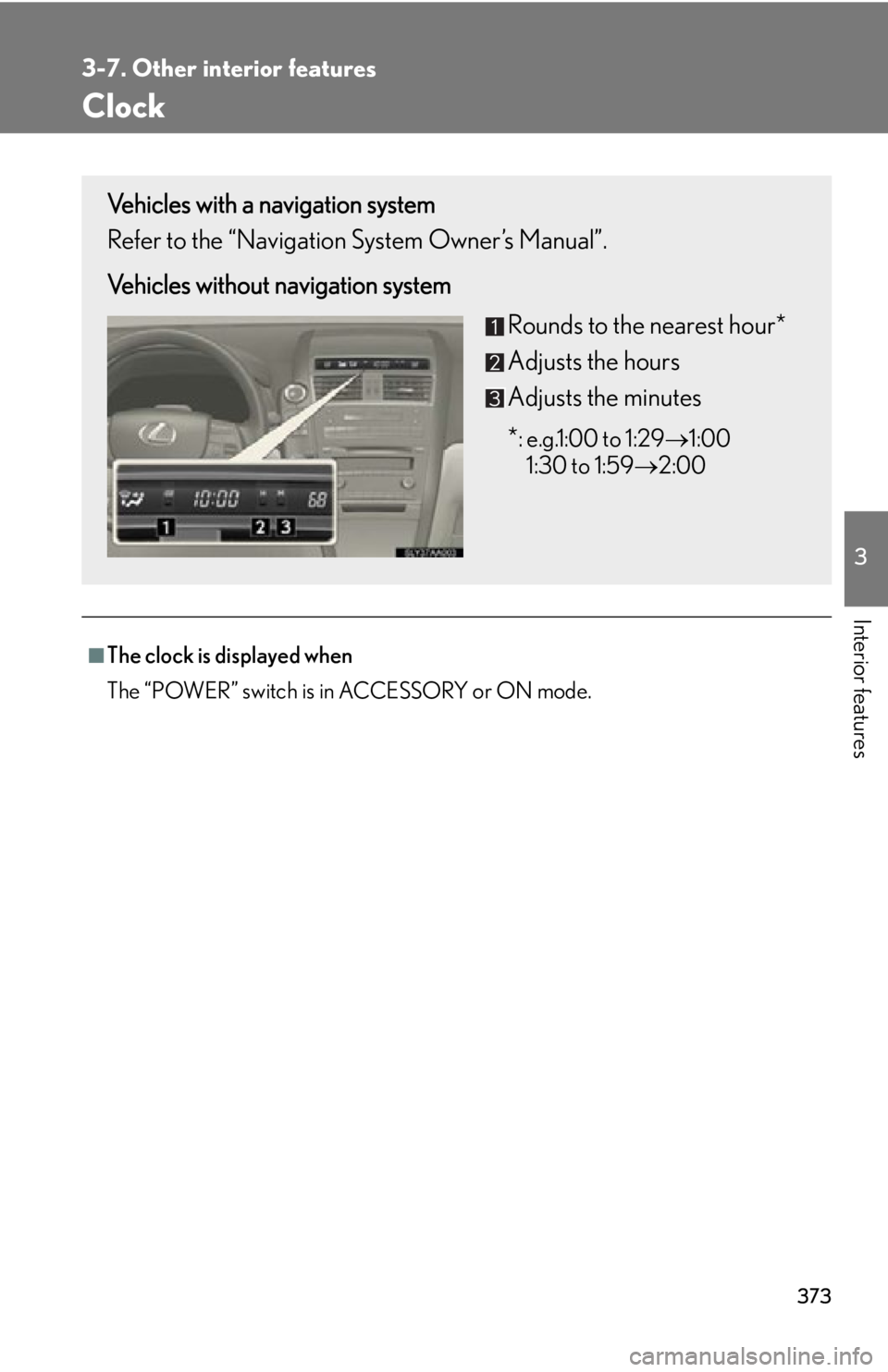
Clock
■The clock is displayed when
The “POWER” switch is in ACCESSORY or ON mode.
Vehicles with a navigation system
Refer to the “Navigation System Owner’s Manual”.
Vehicles without navigation systemRounds to the nearest hour*
Adjusts the hours
Adjusts the minutes
*
: e.g.1:00 to 1:291:00
1:30 to 1:59 2:00
Page 374 of 608

374
3-7. Other interior features
Power outlets
■The power outlet can be used when
The “POWER” switch is in ACCESSORY or ON mode.
NOTICE
■To avoid damaging the power outlets
Close the power outlet lid when the power outlet is not in use.
Foreign objects or liquids that enter the power outlet may cause a short circuit.
■To prevent blown fuse
Do not use an accessory that uses more than 12 V 10 A.
■To prevent 12-volt battery discharge
Do not use the power outlet longer than necessary when the hybrid system is off.
The power outlet can be used for 12 V accessories that run on less than 10
A.