lock Lexus HS250h 2010 Owner's Manual
[x] Cancel search | Manufacturer: LEXUS, Model Year: 2010, Model line: HS250h, Model: Lexus HS250h 2010Pages: 611, PDF Size: 11 MB
Page 535 of 611

5
When trouble arises
533
5-2. Steps to take in an emergency
HS250h_U_75033U(Canada)
If the electronic key does not operate properly
Locking and unlocking the doors, unlocking the trunk and key linked functions
DoorsUse the mechanical key (→P. 39)
in order to perform the following
operations (driver’s door only):
Locks all the doors
Closes the windows and moon
roof (turn and hold)
*
Unlocks the door
Turning the key rearward unlocks
the driver's door. Turning the key
once again unlocks the other
doors.
Opens the windows and moon
roof (turn and hold)
*
*: This setting must be customized at your Lexus dealer.
If communication between the electronic key and vehicle is interrupted
(→ P. 49) or the electronic key canno t be used because the battery is
depleted, the smart access system with push-button start and wireless
remote control cannot be used. In such cases, the doors and trunk can be
opened and the hybrid system can be started by following the procedure
below.
Page 536 of 611
534
5-2. Steps to take in an emergency
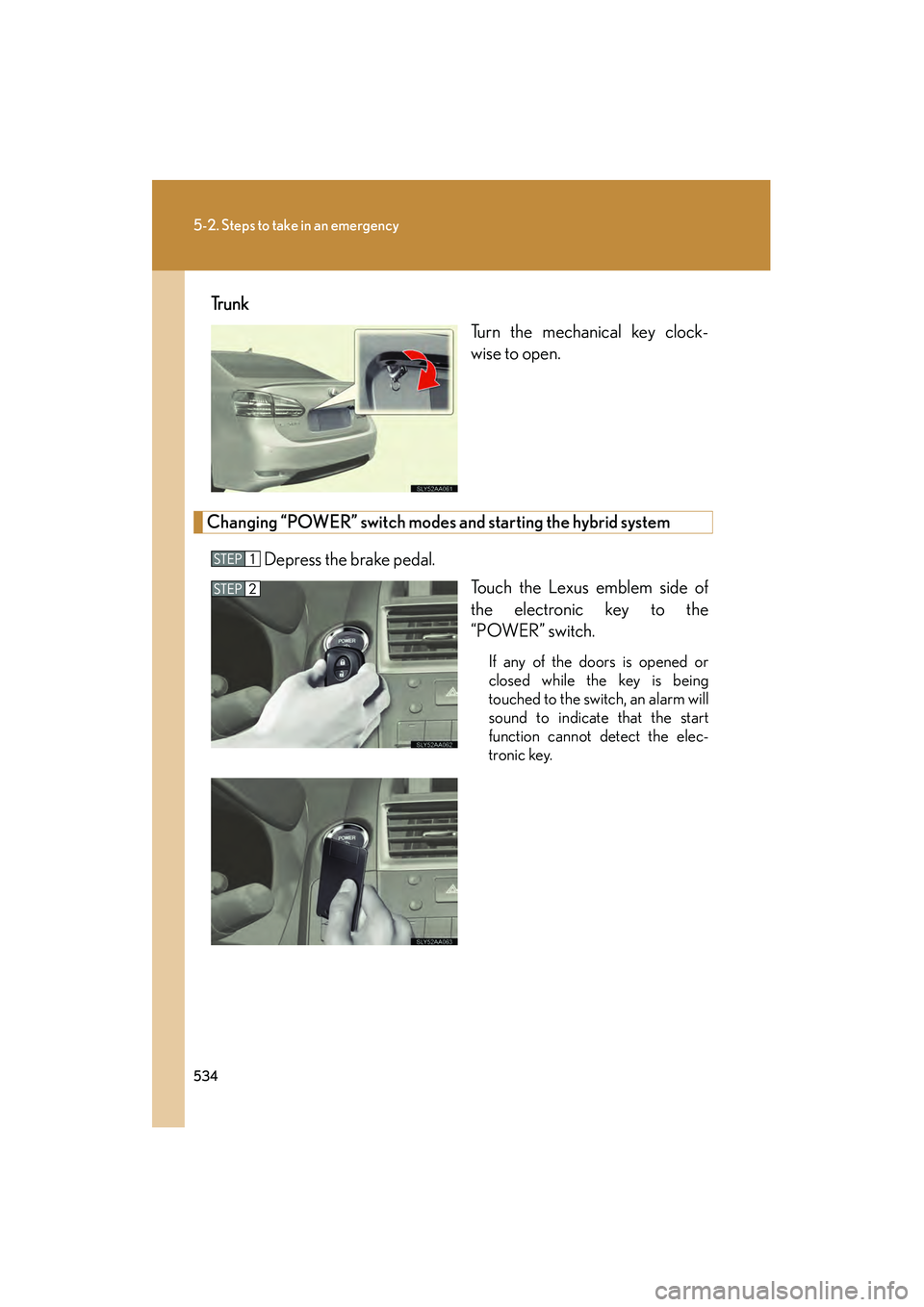
HS250h_U_75033U(Canada)Tr u n k
Turn the mechanical key clock-
wise to open.
Changing “POWER” switch modes and starting the hybrid system
Depress the brake pedal. Touch the Lexus emblem side of
the electronic key to the
“POWER” switch.
If any of the doors is opened or
closed while the key is being
touched to the switch, an alarm will
sound to indicate that the start
function cannot detect the elec-
tronic key.
Page 540 of 611
538
5-2. Steps to take in an emergency
HS250h_U_75033U(Canada)
■Starting the hybrid system when the 12-volt battery is discharged
The hybrid system cannot be started by push-starting.
■To prevent 12-volt battery discharge
●Turn off the headlights and the audio system while the hybrid system is off.
●Turn off any unnecessary electrical components when the vehicle is running at a
low speed for an extended period, such as in heavy traffic.
■When the 12-volt battery is discharged
●The hybrid system may not start. (→P. 434)
●If the 12-volt battery is depleted with the shift position in P, it will not be possible
to shift out of P. In this case, the vehicle cannot be towed without lifting both
front wheels because the front wheels are locked by the parking lock.
(→ P. 4 8 3 )
●When the 12-volt battery is reconnected, start the hybrid system, depress the
brake pedal, and confirm that it is possible to shift into each shift position.
Close the exclusive jump starting terminal cover and reinstall
the fuse box cover.
Once the hybrid system starts, ha ve the vehicle inspected at your
Lexus dealer as soon as possible.
Page 557 of 611
555
6-1. Specifications
6
Vehicle specifications
HS250h_U_75033U(Canada)
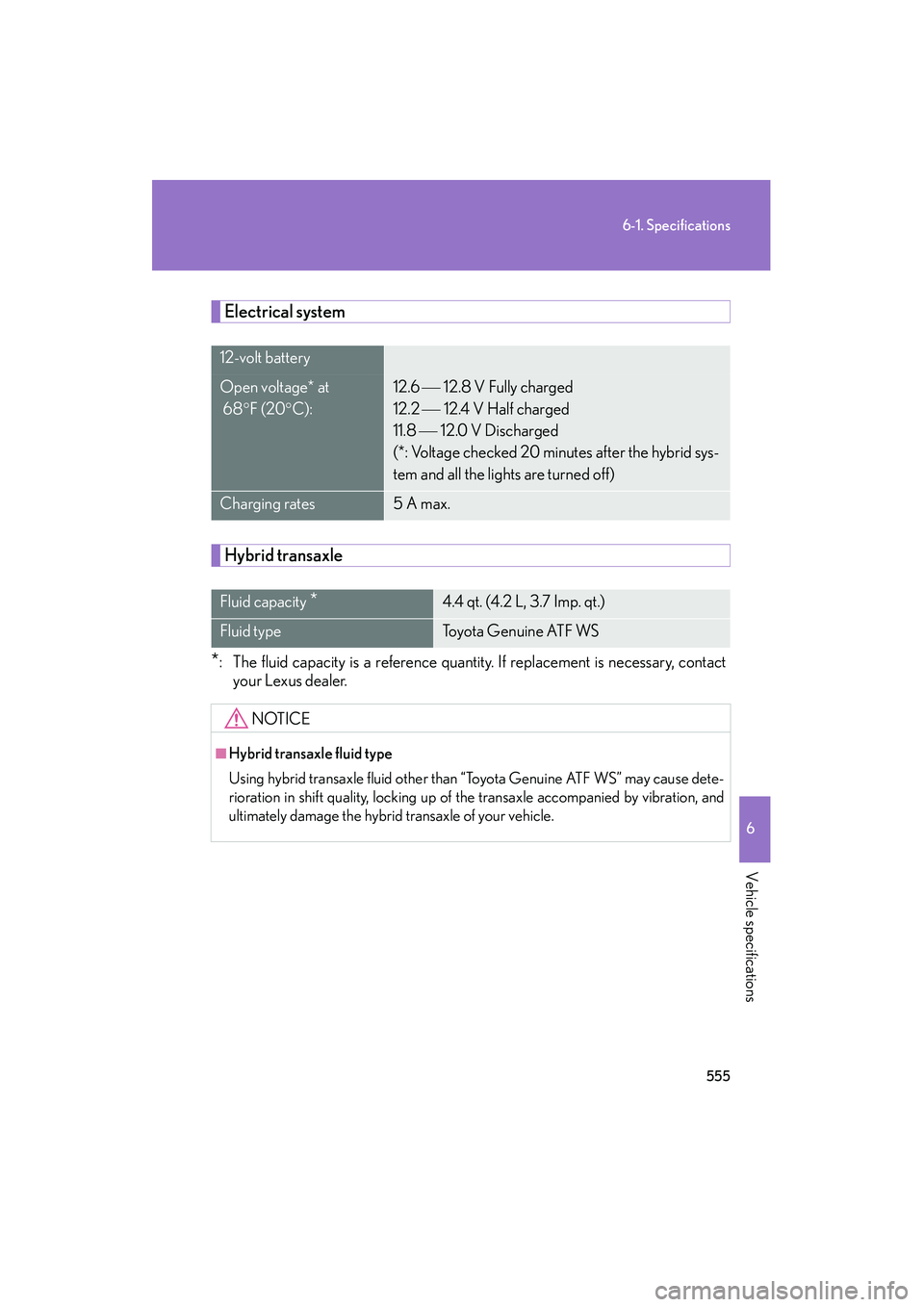
Electrical system
Hybrid transaxle
*: The fluid capacity is a reference quantity. If replacement is necessary, contactyour Lexus dealer.
12-volt battery
Open voltage* at
68 °F (20 °C):12.6 12.8 V Fully charged
12.2
12.4 V Half charged
11.8
12.0 V Discharged
(*: Voltage checked 20 minutes after the hybrid sys-
tem and all the lights are turned off)
Charging rates5 A max.
Fluid capacity *4.4 qt. (4.2 L, 3.7 Imp. qt.)
Fluid typeTo y o t a G e n u i n e AT F W S
NOTICE
■Hybrid transaxle fluid type
Using hybrid transaxle fluid other than “Toyota Genuine ATF WS” may cause dete-
rioration in shift quality, locking up of the transaxle accompanied by vibration, and
ultimately damage the hybrid transaxle of your vehicle.
Page 578 of 611
576
6-2. Customization
HS250h_U_75033U(Canada)
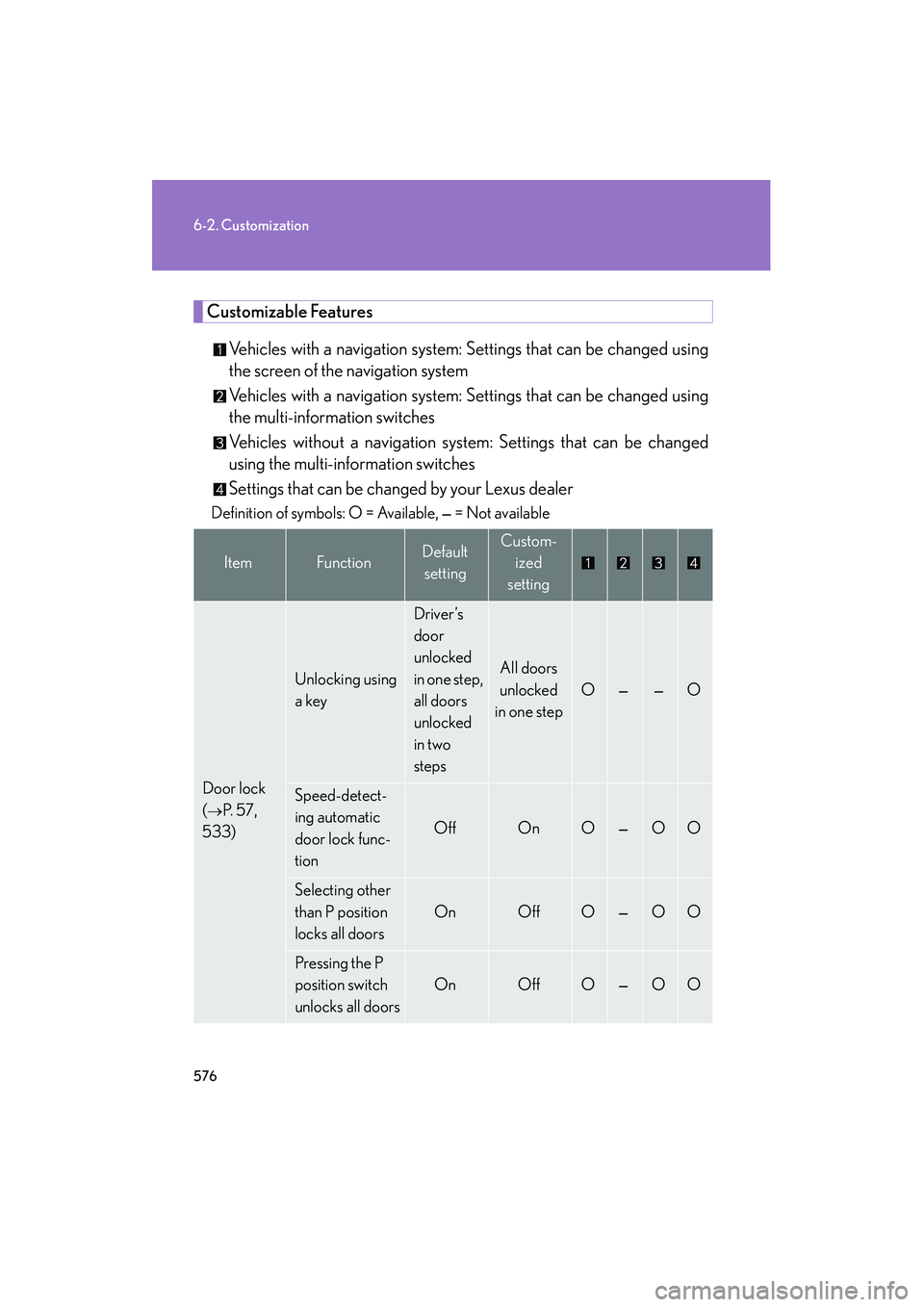
Customizable FeaturesVehicles with a navigation system: Settings that can be changed using
the screen of the navigation system
Vehicles with a navigation system: Settings that can be changed using
the multi-information switches
Vehicles without a navigation system: Settings that can be changed
using the multi-information switches
Settings that can be changed by your Lexus dealer
Definition of symbols: O = Available, — = Not available
ItemFunctionDefault settingCustom- ized
setting
Door lock
(
→P. 5 7 ,
533)
Unlocking using
a key
Driver’s
door
unlocked
in one step,
all doors
unlocked
in two
steps
All doors
unlocked
in one step
O——O
Speed-detect-
ing automatic
door lock func-
tion
OffOnO—OO
Selecting other
than P position
locks all doors
OnOffO—OO
Pressing the P
position switch
unlocks all doors
OnOffO—OO
Page 579 of 611
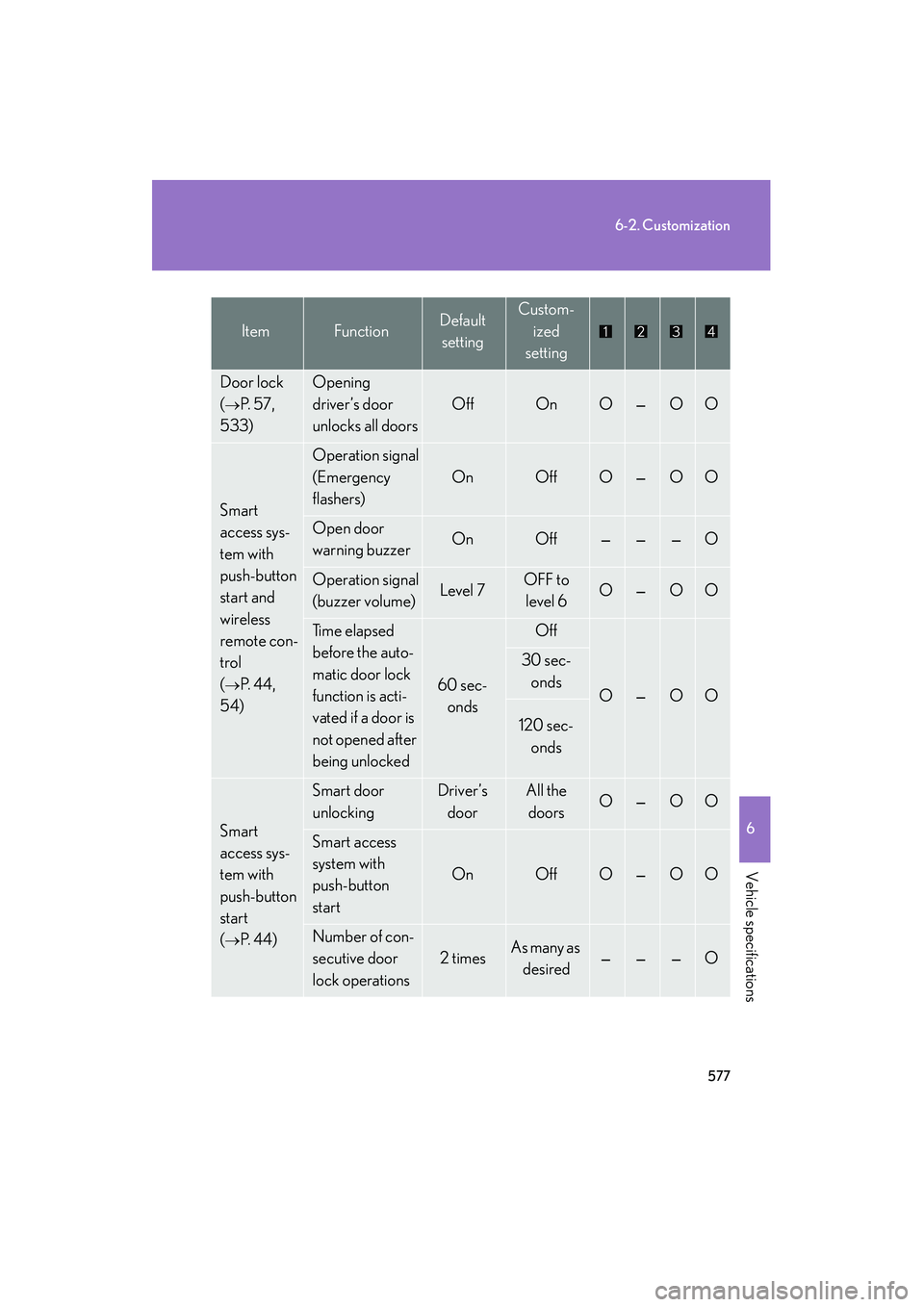
577
6-2. Customization
6
Vehicle specifications
HS250h_U_75033U(Canada)
Door lock
(
→P. 5 7 ,
533)
Opening
driver’s door
unlocks all doors
OffOnO—OO
Smart
access sys-
tem with
push-button
start and
wireless
remote con-
trol
(
→P. 4 4 ,
54)
Operation signal
(Emergency
flashers)
OnOffO—OO
Open door
warning buzzerOnOff———O
Operation signal
(buzzer volume)Level 7OFF to level 6O—OO
Ti m e e l a p s e d
before the auto-
matic door lock
function is acti-
vated if a door is
not opened after
being unlocked
60 sec-
onds
Off
O—OO
30 sec-onds
120 sec- onds
Smart
access sys-
tem with
push-button
start
(
→P. 4 4 )
Smart door
unlockingDriver’s doorAll the doorsO—OO
Smart access
system with
push-button
start
OnOffO—OO
Number of con-
secutive door
lock operations
2 timesAs many as desired———O
ItemFunctionDefault settingCustom-
ized
setting
Page 580 of 611
578
6-2. Customization
HS250h_U_75033U(Canada)
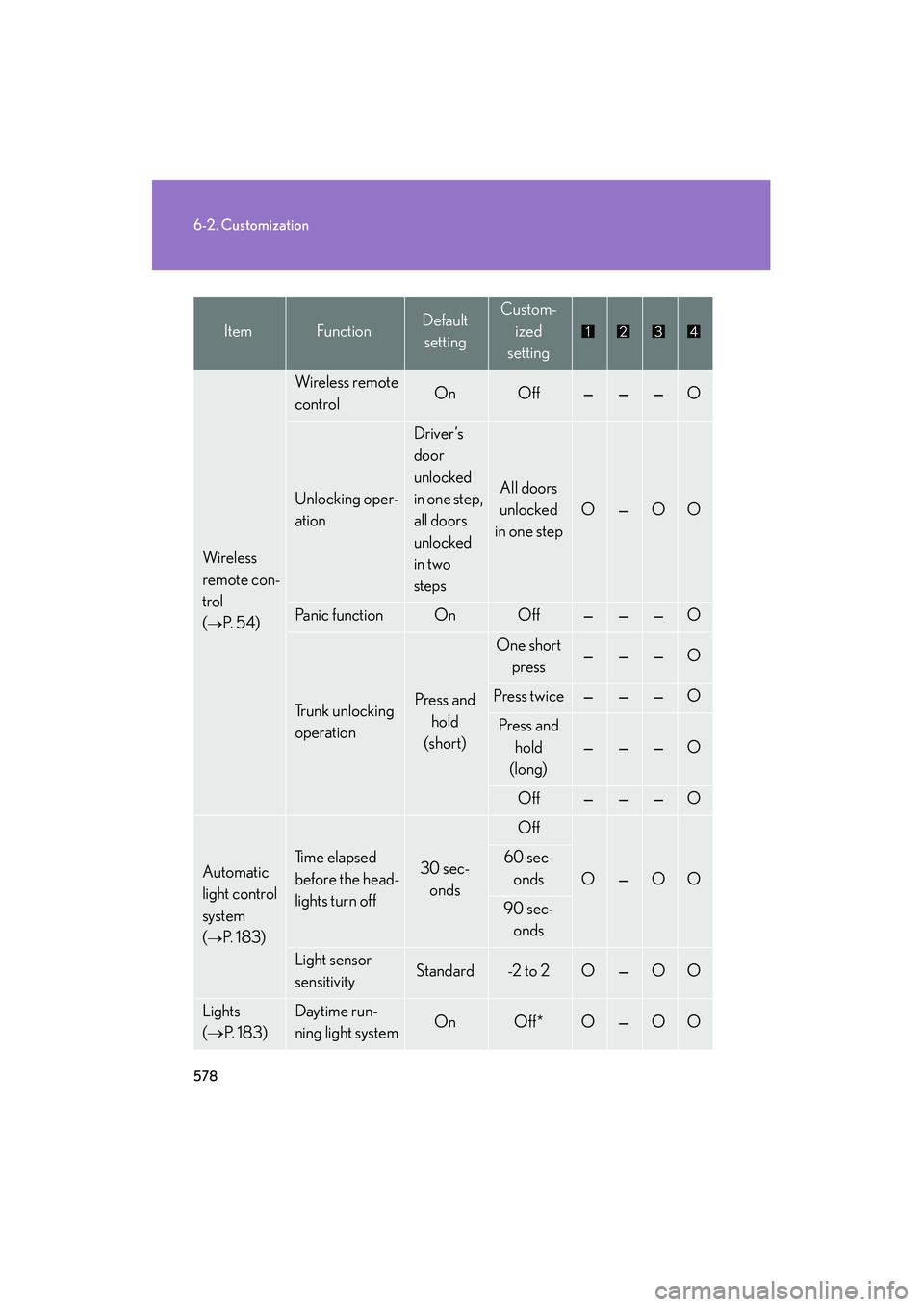
Wi re le ss
remote con-
trol
(
→P. 5 4 )
Wireless remote
controlOnOff———O
Unlocking oper-
ation
Driver’s
door
unlocked
in one step,
all doors
unlocked
in two
steps
All doors
unlocked
in one step
O—OO
Panic functionOnOff———O
Trunk unlocking
operationPress and
hold
(short)
One short press———O
Press twice———O
Press and
hold
(long)
———O
Off———O
Automatic
light control
system
(
→P. 1 8 3 )
Ti m e e l a p s e d
before the head-
lights turn off30 sec- onds
Off
O—OO
60 sec-
onds
90 sec- onds
Light sensor
sensitivityStandard-2 to 2O—OO
Lights
(→ P. 1 8 3 )Daytime run-
ning light systemOnOff*O—OO
ItemFunctionDefault
settingCustom-
ized
setting
Page 581 of 611
579
6-2. Customization
6
Vehicle specifications
HS250h_U_75033U(Canada)
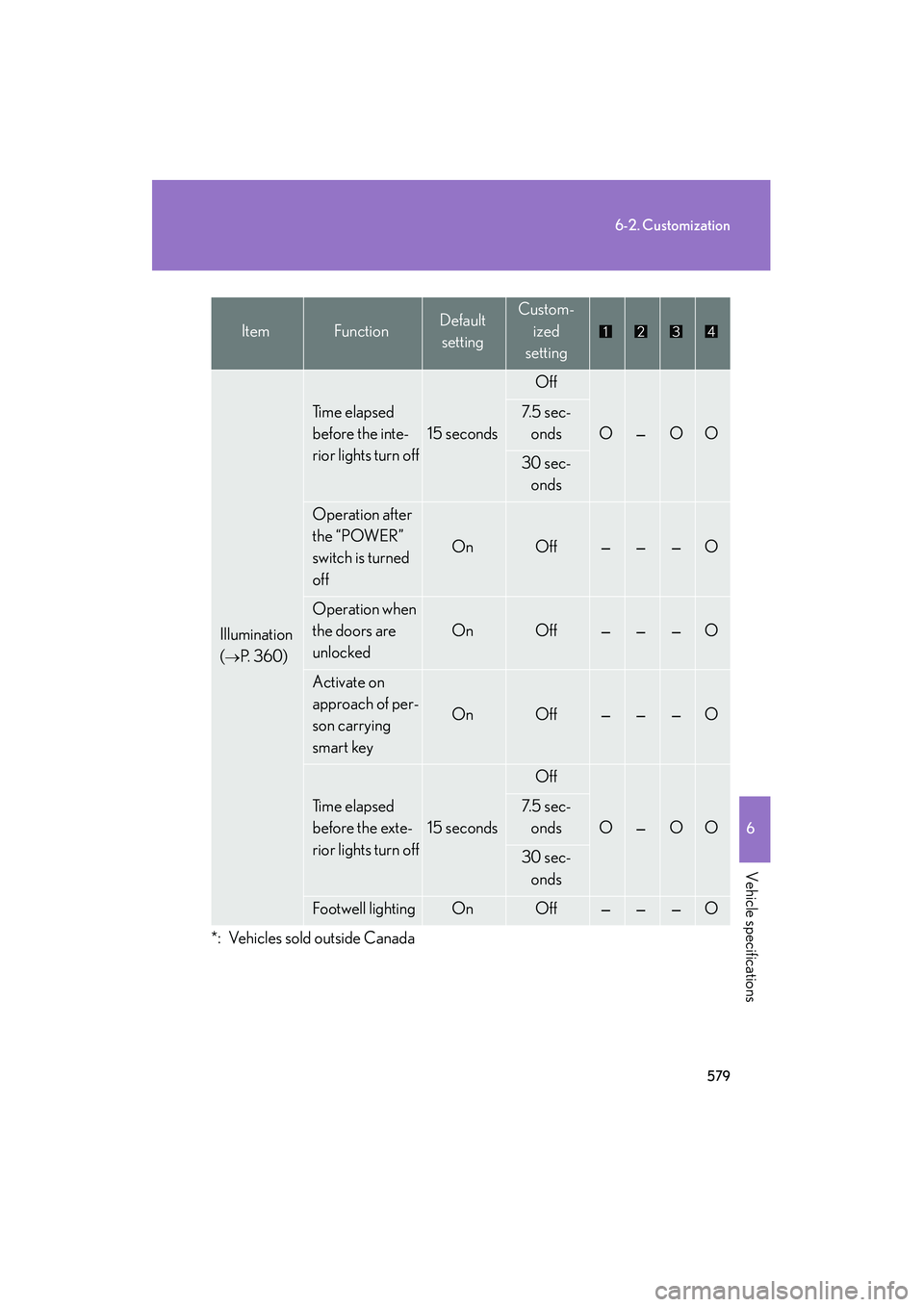
Illumination
(
→P. 360)
Ti m e e l a p s e d
before the inte-
rior lights turn off
15 seconds
Off
O—OO
7. 5 s e c -onds
30 sec-onds
Operation after
the “POWER”
switch is turned
off
OnOff———O
Operation when
the doors are
unlocked
OnOff———O
Activate on
approach of per-
son carrying
smart key
OnOff———O
Ti m e e l a p s e d
before the exte-
rior lights turn off
15 seconds
Off
O—OO
7. 5 s e c -
onds
30 sec-onds
Footwell lightingOnOff———O
*: Vehicles sold outside Canada
ItemFunctionDefault settingCustom-
ized
setting
Page 582 of 611
580
6-2. Customization
HS250h_U_75033U(Canada)
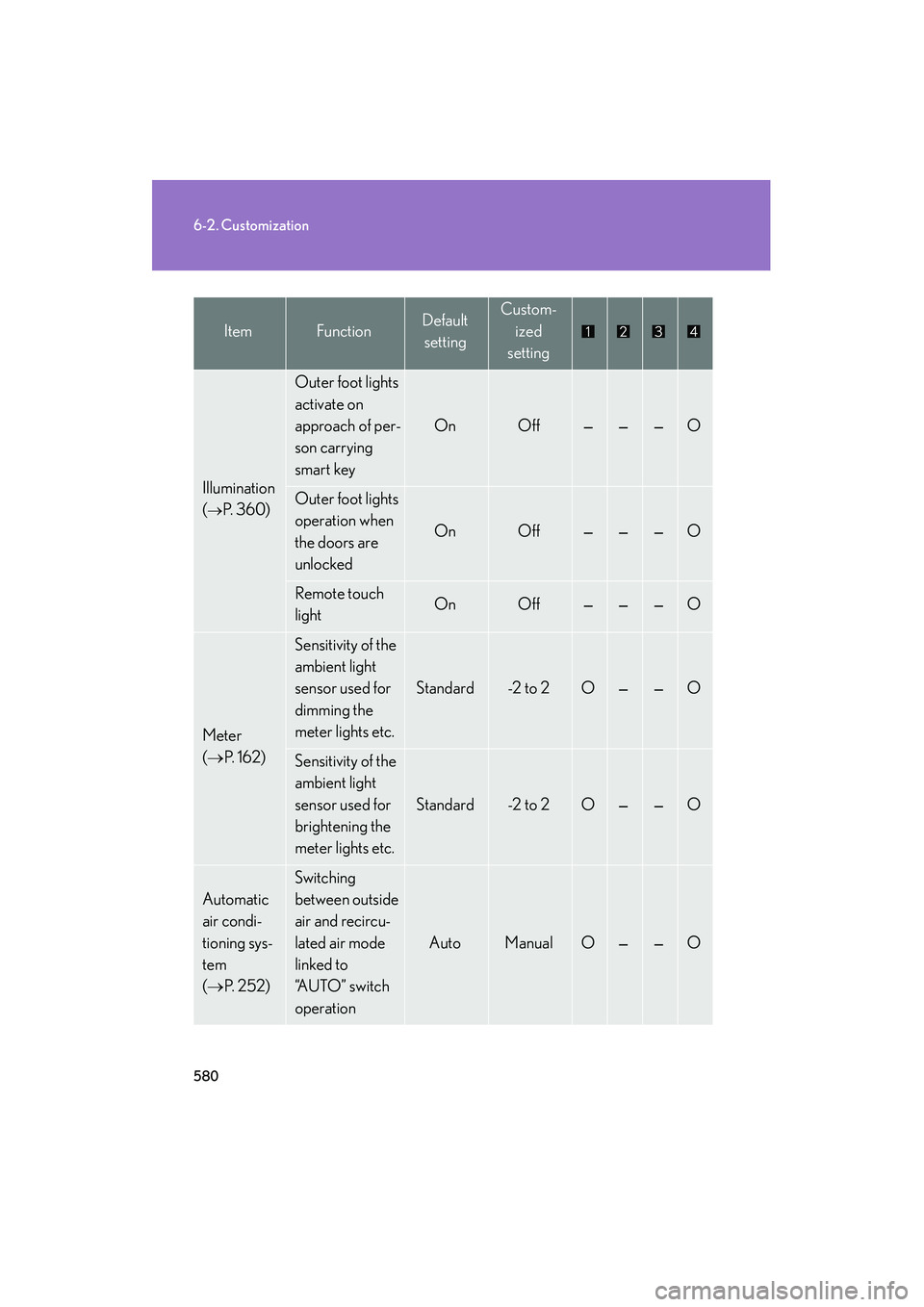
Illumination
(
→P. 360)
Outer foot lights
activate on
approach of per-
son carrying
smart key
OnOff———O
Outer foot lights
operation when
the doors are
unlocked
OnOff———O
Remote touch
lightOnOff———O
Meter
(→ P. 1 6 2 )
Sensitivity of the
ambient light
sensor used for
dimming the
meter lights etc.
Standard-2 to 2O——O
Sensitivity of the
ambient light
sensor used for
brightening the
meter lights etc.
Standard-2 to 2O——O
Automatic
air condi-
tioning sys-
tem
(→ P. 2 5 2 )
Switching
between outside
air and recircu-
lated air mode
linked to
“A U T O ” s w i t c h
operation
AutoManualO——O
ItemFunctionDefault
settingCustom-
ized
setting
Page 586 of 611

584
6-2. Customization
HS250h_U_75033U(Canada)
Multi-information display (→P. 1 6 9 )
Settings that can be changed using the multi-information switches
Av a i l a b l e u n i t smiles (MPG), km (km/l), km (l/100 km)
Available languagesEnglish, French and Spanish
■Vehicle customization
●When the “Speed-detecting automatic door lock function” and “Selecting other
than P position locks all doors” are both on, the door lock operates as follows.
• When shifting the shift lever to any position other than P, all the doors will be locked.
• If the vehicle is started with all the doors locked, the “Speed-detecting auto- matic door lock function” would not operate.
• If the vehicle is started with any door unlocked, the “Speed-detecting auto- matic door lock function” will operate.
●When the smart access system with push-button start is off, the “Smart door
unlocking function” cannot be customized.
●When the doors remain closed after unlocking the doors and the “Automatic
door lock function” activates, the signals will be generated in accordance with
the “Operation signal (emergency flashers)” and the “Operation signal (buzzer
volume)” settings.
■In the following situations, customize mode in which the settings can be changed
through the multi-information switches will automatically be turned off.
●A warning message appears after the customize mode screen is displayed.
●The “POWER” switch is turned off.
●The vehicle begins to move while the customize mode screen is displayed.