lock Lexus HS250h 2010 Manual PDF
[x] Cancel search | Manufacturer: LEXUS, Model Year: 2010, Model line: HS250h, Model: Lexus HS250h 2010Pages: 611, PDF Size: 11 MB
Page 260 of 611
258
3-1. Using the air conditioning system and defogger
HS250h_U_75033U(Canada)
■Using the system in recirculated air mode
The windows will fog up more easily if recirculated air mode is used.
■Window defogger feature
Recirculated air mode may automatically switch to (outside air) mode in sit-
uations where the windows need to be defogged.
■When micro dust and pollen filter is active
●In order to prevent the windshield from fogging up when the outside air is cold,
the following may occur:
• Outside air mode does not switch to (recirculated air) mode.
• The air conditioning system operates automatically.
• The operation cancels after 1 minute.
●In rainy weather, the windows may fog up. Press .
■When outside air temperature is below 32°F (0 °C)
The cooling and dehumidification function may not operate even when
is
pressed.
CAUTION
■To prevent the windshield from fogging up
Do not use
during cool air operation in extremely humid weather. The dif-
ference between the temperature of the outside air and that of the windshield can
cause the outer surface of the windshield to fog up, blocking your vision.
Page 307 of 611
305
3-2. Using the audio system
3
Interior features
HS250h_U_75033U(Canada)
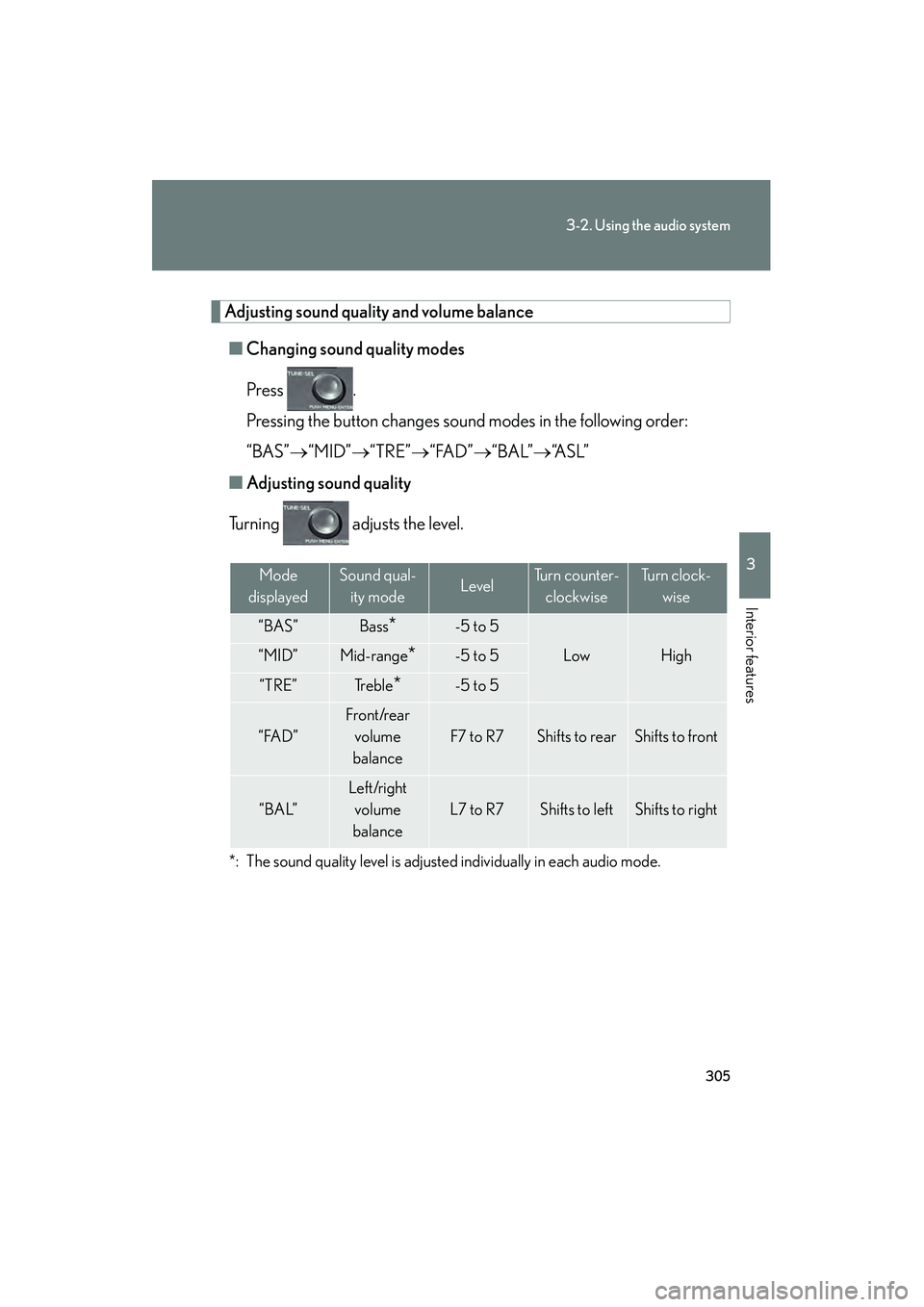
Adjusting sound quality and volume balance■ Changing sound quality modes
Press .
Pressing the button changes sound modes in the following order:
“BAS”→ “MID”→“TRE”→“FAD” →“BAL”→ “A S L ”
■ Adjusting sound quality
Turning adjusts the level.
*: The sound quality level is adjusted individually in each audio mode.
Mode
displayedSound qual- ity modeLevelTurn counter- clockwiseTu r n c l o c k - wise
“BAS”Bass*-5 to 5
LowHigh“MID”Mid-range*-5 to 5
“TRE”Tr e b l e*-5 to 5
“FAD”
Front/rear volume
balance
F7 to R7Shifts to rearShifts to front
“BAL”
Left/right volume
balance
L7 to R7Shifts to leftShifts to right
Page 308 of 611
306
3-2. Using the audio system
HS250h_U_75033U(Canada)
Turning the Automatic Sound Levelizer (ASL) on/offTurning clockwise turns on the ASL, and turning
counterclockwise turns off the ASL.
ASL automatically adjusts the volume an d tone quality according to the noise
level as you drive your vehicle.
Page 339 of 611
337
3-4. Using the hands-free phone system (for cellular phones)
3
Interior features
HS250h_U_75033U(Canada)
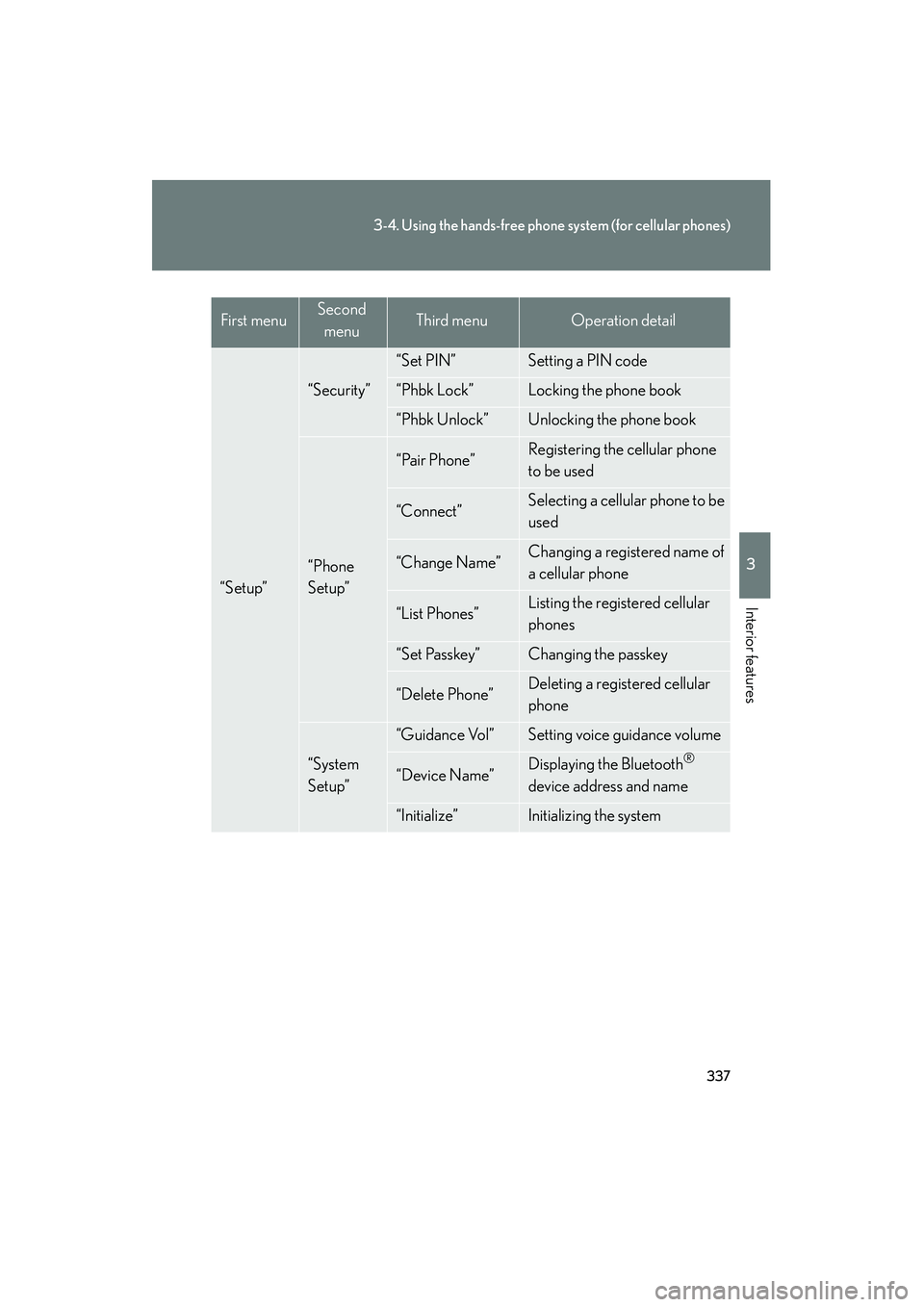
“Setup”
“Security”
“Set PIN”Setting a PIN code
“Phbk Lock”Locking the phone book
“Phbk Unlock”Unlocking the phone book
“Phone
Setup”
“Pair Phone”Registering the cellular phone
to be used
“Connect”Selecting a cellular phone to be
used
“Change Name”Changing a registered name of
a cellular phone
“List Phones”Listing the registered cellular
phones
“Set Passkey”Changing the passkey
“Delete Phone”Deleting a registered cellular
phone
“System
Setup”
“Guidance Vol”Setting voice guidance volume
“Device Name”Displaying the Bluetooth®
device address and name
“Initialize”Initializing the system
First menuSecond menuThird menuOperation detail
Page 340 of 611
338
3-4. Using the hands-free phone system (for cellular phones)
HS250h_U_75033U(Canada)■
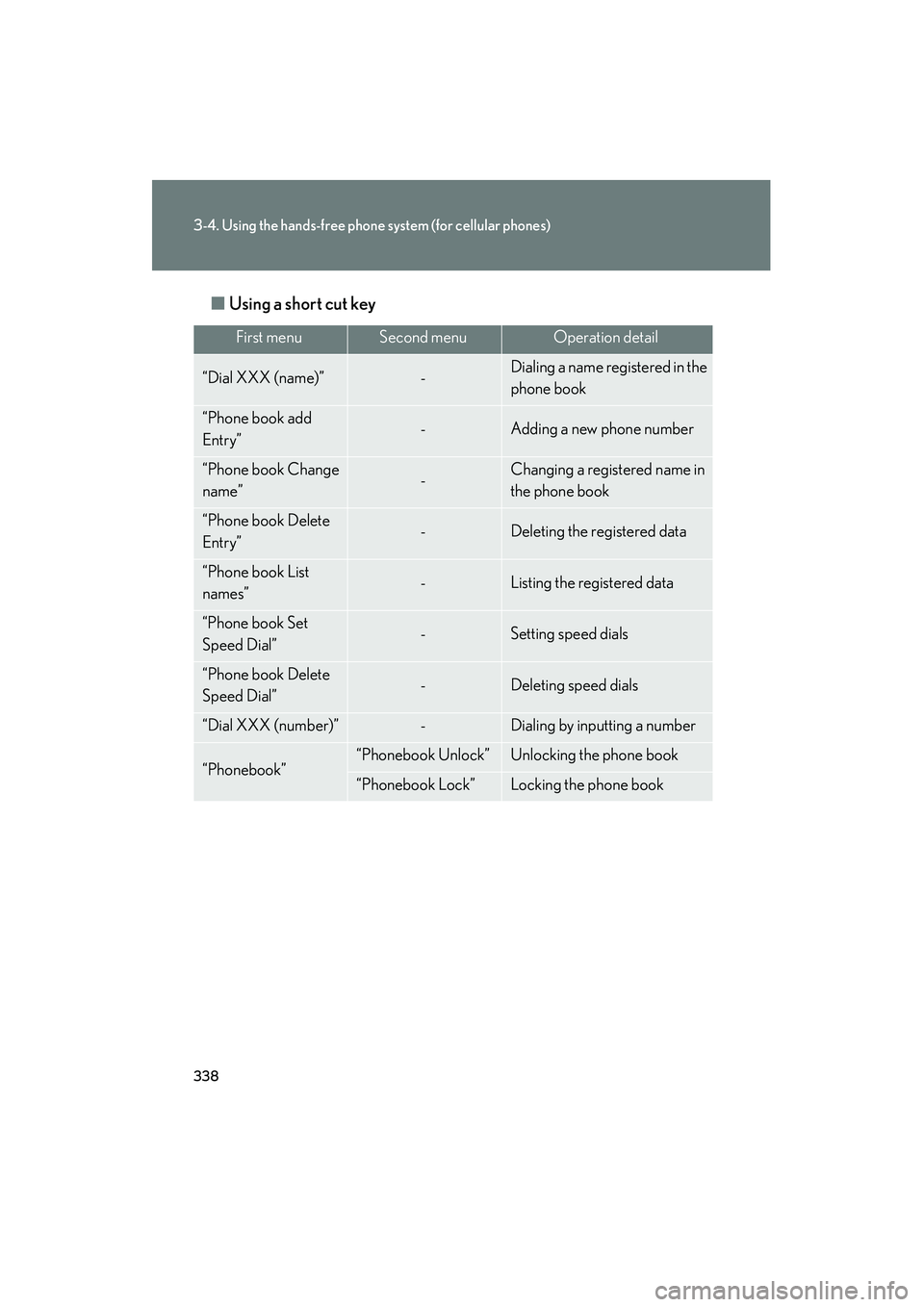
Using a short cut key
First menuSecond menuOperation detail
“Dial XXX (name)”-Dialing a name registered in the
phone book
“Phone book add
Entry”-Adding a new phone number
“Phone book Change
name”-Changing a registered name in
the phone book
“Phone book Delete
Entry”-Deleting the registered data
“Phone book List
names”-Listing the registered data
“Phone book Set
Speed Dial”-Setting speed dials
“Phone book Delete
Speed Dial”-Deleting speed dials
“Dial XXX (number)”-Dialing by inputting a number
“Phonebook”“Phonebook Unlock”Unlocking the phone book
“Phonebook Lock”Locking the phone book
Page 352 of 611
350
3-4. Using the hands-free phone system (for cellular phones)
HS250h_U_75033U(Canada)
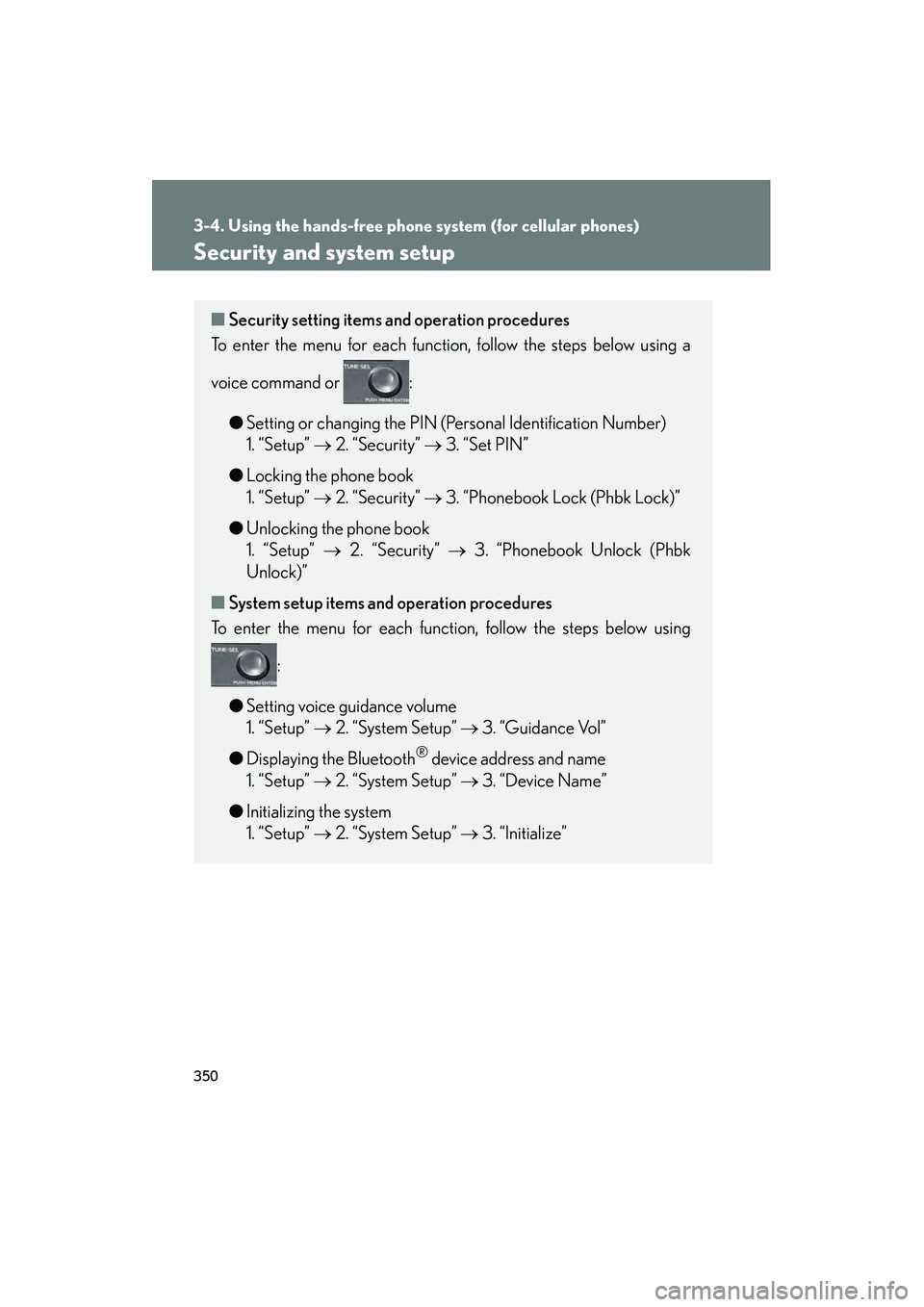
Security and system setup
■Security setting items an d operation procedures
To enter the menu for each function, follow the steps below using a
voice command or :
●Setting or changing the PIN (Personal Identification Number)
1. “Setup” → 2. “Security” → 3. “Set PIN”
● Locking the phone book
1. “Setup” → 2. “Security” → 3. “Phonebook Lock (Phbk Lock)”
● Unlocking the phone book
1. “Setup” → 2. “Security” → 3. “Phonebook Unlock (Phbk
Unlock)”
■ System setup items and operation procedures
To enter the menu for each function, follow the steps below using
:
● Setting voice guidance volume
1. “Setup” → 2. “System Setup” → 3. “Guidance Vol”
● Displaying the Bluetooth
® device address and name
1. “Setup” → 2. “System Setup” → 3. “Device Name”
● Initializing the system
1. “Setup” → 2. “System Setup” → 3. “Initialize”
Page 353 of 611
351
3-4. Using the hands-free phone system (for cellular phones)
3
Interior features
HS250h_U_75033U(Canada)
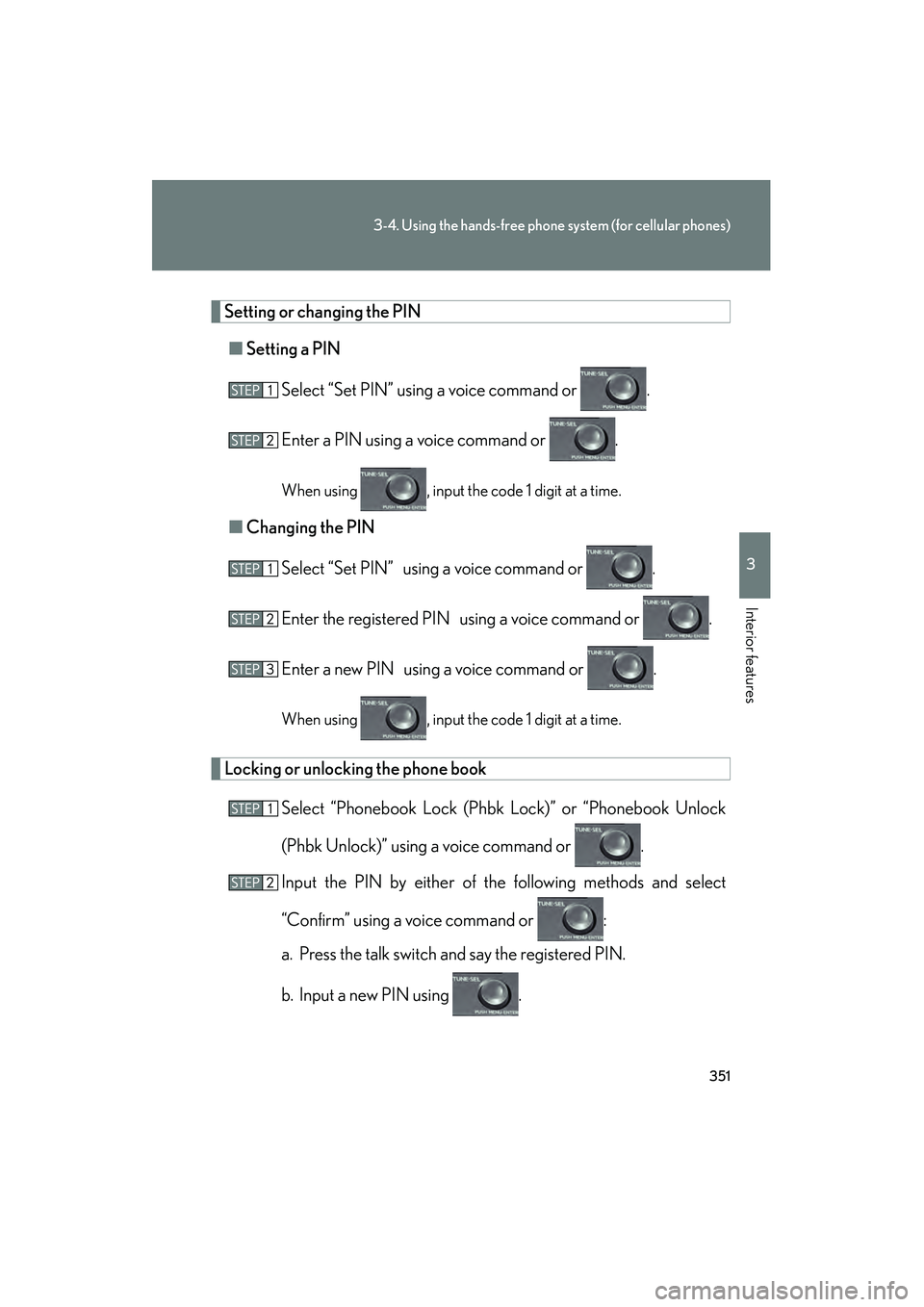
Setting or changing the PIN■ Setting a PIN
Select “Set PIN” using a voice command or .
Enter a PIN using a voice command or .
When using , input the code 1 digit at a time.
■Changing the PIN
Select “Set PIN” using a voice command or .
Enter the registered PIN using a voice command or .
Enter a new PIN using a voice command or .
When using , input the code 1 digit at a time.
Locking or unlocking the phone book
Select “Phonebook Lock (Phbk Lock)” or “Phonebook Unlock
(Phbk Unlock)” using a voice command or .
Input the PIN by either of the following methods and select
“Confirm” using a voice command or :
a. Press the talk switch and say the registered PIN.
b. Input a new PIN using .
Page 354 of 611

352
3-4. Using the hands-free phone system (for cellular phones)
HS250h_U_75033U(Canada)
Setting voice guidance volumeSelect “Guidance Vol” using .
Change the voice guidance volume.
To decrease the volume: Turn counterclockwise.
To increase the volume: Turn clockwise.
Displaying the Bluetooth® device address and name
Select “Device Name” using .
Turn to display the Bluetooth
® device address and
name.
Select “Go Back” using to return to “System Setup”.
Initializing the system
Select “Initialize” and then “Confirm” using .
Select “Confirm” again using .
Page 355 of 611

353
3-4. Using the hands-free phone system (for cellular phones)
3
Interior features
HS250h_U_75033U(Canada)
■Initialization
●The following data in the system can be initialized:
• Phone book
• Outgoing and incoming call history
• Speed dials
• Registered cellular phone data
•Security code
• Registered Bluetooth
® enabled portable player data
• Passkey for the cellular phones
• Passkey for the Bluetooth
® audio players
•Guidance volume
• Receiver volume
•Ring tone volume
●Once the initialization has been completed, the data cannot be restored to its
original state.
■When the phone book is locked
The following functions cannot be used:
●Dialing by inputting a name
●Speed dialing
●Dialing a number stored in the call history memory
●Using the phone book
Page 364 of 611

362
3-5. Using the interior lights
HS250h_U_75033U(Canada)
■Illuminated entry system
The lights automatically turn on/off according to “POWER” switch mode, the pres-
ence of the electronic key, whether the doors are locked/unlocked, and whether
the doors are opened/closed.
■To prevent 12-volt battery discharge
If the interior lights remain on when the door is not fully closed and the interior light
switch (door position on/ off) is on, the lights will go off automatically after 20 min-
utes.
■Customization
Settings (e.g. the time elapsed before the lights turn off) can be changed. (Custom-
izable features →P. 5 74 )
Personal lights