instrument panel Lexus HS250h 2011 Do-it-yourself maintenance / LEXUS 2011 HS250H (OM75037U) User Guide
[x] Cancel search | Manufacturer: LEXUS, Model Year: 2011, Model line: HS250h, Model: Lexus HS250h 2011Pages: 628, PDF Size: 10.69 MB
Page 165 of 628
165
2-2. Instrument cluster
2
When driving
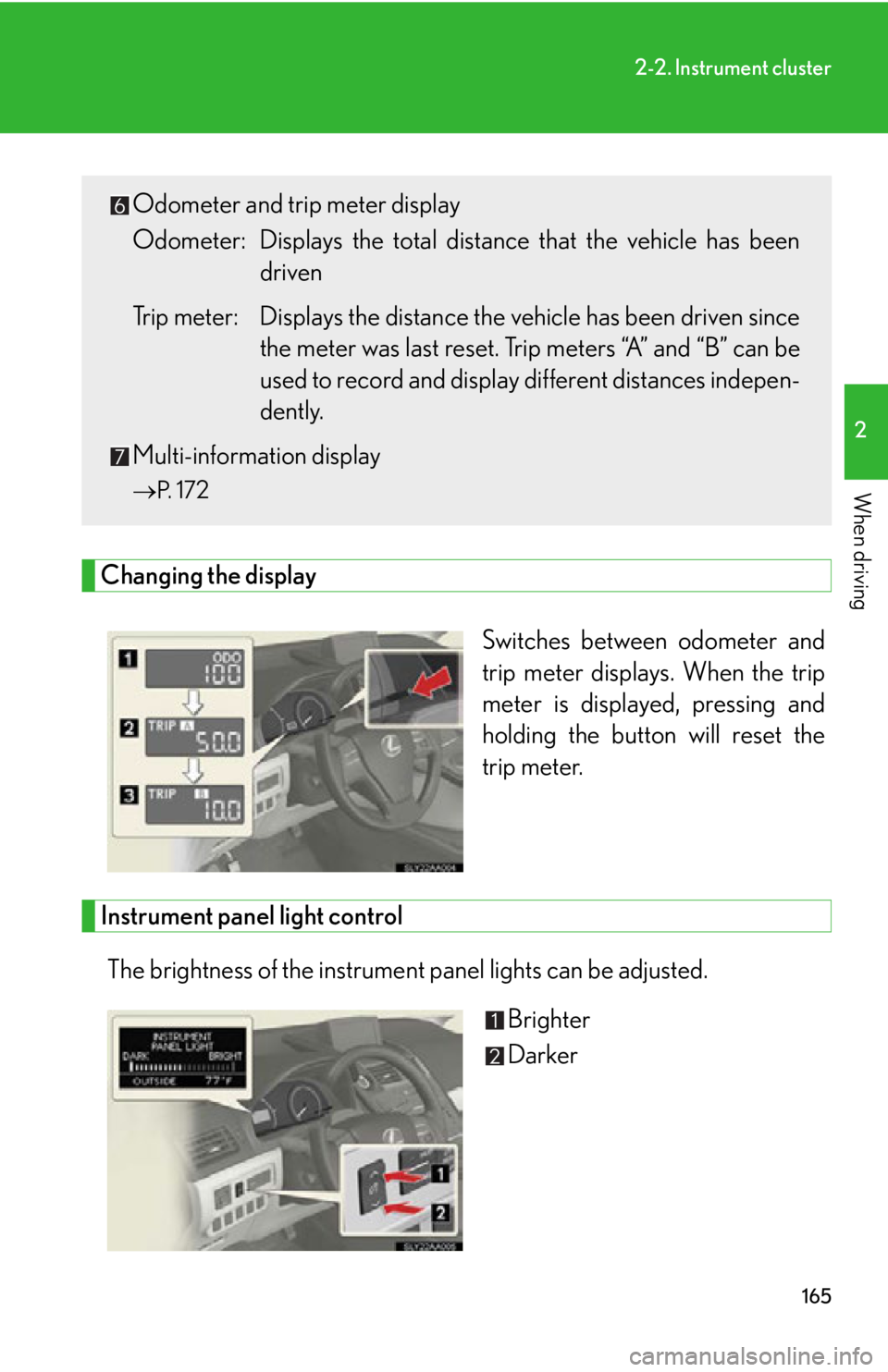
Changing the displaySwitches between odometer and
trip meter displays. When the trip
meter is displayed, pressing and
holding the button will reset the
trip meter.
Instrument panel light control
The brightness of the instrument panel lights can be adjusted. Brighter
Darker
Odometer and trip meter display
Odometer: Displays the total distance that the vehicle has been
driven
Trip meter: Displays the distance th e vehicle has been driven since
the meter was last reset. Trip meters “A” and “B” can be
used to record and display different distances indepen-
dently.
Multi-information display
P. 1 7 2
Page 166 of 628
166
2-2. Instrument cluster
■Instrument panel brightness adjustment
The instrument panel brightness levels when the tail lights are on and off can be
adjusted. However, when the surroundings are bright (daytime, etc.) turning on the
tail lights will not change the instrument panel brightness.
■Limitations of brightness adjustment
The brightness of the instrument panel ligh ts is automatically adjusted based on the
light sensor detecting how bright the surroundings are. However, if the instrument
panel brightness has been manually set to either the brightest or dimmest setting,
the automatic adjustment will not be performed.
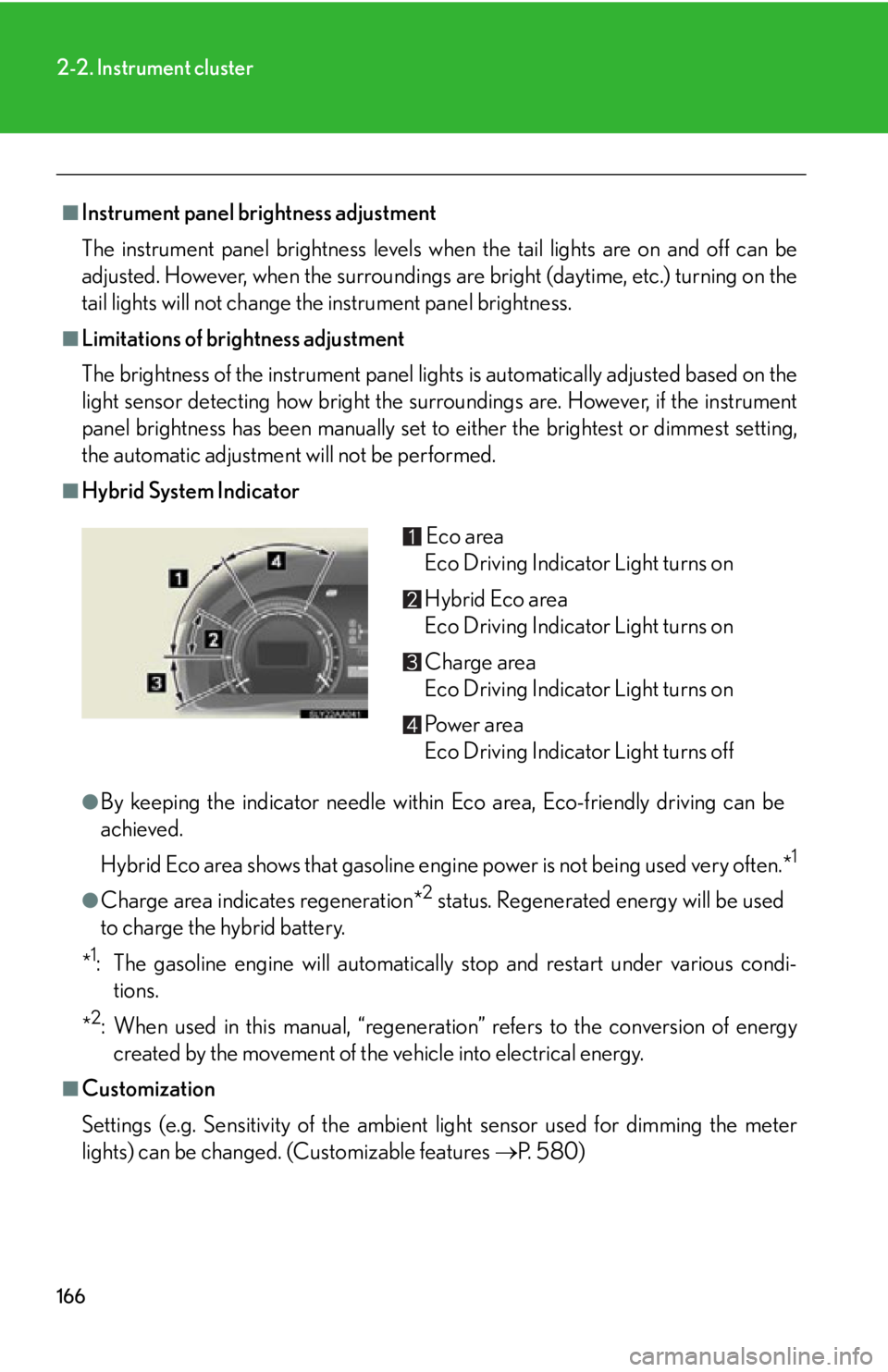
■Hybrid System Indicator
●By keeping the indicator needle within Eco area, Eco-friendly driving can be
achieved.
Hybrid Eco area shows that gasoline engine power is not being used very often.*
1
●Charge area indicates regeneration*2 status. Regenerated energy will be used
to charge the hybrid battery.
*
1: The gasoline engine will automatically stop and restart under various condi- tions.
*
2: When used in this manual, “regeneration” refers to the conversion of energy created by the movement of the vehicle into electrical energy.
■Customization
Settings (e.g. Sensitivity of the ambient light sensor used for dimming the meter
lights) can be changed. (Customizable features P. 5 8 0 )
Eco area
Eco Driving Indicator Light turns on
Hybrid Eco area
Eco Driving Indicator Light turns on
Charge area
Eco Driving Indicator Light turns on
Po w e r a r e a
Eco Driving Indicator Light turns off
Page 168 of 628
168
2-2. Instrument cluster
Indicators and warning lights
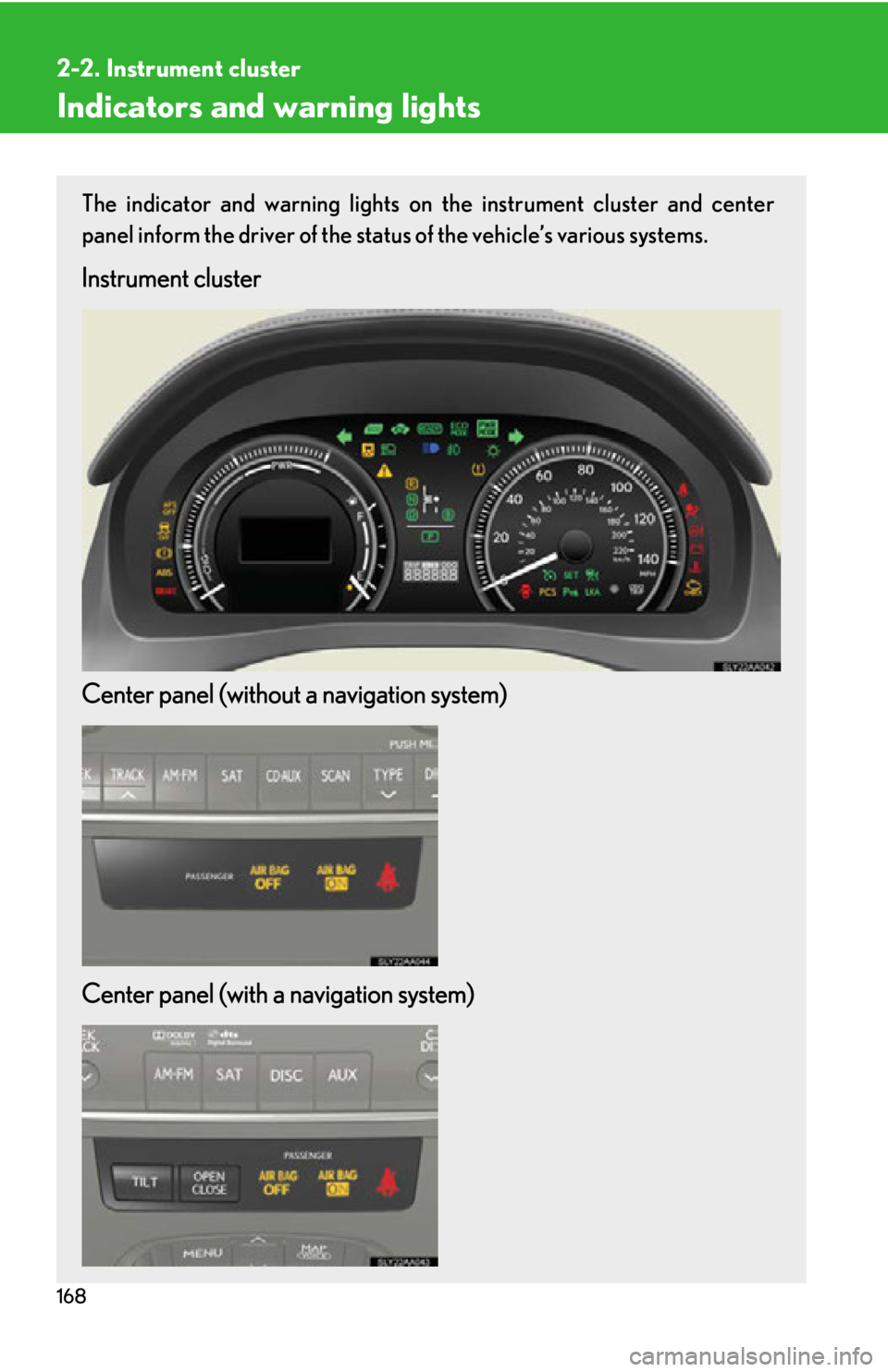
The indicator and warning lights on the instrument cluster and center
panel inform the driver of the status of the vehicle’s various systems.
Instrument cluster
Center panel (without a navigation system)
Center panel (with a navigation system)
Page 186 of 628
186
2-3. Operating the lights and windshield wipers
Headlight switch
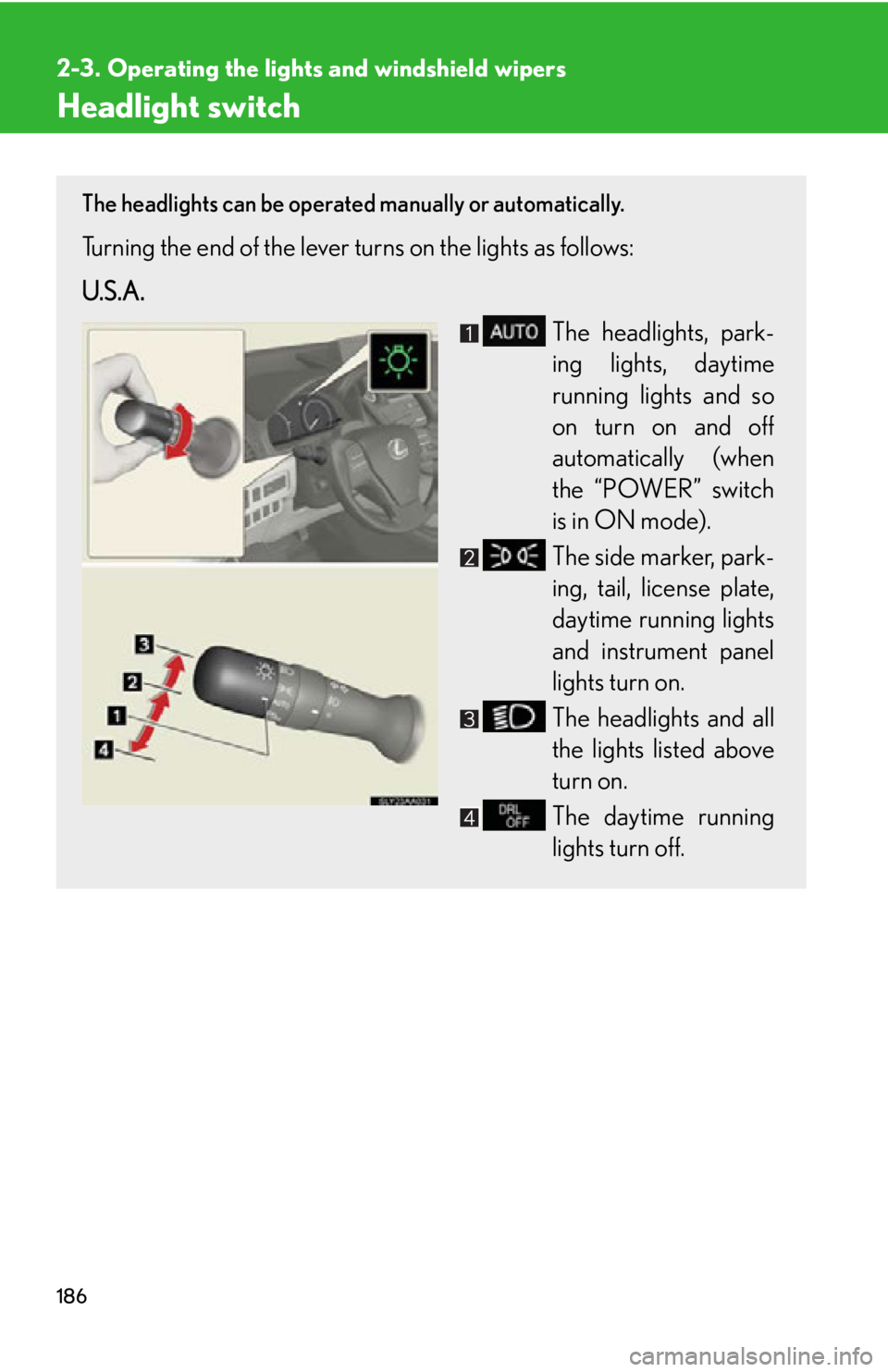
The headlights can be operated manually or automatically.
Turning the end of the lever turns on the lights as follows:
U.S.A.
The headlights, park-
ing lights, daytime
running lights and so
on turn on and off
automatically (when
the “POWER” switch
is in ON mode).
The side marker, park-
ing, tail, license plate,
daytime running lights
and instrument panel
lights turn on.
The headlights and all
the lights listed above
turn on.
The daytime running
lights turn off.
Page 187 of 628
187
2-3. Operating the lights and windshield wipers
2
When driving
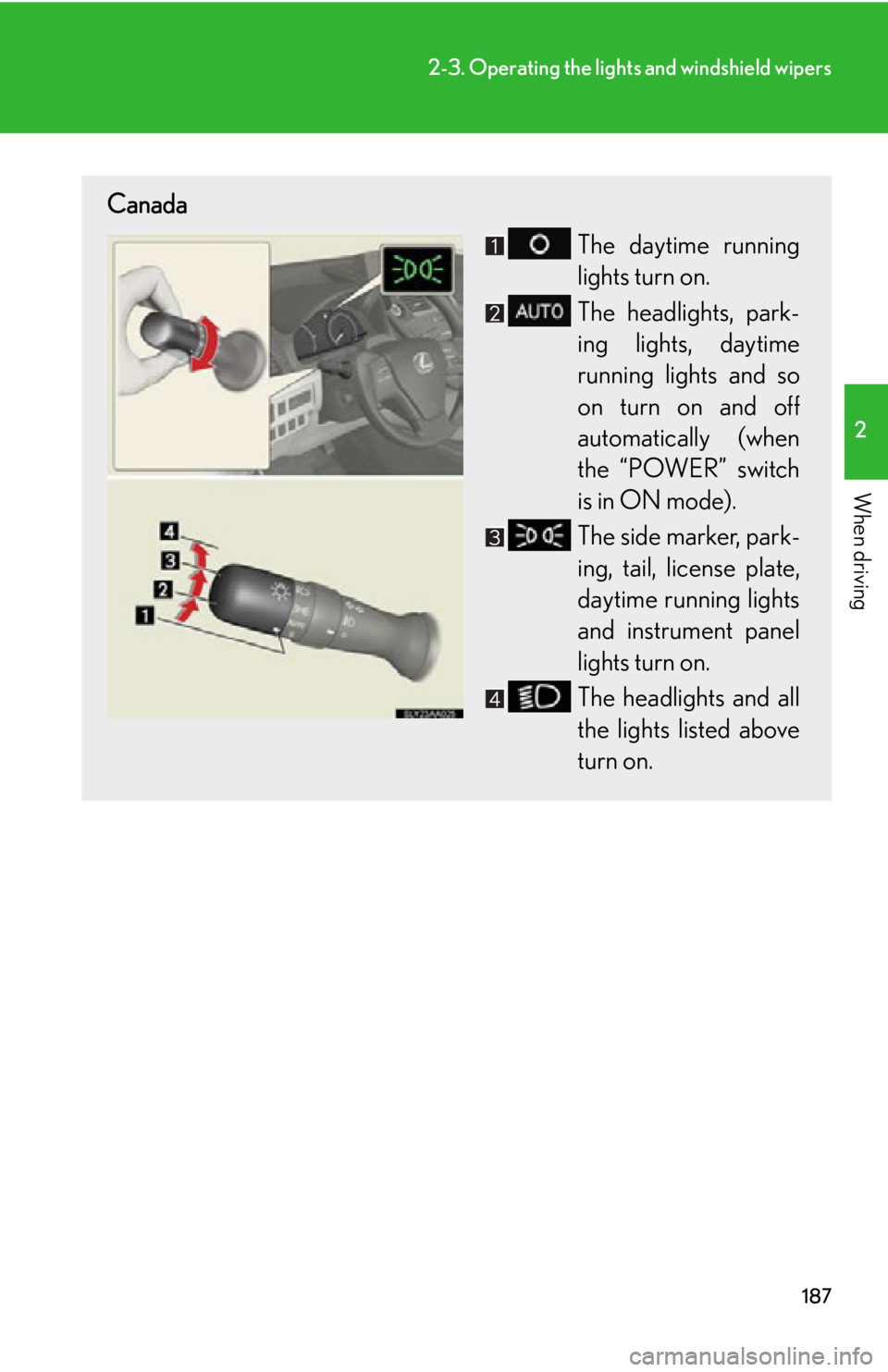
Canada
The daytime running
lights turn on.
The headlights, park-
ing lights, daytime
running lights and so
on turn on and off
automatically (when
the “POWER” switch
is in ON mode).
The side marker, park-
ing, tail, license plate,
daytime running lights
and instrument panel
lights turn on.
The headlights and all
the lights listed above
turn on.
Page 247 of 628
247
2-5. Driving information
2
When driving
CAUTION
■Things that must not be carried in the trunk
The following things may cause a fire if loaded in the trunk:
●Receptacles containing gasoline
●Aerosol cans
■Storage precautions
Observe the following precautions.
Failing to do so may result in death or serious injury.
●Stow cargo and luggage in the trunk whenever possible.
●Do not place cargo or luggage in or on the following locations as the item may
get under the brake or accelerator pedal and prevent the pedals from being
depressed properly, block the driver’s vision, or hit the driver or passengers,
causing an accident:
• At the feet of the driver
• On the front passenger or rear seats (when stacking items)
• On the package tray
• On the instrument panel
•On the dashboard
●Secure all items in the occupant compartment, as they may shift and injure some-
one during sudden braking, sudd en swerving or an accident.
■Capacity and distribution
●Do not exceed the maximum axle weight ra ting or the total vehicle weight rating.
●Even if the total load of occupant’s weight and the cargo load is less than the total
load capacity, do not apply the load unevenly. Improper loading may cause dete-
rioration of steering or braking control which may cause death or serious injury.
Page 413 of 628
413
4-1. Maintenance and care
4
Maintenance and care
■Caring for leather areas
Lexus recommends cleaning the interior of the vehicle at least twice a year to main-
tain the quality of the vehicle’s interior.
■Shampooing the carpets
There are several commercial foaming-type cleaners available. Use a sponge or
brush to apply the foam. Rub in overlapping circles. Do not use water. Wipe dirty
surfaces and let them dry. Excellent results are obtained by keeping the carpet as
dry as possible.
■Seat belts
Clean with mild soap and lukewarm water using a cloth or sponge. Also check the
belts periodically for excessive wear, fraying or cuts.
CAUTION
■Water in the vehicle
●Do not splash or spill liquid in the vehicle, such as on the floor, in the hybrid bat-
tery (traction battery) air vents, and in the trunk.
Doing so may cause the hybr id battery, electrical components, etc. to malfunc-
tion or catch fire.
●Do not get any of the SRS components or wiring in the vehicle interior wet.
( P. 1 0 8 )
An electrical malfunction may cause the airbags to deploy or not function prop-
erly, resulting in death or serious injury.
■Cleaning the interior (especially instrument panel)
Do not use polish wax or polish cleaner. The instrument panel may reflect off the
windshield, obstructing the driver’s view and leading to an accident, resulting in
death or serious injury.
Page 414 of 628
414
4-1. Maintenance and care
NOTICE
■Cleaning detergents
●Do not use the following types of detergent, as they may discolor the vehicle inte-
rior or cause streaks or damage to painted surfaces:
• Non-seat portions: Organic substances such as benzene or gasoline, alkaline or acidic solutions, dye, and bleach
• Seats: Alkaline or acidic solutions, such as thinner, benzene, and alcohol
●Do not use polish wax or polish cleaner. The instrument panel’s or other interior
part’s painted surface may be damaged.
■Preventing damage to leather surfaces
Observe the following precautions to avoid damage to and deterioration of leather
surfaces:
●Remove any dust or dirt from leather surfaces immediately.
●Do not expose the vehicle to direct sunlight for extended pe riods of time. Park
the vehicle in the shade, especially during summer.
●Do not place items made of vinyl, plastic, or containing wax on the upholstery, as
they may stick to the leather surface if the vehicle interior heats up significantly.
■Water on the floor
Do not wash the vehicle floor with water.
Vehicle systems such as the audio syst em may be damaged if water comes into
contact with electrical components such as the audio system above or under the
floor of the vehicle. Water may also cause the body to rust.
■Cleaning the inside of the rear window
●Do not use glass cleaner to clean the rear window, as this may cause damage to
the rear window defogger heater wires or antenna. Use a cloth dampened with
lukewarm water to gently wipe the window clean. Wipe the window in strokes
running parallel to the heater wires or antenna.
●Be careful not to scratch or damage the heater wires or antenna.
Page 461 of 628
461
4-3. Do-it-yourself maintenance
4
Maintenance and care
Checking and replacing fuses
If any of the electrical components do not operate, a fuse may have blown.
If this happens, check and replace the fuses as necessary.
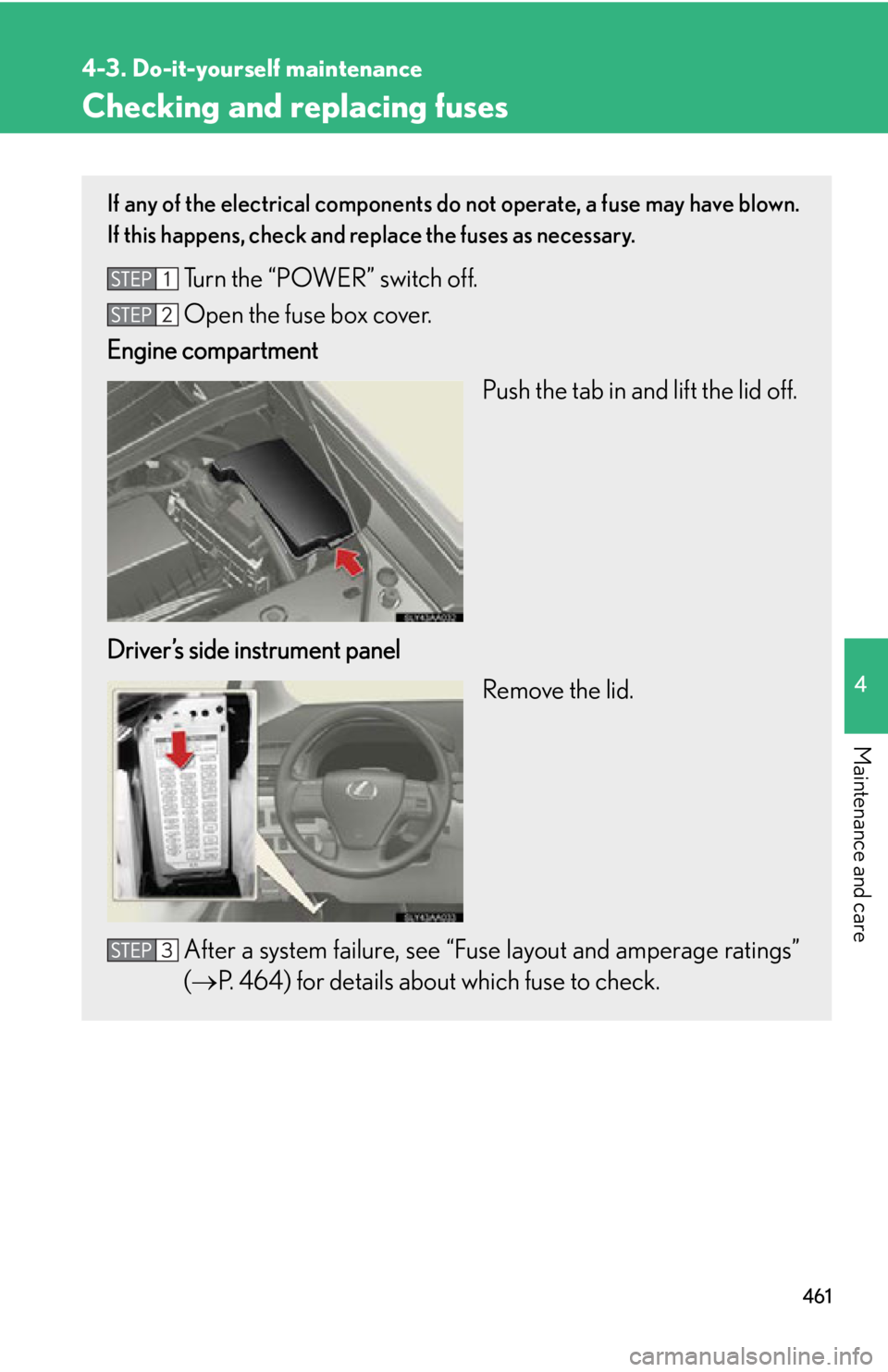
Turn the “POWER” switch off.
Open the fuse box cover.
Engine compartment
Push the tab in and lift the lid off.
Driver’s side instrument panel Remove the lid.
After a system failure, see “Fuse layout and amperage ratings”
( P. 464) for details about which fuse to check.
Page 468 of 628
468
4-3. Do-it-yourself maintenance
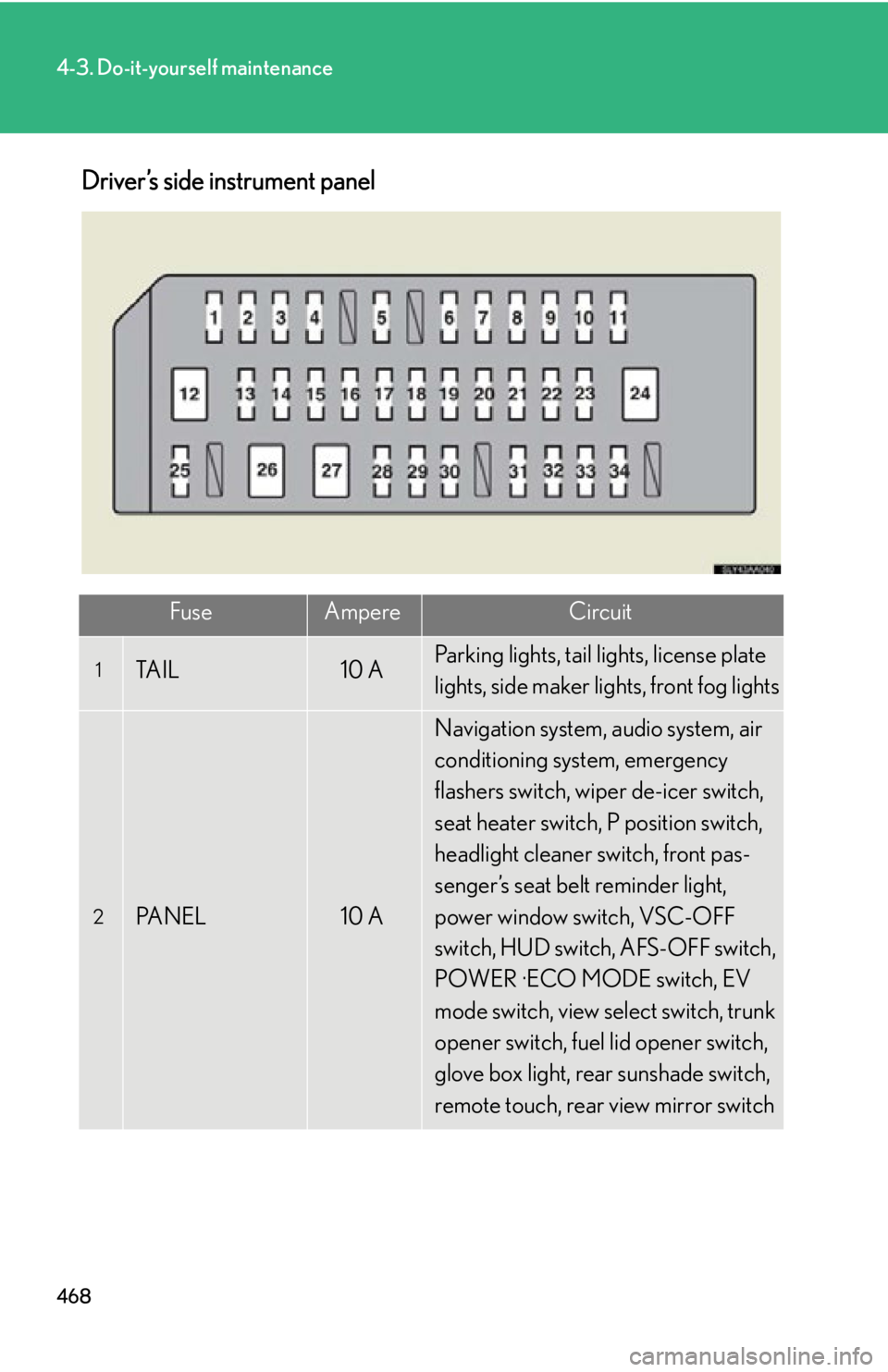
Driver’s side instrument panel
FuseAmpereCircuit
1TA I L10 AParking lights, tail lights, license plate
lights, side maker lights, front fog lights
2PA N E L10 A
Navigation system, audio system, air
conditioning system, emergency
flashers switch, wiper de-icer switch,
seat heater switch, P position switch,
headlight cleaner switch, front pas-
senger’s seat belt reminder light,
power window switch, VSC-OFF
switch, HUD switch, AFS-OFF switch,
POWER ·ECO MODE switch, EV
mode switch, view select switch, trunk
opener switch, fuel lid opener switch,
glove box light, rear sunshade switch,
remote touch, rear view mirror switch