lights Lexus HS250h 2011 Hybrid system / LEXUS 2011 HS250H OWNERS MANUAL (OM75037U)
[x] Cancel search | Manufacturer: LEXUS, Model Year: 2011, Model line: HS250h, Model: Lexus HS250h 2011Pages: 628, PDF Size: 10.69 MB
Page 3 of 628

1
2
3
4
5
6
7
3
1-8. Safety informationCorrect driving posture ............. 104
SRS airbags ..................................... 106
Front passenger occupant classification sy stem ................... 118
Child restraint systems ............... 123
Installing child re straints .............. 127
2-1. Driving procedures Driving the vehicle ........................ 138
Power (ignition) switch ............... 147
EV drive mode ............................... 152
Hybrid transmission ..................... 155
Turn signal lever .............................. 161
Parking brake ................................. 162
Horn.................................................... 163
2-2. Instrument cluster Gauges and meters ..................... 164
Indicators and warning lights................................................. 168
Multi-information display............ 172
Head-up display ............................ 178 2-3. Operating the lights and
windshield wipers
Headlight switch ............................ 186
Automatic High Beam .................. 191
Fog light switch .............................. 197
Windshield wipers and washer ............................................ 198
Headlight cleaner switch .......... 203
2-4. Using other driving systems Cruise control ............................... 204
Dynamic radar cruise control........................................... 208
LKA (Lane-Keeping Assist) ..... 221
Driving assist systems................. 229
Hill-start assist control ............... 234
Pre-Collision System.................. 236
2-5. Driving information Cargo and luggage ..................... 245
Vehicle load limits ........................ 248
Winter driving tips ....................... 249
Trailer towing ................................. 252
Dinghy towing ............................... 253
2When driving
Page 4 of 628

TABLE OF CONTENTSIndex
4
3-1. Using the air conditioning system and defogger
Automatic air conditioning system ............................................ 256
Rear window defogger switch.............................................. 264
Windshield wiper de-icer ......... 265
3-2. Using the audio system Audio system ................................. 266
Using the radio .............................. 269
Using the CD player ................... 277
Playing MP3 and WMA discs ............................................... 285
Operating an iPod ....................... 292
Operating a USB memory...... 300
Optimal use of the audio system ........................................... 308
Using the AUX po rt....................... 311
Using the steering wheel audio switches ............................. 312 3-3. Using the Bluetooth
® audio
system
Bluetooth
® audio system .......... 315
Using the Bluetooth
® audio
system ............................................. 318
Operating a Bluetooth
®
enabled portable player ......... 323
Setting up a Bluetooth
®
enabled portable player ......... 326
Bluetooth
® audio system
setup ................................................ 331
3-4. Using the hands-free phone system (for cellular phones)
Hands-free system for cellular phones ........................................... 332
Using the hands-free system (for cellular phones) ................. 336
Making a phone call.................... 344
Setting a cellular phone ............. 349
Security and system setup ........ 354
Using the phone book............... 358
3-5. Using the interior lights Interior lights list............................ 364
• Interior lights ............................... 365
• Personal lights ............................ 365
3Interior features
Page 5 of 628

1
2
3
4
5
6
7
5
3-6. Using the storage featuresList of storage features............... 367
• Glove box ................................... 368
• Console box ................................ 369
• Cup holders.................................. 371
• Bottle holders ............................. 373
• Auxiliary boxes........................... 374
3-7. Other interior features Sun visors......................................... 375
Vanity mirrors ................................ 376
Clock ................................................. 377
Power outlets ................................. 378
Seat heaters and ventilators ..................................... 379
Armrest ............................................. 381
Rear sunshade .............................. 382
Floor mat......................................... 384
Trunk compartment features......................................... 386
Garage door opener................. 388
Compass.......................................... 396
Safety Connect ............................ 400 4-1. Maintenance and care
Cleaning and protecting the vehicle exterior.................. 408
Cleaning and protecting the vehicle interior ..................... 412
4-2. Maintenance Maintenance requirements ...... 415
General maintena nce .................. 417
Emission inspection and maintenance (I/M)
programs ....................................... 421
4-3. Do-it-yourself maintenance Do-it-yourself service precautions .................................. 422
Hood ................................................. 425
Positioning a floor jack............... 426
Engine compartment.................. 428
12-volt battery................................ 439
Tires ................................................... 443
Tire inflation pressure.................. 451
Wheels ............................................. 454
Air conditioning filter.................. 456
Electronic key battery ................ 459
Checking and replacing fuses ................................................. 461
Headlight aim (LED headlights) ....................... 473
Light bulbs ....................................... 475
4Maintenance and care
Page 8 of 628
8
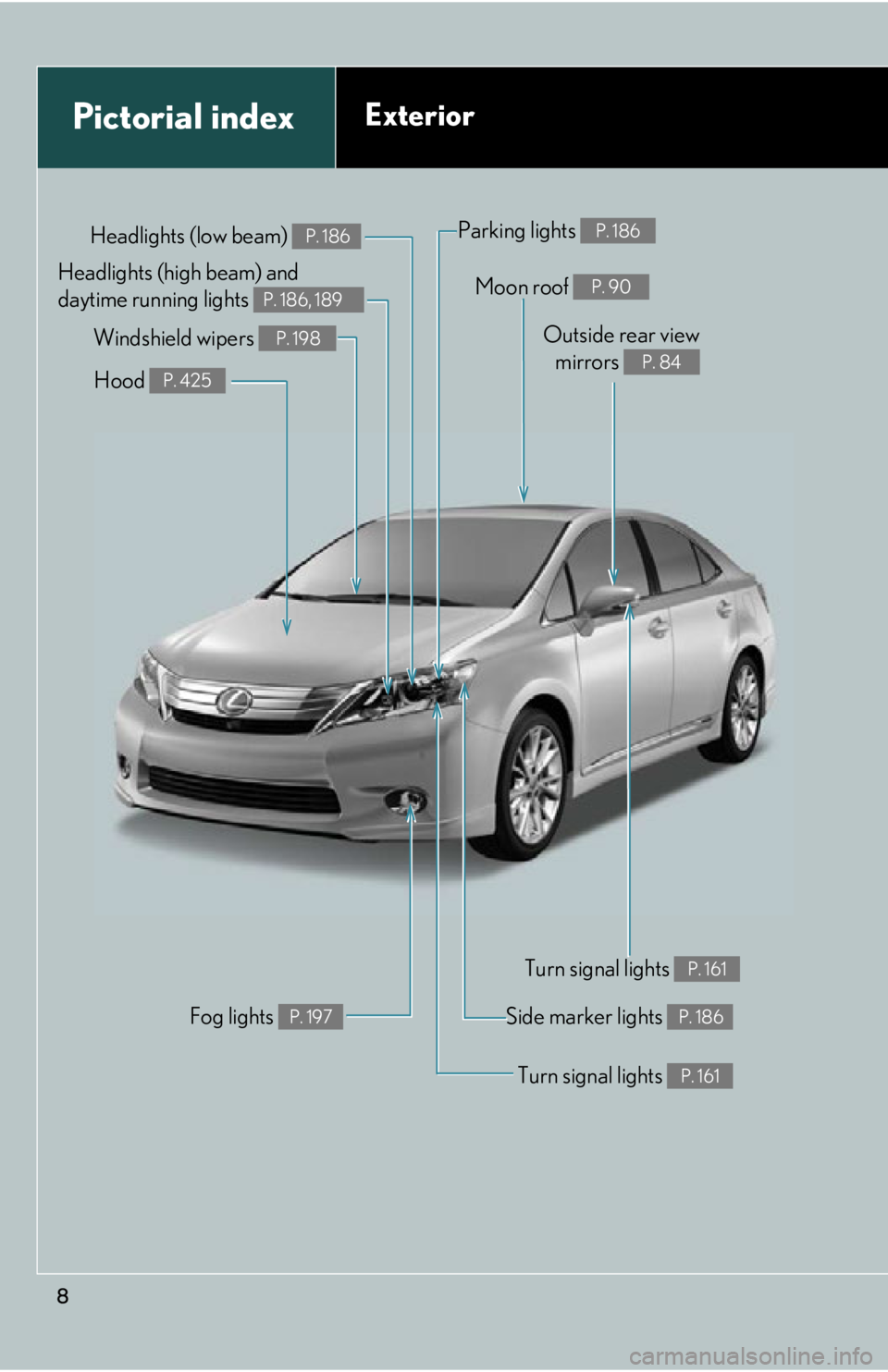
Pictorial indexExterior
Moon roof P. 90
Headlights (low beam) P. 186
Fog lights P. 197
Turn signal lights P. 161
Side marker lights P. 186
Hood P. 425
Parking lights P. 186
Windshield wipers P. 198Outside rear viewmirrors
P. 84
Turn signal lights P. 161
Headlights (high beam) and
daytime running lights
P. 186, 189
Page 9 of 628
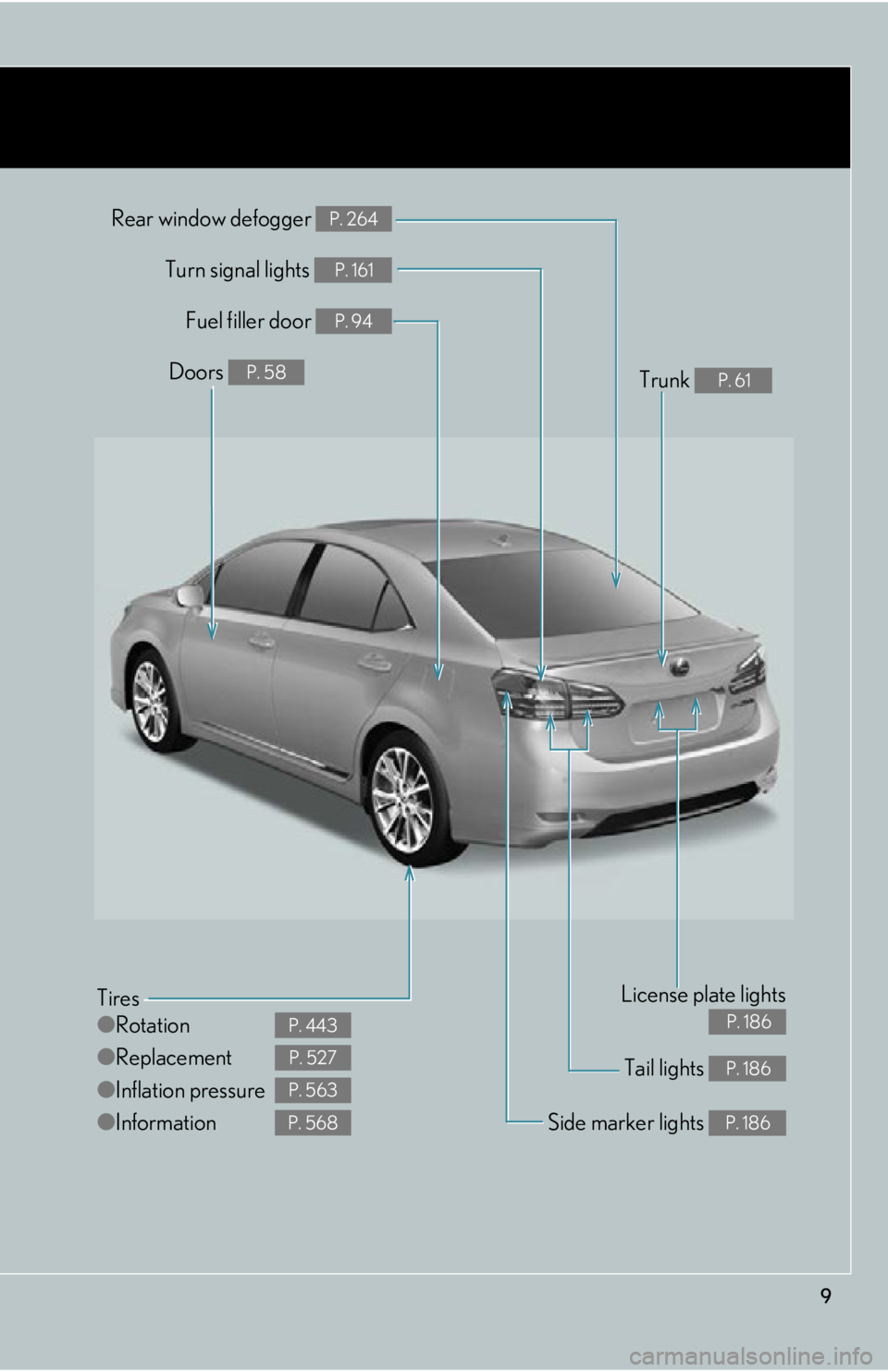
9
Tail lights P. 186
Rear window defogger P. 264
Tires
●Rotation
● Replacement
● Inflation pressure
● Information
P. 443
P. 527
P. 563
P. 568Side marker lights P. 186
Fuel filler door P. 94
Turn signal lights P. 161
License plate lights
P. 186
Doors P. 58Trunk P. 61
Page 11 of 628
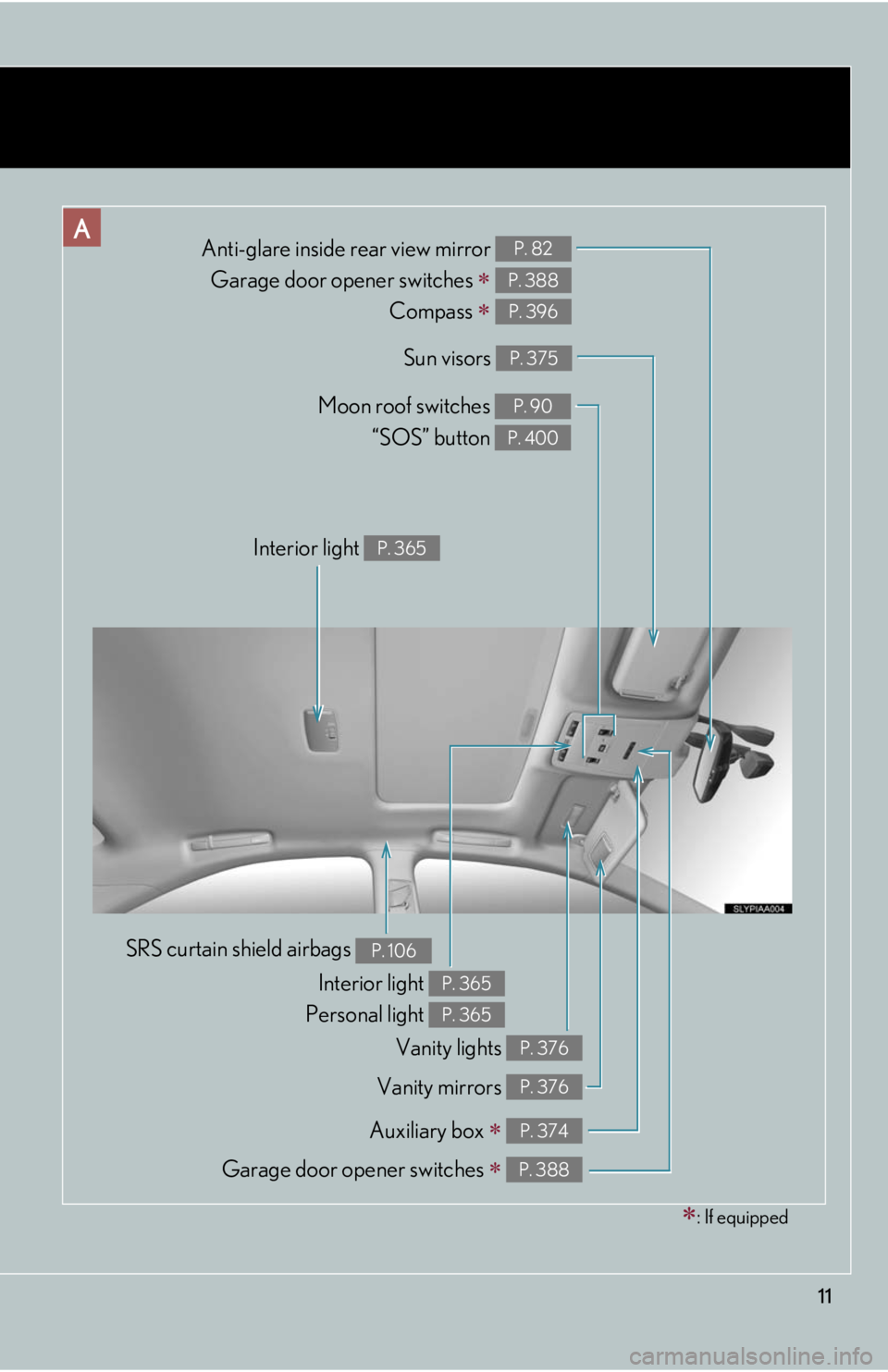
11
Anti-glare inside rear view mirror Garage door opener switches
Compass
P. 82
P. 388
P. 396
Sun visors P. 375
Auxiliary box P. 374
SRS curtain shield airbags P. 106
Interior light
Personal light P. 365
P. 365
Moon roof switches “SOS” button P. 90
P. 400
Garage door opener switches P. 388
Vanity mirrors P. 376
: If equipped
Vanity lights P. 376
Interior light P. 365
Page 38 of 628
38
1-1. Hybrid system
Hybrid vehicle driving tips
For economical and ecological driving, pay attention to the following
points:
■Using Eco drive mode
When using Eco drive mode, the torq ue corresponding to the accelerator
pedal depression amount can be generated more smoothly than it is in
normal conditions. In addition, the op eration of the air conditioning system
(heating/cooling) will be minimized, improving the fuel economy.
( P. 1 5 7 )
■Use of Hybrid System Indicator
The environmentally-friendly driving is possible by keeping the indicate of
Hybrid System Indicator within Eco area. ( P. 1 6 6 )
■When braking the vehicle
Make sure to operate the brakes ge ntly and in good time. A greater
amount of electrical energy can be retained when slowing down.
■ Delays
Repeated acceleration and deceleration, as well as long waits at traffic
lights, will lead to bad fu el consumption. Check traffic reports before leav-
ing and avoid delays as much as possible. When encountering a delay,
gently release the brake pedal to allow the vehicle to move forward slightly
while avoiding overuse of the accelerato r pedal. Doing so can help control
excessive gasoline consumption.
■ Highway driving
Control your speed and keep at a constant speed. Also, before stopping at
a toll booth or similar, allow plenty of time to release the accelerator and
gently apply the brakes. A greater amount of electrical energy can be
retained when slowing down.
Page 56 of 628
56
1-3. Opening, closing and locking the doors
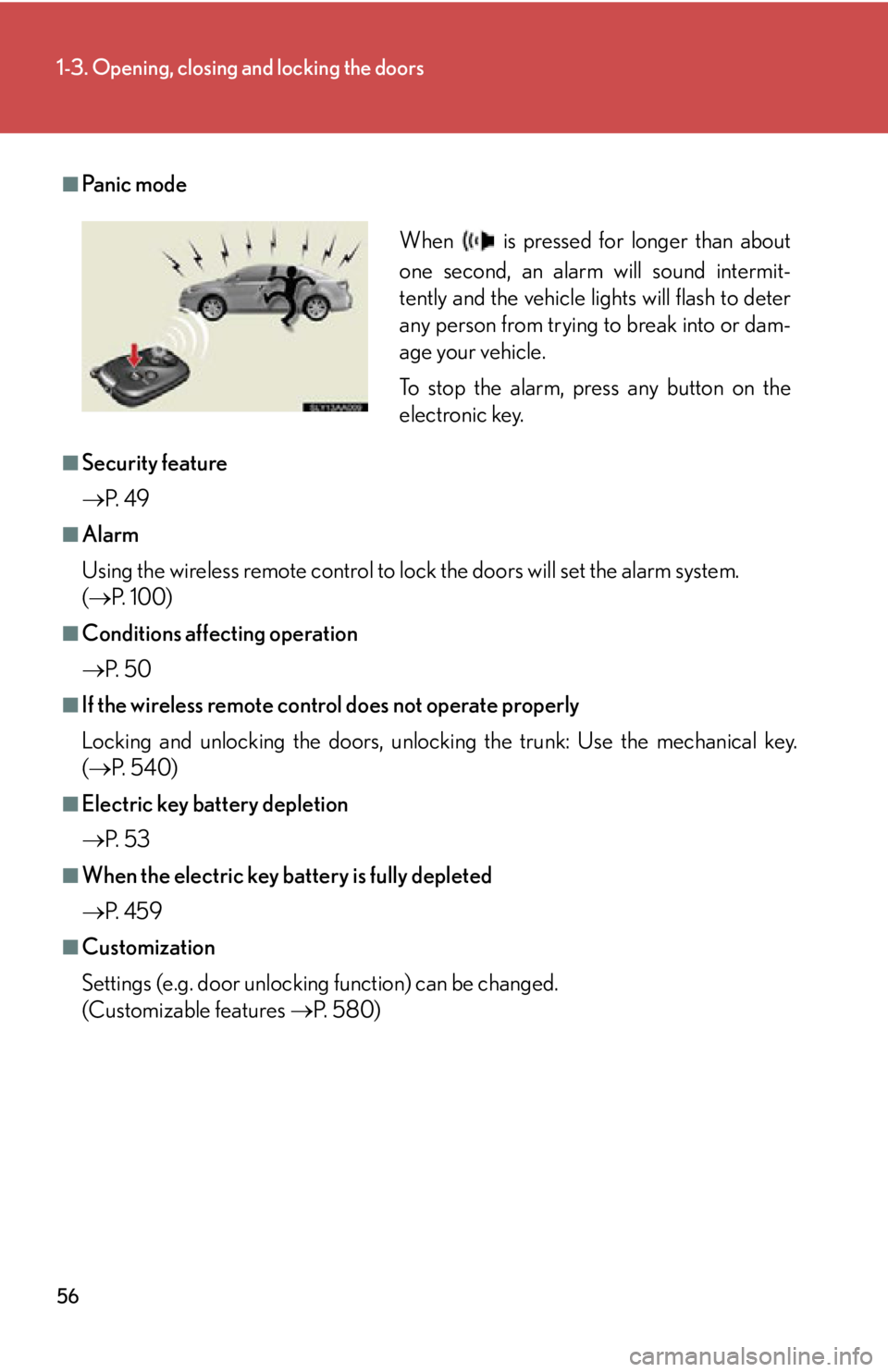
■Pa n i c m o d e
■Security feature
P. 4 9
■Alarm
Using the wireless remote control to lock the doors will set the alarm system.
( P. 100)
■Conditions affecting operation
P. 5 0
■If the wireless remote control does not operate properly
Locking and unlocking the doors, unlocking the trunk: Use the mechanical key.
( P. 5 4 0 )
■Electric key battery depletion
P. 5 3
■When the electric key battery is fully depleted
P. 4 5 9
■Customization
Settings (e.g. door unlocking function) can be changed.
(Customizable features P. 5 8 0 )
When is pressed for longer than about
one second, an alarm will sound intermit-
tently and the vehicle lights will flash to deter
any person from trying to break into or dam-
age your vehicle.
To stop the alarm, press any button on the
electronic key.
Page 82 of 628
82
1-4. Adjustable components (seats, mirrors, steering wheel)
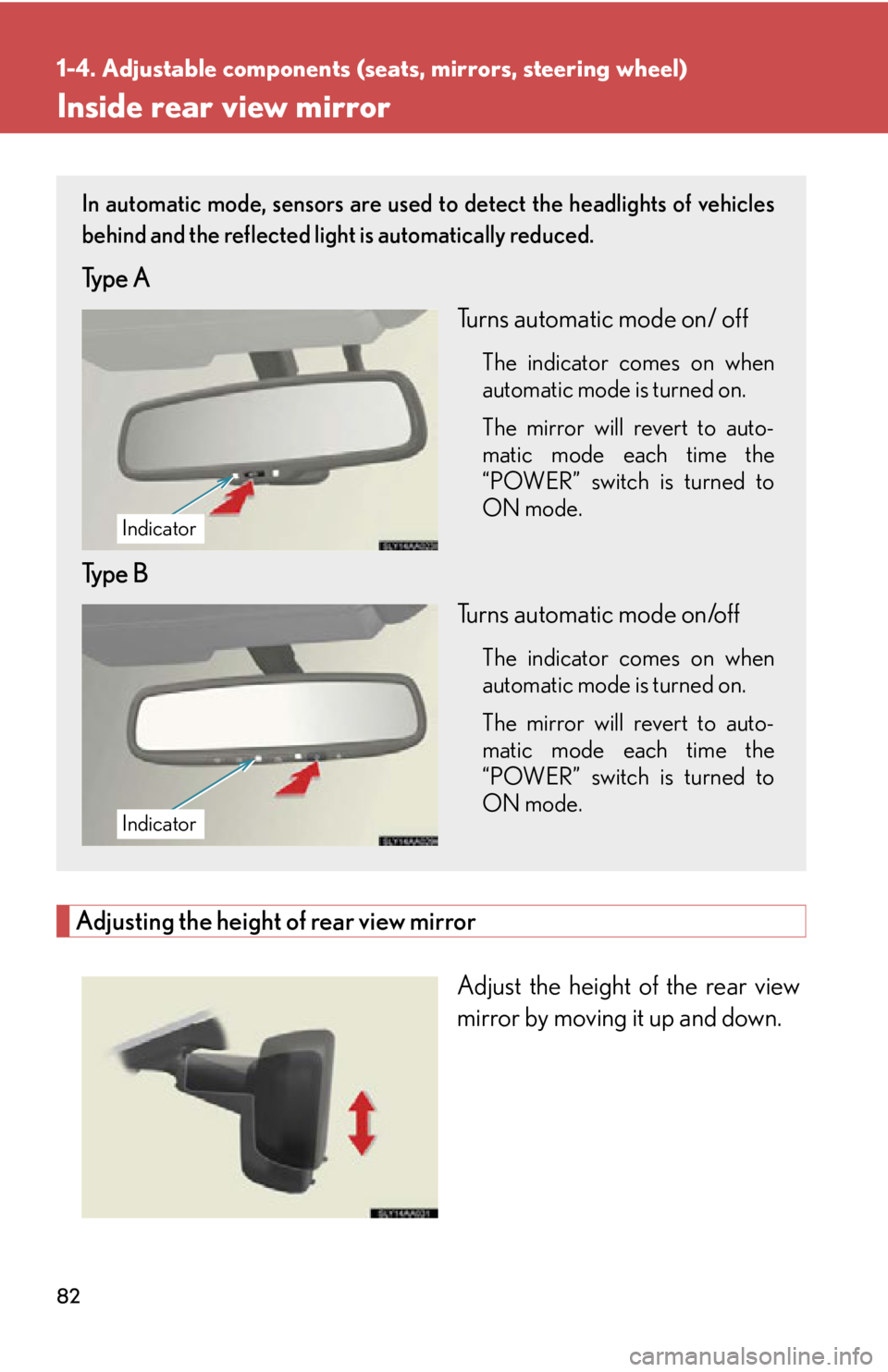
Inside rear view mirror
Adjusting the height of rear view mirror
Adjust the height of the rear view
mirror by moving it up and down.
In automatic mode, sensors are used to detect the headlights of vehicles
behind and the reflected light is automatically reduced.
Type A
Turns automatic mode on/ off
The indicator comes on when
automatic mode is turned on.
The mirror will revert to auto-
matic mode each time the
“POWER” switch is turned to
ON mode.
Type BTurns automatic mode on/off
The indicator comes on when
automatic mode is turned on.
The mirror will revert to auto-
matic mode each time the
“POWER” switch is turned to
ON mode.
Indicator
Indicator
Page 100 of 628
100
1-7. Theft deterrent system
Alarm
The system sounds the alarm and flashes the lights when forced entry is
detected.
■Triggering of the alarm
The alarm is triggered in the following situations when the alarm is
set:
●A locked door or trunk is unlocked or opened in any way other
than using the entry function, wi reless remote control or mechan-
ical key. (The doors will lock again automatically.)
● The hood is opened.
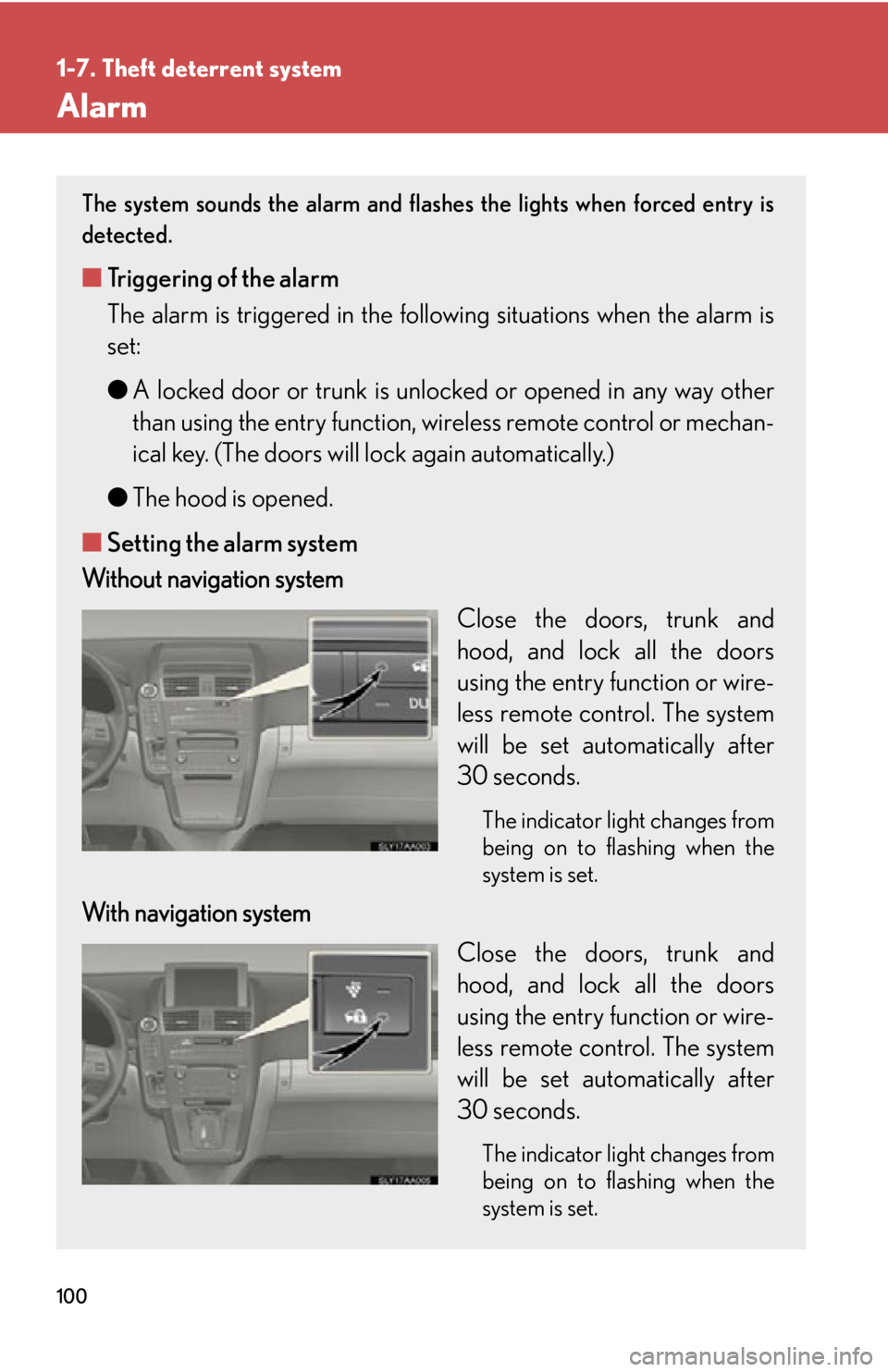
■ Setting the alarm system
Without navigation system
Close the doors, trunk and
hood, and lock all the doors
using the entry function or wire-
less remote control. The system
will be set automatically after
30 seconds.
The indicator light changes from
being on to flashing when the
system is set.
With navigation systemClose the doors, trunk and
hood, and lock all the doors
using the entry function or wire-
less remote control. The system
will be set automatically after
30 seconds.
The indicator light changes from
being on to flashing when the
system is set.