lights Lexus HS250h 2011 Hybrid system / LEXUS 2011 HS250H (OM75037U) User Guide
[x] Cancel search | Manufacturer: LEXUS, Model Year: 2011, Model line: HS250h, Model: Lexus HS250h 2011Pages: 628, PDF Size: 10.69 MB
Page 108 of 628
108
1-8. Safety information
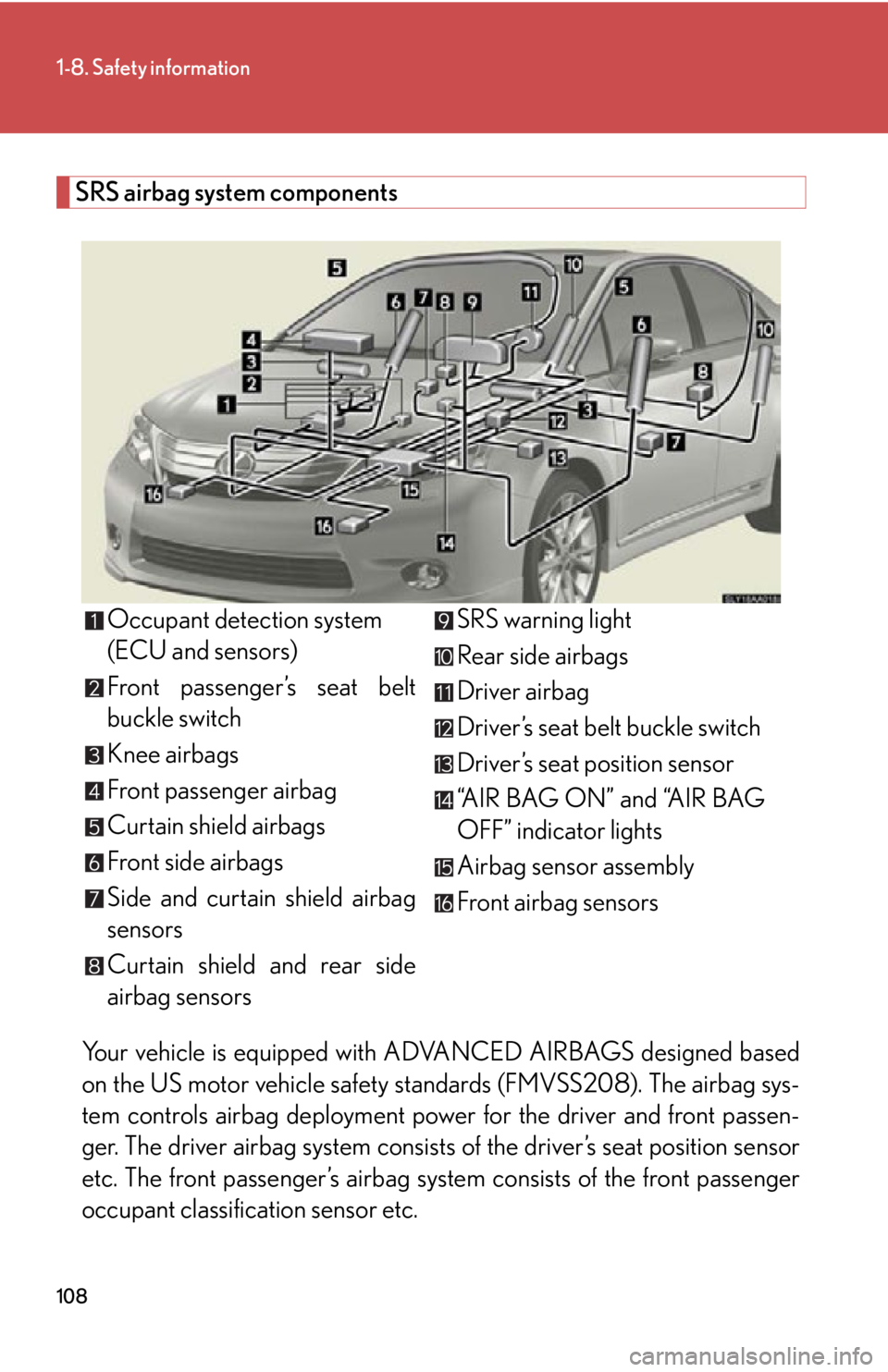
SRS airbag system componentsYour vehicle is equipped with AD VANCED AIRBAGS designed based
on the US motor vehicle safety st andards (FMVSS208). The airbag sys-
tem controls airbag deployment power for the driver and front passen-
ger. The driver airbag system consists of the driver’s seat position sensor
etc. The front passenger’s airbag system consists of the front passenger
occupant classification sensor etc. Occupant detection system
(ECU and sensors)
Front passenger’s seat belt
buckle switch
Knee airbags
Front passenger airbag
Curtain shield airbags
Front side airbags
Side and curtain shield airbag
sensors
Curtain shield and rear side
airbag sensors
SRS warning light
Rear side airbags
Driver airbag
Driver’s seat belt buckle switch
Driver’s seat position sensor
“AIR BAG ON” and “AIR BAG
OFF” indicator lights
Airbag sensor assembly
Front airbag sensors
Page 119 of 628

119
1-8. Safety information
1
Before driving
Condition and operation in the front passenger occupant classification system
■Adult*1
■Child *3 or child restraint system*4
Indicator/
warning light “AIR BAG ON” and “AIR BAG OFF”
indicator lights “A I R B A G
ON”
SRS warning light Off
Front passenger’s seat belt reminder light Flashing
*2
DevicesFront passenger airbag
Activated
Side airbag on the front passenger seatCurtain shield airbag in the front passenger side
Front passenger knee airbag
Front passenger’s seat belt pretensioner
Indicator/
warning light “AIR BAG ON” and “AIR BAG OFF”
indicator lights “A I R B A G
OFF”
*5
SRS warning light Off
Front passenger’s seat belt reminder light Flashing
*2
DevicesFront passenger airbag Deactivated
Side airbag on the front passenger seat ActivatedCurtain shield airbag in the front passenger side
Front passenger knee airbag Deactivated
Front passenger’s seat belt pretensioner Activated
Page 120 of 628

120
1-8. Safety information
■Unoccupied
■ There is a malfunction in the system
*1: The system judges a person of adult size as an adult. When a smaller
adult sits in the front passenger seat, the system may recognize him/
her as a child depending on his/her physique and posture.
*2: In the event the front passenger does not wear a seat belt.
*3: When a larger child who has outgrow n a child restraint system sits in
the front passenger seat, the system may recognize him/her as an
adult depending on his/her physique or posture.
Indicator/
warning light “AIR BAG ON” and “AIR BAG OFF”
indicator lightsNot illuminated
SRS warning light Off
Front passenger’s seat belt reminder light
Devices Front passenger airbag Deactivated
Side airbag on the front passenger seat Activated
Curtain shield airbag in the front passenger side
Front passenger knee airbagDeactivated
Front passenger’s seat belt pretensioner
Indicator/
warning light “AIR BAG ON” and “AIR BAG OFF”
indicator lights “A I R B A G
OFF”
SRS warning light On
Front passenger’s seat belt reminder light Off
Devices Front passenger airbag Deactivated
Side airbag on the front passenger seat Activated
Curtain shield airbag in the front passenger side
Front passenger knee airbag Deactivated
Front passenger’s seat belt pretensioner Activated
Page 137 of 628
When driving2
137
2-1. Driving proceduresDriving the vehicle.................. 138
Power (ignition) switch .......... 147
EV drive mode.......................... 152
Hybrid transmission ............... 155
Turn signal lever ........................ 161
Parking brake ........................... 162
Horn ............................................ 163
2-2. Instrument cluster Gauges and meters ................ 164
Indicators and warning lights ......................................... 168
Multi-information display ..... 172
Head-up display ...................... 178
2-3. Operating the lights and windshield wipers
Headlight switch...................... 186
Automatic High Beam ............ 191
Fog light switch ........................ 197
Windshield wipers and washer ..................................... 198
Headlight cleaner switch.... 203 2-4. Using other driving systems
Cruise control......................... 204
Dynamic radar cruise control .................................... 208
LKA (Lane-Keeping Assist) ........ 221
Driving assist systems ........... 229
Hill-start assist control ......... 234
Pre-Collision System ............ 236
2-5. Driving information Cargo and luggage ............... 245
Vehicle load limits .................. 248
Winter driving tips ................. 249
Trailer towing .......................... 252
Dinghy towing ......................... 253
Page 161 of 628
161
2-1. Driving procedures
2
When driving
Turn signal lever
■Turn signals can be operated when
The “POWER” switch is in ON mode.
■If the indicator flashes faster than usual
Check that a light bulb in the front or rear turn signal lights has not burned out.
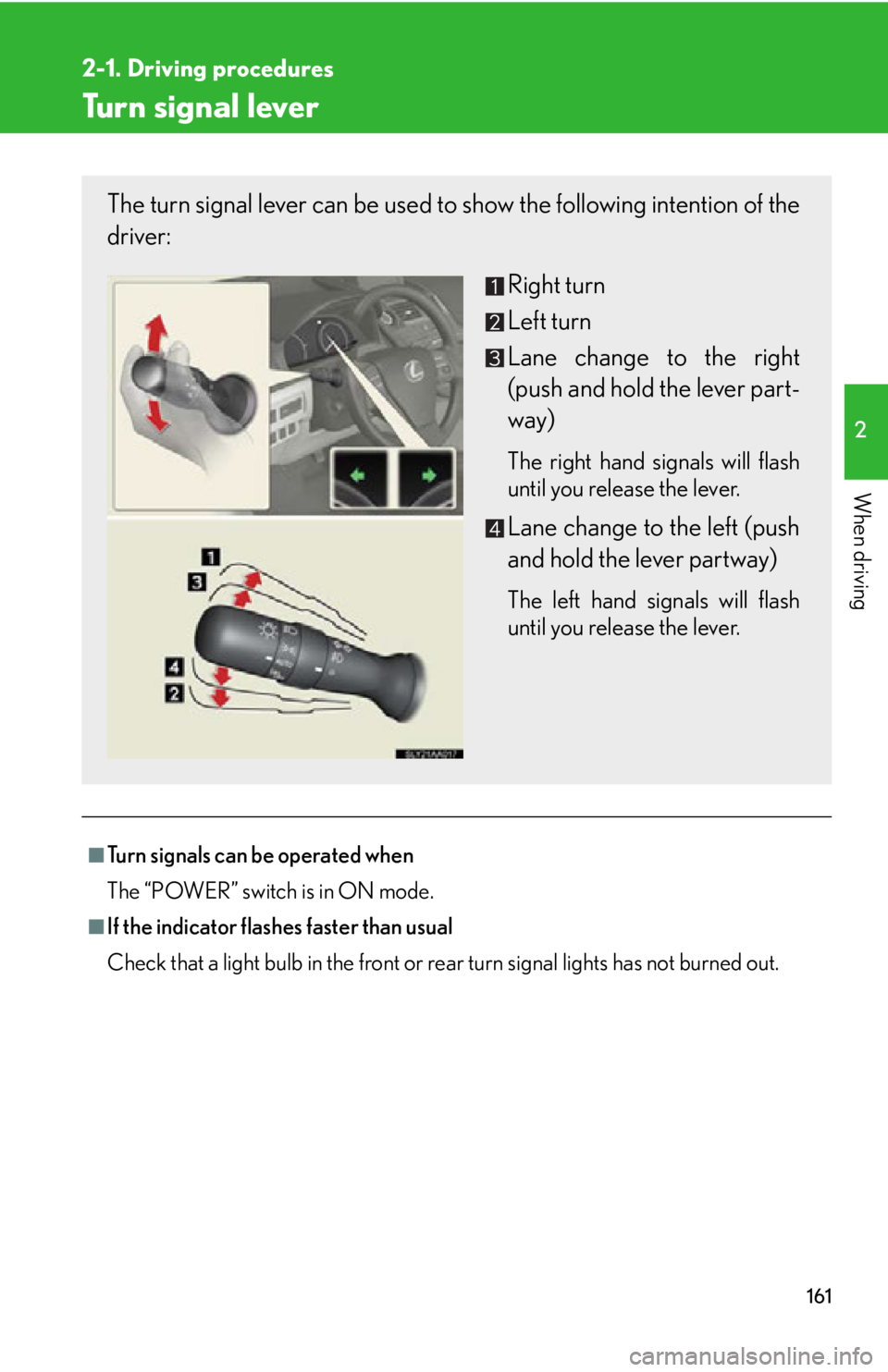
The turn signal lever can be used to show the following intention of the
driver:
Right turn
Left turn
Lane change to the right
(push and hold the lever part-
way)
The right hand signals will flash
until you release the lever.
Lane change to the left (push
and hold the lever partway)
The left hand signals will flash
until you release the lever.
Page 165 of 628
165
2-2. Instrument cluster
2
When driving
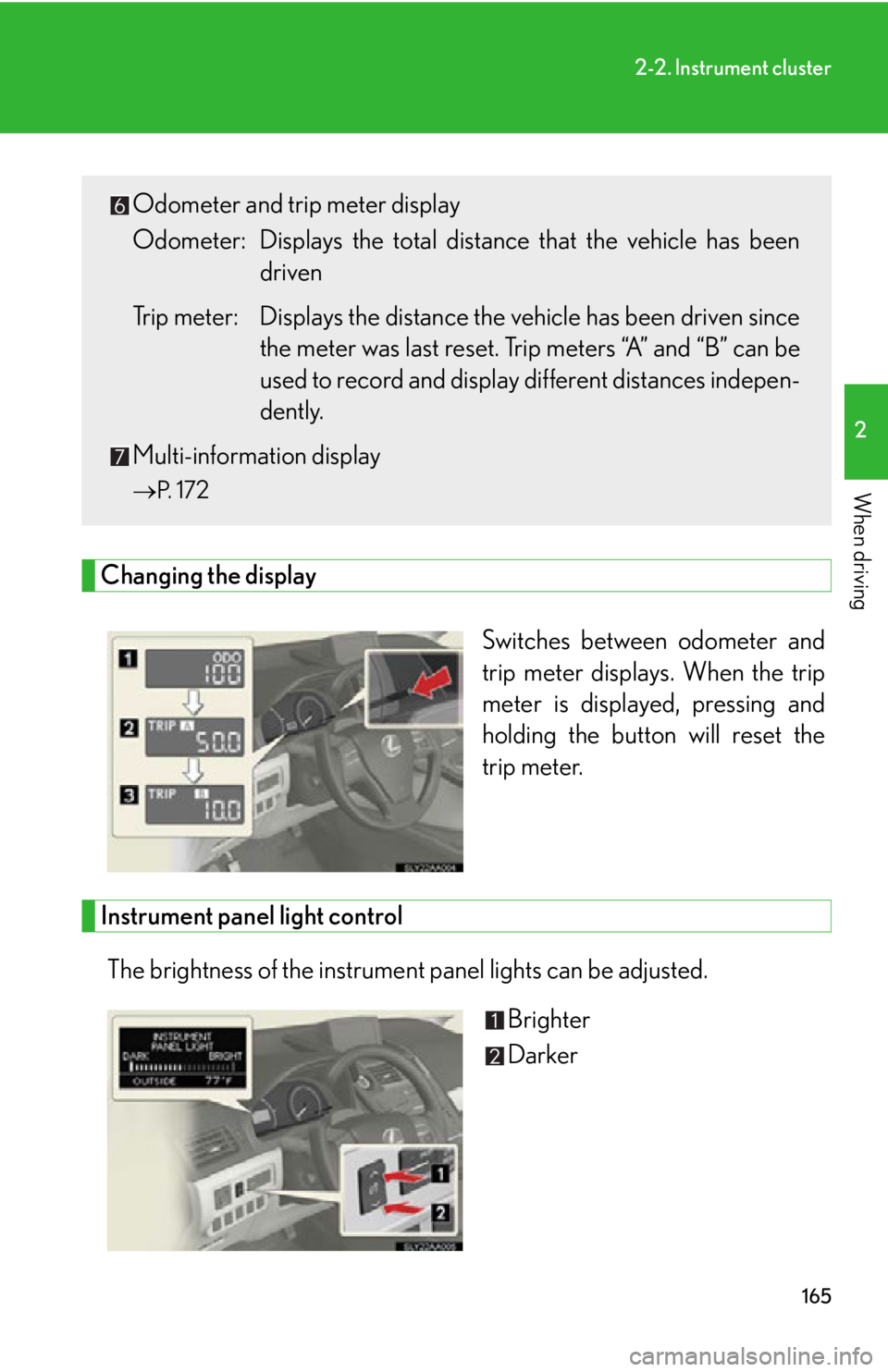
Changing the displaySwitches between odometer and
trip meter displays. When the trip
meter is displayed, pressing and
holding the button will reset the
trip meter.
Instrument panel light control
The brightness of the instrument panel lights can be adjusted. Brighter
Darker
Odometer and trip meter display
Odometer: Displays the total distance that the vehicle has been
driven
Trip meter: Displays the distance th e vehicle has been driven since
the meter was last reset. Trip meters “A” and “B” can be
used to record and display different distances indepen-
dently.
Multi-information display
P. 1 7 2
Page 166 of 628
166
2-2. Instrument cluster
■Instrument panel brightness adjustment
The instrument panel brightness levels when the tail lights are on and off can be
adjusted. However, when the surroundings are bright (daytime, etc.) turning on the
tail lights will not change the instrument panel brightness.
■Limitations of brightness adjustment
The brightness of the instrument panel ligh ts is automatically adjusted based on the
light sensor detecting how bright the surroundings are. However, if the instrument
panel brightness has been manually set to either the brightest or dimmest setting,
the automatic adjustment will not be performed.
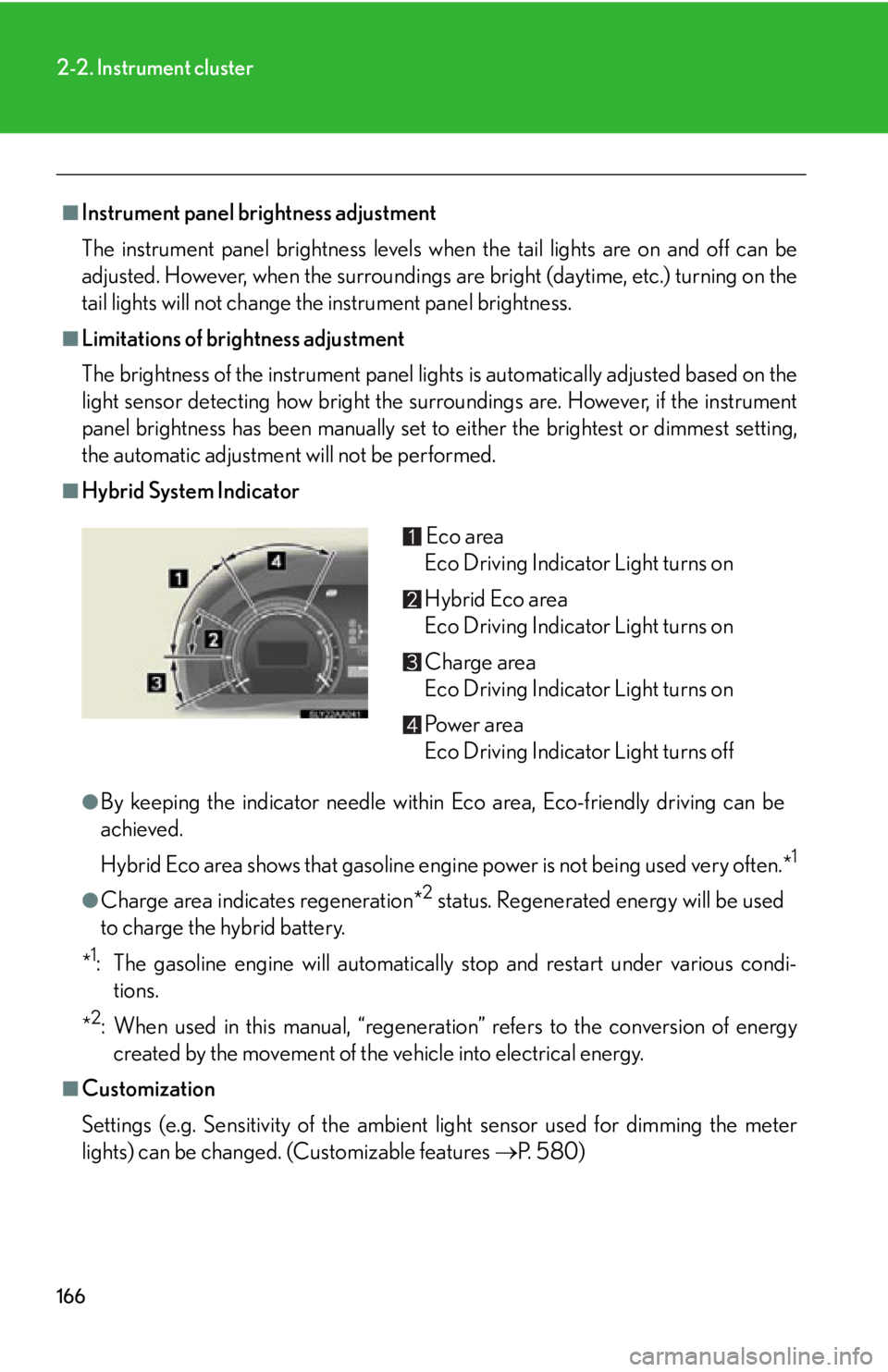
■Hybrid System Indicator
●By keeping the indicator needle within Eco area, Eco-friendly driving can be
achieved.
Hybrid Eco area shows that gasoline engine power is not being used very often.*
1
●Charge area indicates regeneration*2 status. Regenerated energy will be used
to charge the hybrid battery.
*
1: The gasoline engine will automatically stop and restart under various condi- tions.
*
2: When used in this manual, “regeneration” refers to the conversion of energy created by the movement of the vehicle into electrical energy.
■Customization
Settings (e.g. Sensitivity of the ambient light sensor used for dimming the meter
lights) can be changed. (Customizable features P. 5 8 0 )
Eco area
Eco Driving Indicator Light turns on
Hybrid Eco area
Eco Driving Indicator Light turns on
Charge area
Eco Driving Indicator Light turns on
Po w e r a r e a
Eco Driving Indicator Light turns off
Page 168 of 628
168
2-2. Instrument cluster
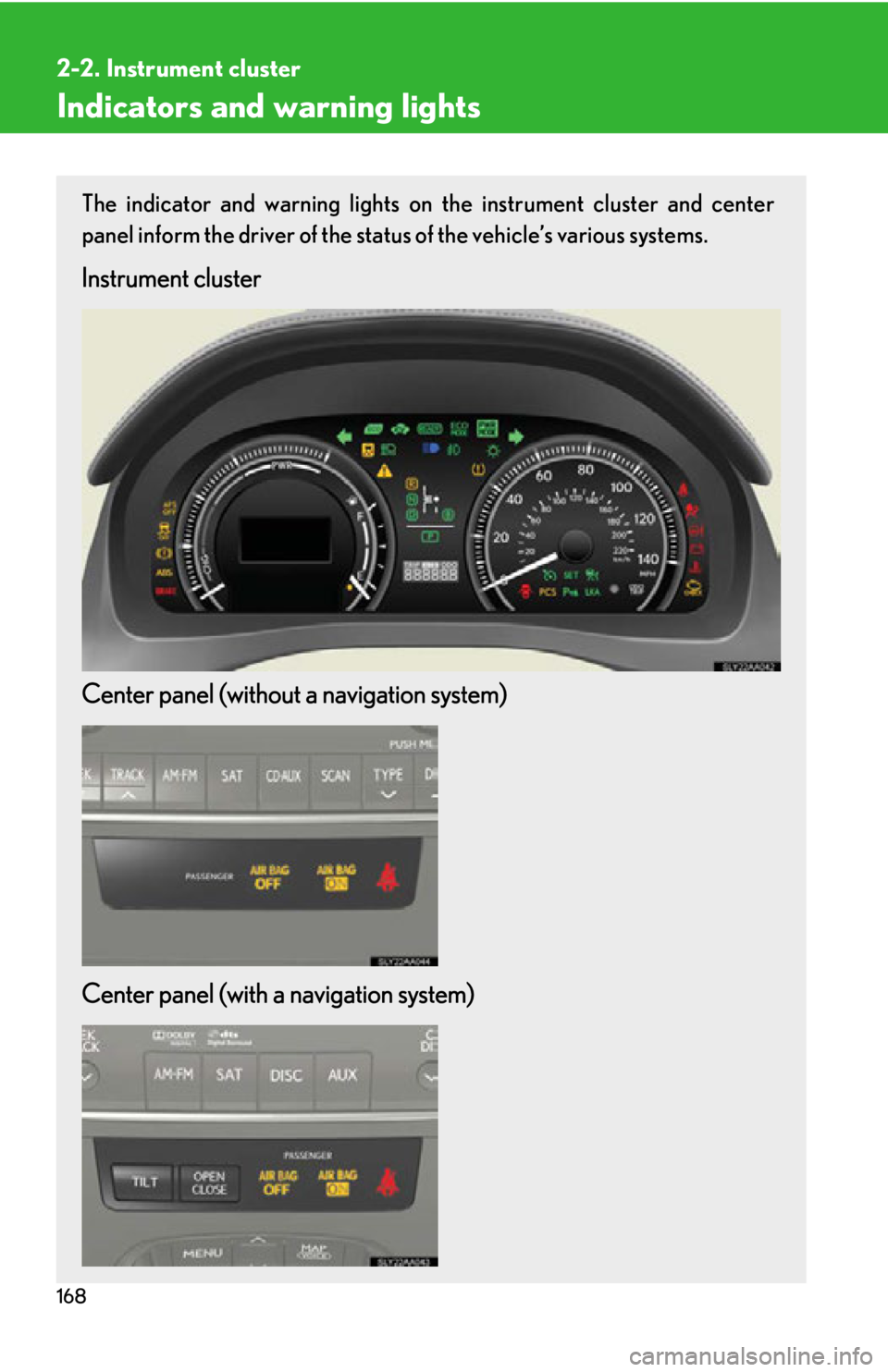
Indicators and warning lights
The indicator and warning lights on the instrument cluster and center
panel inform the driver of the status of the vehicle’s various systems.
Instrument cluster
Center panel (without a navigation system)
Center panel (with a navigation system)
Page 170 of 628
170
2-2. Instrument cluster
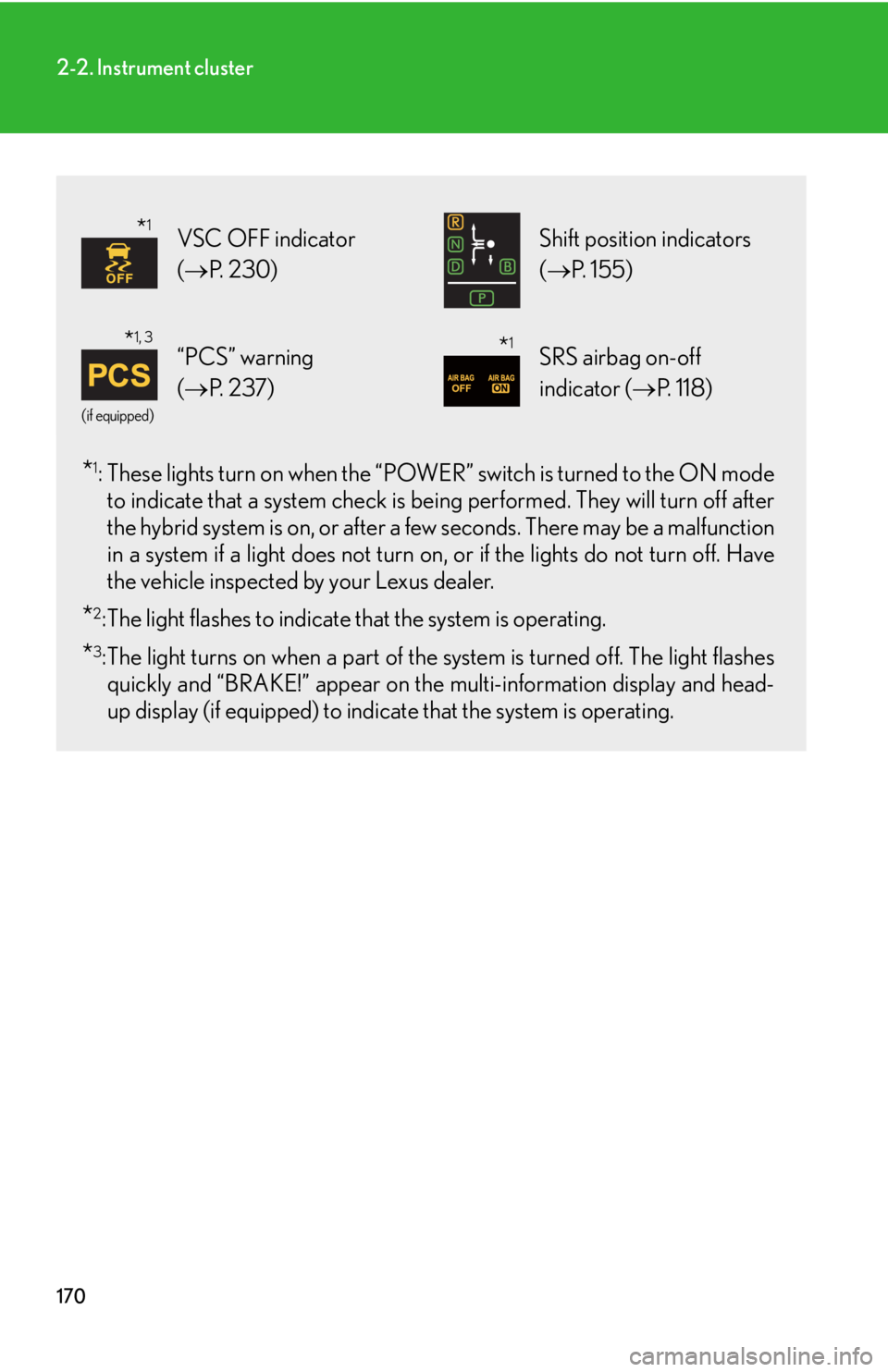
*1: These lights turn on when the “POWER” switch is turned to the ON mode
to indicate that a system check is be ing performed. They will turn off after
the hybrid system is on, or after a fe w seconds. There may be a malfunction
in a system if a light does not turn on , or if the lights do not turn off. Have
the vehicle inspected by your Lexus dealer.
*2: The light flashes to indicate that the system is operating.
*3:The light turns on when a part of the system is turned off. The light flashes quickly and “BRAKE!” appear on the multi-information display and head-
up display (if equipped) to indicat e that the system is operating.
VSC OFF indicator
(P. 2 3 0 ) Shift position indicators
(P. 1 5 5 )
(if equipped)
“PCS” warning
(P. 2 3 7 )SRS airbag on-off
indicator ( P. 118)
*1
*1, 3*1
Page 171 of 628
171
2-2. Instrument cluster
2
When driving
CAUTION
■If a safety system warning light does not come on
Should a safety system light such as the ABS and SRS airbag warning light not
come on when you start the hybrid system , this could mean that these systems are
not available to help protect you in an accid ent, which could result in death or seri-
ous injury. Have the vehicle inspected by your Lexus dealer immediately if this
occurs.
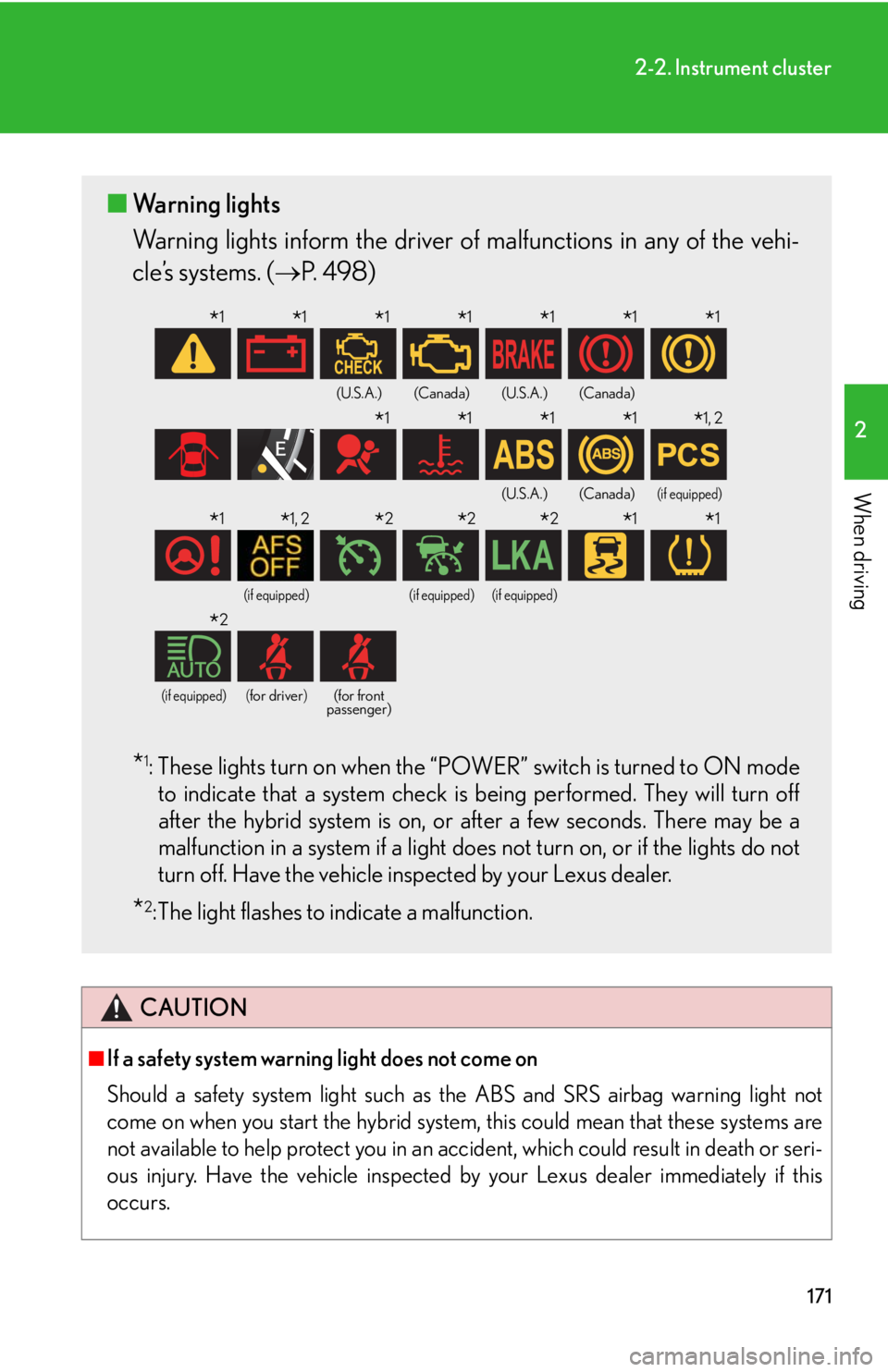
■ Warning lights
Warning lights inform the driver of malfunctions in any of the vehi-
cle’s systems. ( P. 4 9 8 )
*1: These lights turn on when the “POWER” switch is turned to ON mode
to indicate that a system check is being performed. They will turn off
after the hybrid system is on, or after a few seconds. There may be a
malfunction in a system if a light does not turn on, or if the lights do not
turn off. Have the vehicle inspected by your Lexus dealer.
*2: The light flashes to indicate a malfunction.
(U.S.A.)(Canada)(U.S.A.)(Canada)
(U.S.A.)(Canada)(if equipped)
(if equipped)(if equipped)(if equipped)
(if equipped)(for driver)(for front
passenger)
*1*1*1*1*1*1*1
*1*1*1*1*1, 2
*1*1, 2*2*2*2*1*1
*2