instrument panel Lexus HS250h 2012 User Guide
[x] Cancel search | Manufacturer: LEXUS, Model Year: 2012, Model line: HS250h, Model: Lexus HS250h 2012Pages: 630, PDF Size: 16.1 MB
Page 161 of 630
160
2-1. Driving procedures
HS250h_U_75050U
Hybrid transmission
Select a shift position appropriate for the driving conditions.
■Shifting the shift lever
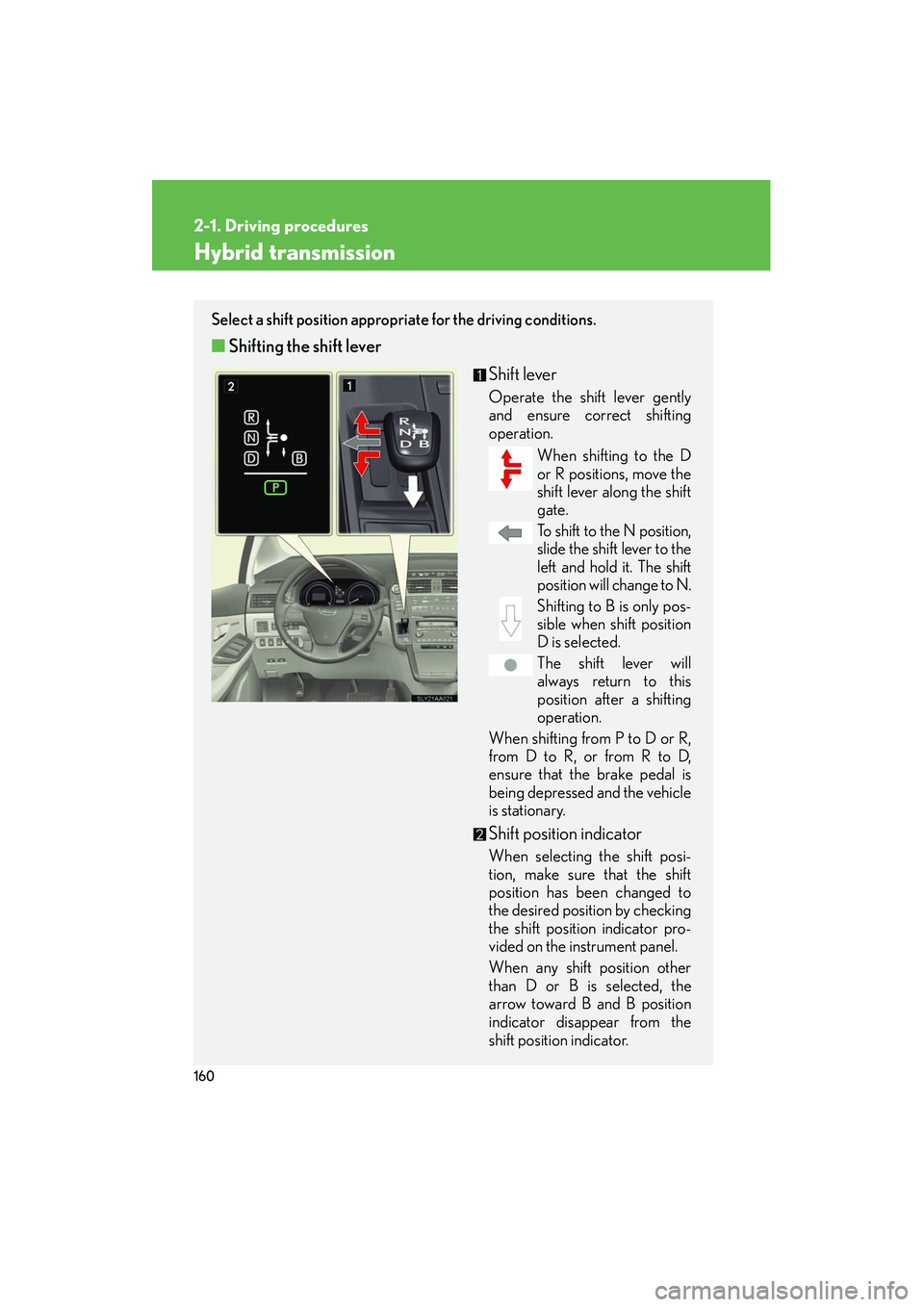
Shift lever
Operate the shift lever gently
and ensure correct shifting
operation.When shifting to the D
or R positions, move the
shift lever along the shift
gate.
To shift to the N position,
slide the shift lever to the
left and hold it. The shift
position will change to N.
Shifting to B is only pos-
sible when shift position
D is selected.
The shift lever will
always return to this
position after a shifting
operation.
When shifting from P to D or R,
from D to R, or from R to D,
ensure that the brake pedal is
being depressed and the vehicle
is stationary.
Shift position indicator
When selecting the shift posi-
tion, make sure that the shift
position has been changed to
the desired position by checking
the shift position indicator pro-
vided on the instrument panel.
When any shift position other
than D or B is selected, the
arrow toward B and B position
indicator disappear from the
shift position indicator.
Page 171 of 630
170
2-2. Instrument cluster
HS250h_U_75050U
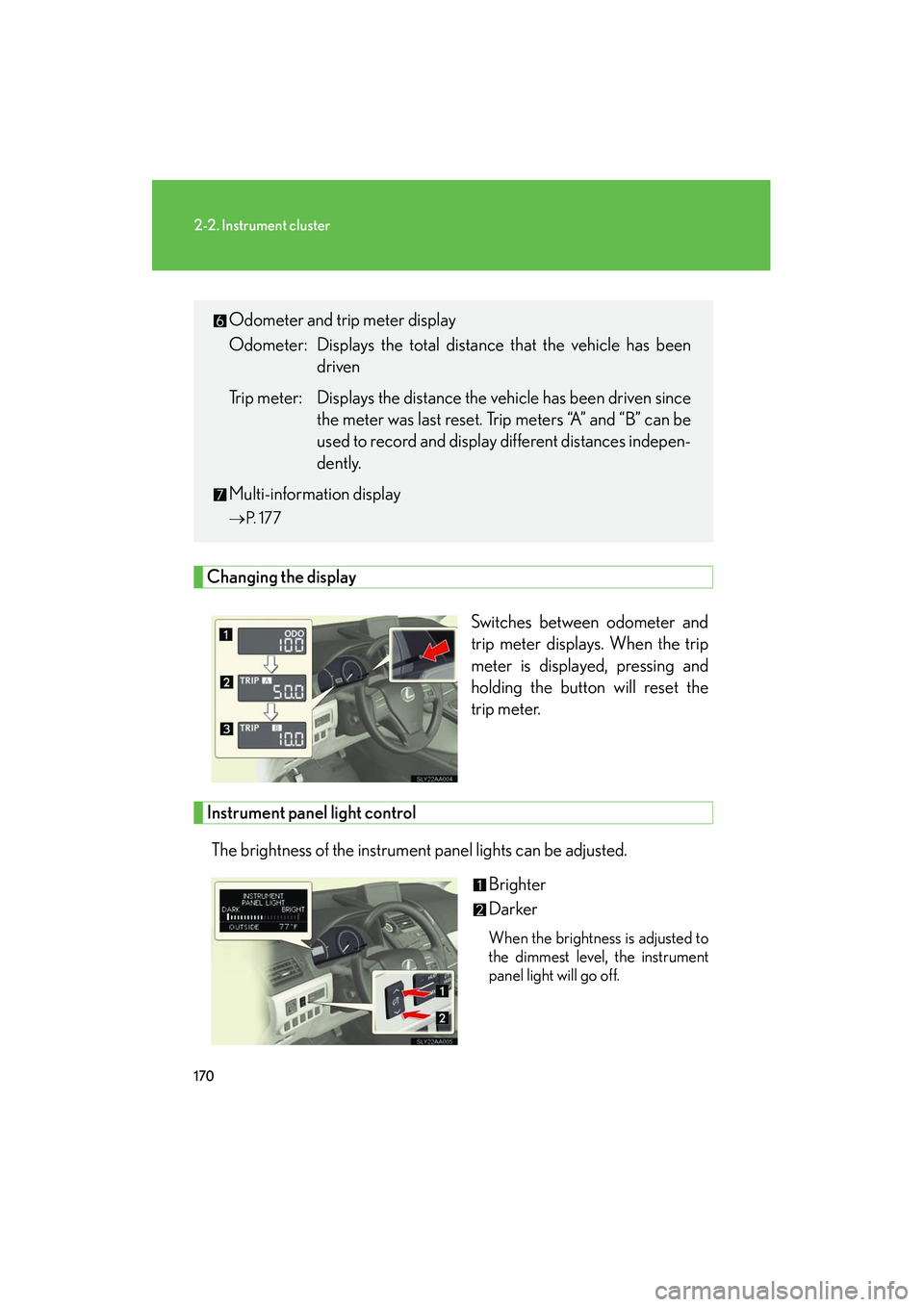
Changing the displaySwitches between odometer and
trip meter displays. When the trip
meter is displayed, pressing and
holding the button will reset the
trip meter.
Instrument panel light controlThe brightness of the instrument panel lights can be adjusted. Brighter
Darker
When the brightness is adjusted to
the dimmest level, the instrument
panel light will go off.
Odometer and trip meter display
Odometer: Displays the total distance that the vehicle has beendriven
Trip meter: Displays the distance the vehicle has been driven since the meter was last reset. Trip meters “A” and “B” can be
used to record and display different distances indepen-
dently.
Multi-information display
→ P. 1 7 7
Page 172 of 630
171
2-2. Instrument cluster
2
When driving
HS250h_U_75050U
■Instrument panel brightness adjustment
The instrument panel brightness levels when the tail lights are on and off can be
adjusted. However, when the surroundings are bright (daytime, etc.) turning on the
tail lights will not change the instrument panel brightness.
■Limitations of brightness adjustment
The brightness of the instrument panel lights is automatically adjusted based on the
light sensor detecting how bright the surroundings are. However, if the instrument
panel brightness has been manually set to the brightest setting, the automatic
adjustment will not be performed.
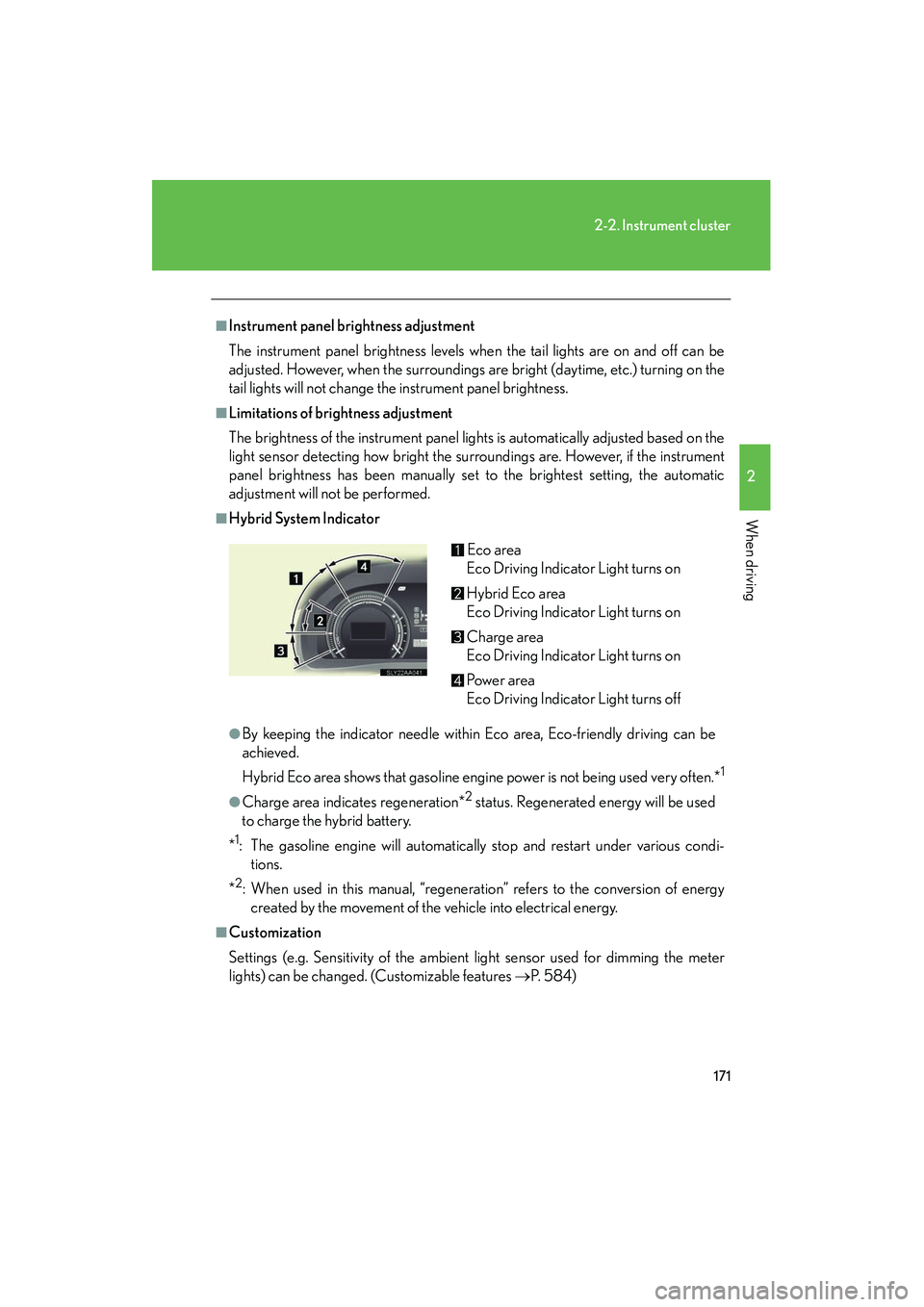
■Hybrid System Indicator
●By keeping the indicator needle within Eco area, Eco-friendly driving can be
achieved.
Hybrid Eco area shows that gasoline engine power is not being used very often.*
1
●Charge area indicates regeneration*2 status. Regenerated energy will be used
to charge the hybrid battery.
*
1: The gasoline engine will automatically stop and restart under various condi- tions.
*
2: When used in this manual, “regeneration” refers to the conversion of energy created by the movement of the vehicle into electrical energy.
■Customization
Settings (e.g. Sensitivity of the ambient light sensor used for dimming the meter
lights) can be changed. (Customizable features →P. 5 8 4 )
Eco area
Eco Driving Indicator Light turns on
Hybrid Eco area
Eco Driving Indicator Light turns on
Charge area
Eco Driving Indicator Light turns on
Powe r a re a
Eco Driving Indicator Light turns off
Page 174 of 630
173
2-2. Instrument cluster
2
When driving
HS250h_U_75050U
Indicators and warning lights
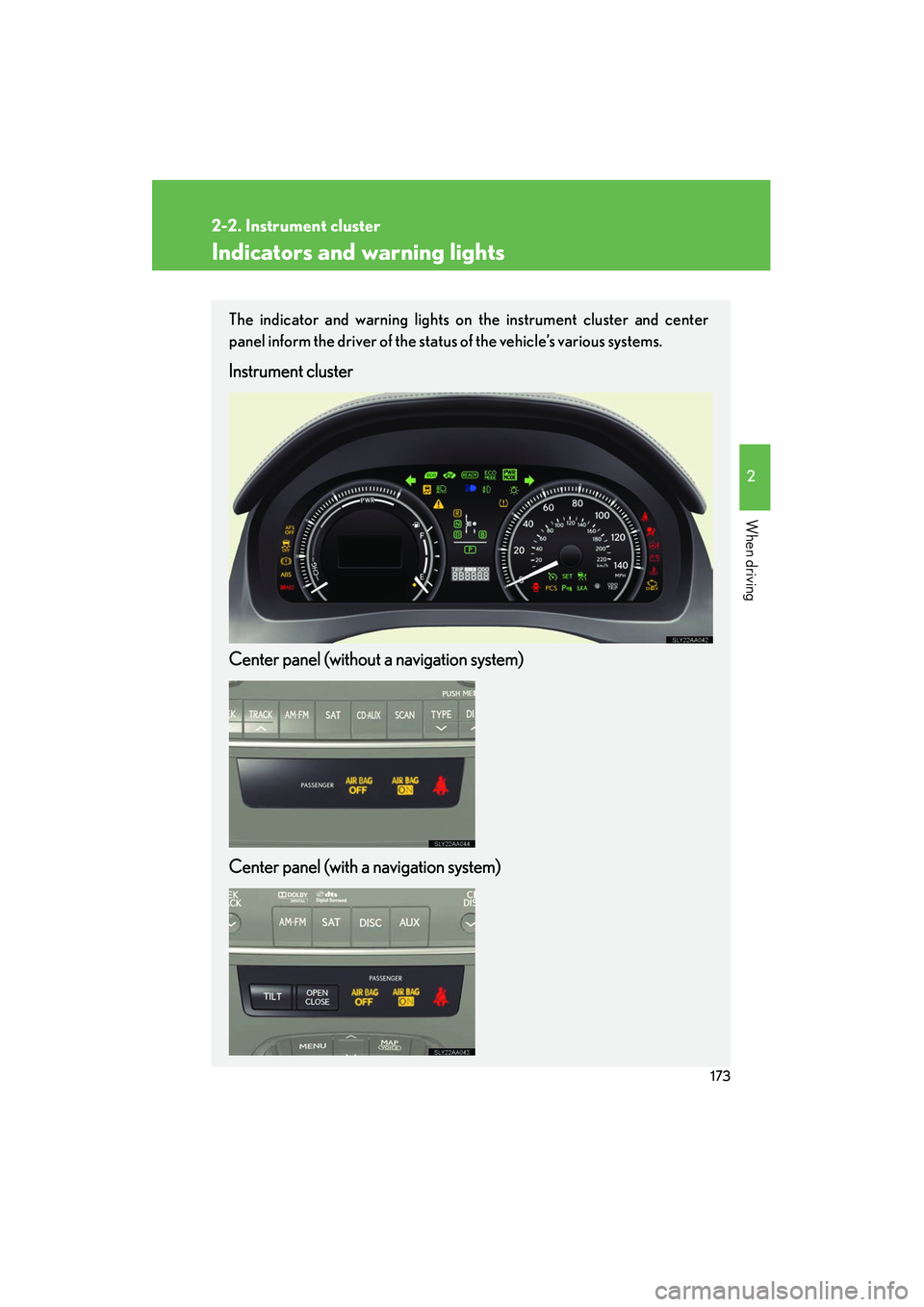
The indicator and warning lights on the instrument cluster and center
panel inform the driver of the status of the vehicle’s various systems.
Instrument cluster
Center panel (without a navigation system)
Center panel (with a navigation system)
Page 192 of 630
191
2
When driving
HS250h_U_75050U
2-3. Operating the lights and windshield wipers
Headlight switch
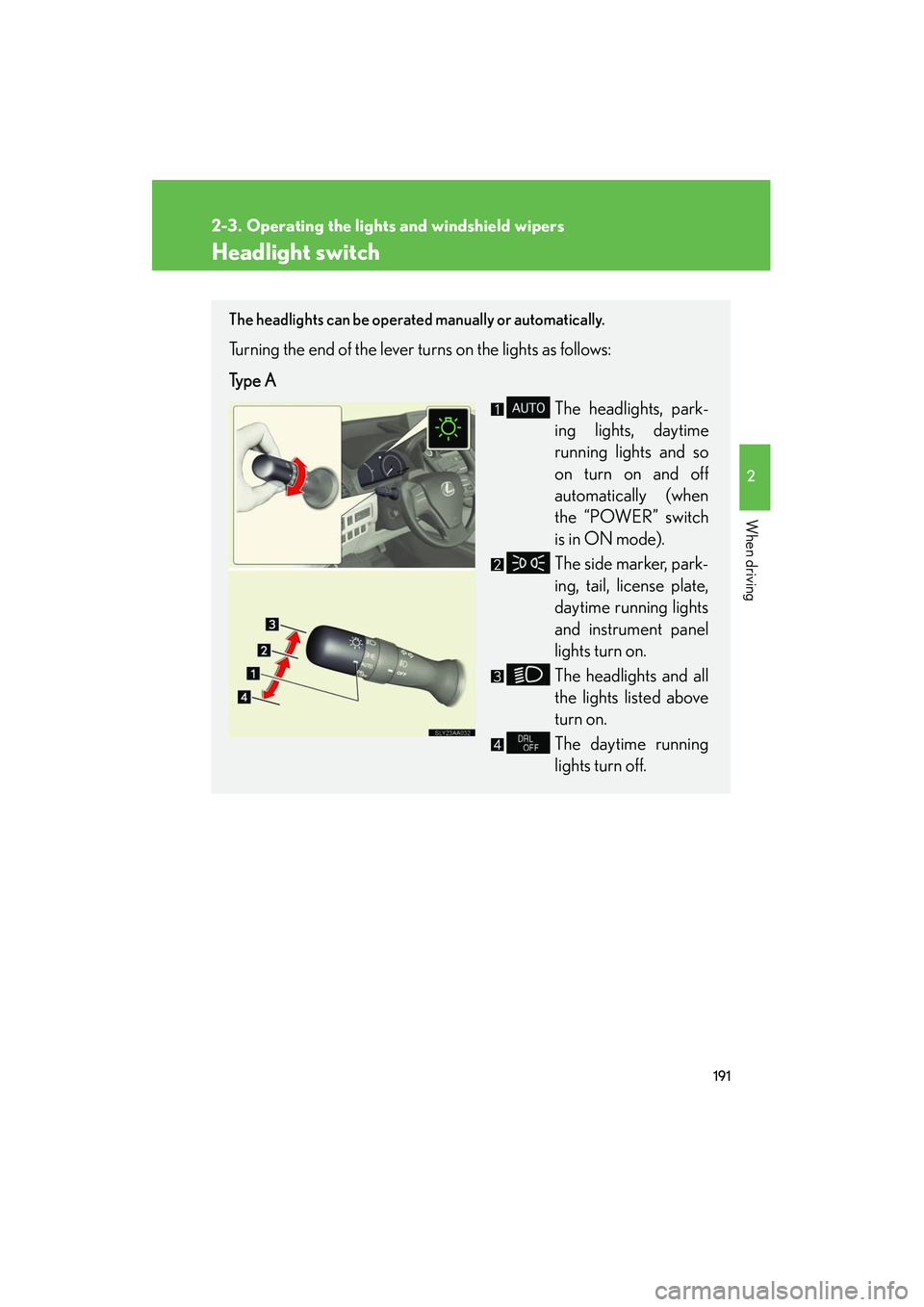
The headlights can be operated manually or automatically.
Turning the end of the lever turns on the lights as follows:
Type AThe headlights, park-
ing lights, daytime
running lights and so
on turn on and off
automatically (when
the “POWER” switch
is in ON mode).
The side marker, park-
ing, tail, license plate,
daytime running lights
and instrument panel
lights turn on.
The headlights and all
the lights listed above
turn on.
The daytime running
lights turn off.
Page 193 of 630
192
2-3. Operating the lights and windshield wipers
HS250h_U_75050U
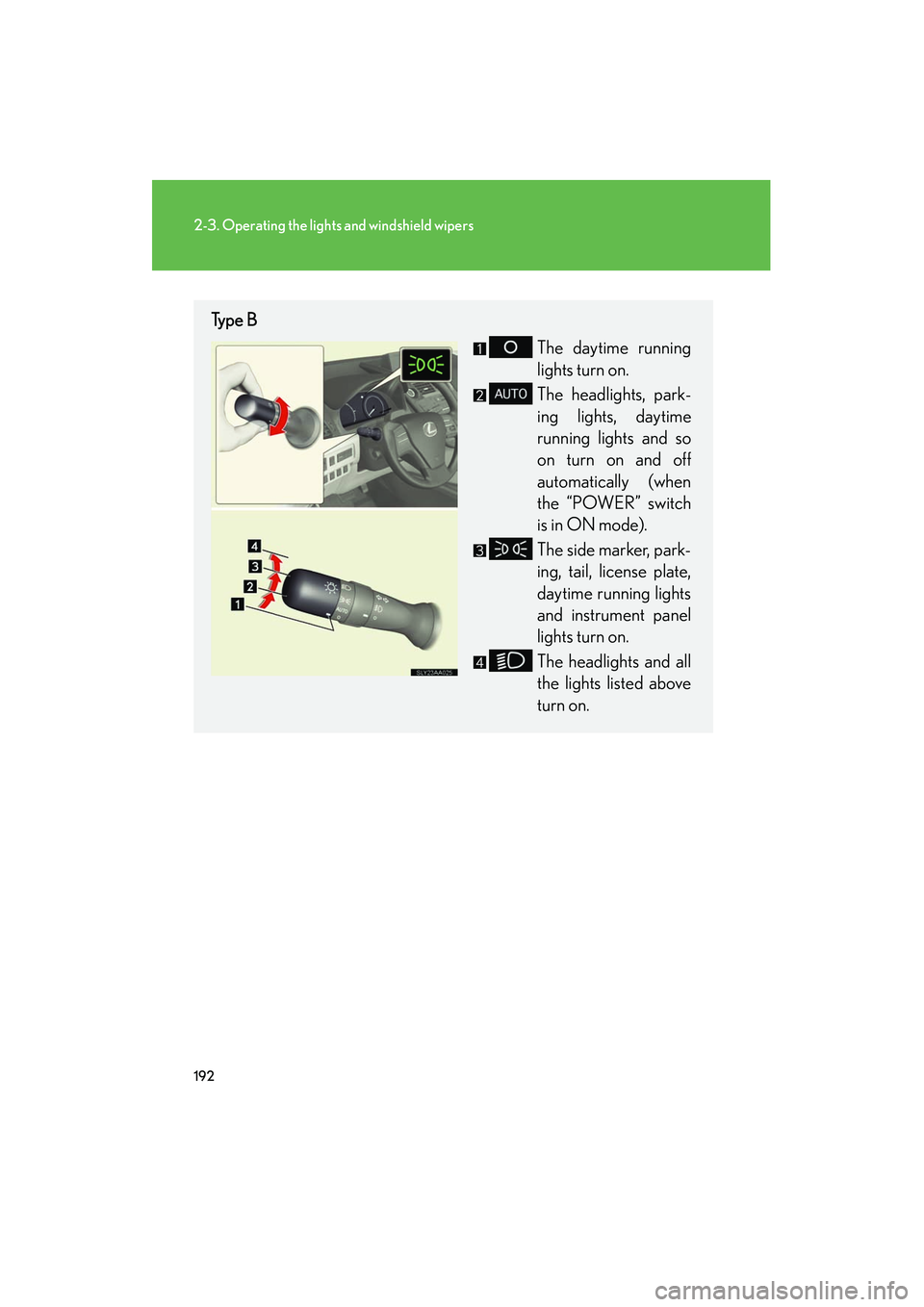
Type BThe daytime running
lights turn on.
The headlights, park-
ing lights, daytime
running lights and so
on turn on and off
automatically (when
the “POWER” switch
is in ON mode).
The side marker, park-
ing, tail, license plate,
daytime running lights
and instrument panel
lights turn on.
The headlights and all
the lights listed above
turn on.
Page 257 of 630
256
2-5. Driving information
HS250h_U_75050U
CAUTION
■Things that must not be carried in the trunk
The following things may cause a fire if loaded in the trunk:
●Receptacles containing gasoline
●Aerosol cans
■Storage precautions
Observe the following precautions.
Failing to do so may result in death or serious injury.
●Stow cargo and luggage in the trunk whenever possible.
●Do not place cargo or luggage in or on the following locations as the item may
get under the brake or accelerator pedal and prevent the pedals from being
depressed properly, block the driver’s vision, or hit the driver or passengers,
causing an accident:
• At the feet of the driver
• On the front passenger or rear seats (when stacking items)
• On the package tray
• On the instrument panel
•On the dashboard
●Secure all items in the occupant compartment, as they may shift and injure some-
one during sudden braking, sudden swerving or an accident.
■Capacity and distribution
●Do not exceed the maximum axle weight rating or the total vehicle weight rating.
●Even if the total load of occupant’s weight and the cargo load is less than the total
load capacity, do not apply the load unevenly. Improper loading may cause dete-
rioration of steering or braking control which may cause death or serious injury.
Page 422 of 630
421
4-1. Maintenance and care
4
Maintenance and care
HS250h_U_75050U
■Caring for leather areas
Lexus recommends cleaning the interior of the vehicle at least twice a year to main-
tain the quality of the vehicle’s interior.
■Shampooing the carpets
There are several commercial foaming-type cleaners available. Use a sponge or
brush to apply the foam. Rub in overlapping circles. Do not use water. Wipe dirty
surfaces and let them dry. Excellent results are obtained by keeping the carpet as
dry as possible.
■Seat belts
Clean with mild soap and lukewarm water using a cloth or sponge. Also check the
belts periodically for excessive wear, fraying or cuts.
CAUTION
■Water in the vehicle
●Do not splash or spill liquid in the vehicle, such as on the floor, in the hybrid bat-
tery (traction battery) air vents, and in the trunk.
Doing so may cause the hybrid battery, electrical components, etc. to malfunc-
tion or catch fire.
●Do not get any of the SRS components or wiring in the vehicle interior wet.
(→ P. 111)
An electrical malfunction may cause the airbags to deploy or not function prop-
erly, resulting in death or serious injury.
■Cleaning the interior (especially instrument panel)
Do not use polish wax or polish cleaner. The instrument panel may reflect off the
windshield, obstructing the driver’s view and leading to an accident, resulting in
death or serious injury.
Page 423 of 630
422
4-1. Maintenance and care
HS250h_U_75050U
NOTICE
■Cleaning detergents
●Do not use the following types of detergent, as they may discolor the vehicle inte-
rior or cause streaks or damage to painted surfaces:
• Non-seat portions: Organic substances such as benzene or gasoline, alkalineor acidic solutions, dye, and bleach
• Seats: Alkaline or acidic solutions, such as thinner, benzene, and alcohol
●Do not use polish wax or polish cleaner. The instrument panel’s or other interior
part’s painted surface may be damaged.
■Preventing damage to leather surfaces
Observe the following precautions to avoid damage to and deterioration of leather
surfaces:
●Remove any dust or dirt from leather surfaces immediately.
●Do not expose the vehicle to direct sunlight for extended periods of time. Park
the vehicle in the shade, especially during summer.
●Do not place items made of vinyl, plastic, or containing wax on the upholstery, as
they may stick to the leather surface if the vehicle interior heats up significantly.
■Water on the floor
Do not wash the vehicle floor with water.
Vehicle systems such as the audio system may be damaged if water comes into
contact with electrical components such as the audio system above or under the
floor of the vehicle. Water may also cause the body to rust.
■Cleaning the inside of the rear window
●Do not use glass cleaner to clean the rear window, as this may cause damage to
the rear window defogger heater wires or antenna. Use a cloth dampened with
lukewarm water to gently wipe the window clean. Wipe the window in strokes
running parallel to the heater wires or antenna.
●Be careful not to scratch or damage the heater wires or antenna.
Page 470 of 630
469
4-3. Do-it-yourself maintenance
4
Maintenance and care
HS250h_U_75050U
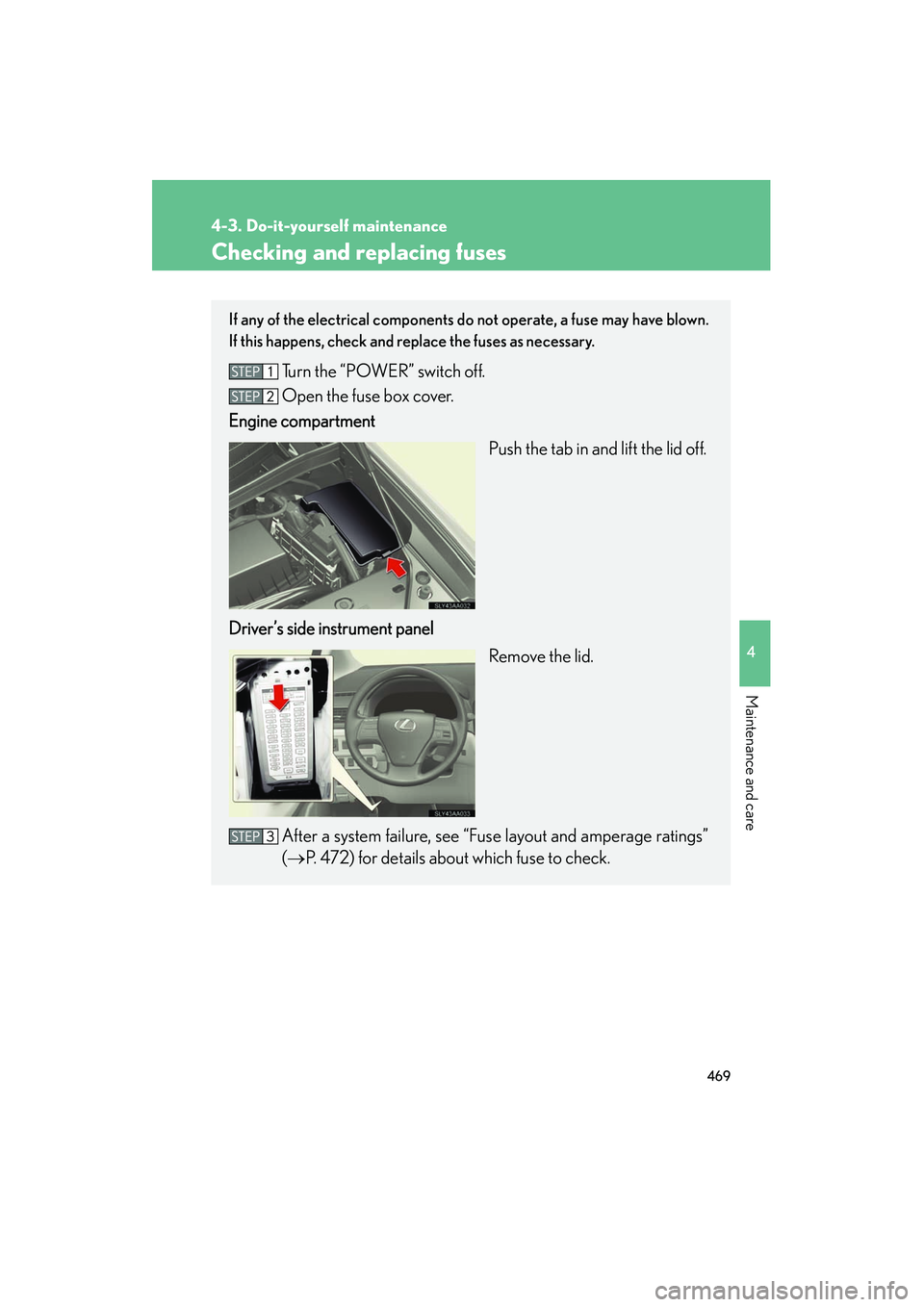
Checking and replacing fuses
If any of the electrical components do not operate, a fuse may have blown.
If this happens, check and replace the fuses as necessary.
Turn the “POWER” switch off.
Open the fuse box cover.
Engine compartment
Push the tab in and lift the lid off.
Driver’s side instrument panel Remove the lid.
After a system failure, see “Fuse layout and amperage ratings”
(→ P. 472) for details about which fuse to check.