fuel Lexus HS250h 2012 Owner's Guide
[x] Cancel search | Manufacturer: LEXUS, Model Year: 2012, Model line: HS250h, Model: Lexus HS250h 2012Pages: 630, PDF Size: 16.1 MB
Page 160 of 630
159
2-1. Driving procedures
2
When driving
HS250h_U_75050U
■Fuel economy
HS250h is designed to achieve the best possible fuel economy during normal driv-
ing (using the gasoline engine and electric motor [traction motor]). Driving in EV
drive mode more than necessary may lower fuel economy.
CAUTION
■Caution while driving
When driving in EV drive mode, pay special attention to the area around the vehi-
cle. Because there is no engine noise, pedestrians, people riding bicycles or other
people and vehicles in the area may not be aware of the vehicle starting off or
approaching them, so take extra care while driving.
Page 162 of 630
161
2-1. Driving procedures
2
When driving
HS250h_U_75050U
■Shift position purpose
*: For good fuel economy and noise redu ction, the D position should usually
be used.
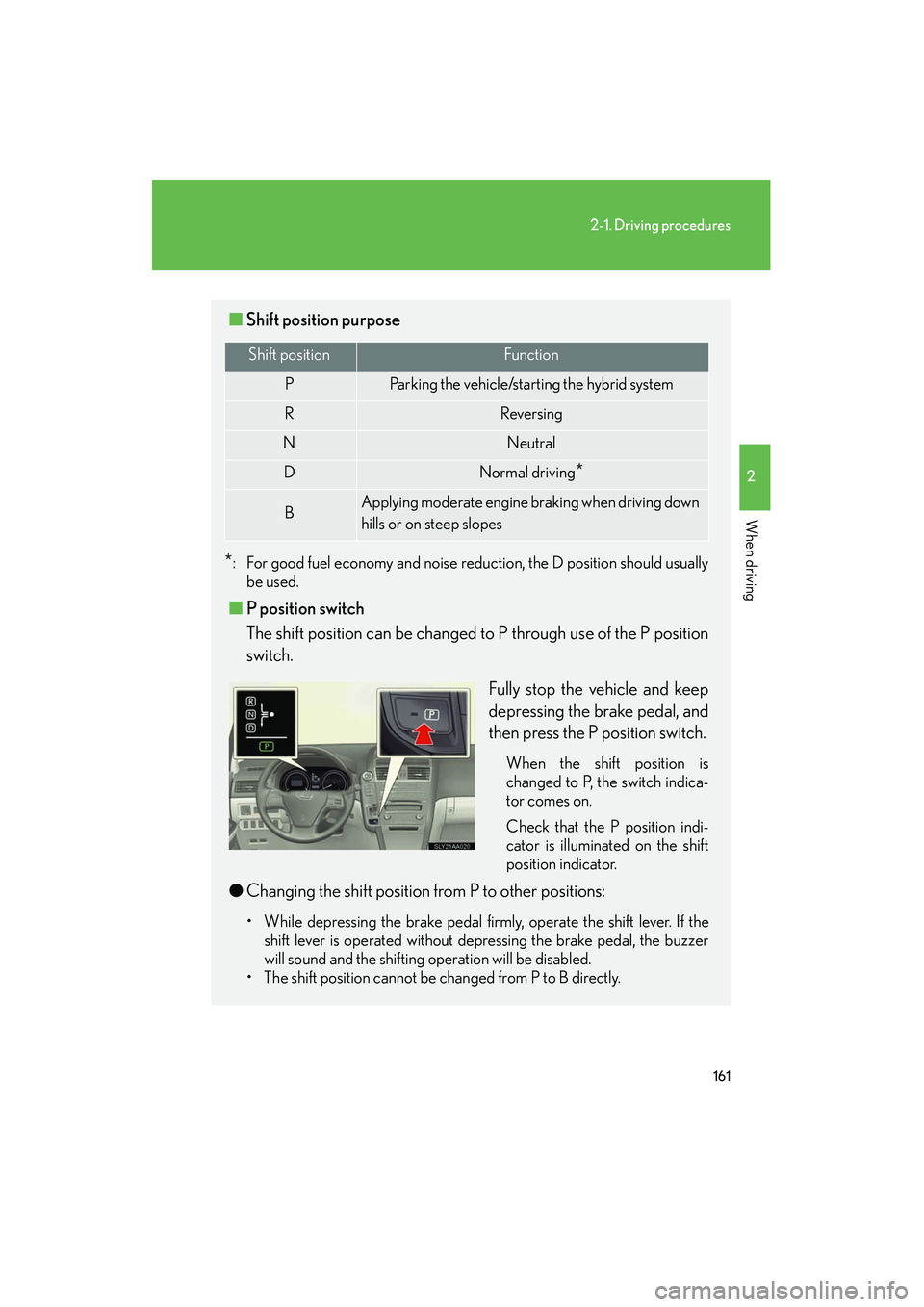
■ P position switch
The shift position can be changed to P through use of the P position
switch.
Fully stop the vehicle and keep
depressing the brake pedal, and
then press the P position switch.
When the shift position is
changed to P, the switch indica-
tor comes on.
Check that the P position indi-
cator is illuminated on the shift
position indicator.
●Changing the shift position from P to other positions:
• While depressing the brake pedal firmly, operate the shift lever. If the
shift lever is operated without depressing the brake pedal, the buzzer
will sound and the shifting operation will be disabled.
• The shift position cannot be changed from P to B directly.
Shift positionFunction
PParking the vehicle/starting the hybrid system
RReversing
NNeutral
DNormal driving*
BApplying moderate engine braking when driving down
hills or on steep slopes
Page 163 of 630
162
2-1. Driving procedures
HS250h_U_75050U
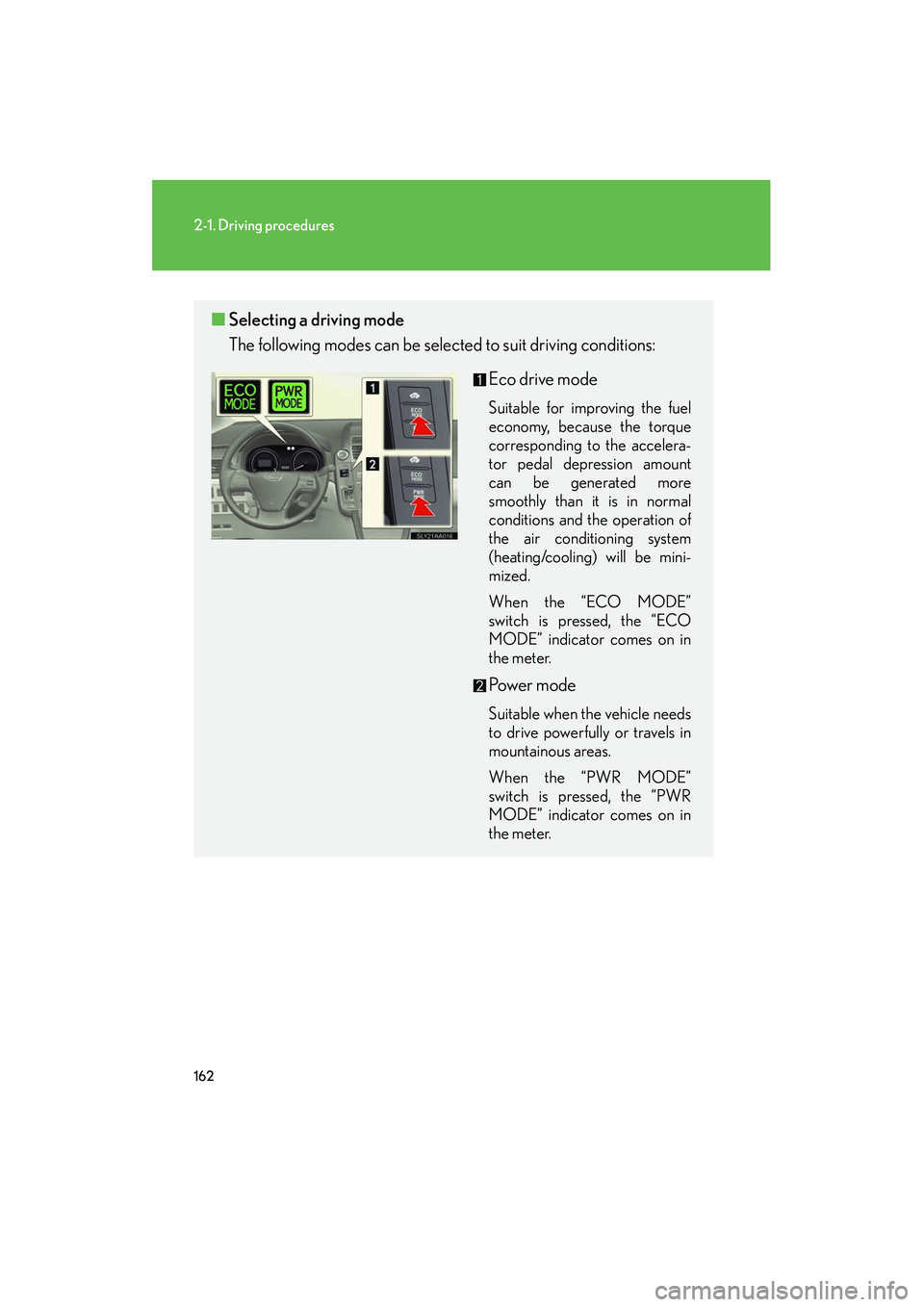
■Selecting a driving mode
The following modes can be sele cted to suit driving conditions:
Eco drive mode
Suitable for improving the fuel
economy, because the torque
corresponding to the accelera-
tor pedal depression amount
can be generated more
smoothly than it is in normal
conditions and the operation of
the air conditioning system
(heating/cooling) will be mini-
mized.
When the “ECO MODE”
switch is pressed, the “ECO
MODE” indicator comes on in
the meter.
Po w e r m o d e
Suitable when the vehicle needs
to drive powerfully or travels in
mountainous areas.
When the “PWR MODE”
switch is pressed, the “PWR
MODE” indicator comes on in
the meter.
Page 165 of 630
164
2-1. Driving procedures
HS250h_U_75050U
■About engine braking
When shift position B is selected, releasing the accelerator pedal will apply engine
braking.
• When the vehicle is driven at high speeds, compared to ordinary gasoline-fueled vehicles, the engine braking deceleration is felt less than that of other
vehicles.
• The vehicle can be accelerated even when shift position B is selected.
If the vehicle is driven continuously in the B position, fuel efficiency will become low.
Usually, select the D position.
■Using air conditioning in Eco drive mode
The Eco drive mode controls heating/cooling and fan speed operation to improve
fuel consumption. When you want to improve the effectiveness of the air condition-
ing system, adjust the fan speed or cancel the Eco drive mode.
For more information, refer to the “Navigation System Owner’s Manual”.
■Power mode automatic deactivation
Power mode is automatically deactivated if the “POWER” switch is turned off after
driving in power mode.
■Customization
Settings (e.g. Reverse warning buzzer) can be changed.
(Customizable features →P. 5 8 4 )
CAUTION
■When driving on slippery road surfaces
Do not accelerate or change the shift position suddenly.
Sudden changes in engine braking may cause the vehicle to spin or skid, resulting in
an accident.
■For the shift lever
Do not hang anything on the shift lever.
Doing so could prevent the shift lever fr om returning to position, causing unex-
pected accidents to occur when the vehicle is in motion.
Page 170 of 630
169
2
When driving
HS250h_U_75050U
2-2. Instrument cluster
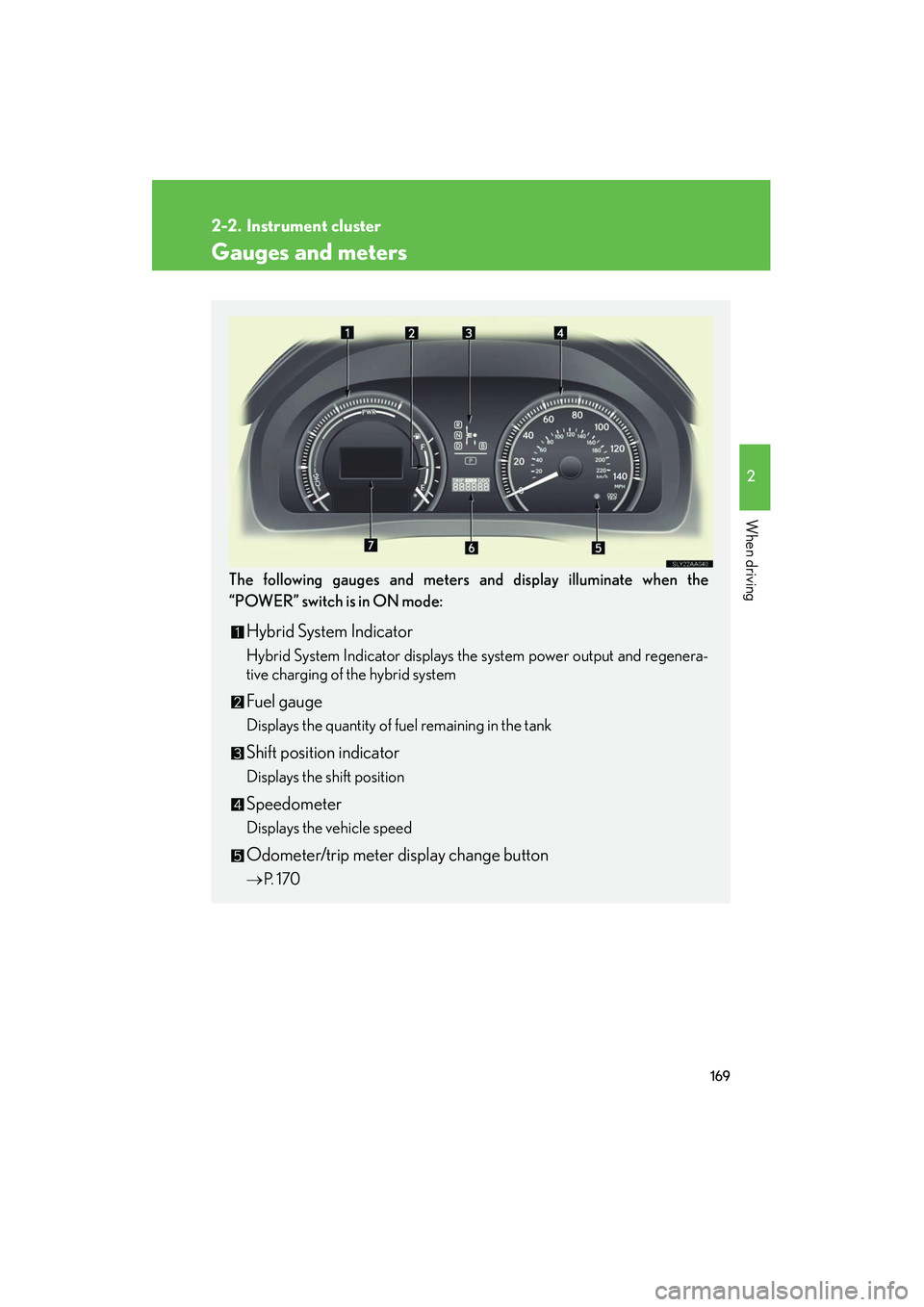
Gauges and meters
The following gauges and meters and display illuminate when the
“POWER” switch is in ON mode:
Hybrid System Indicator
Hybrid System Indicator displays the system power output and regenera-
tive charging of the hybrid system
Fuel gauge
Displays the quantity of fuel remaining in the tank
Shift position indicator
Displays the shift position
Speedometer
Displays the vehicle speed
Odometer/trip meter display change button
→P. 1 7 0
Page 179 of 630
178
2-2. Instrument cluster
HS250h_U_75050U
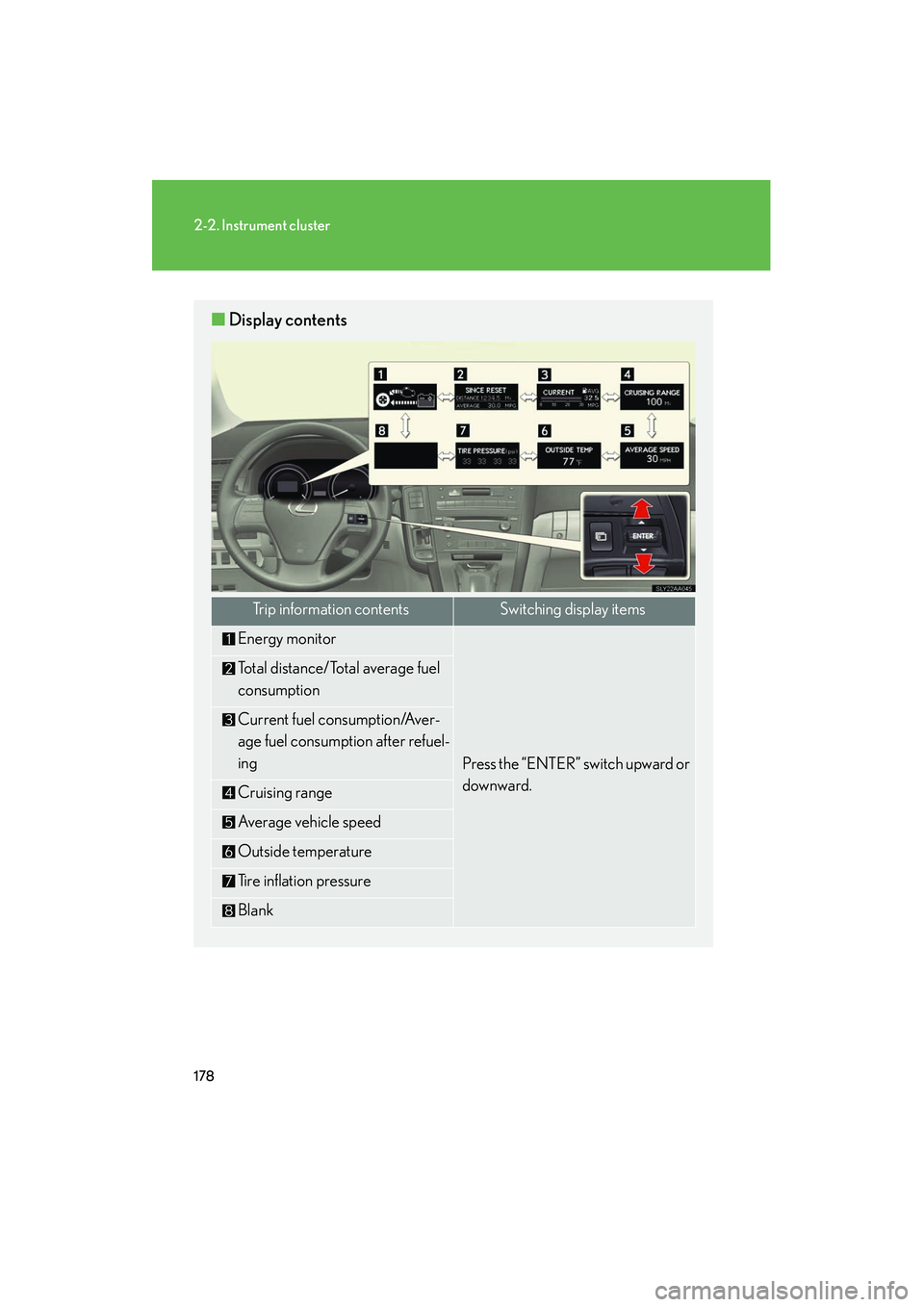
■Display contents
Trip information contentsSwitching display items
Energy monitor
Press the “ENTER” switch upward or
downward.
Total distance/Total average fuel
consumption
Current fuel consumption/Aver-
age fuel consumption after refuel-
ing
Cruising range
Average vehicle speed
Outside temperature
Tire inflation pressure
Blank
Page 181 of 630
180
2-2. Instrument cluster
HS250h_U_75050U
Trip information■ Energy monitor
Displays the status of the hybrid system ( →P. 3 5 )
■ Total distance/Total average fuel consumption
Displays the total distance and average fuel consumption since the last
reset.
Press the “ENTER” switch for 1 second or more when the total distance and
the average fuel consumption is displayed.
“Past Record” screen on the navigation system (if equipped) will also be
reset. ( →P. 3 9 )
■Current fuel consumption/Average fuel consumption after refueling
Displays the instant fuel consumption and average fuel consumption
after refueling.
Use the displayed average fuel consumption as a reference.
■ Cruising range
Displays the estimated maximum distan ce that can be driven with the
quantity of fuel remaining.
• This distance is computed based on your average fuel consumption. As a result, the actual distance that can be driven may differ from that
displayed.
• When only a small amount of fuel is added to the tank, the display may not be updated.
When adding fuel, turn the “POWER” switch to off. In case fuel is
added without turning the “POWER” switch to off, the display may not
be updated.
Other contentsDe ta ils
Wa r n i n g m e s s a g e ( →P. 5 1 2 )
Automatically displayed when a mal-
function occurs in any of the vehi-
cle's systems
Page 182 of 630
181
2-2. Instrument cluster
2
When driving
HS250h_U_75050U
• When only a small amount of fuel is remaining, the distance indicator onthe cruising range display is replaced with the message “CRUISING
RANGE LOW FUEL”. ( →P. 5 2 4 )
■Average vehicle speed
Displays the average vehicle speed since the function was reset
The function can be reset by pushing the “ENTER” switch for longer than 1
second when the average vehicle speed is displayed.
■Outside temperature
Displays the outside temperature
■ Tire inflation pressure
Displays inflation pressure of each tire. There is no correlation between
the order of the displayed values and the tire positions.
It may take a few minutes to display the tire inflation pressure after the
“POWER” switch is turned to ON mode. It may also take a few minutes to
display the tire inflation pressure after the inflation pressure has been
adjusted.
■Electronic feature control can be turned on/off when
The “POWER” switch is in ON mode.
■Conditions for ending electronic feature control
In the following situations, the electronic feature control will end:
●The menu switch is pressed
●The radar cruise control is operated (if equipped)
●The lane keeping assist is operated (if equipped)
●Intuitive parking assist starts operating (if equipped)
●No action is performed for some time after the electronic feature control
screen is displayed
●A warning message appears after the electronic feature control screen is dis-
played
Page 183 of 630
182
2-2. Instrument cluster
HS250h_U_75050U
■Outside temperature display
In the following situations, the correct outside temperature may not be displayed, or
the display may take longer than normal to change.
●When stopped, or driving at low speeds (less than 15 mph [25 km/h])
●When the outside temperature has changed suddenly (at the entrance/exit of a
garage, tunnel, etc.)
■When disconnecting and reconnecting battery terminals
The following information will be reset:
●Total distance/Total average fuel consumption
●Average fuel consumption after refueling
●Cruising range
●Average vehicle speed
■Customization
Settings (e.g. available languages) can be changed.
(Customizable features →P. 5 8 4 )
CAUTION
■Caution while driving
When operating the electronic feature control while driving, take extra notice of the
vehicle’s surrounding area.
NOTICE
■The multi-information display at low temperatures
Allow the interior of the vehicle to warm up before using the liquid crystal informa-
tion display. At extremely low temperatures, the information display monitor may
respond slowly, and display changes may be delayed.
Page 195 of 630
194
2-3. Operating the lights and windshield wipers
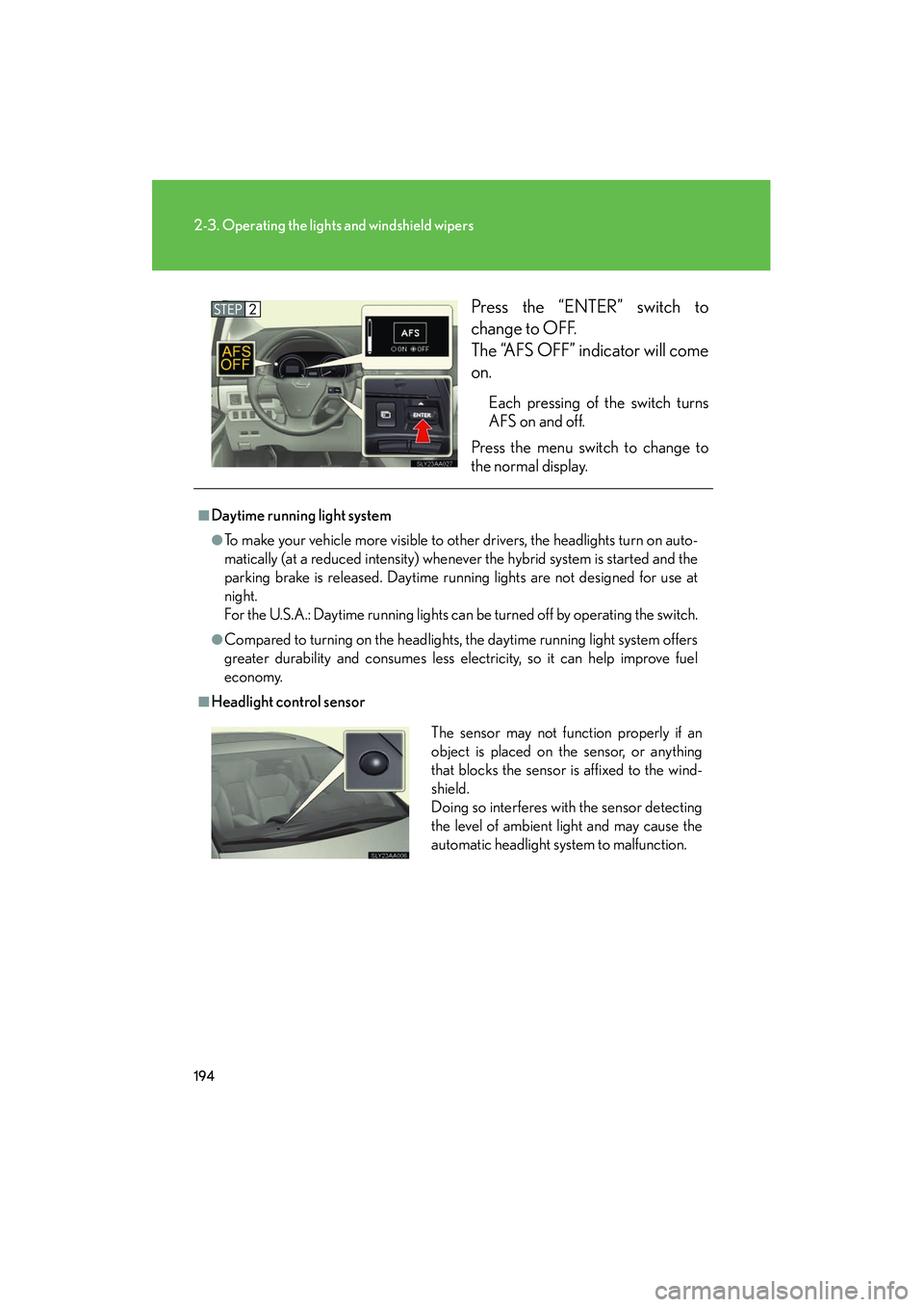
HS250h_U_75050UPress the “ENTER” switch to
change to OFF.
The “AFS OFF” indicator will come
on.
Each pressing of the switch turns
AFS on and off.
Press the menu switch to change to
the normal display.
■Daytime running light system
●To make your vehicle more visible to other drivers, the headlights turn on auto-
matically (at a reduced intensity) whenever the hybrid system is started and the
parking brake is released. Daytime running lights are not designed for use at
night.
For the U.S.A.: Daytime running lights can be turned off by operating the switch.
●Compared to turning on the headlights, the daytime running light system offers
greater durability and consumes less electricity, so it can help improve fuel
economy.
■Headlight control sensor
The sensor may not function properly if an
object is placed on the sensor, or anything
that blocks the sensor is affixed to the wind-
shield.
Doing so interferes with the sensor detecting
the level of ambient light and may cause the
automatic headlight system to malfunction.