warning Lexus HS250h 2012 Owner's Guide
[x] Cancel search | Manufacturer: LEXUS, Model Year: 2012, Model line: HS250h, Model: Lexus HS250h 2012Pages: 630, PDF Size: 16.1 MB
Page 166 of 630
165
2-1. Driving procedures
2
When driving
HS250h_U_75050U
CAUTION
■P position switch
Do not press the P position switch while the vehicle is moving.
If the P position switch is pressed when driving at extremely low speeds (for exam-
ple, directly before stopping the vehicle), the vehicle may stop suddenly when the
shift position switches to P, which could lead to an accident.
NOTICE
■Situations where P position control system malfunctions are possible
If any of the following situations occurs, P position control system malfunctions are
possible.
Immediately stop the vehicle in a safe place on level ground, apply the parking
brake, and then contact your Lexus dealer.
●When the “P Lock Malfunction” warning message appears on the multi-informa-
tion display. (→P. 5 1 3 )
●When the P position switch indicator flashes.
●When the shift position symbols (such as P and R) are flashing on the shift posi-
tion indicator.
●When the shift position indicator remains off.
■When in heavy traffic
If shift position N is selected, the hybrid battery (traction battery) will not be
charged. To help prevent the battery from discharging, avoid leaving the N position
selected for an extended period of time.
■If the vehicle will not shift out of the P position
There is a possibility that the 12-volt battery is discharged. Check the 12-volt battery
in this situation.
■Notes regarding shift lever and P position switch operation
Avoid repeatedly operating the shift lever and P position switch in quick succession.
The system protection function may activate and temporarily prevent the vehicle
from shifting out of the P position. If this happens, please wait for around 15 seconds
before attempting to change the shift position again.
Page 168 of 630
167
2-1. Driving procedures
2
When driving
HS250h_U_75050U
Parking brake
■Parking brake engaged warning buzzer
The buzzer sounds to indicate that parking brake is still engaged (with the vehicle
having reached a speed of 3 mph [5 km/h]). (→P. 5 1 6 )
■Usage in winter time
See “Winter driving tips” for parking brake usage in winter time. ( →P. 2 5 8 )
NOTICE
■Before driving
Fully release the parking brake.
Driving the vehicle with the parking brake set will lead to brake components over-
heating, which may affect braking performance and increase brake wear.
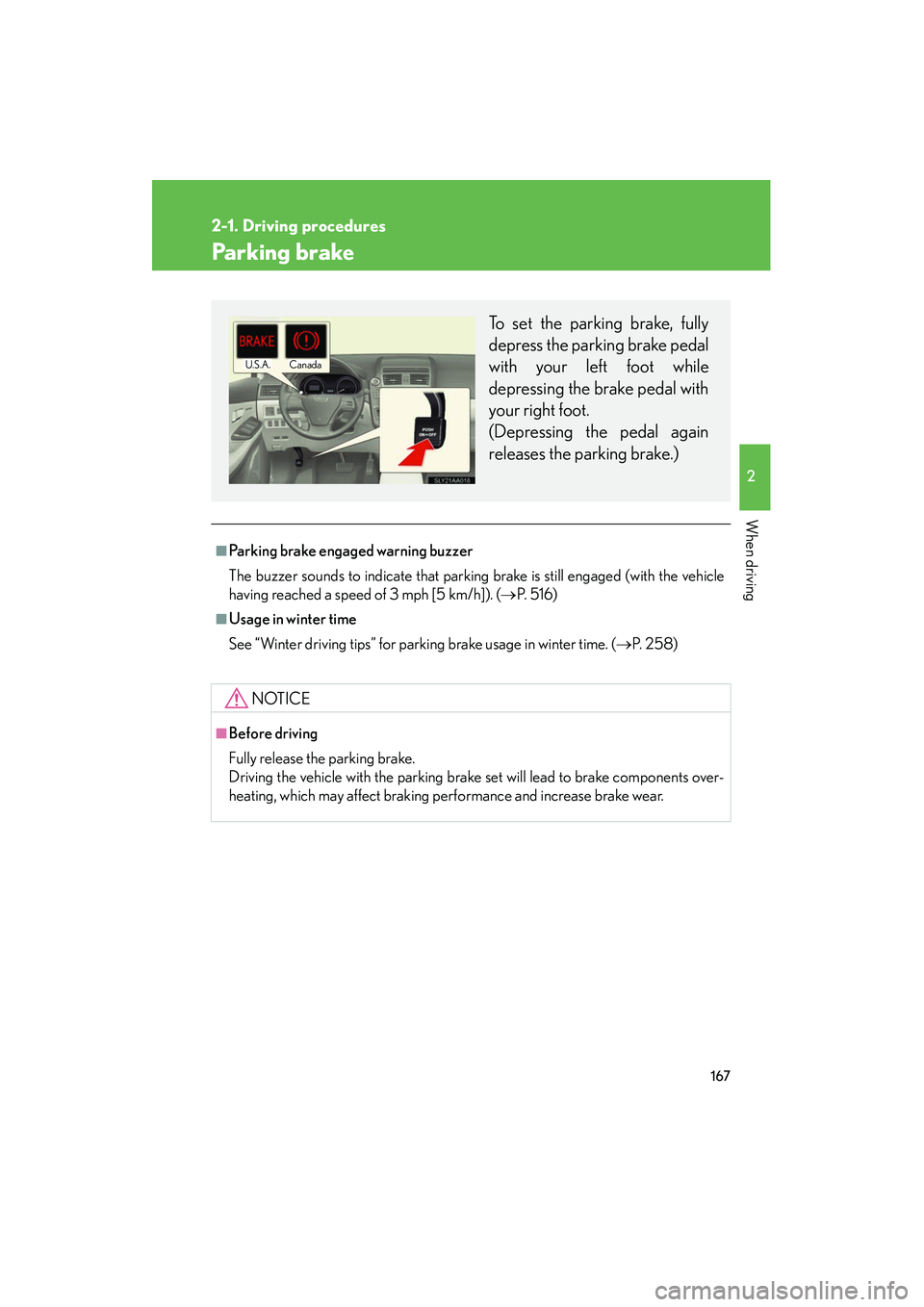
To set the parking brake, fully
depress the parking brake pedal
with your left foot while
depressing the brake pedal with
your right foot.
(Depressing the pedal again
releases the parking brake.)
U.S.A.Canada
Page 173 of 630
172
2-2. Instrument cluster
HS250h_U_75050U
NOTICE
■To prevent damage to the hybrid system and its components
A high engine coolant temperature warning light (→P. 502) is installed instead of
an engine coolant temperature gauge. If the high engine coolant temperature
warning light illuminates or flashes, the vehicle may be overheating. Immediately
stop the vehicle in a safe area ( →P. 5 5 2 ) .
Page 174 of 630
173
2-2. Instrument cluster
2
When driving
HS250h_U_75050U
Indicators and warning lights
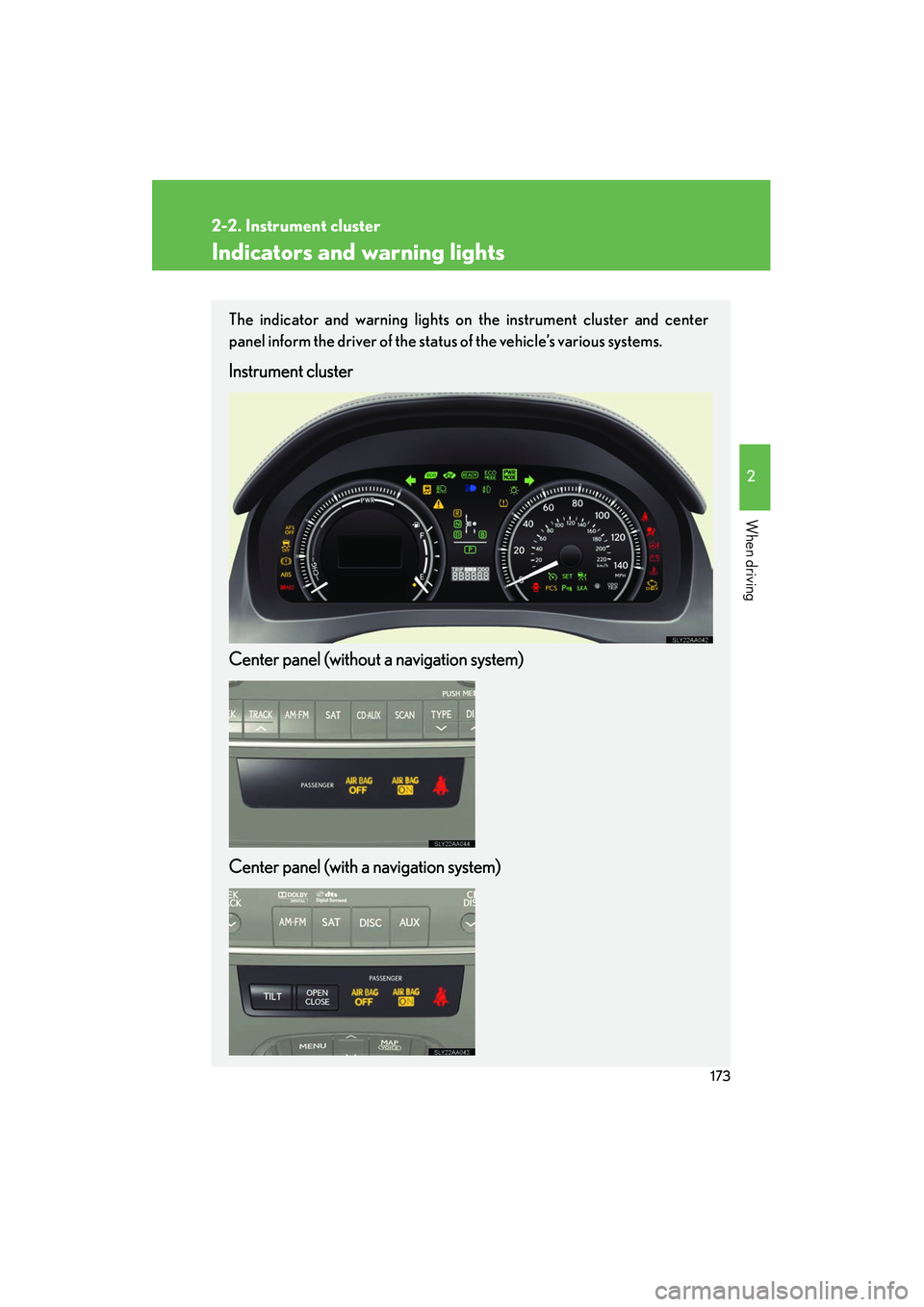
The indicator and warning lights on the instrument cluster and center
panel inform the driver of the status of the vehicle’s various systems.
Instrument cluster
Center panel (without a navigation system)
Center panel (with a navigation system)
Page 176 of 630
175
2-2. Instrument cluster
2
When driving
HS250h_U_75050U
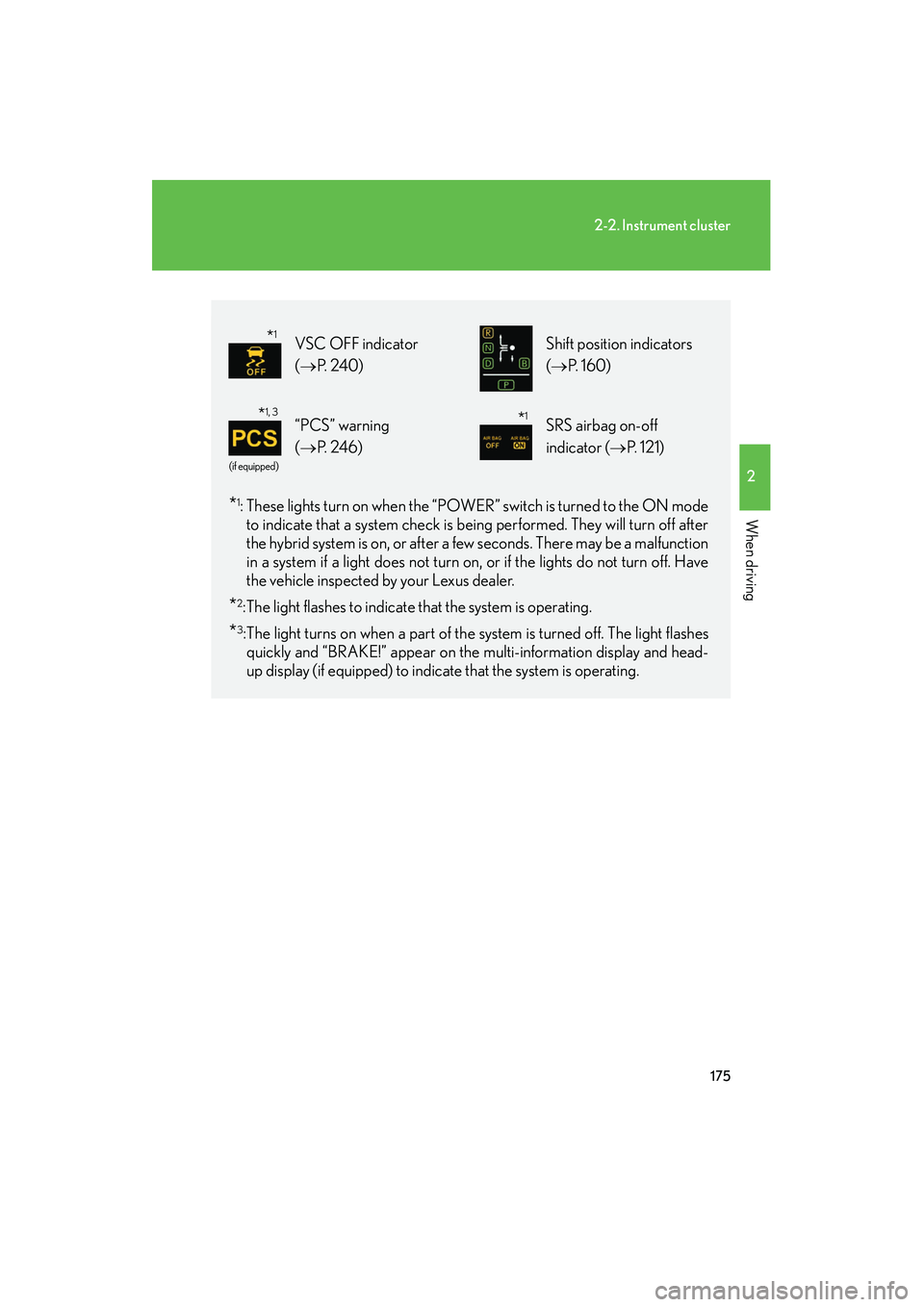
*1: These lights turn on when the “POWER” switch is turned to the ON modeto indicate that a system check is being performed. They will turn off after
the hybrid system is on, or after a few seconds. There may be a malfunction
in a system if a light does not turn on, or if the lights do not turn off. Have
the vehicle inspected by your Lexus dealer.
*2:The light flashes to indicate that the system is operating.
*3:The light turns on when a part of the system is turned off. The light flashesquickly and “BRAKE!” appear on the multi-information display and head-
up display (if equipped) to indicate that the system is operating.
VSC OFF indicator
( → P. 2 4 0 ) Shift position indicators
(→ P. 1 6 0 )
(if equipped)
“PCS” warning
(→ P. 2 4 6 )SRS airbag on-off
indicator ( →P. 121)
*1
*1, 3*1
Page 177 of 630
176
2-2. Instrument cluster
HS250h_U_75050U
CAUTION
■If a safety system warning light does not come on
Should a safety system light such as the ABS and SRS airbag warning light not
come on when you start the hybrid system, this could mean that these systems are
not available to help protect you in an accident, which could result in death or seri-
ous injury. Have the vehicle inspected by your Lexus dealer immediately if this
occurs.
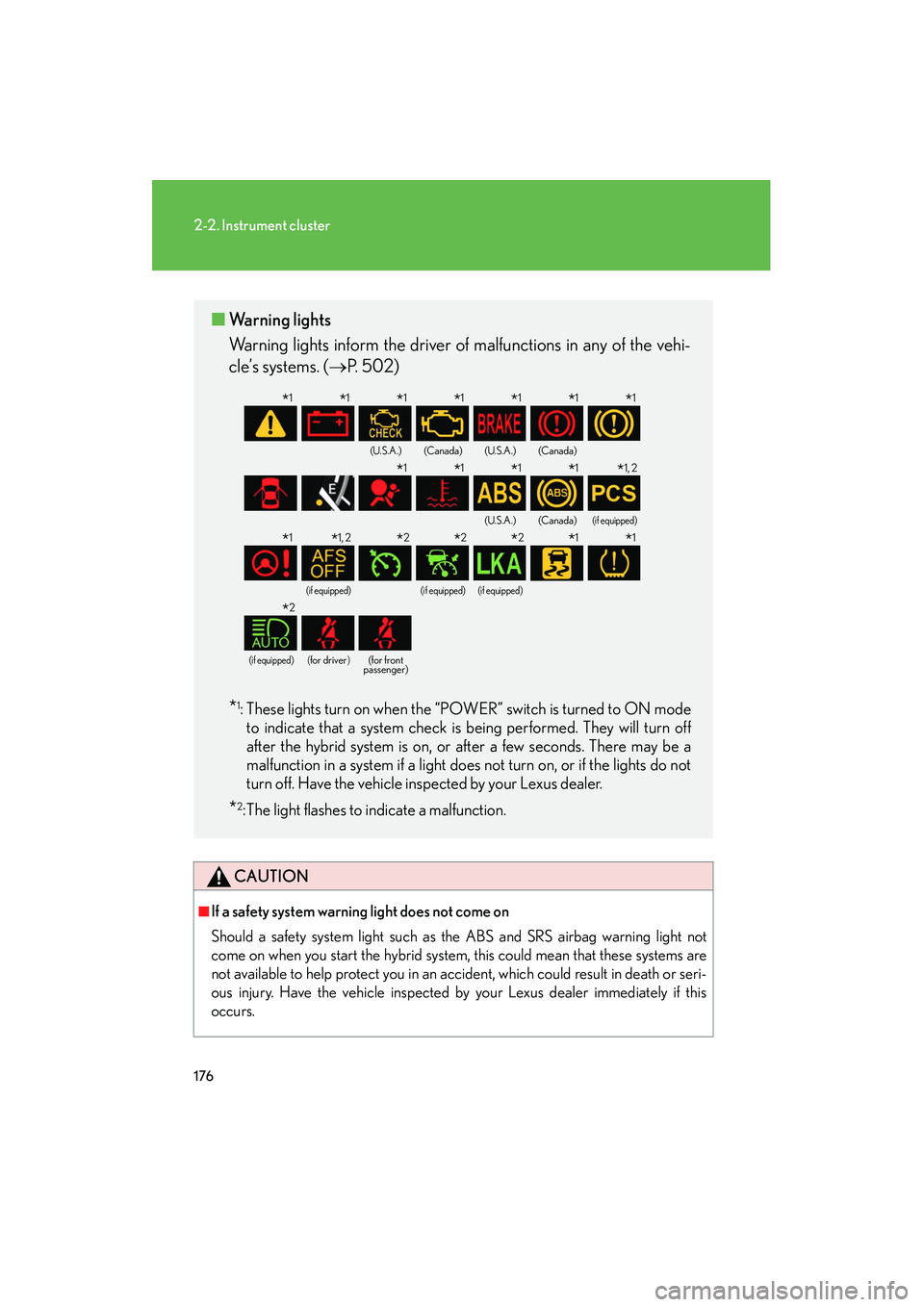
■Warning lights
Warning lights inform the driver of malfunctions in any of the vehi-
cle’s systems. ( →P. 502)
*1: These lights turn on when the “POWER” switch is turned to ON mode
to indicate that a system check is being performed. They will turn off
after the hybrid system is on, or after a few seconds. There may be a
malfunction in a system if a light does not turn on, or if the lights do not
turn off. Have the vehicle inspected by your Lexus dealer.
*2: The light flashes to indicate a malfunction.
(U.S.A.)(Canada)(U.S.A.)(Canada)
(U.S.A.)(Canada)(if equipped)
(if equipped)(if equipped)(if equipped)
(if equipped)(for driver)(for front
passenger)
*1*1*1*1*1*1*1
*1*1*1*1*1, 2
*1*1, 2*2*2*2*1*1
*2
Page 182 of 630
181
2-2. Instrument cluster
2
When driving
HS250h_U_75050U
• When only a small amount of fuel is remaining, the distance indicator onthe cruising range display is replaced with the message “CRUISING
RANGE LOW FUEL”. ( →P. 5 2 4 )
■Average vehicle speed
Displays the average vehicle speed since the function was reset
The function can be reset by pushing the “ENTER” switch for longer than 1
second when the average vehicle speed is displayed.
■Outside temperature
Displays the outside temperature
■ Tire inflation pressure
Displays inflation pressure of each tire. There is no correlation between
the order of the displayed values and the tire positions.
It may take a few minutes to display the tire inflation pressure after the
“POWER” switch is turned to ON mode. It may also take a few minutes to
display the tire inflation pressure after the inflation pressure has been
adjusted.
■Electronic feature control can be turned on/off when
The “POWER” switch is in ON mode.
■Conditions for ending electronic feature control
In the following situations, the electronic feature control will end:
●The menu switch is pressed
●The radar cruise control is operated (if equipped)
●The lane keeping assist is operated (if equipped)
●Intuitive parking assist starts operating (if equipped)
●No action is performed for some time after the electronic feature control
screen is displayed
●A warning message appears after the electronic feature control screen is dis-
played
Page 185 of 630
184
2-2. Instrument cluster
HS250h_U_75050U
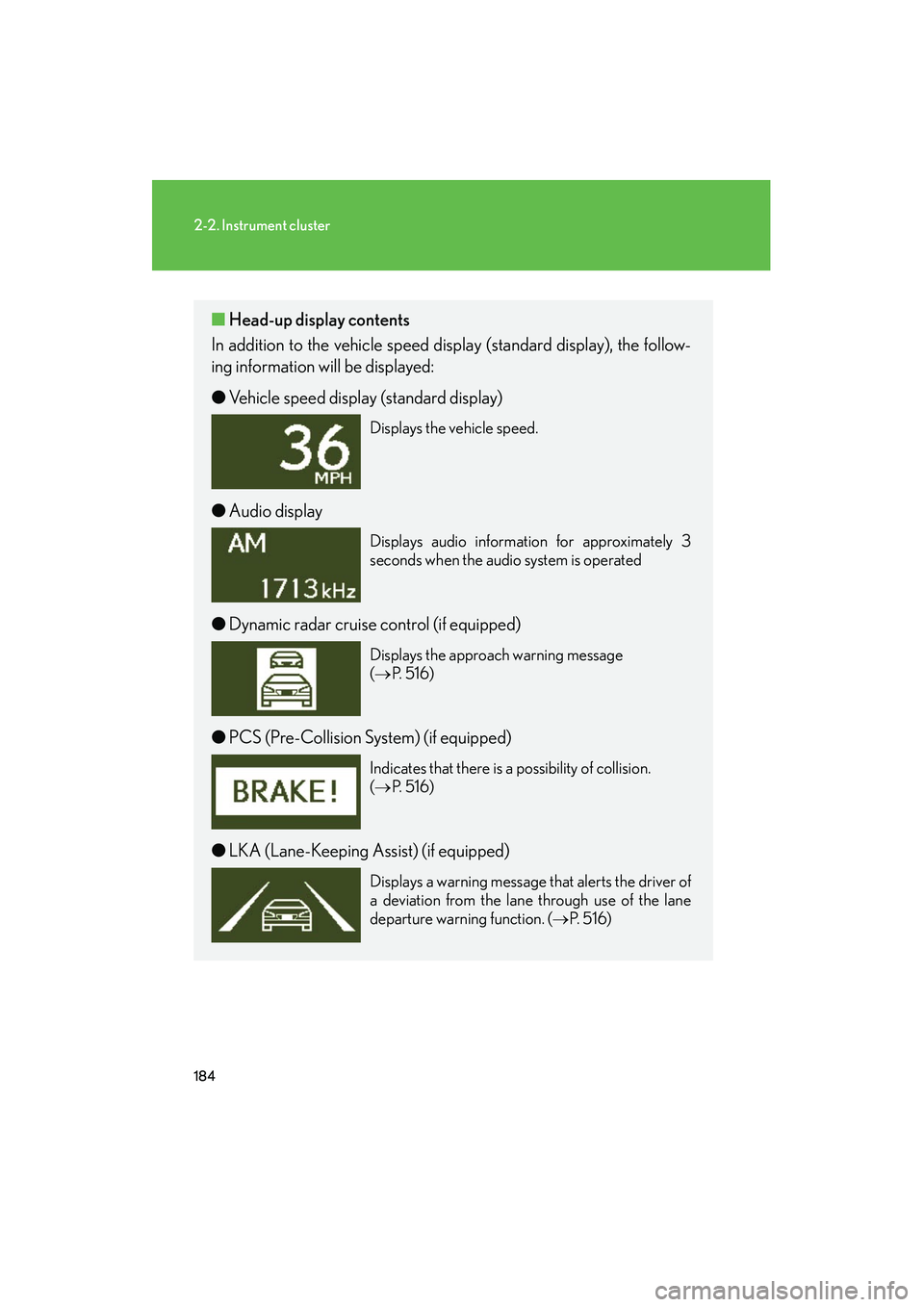
■Head-up display contents
In addition to the vehicle speed display (standard display), the follow-
ing information will be displayed:
● Vehicle speed display (standard display)
Displays the vehicle speed.
●Audio display
Displays audio information for approximately 3
seconds when the audio system is operated
●Dynamic radar cruise control (if equipped)
Displays the approach warning message
(→ P. 5 1 6 )
●PCS (Pre-Collision System) (if equipped)
Indicates that there is a possibility of collision.
(→ P. 5 1 6 )
●LKA (Lane-Keeping Assist) (if equipped)
Displays a warning message that alerts the driver of
a deviation from the lane through use of the lane
departure warning function. ( →P. 5 1 6 )
Page 222 of 630
221
2-4. Using other driving systems
2
When driving
HS250h_U_75050U
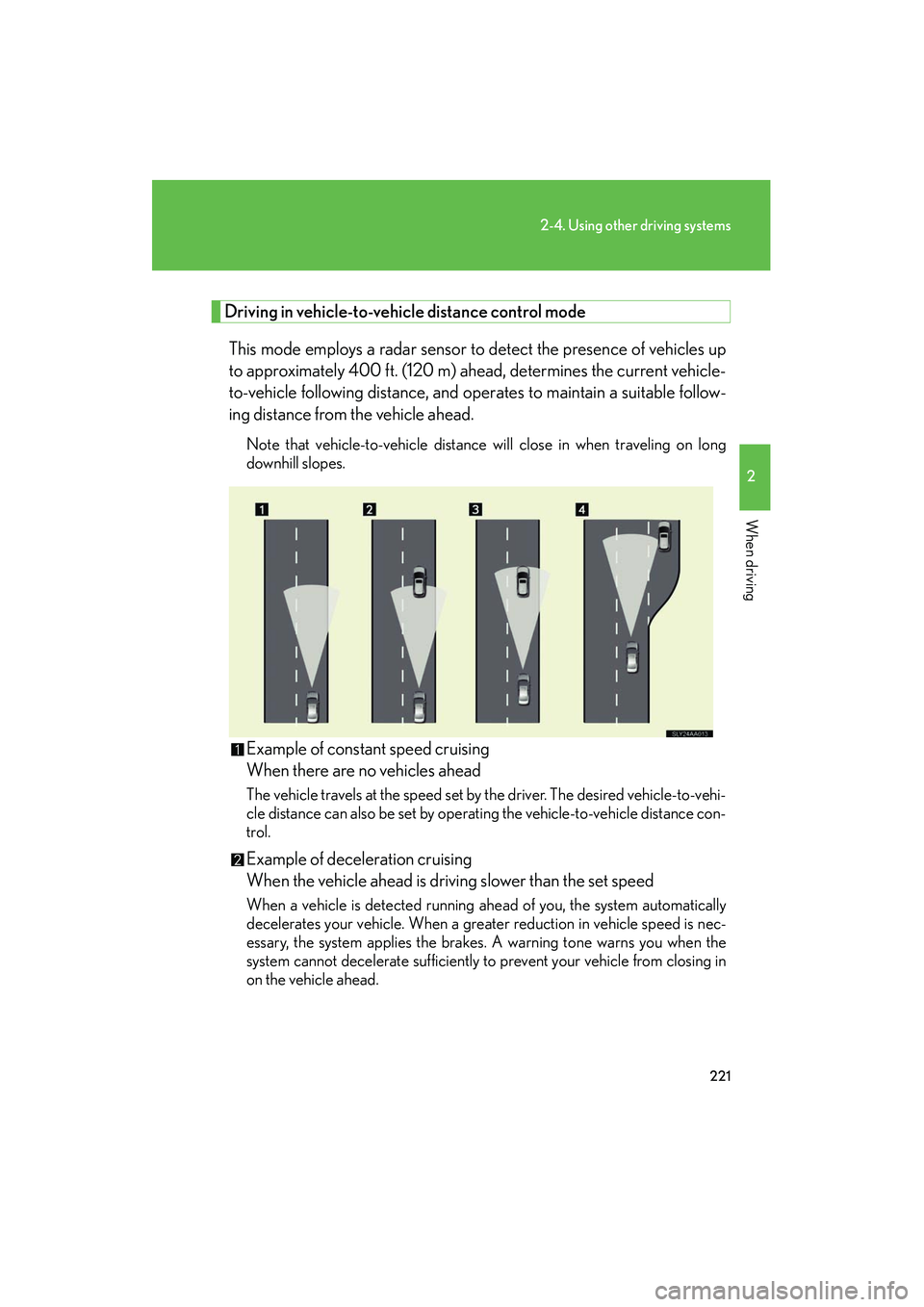
Driving in vehicle-to-vehicle distance control mode
This mode employs a radar sensor to detect the presence of vehicles up
to approximately 400 ft. (120 m) ahead, determines the current vehicle-
to-vehicle following distance, and operates to maintain a suitable follow-
ing distance from the vehicle ahead.
Note that vehicle-to-vehicle distance will close in when traveling on long
downhill slopes.
Example of constant speed cruising
When there are no vehicles ahead
The vehicle travels at the speed set by the driver. The desired vehicle-to-vehi-
cle distance can also be set by operating the vehicle-to-vehicle distance con-
trol.
Example of deceleration cruising
When the vehicle ahead is driving slower than the set speed
When a vehicle is detected running ahead of you, the system automatically
decelerates your vehicle. When a greater reduction in vehicle speed is nec-
essary, the system applies the brakes. A warning tone warns you when the
system cannot decelerate sufficiently to prevent your vehicle from closing in
on the vehicle ahead.
Page 223 of 630
222
2-4. Using other driving systems
HS250h_U_75050UExample of follow-up cruising
When following a vehicle driving slower than the set speed
The system continues follow-up cruising while adjusting for changes in the
speed of the vehicle ahead in order to maintain the vehicle-to-vehicle dis-
tance set by the driver.
Example of acceleration
When there are no longer any vehicles ahead driving slower than the
set speed.
The system accelerates until the set speed is reached. The system then
returns to constant speed cruising.
Approach warning
When your vehicle is too close to a vehicle ahead, and sufficient auto-
matic deceleration via the cruise control is not possible, the display will
flash and the buzzer will sound to alert the driver. An example of this
would be if another driver cuts in front of you while you are following a
vehicle. Apply the brakes to ensure an appropriate vehicle-to-vehicle dis-
tance.
■ Warnings may not occur when
In the following instances, there is a possibility that the warnings will not
occur:
● When the speed of the vehicle ahead matches or exceeds your vehicle
speed
● When the vehicle ahead is traveling at an extremely slow speed
● Immediately after the cruise control speed was set
● At the instant the accelerator is applied