light Lexus HS250h 2012 Repair Manual
[x] Cancel search | Manufacturer: LEXUS, Model Year: 2012, Model line: HS250h, Model: Lexus HS250h 2012Pages: 630, PDF Size: 16.1 MB
Page 180 of 630
179
2-2. Instrument cluster
2
When driving
HS250h_U_75050U
Display order may vary depending on vehicle condition.
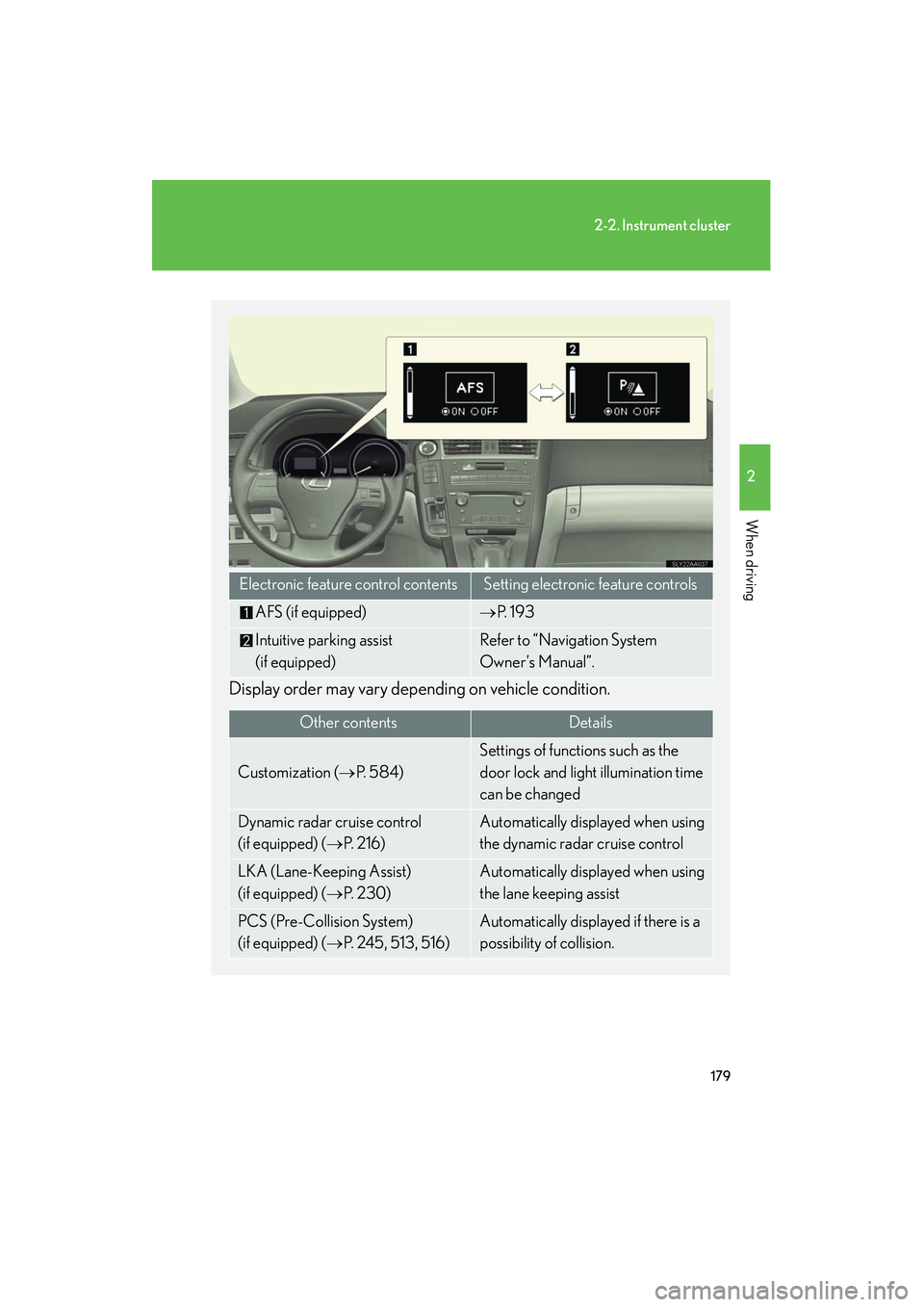
Electronic feature control contentsSetting electronic feature controls
AFS (if equipped)→P. 1 9 3
Intuitive parking assist
(if equipped)Refer to “Navigation System
Owner’s Manual”.
Other contentsDe ta ils
Customization ( →P. 5 8 4 )
Settings of functions such as the
door lock and light illumination time
can be changed
Dynamic radar cruise control
(if equipped) ( →P. 2 1 6 )Automatically displayed when using
the dynamic radar cruise control
LKA (Lane-Keeping Assist)
(if equipped) ( →P. 2 3 0 )Automatically displayed when using
the lane keeping assist
PCS (Pre-Collision System)
(if equipped) ( →P. 2 4 5 , 5 1 3 , 5 1 6 )Automatically displayed if there is a
possibility of collision.
Page 189 of 630
188
2-2. Instrument cluster
HS250h_U_75050U■
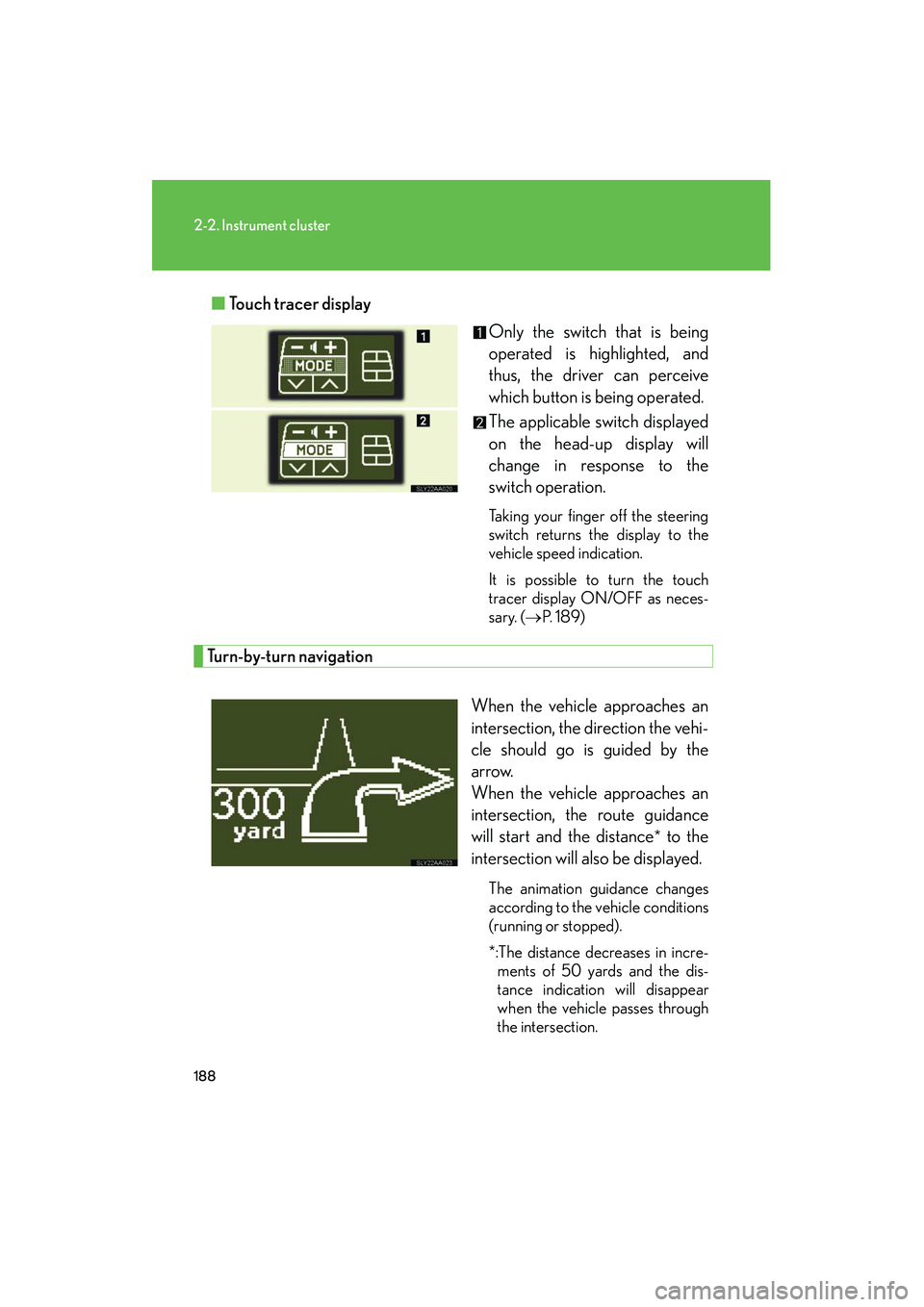
Touch tracer display
Only the switch that is being
operated is highlighted, and
thus, the driver can perceive
which button is being operated.
The applicable switch displayed
on the head-up display will
change in response to the
switch operation.
Taking your finger off the steering
switch returns the display to the
vehicle speed indication.
It is possible to turn the touch
tracer display ON/OFF as neces-
sary. (→P. 1 8 9 )
Turn-by-turn navigation
When the vehicle approaches an
intersection, the direction the vehi-
cle should go is guided by the
arrow.
When the vehicle approaches an
intersection, the route guidance
will start and the distance
* to the
intersection will also be displayed.
The animation guidance changes
according to the vehicle conditions
(running or stopped).
*:The distance decreases in incre- ments of 50 yards and the dis-
tance indication will disappear
when the vehicle passes through
the intersection.
Page 191 of 630
190
2-2. Instrument cluster
HS250h_U_75050U
■Brightness of the head-up display
The headlight control sensor detects the brightness of the area surrounding the
head-up display and adjusts the brightness accordingly. (→P. 1 9 4 )
■Head-up display
The head-up display may seem dark and hard to see when viewed through sun-
glasses, especially polarized sunglasses.
Adjust the brightness of the head-up display or remove your sunglasses.
CAUTION
■Before using the head-up display
Check that the position and brightness of the head-up display image does not inter-
fere with safe driving. Incorrect adjustment of the image's position or brightness
may obstruct the driver's view and lead to an accident, resulting in death or serious
injury.
NOTICE
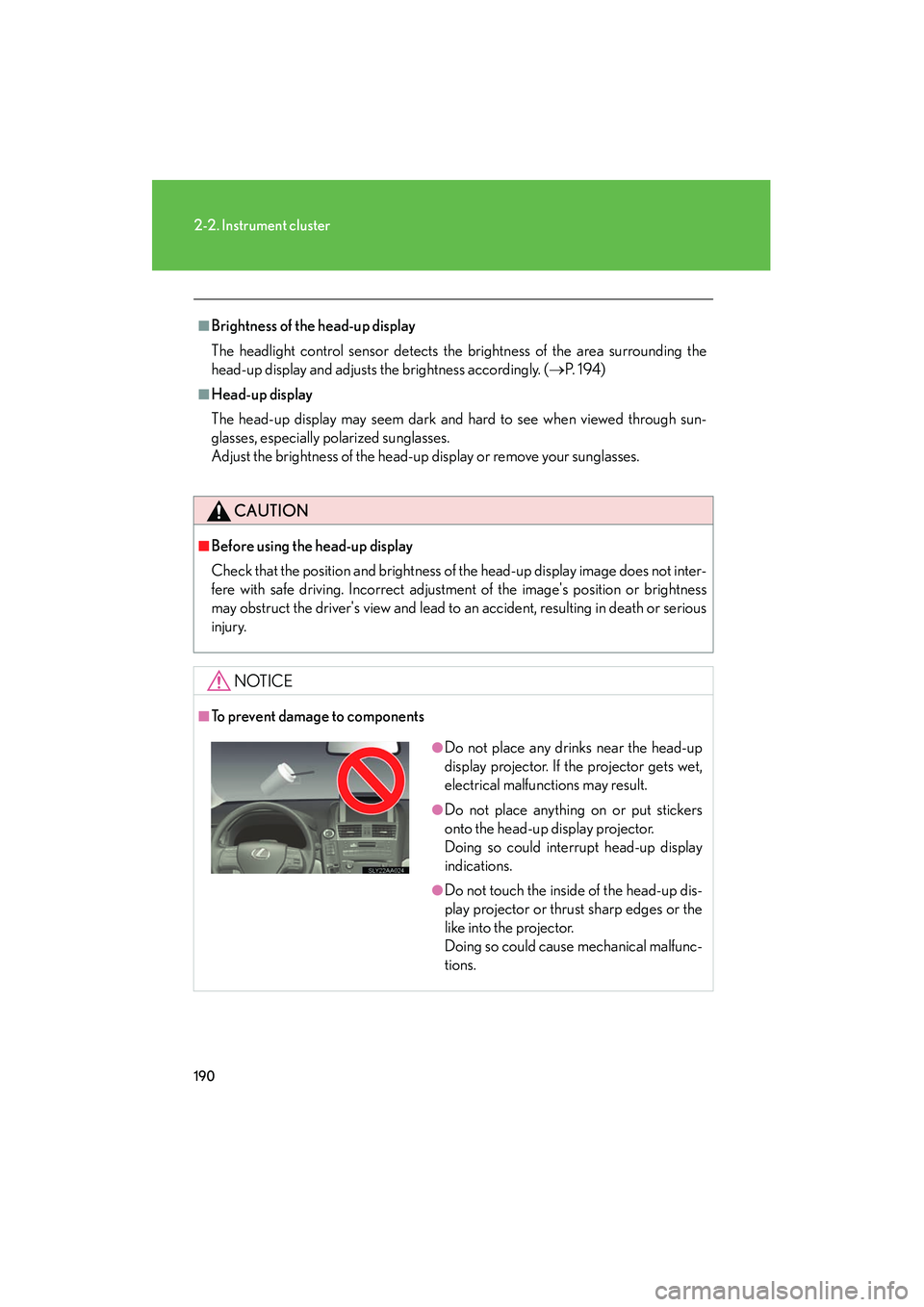
■To prevent damage to components
●Do not place any drinks near the head-up
display projector. If the projector gets wet,
electrical malfunctions may result.
●Do not place anything on or put stickers
onto the head-up display projector.
Doing so could interrupt head-up display
indications.
●Do not touch the inside of the head-up dis-
play projector or thrust sharp edges or the
like into the projector.
Doing so could cause mechanical malfunc-
tions.
Page 192 of 630
191
2
When driving
HS250h_U_75050U
2-3. Operating the lights and windshield wipers
Headlight switch
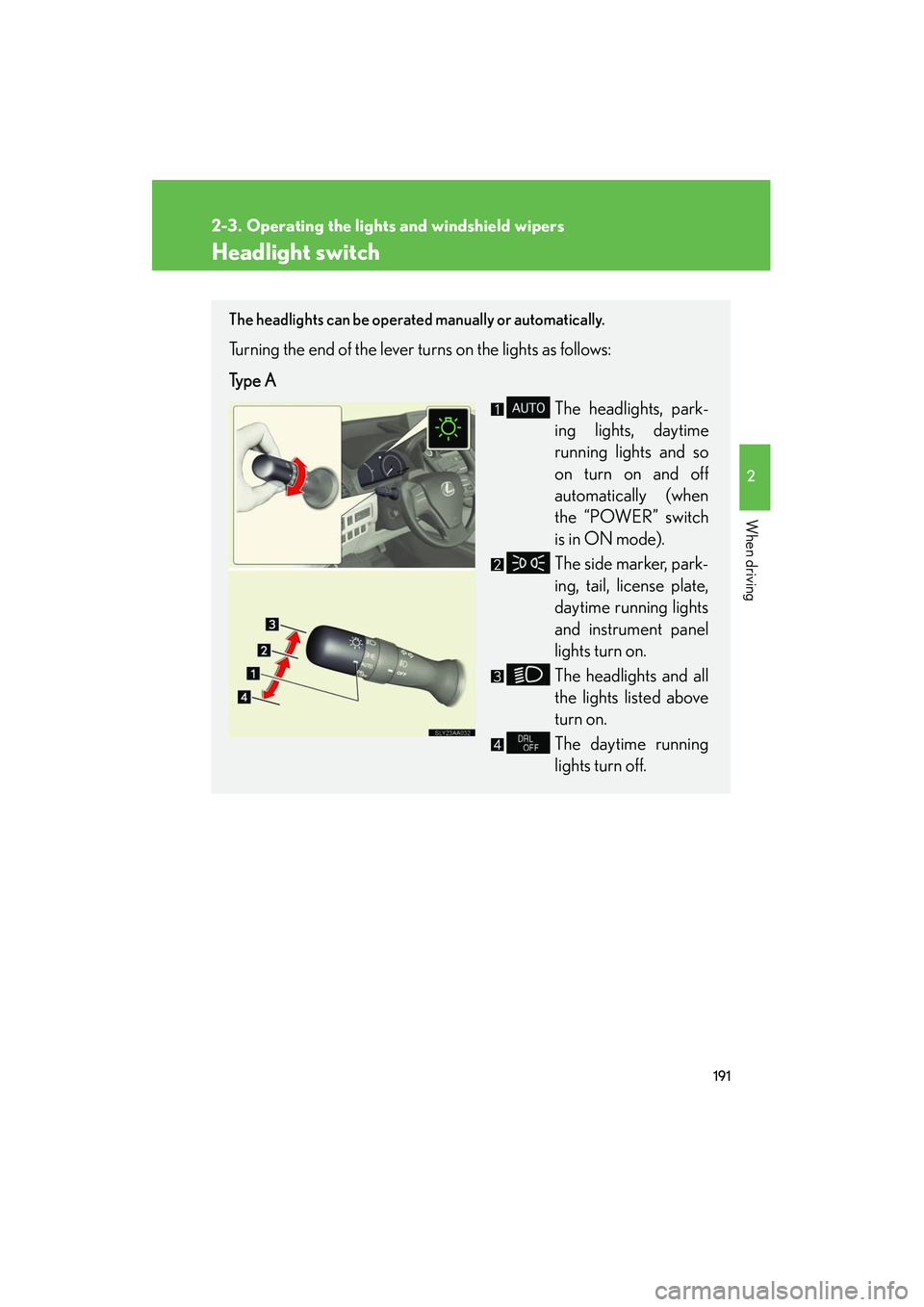
The headlights can be operated manually or automatically.
Turning the end of the lever turns on the lights as follows:
Type AThe headlights, park-
ing lights, daytime
running lights and so
on turn on and off
automatically (when
the “POWER” switch
is in ON mode).
The side marker, park-
ing, tail, license plate,
daytime running lights
and instrument panel
lights turn on.
The headlights and all
the lights listed above
turn on.
The daytime running
lights turn off.
Page 193 of 630
192
2-3. Operating the lights and windshield wipers
HS250h_U_75050U
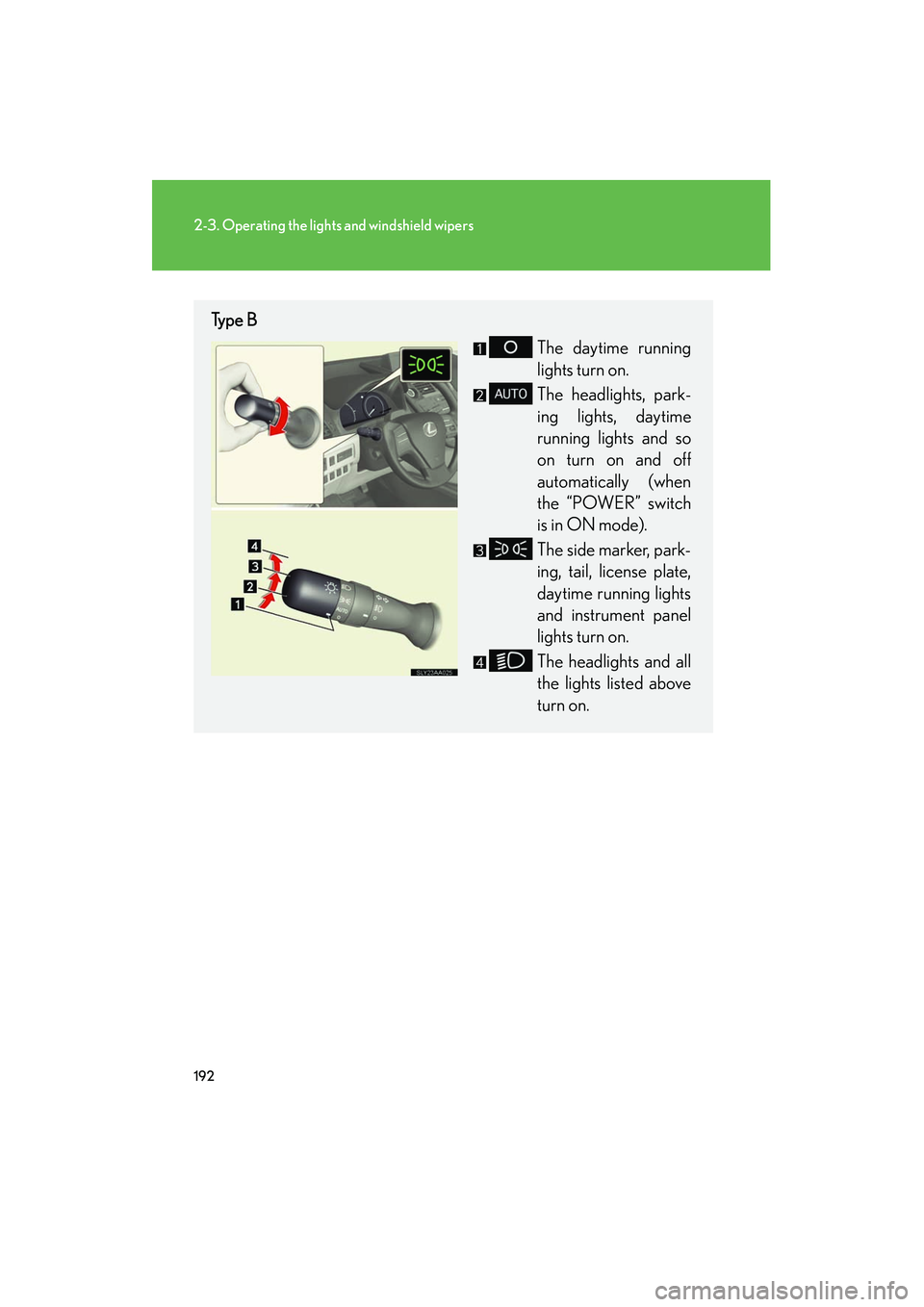
Type BThe daytime running
lights turn on.
The headlights, park-
ing lights, daytime
running lights and so
on turn on and off
automatically (when
the “POWER” switch
is in ON mode).
The side marker, park-
ing, tail, license plate,
daytime running lights
and instrument panel
lights turn on.
The headlights and all
the lights listed above
turn on.
Page 194 of 630
193
2-3. Operating the lights and windshield wipers
2
When driving
HS250h_U_75050U
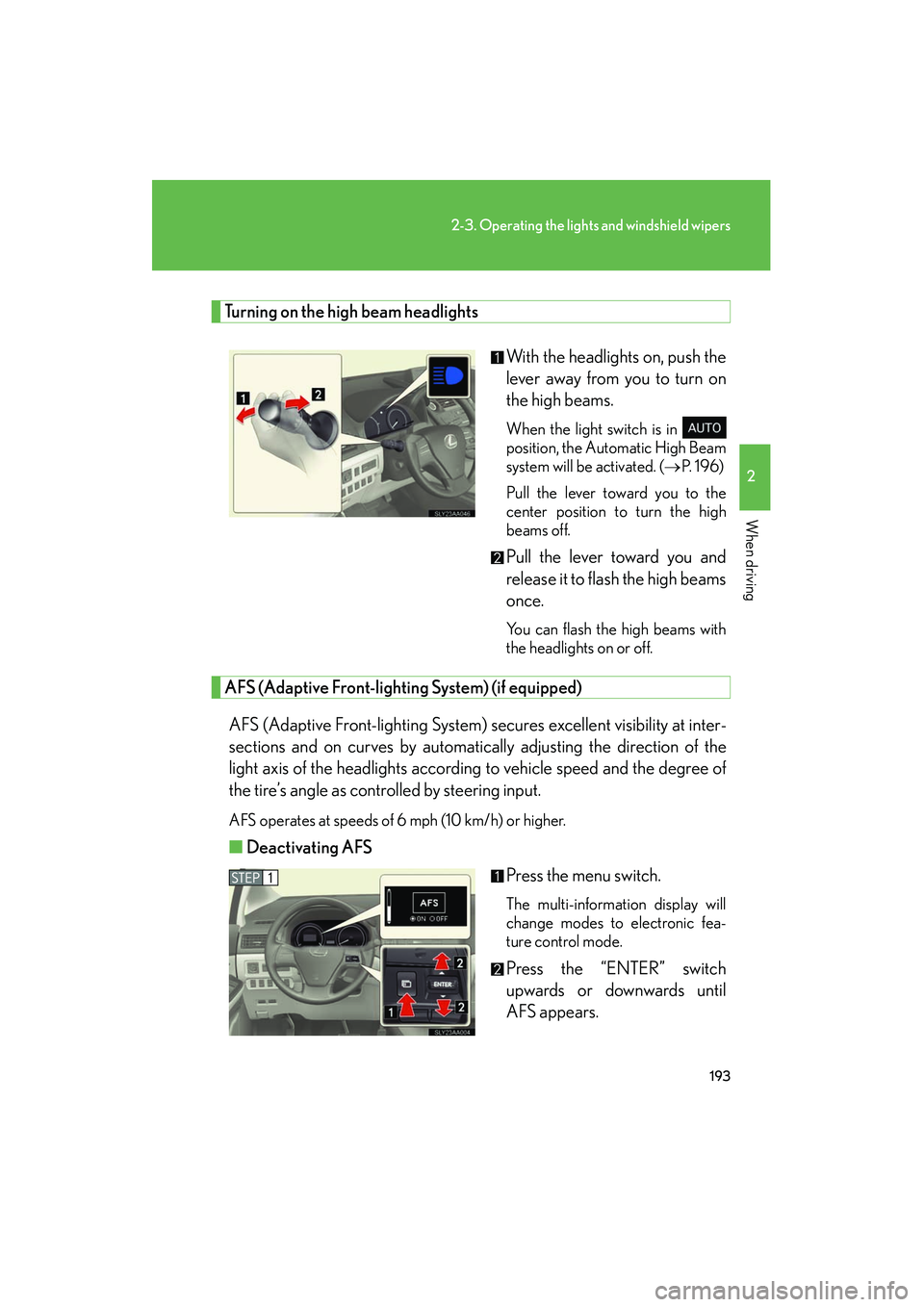
Turning on the high beam headlightsWith the headlights on, push the
lever away from you to turn on
the high beams.
When the light switch is in
position, the Automatic High Beam
system will be activated. (→P. 1 9 6 )
Pull the lever toward you to the
center position to turn the high
beams off.
Pull the lever toward you and
release it to flash the high beams
once.
You can flash the high beams with
the headlights on or off.
AFS (Adaptive Front-lighting System) (if equipped)
AFS (Adaptive Front-lighting System) secures excellent visibility at inter-
sections and on curves by automatically adjusting the direction of the
light axis of the headlights according to vehicle speed and the degree of
the tire’s angle as controlled by steering input.
AFS operates at speeds of 6 mph (10 km/h) or higher.
■ Deactivating AFS
Press the menu switch.
The multi-information display will
change modes to electronic fea-
ture control mode.
Press the “ENTER” switch
upwards or downwards until
AFS appears.
Page 195 of 630
194
2-3. Operating the lights and windshield wipers
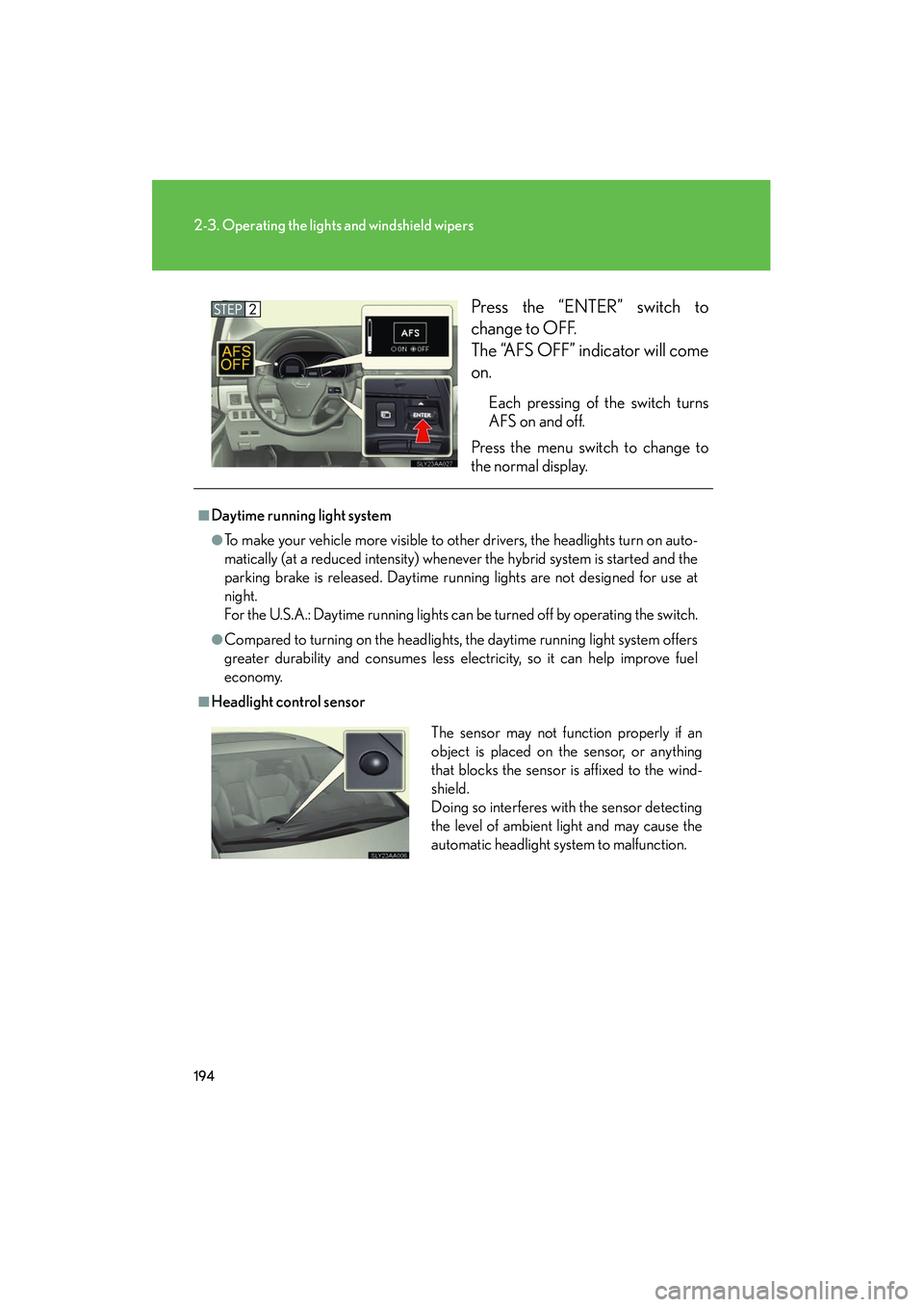
HS250h_U_75050UPress the “ENTER” switch to
change to OFF.
The “AFS OFF” indicator will come
on.
Each pressing of the switch turns
AFS on and off.
Press the menu switch to change to
the normal display.
■Daytime running light system
●To make your vehicle more visible to other drivers, the headlights turn on auto-
matically (at a reduced intensity) whenever the hybrid system is started and the
parking brake is released. Daytime running lights are not designed for use at
night.
For the U.S.A.: Daytime running lights can be turned off by operating the switch.
●Compared to turning on the headlights, the daytime running light system offers
greater durability and consumes less electricity, so it can help improve fuel
economy.
■Headlight control sensor
The sensor may not function properly if an
object is placed on the sensor, or anything
that blocks the sensor is affixed to the wind-
shield.
Doing so interferes with the sensor detecting
the level of ambient light and may cause the
automatic headlight system to malfunction.
Page 196 of 630
195
2-3. Operating the lights and windshield wipers
2
When driving
HS250h_U_75050U
■Automatic light off system
●When the headlights come on: The headlights and tail lights turn off 30 seconds
after a door is opened and closed if the “POWER” switch is turned to ACCES-
SORY mode or turned off. (The lights turn off immediately if on the key is
pressed after all the doors are locked.)
●When only the tail lights come on: The tail lights turn off automatically if the
“POWER” switch is turned to ACCESSORY mode or turned off and the
driver’s door is opened.
To turn the lights on again, turn the “POWER” switch to ON mode, or turn the light
switch off once and then back to or .
■Automatic headlight leveling system (if equipped)
The level of the headlights is automatically adjusted according to the number of
passengers and the loading condition of the vehicle to ensure that the headlights do
not interfere with other road users.
■ If the “AFS OFF” indicator flashes (if equipped)
It may indicate a malfunction in the system. Contact your Lexus dealer.
■Customization
Settings (e.g. light sensor sensitivity) can be changed.
(Customizable features →P. 5 8 4 )
NOTICE
■To prevent 12-volt battery discharge
Do not leave the lights on longer than necessary when the hybrid system is off.
Page 197 of 630
196
2-3. Operating the lights and windshield wipers
HS250h_U_75050U
Automatic High Beam∗∗
: If equipped
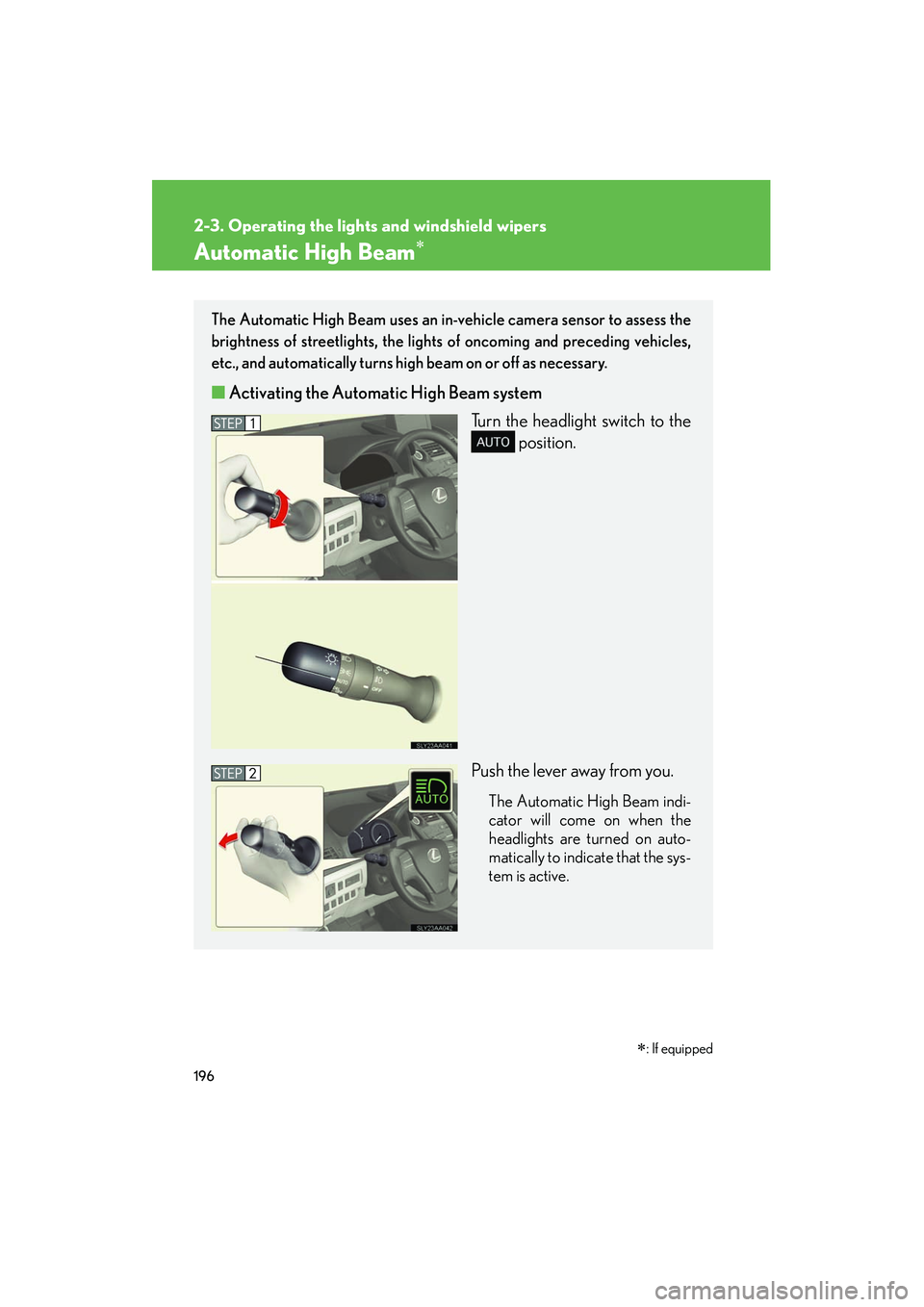
The Automatic High Beam uses an in-vehicle camera sensor to assess the
brightness of streetlights, the lights of oncoming and preceding vehicles,
etc., and automatically turns high beam on or off as necessary.
■ Activating the Automatic High Beam system
Turn the headlight switch to the position.
Push the lever away from you.
The Automatic High Beam indi-
cator will come on when the
headlights are turned on auto-
matically to indicate that the sys-
tem is active.
Page 198 of 630
197
2-3. Operating the lights and windshield wipers
2
When driving
HS250h_U_75050U
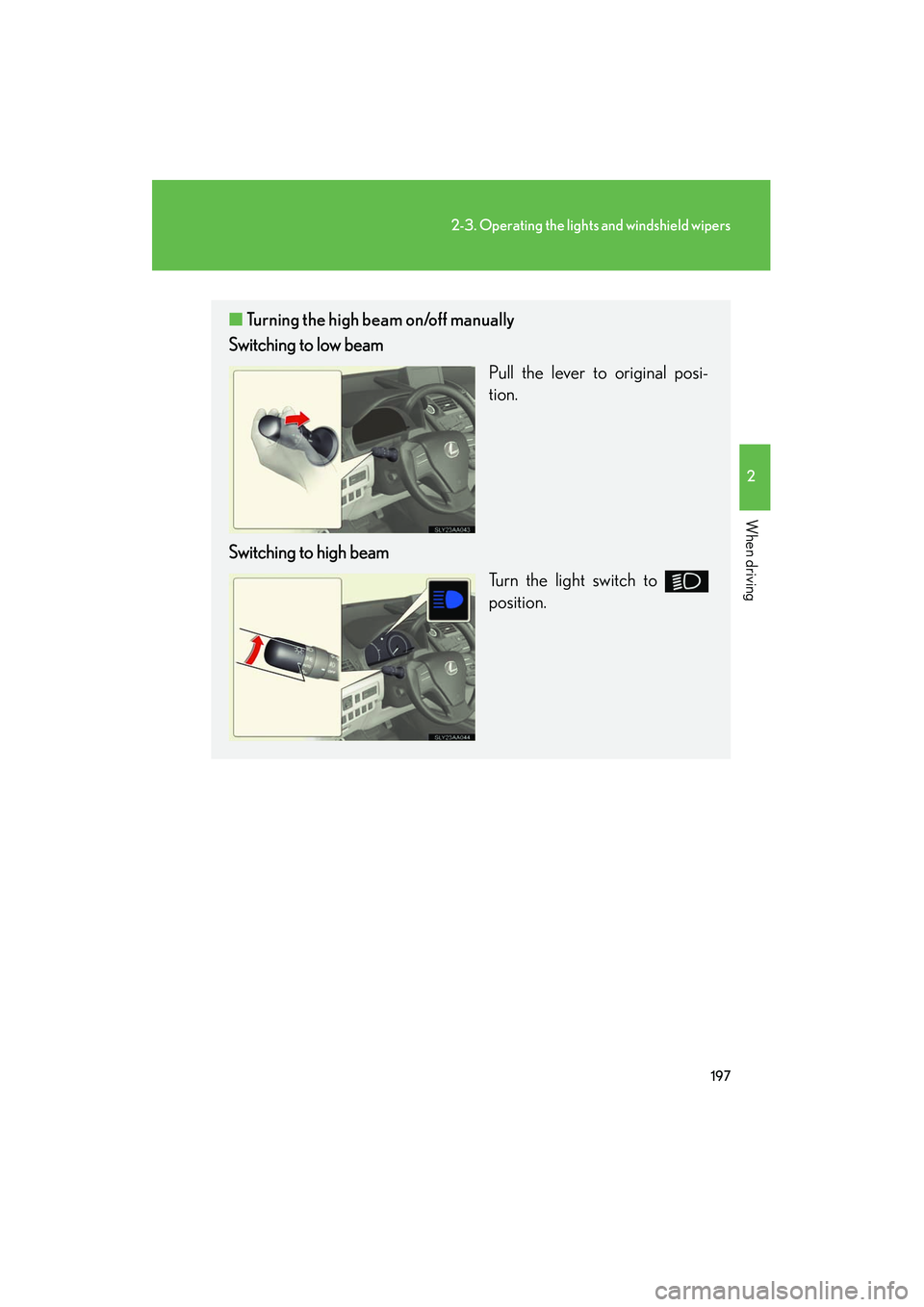
■Turning the high beam on/off manually
Switching to low beam
Pull the lever to original posi-
tion.
Switching to high beam Turn the light switch to
position.