park assist Lexus IS F 2010 Audio/video System / LEXUS 2010 IS F OWNERS MANUAL (OM53A25U)
[x] Cancel search | Manufacturer: LEXUS, Model Year: 2010, Model line: IS F, Model: Lexus IS F 2010Pages: 543, PDF Size: 16.07 MB
Page 3 of 543

1
2
3
4
5
6
7
3
Multi-information display........... 146
2-3. Operating the lights and
windshield wipers
Headlight switch ............................ 150
Fog light switch .............................. 153
Windshield wipers and
washer............................................. 154
Headlight cleaner switch ........... 157
2-4. Using other driving systems
Cruise control ................................ 158
Dynamic radar cruise control .... 161
Intuitive parking assist ................... 171
Driving assist systems................... 177
PCS (Pre-Collision System)..... 184
2-5. Driving information
Cargo and luggage ...................... 188
Vehicle load limits ........................... 191
Winter driving tips ........................ 192
Trailer towing .................................. 194
Dinghy towing ................................ 195
3-1. Using the air conditioning
system and defogger
Automatic air conditioning
system ............................................. 198
Rear window and outside rear
view mirror defoggers ............ 2063-2. Using the audio system
Audio system type ....................... 207
Using the radio............................... 210
Using the CD player.................... 218
Playing back MP3 and WMA
discs ................................................ 225
Operating an iPod
®................... 233
Operating a USB memory........ 241
Optimal use of the audio
system ........................................... 250
Using the AUX adapter ............ 252
Using the steering wheel
audio switches ............................ 254
3-3. Using the Bluetooth
® audio
system
Bluetooth
® audio system ......... 257
Using the Bluetooth
® audio
system ............................................ 260
Operating a Bluetooth
®
enabled portable player ......... 265
Setting up a Bluetooth
®
enabled portable player ......... 268
Bluetooth
® audio system
setup ............................................... 274
3-4. Using the hands-free phone
system (for mobile phones)
Hands-free system for mobile
phones ........................................... 275
Using the hands-free system
(for mobile phones) .................. 279
Making a phone call.................... 287
Setting a mobile phone ............... 291
3Interior features
Page 115 of 543
When driving2
115
2-1. Driving procedures
Driving the vehicle................... 116
Engine (ignition) switch ......... 124
Automatic transmission ........ 128
Turn signal lever ....................... 136
Parking brake ........................... 137
Horn ............................................ 138
2-2. Instrument cluster
Gauges and meters ................ 139
Indicators and warning
lights ......................................... 143
Multi-information display ..... 146
2-3. Operating the lights and
windshield wipers
Headlight switch...................... 150
Fog light switch ........................ 153
Windshield wipers and
washer ..................................... 154
Headlight cleaner switch...... 1572-4. Using other driving
systems
Cruise control.......................... 158
Dynamic radar cruise
control ....................................... 161
Intuitive parking assist ............. 171
Driving assist systems ............. 177
PCS
(Pre-Collision System) ....... 184
2-5. Driving information
Cargo and luggage ................ 188
Vehicle load limits .................... 191
Winter driving tips .................. 192
Trailer towing ........................... 194
Dinghy towing .......................... 195
Page 117 of 543

117
2-1. Driving procedures
2
When driving
■Starting off on a hill
Hill-start assist control will operate. (P. 1 7 7 )
■Driving in the rain
●Drive carefully when it is raining, because visibility will be reduced, the windows
may become fogged-up, and the road will be slippery.
●Drive carefully when it starts to rain, because the road surface will be especially
slippery.
●Refrain from high speeds when driving on an expressway in the rain, because
there may be a layer of water between the tires and the road surface, preventing
the steering and brakes from operating properly.
■Breaking in your new Lexus
To extend the life of the vehicle, the following precautions are recommended to
observe:
●For the first 186 miles (300 km):
Avoid sudden stops.
●For the first 621 miles (1000 km):
• Do not drive at extremely high speeds.
• Avoid sudden acceleration.
• Do not drive continuously in the low gears.
• Do not drive at a constant speed for extended periods.
■Drum-in-disc type parking brake system
Your vehicle has a drum-in-disc type parking brake system. This type of brake sys-
tem needs bedding-down of the brake shoes periodically or whenever the parking
brake shoes and/or drum are replaced. Have your Lexus dealer perform the bed-
ding down.
■Operating your vehicle in a foreign country
Comply with the relevant vehicle registration laws and confirm the availability of the
correct fuel. (P. 4 9 2 )
Page 119 of 543

119
2-1. Driving procedures
2
When driving
CAUTION
●During normal driving, do not turn off the engine. Turning the engine off while
driving will not cause loss of steering or braking control, but the power assist to
these systems will be lost. This will make it more difficult to steer and brake, so you
should pull over and stop the vehicle as soon as it is safe to do so.
However, in the event of an emergency, such as if it becomes impossible to stop
the vehicle in the normal way: P. 4 4 1
●Use engine braking (downshift) to maintain a safe speed when driving down a
steep hill.
Using the brakes continuously may cause the brakes to overheat and lose effec-
tiveness. (P. 130, 132)
●When stopped on an inclined surface, use the brake pedal and parking brake to
prevent the vehicle from rolling backward or forward and causing an accident.
●Do not adjust the position of the steering wheel, the seat, or the inside or outside
rear view mirrors while driving.
Doing so may result in a loss of vehicle control that can cause accidents that may
result in death or serious injury.
●Always check that all passengers' arms, heads or other parts of their bodies are
not outside the vehicle, as this may result in death or serious injury.
●Do not drive in excess of the speed limit. Even if the legal speed limit permits it, do
not drive over 85 mph (140 km/h) unless your vehicle has high-speed capability
tires. Driving over 85 mph (140 km/h) may result in tire failure, loss of control and
possible injury. Be sure to consult a tire dealer to determine whether the tires on
your vehicle are high-speed capability tires or not before driving at such speeds.
■When driving on slippery road surfaces
●Sudden braking, acceleration and steering may cause tire slippage and reduce
your ability to control the vehicle, resulting in an accident.
●Sudden changes in engine speed, such as engine braking caused by up-shifting
or down-shifting, may cause the vehicle to skid, resulting in an accident.
●After driving through a puddle, lightly depress the brake pedal to make sure that
the brakes are functioning properly. Wet brake pads may prevent the brakes from
functioning properly. If the brakes on only one side are wet and not functioning
properly, steering control may be affected, resulting in an accident.
Page 121 of 543

121
2-1. Driving procedures
2
When driving
CAUTION
●Do not leave the engine running in an area with snow build-up, or where it is
snowing. If snowbanks build up around the vehicle while the engine is running,
exhaust gases may collect and enter the vehicle. This may lead to death or a seri-
ous health hazard.
■Exhaust gases
Exhaust gases include harmful carbon monoxide (CO) that is colorless and odor-
less. Inhaling exhaust gases may lead to death or a serious health hazard.
●If the vehicle is in a poorly ventilated area, stop the engine. In a closed area, such
as a garage, exhaust gases may collect and enter the vehicle. This may lead to
death or a serious health hazard.
●The exhaust should be checked occasionally. If there is a hole or crack caused by
corrosion, damage to a joint or abnormal exhaust noise, be sure to have the vehi-
cle inspected and repaired by your Lexus dealer. Failure to do so may allow
exhaust gases to enter the vehicle, resulting in death or a serious health hazard.
■When taking a nap in the vehicle
Always turn the engine off. Otherwise, you may accidentally move the shift lever or
depress the accelerator pedal, which could cause an accident or fire due to engine
overheating. Additionally, if the vehicle is parked in a poorly ventilated area, exhaust
gases may collect and enter the vehicle, leading to death or a serious health hazard.
■When braking the vehicle
●When the brakes are wet, drive more cautiously.
Braking distance increases when the brakes are wet, and may cause one side of
the vehicle to brake differently than the other side. Also the parking brake may
not securely hold the vehicle.
●If the power brake assist function does not operate, do not follow other vehicles
closely and avoid downhills or sharp turns that require braking.
In this case, braking is still possible, but it will require more force on the pedal than
usual. Braking distance may also increase.
●Do not pump the brake pedal if the engine stalls.
Each push on the brake pedal uses up the reserve for the power-assisted brakes.
Page 144 of 543
144
2-2. Instrument cluster
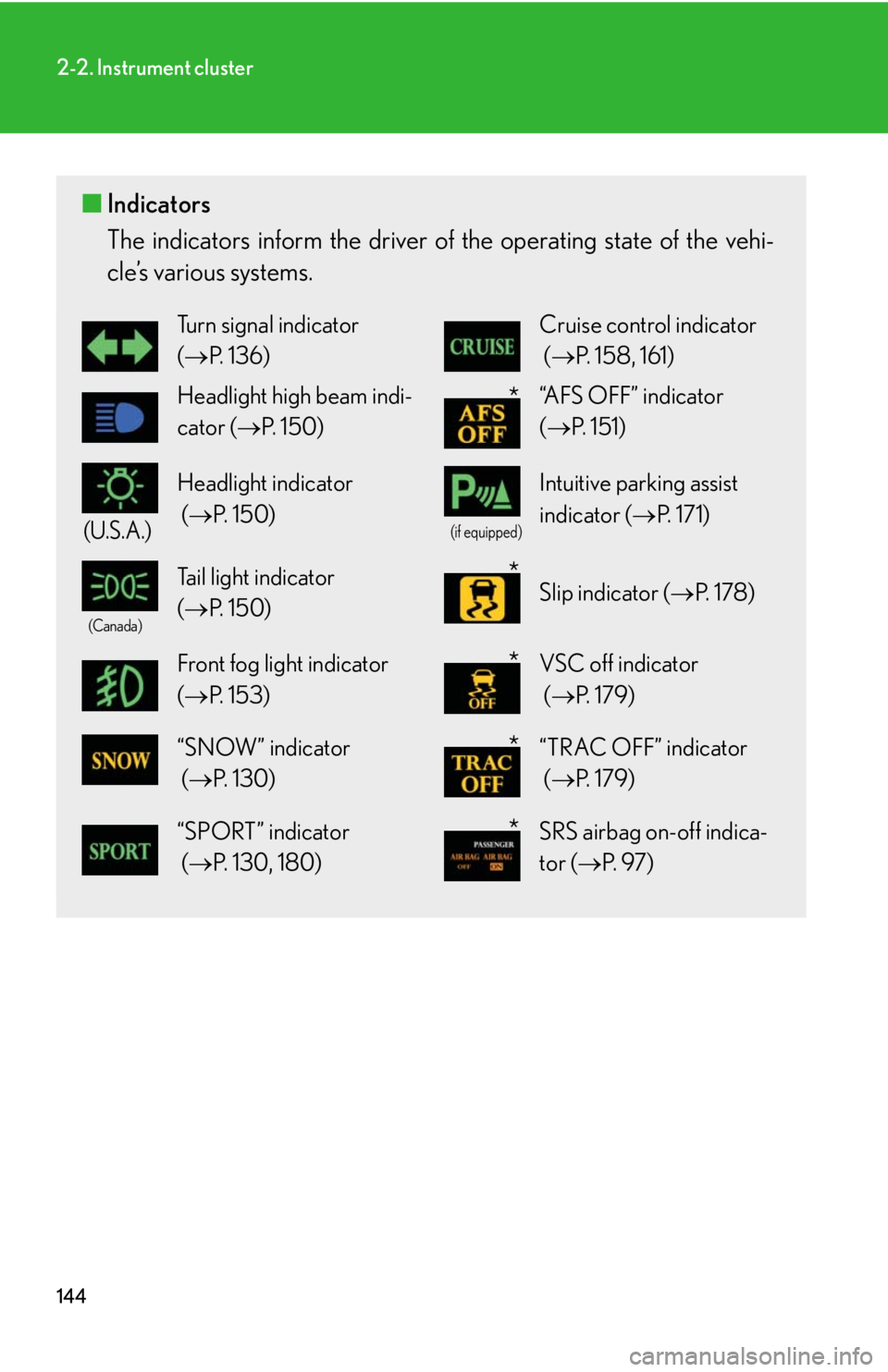
■Indicators
The indicators inform the driver of the operating state of the vehi-
cle’s various systems.
Turn signal indicator
(P. 1 3 6 )Cruise control indicator
(P. 158, 161)
Headlight high beam indi-
cator (P. 1 5 0 )“AFS OFF” indicator
(P. 151)
(U.S.A.)
Headlight indicator
(P. 1 5 0 )
(if equipped)
Intuitive parking assist
indicator (P. 1 7 1 )
(Canada)
Tail light indicator
(P. 1 5 0 ) Slip indicator (P. 1 7 8 )
Front fog light indicator
(P. 1 5 3 ) VSC off indicator
(P. 1 7 9 )
“SNOW” indicator
(P. 1 3 0 ) “TRAC OFF” indicator
(P. 1 7 9 )
“SPORT” indicator
(P. 130, 180)SRS airbag on-off indica-
tor (P. 9 7 )
*
*
*
*
*
Page 146 of 543
146
2-2. Instrument cluster
Multi-information display
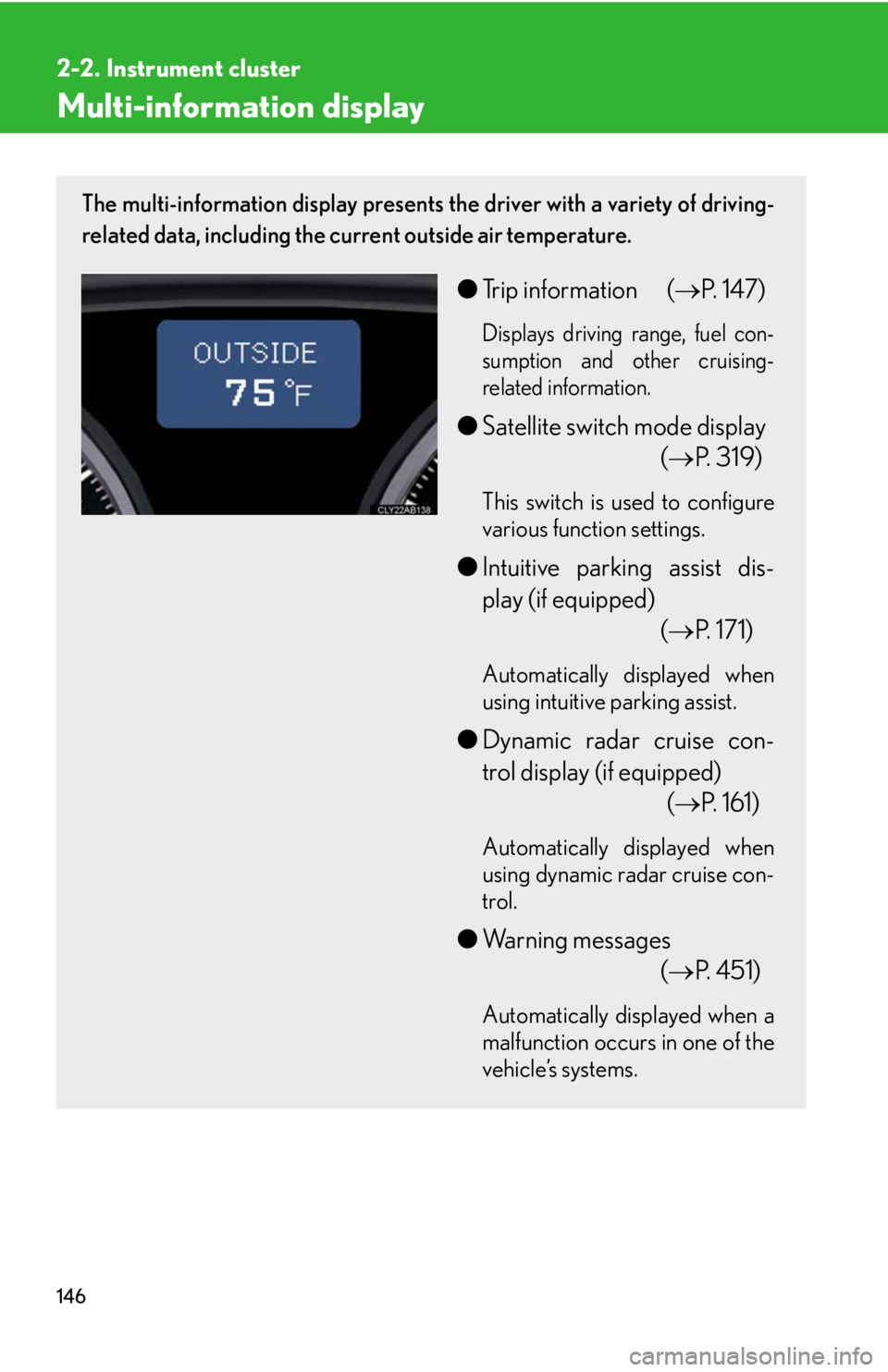
The multi-information display presents the driver with a variety of driving-
related data, including the current outside air temperature.
●Trip information (P. 147)
Displays driving range, fuel con-
sumption and other cruising-
related information.
●Satellite switch mode display
(P. 319)
This switch is used to configure
various function settings.
●Intuitive parking assist dis-
play (if equipped)
(P. 171)
Automatically displayed when
using intuitive parking assist.
●Dynamic radar cruise con-
trol display (if equipped)
(P. 161)
Automatically displayed when
using dynamic radar cruise con-
trol.
●Warning messages
(P. 4 5 1 )
Automatically displayed when a
malfunction occurs in one of the
vehicle’s systems.
Page 174 of 543
174
2-4. Using other driving systems
Intuitive parking assist
: If equipped
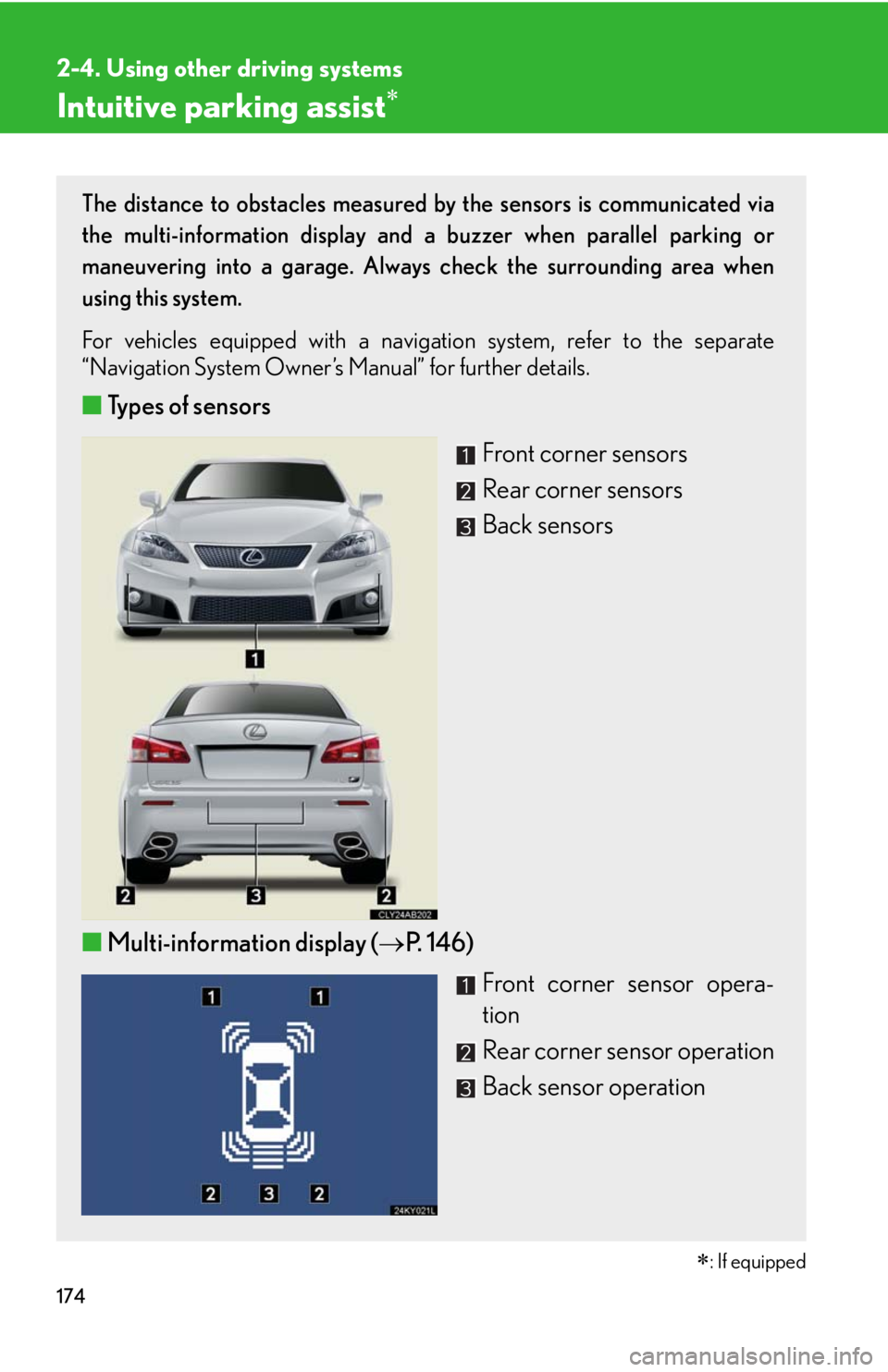
The distance to obstacles measured by the sensors is communicated via
the multi-information display and a buzzer when parallel parking or
maneuvering into a garage. Always check the surrounding area when
using this system.
For vehicles equipped with a navigation system, refer to the separate
“Navigation System Owner’s Manual” for further details.
■Types of sensors
Front corner sensors
Rear corner sensors
Back sensors
■Multi-information display (P. 146)
Front corner sensor opera-
tion
Rear corner sensor operation
Back sensor operation
Page 175 of 543

175
2-4. Using other driving systems
2
When driving
The display and buzzer system
■Corner sensor operation display and distance to an obstacle
The system operates when the vehicle approaches within approxi-
mately 1.6 ft. (50 cm) of an obstacle.
Approximately 1.2 ft. (37.5 cm)
to 1.6 ft. (50 cm) from the obsta-
cle
Approximately 0.8 ft. (25 cm)
to 1.2 ft. (37.5 cm) from the
obstacle
Flashing: Within 0.8 ft. (25 cm)
of the obstacle
■Switching the intuitive parking assist on (P. 3 1 9 )
When on, an indicator is dis-
played to inform the driver that
the function is operational.
Page 178 of 543

178
2-4. Using other driving systems
■Sensor detection information
●Certain vehicle conditions and the surrounding environment may affect the
ability of the sensor to correctly detect obstacles. Particular instances where this
may occur are listed below.
• There is dirt, snow or ice on the sensor.
• The sensor is frozen.
• The sensor is covered in any way.
• The vehicle is leaning considerably to one side.
• On an extremely bumpy road, on an incline, on gravel, or on grass.
• The vicinity of the vehicle is noisy due to vehicle horns, motorcycle engines,
air brakes of large vehicles, or other loud noises producing ultrasonic waves.
• There is another vehicle equipped with parking assist sensors in the vicinity.
• The sensor is coated with a sheet of spray or heavy rain.
• The vehicle is equipped with a fender pole or wireless antenna.
• A towing eyelet is installed.
• The bumper or sensor receives a strong impact.
• The vehicle is approaching a tall or curved curb.
• In harsh sunlight or intense cold weather
In addition to the examples above, there are instances in which, because of their
shapes, signs and other objects may be judged by the sensor to be closer than they
are.
●The shape of the obstacle may prevent the sensor from detecting it. Pay particu-
lar attention to the following obstacles.
• Wires, fences, ropes etc.
• Cotton, snow and other materials that absorb radio waves
• Sharply-angled objects
•Low obstacles
• Tall obstacles with upper sections projecting outwards in the direction of your
vehicle
■If the display flashes and a message is displayed
P. 4 5 1