lock Lexus IS F 2011 Service Manual
[x] Cancel search | Manufacturer: LEXUS, Model Year: 2011, Model line: IS F, Model: Lexus IS F 2011Pages: 529, PDF Size: 13.89 MB
Page 67 of 529
62
1-3. Adjustable components (seats, mirrors, steering wheel)
IS F_EE
Driving position memory (driver’s seat)
Your preferred driving position (the position of the driver's seat, steer-
ing wheel and outside rear view mirrors) can be memorized and
recalled with the touch of a button. It is also possible to set this func-
tion to activate automatically when the doors are unlocked.
Three different driving positions can be entered into memory.
Entering a position to memory
Turn the “ENGINE START STOP” switch to IGNITION
ON mode.
Adjust the driver’s seat, steering wheel, and outside rear
view mirrors to the desired positions.
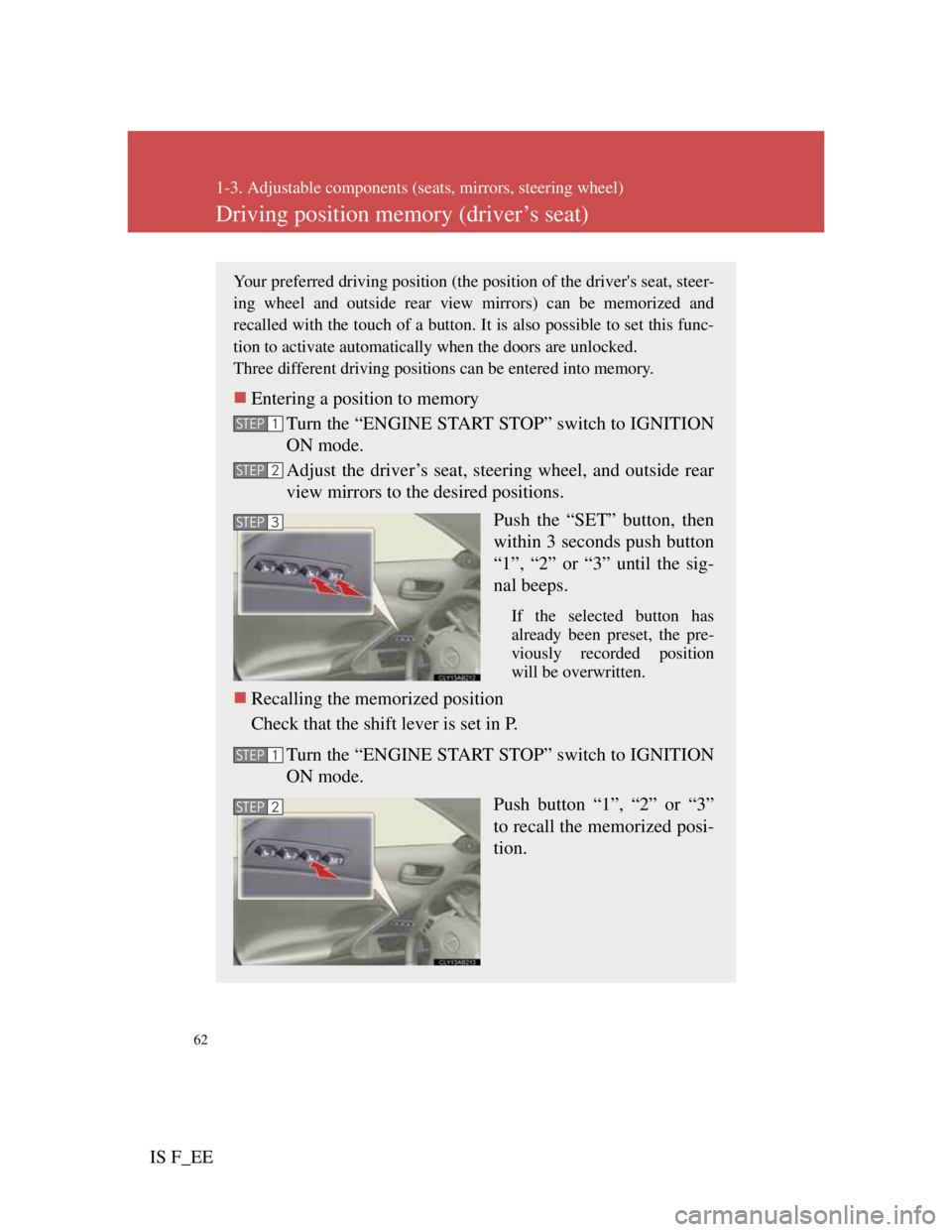
Push the “SET” button, then
within 3 seconds push button
“1”, “2” or “3” until the sig-
nal beeps.
If the selected button has
already been preset, the pre-
viously recorded position
will be overwritten.
Recalling the memorized position
Check that the shift lever is set in P.
Turn the “ENGINE START STOP” switch to IGNITION
ON mode.
Push button “1”, “2” or “3”
to recall the memorized posi-
tion.
STEP1
STEP2
STEP3
STEP1
STEP2
Page 68 of 529

63
1-3. Adjustable components (seats, mirrors, steering wheel)
1
Before driving
IS F_EE
Linking driving position memory with door unlock operation
Record your driving position to button “1”, “2” or “3” before per-
forming the following.
Using the wireless remote control
Turn the “ENGINE START STOP” switch OFF and close
the driver's door.
While pressing the desired but-
ton (“1”, “2” or “3”), push
on the wireless remote control
until the signal beeps.
The driving position is recalled
when the driver's door is
unlocked using the entry func-
tion or wireless remote control
and the driver's door is opened.
To prevent unintended triggering of the alarm, open and close a
door once after a driving position has been recorded. (If a door is
not opened within 30 seconds after is pressed, the doors will be
locked again and the alarm will automatically be set.)
In case that the alarm is triggered, immediately stop the alarm.
(P. 9 7 )
STEP1
STEP2
Page 69 of 529

64
1-3. Adjustable components (seats, mirrors, steering wheel)
IS F_EEUsing the door lock switch
Carry only the key (including the card key
) to which you want
to link the driving position. If 2 or more keys are in the vehicle,
the driving position cannot be linked properly.
Turn the “ENGINE START STOP” switch OFF and close
the driver's door.
While pressing the desired but-
ton (“1”, “2” or “3”), press the
lock or unlock side on the
driver’s door lock switch until
the signal beeps.
The driving position is recalled
when the driver's door is
unlocked using the entry func-
tion or wireless remote control
and the driver's door is opened.
: If equipped
STEP1
STEP2
Canceling the linked door unlock operation
Turn the “ENGINE START STOP” switch OFF and close the
driver's door.
Using the wireless remote control: While pushing the “SET” but-
ton, press on the wireless remote control until the signal
beeps.
Using the door lock switch: While pressing the “SET” button, press
the lock or unlock side on the door lock switch until the signal
beeps.
Operating the driving position memory after turning the “ENGINE START
STOP” switch OFF
Memorized positions (except for the steering wheel position) can be acti-
vated up to 180 seconds after the driver’s door is opened and another 60 sec-
onds after it is closed again, even after turning the “ENGINE START
STOP” switch OFF.
STEP1
STEP2
Page 73 of 529

68
1-3. Adjustable components (seats, mirrors, steering wheel)
IS F_EE
Head restraints
Removing the head restraints (front seats)
Vertical adjustment (front
seats)
Up
Pull the head restraints up.
Down
Push the head restraint down
while pushing the lock
release button.
Folding operation (rear seats)
To stow the head restraint by
folding it forward, pull the
head restraint up while push-
ing the lock release button.
Only the button on the right
stay (when facing the front of
the vehicle) can be used to
Lock release but-
Lock release but-
Pull the head restraint up while pushing
the lock release button.
Page 74 of 529

69
1-3. Adjustable components (seats, mirrors, steering wheel)
1
Before driving
IS F_EE
Removing the head restraints (rear seats)
Adjusting the height of the head restraints
When using the rear seat head restraints
Make sure the head restraints are not in the stowed/folded position while in
use.
CAUTION
Head restraint precautions
Observe the following precautions regarding the head restraints. Failure to
do so may result in death or serious injury.
Use the head restraints designed for each respective seat.
Adjust the head restraints to the correct position at all times.
After adjusting the head restraints, push down on them and make sure
they are locked in position.
Do not drive with the head restraints removed.
Pull the head restraint up while pushing
both of the lock release buttons.
Lock release but-
Make sure that the head restraints are
adjusted so that the center of the head
restraint is closest to the top of your ears.
Page 77 of 529
72
1-3. Adjustable components (seats, mirrors, steering wheel)
IS F_EE
Seat belt pretensioners
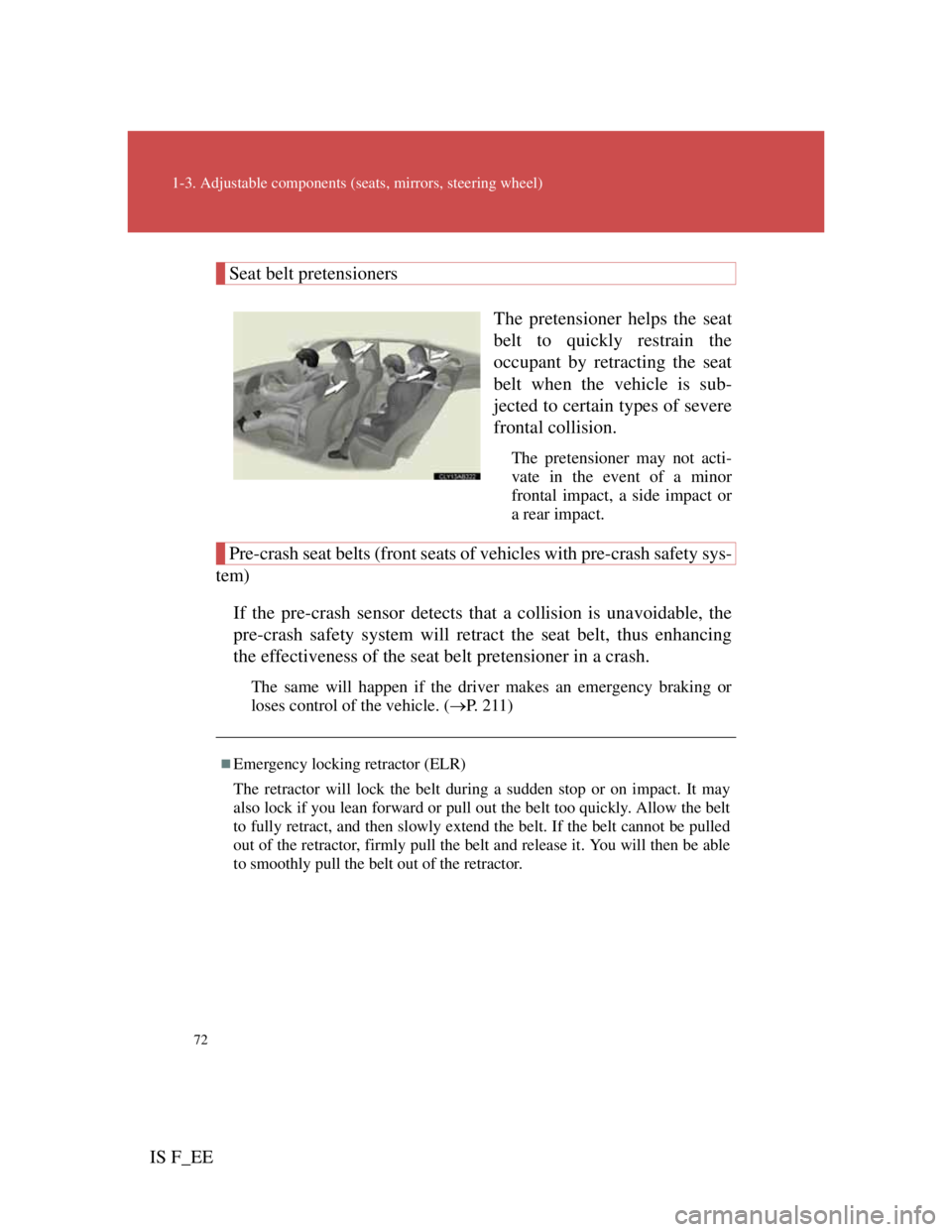
The pretensioner helps the seat
belt to quickly restrain the
occupant by retracting the seat
belt when the vehicle is sub-
jected to certain types of severe
frontal collision.
The pretensioner may not acti-
vate in the event of a minor
frontal impact, a side impact or
a rear impact.
Pre-crash seat belts (front seats of vehicles with pre-crash safety sys-
tem)
If the pre-crash sensor detects that a collision is unavoidable, the
pre-crash safety system will retract the seat belt, thus enhancing
the effectiveness of the seat belt pretensioner in a crash.
The same will happen if the driver makes an emergency braking or
loses control of the vehicle. (P. 2 1 1 )
Emergency locking retractor (ELR)
The retractor will lock the belt during a sudden stop or on impact. It may
also lock if you lean forward or pull out the belt too quickly. Allow the belt
to fully retract, and then slowly extend the belt. If the belt cannot be pulled
out of the retractor, firmly pull the belt and release it. You will then be able
to smoothly pull the belt out of the retractor.
Page 80 of 529

75
1-3. Adjustable components (seats, mirrors, steering wheel)
1
Before driving
IS F_EE
CAUTION
Seat belt damage and wear
Inappropriate handling of the pretensioner may prevent it from operating
properly resulting in death or serious injury.
Do not damage the seat belts by allowing the belt, plate, or buckle to be
jammed in the door.
Inspect the seat belt system periodically. Check for cuts, fraying, and
loose parts. Do not use a damaged seat belt until it is replaced. Damaged
seat belts cannot protect an occupant from death or serious injury.
Ensure that the belt and tab are locked and the belt is not twisted.
If the seat belt does not function correctly, immediately contact any autho-
rized Lexus dealer or repairer, or another duly qualified and equipped pro-
fessional.
Replace the seat assembly, including the belts, if your vehicle has been
involved in a serious accident, even if there's no obvious damage.
Do not attempt to install, remove, modify, disassemble or dispose of the
seat belts. Have any necessary repairs carried out by any authorized Lexus
dealer or repairer, or another duly qualified and equipped professional.
Seat belt pretensioners
If the pretensioner has activated, the SRS warning light will come on. In that
case, the seat belt cannot be used again and must be replaced at any autho-
rized Lexus dealer or repairer, or another duly qualified and equipped pro-
fessional.
Page 89 of 529
82
IS F_EE
1-4. Opening and closing the windows and moon roof
Power windows
Lock switch
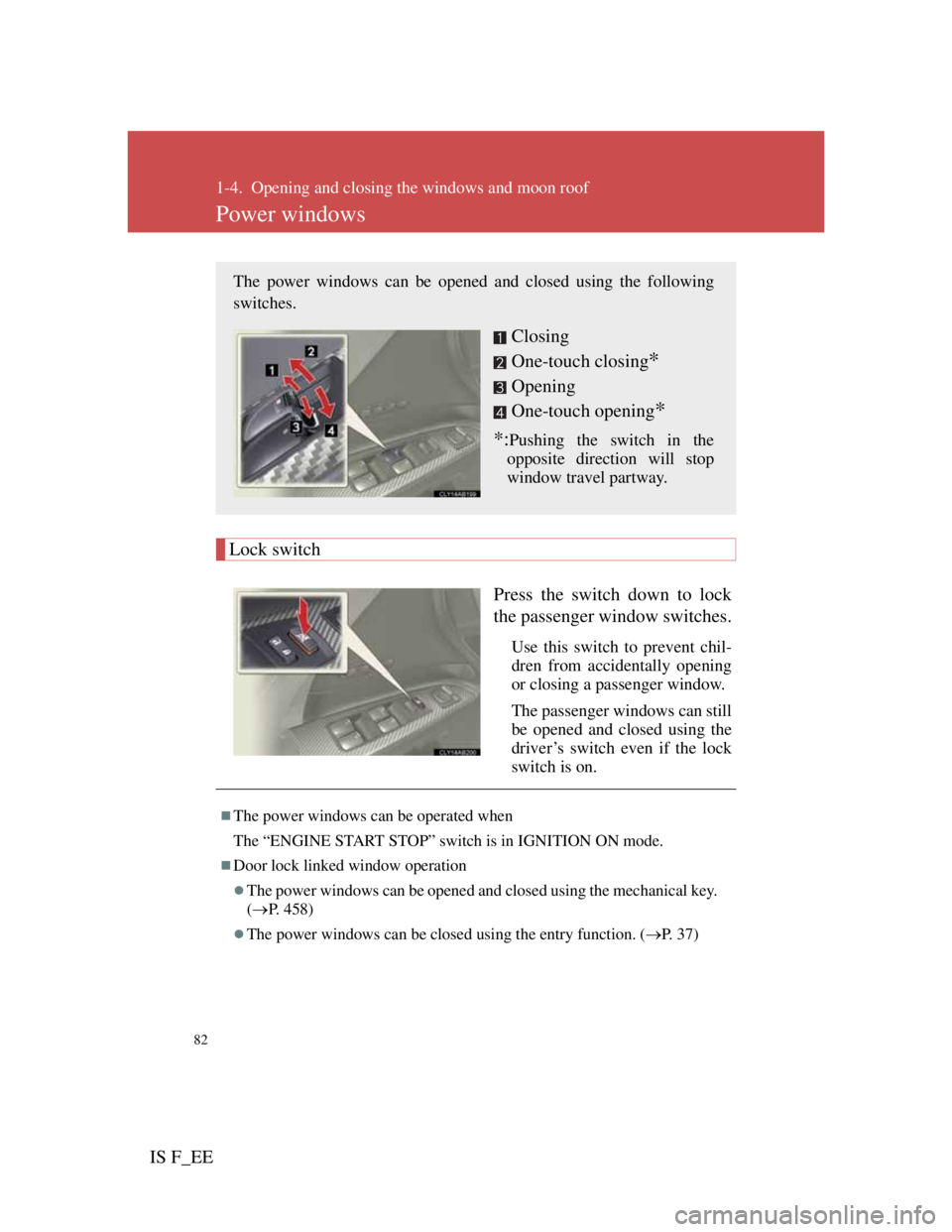
Press the switch down to lock
the passenger window switches.
Use this switch to prevent chil-
dren from accidentally opening
or closing a passenger window.
The passenger windows can still
be opened and closed using the
driver’s switch even if the lock
switch is on.
The power windows can be opened and closed using the following
switches.
Closing
One-touch closing
*
Opening
One-touch opening
*
*:Pushing the switch in the
opposite direction will stop
window travel partway.
The power windows can be operated when
The “ENGINE START STOP” switch is in IGNITION ON mode.
Door lock linked window operation
The power windows can be opened and closed using the mechanical key.
(P. 458)
The power windows can be closed using the entry function. (P. 3 7 )
Page 90 of 529
83
1-4. Opening and closing the windows and moon roof
1
Before driving
IS F_EE
Operating the power windows after turning the “ENGINE START STOP”
switch OFF
The power windows can be operated for approximately 45 seconds even
after the “ENGINE START STOP” switch is switched to ACCESSORY
mode or turned OFF. They cannot, however, be operated once either front
door is opened.
Jam protection function
If an object becomes caught between the window and the window frame,
window travel is stopped and the window is opened slightly.
When the power window does not close normally
If the jam protection function is operating abnormally and a window cannot
be closed, perform the following operations using the power window switch
on the relevant door.
After stopping the vehicle, the window can be closed by holding the
power window switch in the one-touch closing position while the
“ENGINE START STOP” switch is turned to IGNITION ON mode.
If the window still cannot be closed even by carrying out the operation
explained above, initialize the function by performing the following pro-
cedure.
Hold the power window switch in the one-touch closing position.
Continue holding the switch for a further 6 seconds after the win-
dow has closed.
Hold the power window switch in the one-touch opening position.
Continue holding the switch for a further 2 seconds after the win-
dow has opened completely.
Hold the power window switch in the one-touch closing position
once again. Continue holding the switch for a further 2 seconds
after the window has closed.
If you release the switch while the window is moving, start again from the
beginning. If the window continues to close but then re-open slightly even
after performing the above procedure correctly, have the vehicle inspected
by any authorized Lexus dealer or repairer, or another duly qualified and
equipped professional.
Customization that can be configured at any authorized Lexus dealer or
repairer, or another duly qualified and equipped professional
Settings (e.g. linked door lock operation) can be changed.
(Customizable features P. 484)
STEP1
STEP2
STEP3
Page 93 of 529
86
1-4. Opening and closing the windows and moon roof
IS F_EE
The moon roof can be operated when
The “ENGINE START STOP” switch is in IGNITION ON mode.
Door lock linked moon roof operation
The moon roof can be opened and closed using the mechanical key.
( P. 458)
The moon roof can be closed using the entry function. (P. 3 7 )
Operating the moon roof after turning the “ENGINE START STOP” switch
OFF
The moon roof can be operated for approximately 45 seconds even after the
“ENGINE START STOP” switch is switched to ACCESSORY mode or
turned OFF. It cannot, however, be operated once either front door is
opened.
Jam protection function
If an object is detected between the moon roof and the frame while closing
or tilting down, travel is stopped and the moon roof opens slightly.
To reduce moon roof wind noise
Drive with the moon roof opened to slightly before the fully open position
as driving with the moon roof opened fully will cause wind noise.
Sunshade
The sunshade can be opened and closed manually. However, the sunshade
will open automatically when the moon roof is opened.