lock Lexus IS F 2011 Workshop Manual
[x] Cancel search | Manufacturer: LEXUS, Model Year: 2011, Model line: IS F, Model: Lexus IS F 2011Pages: 529, PDF Size: 13.89 MB
Page 95 of 529
88
1-4. Opening and closing the windows and moon roof
IS F_EE
Customization that can be configured at any authorized Lexus dealer or
repairer, or another duly qualified and equipped professional
Settings (e.g. linked door lock operation) can be changed.
(Customizable features P. 484)
CAUTION
Opening the moon roof
Observe the following precautions.
Failing to do so may cause death or serious injury.
Do not allow any passengers to put their hands or heads outside the vehi-
cle while it is moving.
Do not sit on top of the moon roof.
Closing the moon roof
Observe the following precautions.
Failing to do so may result in death or serious injury.
Check to make sure that all passengers do not have any part of their bodies
in a position where they could be caught when the moon roof is being
operated.
Do not allow children to operate the moon roof.
Closing the moon roof on someone can cause death or serious injury.
Jam protection function
Never try jamming any part of your body to activate the jam protection
function intentionally.
The jam protection function may not work if something gets caught just
before the moon roof fully closes.
Page 104 of 529

96
1-6. Theft deterrent system
IS F_EE
Double locking system
Setting the double locking system
Turn the “ENGINE START STOP” switch OFF, have all the pas-
sengers exit the vehicle and ensure that all the doors are closed.
Using the entry function:
Press the lock button on the outside door handle twice within 2.5
seconds.
Using the wireless remote control:
Press twice within 5 seconds.
Canceling the double locking system
Using the entry function: Hold the outside door handle.
Using the wireless remote control: Press .
CAUTION
Double locking system precaution
Never activate the double locking system when there are people in the vehi-
cle, because all the doors cannot be opened from inside the vehicle.
Unauthorized access to the vehicle is prevented by disabling the door
unlocking function from both the interior and exterior of the vehicle.
Vehicles employing this sys-
tem have labels on the win-
dow glass of both front
doors.
Page 105 of 529

97
1
1-6. Theft deterrent system
Before driving
IS F_EE
Alarm
The system sounds the alarm and flashes the lights when forcible entry
is detected.
Triggering of the alarm
The alarm is triggered in the following situations with the
alarm set.
A locked door or trunk is unlocked or opened in any way
other than using the entry function or wireless remote door
lock function.
The hood is opened.
The intrusion sensor detects something moving inside the
vehicle. (An intruder gets in the vehicle.)
Setting the alarm system
Close the doors, trunk and
hood, and lock all doors
using the entry function or
the wireless remote control.
The system will be set auto-
matically after 30 seconds.
The indicator light changes
from being on to flashing
when the system is set.
Deactivating or stopping the alarm
Do one of the following to deactivate or stop the alarm.
Unlock the doors or trunk using the entry function or the
wireless remote control.
Start the engine. (The alarm will be deactivated or stopped
Page 106 of 529

98
1-6. Theft deterrent system
IS F_EE
Intrusion sensor
The intrusion sensor detects an intruder or movement in the vehi-
cle. When an intruder or movement is detected, the alarm will be
triggered.
This system is designed to deter and prevent vehicle theft but does
not guarantee absolute security against all intrusions.
Canceling the intrusion sensor
The operation of intrusion sensor can be canceled using the satel-
lite switches.
(P. 333)
System maintenance
The vehicle has a maintenance-free type alarm system.
Items to check before locking the vehicle
To prevent unexpected triggering of the alarm and vehicle theft, make sure
of the following.
Nobody is in the vehicle.
The windows and moon roof are closed before the alarm is set.
No valuables or other personal items are left in the vehicle.
Page 107 of 529
99
1-6. Theft deterrent system
1
Before driving
IS F_EE
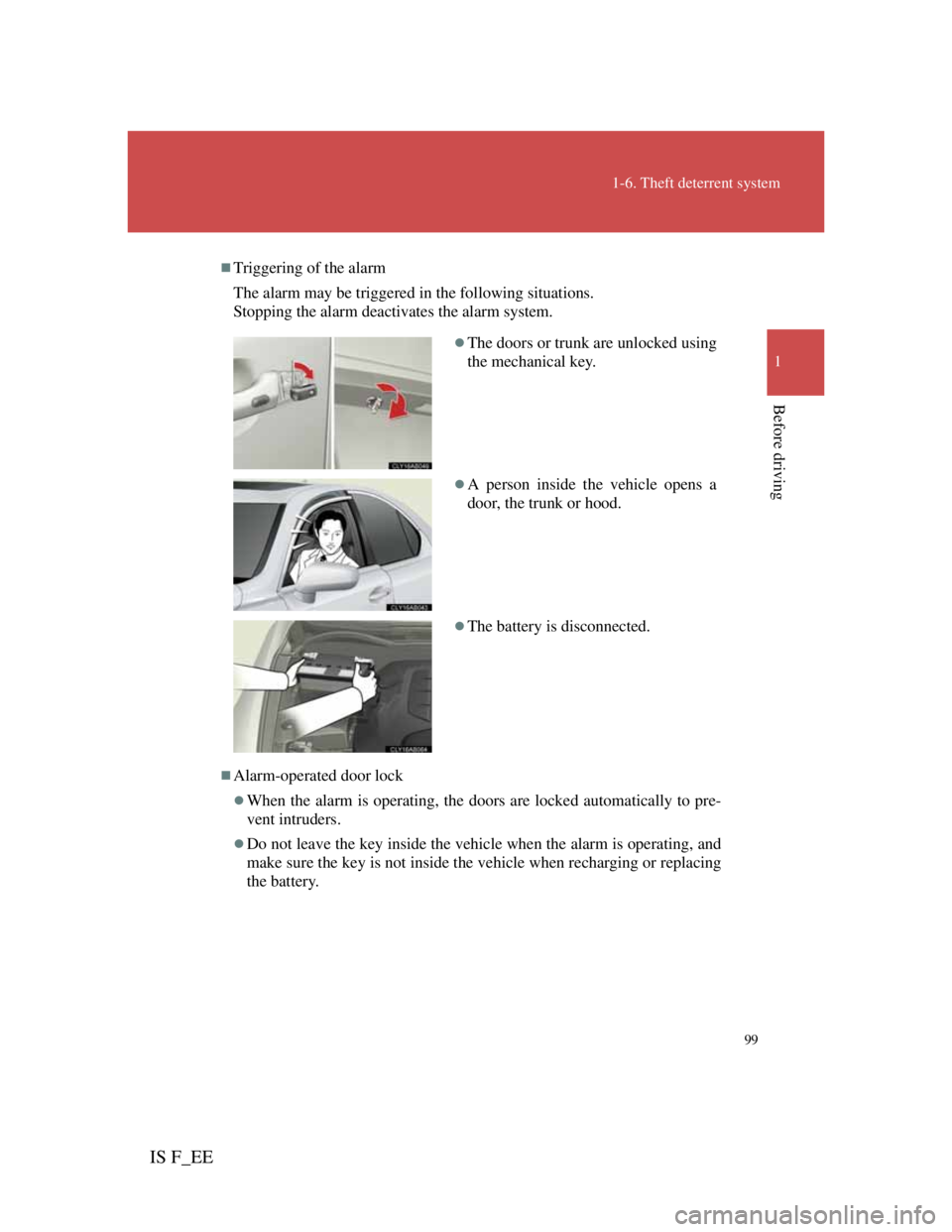
Triggering of the alarm
The alarm may be triggered in the following situations.
Stopping the alarm deactivates the alarm system.
Alarm-operated door lock
When the alarm is operating, the doors are locked automatically to pre-
vent intruders.
Do not leave the key inside the vehicle when the alarm is operating, and
make sure the key is not inside the vehicle when recharging or replacing
the battery.
The doors or trunk are unlocked using
the mechanical key.
A person inside the vehicle opens a
door, the trunk or hood.
The battery is disconnected.
Page 108 of 529

100
1-6. Theft deterrent system
IS F_EE
Canceling the intrusion sensor
The alarm will be set even when the intrusion sensor is canceled.
To re-enable the intrusion sensor, press the “ENGINE START STOP”
switch or unlock the doors using the wireless remote door lock function
while the intrusion sensor is canceled.
Automatic re-enabling of the intrusion sensor
When the alarm system is set again, the intrusion sensor will also be set.
Intrusion sensor
The sensor may trigger the alarm in the following situations.
Persons or pets are in the vehicle.
Unstable items, such as dangling accessories or clothes hanging on the
coat hooks, are in the vehicle.
The windows or moon roof are open.
The vehicle is parked in a place where extreme vibration or noises occur,
such as in a parking garage.
The vehicle is inside an automatic or high-pressure car wash.
The vehicle experiences impacts, such as hail, lightning strikes, or other
kinds of repeated impacts or vibrations.
Ice or snow is removed from the vehicle, causing the vehicle to receive
repeated impacts or vibrations.
The wind or something similar causes an externally mounted reflectively
coated windshield cover to move.
When the battery is disconnected
Be sure to deactivate the alarm system.
If the battery is disconnected before deactivating the alarm system, the
alarm may be triggered.
When using the mechanical key to unlock the doors or trunk
Deactivate the alarm.
If the doors or trunk are unlocked using the mechanical key with the alarm
operational, the alarm will be triggered.
Page 111 of 529
103
1
Before driving
IS F_EE
1-7. Safety information
Correct driving posture
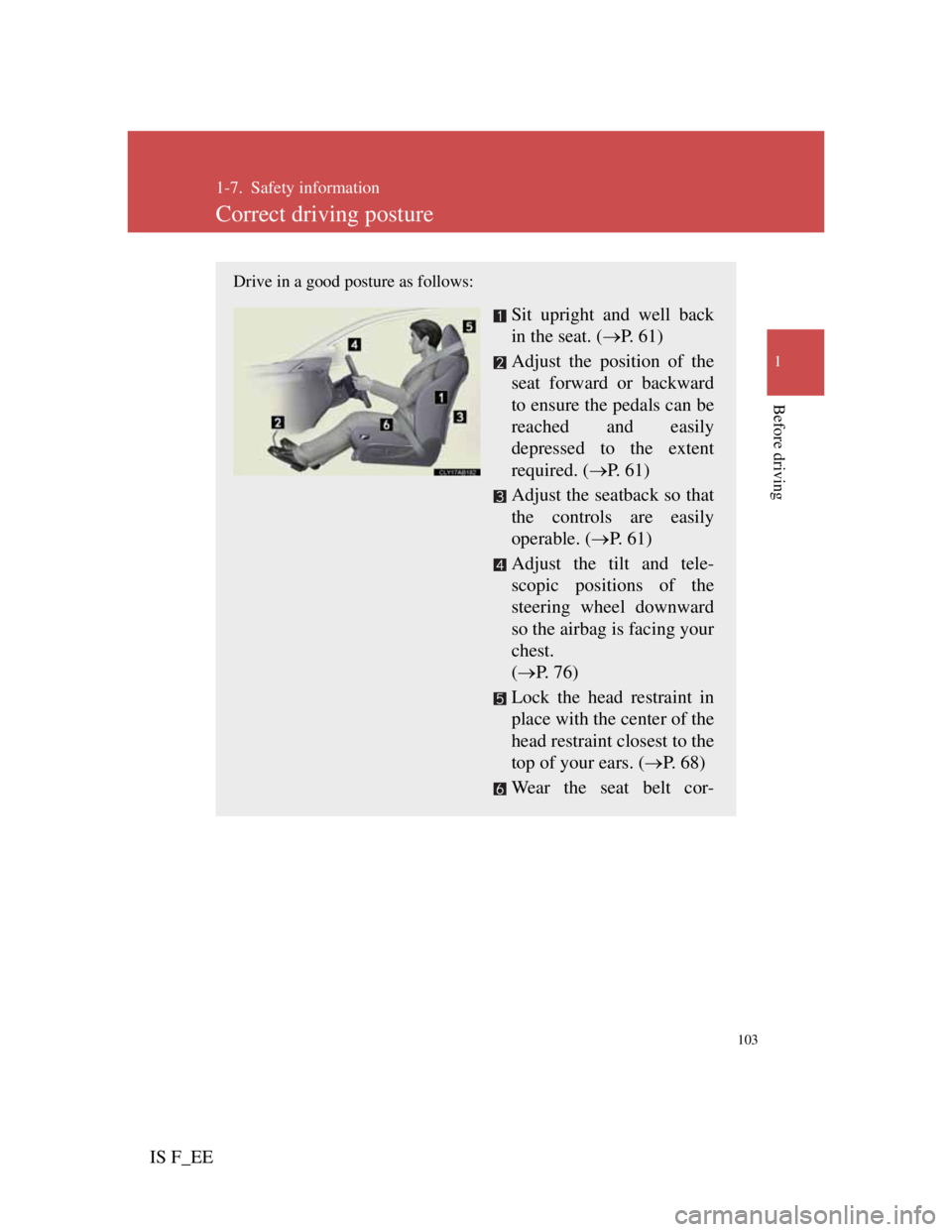
Drive in a good posture as follows:
Sit upright and well back
in the seat. (P. 6 1 )
Adjust the position of the
seat forward or backward
to ensure the pedals can be
reached and easily
depressed to the extent
required. (P. 61)
Adjust the seatback so that
the controls are easily
operable. (P. 61)
Adjust the tilt and tele-
scopic positions of the
steering wheel downward
so the airbag is facing your
chest.
(P. 76)
Lock the head restraint in
place with the center of the
head restraint closest to the
top of your ears. (P. 68)
Wear the seat belt cor-
Page 112 of 529
104
1-7. Safety information
IS F_EE
CAUTION
While driving
Do not adjust the position of the driver's seat while driving.
Doing so could cause the driver to lose control of the vehicle.
Do not place a cushion between the driver or passenger and the seatback.
A cushion may prevent correct posture from being achieved, and reduce
the effectiveness of the seat belt and head restraint, increasing the risk of
death or serious injury to the driver or passenger.
Do not place anything under the front seats.
Objects placed under the front seats may become jammed in the seat
tracks and stop the seat from locking in place. This may lead to an acci-
dent. The adjustment mechanism may also be damaged.
Adjusting the seat position:
Take care when adjusting the seat position to ensure that other passengers
are not injured by the moving seat.
Do not put your hands under the seat or near the moving parts to avoid
injury.
Fingers or hands may become jammed in the seat mechanism.
Page 133 of 529
125
1-7. Safety information
1
Before driving
IS F_EE
Installing child restraints using a seat belt
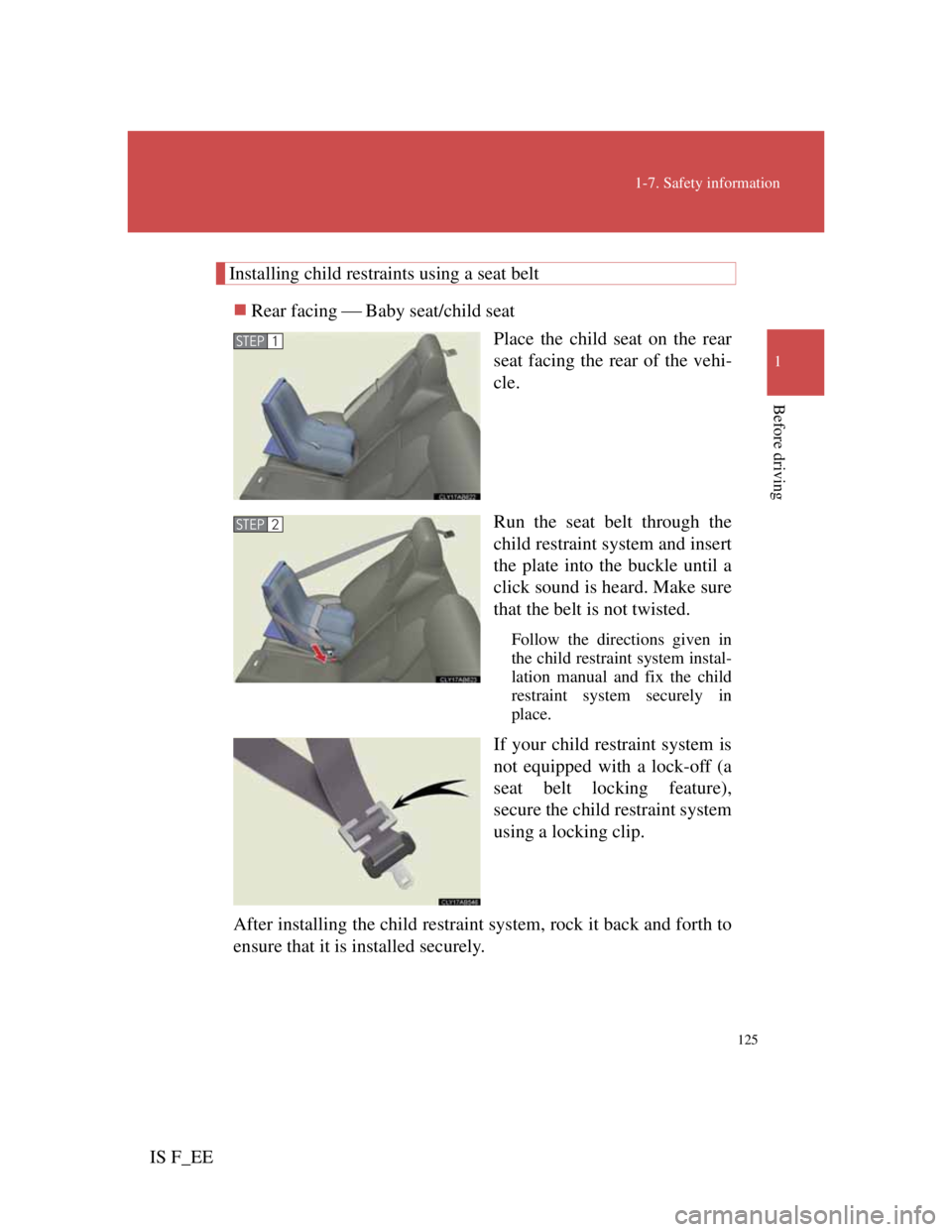
Rear facing Baby seat/child seat
Place the child seat on the rear
seat facing the rear of the vehi-
cle.
Run the seat belt through the
child restraint system and insert
the plate into the buckle until a
click sound is heard. Make sure
that the belt is not twisted.
Follow the directions given in
the child restraint system instal-
lation manual and fix the child
restraint system securely in
place.
If your child restraint system is
not equipped with a lock-off (a
seat belt locking feature),
secure the child restraint system
using a locking clip.
After installing the child restraint system, rock it back and forth to
ensure that it is installed securely.
STEP1
STEP2
Page 134 of 529
126
1-7. Safety information
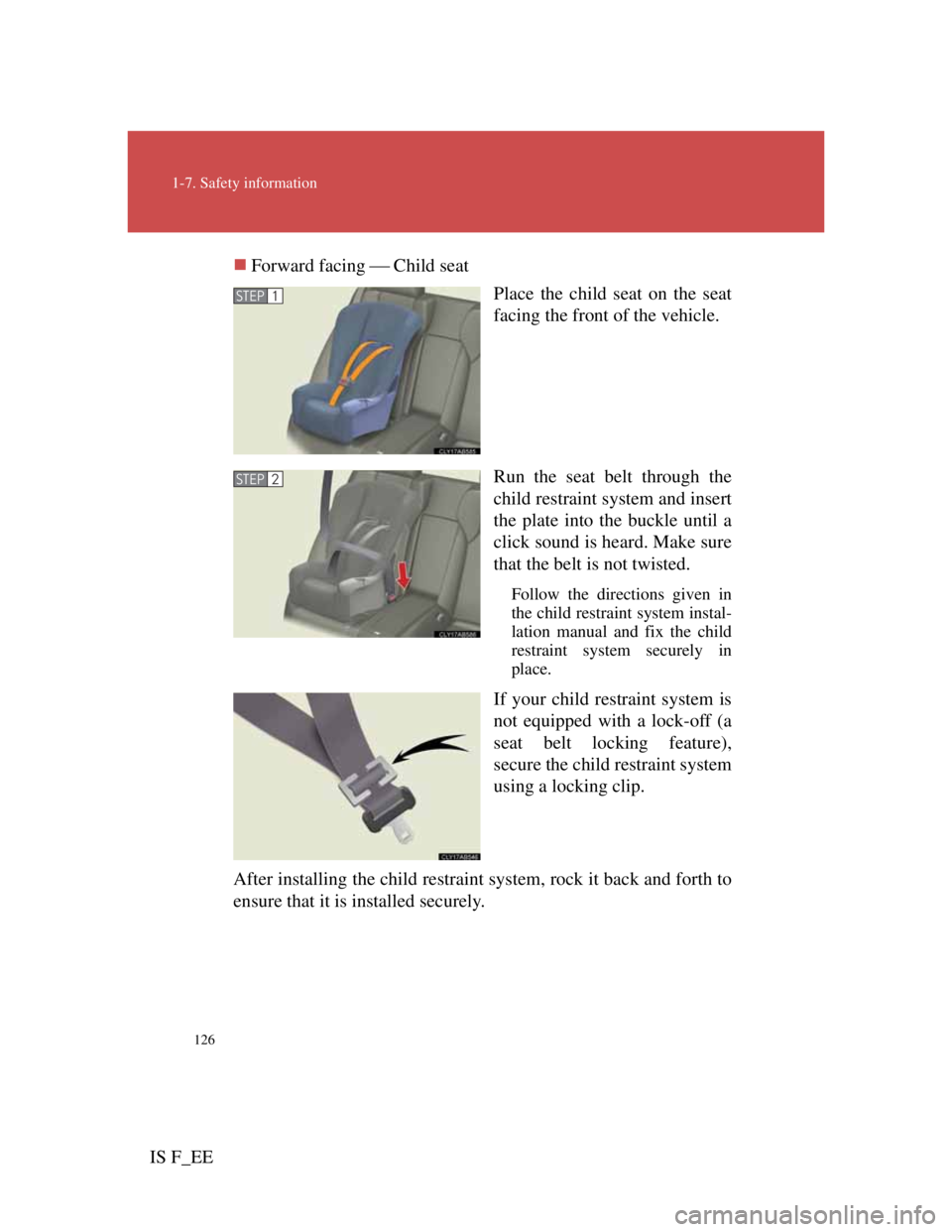
IS F_EEForward facing Child seat
Place the child seat on the seat
facing the front of the vehicle.
Run the seat belt through the
child restraint system and insert
the plate into the buckle until a
click sound is heard. Make sure
that the belt is not twisted.
Follow the directions given in
the child restraint system instal-
lation manual and fix the child
restraint system securely in
place.
If your child restraint system is
not equipped with a lock-off (a
seat belt locking feature),
secure the child restraint system
using a locking clip.
After installing the child restraint system, rock it back and forth to
ensure that it is installed securely.
STEP1
STEP2