radio Lexus IS F 2014 Owner's Guide
[x] Cancel search | Manufacturer: LEXUS, Model Year: 2014, Model line: IS F, Model: Lexus IS F 2014Pages: 586, PDF Size: 7.17 MB
Page 244 of 586
243
3-2. Using the audio system
3
Interior features
IS F_U
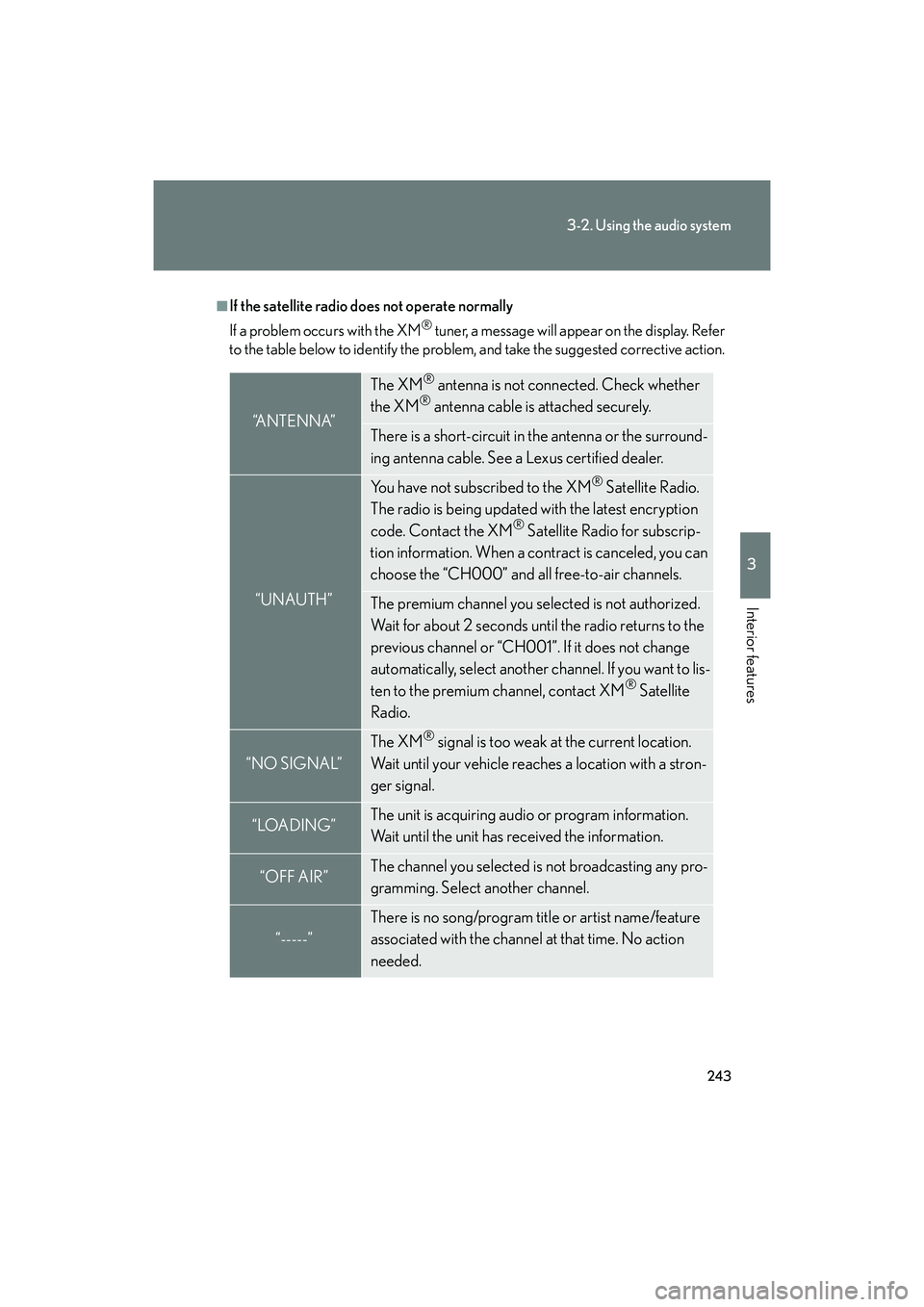
■If the satellite radio does not operate normally
If a problem occurs with the XM
® tuner, a message will appear on the display. Refer
to the table below to identify the problem, and take the suggested corrective action.
“A N T E N N A”
The XM® antenna is not connected. Check whether
the XM® antenna cable is attached securely.
There is a short-circuit in the antenna or the surround-
ing antenna cable. See a Lexus certified dealer.
“UNAUTH”
You have not subscribed to the XM® Satellite Radio.
The radio is being updated with the latest encryption
code. Contact the XM
® Satellite Radio for subscrip-
tion information. When a contract is canceled, you can
choose the “CH000” and all free-to-air channels.
The premium channel you selected is not authorized.
Wait for about 2 seconds until the radio returns to the
previous channel or “CH001”. If it does not change
automatically, select another channel. If you want to lis-
ten to the premium channel, contact XM
® Satellite
Radio.
“NO SIGNAL”
The XM® signal is too weak at the current location.
Wait until your vehicle reaches a location with a stron-
ger signal.
“LOADING”The unit is acquiring audio or program information.
Wait until the unit has received the information.
“OFF AIR”The channel you selected is not broadcasting any pro-
gramming. Select another channel.
“-----”
There is no song/program title or artist name/feature
associated with the channel at that time. No action
needed.
Page 245 of 586
244
3-2. Using the audio system
IS F_U
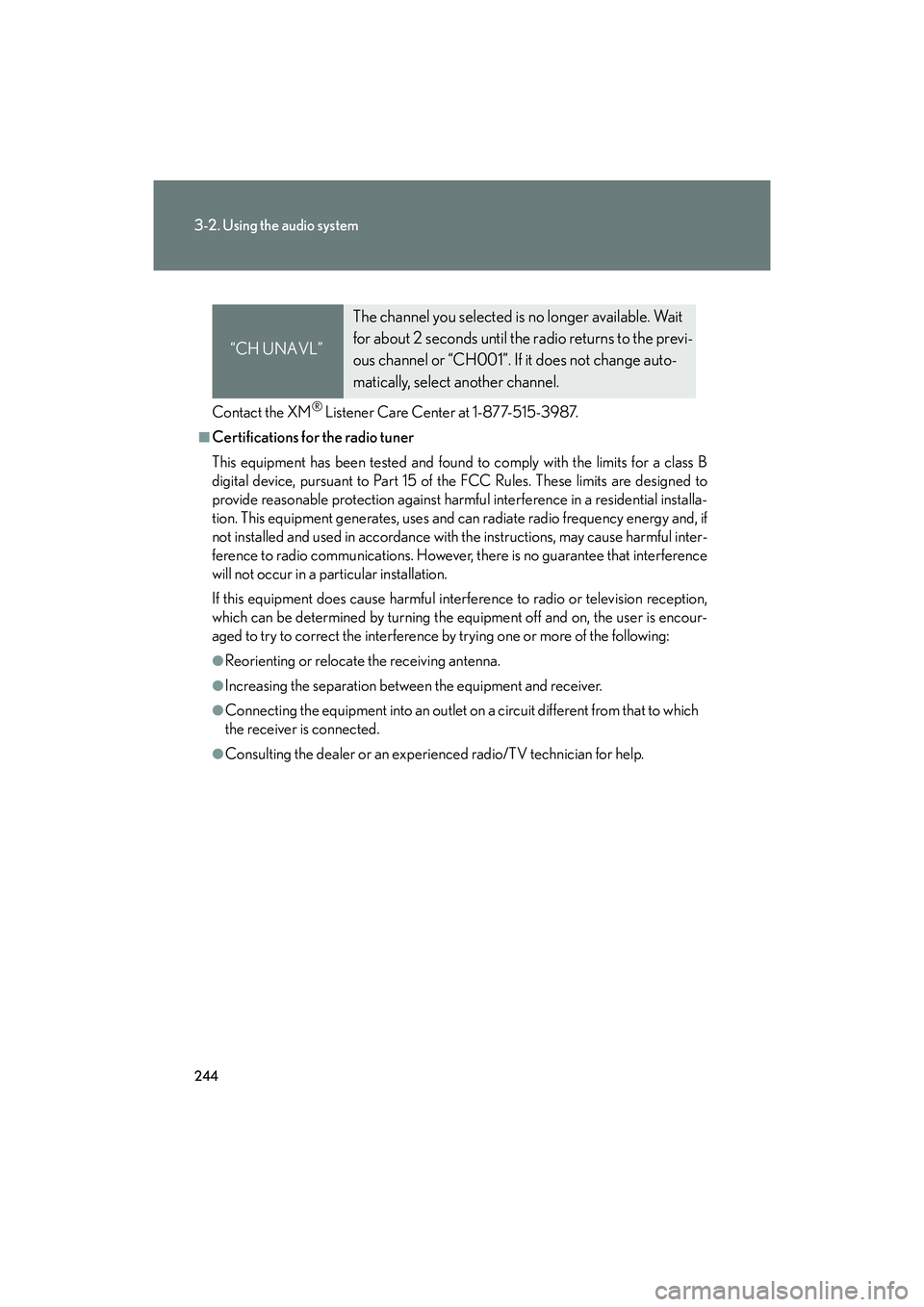
Contact the XM® Listener Care Center at 1-877-515-3987.
■Certifications for the radio tuner
This equipment has been tested and found to comply with the limits for a class B
digital device, pursuant to Part 15 of the FCC Rules. These limits are designed to
provide reasonable protection against harmful interference in a residential installa-
tion. This equipment generates, uses and can radiate radio frequency energy and, if
not installed and used in accordance with the instructions, may cause harmful inter-
ference to radio communications. However, there is no guarantee that interference
will not occur in a particular installation.
If this equipment does cause harmful interference to radio or television reception,
which can be determined by turning the equipment off and on, the user is encour-
aged to try to correct the interference by trying one or more of the following:
●Reorienting or relocate the receiving antenna.
●Increasing the separation between the equipment and receiver.
●Connecting the equipment into an outlet on a circuit different from that to which
the receiver is connected.
●Consulting the dealer or an experienced radio/TV technician for help.
“CH UNAVL”
The channel you selected is no longer available. Wait
for about 2 seconds until the radio returns to the previ-
ous channel or “CH001”. If it does not change auto-
matically, select another channel.
Page 282 of 586

281
3-2. Using the audio system
3
Interior features
IS F_U
Using the steering wheel audio switches
Turning on the powerPress when the audio system is turned off.
The audio system can be turned off by holding down until you hear a
beep.
Some audio features can be controlled using the switches on the steering
wheel.
Operation may differ depending on the type of audio system or navi-
gation system. For details, refer to the manual provided with the audio
system or navigation system.
Turns the power on, selects
an audio source
Increases/decreases volume
Radio mode: Selects a radiostation
CD mode: Selects a track, file (MP3 and
WMA) and disc
Bluetooth
® audio mode:
Selects a track and
album
iPod mode: Selects a song
USB memory mode: Selects a file and folder
Page 283 of 586

282
3-2. Using the audio system
IS F_U
Changing the audio sourcePress when the audio system is turned on. The audio source
changes as follows each time is pressed. If no discs are inserted in
the player, or if the external device is not connected, that mode will be
skipped. Type A:
FM1 →FM2 →SAT1 →SAT2 →SAT3 →CD player →
Bluetooth
® audio →AUX →iPod or USB memory →AM
Type B:
FM1 →FM2 →CD player →Bluetooth
® audio →AUX →
iPod or USB memory →AM
Adjusting the volume
Press “+” on to increase the volume and “-” to decrease the vol-
ume.
Hold down to continue increasing or decreasing the volume.
Selecting a radio station
Press to select radio mode.
Press “∧” or “ ∨” on to select a radio station.
To scan for receivable stations, press and hold until you hear a
beep.
Selecting a track/file or song
Press to select CD, Bluetooth
® audio, iPod or USB mem-
ory mode.
Press “ ∧” or “ ∨” on to select the desired track/file or song.
STEP1
STEP2
STEP1
STEP2
Page 287 of 586

286
3-3. Using the Bluetooth® audio system
IS F_U
CAUTION
■FCC WARNING
Changes or modifications not expressly approved by the party responsible for
compliance could void the user's authority to operate the equipment.
Radio Frequency Radiation Exposure. This equipment complies with FCC radiation
exposure limits set forth for uncontrolled equipment and meets the FCC radio fre-
quency (RF) Exposure Guidelines in Supplement C to OET65. This equipment has
very low levels of RF energy that it deemed to comply without maximum permissive
exposure evaluation (MPE). But it is desirable that it should be installed and oper-
ated with at least 7.9 in. (20 cm) and more between the radiator and person’s body
(excluding extremities: hands, wrists, feet and ankles).
This transmitter must not be co-located or operated in conjunction with any other
antenna or transmitter.
■Caution while driving
Do not connect portable players or operate the controls.
NOTICE
■To prevent damage to portable players
Do not leave portable players in the vehicle. The temperature inside the vehicle
may become high, resulting in damage to the player.
Page 306 of 586

305
3-4. Using the hands-free phone system (for mobile phones)
3
Interior features
IS F_U
■Compatible models
Compatible with HFP (Hands Free Profile) Ver. 1.0 or higher (Conformed: Ver. 1.5)
and OPP (Object Push Profile) Ver. 1.1.
If your mobile phone does not support HFP, you cannot enter the Bluetooth
®
phone. If your mobile phone supports OPP alone, you cannot use the Bluetooth®
phone.
■Certification for the hands-free system
FCC ID: AJDK018
IC ID: 775E-K018
MADE IN JAPAN
This device complies with Part 15 of the FCC Rules and RSS-Gen and RSS-210 of
IC Rules. Operation is subject to the following two conditions: (1) This device may
not cause harmful interference, and (2) This device must accept any interference
received, including interference that may cause undesired operation.
CAUTION
■FCC WARNING
Changes or modifications not expressly approved by the party responsible for
compliance could void the user's authority to operate the equipment.
Radio Frequency Radiation Exposure. This equipment complies with FCC radiation
exposure limits set forth for uncontrolled equipment and meets the FCC radio fre-
quency (RF) Exposure Guidelines in Supplement C to OET65. This equipment has
very low levels of RF energy that it deemed to comply without maximum permissive
exposure evaluation (MPE). But it is desirable that it should be installed and oper-
ated with at least 7.9 in. (20 cm) and more between the radiator and person’s body
(excluding extremities: hands, wrists, feet and ankles).
This transmitter must not be co-located or operated in conjunction with any other
antenna or transmitter.
■Caution while driving
Do not use a mobile phone or connect the Bluetooth
® phone.
Page 371 of 586

370
3-7. Other interior features
IS F_U
■Before programming
●Install a new battery in the remote control transmitter.
●The battery side of the remote control transmitter must be pointed away from
the HomeLink button.
■Certification for the garage door openerFor vehicles sold in the U.S.A.
FCC ID: NZLWZLHL4
FCC ID: NZLOBIHL4
NOTE:
This device complies with part 15 of the FCC Rules. Operation is subject to the fol-
lowing two conditions: (1) This device may not cause harmful interference, and (2)
this device must accept any interference received, including interference that may
cause undesired operation.
FCC WARNING:
Changes or modifications not expressly approved by the party responsible for
compliance could void the user's authority to operate the equipment. For vehicles sold in Canada
NOTE:
This device complies with Industry Canada licence-exempt RSS standard(s). Oper-
ation is subject to the following two cond itions: (1) this device may not cause inter-
ference, and (2) this device must accept any interference, including interference
that may cause undesired operation of the device.
NOTE:
Le présent appareil est conforme aux CNR d’Industrie Canada applicables aux
appareils radio exempts de licence. L’exploitation est autorisée aux deux conditions
suivantes : (1) l’appareil ne doit pas produire de brouillage, et (2) l’utilisateur de
l’appareil doit accepter tout brouillage radioélectrique subi, même si le brouillage
est susceptible d’en compromettre le fonctionnement.
■When support is necessary
Visit on the web at www.homelink.com
or call 1-800-355-3515.
Page 382 of 586

381
3-7. Other interior features
3
Interior features
IS F_U
Safety information for Safety ConnectImportant! Read this information before using Safety Connect.
■ Exposure to radio frequency signals
The Safety Connect system installed in your vehicle is a low-power
radio transmitter and receiver. It receives and also sends out radio fre-
quency (RF) signals.
In August 1996, the Federal Communications Commission (FCC)
adopted RF exposure guidelines with safety levels for mobile wireless
phones. Those guidelines are consistent with the safety standards pre-
viously set by the following U.S. and international standards bodies.
●ANSI (American National Stan dards Institute) C95.1 [1992]
● NCRP (National Council on Radiation Protection and Measure-
ment) Report 86 [1986]
● ICNIRP (International Commission on Non-Ionizing Radiation Pro-
tection) [1996]
Those standards were based on comprehensive and periodic evalua-
tions of the relevant scientific literature. Over 120 scientists, engineers,
and physicians from universities, and government health agencies and
industries reviewed the available body of research to develop the
ANSI Standard (C95.1).
The design of Safety Connect complies with the FCC guidelines in
addition to those standards.
Page 426 of 586

425
4-3. Do-it-yourself maintenance
4
Maintenance and care
IS F_U
■Tire pressure warning system certification
FCC ID: PAXPMV107J
FCC ID: HYQ13BCEFor vehicles sold in the U.S.A.
This device complies with part 15 of the FCC Rules. Operation is subject to the fol-
lowing two conditions: (1) This device may not cause harmful interference, and (2)
this device must accept any interference received, including interference that may
cause undesired operation.
FCC WARNING:
Changes or modifications not expressly approved by the party responsible for
compliance could void the user’s authority to operate the equipment. For vehicles sold in Canada
Operation is subject to the following two conditions: (1) this device may not cause
interference, and (2) this device must accept any interference, including interfer-
ence that may cause undesired operation of the device.
L’utilisation de ce dispositif est autorisée seulement aux deux conditions suivantes:
(1) il ne doit pas produire de brouillage, et (2) l’utilisateur du dispositif doit être prêt
à accepter tout brouillage radioélectrique reçu, même si ce brouillage est
susceptible de compromettre le fonctionnement du dispositif.
Page 476 of 586

5
When trouble arises
475
5-2. Steps to take in an emergency
IS F_U
■If the tire pressure warning system is inoperative
The tire pressure warning system will be disabled in the following conditions:
(When the condition becomes normal, the system will work properly.)
●If tires not equipped with tire pressure warning valves and transmitters are used.
●If the ID code on the tire pressure warning valves and transmitters is not regis-
tered in the tire pressure warning computer.
●If a different set of tires has been selected using the satellite switch.
●If the tire inflation pressure is 73 psi (500 kPa, 5.1 kgf/cm2 or bar) or higher.
●If electronic devices or facilities using similar radio wave frequencies are nearby.
●If a radio set at similar frequencies is in use in the vehicle.
●If there is a lot of snow or ice on the vehicle, in particular, around the wheels or
wheel housings.
●If non-genuine Lexus wheels are used. (Even if you use Lexus wheels, the tire
pressure warning system may not work properly with some types of tires.)
■If the tire pressure warning light frequently comes on after blinking for 1 minute
If the tire pressure warning light frequently comes on after blinking for 1 minute
when the “ENGINE START STOP” switch is turned to IGNITION ON mode, have
it checked by your Lexus dealer.
■Customization that can be configured at Lexus dealer
The vehicle speed linked seat belt reminder buzzer can be disabled.
(Customizable features →P. 5 4 4 )