ratio Lexus IS200d 2011 s Manual PDF
[x] Cancel search | Manufacturer: LEXUS, Model Year: 2011, Model line: IS200d, Model: Lexus IS200d 2011Pages: 609, PDF Size: 14.63 MB
Page 272 of 609
258
3-1. Using the air conditioning system and defogger
IS250/220d/200d_EE
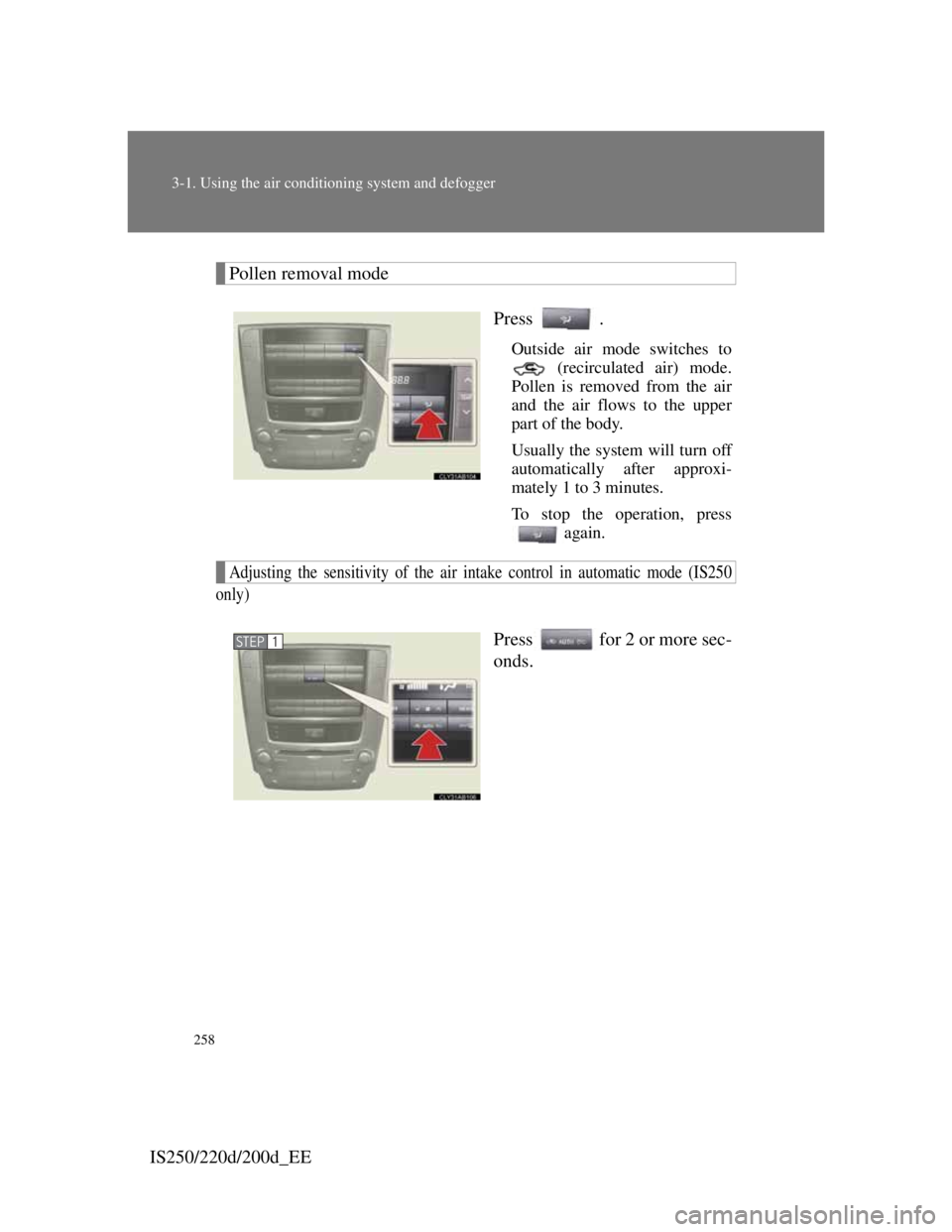
Pollen removal mode
Press .
Outside air mode switches to
(recirculated air) mode.
Pollen is removed from the air
and the air flows to the upper
part of the body.
Usually the system will turn off
automatically after approxi-
mately 1 to 3 minutes.
To stop the operation, press
again.
Adjusting the sensitivity of the air intake control in automatic mode (IS250
only)
Press for 2 or more sec-
onds.STEP1
Page 276 of 609
262
3-1. Using the air conditioning system and defogger
IS250/220d/200d_EE
Automatic mode for air intake control (IS250 only)
In automatic mode, the system detects exhaust gas and other pollutants and
automatically switches between outside air and recirculated air modes.
Pollen removal mode
In order to prevent the windshield from fogging up when the outside air
is cold, the following may occur.
• Outside air mode does not switch to .
• The air conditioning system operates automatically.
• The operation cancels after 1 minute.
In rainy weather, the windows may fog up. Press .
Air conditioning odors
During use, various odors from inside and outside the vehicle may enter
into and accumulate in the air conditioning system. This may then cause
odor to be emitted from the vents.
To reduce potential odors from occurring:
• It is recommended that the air conditioning system be set to outside air
mode prior to turning the vehicle off.
• The start timing of the blower may be delayed for a short period of
time immediately after the air conditioning system is started in auto-
matic mode.
CAUTION
To prevent the windshield from fogging up
Do not use during cool air operation in extremely humid weather.
The difference between the temperature of the outside air and that of the
windshield can cause the outer surface of the windshield to fog up, blocking
your vision.
NOTICE
To prevent battery discharge
Do not leave the air conditioning system on longer than necessary when the
engine is stopped.
Page 277 of 609
263
3-1. Using the air conditioning system and defogger
3
Interior features
IS250/220d/200d_EE
Power heater
Power heater can be operated when
The engine is running.
Normal characteristics of power heater operation
The following cases do not indicate a malfunction.
When the power heater is turned on or off, some white smoke and a
slight odor may be emitted from the power heater exhaust that is located
under the floor.
When the power heater is being used under extremely cold conditions,
vapor may be visible from its exhaust.
When the power heater is turned off, you may hear a sound in the engine
compartment for about 2 minutes until the power heater turns off com-
pletely.
After the heater is off
We recommend not restarting the heater for 10 minutes after you turn it off.
Otherwise, a noise may be heard as the heater ignites.
When refueling your vehicle
The heater must be off.
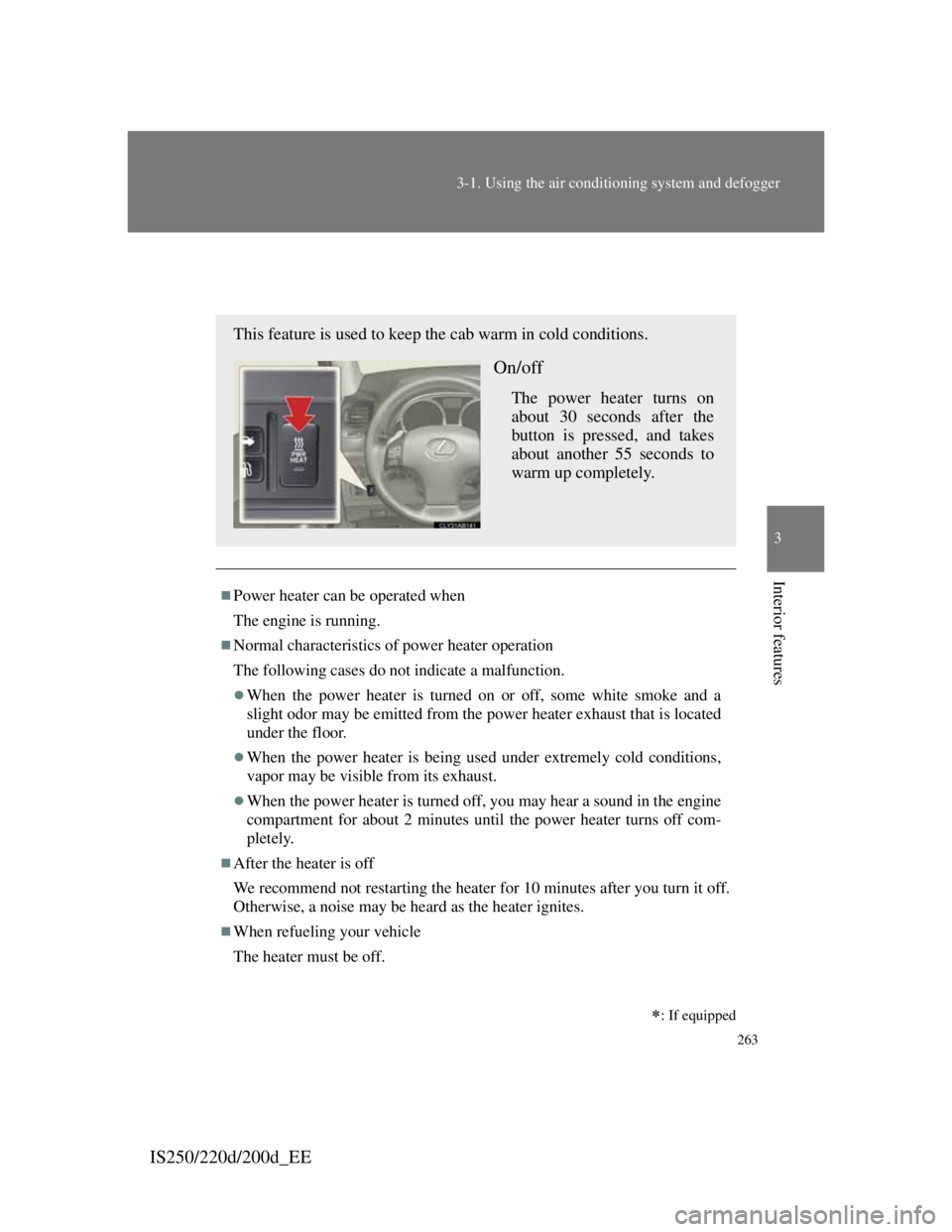
This feature is used to keep the cab warm in cold conditions.
On/off
The power heater turns on
about 30 seconds after the
button is pressed, and takes
about another 55 seconds to
warm up completely.
: If equipped
Page 281 of 609

266
IS250/220d/200d_EE
3-2. Using the audio system
Audio system types
With navigation system
Owners of models equipped with a navigation system should
refer to the “Navigation System Owner's Manual”.
Without navigation system
CD player with changer and AM/FM radio
The illustration below is for left-hand drive vehicles.
The button positions and shapes may differ slightly for right-
hand drive vehicles.
Page 283 of 609

268
3-2. Using the audio system
IS250/220d/200d_EE
CAUTION
Certification for the radio (for Italy)
IL PRODUTTORE PIONEER CORPORATION 4-1, Meguro 1-Chome,
Meguro-Ku, Tokyo, Japan DI QUESTO APPARECCHIO MODELLO
86120-53B00 (radio-CD player) DICHIARA CHE ESSO E’ CONFORME
AL D.M.28.08.1995 No.548, OTTEMPERANDO ALLE PRESCRIZIONI
DI CUI AL D.M.25.6.1985 (PARAGRAFO 3,ALL.A) ED AL
D.M.27.8.1987 (PARAGRAFO 3,ALL.I).
Certification for the disc player with a changer
This product is a class 1 laser product.
A laser beam leak may result in hazardous radiation exposure.
Do not open the cover of the player or attempt to repair the unit yourself.
Refer servicing to qualified personnel.
Laser power: No hazardous
NOTICE
To prevent battery discharge
Do not leave the audio system on longer than necessary with the engine off.
To avoid damaging the audio system
Take care not to spill drinks or other fluids over the audio system.
Page 284 of 609
269
3-2. Using the audio system
3
Interior features
IS250/220d/200d_EE
Using the radio
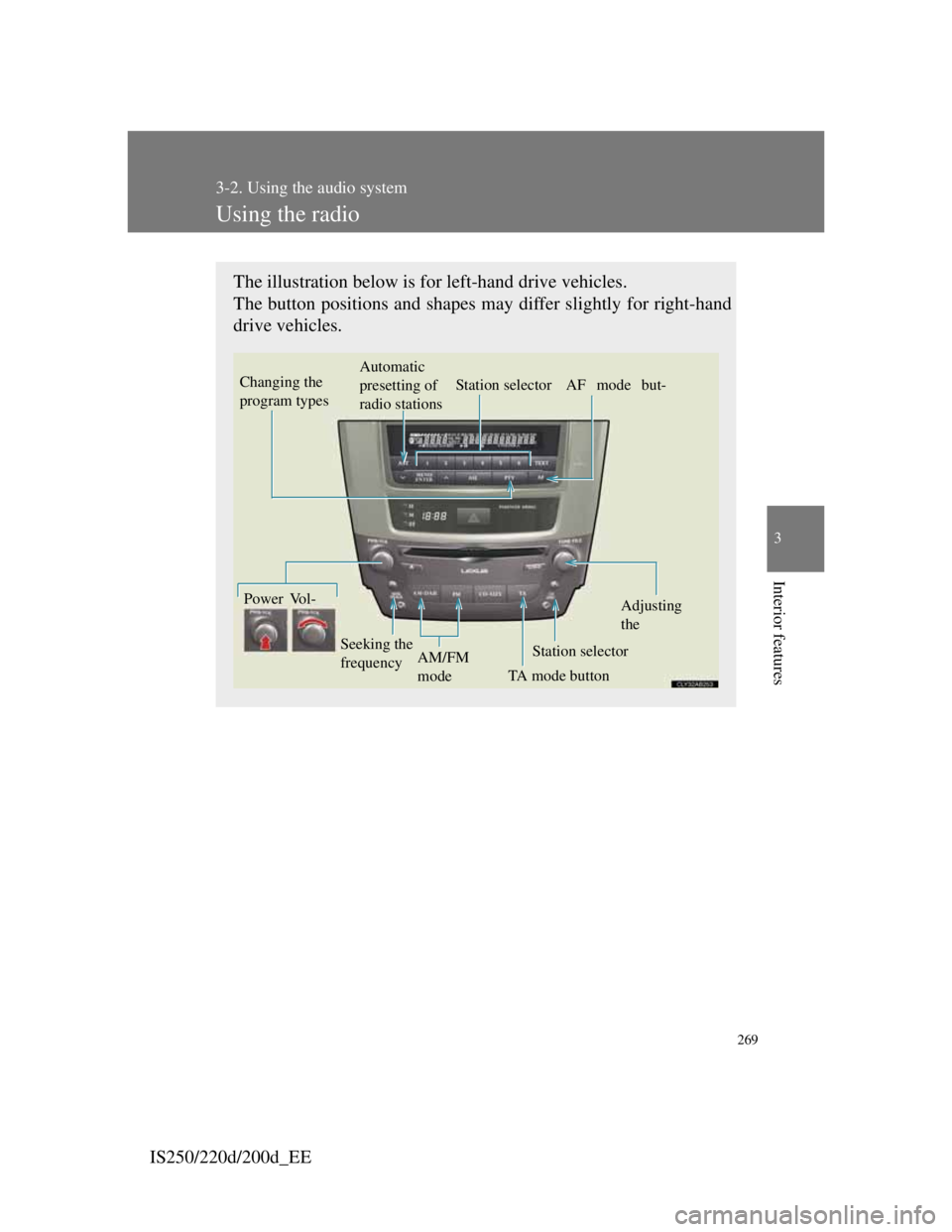
The illustration below is for left-hand drive vehicles.
The button positions and shapes may differ slightly for right-hand
drive vehicles.
Vo l -Automatic
presetting of
radio stationsStation selector AF mode but-Power
TA mode button Seeking the
frequencyStation selectorAdjusting
the
AM/FM
mode
Changing the
program types
Page 288 of 609

273
3-2. Using the audio system
3
Interior features
IS250/220d/200d_EE
Using the CD player
The illustration below is for left-hand drive vehicles.
The button positions and shapes may differ slightly for right-hand
drive vehicles.
Powe Vol-
Track
selectionCD ejectPlayback
CD loadCD selection
Random play-RepeatPlayback/Displays text mes-
Page 289 of 609

274
3-2. Using the audio system
IS250/220d/200d_EE
Loading CDs
Loading a CD
Press .
“WAIT” is shown on the display.
Insert a CD when the indicator on the slot turns from amber
to green.
The display changes from “WAIT” to “LOAD”.
Loading multiple CDs
Press and hold until you hear a beep.
“WAIT” is shown on the display.
Insert a CD when the indicator on the slot turns from amber
to green.
The display changes from “WAIT” to “LOAD”.
The indicator on the slot turns to amber when the CD is inserted.
Insert the next CD when the indicator on the slot turns from
amber to green again.
Repeat the procedure for the remaining CDs.
To stop the operation, press .
Ejecting CDs
Ejecting a CD
To select the CD to be ejected,
press “” or “” on .
The number of the CD selected
is shown on the display.
Press and remove the CD.
STEP1
STEP2
STEP1
STEP2
STEP3
STEP1
STEP2
Page 292 of 609
277
3-2. Using the audio system
3
Interior features
IS250/220d/200d_EE
When “LOAD”, “ERROR” or “WAIT” is shown on the display
“LOAD”: This indicates that the CD player has completed loading the CD.
“ERROR”:This indicates a trouble either in the CD or inside the player. The
CD may be dirty, damaged, or inserted up-side down.
“WAIT”: Operation is stopped due to a high temperature inside the player.
Wait for a while and then press . Contact any authorized
Lexus dealer or repairer, or another duly qualified and equipped
professional, if the CD still cannot be played back.
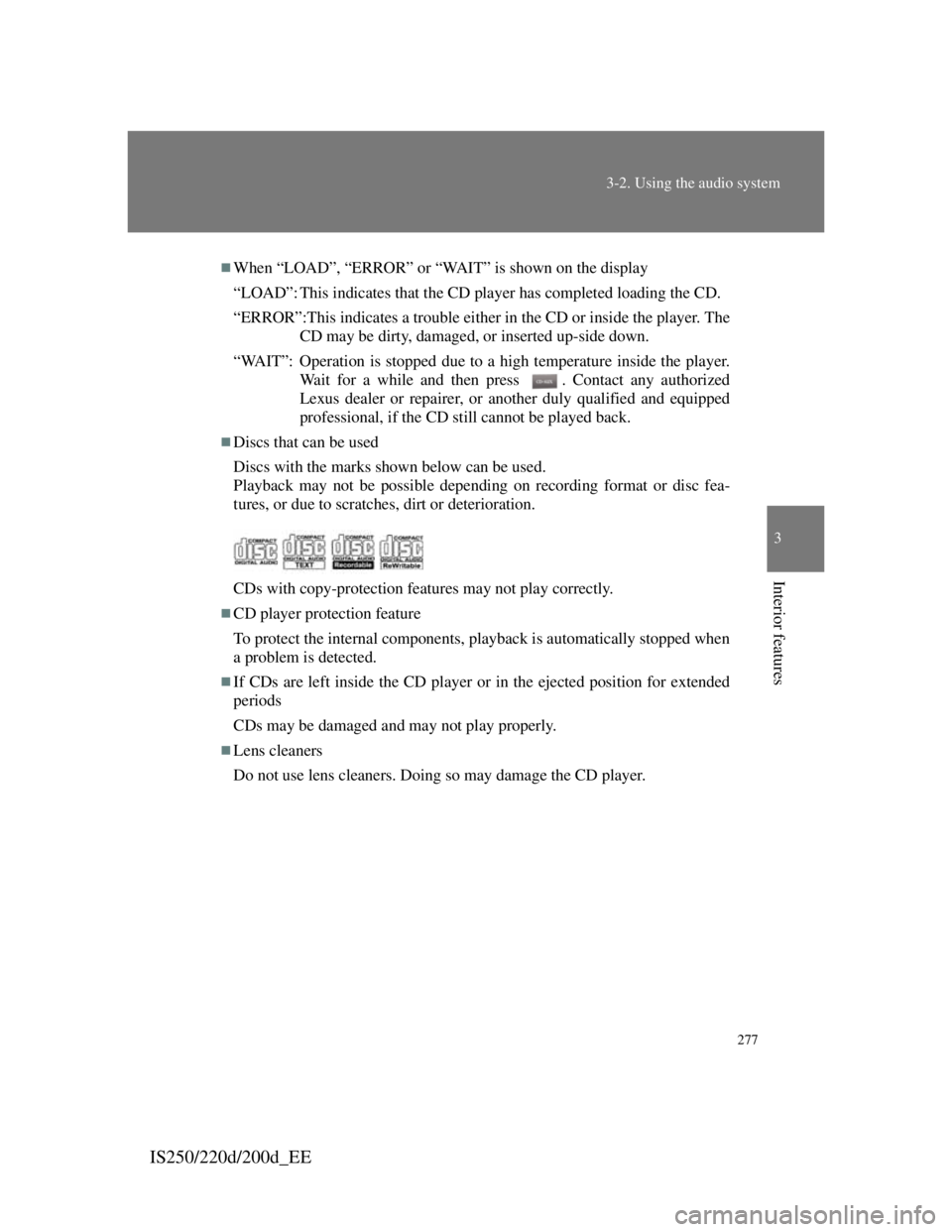
Discs that can be used
Discs with the marks shown below can be used.
Playback may not be possible depending on recording format or disc fea-
tures, or due to scratches, dirt or deterioration.
CDs with copy-protection features may not play correctly.
CD player protection feature
To protect the internal components, playback is automatically stopped when
a problem is detected.
If CDs are left inside the CD player or in the ejected position for extended
periods
CDs may be damaged and may not play properly.
Lens cleaners
Do not use lens cleaners. Doing so may damage the CD player.
Page 295 of 609
280
3-2. Using the audio system
IS250/220d/200d_EE
Playing back MP3 and WMA discs
Loading and ejecting MP3 and WMA discs
P. 274
Selecting MP3 and WMA discs
P. 275
Selecting a folder
Selecting folders one at a time
Press () or () to select the desired folder.
Returning to the first folder
Press and hold () until you hear a beep.
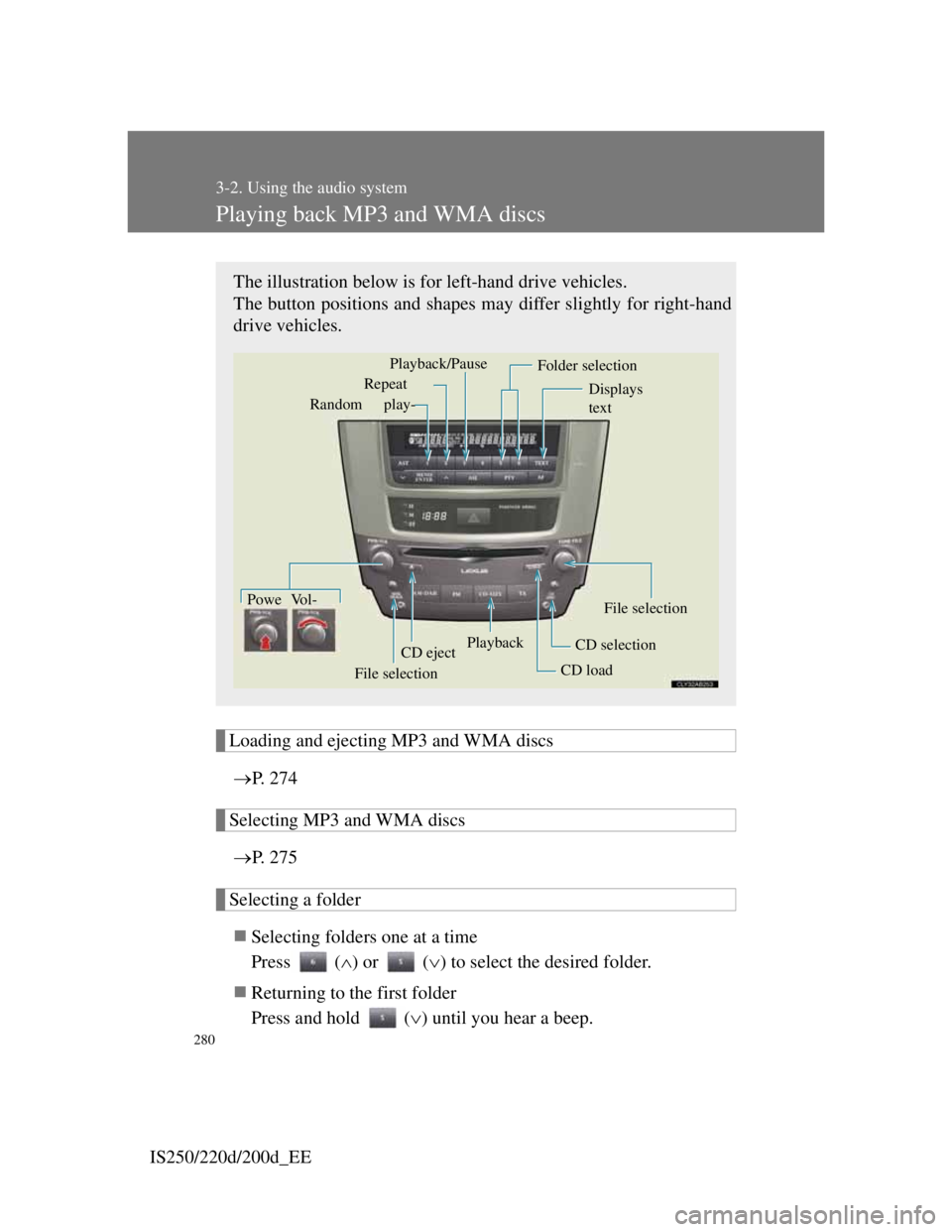
The illustration below is for left-hand drive vehicles.
The button positions and shapes may differ slightly for right-hand
drive vehicles.
Powe Vol-
CD ejectPlayback
CD loadCD selectionFile selection Random play-Repeat
Displays
text
Folder selection
File selection
Playback/Pause