fuel Lexus IS200t 2015 User Guide
[x] Cancel search | Manufacturer: LEXUS, Model Year: 2015, Model line: IS200t, Model: Lexus IS200t 2015Pages: 612, PDF Size: 132.21 MB
Page 103 of 612
1032. Instrument cluster
2
Instrument cluster
IS200t_EE(OM53D19E)
■Boost Meter/Oil Temperature Gauge/Oil Pressure Gauge (F SPORT
models)
Boost Meter:
Displays the boost pressure. The display changes colors when the set pres-
sure is exceeded.
Oil Temperature Gauge:
Displays the temperature of the engine oil. The display flashes when the
engine oil exceeds 140°C (284°F).
Oil Pressure Gauge:
Displays the oil pressure for the engine interior. A buzzer sounds and warning
message is displayed when the oil pressure gets low. ( →P. 511)
Depending on the road conditions, temperature, vehicle speed, etc., the actual
vehicle condition on the display screen may differ.
Use the display screen as a reference.
■Gear positions
→P. 2 0 6
*1: Displayed when the item is set in “Drive Info 1” or “Drive Info 2”. Use these values as a
reference.
*2: Resetting The following displays can be reset: average fuel consumption after reset, average
vehicle speed after reset, and elapsed time after reset.
• To reset, display the desired item and press and hold .
• If both displayed items are resettable, a reset selection screen will appear.
Page 104 of 612
1042. Instrument cluster
IS200t_EE(OM53D19E)
■Language
Select to change the language on the display.
■Units
Select to change the unit of measure for fuel consumption.
■Maintenance system
Select to reset the maintenance data after the required maintenance is per-
formed. (
→P. 444)
■Eco Driving Indicator Light
Select to activate/deactivate the Eco Driving Indicator Light.
■ switch settings (except F SPORT models)
Displays a procedure to register a desired screen to .
You can register 1 screen as a shortcut, which can be displayed by pressing .
(→ P. 1 0 1 )
■Drive information 1 /Drive information 2
Select to select up to 2 items that will be displayed on the “Drive Info 1” screen
and “Drive Info 2” screen respectively.
(→ P. 1 0 2 )
■Pop-up display
Select to set the following pop-up displays, which may appear in some situa-
tions, on/off.
• Route guidance display of the navigation system-linked system (if equipped)
• Incoming call display of the hands-free phone system
• Dynamic radar cruise control operation display (if equipped)
• Instrument panel brightne ss adjustment display
• Main meter switch operation display (F SPORT models)
• Stop & Start system duration (if equipped)
• Stop & Start system status (if equipped)
■Accent color (except F SPORT models)
Select to change the accent colors on the screen, such as the cursor color.
■Needle (F SPORT models)
Select to change the needle color for the tachometer.
Settings display
Page 106 of 612
1062. Instrument cluster
IS200t_EE(OM53D19E)
■Smart Stop settings
→P. 2 3 6
■Idling Stop Time
Displays the current idling stop time (Engine stop time due to the Stop & Start
system)
■Idling Stop Time (after reset/after start)
Displays the total idling stop time (engine stop time via the Stop & Start sys-
tem) after resetting and engine startup.
■Idling Stop Time fuel savings (after reset/after start)
Displays the fuel savings (reference) during idling stop time after resetting and
engine startup.
Stop & Start system (Smart Stop) information (if equipped)
Page 109 of 612
1092. Instrument cluster
2
Instrument cluster
IS200t_EE(OM53D19E)
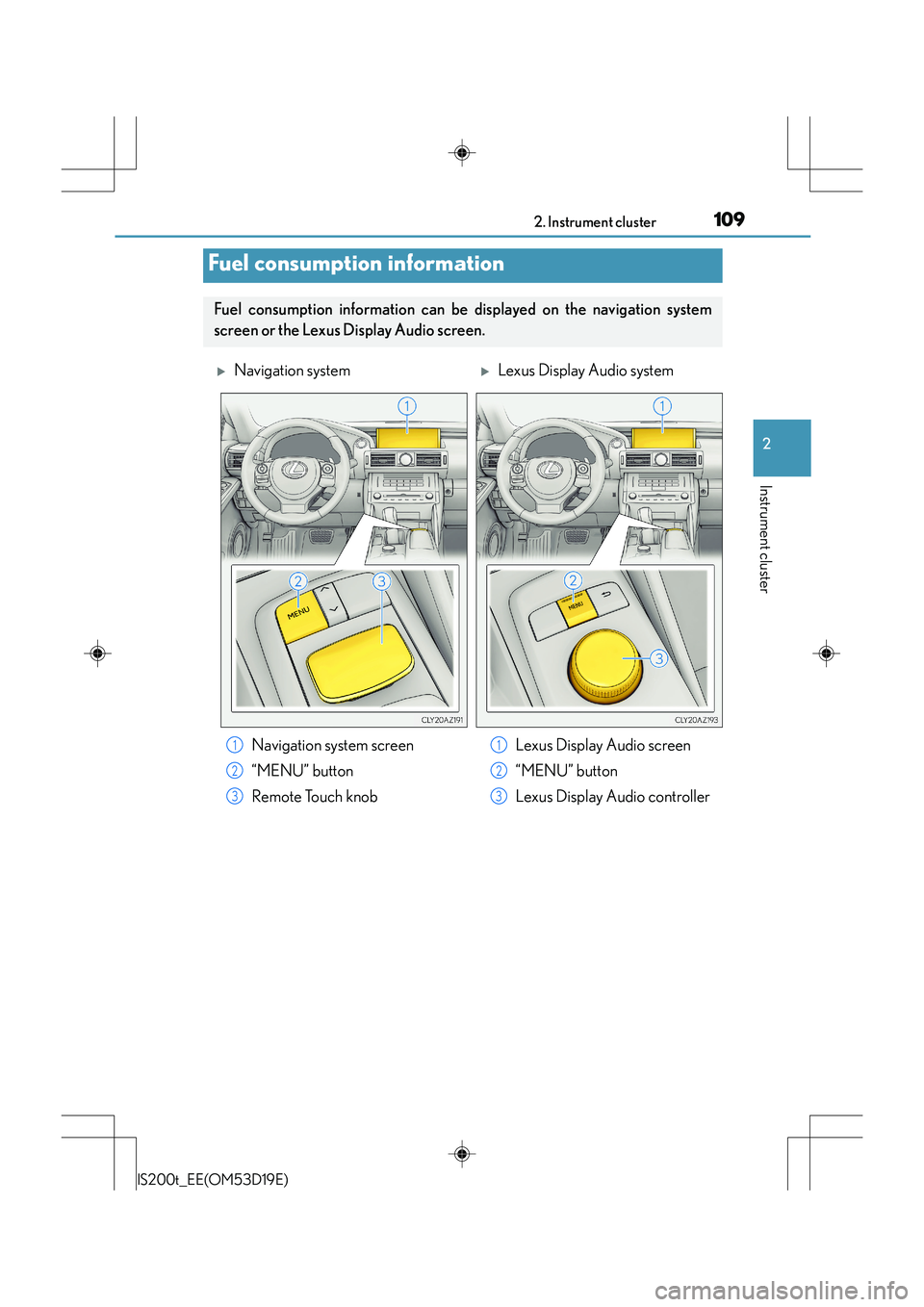
Fuel consumption information
Fuel consumption information can be displayed on the navigation system
screen or the Lexus Display Audio screen.
XNavigation systemXLexus Display Audio system
Navigation system screen
“MENU” button
Remote Touch knob Lexus Display Audio screen
“MENU” button
Lexus Display Audio controller
1
2
3
1
2
3
Page 110 of 612
1102. Instrument cluster
IS200t_EE(OM53D19E)
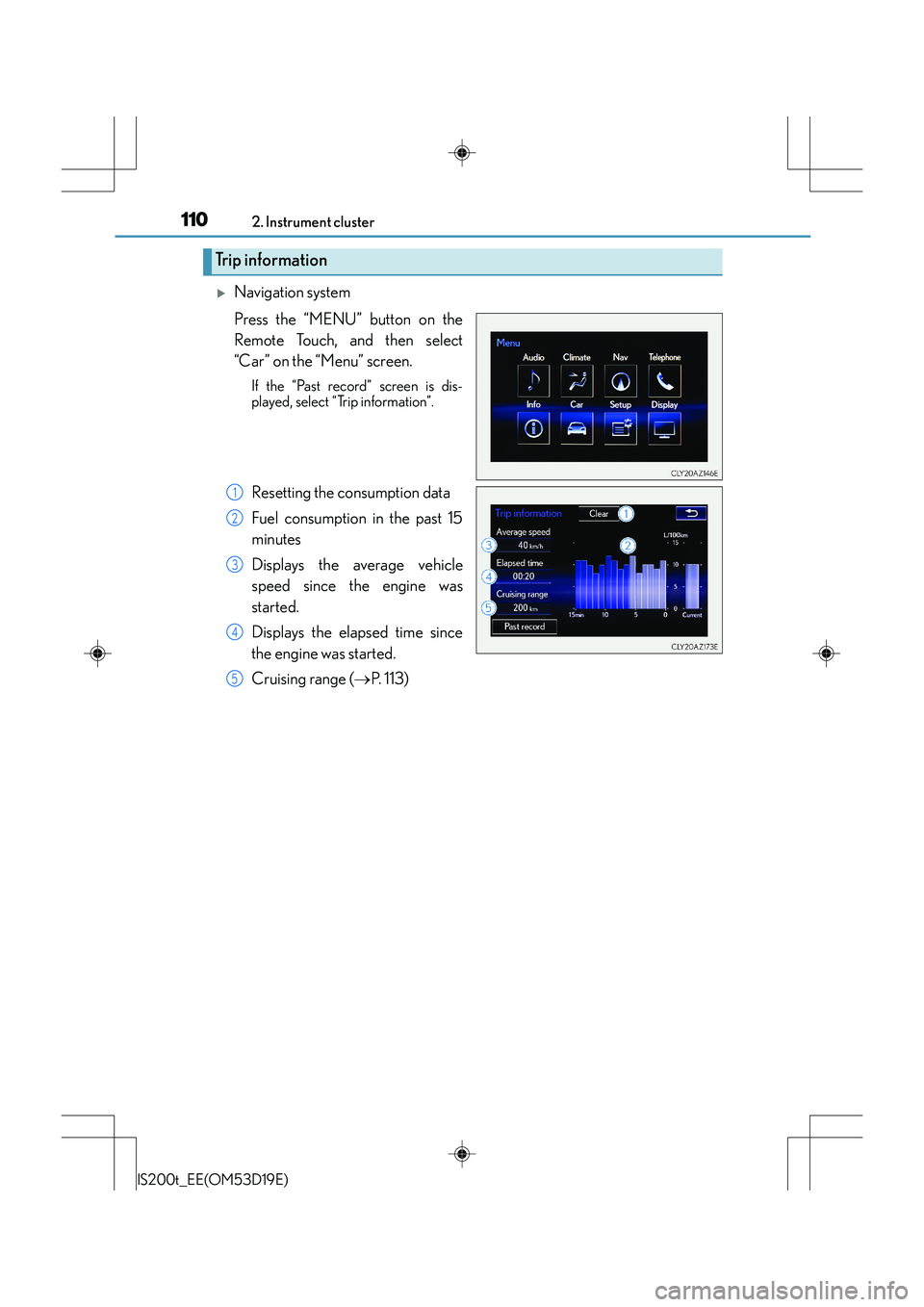
XNavigation system
Press the “MENU” button on the
Remote Touch, and then select
“Car” on the “Menu” screen.
If the “Past record” screen is dis-
played, select “Trip information”.
Resetting the consumption data
Fuel consumption in the past 15
minutes
Displays the average vehicle
speed since the engine was
started.
Displays the elapsed time since
the engine was started.
Cruising range (→P. 113)
Trip information
1
2
3
4
5
Page 111 of 612
1112. Instrument cluster
2
Instrument cluster
IS200t_EE(OM53D19E)
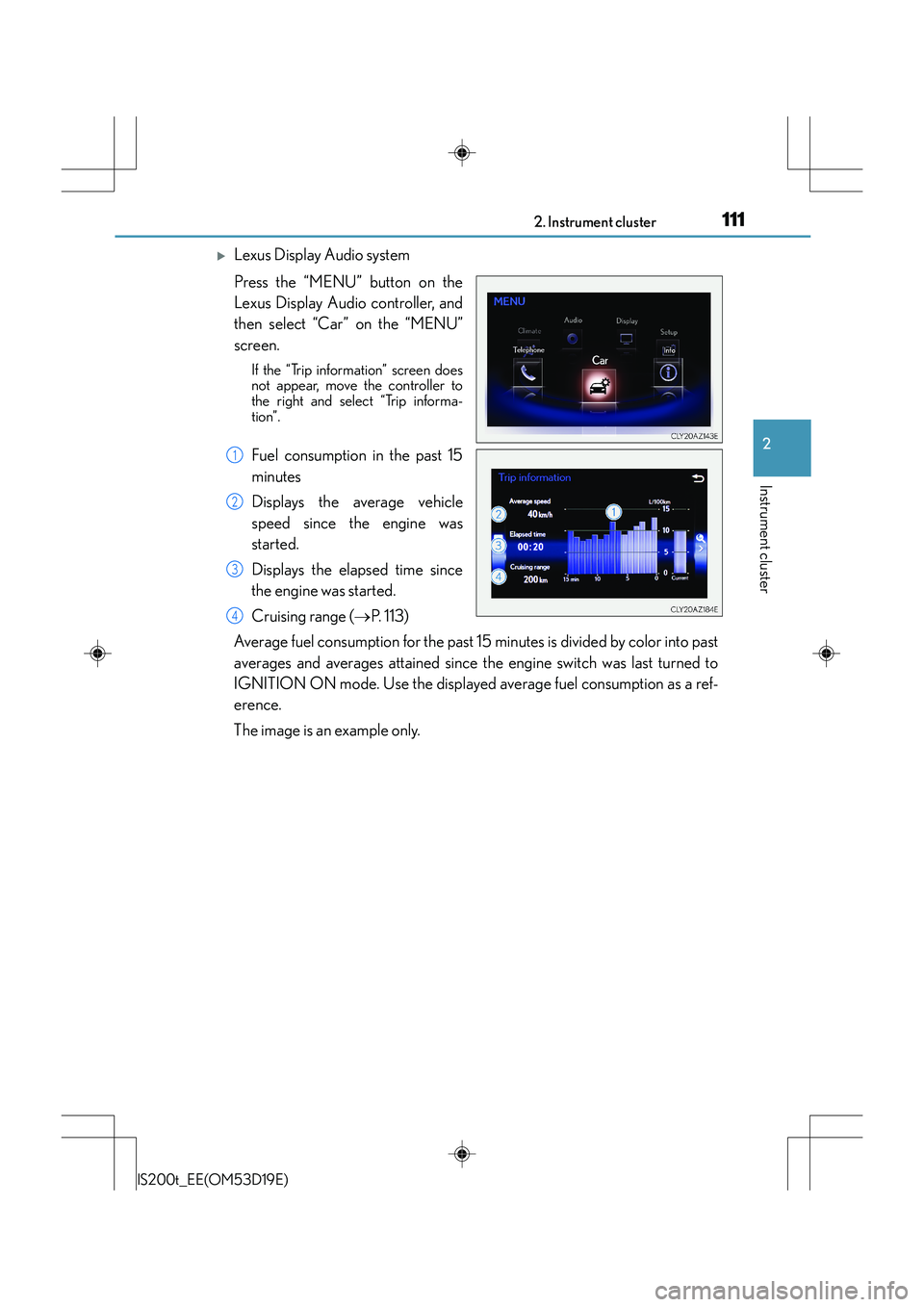
XLexus Display Audio system
Press the “MENU” button on the
Lexus Display Audio controller, and
then select “Car” on the “MENU”
screen.
If the “Trip information” screen does
not appear, move the controller to
the right and select “Trip informa-
tion”.
Fuel consumption in the past 15
minutes
Displays the average vehicle
speed since the engine was
started.
Displays the elapsed time since
the engine was started.
Cruising range (→P. 113)
Average fuel consumption for the past 15 minutes is divided by color into past
averages and averages attained since the engine switch was last turned to
IGNITION ON mode. Use the displayed average fuel consumption as a ref-
erence.
The image is an example only.1
2
3
4
Page 112 of 612
1122. Instrument cluster
IS200t_EE(OM53D19E)
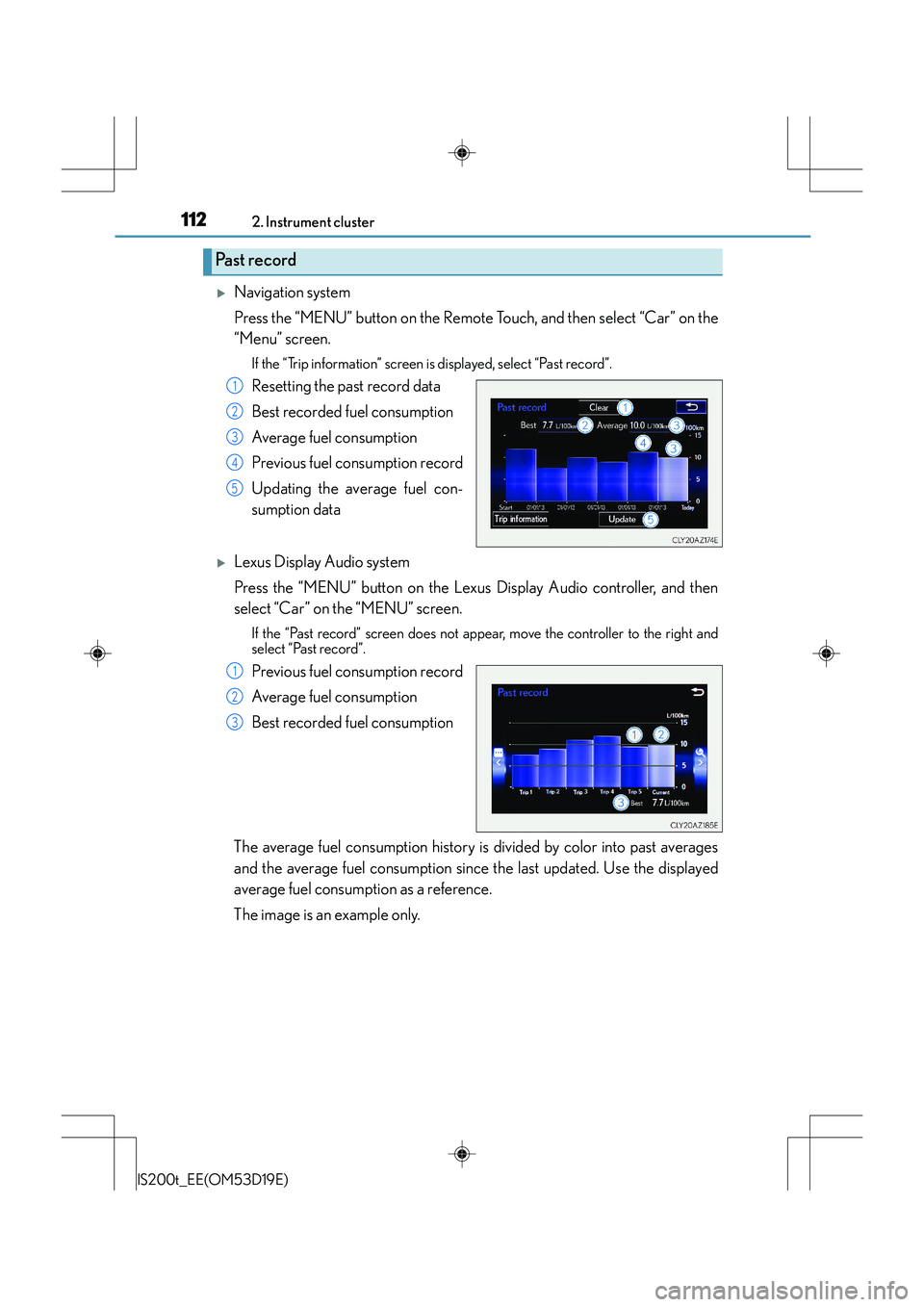
XNavigation system
Press the “MENU” button on the Remote Touch, and then select “Car” on the
“Menu” screen.
If the “Trip information” screen is displayed, select “Past record”.
Resetting the past record data
Best recorded fuel consumption
Average fuel consumption
Previous fuel consumption record
Updating the average fuel con-
sumption data
XLexus Display Audio system
Press the “MENU” button on the Lexus Display Audio controller, and then
select “Car” on the “MENU” screen.
If the “Past record” screen does not appear, move the controller to the right and
select “Past record”.
Previous fuel consumption record
Average fuel consumption
Best recorded fuel consumption
The average fuel consumption history is divided by color into past averages
and the average fuel consumption since the last updated. Use the displayed
average fuel consumption as a reference.
The image is an example only.
Past record
1
2
3
4
5
1
2
3
Page 113 of 612
1132. Instrument cluster
2
Instrument cluster
IS200t_EE(OM53D19E)
■Updating the past record data
XNavigation system
Update the average fuel consumption by selecting “Update” to measure the current fuel
consumption again.
XLexus Display Audio system
Update the average fuel consumption by moving the controller to the left and select
“Update” to measure the current fuel consumption again.
■Resetting the data
XNavigation system
The fuel consumption data can be deleted by selecting “Clear”.
XLexus Display Audio system
The fuel consumption data can be deleted by moving the controller to the left and select
“Clear ”.
■Cruising range
Displays the estimated maximum distance that can be driven with the quantity of fuel
remaining.
This distance is computed based on your average fuel consumption.
As a result, the actual distance that can be driven may differ from that displayed.
Page 177 of 612
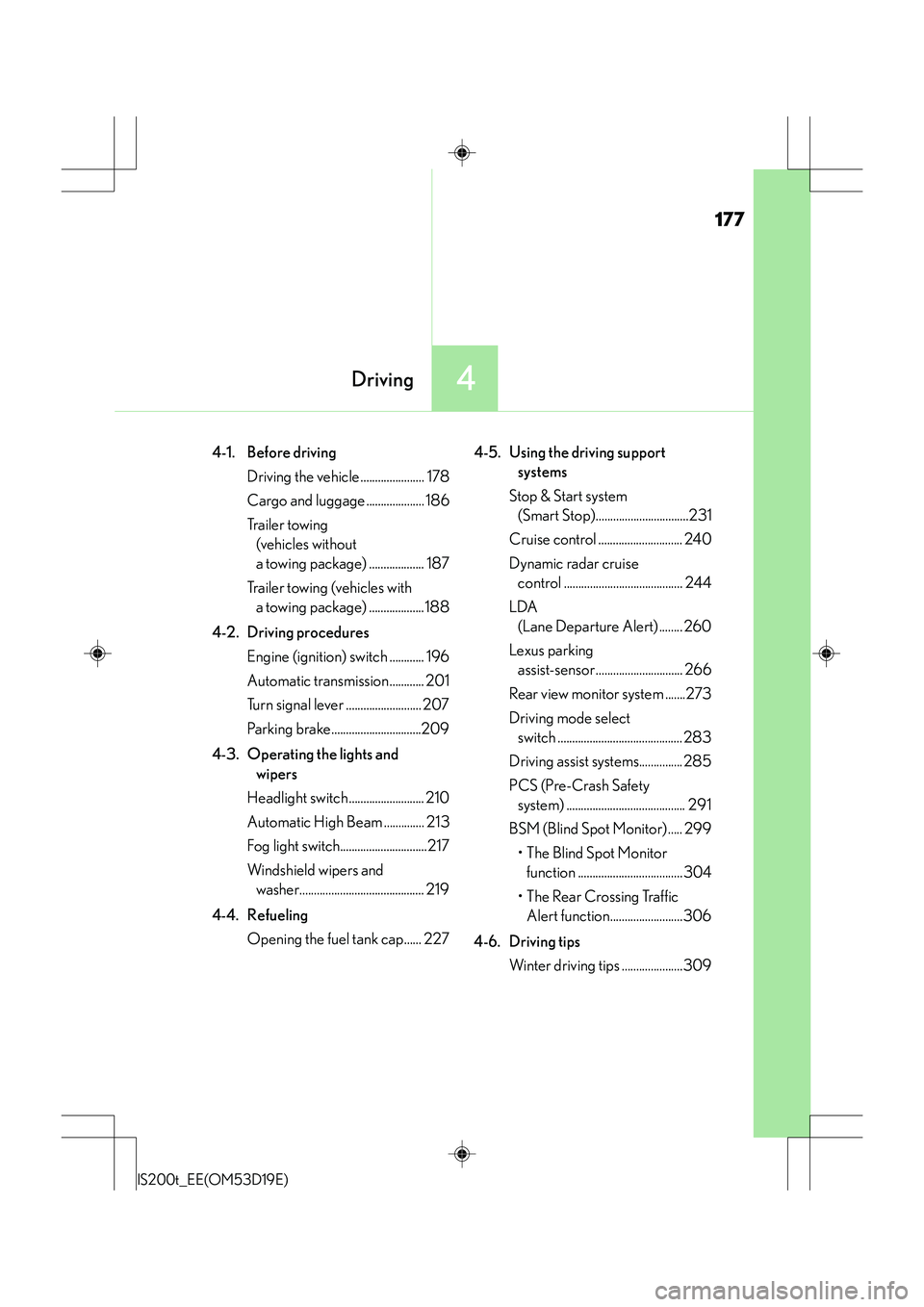
177
4Driving
IS200t_EE(OM53D19E)
4-1. Before drivingDriving the vehicle ...................... 178
Cargo and luggage .................... 186
Tr a i l e r t o w i n g (vehicles without
a towing package) ................... 187
Trailer towing (vehicles with a towing package) ...................188
4-2. Driving procedures Engine (ignition) switch ............ 196
Automatic transmission............ 201
Turn signal lever .......................... 207
Parking brake...............................209
4-3. Operating the lights and wipers
Headlight switch .......................... 210
Automatic High Beam .............. 213
Fog light switch..............................217
Windshield wipers and washer........................................... 219
4-4. Refueling Opening the fuel tank cap...... 227 4-5. Using the driving support
systems
Stop & Start system (Smart Stop)................................231
Cruise control ............................. 240
Dynamic radar cruise control ......................................... 244
LDA (Lane Departure Alert) ........ 260
Lexus parking assist-sensor.............................. 266
Rear view monitor system .......273
Driving mode select switch ........................................... 283
Driving assist systems............... 285
PCS (Pre-Crash Safety system) ......................................... 291
BSM (Blind Spot Monitor) ..... 299
•The Blind Spot Monitor function ....................................304
• The Rear Crossing Traffic Alert function.........................306
4-6. Driving tips Winter driving tips .....................309
Page 180 of 612
1804-1. Before driving
IS200t_EE(OM53D19E)
■Drum-in-disc type parking brake system
Your vehicle has a drum-in-disc type parking brake system. This type of brake system
needs bedding-down of the brake shoes periodically or whenever the parking brake
shoes and/or drum are replaced. Have any authorized Lexus dealer or repairer, or
another duly qualified and equipped professional, perform the bedding down operation.
■Operating your vehicle in a foreign country
Comply with the relevant vehicle registration laws and confirm the availability of the cor-
rect fuel. ( →P. 5 6 6 )
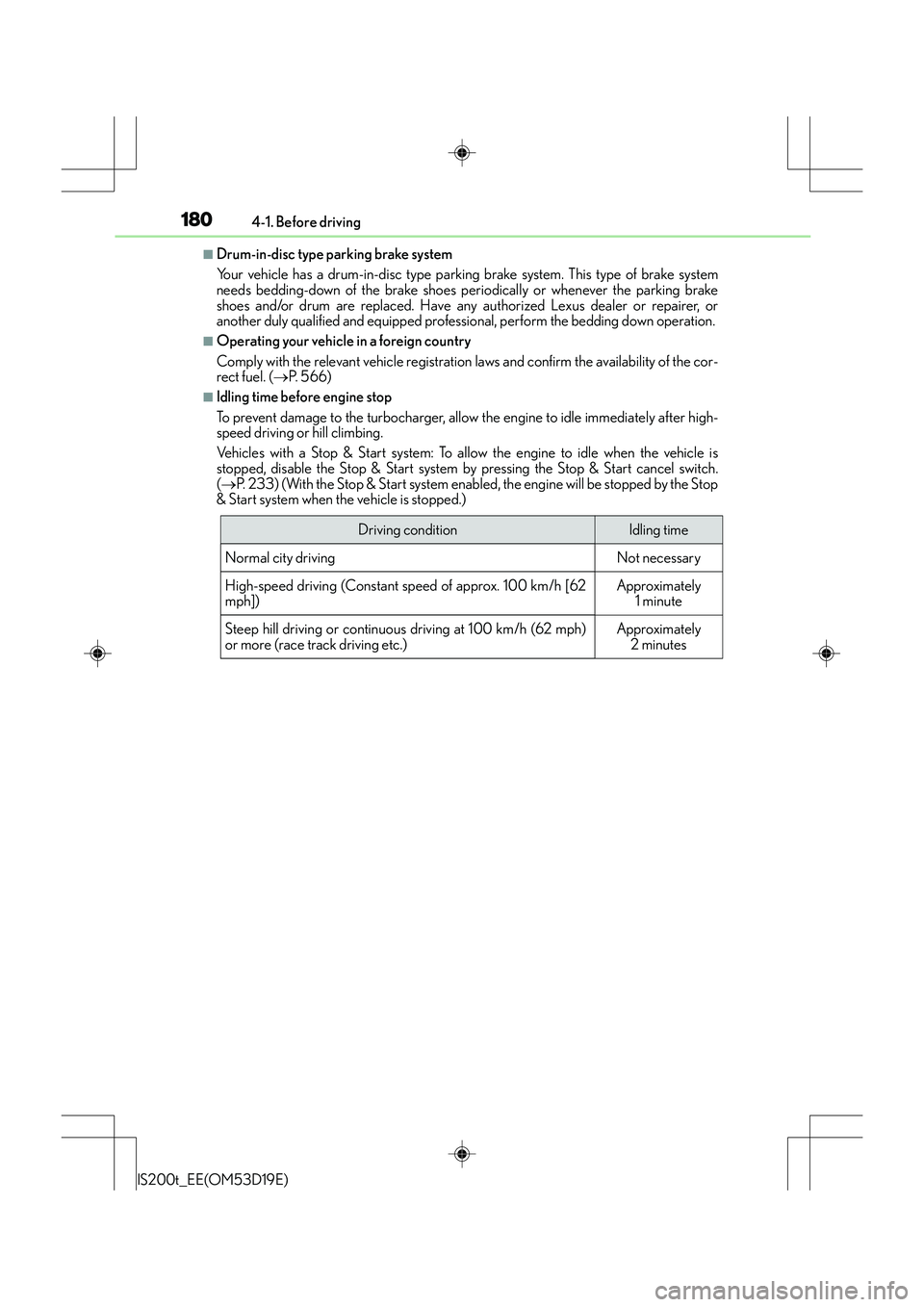
■Idling time before engine stop
To prevent damage to the turbocharger, allow the engine to idle immediately after high-
speed driving or hill climbing.
Vehicles with a Stop & Start system: To allow the engine to idle when the vehicle is
stopped, disable the Stop & Start system by pressing the Stop & Start cancel switch.
( → P. 233) (With the Stop & Start system enabled, the engine will be stopped by the Stop
& Start system when the vehicle is stopped.)
Driving conditionIdling time
Normal city driving
Not necessary
High-speed driving (Constant sp eed of approx. 100 km/h [62
mph])
Approximately 1 minute
Steep hill driving or continuous driving at 100 km/h (62 mph)
or more (race track driving etc.)
Approximately 2 minutes