key battery Lexus IS200t 2015 User Guide
[x] Cancel search | Manufacturer: LEXUS, Model Year: 2015, Model line: IS200t, Model: Lexus IS200t 2015Pages: 612, PDF Size: 132.21 MB
Page 137 of 612
1373-2. Opening, closing and locking the doors and trunk
3
Operation of each component
IS200t_EE(OM53D19E)
■Note for the entry function (if equipped)
●Even when the electronic key is within the effective range (detection areas), the system
may not operate properly in the following cases:
• The electronic key is too close to the window or outside door handle, near theground, or in a high place when the doors are locked or unlocked.
• The electronic key is near the ground or in a high place, or too close to the rear
bumper center when the trunk is opened.
●Do not leave the electronic key on top of th e instrument panel or near the door pockets
when exiting the vehicle. Depending on the radio wave reception conditions, it may be
detected by the antenna outside the cabin and the doors will become lockable from the
outside, possibly trapping the electronic key inside the vehicle.
●As long as the electronic key is within the effective range, the doors may be locked or
unlocked by anyone. However, only the doors detecting the electronic key can be used
to unlock the vehicle.
●The doors may unlock or lock if a large amou nt of water splashes on the door handle,
such as in the rain or in a car wash, when the electronic key is within the effective range.
(The doors will automatically be locked af ter approximately 30 seconds if the doors
are not opened and closed.)
●If the wireless remote control is used to lock the doors when the electronic key is near
the vehicle, there is a possibility that the d oor may not be unlocked by the entry func-
tion. (Use the wireless remote control to unlock the doors.)
●Touching the door lock or unlock sensor while wearing gloves may prevent lock or
unlock operation.
●If the door handle becomes wet while the electronic key is within the effective range,
the door may lock and unlock repeatedly. In this case, follow the following correction
procedures to wash the vehicle:
• Place the electronic key in a location 2 m (6 ft.) or more away from the vehicle. (Take care to ensure that the key is not stolen.)
• Set the electronic key to battery-saving mode to disable the smart entry & start sys- tem. ( →P. 1 3 5 )
●If the electronic key is inside the vehicle and a door handle becomes wet during a car
wash, a message may be shown on the multi-information display and a buzzer will
sound outside the vehicle. To turn off the alarm, lock all the doors.
●The lock sensor may not work properly if it comes into contact with ice, snow, mud, etc.
Clean the lock sensor and attempt to operate it again, or use the lock sensor on the
lower part of the door handle.
●A sudden handle operation or a handle operation immediately after entering the effec-
tive range may prevent the doors from being unlocked. Touch the door unlock sensor
and check that the doors are unlocked before pulling the door handle again.
●Unlocking the vehicle may take more time if another electronic key is within the effec-
tive range.
Page 171 of 612
1713-5. Opening, closing the windows and moon roof
3
Operation of each component
IS200t_EE(OM53D19E)
■Door lock linked window operation
●The power windows can be opened and closed using the mechanical key.*
( → P. 5 5 0 )
●The power windows can be opened and closed using the wireless remote control.*(→ P. 1 2 2 )
*: These settings must be customized at any authorized Lexus dealer or repairer, or
another duly qualified and equipped professional.
■When the battery is disconnected
The window lock switch is disabled. If nece ssary, press the window lock switch after
reconnecting the battery.
■Power windows open warning buzzer
The buzzer sounds and a message is shown on the multi-information display in the instru-
ment cluster when the engine switch is turned off and the driver’s door is opened with the
power windows open.
■Customization
Settings (e.g. linked door lock operation) can be changed.
(Customizable features: →P. 5 76 )
CAUTION
Observe the following precautions.
Failure to do so may result in death or serious injury.
■Closing the windows
●The driver is responsible for all the power window operations, including the operation
for the passengers. In order to prevent accidental operation, especially by a child, do
not let a child operate the power windows. It is possible for children and other passen-
gers to have body parts caught in the power window. Also, when riding with a child, it
is recommended to use the window lock switch. ( →P. 1 6 9 )
●Check to make sure that all passengers do not have any part of their body in a posi-
tion where it could be caught when a window is being operated.
●When using the wireless remote control or mechanical key and operating the power
windows, operate the power window after checking to make sure that there is no pos-
sibility of any passenger having any of thei r body parts caught in the window. Also do
not let a child operate window by the wireless remote control or mechanical key. It is
possible for children and other passengers to get caught in the power window.
●When exiting the vehicle, turn the engine switch off, carry the key and exit the vehicle
along with the child. There may be accidental operation, due to mischief, etc., that
may possibly lead to an accident.
Page 198 of 612
1984-2. Driving procedures
IS200t_EE(OM53D19E)
■Auto power off function
If the vehicle is left in ACCESSORY mode for more than 20 minutes or IGNITION ON
mode (the engine is not running) for more than an hour with the shift lever in P, the engine
switch will automatically turn off. However, this function cannot entirely prevent battery
discharge. Do not leave the vehicle with the engine switch in ACCESSORY or IGNI-
TION ON mode for long periods of time when the engine is not running.
■Electronic key battery depletion
→P. 1 1 9
■Conditions affecting operation
→P. 1 3 6
■Notes for the entry function
→P. 1 3 7
■If the engine does not start
●Check that the shift lever is securely set in P. The engine may not start if the shift lever is
displaced out of P.
●The engine immobilizer system may not have been deactivated. ( →P. 77)
Contact any authorized Lexus dealer or repairer, or another duly qualified and
equipped professional.
■Steering lock
After turning the engine switch off and opening and closing the doors, the steering wheel
will be locked due to the steering lock functi on. Operating the engine switch again auto-
matically cancels the steering lock.
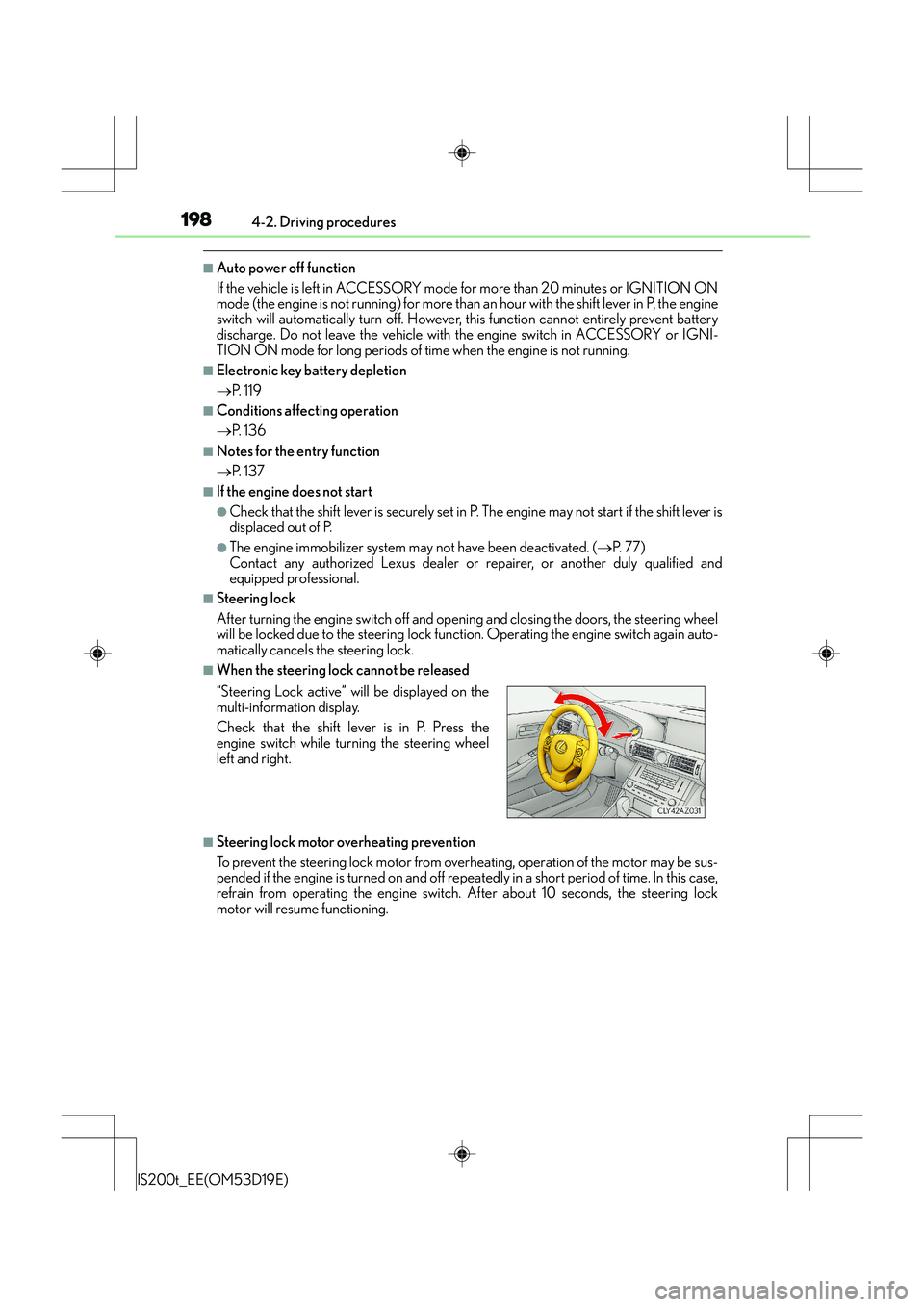
■When the steering lock cannot be released
■Steering lock motor overheating prevention
To prevent the steering lock motor from overheating, operation of the motor may be sus-
pended if the engine is turned on and off repeat edly in a short period of time. In this case,
refrain from operating the engine switch. After about 10 seconds, the steering lock
motor will resume functioning. “Steering Lock active” w ill be displayed on the
multi-information display.
Check that the shift lever is in P. Press the
engine switch while tu rning the steering wheel
left and right.
Page 199 of 612
1994-2. Driving procedures
4
Driving
IS200t_EE(OM53D19E)
■When “Check Entry & Start System” is displayed on the multi-information display
The system may be malfunctioning. Have the vehicle inspected by any authorized Lexus
dealer or repairer, or another duly qualified and equipped professional immediately.
■If the electronic key battery is depleted
→P. 5 4 7
■Operation of the engine switch
●When operating the engine switch, one short, firm press is enough. If the switch is
pressed improperly, the engine may not start or the engine switch mode may not
change. It is not necessary to press and hold the switch.
●If attempting to restart the engine immediately after turning the engine switch off, the
engine may not start in some cases. After tu rning the engine switch off, please wait a
few seconds before restarting the engine.
■If the smart entry & start system has been deactivated by a customized setting
→ P. 5 5 0
CAUTION
■When starting the engine
Always start the engine while sitting in the driver’s seat. Do not depress the accelerator
pedal while starting the engine under any circumstances.
Doing so may cause an accident resulting in death or serious injury.
■Caution while driving
If engine failure occurs while the vehicle is moving, do not lock or open the doors until
the vehicle reaches a safe and complete stop. Activation of the steering lock in this cir-
cumstance may lead to an accident, resulting in death or serious injury.
■Stopping the engine in an emergency
If you want to stop the engine in an emer gency while driving the vehicle, press and hold
the engine switch for more than 2 seconds, or press it briefly 3 times or more in succes-
sion. ( →P. 4 9 1 )
However, do not touch the engine switch while driving except in an emergency. Turning
the engine off while driving will not cause lo ss of steering or braking control, but the
power assist to these systems will be lost. Th is will make it more difficult to steer and
brake, so you should pull over and stop the vehicle as soon as it is safe to do so.
Page 413 of 612
4136-2. Using the interior lights
6
Interior features
IS200t_EE(OM53D19E)
■The interior lights and personal lights can be operated when
The interior lights and personal lights can be used regardless of the engine switch mode.
However, when the engine switch is turned off, they can be used only when the battery
protection function is not operating.
■Battery protection function
To prevent the battery from being discharged, approximately 20 minutes after the
engine switch is turned off, the power supplied to the interior lights, personal lights, and
other lights will be cut off automatically. (If the interior lights, etc. are left on when the
engine switch is turned off, they will be turned off automatically.)
To turn the interior lights, etc. back on, tu rn the engine switch to ACCESSORY or IGNI-
TION ON mode or operate the interior light switch until the interior lights turn on.
If any of the lights are illuminated automatically due to the illuminated entry system, the
battery protection function will be canceled.
■Illuminated entry system
The lights automatically turn on/off according to engine switch mode, the presence of the
electronic key, whether the doors are locked/unlocked, and whether the doors are
opened/closed.
■Customization
Setting (e.g. the time elapsed before lights turn off) can be changed.
(Customizable features: →P. 5 76 )
NOTICE
To prevent battery discharge, do not leave the lights on longer than necessary when the
engine is off.
Page 427 of 612
427
7Maintenance and care
IS200t_EE(OM53D19E)
7-1. Maintenance and careCleaning and protecting the vehicle exterior................. 428
Cleaning and protecting the vehicle interior.................. 432
7-2. Maintenance Maintenance requirements............................. 435
7-3. Do-it-yourself maintenance
Do-it-yourself service precautions................................ 437
Hood ............................................... 439
Positioning a floor jack.............440
Engine compartment .................441
Tires....................................................451
Tire inflation pressure ............... 460
Wheels ........................................... 462
Air conditioning filter ............... 464
Electronic key battery .............. 466
Checking and replacing fuses.............................................. 469
Light bulbs......................................473
Page 428 of 612
428
IS200t_EE(OM53D19E)7-1. Maintenance and care
●Working from top to bottom, liberally
apply water to the vehicle body, wheel
wells and underside of the vehicle to remove any dirt and dust.
●Wash the vehicle body using a sponge or soft cloth, such as a chamois.
●For hard-to-remove marks, use car wash soap and rinse thoroughly with
water.
●Wipe away any water.
●Wax the vehicle when the waterproof coating deteriorates.
If water does not bead on a clean surface, apply wax when the vehicle body is cool.
■Self-restoring coat
The vehicle body has a self-restoring coating that is resistant to small surface scratches
caused in a car wash etc.
●The coating lasts for 5 to 8 years from when the vehicle is delivered from the plant.
●The restoration time differs depending on the depth of the scratch and outside temper-
ature.
The restoration time may become shorter when the coating is warmed by applying
warm water.
●Deep scratches caused by keys, coins, etc. cannot be restored.
●Do not use wax that contain abrasives.
■Automatic car washes
●Fold the mirrors before washing the vehicle. Start washing from the front of the vehicle.
Make sure to extend the mirrors before driving.
●Brushes used in automatic car washes may scratch the vehicle surface and harm your
vehicle’s paint.
■High pressure car washes
●Do not allow the nozzles of the car wash to come within close proximity of the windows.
●Before using the car wash, check that the fuel filler door on your vehicle is closed prop-
erly.
■When using a car wash (vehicles with entry function)
If the door handle becomes wet while the electronic key is within the effective range, the
door may lock and unlock repeatedly. In that case, follow the following correction proce-
dures to wash the vehicle:
●Place the key in a position 2 m (6 ft.) or more separate from the vehicle while the vehi-
cle is being washed. (Take care to ensure that the key is not stolen.)
●Set the electronic key to battery-saving mode to disable the smart entry & start system.
( → P. 1 3 5 )
Cleaning and protecti ng the vehicle exterior
Perform the following to protect the vehicle and maintain it in prime condi-
tion:
Page 448 of 612
4487-3. Do-it-yourself maintenance
IS200t_EE(OM53D19E)
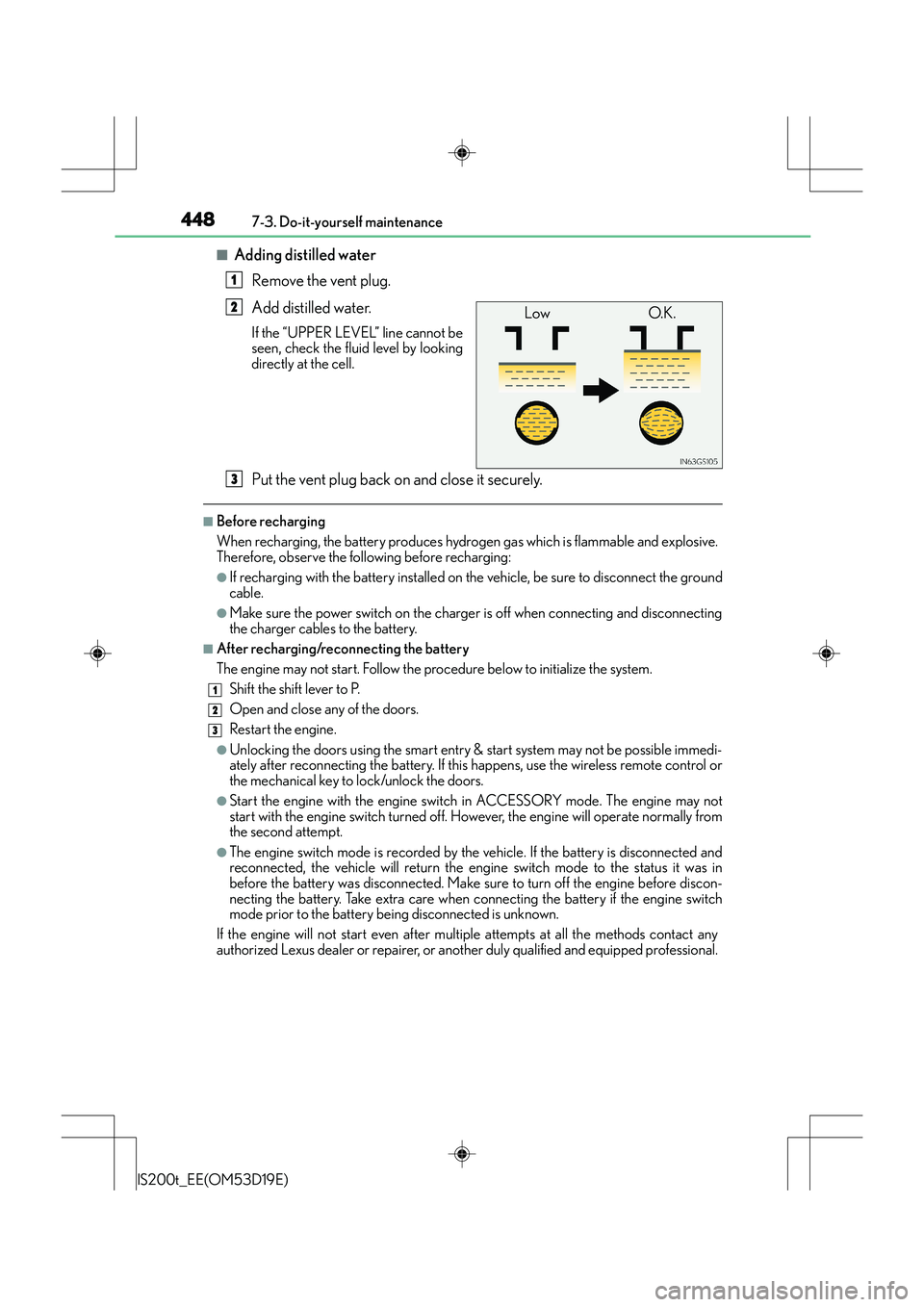
■Adding distilled waterRemove the vent plug.
Add distilled water.
If the “UPPER LEVEL” line cannot be
seen, check the fluid level by looking
directly at the cell.
Put the vent plug back on and close it securely.
■Before recharging
When recharging, the battery produces hydrogen gas which is flammable and explosive.
Therefore, observe the following before recharging:
●If recharging with the battery installed on the vehicle, be sure to disconnect the ground
cable.
●Make sure the power switch on the charger is off when connecting and disconnecting
the charger cables to the battery.
■After recharging/reconnecting the battery
The engine may not start. Follow the procedure below to initialize the system.Shift the shift lever to P.
Open and close an y of the doors.
Restart the engine.
●Unlocking the doors using the smart entry & start system may not be possible immedi-
ately after reconnecting the battery. If this happens, use the wireless remote control or
the mechanical key to lock/unlock the doors.
●Start the engine with the engine switch in ACCESSORY mode. The engine may not
start with the engine switch turned off. Ho wever, the engine will operate normally from
the second attempt.
●The engine switch mode is recorded by the vehicle. If the battery is disconnected and
reconnected, the vehicle will return the engine switch mode to the status it was in
before the battery was disconnected. Make sure to turn off the engine before discon-
necting the battery. Take extra care when connecting the battery if the engine switch
mode prior to the battery being disconnected is unknown.
If the engine will not start even after multip le attempts at all the methods contact any
authorized Lexus dealer or repairer, or another duly qualified and equipped professional.
1
Low O.K.2
3
1
2
3
Page 466 of 612
4667-3. Do-it-yourself maintenance
IS200t_EE(OM53D19E)
●Flathead screwdriver
●Small flathead screwdriver
●Lithium battery CR2032
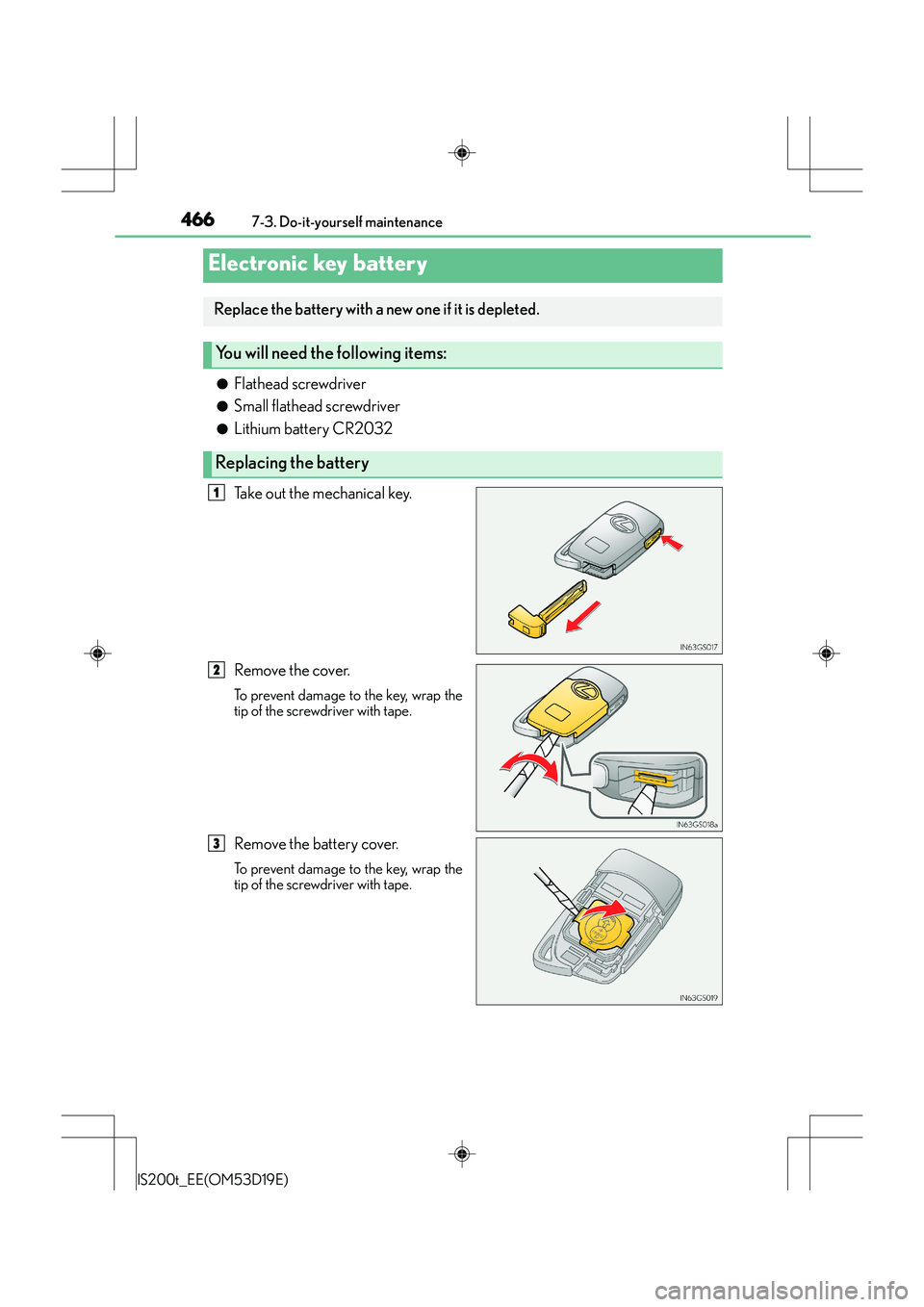
Take out the mechanical key.
Remove the cover.
To prevent damage to the key, wrap the
tip of the screwdriver with tape.
Remove the battery cover.
To prevent damage to the key, wrap the
tip of the screwdriver with tape.
Electronic key battery
Replace the battery with a new one if it is depleted.
You will need the following items:
Replacing the battery
1
2
3
Page 467 of 612
4677-3. Do-it-yourself maintenance
7
Maintenance and care
IS200t_EE(OM53D19E)
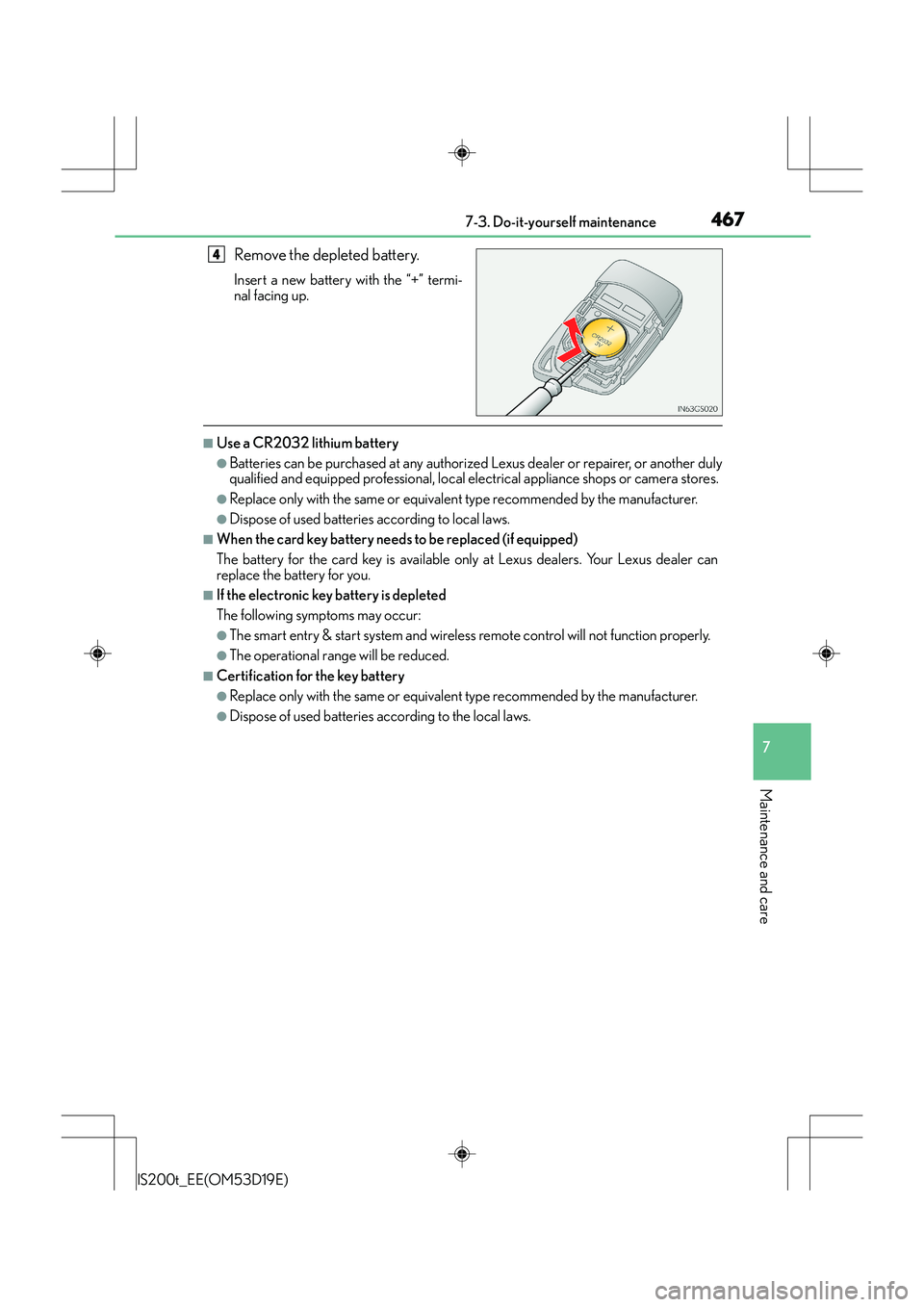
Remove the depleted battery.
Insert a new battery with the “+” termi-
nal facing up.
■Use a CR2032 lithium battery
●Batteries can be purchased at any authorized Lexus dealer or repairer, or another duly
qualified and equipped professional, local electrical appliance shops or camera stores.
●Replace only with the same or equivalent type recommended by the manufacturer.
●Dispose of used batteries according to local laws.
■When the card key battery needs to be replaced (if equipped)
The battery for the card key is available only at Lexus dealers. Your Lexus dealer can
replace the battery for you.
■If the electronic key battery is depleted
The following symptoms may occur:
●The smart entry & start system and wireless remote control will not function properly.
●The operational range will be reduced.
■Certification for the key battery
●Replace only with the same or equivalent type recommended by the manufacturer.
●Dispose of used batteries according to the local laws.
4